> ## Documentation Index
> Fetch the complete documentation index at: https://notes.kodekloud.com/llms.txt
> Use this file to discover all available pages before exploring further.
# Explaining Milestones
> Explains using milestones to group issues and pull requests for tracking progress, deadlines, and priorities to coordinate releases, sprints, and project phases.
In this lesson/article we’ll explain milestones and how they help coordinate work across issues and pull requests. Milestones are a lightweight project-management feature (commonly used in GitHub) that group related issues and PRs around a single delivery objective—such as a release, sprint, or project phase. While labels describe the nature of a task, milestones answer the “when” for a collection of tasks by centralizing deadlines, progress, and scope.
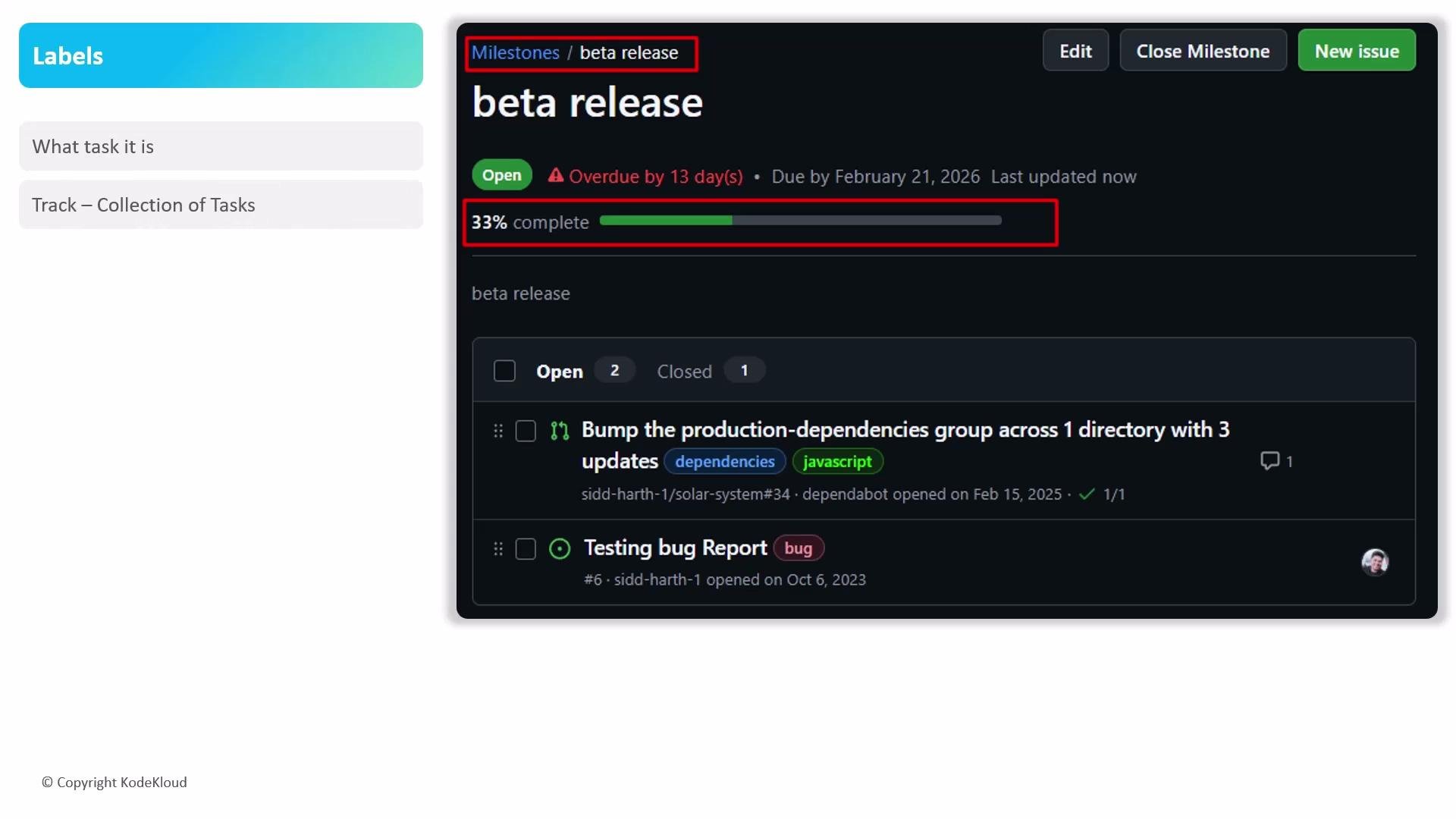 Core functionalities of milestones
| Functionality | What it provides | How to use it effectively |
| ------------------------ | ---------------------------------------------------------------------------------------------------: | ------------------------------------------------------------------------------------------------------------------------- |
| Progress visualization | A dynamic progress bar that reflects the percentage of closed issues and PRs linked to the milestone | Link issues/PRs to the milestone or create them from the milestone view so progress is computed automatically |
| Deadline management | A single due date for the milestone that highlights upcoming or overdue work | Set realistic due dates and review milestone timelines during planning meetings |
| Strategic prioritization | Groups tasks that belong to a release or phase to clarify scope and priority | Assign only the tasks required to reach the milestone objective; use milestones to communicate priorities across the team |
Make sure you link issues and pull requests to the milestone (or create them from the milestone view). The progress bar only reflects work that is associated with the milestone.
Practical tips and best practices
* Create a milestone for each release, sprint, or major project phase to keep scope and deadlines visible.
* Use the milestone view to create issues directly—this automatically associates them with the milestone and updates progress.
* Regularly review overdue milestones and update due dates or rescope the work to reflect current priorities.
* Filter and sort issues by milestone to produce status reports and to identify blockers quickly.
* Combine milestones with labels (e.g., `bug`, `enhancement`, `high-priority`) for better filtering and triage workflows.
Why use milestones?
* Visibility: Stakeholders can quickly see overall progress and what’s blocking a release.
* Coordination: Developers and maintainers have a shared reference for delivery dates and scope.
* Reporting: Progress bars and milestone lists simplify status reporting and retrospective analysis.
References and further reading
* [GitHub Docs: About milestones](https://docs.github.com/en/issues/organizing-your-work-with-projects/organizing-your-work-with-issues-and-pull-requests/about-milestones)
* [Project management best practices](https://www.atlassian.com/agile/project-management/milestones)
By grouping related issues and pull requests under milestones, teams gain a clearer picture of progress, deadlines, and priorities—making release planning and sprint execution more predictable and transparent.
Core functionalities of milestones
| Functionality | What it provides | How to use it effectively |
| ------------------------ | ---------------------------------------------------------------------------------------------------: | ------------------------------------------------------------------------------------------------------------------------- |
| Progress visualization | A dynamic progress bar that reflects the percentage of closed issues and PRs linked to the milestone | Link issues/PRs to the milestone or create them from the milestone view so progress is computed automatically |
| Deadline management | A single due date for the milestone that highlights upcoming or overdue work | Set realistic due dates and review milestone timelines during planning meetings |
| Strategic prioritization | Groups tasks that belong to a release or phase to clarify scope and priority | Assign only the tasks required to reach the milestone objective; use milestones to communicate priorities across the team |
Make sure you link issues and pull requests to the milestone (or create them from the milestone view). The progress bar only reflects work that is associated with the milestone.
Practical tips and best practices
* Create a milestone for each release, sprint, or major project phase to keep scope and deadlines visible.
* Use the milestone view to create issues directly—this automatically associates them with the milestone and updates progress.
* Regularly review overdue milestones and update due dates or rescope the work to reflect current priorities.
* Filter and sort issues by milestone to produce status reports and to identify blockers quickly.
* Combine milestones with labels (e.g., `bug`, `enhancement`, `high-priority`) for better filtering and triage workflows.
Why use milestones?
* Visibility: Stakeholders can quickly see overall progress and what’s blocking a release.
* Coordination: Developers and maintainers have a shared reference for delivery dates and scope.
* Reporting: Progress bars and milestone lists simplify status reporting and retrospective analysis.
References and further reading
* [GitHub Docs: About milestones](https://docs.github.com/en/issues/organizing-your-work-with-projects/organizing-your-work-with-issues-and-pull-requests/about-milestones)
* [Project management best practices](https://www.atlassian.com/agile/project-management/milestones)
By grouping related issues and pull requests under milestones, teams gain a clearer picture of progress, deadlines, and priorities—making release planning and sprint execution more predictable and transparent.