> ## Documentation Index
> Fetch the complete documentation index at: https://notes.kodekloud.com/llms.txt
> Use this file to discover all available pages before exploring further.
# GitHub Projects
> Overview of GitHub Projects, a native planning tool that combines boards, tables, custom fields, and automation to track and manage issues and pull requests across repositories.
GitHub Projects is a flexible, spreadsheet-like planning tool built directly into GitHub that helps teams plan, track, and manage work across repositories. It combines Kanban-style boards, table/spreadsheet views, and automation rules so you can link issues and pull requests into a single, real-time project view. Use Projects to centralize roadmaps, coordinate work across teams, and reduce manual tracking by tying project state directly to repository activity.
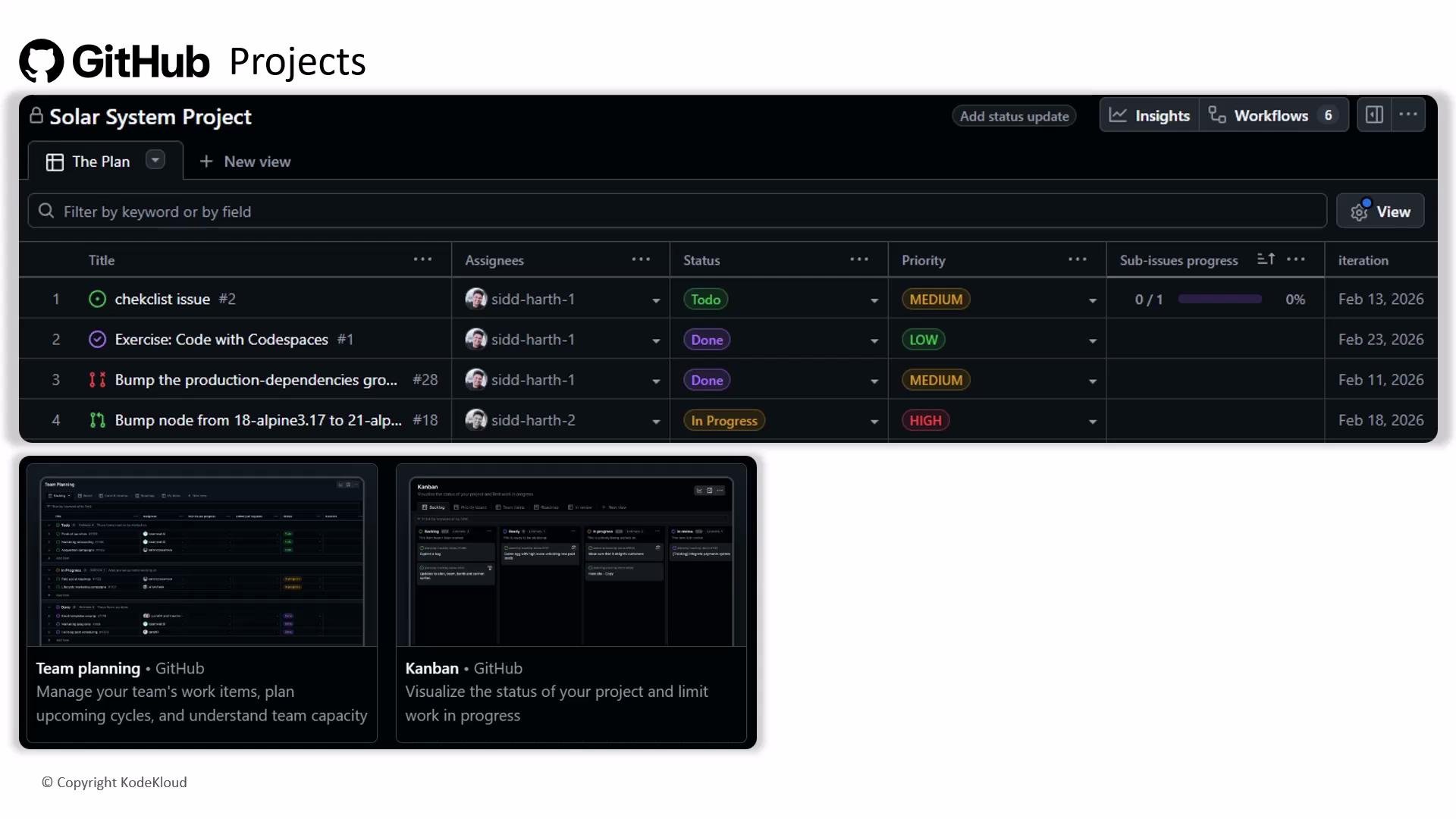 GitHub Projects aggregates issues and pull requests from multiple repositories into a single board or table. Combine custom fields, saved views, and automation to keep your project synchronized with issues/PRs and reduce manual updates.
## Overview: Core capabilities at a glance
Use the table below to quickly understand the main capabilities and typical use cases for GitHub Projects.
| Feature | What it does | Typical use |
| -----------------------: | -------------------------------------------------------------------------------------------------- | ------------------------------------------------------------------ |
| Unified views | Kanban board, table/spreadsheet, and timeline/roadmap (if available) for different planning lenses | Visualize workflows, bulk-edit tasks, and plan milestones |
| Linking issues & PRs | Add existing issues/PRs to project items without duplication | Track cross-repo work from a single project view |
| Custom fields | Add fields like Priority, Effort, Sprint, Component to items | Filter, sort, and group tasks by metadata |
| Automation | Rules to move cards, update status, add labels when issues/PRs change | Reduce manual state changes and human error |
| Filtering & saved views | Create complex filters (assignee, label, custom fields) and save them as views | Quick role-specific or sprint-focused shortcuts |
| Templates & reuse | Create templates for recurring workflows (releases, triage, onboarding) | Standardize processes across teams |
| Cross-repo & permissions | Aggregate items across repositories and organizations (permissions apply) | Centralize multi-repo initiatives while respecting access controls |
| Integrations & API | Connect via the GitHub API, webhooks, or third-party apps | Integrate Projects with CI/CD, calendars, reporting tools |
| Reporting | Export or query project data for velocity, cycle time, and stakeholder reports | Generate metrics to measure progress and bottlenecks |
## How Projects connects with issues and pull requests
* Add issues/PRs to a project from their sidebar or by dragging cards into a board.
* When you enable automation, project items can update in response to repository events (for example, moving a card when an issue is closed).
* Link back to the source issue/PR so the canonical record stays in the repository while the project tracks status and metadata.
## Recommended workflow examples
1. Basic Kanban workflow
* Create a project and add columns: Backlog, In Progress, Review, Done.
* Add issues and PRs to the project via the “Projects” selection in each issue/PR, or drag them into columns.
* Configure automation rules to move items to Done when their linked issue is closed or PR is merged.
2. Sprint planning using table view
* Create custom fields such as `Sprint`, `Story Points`, and `Priority`.
* Filter for the current sprint and bulk-edit the `Sprint` field or drag items into the sprint column.
* Save this filtered view to use during planning and daily standups.
3. Release planning with templates
* Create a project template for release checklists and common tasks.
* Instantiate the template for each release to ensure consistency across teams.
* Use the timeline/roadmap view (if available) to visualize release milestones.
Be cautious with automations and permissions: overly complex automation can make project behavior unpredictable. Ensure users have the proper repository and project permissions before adding or modifying cross-repo items.
## Best practices
* Start from a template to reduce setup time and keep structures consistent.
* Standardize custom field names and allowed values (for example: Priority = High / Medium / Low).
* Limit the number of automations per project and document their rules so team members understand expected behavior.
* Use saved views for role-specific dashboards (maintainers, QA, product owners).
* Regularly review and prune views, fields, and automations to prevent drift and clutter.
## Extending Projects: integrations and reporting
* Integrations and API
* Use the GitHub API and webhooks to integrate Projects with CI/CD systems, calendar tools, dashboards, or custom reporting. See the GitHub docs for developers: [https://docs.github.com/en/developers/webhooks-and-events](https://docs.github.com/en/developers/webhooks-and-events)
* Third-party apps in the GitHub Marketplace can add notifications, analytics, and other enhancements.
* Reporting
* Export project data or query via API to produce stakeholder reports (velocity, cycle time, open vs. closed items).
* Use consistent custom fields (e.g., `Story Points`, `Sprint`) to enable meaningful metrics across projects.
## Quick reference links
* GitHub Projects documentation: [https://docs.github.com/en/issues/planning-and-tracking-with-projects](https://docs.github.com/en/issues/planning-and-tracking-with-projects)
* GitHub API & webhooks: [https://docs.github.com/en/developers/webhooks-and-events](https://docs.github.com/en/developers/webhooks-and-events)
## Wrap-up
GitHub Projects gives teams a GitHub-native way to plan, track, and manage work across repositories. By combining boards and tables with custom fields, automations, and saved views, you can centralize planning, reduce manual updates, and maintain a single source of truth tied directly to your issues and pull requests.
GitHub Projects aggregates issues and pull requests from multiple repositories into a single board or table. Combine custom fields, saved views, and automation to keep your project synchronized with issues/PRs and reduce manual updates.
## Overview: Core capabilities at a glance
Use the table below to quickly understand the main capabilities and typical use cases for GitHub Projects.
| Feature | What it does | Typical use |
| -----------------------: | -------------------------------------------------------------------------------------------------- | ------------------------------------------------------------------ |
| Unified views | Kanban board, table/spreadsheet, and timeline/roadmap (if available) for different planning lenses | Visualize workflows, bulk-edit tasks, and plan milestones |
| Linking issues & PRs | Add existing issues/PRs to project items without duplication | Track cross-repo work from a single project view |
| Custom fields | Add fields like Priority, Effort, Sprint, Component to items | Filter, sort, and group tasks by metadata |
| Automation | Rules to move cards, update status, add labels when issues/PRs change | Reduce manual state changes and human error |
| Filtering & saved views | Create complex filters (assignee, label, custom fields) and save them as views | Quick role-specific or sprint-focused shortcuts |
| Templates & reuse | Create templates for recurring workflows (releases, triage, onboarding) | Standardize processes across teams |
| Cross-repo & permissions | Aggregate items across repositories and organizations (permissions apply) | Centralize multi-repo initiatives while respecting access controls |
| Integrations & API | Connect via the GitHub API, webhooks, or third-party apps | Integrate Projects with CI/CD, calendars, reporting tools |
| Reporting | Export or query project data for velocity, cycle time, and stakeholder reports | Generate metrics to measure progress and bottlenecks |
## How Projects connects with issues and pull requests
* Add issues/PRs to a project from their sidebar or by dragging cards into a board.
* When you enable automation, project items can update in response to repository events (for example, moving a card when an issue is closed).
* Link back to the source issue/PR so the canonical record stays in the repository while the project tracks status and metadata.
## Recommended workflow examples
1. Basic Kanban workflow
* Create a project and add columns: Backlog, In Progress, Review, Done.
* Add issues and PRs to the project via the “Projects” selection in each issue/PR, or drag them into columns.
* Configure automation rules to move items to Done when their linked issue is closed or PR is merged.
2. Sprint planning using table view
* Create custom fields such as `Sprint`, `Story Points`, and `Priority`.
* Filter for the current sprint and bulk-edit the `Sprint` field or drag items into the sprint column.
* Save this filtered view to use during planning and daily standups.
3. Release planning with templates
* Create a project template for release checklists and common tasks.
* Instantiate the template for each release to ensure consistency across teams.
* Use the timeline/roadmap view (if available) to visualize release milestones.
Be cautious with automations and permissions: overly complex automation can make project behavior unpredictable. Ensure users have the proper repository and project permissions before adding or modifying cross-repo items.
## Best practices
* Start from a template to reduce setup time and keep structures consistent.
* Standardize custom field names and allowed values (for example: Priority = High / Medium / Low).
* Limit the number of automations per project and document their rules so team members understand expected behavior.
* Use saved views for role-specific dashboards (maintainers, QA, product owners).
* Regularly review and prune views, fields, and automations to prevent drift and clutter.
## Extending Projects: integrations and reporting
* Integrations and API
* Use the GitHub API and webhooks to integrate Projects with CI/CD systems, calendar tools, dashboards, or custom reporting. See the GitHub docs for developers: [https://docs.github.com/en/developers/webhooks-and-events](https://docs.github.com/en/developers/webhooks-and-events)
* Third-party apps in the GitHub Marketplace can add notifications, analytics, and other enhancements.
* Reporting
* Export project data or query via API to produce stakeholder reports (velocity, cycle time, open vs. closed items).
* Use consistent custom fields (e.g., `Story Points`, `Sprint`) to enable meaningful metrics across projects.
## Quick reference links
* GitHub Projects documentation: [https://docs.github.com/en/issues/planning-and-tracking-with-projects](https://docs.github.com/en/issues/planning-and-tracking-with-projects)
* GitHub API & webhooks: [https://docs.github.com/en/developers/webhooks-and-events](https://docs.github.com/en/developers/webhooks-and-events)
## Wrap-up
GitHub Projects gives teams a GitHub-native way to plan, track, and manage work across repositories. By combining boards and tables with custom fields, automations, and saved views, you can centralize planning, reduce manual updates, and maintain a single source of truth tied directly to your issues and pull requests.