> ## Documentation Index
> Fetch the complete documentation index at: https://notes.kodekloud.com/llms.txt
> Use this file to discover all available pages before exploring further.
# Linking Activity Within a Pull Request
> Guide to GitHub autolinking methods for referencing issues, pull requests, and commits, explaining formats, examples, and best practices for readable, clickable cross-references.
Cross-linking within a GitHub repository creates an automated trail of context, making it easy to track how issues, pull requests, and commits relate to one another. This guide summarizes the common reference formats GitHub recognizes so your discussions remain concise, clickable, and easy to navigate.
## Issue and pull request references
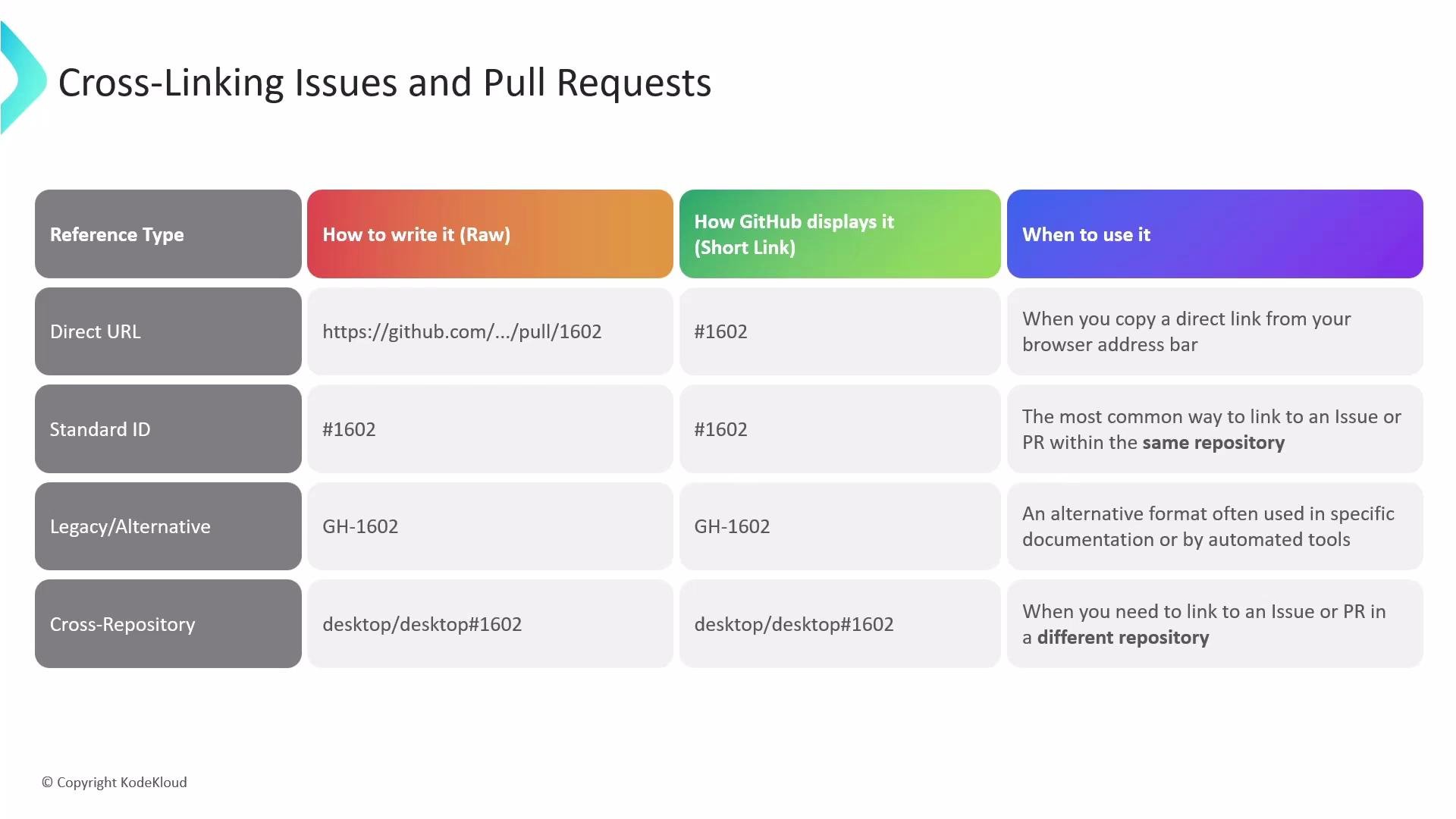
GitHub recognizes multiple ways to reference issues and pull requests. Each becomes a clickable link and is tracked by GitHub across conversations, timelines, and the network graph.
Common reference formats:
* Direct URL — paste the full issue/PR web address; the UI displays a shortened, clickable representation.
* Shorthand ID — type `#` followed by the issue/PR number (e.g., `#42`) for references within the same repository.
* Legacy/alternate — some tooling or older docs may use the `GH-` prefix (e.g., `GH-42`).
* Cross-repository — reference an item in another repository with `owner/repository#number` (e.g., `octocat/Hello-World#42`).
| Reference style | When to use | Example |
| -------------------- | --------------------------------------------: | ---------------------------------------------------- |
| Shorthand ID | Most common for same-repo links | `#1347` |
| Cross-repo reference | Linking across repositories | `octocat/Hello-World#1347` |
| Direct URL | When copying from browser or external systems | `https://github.com/octocat/Hello-World/issues/1347` |
| Legacy format | Encountered in older tools or exports | `GH-1347` |
 Examples
```text theme={null}
# Same-repo shorthand
#1347
# Cross-repo reference
octocat/Hello-World#1347
# Direct URL (the UI will shorten this)
https://github.com/octocat/Hello-World/issues/1347
# Legacy format
GH-1347
```
Regardless of the syntax you choose, GitHub will convert recognized references into links and maintain back-references on the referenced issue/PR timeline.
## Commit references
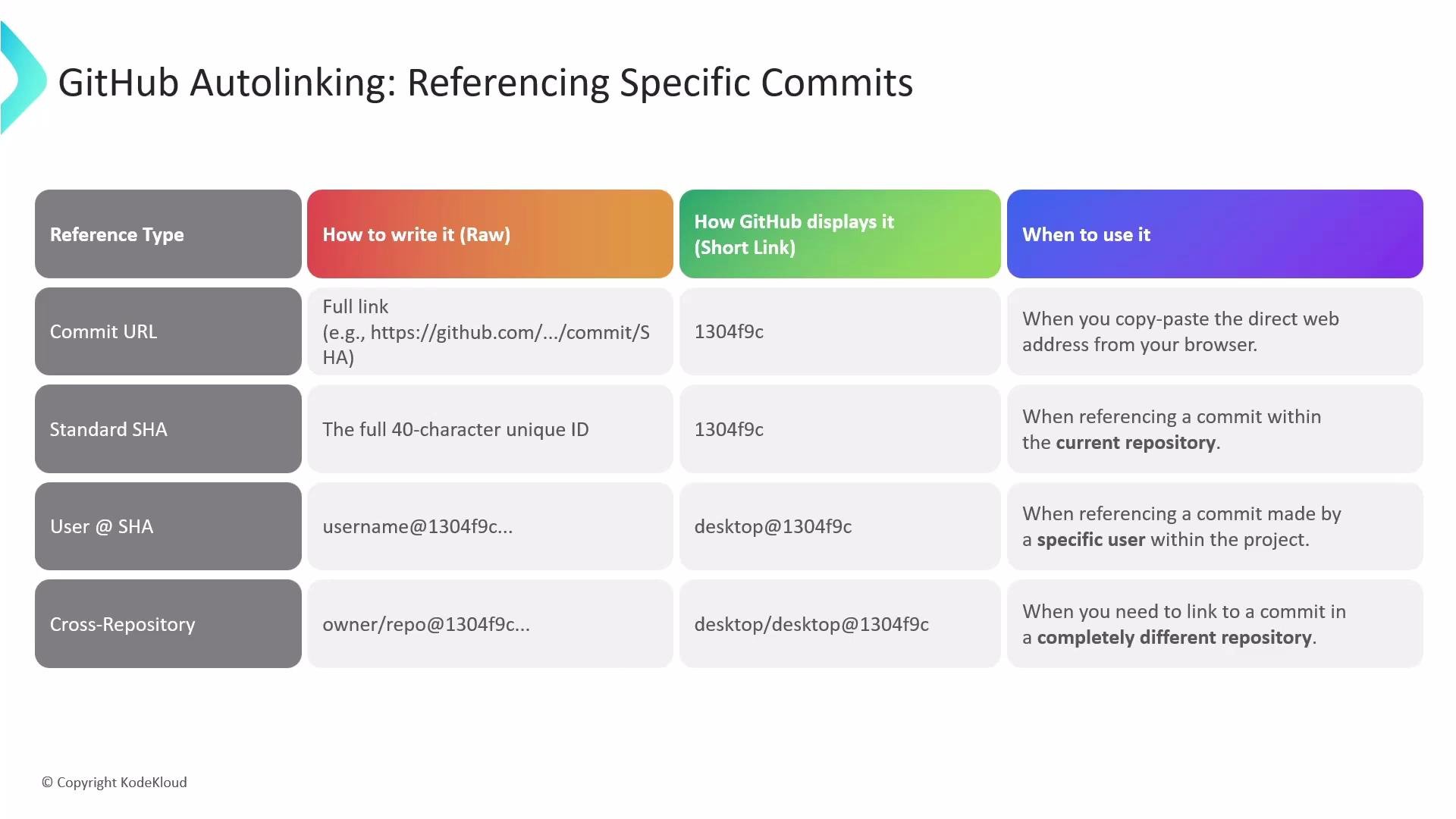
GitHub also auto-detects and links commit identifiers in comments, descriptions, and PR bodies. Use the format that best balances readability and precision for your workflow.
Common commit reference types:
* Commit URL — paste the full commit web address; GitHub displays a shortened seven-character SHA.
* Full SHA — include the full 40-character commit SHA when you need an exact identifier.
* Short SHA — the seven-character SHA shown in GitHub is usually sufficient for human-readable references.
* Username + SHA — `username@SHA` to indicate a specific user's commit (e.g., `octocat@7fd1a60`).
* Cross-repo commit — reference a commit in another repo with `owner/repository@SHA` (e.g., `octocat/Hello-World@7fd1a60`).
| Reference style | Use case | Example |
| ----------------- | --------------------------------------: | ---------------------------------------------------------------------------------------- |
| Direct commit URL | Copying directly from the browser | `https://github.com/octocat/Hello-World/commit/7fd1a604d4f2b3d2f3c9a9f1b6c2e5a6f7d8c9b0` |
| Full SHA | Exact, unambiguous reference | `7fd1a604d4f2b3d2f3c9a9f1b6c2e5a6f7d8c9b0` |
| Short SHA | Readable, commonly used in comments | `7fd1a60` |
| Username + SHA | Clarifies author context | `octocat@7fd1a60` |
| Cross-repo commit | Reference commits in other repositories | `octocat/Hello-World@7fd1a60` |
Examples
```text theme={null}
# Same-repo shorthand
#1347
# Cross-repo reference
octocat/Hello-World#1347
# Direct URL (the UI will shorten this)
https://github.com/octocat/Hello-World/issues/1347
# Legacy format
GH-1347
```
Regardless of the syntax you choose, GitHub will convert recognized references into links and maintain back-references on the referenced issue/PR timeline.
## Commit references
GitHub also auto-detects and links commit identifiers in comments, descriptions, and PR bodies. Use the format that best balances readability and precision for your workflow.
Common commit reference types:
* Commit URL — paste the full commit web address; GitHub displays a shortened seven-character SHA.
* Full SHA — include the full 40-character commit SHA when you need an exact identifier.
* Short SHA — the seven-character SHA shown in GitHub is usually sufficient for human-readable references.
* Username + SHA — `username@SHA` to indicate a specific user's commit (e.g., `octocat@7fd1a60`).
* Cross-repo commit — reference a commit in another repo with `owner/repository@SHA` (e.g., `octocat/Hello-World@7fd1a60`).
| Reference style | Use case | Example |
| ----------------- | --------------------------------------: | ---------------------------------------------------------------------------------------- |
| Direct commit URL | Copying directly from the browser | `https://github.com/octocat/Hello-World/commit/7fd1a604d4f2b3d2f3c9a9f1b6c2e5a6f7d8c9b0` |
| Full SHA | Exact, unambiguous reference | `7fd1a604d4f2b3d2f3c9a9f1b6c2e5a6f7d8c9b0` |
| Short SHA | Readable, commonly used in comments | `7fd1a60` |
| Username + SHA | Clarifies author context | `octocat@7fd1a60` |
| Cross-repo commit | Reference commits in other repositories | `octocat/Hello-World@7fd1a60` |
 Examples
```text theme={null}
# Direct commit URL (UI shortens this)
https://github.com/octocat/Hello-World/commit/7fd1a604d4f2b3d2f3c9a9f1b6c2e5a6f7d8c9b0
# Full SHA (40 chars)
7fd1a604d4f2b3d2f3c9a9f1b6c2e5a6f7d8c9b0
# Shortened (displayed by GitHub as 7 chars)
7fd1a60
# Username + SHA (contextual reference)
octocat@7fd1a60
# Cross-repo commit
octocat/Hello-World@7fd1a60
```
Best practice: use `#number` for references within the same repository and `owner/repo#number` for cross-repo links. For commits, prefer the 7-character SHA shown in the UI for readability; use the full SHA when you need an exact, unambiguous identifier.
These autolinking conventions keep conversations tidy, make references clickable, and ensure context is preserved across issues, PRs, and commits. For more details, see GitHub's documentation on linking references and commit SHAs:
* [About referencing issues and pull requests](https://docs.github.com/en/issues/tracking-your-work-with-issues/linking-a-pull-request-to-an-issue)
* [Viewing commits on GitHub](https://docs.github.com/en/repositories/committing-changes-to-your-project/viewing-contributions-and-commits)
Examples
```text theme={null}
# Direct commit URL (UI shortens this)
https://github.com/octocat/Hello-World/commit/7fd1a604d4f2b3d2f3c9a9f1b6c2e5a6f7d8c9b0
# Full SHA (40 chars)
7fd1a604d4f2b3d2f3c9a9f1b6c2e5a6f7d8c9b0
# Shortened (displayed by GitHub as 7 chars)
7fd1a60
# Username + SHA (contextual reference)
octocat@7fd1a60
# Cross-repo commit
octocat/Hello-World@7fd1a60
```
Best practice: use `#number` for references within the same repository and `owner/repo#number` for cross-repo links. For commits, prefer the 7-character SHA shown in the UI for readability; use the full SHA when you need an exact, unambiguous identifier.
These autolinking conventions keep conversations tidy, make references clickable, and ensure context is preserved across issues, PRs, and commits. For more details, see GitHub's documentation on linking references and commit SHAs:
* [About referencing issues and pull requests](https://docs.github.com/en/issues/tracking-your-work-with-issues/linking-a-pull-request-to-an-issue)
* [Viewing commits on GitHub](https://docs.github.com/en/repositories/committing-changes-to-your-project/viewing-contributions-and-commits)