> ## Documentation Index
> Fetch the complete documentation index at: https://notes.kodekloud.com/llms.txt
> Use this file to discover all available pages before exploring further.
# Options for Providing a Code Review on a Pull Request
> Explains when and how to use Comment, Approve, or Request changes during GitHub pull request reviews and best practices for constructive feedback
In GitHub's collaborative workflow, a code review is the formal mechanism for giving feedback on a pull request (PR). When you submit a review you must select a status that signals the next steps for the contributor and the repository: Comment, Approve, or Request changes. Choose the status that matches the severity of your feedback and the repository's branch protection rules so the team knows whether the PR can be merged.
Best practices for constructive reviews:
* Focus on scope and clarity: flag only issues that affect correctness, security, or maintainability.
* Use `Comment` for stylistic or non-blocking suggestions to avoid unnecessary workflow friction.
* When requesting changes, include clear reproduction steps and a prioritized list of fixes.
Below are the three review submission states you can use and when to use each.
* Comment — Use this to provide general feedback, ask technical questions, or note observations without changing the formal status of the pull request. This is a non-binding option intended to facilitate discussion and clarification without blocking or approving the merge.
* Approve — This is the formal sign-off. Choose Approve when the proposed changes meet project requirements and are verified for integration into the base branch. An approval is often required by branch protection rules before a pull request can be merged.
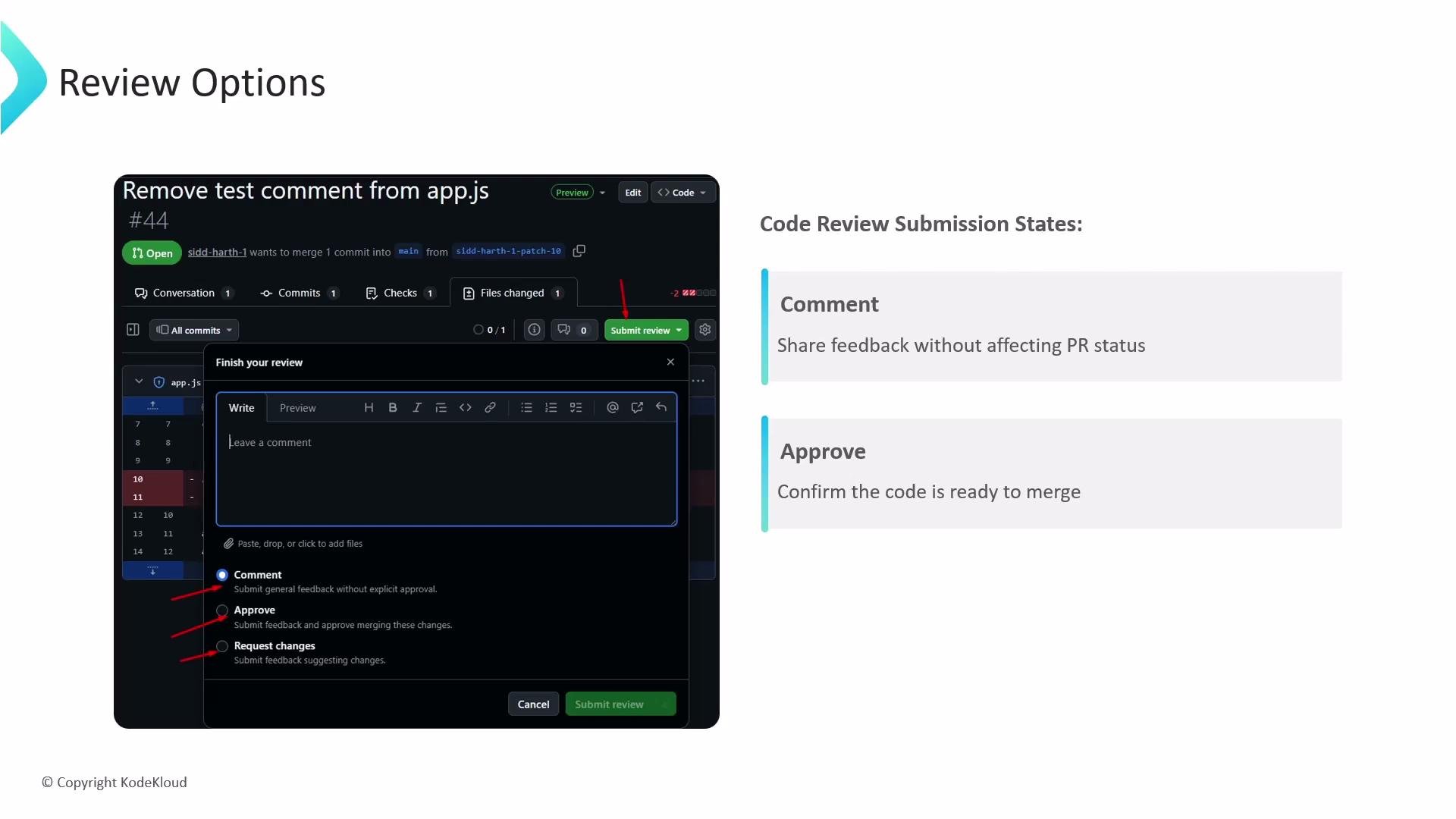 * Request changes — Use this when you identify critical bugs, security vulnerabilities, or architectural issues that must be fixed before the pull request can be merged. This status formally blocks the pull request until the author addresses the requested changes and you re-review.
Requesting changes prevents the pull request from being merged until the issues are resolved and the reviewer either re-approves or the branch protection rules are satisfied.
Summary table — quick reference
| Review status | Use case (when to pick) | Effect on PR |
| --------------: | ------------------------------------------------------- | ------------------------------------------------- |
| Comment | Minor suggestions, questions, or discussion items | No formal block — PR remains mergeable by policy |
| Approve | Changes are correct, tested, and ready for integration | Signals readiness; may satisfy branch protections |
| Request changes | Critical bugs, security, or design issues needing fixes | Blocks merging until addressed and re-reviewed |
Guidance for reviewers
* Match the review status to impact: non-blocking feedback = Comment, acceptance = Approve, blocking issues = Request changes.
* Be specific in comments: link to failing tests, include code snippets, or point to relevant docs.
* If a change is required but small, consider leaving a clear `Comment` and following up with a suggested patch; otherwise use `Request changes`.
Links and references
* [GitHub: Reviewing changes in pull requests](https://docs.github.com/en/pull-requests/collaborating-with-pull-requests/reviewing-changes-in-pull-requests)
* [GitHub: About protected branches](https://docs.github.com/en/repositories/configuring-branches-and-merges-in-your-repository/configuring-protected-branches)
* Request changes — Use this when you identify critical bugs, security vulnerabilities, or architectural issues that must be fixed before the pull request can be merged. This status formally blocks the pull request until the author addresses the requested changes and you re-review.
Requesting changes prevents the pull request from being merged until the issues are resolved and the reviewer either re-approves or the branch protection rules are satisfied.
Summary table — quick reference
| Review status | Use case (when to pick) | Effect on PR |
| --------------: | ------------------------------------------------------- | ------------------------------------------------- |
| Comment | Minor suggestions, questions, or discussion items | No formal block — PR remains mergeable by policy |
| Approve | Changes are correct, tested, and ready for integration | Signals readiness; may satisfy branch protections |
| Request changes | Critical bugs, security, or design issues needing fixes | Blocks merging until addressed and re-reviewed |
Guidance for reviewers
* Match the review status to impact: non-blocking feedback = Comment, acceptance = Approve, blocking issues = Request changes.
* Be specific in comments: link to failing tests, include code snippets, or point to relevant docs.
* If a change is required but small, consider leaving a clear `Comment` and following up with a suggested patch; otherwise use `Request changes`.
Links and references
* [GitHub: Reviewing changes in pull requests](https://docs.github.com/en/pull-requests/collaborating-with-pull-requests/reviewing-changes-in-pull-requests)
* [GitHub: About protected branches](https://docs.github.com/en/repositories/configuring-branches-and-merges-in-your-repository/configuring-protected-branches)