> ## Documentation Index
> Fetch the complete documentation index at: https://notes.kodekloud.com/llms.txt
> Use this file to discover all available pages before exploring further.
# Exploring Predefined CICD Variables
> This article explores GitLabs predefined CI/CD variables that provide contextual information for jobs, pipelines, and repositories to enhance flexibility and security.
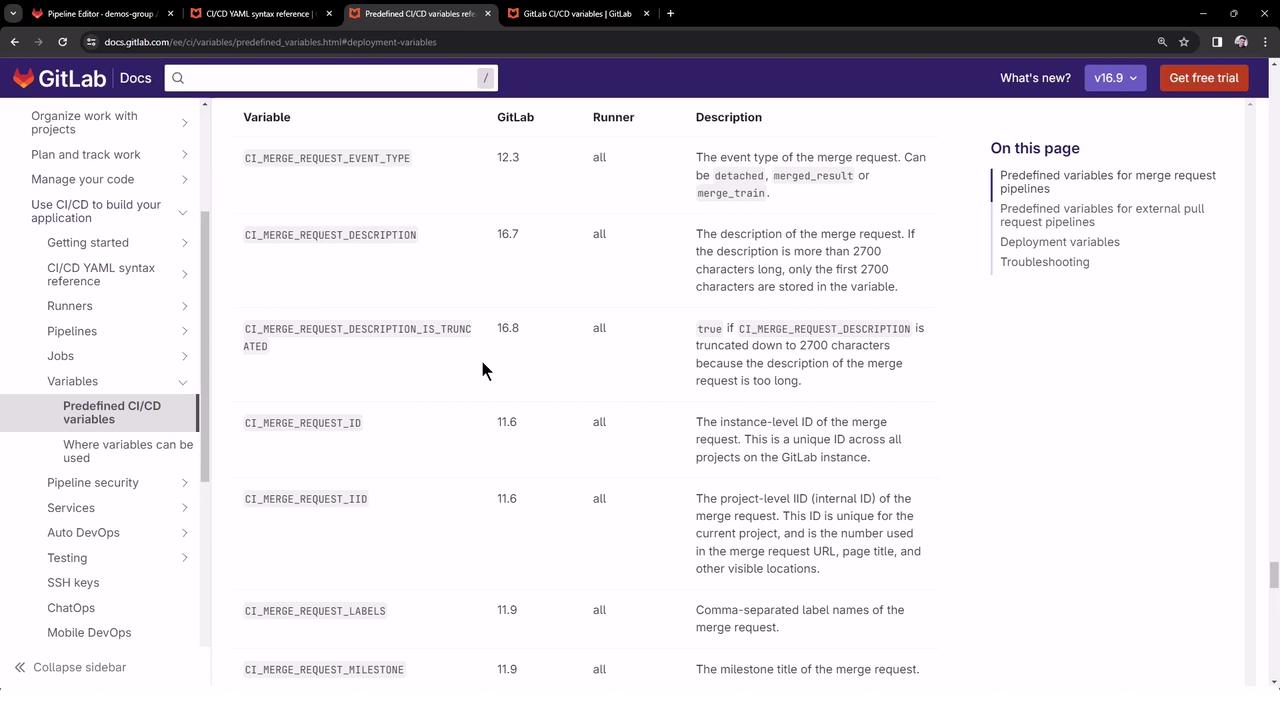
In this lesson we explore GitLab’s predefined CI/CD variables—auto-generated environment variables that provide contextual information about jobs, pipelines, repositories, and more. Leveraging these variables makes your pipelines flexible and secure by avoiding hardcoded values.
For a complete list of all predefined variables, see the [GitLab Documentation on Predefined CI/CD Variables][1].
## Categories of Predefined Variables
| Category | Available In | Usage Scenario |
| ------------------------ | ----------------------------- | --------------------------------------------------- |
| Pipeline-level Variables | Pipeline config & job scripts | Detect pipeline source, IDs, status |
| Runner-level Variables | Job execution | Access runner-specific details (e.g., shell, token) |
| Merge Request Variables | Merge request pipelines | Retrieve MR labels, branches, title |
## Inspecting All Available Variables
To view every environment variable supplied to a CI job, add a job that runs the `export` command:
```bash theme={null}
export CI_JOB_ID="50"
export CI_COMMIT_SHA="1ecfd27573eff1d6b4844ea3168962458c9f27a"
export CI_COMMIT_SHORT_SHA="1ecfd275"
export CI_COMMIT_REF_NAME="main"
export CI_REPOSITORY_URL="https://gitlab-ci-token:[masked]@example.com/gitlab-org/gitlab.git"
export CI_COMMIT_TAG="1.0.0"
export CI_JOB_NAME="spec:other"
export CI_JOB_STAGE="test"
export CI_JOB_MANUAL="true"
export CI_JOB_TRIGGERED="true"
export CI_PIPELINE_ID="1000"
export CI_PIPELINE_IID="10"
export CI_PAGES_DOMAIN="gitlab.io"
export CI_PAGES_URL="https://gitlab-org.gitlab.io/gitlab"
```
***
## 1. Creating a New GitLab Project
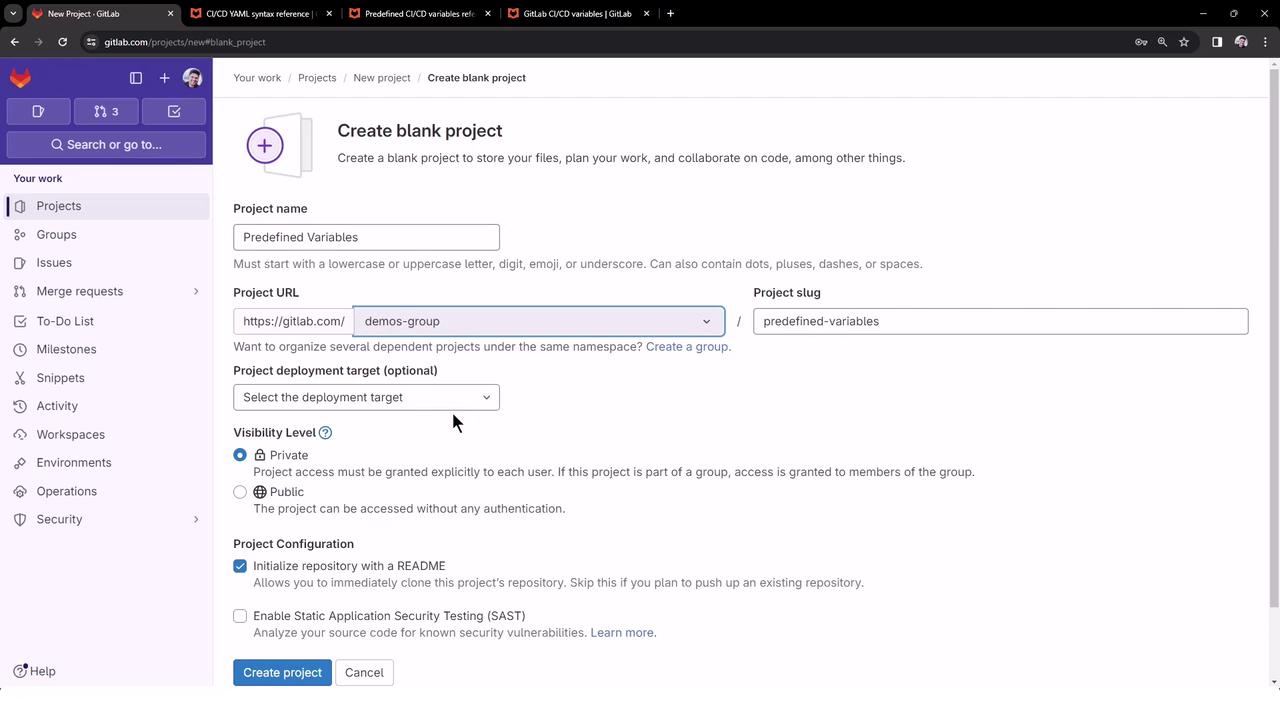
1. Navigate to your GitLab instance and click **New project**.
2. Select **Create blank project**, choose a group (e.g., `demos-group`), set visibility to **Public**, and initialize with a README.
3. Clone the repository locally or open it in the Web IDE.
Create a `.gitlab-ci.yml` file at the root of your project:
```yaml theme={null}
workflow:
name: Exploring Predefined Variable Pipeline
export_variable_job:
script:
- export
generic_predefined_variables:
script: |
echo "GITLAB_USER_LOGIN = $GITLAB_USER_LOGIN"
echo "GITLAB_USER_EMAIL = $GITLAB_USER_EMAIL"
echo "CI_COMMIT_AUTHOR = $CI_COMMIT_AUTHOR"
echo "CI_COMMIT_BRANCH = $CI_COMMIT_BRANCH"
echo "CI_PROJECT_NAME = $CI_PROJECT_NAME"
echo "CI_PROJECT_URL = $CI_PROJECT_URL"
echo "CI_JOB_STAGE = $CI_JOB_STAGE"
echo "CI_PIPELINE_NAME = $CI_PIPELINE_NAME"
echo "CI_PIPELINE_ID = $CI_PIPELINE_ID"
echo "CI_PIPELINE_SOURCE = $CI_PIPELINE_SOURCE"
merge_request_predefined_variables:
script: |
echo "CI_MERGE_REQUEST_LABELS = $CI_MERGE_REQUEST_LABELS"
echo "CI_MERGE_REQUEST_TARGET_BRANCH_NAME = $CI_MERGE_REQUEST_TARGET_BRANCH_NAME"
echo "CI_MERGE_REQUEST_ASSIGNEES = $CI_MERGE_REQUEST_ASSIGNEES"
echo "CI_MERGE_REQUEST_SOURCE_BRANCH_NAME = $CI_MERGE_REQUEST_SOURCE_BRANCH_NAME"
echo "CI_MERGE_REQUEST_TITLE = $CI_MERGE_REQUEST_TITLE"
```
Commit and push your changes to trigger the pipeline:
```bash theme={null}
git add .gitlab-ci.yml
git commit -m "Add predefined variable exploration pipeline"
git push origin main
```
***
## 2. Pipeline Overview
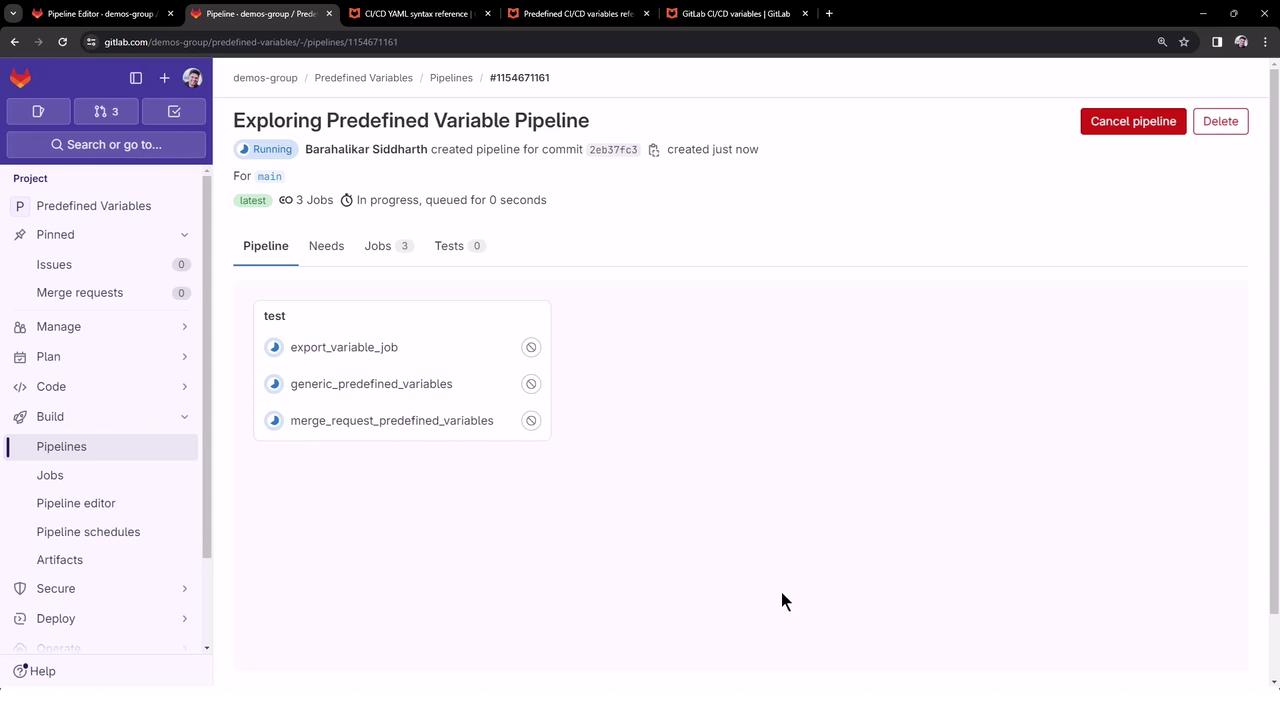
Once pushed, GitLab triggers a pipeline named **Exploring Predefined Variable Pipeline**. By default, all jobs run in the `test` stage and execute in parallel:
### 2.1 export\_variable\_job
This job dumps *all* environment variables. Here’s a truncated output:
```bash theme={null}
$ export
declare -x CI="true"
declare -x CI_API_GRAPHQL_URL="https://gitlab.com/api/graphql"
declare -x CI_API_V4_URL="https://gitlab.com/api/v4"
declare -x CI_BUILD_ID="6035315241"
declare -x CI_COMMIT_SHA="2eb37fc3a7591ffecfbab205433395b34ef4a88c"
declare -x CI_COMMIT_REF_NAME="main"
declare -x CI_JOB_ID="6035315241"
declare -x CI_JOB_NAME="export_variable_job"
declare -x CI_JOB_STAGE="test"
declare -x CI_PIPELINE_ID="1154671161"
declare -x CI_PIPELINE_NAME="Exploring Predefined Variable Pipeline"
declare -x CI_PIPELINE_SOURCE="push"
# … plus over 100 more variables
```
Running `export` will print all environment variables, including sensitive tokens. Ensure your job logs are protected.
### 2.2 generic\_predefined\_variables
This job echoes commonly used variables to illustrate dynamic scripting:
```bash theme={null}
$ echo "GITLAB_USER_LOGIN = $GITLAB_USER_LOGIN"
GITLAB_USER_LOGIN = sidd-harth
$ echo "GITLAB_USER_EMAIL = $GITLAB_USER_EMAIL"
GITLAB_USER_EMAIL = barahalikar.siddharth@gmail.com
$ echo "CI_COMMIT_AUTHOR = $CI_COMMIT_AUTHOR"
CI_COMMIT_AUTHOR = Barahalikar Siddharth
$ echo "CI_COMMIT_BRANCH = $CI_COMMIT_BRANCH"
CI_COMMIT_BRANCH = main
$ echo "CI_PROJECT_NAME = $CI_PROJECT_NAME"
CI_PROJECT_NAME = predefined-variables
$ echo "CI_PROJECT_URL = $CI_PROJECT_URL"
CI_PROJECT_URL = https://gitlab.com/demos-group/predefined-variables
$ echo "CI_JOB_STAGE = $CI_JOB_STAGE"
CI_JOB_STAGE = test
$ echo "CI_PIPELINE_ID = $CI_PIPELINE_ID"
CI_PIPELINE_ID = 1154671161
$ echo "CI_PIPELINE_SOURCE = $CI_PIPELINE_SOURCE"
CI_PIPELINE_SOURCE = push
```
Use these variables to customize your jobs based on commit metadata and pipeline context.
### 2.3 merge\_request\_predefined\_variables
This job attempts to print merge-request–specific variables:
```bash theme={null}
$ echo "CI_MERGE_REQUEST_LABELS = $CI_MERGE_REQUEST_LABELS"
CI_MERGE_REQUEST_LABELS =
$ echo "CI_MERGE_REQUEST_TARGET_BRANCH_NAME = $CI_MERGE_REQUEST_TARGET_BRANCH_NAME"
CI_MERGE_REQUEST_TARGET_BRANCH_NAME =
$ echo "CI_MERGE_REQUEST_ASSIGNEES = $CI_MERGE_REQUEST_ASSIGNEES"
CI_MERGE_REQUEST_ASSIGNEES =
$ echo "CI_MERGE_REQUEST_SOURCE_BRANCH_NAME = $CI_MERGE_REQUEST_SOURCE_BRANCH_NAME"
CI_MERGE_REQUEST_SOURCE_BRANCH_NAME =
$ echo "CI_MERGE_REQUEST_TITLE = $CI_MERGE_REQUEST_TITLE"
CI_MERGE_REQUEST_TITLE =
```
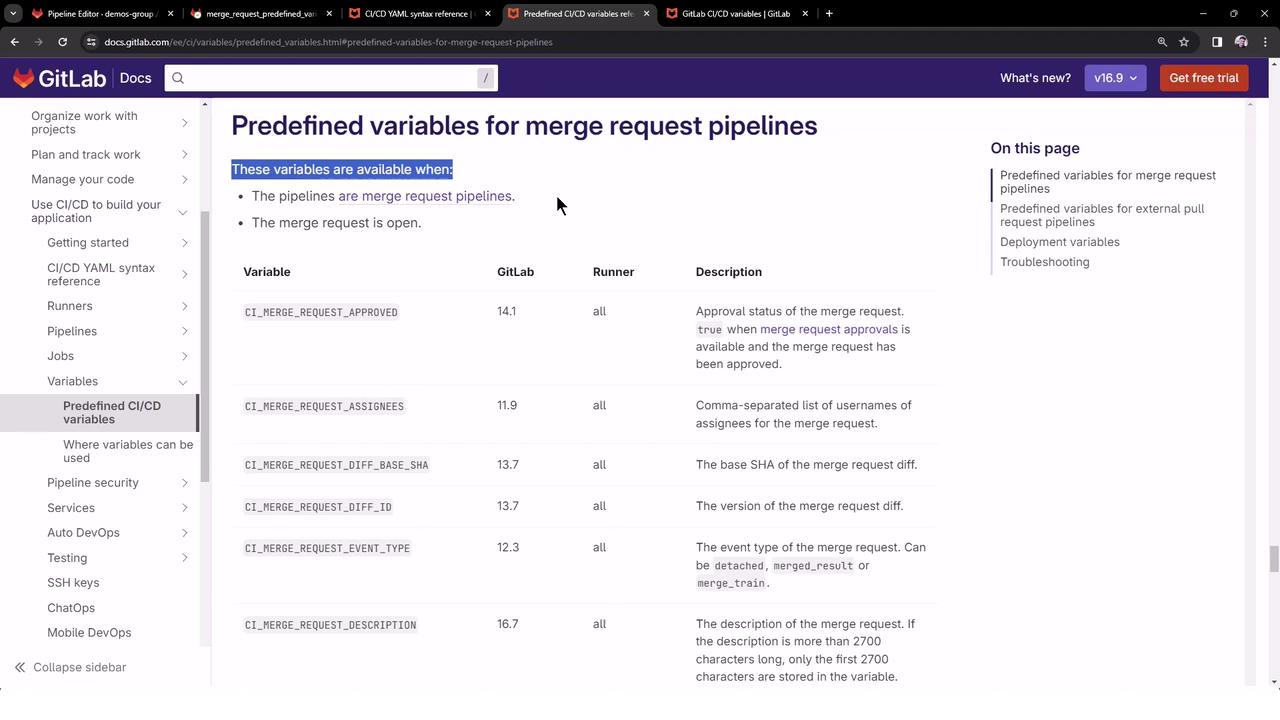
Merge request variables are only populated in pipelines triggered by Merge Requests. In direct pushes, these remain empty.
For more on Merge Request CI/CD variables, see the [GitLab Merge Request Variables documentation][2].
***
## Links and References
* [GitLab Predefined CI/CD Variables][1]
* [Merge Request CI/CD Variables][2]
* [Kubernetes Basics](https://kubernetes.io/docs/concepts/overview/what-is-kubernetes/)
* [Docker Hub](https://hub.docker.com/)
[1]: https://docs.gitlab.com/ee/ci/variables/predefined_variables.html
[2]: https://docs.gitlab.com/ee/ci/variables/predefined_variables.html#merge-request-cicd-variables