> ## Documentation Index
> Fetch the complete documentation index at: https://notes.kodekloud.com/llms.txt
> Use this file to discover all available pages before exploring further.
# Parallel Matrix
> This article demonstrates how to accelerate GitLab CI pipelines by using parallel jobs and matrix configurations.
In this lesson, we’ll demonstrate how to accelerate your GitLab CI pipelines by splitting workloads across concurrent jobs. You'll learn:
* How to shard a large test suite using the `parallel` keyword.
* How to run jobs across different environments or versions with `parallel:matrix`.
For more details, refer to the [GitLab CI/CD parallel jobs documentation](https://docs.gitlab.com/ee/ci/yaml/#parallel).
***
## 1. Sharding Test Suites with `parallel`
Running a monolithic test job can lead to long feedback loops. For example, a 100-test RSpec suite might take \~20 minutes in a single job. You can reduce this by splitting tests into N segments:
```yaml theme={null}
test:
stage: test
image: ruby:3.2
script:
- bundle install
- rspec --profile --format documentation
parallel: 5
```
This creates five clones of the `test` job. Each instance runs roughly 20 tests, cutting overall runtime by \~80%.
GitLab automatically sets `$CI_NODE_INDEX` (starting at 1) and `$CI_NODE_TOTAL` for each parallel job. Use them to customize test split logic.
***
## 2. Running Jobs Across Multiple Dimensions with `parallel:matrix`
When you need to validate or deploy across different environments—like OS types or runtime versions—`parallel:matrix` provides a clean, DRY approach. Instead of duplicating job definitions, define variable axes in a matrix.
### 2.1. Base Deployment Job
Here’s a simple deployment job that prints Node.js and npm versions:
```yaml theme={null}
workflow:
name: CI with Parallel Matrix
rules:
- if: '$CI_COMMIT_BRANCH == "main"'
when: always
variables:
DEPLOY_ENV: "production"
deploy-job:
stage: deploy
resource_group: production
timeout: 10m
image: node:20-alpine3.18
script:
- echo "Deploying to $DEPLOY_ENV"
- node -v
- npm -v
```
This single job definition can be extended with multiple parallel axes.
### 2.2. Example 1: Varying Runner Machines
To target different runner machines without duplicating the job:
```yaml theme={null}
deploy-job:
stage: deploy
resource_group: production
timeout: 10m
parallel:
matrix:
- RUNNER_MACHINE:
- saas-linux-small-amd64
- saas-linux-medium-amd64
- windows
- macos
tags:
- $RUNNER_MACHINE
image: node:20-alpine3.18
script:
- echo "Using runner: $RUNNER_MACHINE"
- node -v
- npm -v
```
This configuration spawns **4** parallel jobs—one per runner machine.
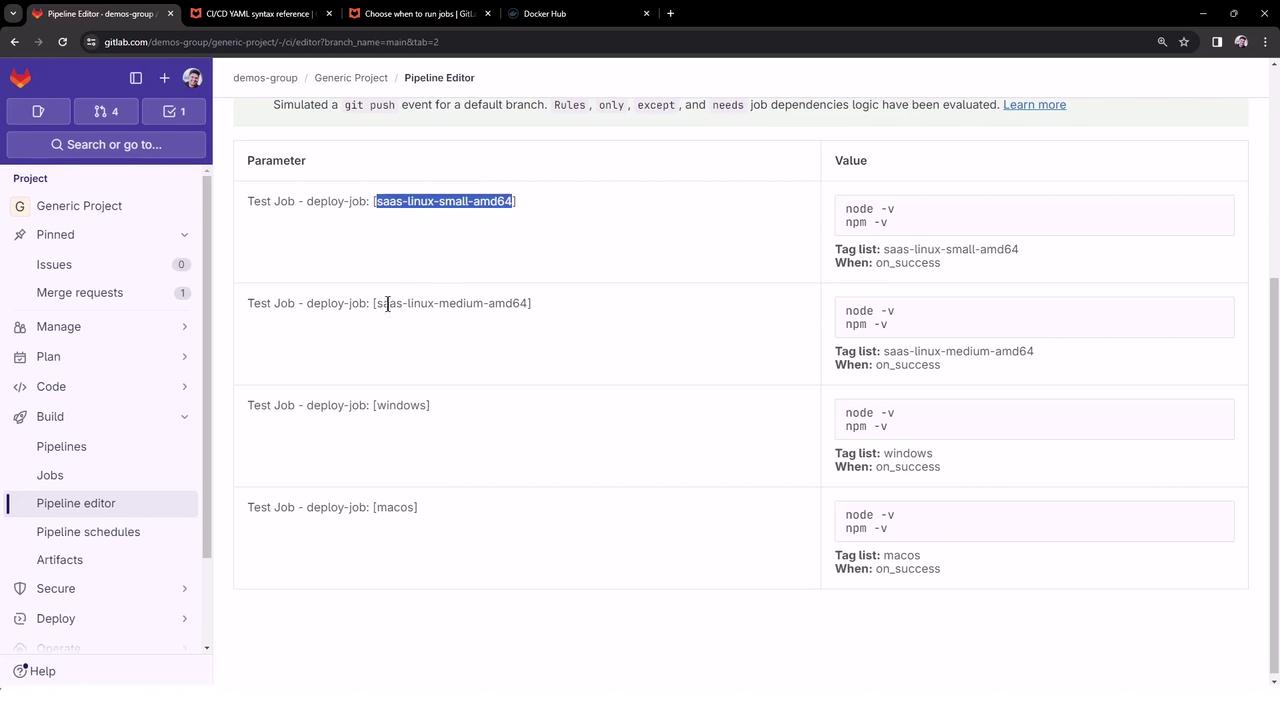
Ensure each runner has the appropriate `tags` configured to match `$RUNNER_MACHINE`. Otherwise, jobs may remain pending.
### 2.3. Example 2: Combining Runners and Node.js Versions
You can further expand the matrix to cover multiple Node.js versions:
```yaml theme={null}
deploy-job:
stage: deploy
resource_group: production
timeout: 10m
parallel:
matrix:
RUNNER_MACHINE:
- saas-linux-small-amd64
- saas-linux-medium-amd64
NODE_VERSION:
- '20-alpine3.18'
- '18-alpine3.18'
- '21-alpine3.18'
tags:
- $RUNNER_MACHINE
image: node:$NODE_VERSION
script:
- echo "Runner: $RUNNER_MACHINE, Node.js: $NODE_VERSION"
- node -v
- npm -v
```
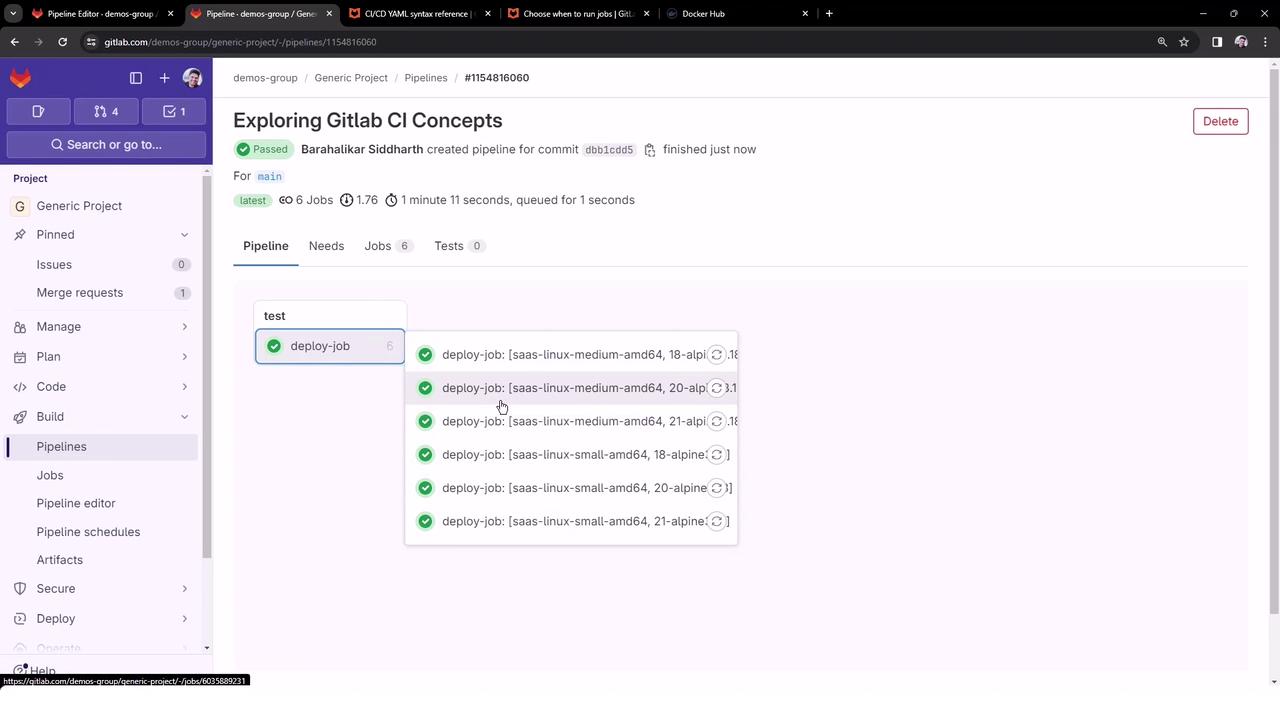
This results in **6** parallel jobs—covering all combinations of runner machines and Node.js images.
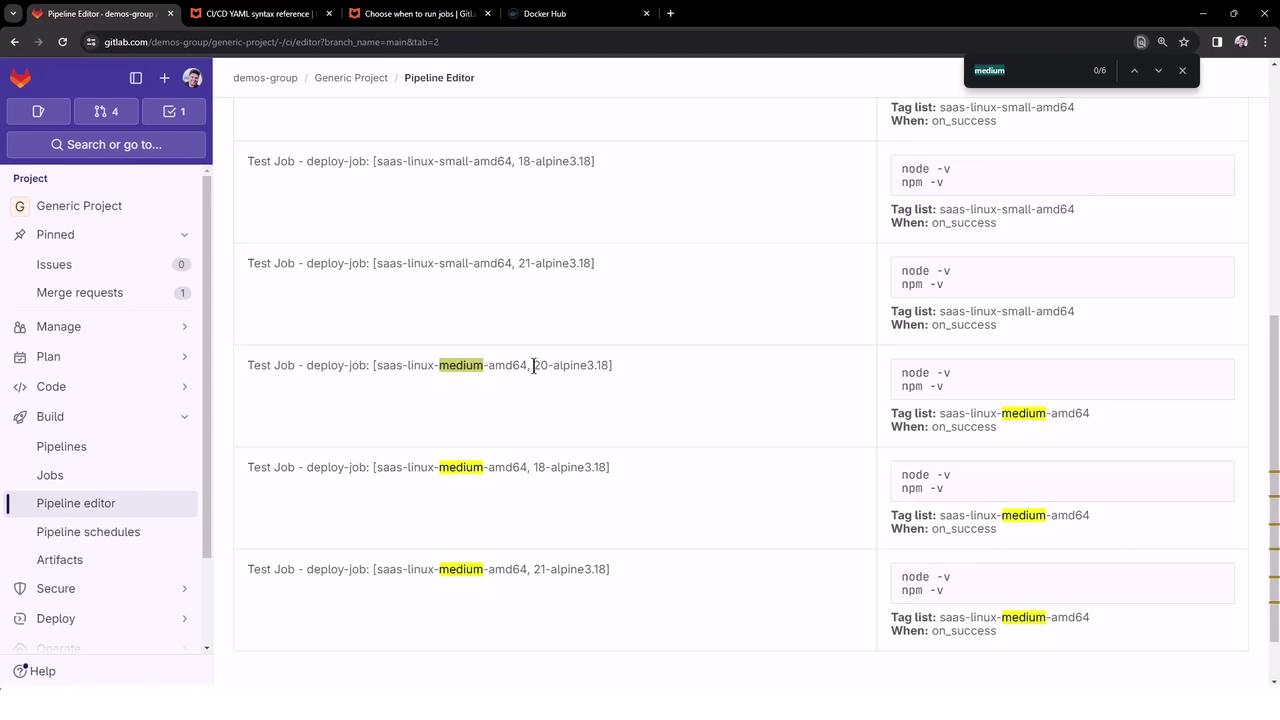
Once complete, the pipeline dashboard will display six successful deploy jobs:
***
## 3. Matrix Configuration Overview
| Variable | Values |
| --------------- | -------------------------------------------------------------------- |
| RUNNER\_MACHINE | saas-linux-small-amd64, saas-linux-medium-amd64,
windows, macos |
| NODE\_VERSION | 20-alpine3.18, 18-alpine3.18, 21-alpine3.18 |
***
## 4. Conclusion
By using `parallel` and `parallel:matrix`, you can:
* Drastically reduce CI feedback loops by sharding tests.
* Validate or deploy against multiple environments without redundant job definitions.
Start optimizing your GitLab CI today!