> ## Documentation Index
> Fetch the complete documentation index at: https://notes.kodekloud.com/llms.txt
> Use this file to discover all available pages before exploring further.

# Fixing Issues and Deploying to Review Environment

> This guide resolves GitLab Auto DevOps review pipeline failures by configuring MongoDB secrets, adjusting Kubernetes probe ports, and performing deployment and cleanup procedures.

In this guide, we’ll resolve a failed GitLab Auto DevOps review pipeline by correctly injecting MongoDB secrets, aligning Kubernetes probe ports, and redeploying to the review environment. We’ll also cover performance testing and cleanup procedures.

## 1. Identifying the Pipeline Failure

The review stage failed because the application pod couldn’t access the MongoDB environment variables:
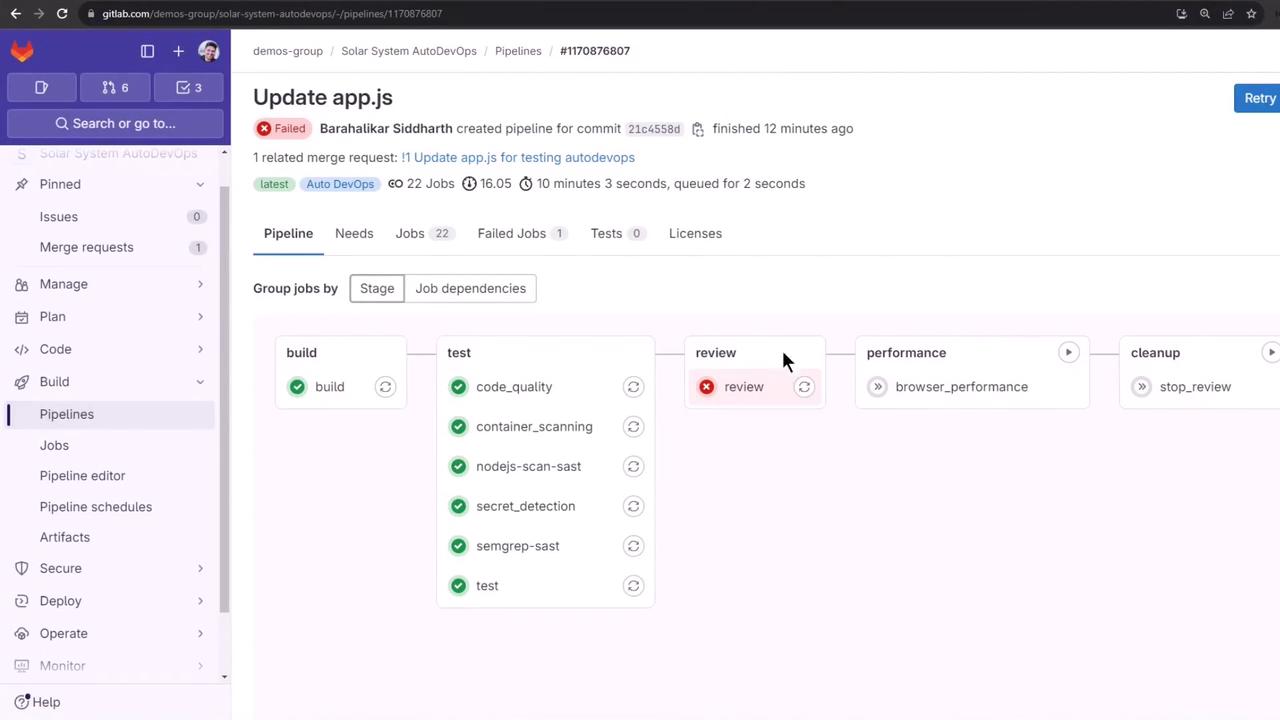
<Frame>
  ![The image shows a GitLab pipeline interface with various stages like build, test, review, performance, and cleanup. The review stage has failed, indicated by a red icon, while other stages have passed or are pending.](https://kodekloud.com/kk-media/image/upload/v1752877095/notes-assets/images/GitLab-CICD-Architecting-Deploying-and-Optimizing-Pipelines-Fixing-Issues-and-Deploying-to-Review-Environment/gitlab-pipeline-interface-review-failed.jpg)
</Frame>

Pipeline Stages Overview:

| Stage       | Status    | Description                    |
| ----------- | --------- | ------------------------------ |
| build       | ✅ Passed  | Build and push container image |
| test        | ✅ Passed  | Run unit and integration tests |
| review      | ❌ Failed  | Deploy to review environment   |
| performance | ⏳ Pending | Browser performance testing    |
| cleanup     | ⏳ Pending | Teardown review environment    |

## 2. Configuring Kubernetes Secrets via CI/CD Variables

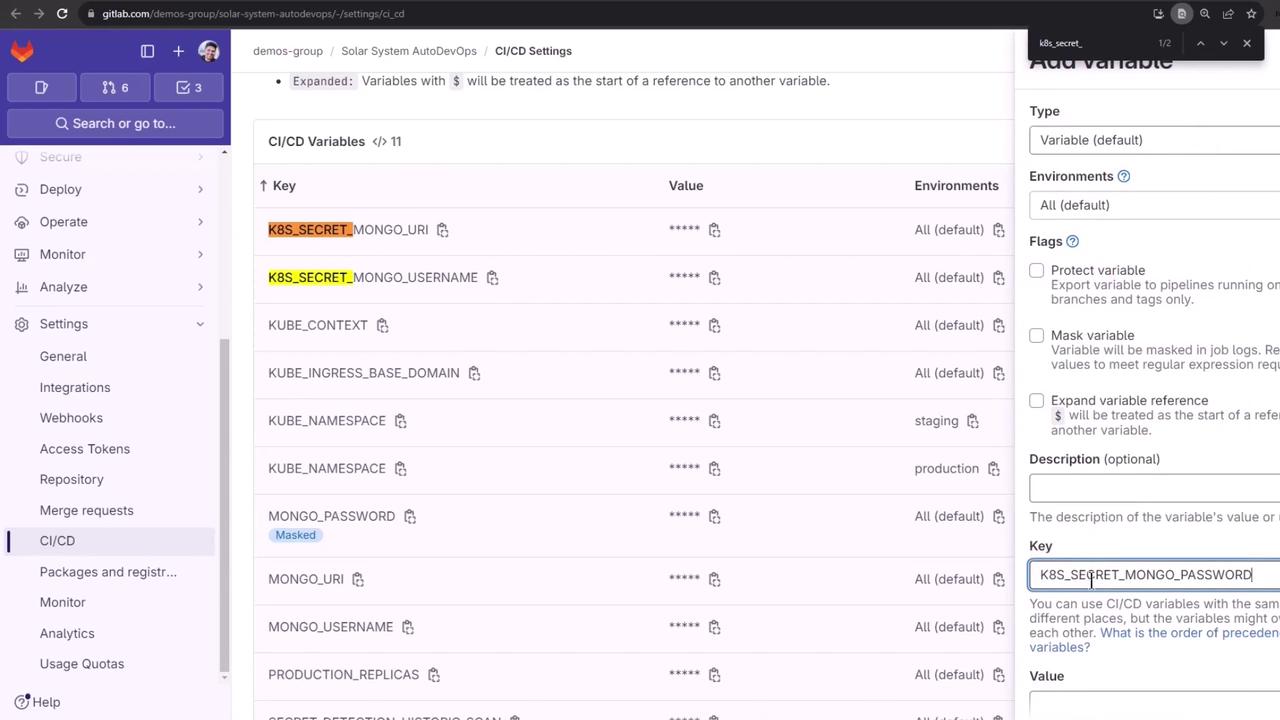
Store your MongoDB credentials as CI/CD variables in GitLab:

1. Go to **Settings > CI/CD > Variables** under the Auto DevOps customizer.
2. Prefix each key with `K8S_SECRET_` so Auto DevOps creates a Kubernetes Secret and injects it into pods.

<Callout icon="lightbulb" color="#1CB2FE">
  Auto DevOps will map `K8S_SECRET_<NAME>` to a Kubernetes secret named `<NAME>`, making it available as an environment variable inside your pod.
</Callout>

<Frame>
  ![The image shows a GitLab CI/CD settings page with a list of environment variables, including keys like K8S\_SECRET\_MONGO\_URI and K8S\_SECRET\_MONGO\_USERNAME, with their values masked. On the right, there's a section for adding a new variable with options for type, environments, and flags.](https://kodekloud.com/kk-media/image/upload/v1752877096/notes-assets/images/GitLab-CICD-Architecting-Deploying-and-Optimizing-Pipelines-Fixing-Issues-and-Deploying-to-Review-Environment/gitlab-ci-cd-environment-variables.jpg)
</Frame>

Example (in CI/CD UI or via `curl` API):

```bash theme={null}
# Key: K8S_SECRET_MONGO_URI
# Value: mongodb://mongo.example.com:27017
# Key: K8S_SECRET_MONGO_USERNAME
# Value: appuser
# Key: K8S_SECRET_MONGO_PASSWORD
# Value: superpassword
```

## 3. Cleaning Up the Default Namespace

Before re-running the review job, remove any leftover review resources:

```bash theme={null}
kubectl get all -n default
kubectl get secret -n default

# Delete old review secret if present
kubectl delete secret review-feature-<ID>-secret -n default

kubectl get secret -n default
# No resources found
```

<Callout icon="triangle-alert" color="#FF6B6B">
  Ensure you’re only deleting review-specific secrets. Running deletions in `default` can impact other workloads.
</Callout>

## 4. Rerunning and Monitoring the Review Job

Trigger the review job again in GitLab or via API. Then inspect:

```bash theme={null}
kubectl get all -n default
kubectl logs review-feature-<ID>-xxxxx -n default
```

The app will start and connect to MongoDB successfully:

```plaintext theme={null}
Server successfully running on port - 3000
MongoDB Connection Successful
```

However, the liveness and readiness probes still fail.

## 5. Diagnosing Probe Failures

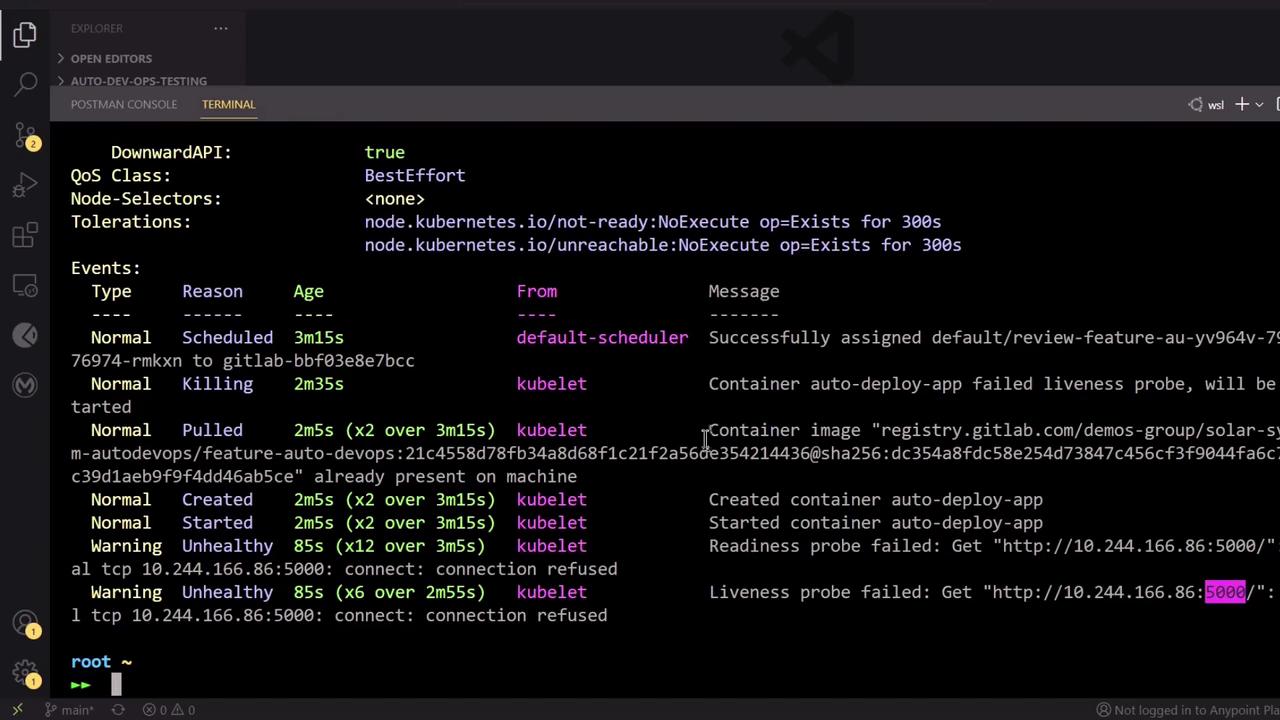
Describe the pod to view probe errors:

```bash theme={null}
kubectl describe pod review-feature-<ID>-xxxxx -n default
```

<Frame>
  ![The image shows a terminal window displaying Kubernetes pod events and status messages, including scheduling, container creation, and liveness probe failures.](https://kodekloud.com/kk-media/image/upload/v1752877098/notes-assets/images/GitLab-CICD-Architecting-Deploying-and-Optimizing-Pipelines-Fixing-Issues-and-Deploying-to-Review-Environment/kubernetes-pod-events-status-terminal.jpg)
</Frame>

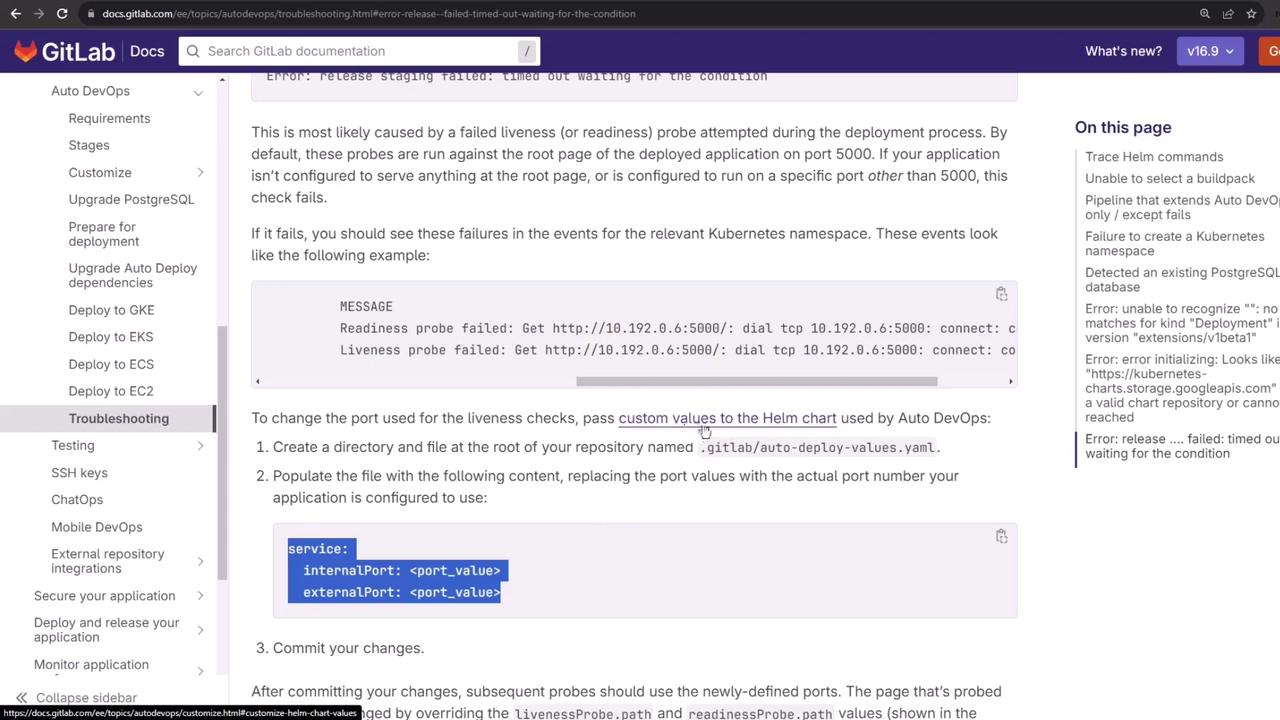
By default, Auto DevOps probes port `5000`, but your app listens on `3000`:

```javascript theme={null}
// app.js
app.listen(3000, () => {
  console.log("Server successfully running on port - " + 3000);
});
```

## 6. Troubleshooting Auto DevOps Timeouts

Auto DevOps may report a “timed out waiting for the condition” error due to mismatched probe ports:
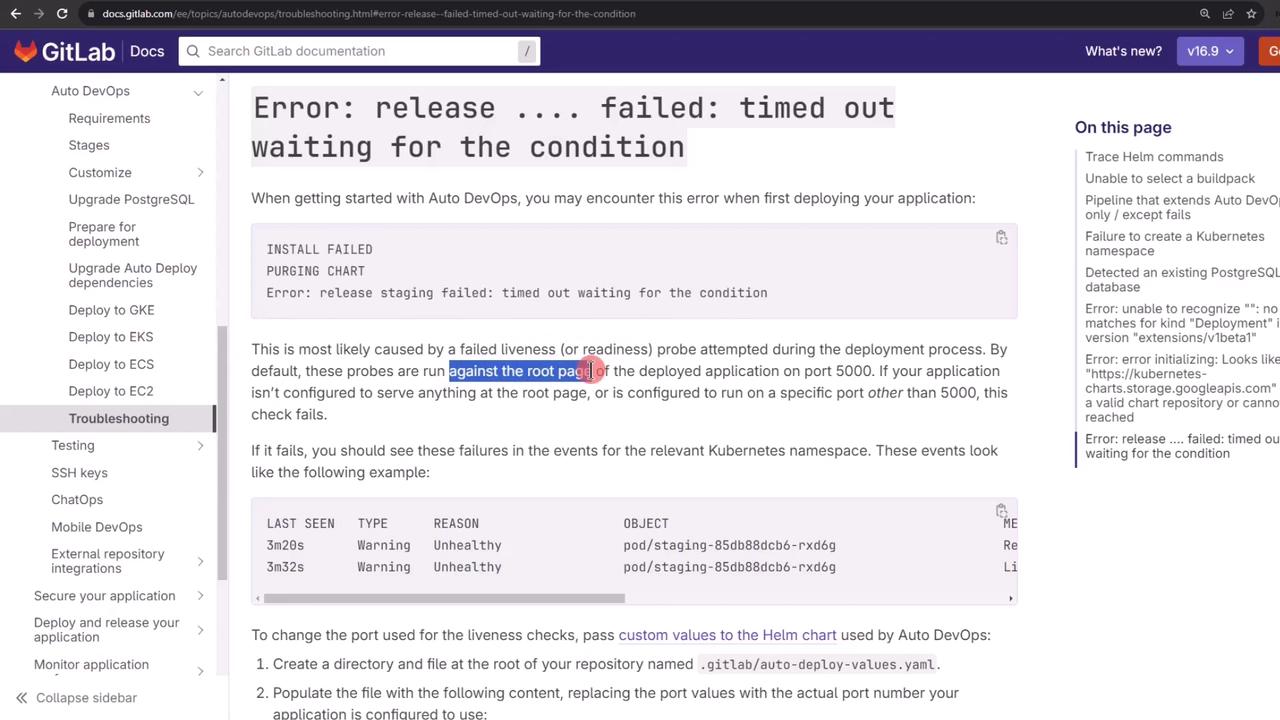
<Frame>
  ![The image shows a GitLab documentation page about troubleshooting an error related to Auto DevOps deployment, specifically a "timed out waiting for the condition" error. It includes explanations and steps to resolve the issue.](https://kodekloud.com/kk-media/image/upload/v1752877099/notes-assets/images/GitLab-CICD-Architecting-Deploying-and-Optimizing-Pipelines-Fixing-Issues-and-Deploying-to-Review-Environment/gitlab-auto-devops-troubleshooting-error.jpg)
</Frame>

The Helm chart defaults to port `5000` for readiness and liveness:
<Frame>
  ![The image shows a GitLab documentation page about troubleshooting Auto DevOps, specifically addressing issues with liveness and readiness probes during deployment. It includes instructions on changing port values in a Helm chart.](https://kodekloud.com/kk-media/image/upload/v1752877100/notes-assets/images/GitLab-CICD-Architecting-Deploying-and-Optimizing-Pipelines-Fixing-Issues-and-Deploying-to-Review-Environment/gitlab-auto-devops-troubleshooting.jpg)
</Frame>

## 7. Customizing the Helm Chart Values

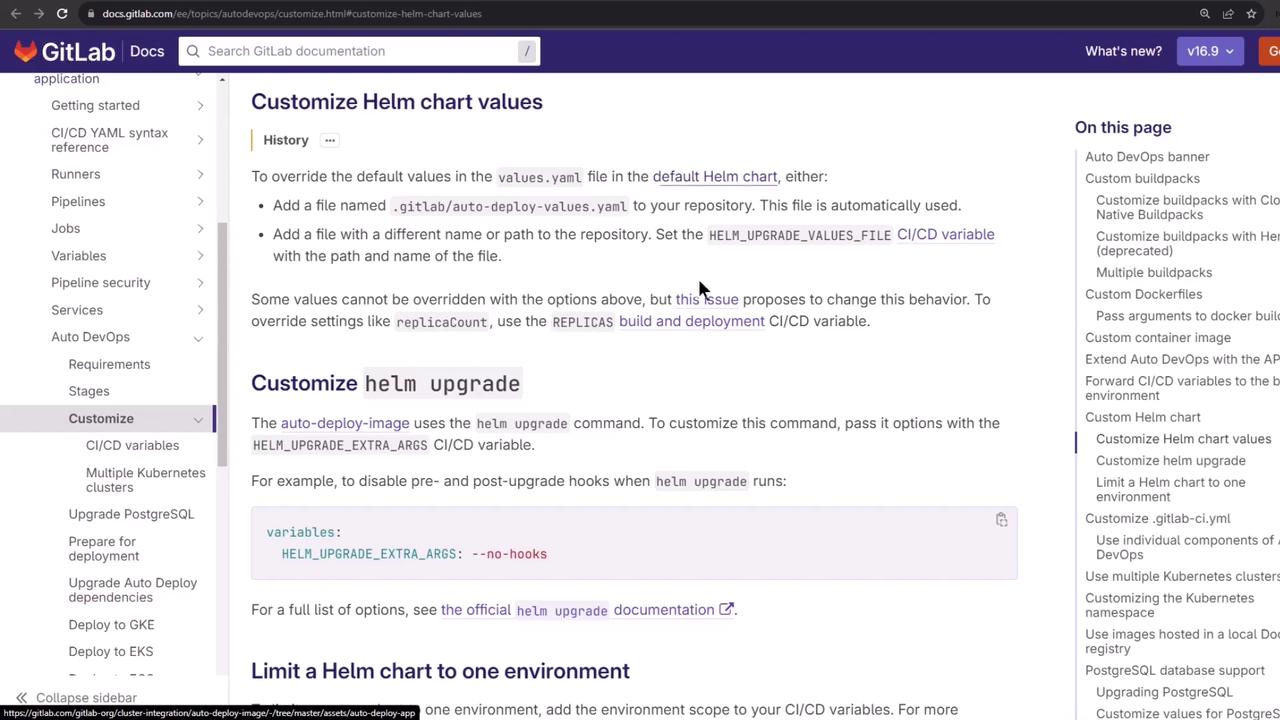
Create a `.gitlab/auto-deploy-values.yaml` at the root of your branch to override the probe ports:
<Frame>
  ![The image shows a GitLab documentation page about customizing Helm chart values, with navigation menus on the left and related topics on the right.](https://kodekloud.com/kk-media/image/upload/v1752877102/notes-assets/images/GitLab-CICD-Architecting-Deploying-and-Optimizing-Pipelines-Fixing-Issues-and-Deploying-to-Review-Environment/gitlab-customizing-helm-chart-values.jpg)
</Frame>

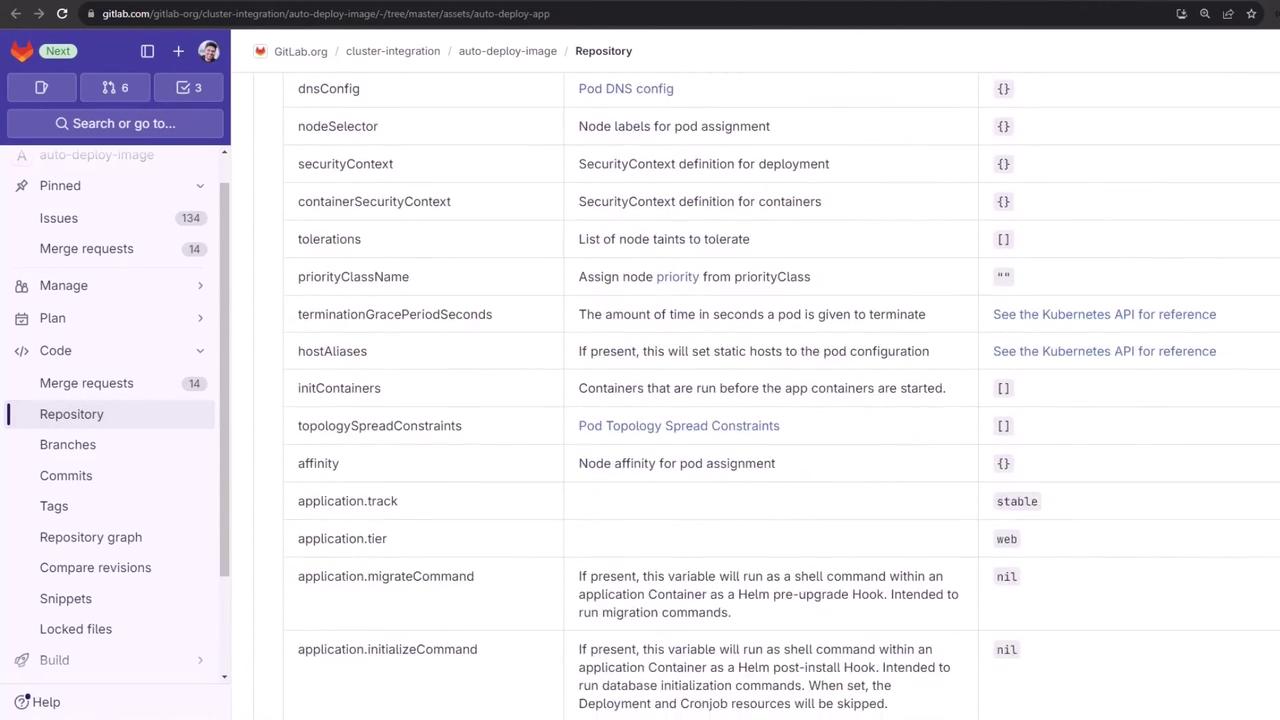
You can refer to all available Kubernetes options here:
<Frame>
  ![The image shows a GitLab repository interface with a list of configuration options related to Kubernetes deployment, such as dnsConfig, nodeSelector, and securityContext. The left sidebar includes navigation options like Issues, Merge requests, and Repository.](https://kodekloud.com/kk-media/image/upload/v1752877103/notes-assets/images/GitLab-CICD-Architecting-Deploying-and-Optimizing-Pipelines-Fixing-Issues-and-Deploying-to-Review-Environment/gitlab-repo-kubernetes-config-options.jpg)
</Frame>

Example `auto-deploy-values.yaml`:

```yaml theme={null}
service:
  internalPort: 3000
  externalPort: 3000
```

Commit and push to trigger a new pipeline.

## 8. Verifying the Updated Pipeline

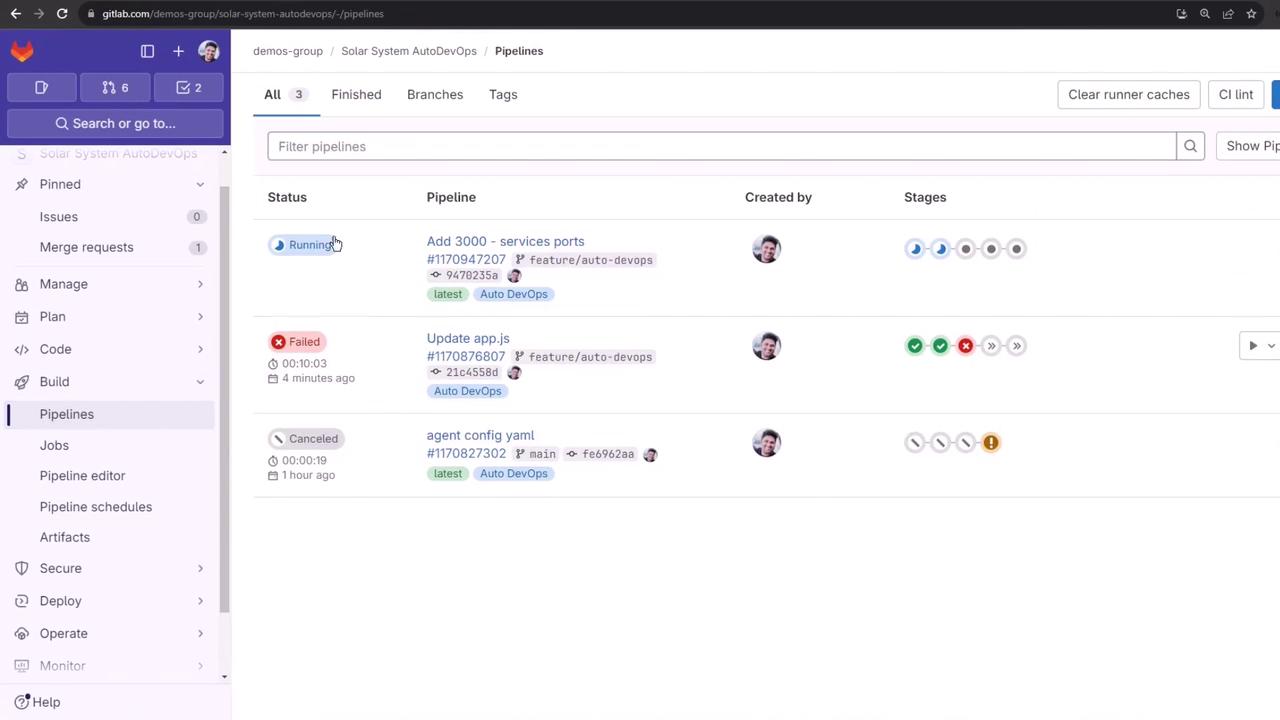
After pushing, your pipeline will rerun with the correct ports:
<Frame>
  ![The image shows a GitLab interface displaying a list of CI/CD pipelines with their statuses, such as "Running," "Failed," and "Canceled." The sidebar includes options like "Issues," "Merge requests," and "Pipelines."](https://kodekloud.com/kk-media/image/upload/v1752877104/notes-assets/images/GitLab-CICD-Architecting-Deploying-and-Optimizing-Pipelines-Fixing-Issues-and-Deploying-to-Review-Environment/gitlab-cicd-pipelines-status-interface.jpg)
</Frame>

You can cancel unneeded jobs (e.g., Code Quality, SAST) to speed up **build**, **test**, and **review**.

## 9. Successful Deployment to Review Environment

Once the review job succeeds, you’ll see the application URL:

```plaintext theme={null}
Using helm values file '.gitlab/auto-deploy-values.yaml'
Release "review-feature-<ID>" does not exist. Installing it now.
…
NOTES:
Application should be accessible at
http://<random>-review-feature-<ID>.<cluster-domain>.nip.io/
```

Verify with Kubernetes:

```bash theme={null}
kubectl get pods -n default
kubectl get ingress -n default
```

## 10. Auto Browser Performance Testing

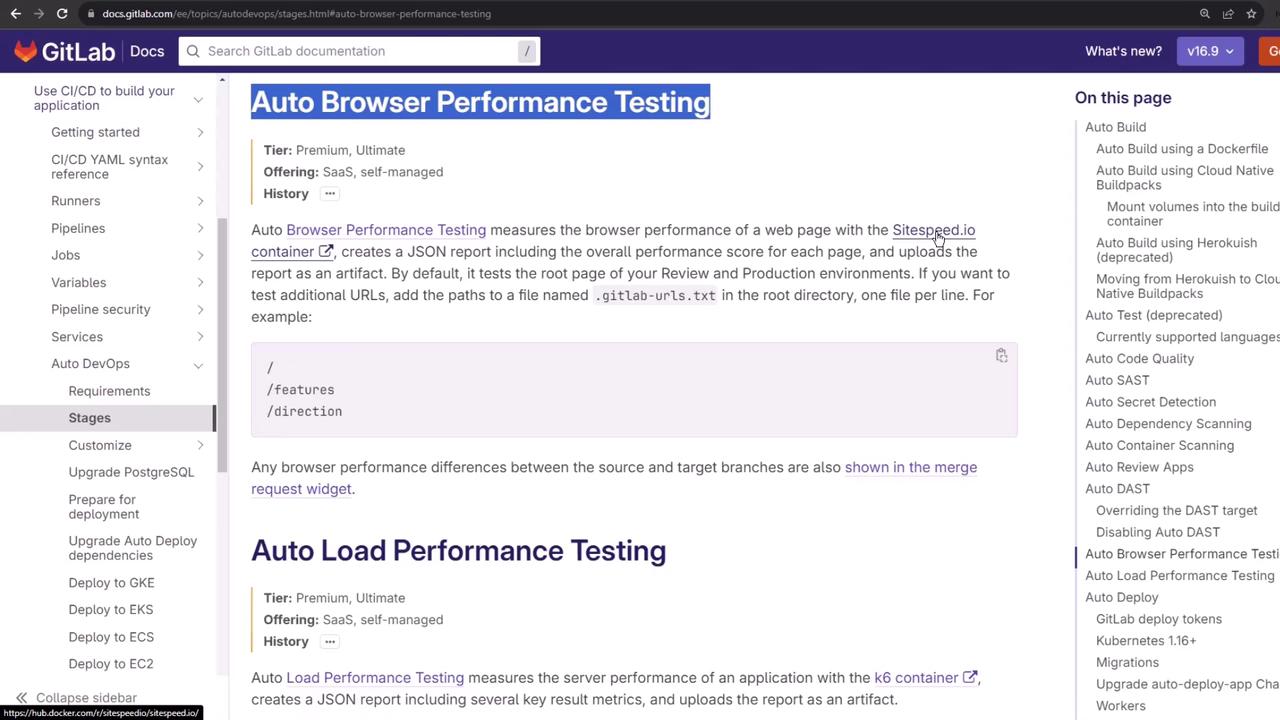
After deployment, Auto DevOps launches **Auto Browser Performance Testing** using sitespeed.io:
<Frame>
  ![The image shows a GitLab documentation page about "Auto Browser Performance Testing," detailing how it measures browser performance using a specific container and generates a JSON report. The page includes navigation links on the left and a table of contents on the right.](https://kodekloud.com/kk-media/image/upload/v1752877104/notes-assets/images/GitLab-CICD-Architecting-Deploying-and-Optimizing-Pipelines-Fixing-Issues-and-Deploying-to-Review-Environment/gitlab-auto-browser-performance-testing.jpg)
</Frame>

The job runs:

```bash theme={null}
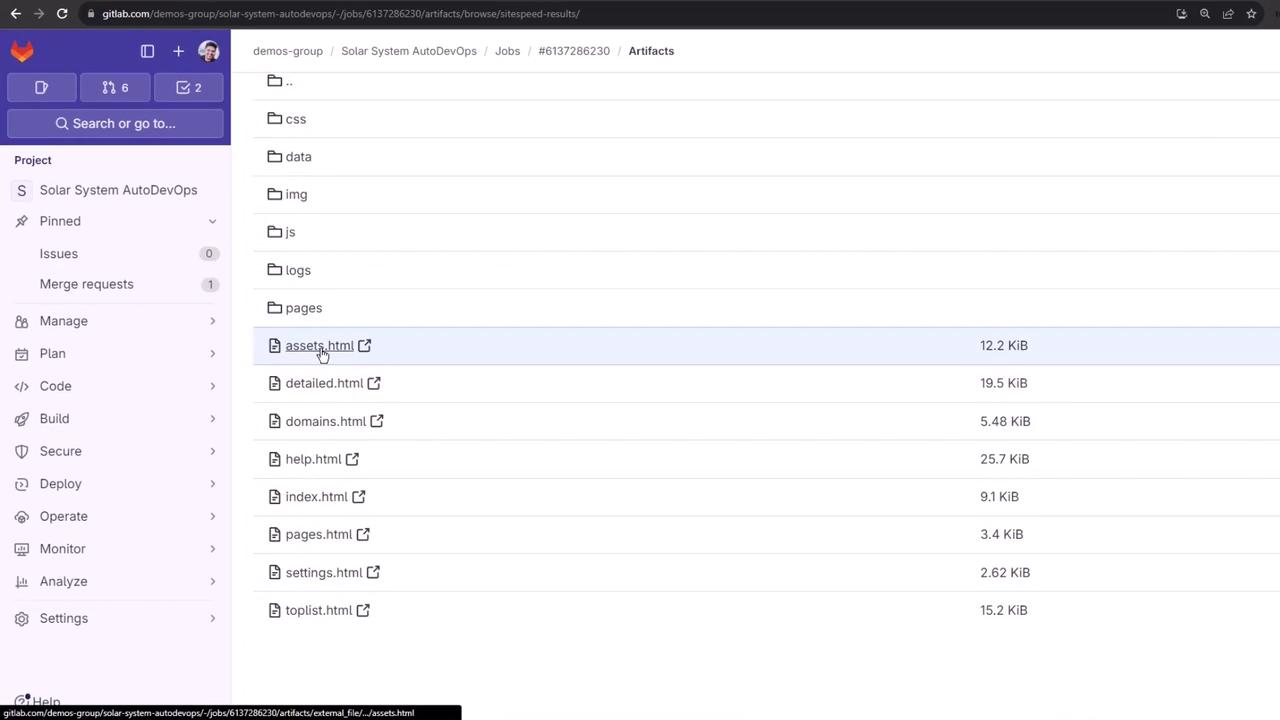
sitespeed.io $CI_ENVIRONMENT_URL --outputFolder sitespeed-results
```

Inspect the artifact files:
<Frame>
  ![The image shows a GitLab interface displaying a list of files and directories within a project called "Solar System AutoDevOps," including HTML files and folders like "css," "data," and "img."](https://kodekloud.com/kk-media/image/upload/v1752877105/notes-assets/images/GitLab-CICD-Architecting-Deploying-and-Optimizing-Pipelines-Fixing-Issues-and-Deploying-to-Review-Environment/gitlab-solarsystem-autodevops-files.jpg)
</Frame>

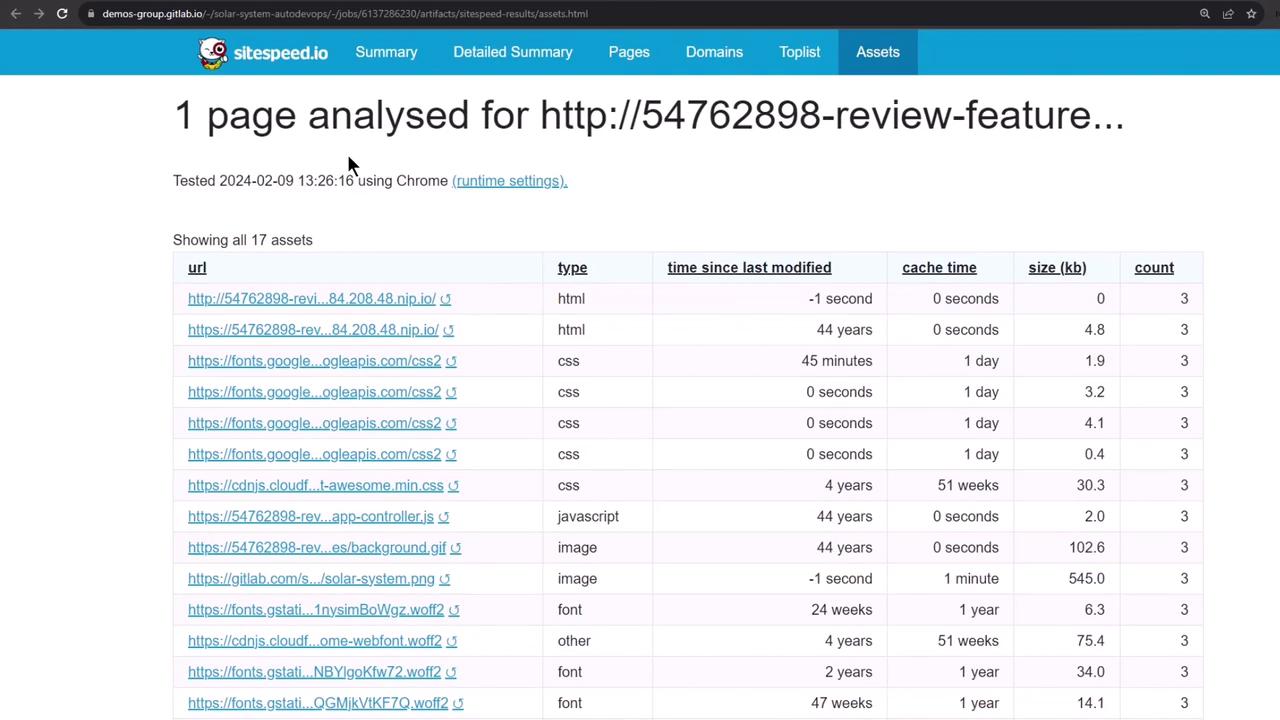
Open the main HTML report to view asset analysis:
<Frame>
  ![The image shows a webpage analysis report from sitespeed.io, listing various assets with details like type, time since last modified, cache time, size, and count.](https://kodekloud.com/kk-media/image/upload/v1752877106/notes-assets/images/GitLab-CICD-Architecting-Deploying-and-Optimizing-Pipelines-Fixing-Issues-and-Deploying-to-Review-Environment/webpage-analysis-report-sitespeedio.jpg)
</Frame>

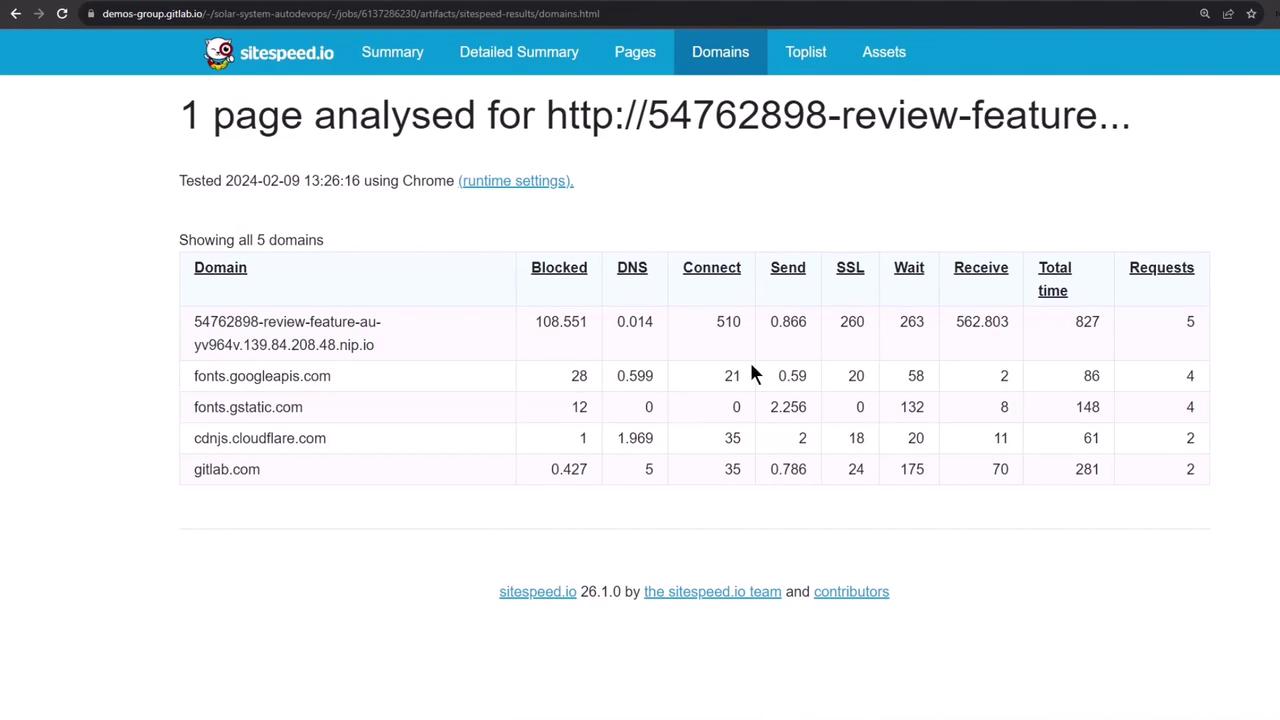
See detailed performance metrics by domain:
<Frame>
  ![The image shows a performance analysis report from sitespeed.io for a specific webpage, detailing metrics like DNS, connect, send, SSL, wait, receive, total time, and requests for various domains.](https://kodekloud.com/kk-media/image/upload/v1752877107/notes-assets/images/GitLab-CICD-Architecting-Deploying-and-Optimizing-Pipelines-Fixing-Issues-and-Deploying-to-Review-Environment/sitespeed-performance-analysis-report.jpg)
</Frame>

## 11. Manual Stop Review and Cleanup

When you’re done, manually trigger the **Stop Review** job to delete all review resources:
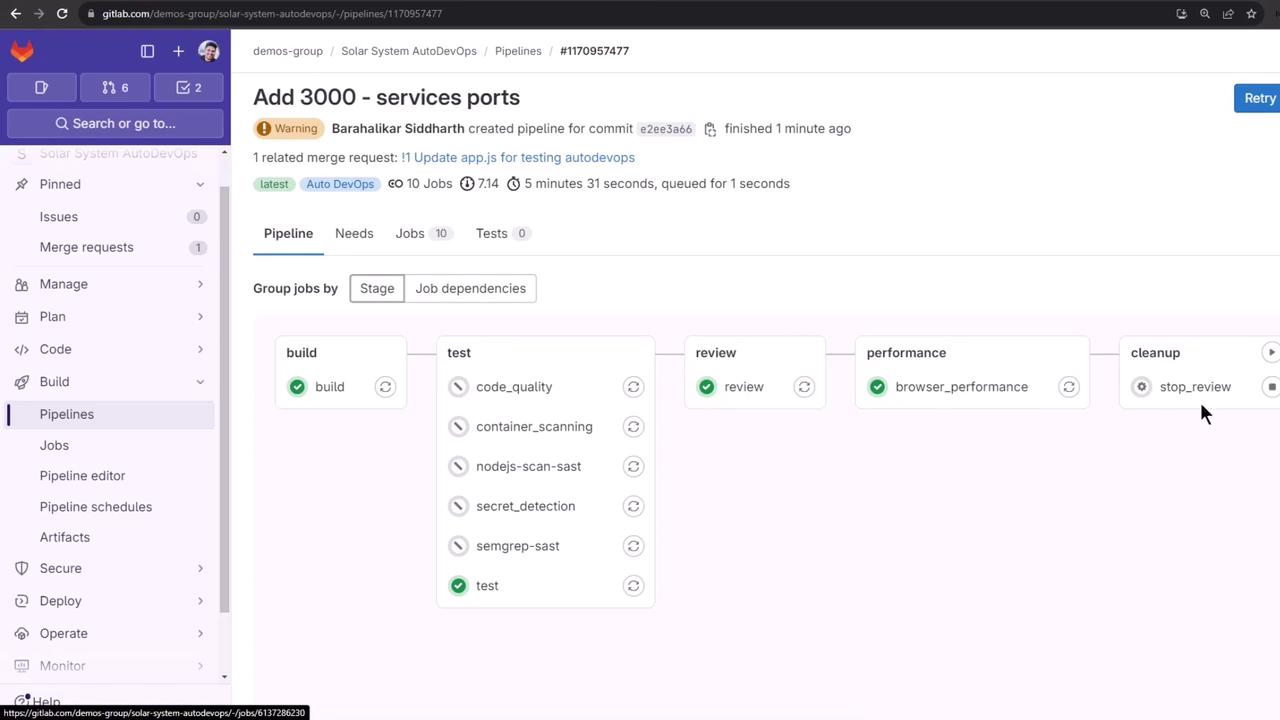
<Frame>
  ![The image shows a GitLab pipeline interface with stages for build, test, review, performance, and cleanup. Each stage contains various jobs, some of which are marked as completed.](https://kodekloud.com/kk-media/image/upload/v1752877108/notes-assets/images/GitLab-CICD-Architecting-Deploying-and-Optimizing-Pipelines-Fixing-Issues-and-Deploying-to-Review-Environment/gitlab-pipeline-interface-stages.jpg)
</Frame>

In **Pipelines**, click **Stop Review**:
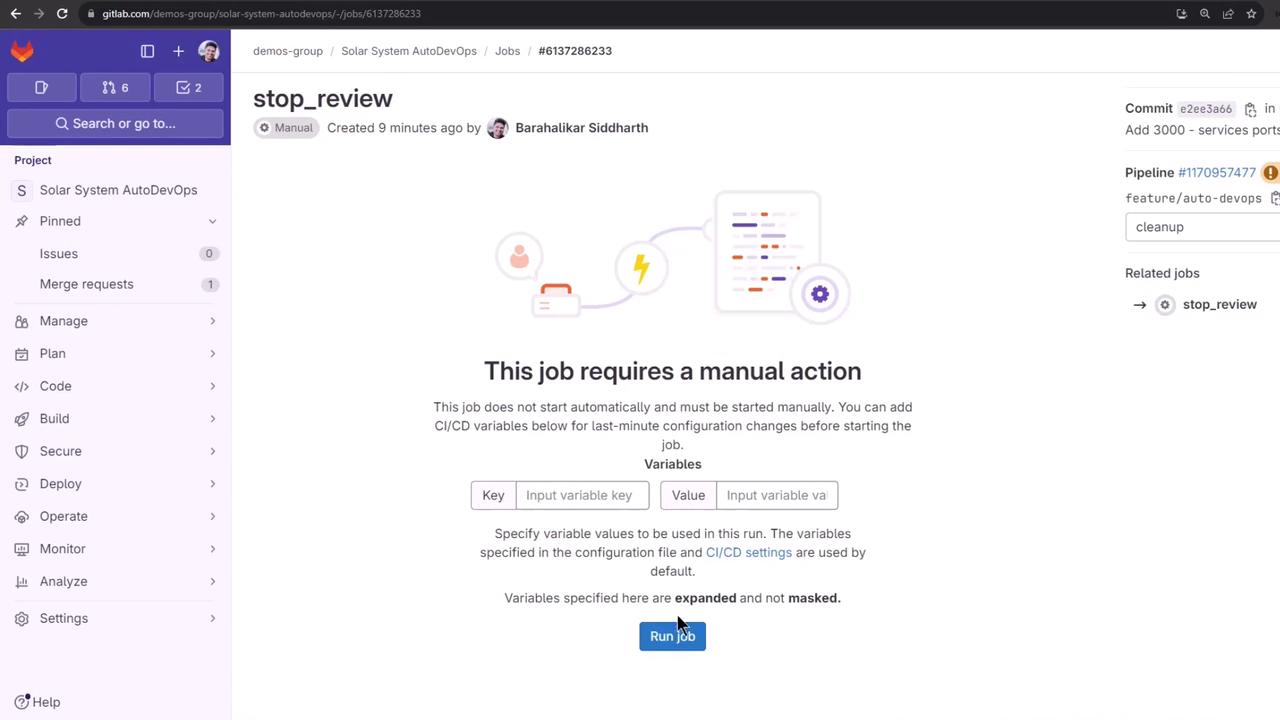
<Frame>
  ![The image shows a GitLab interface indicating a job that requires manual action, with options to input CI/CD variables and a "Run job" button. The sidebar includes project management options like "Manage," "Plan," "Code," and more.](https://kodekloud.com/kk-media/image/upload/v1752877109/notes-assets/images/GitLab-CICD-Architecting-Deploying-and-Optimizing-Pipelines-Fixing-Issues-and-Deploying-to-Review-Environment/gitlab-manual-action-job-interface.jpg)
</Frame>

This job removes the Helm release, pods, secrets, and ingress:

```bash theme={null}
kubectl get all -n default
# Should show only core resources
kubectl get secret -n default  # No secrets
kubectl get ingress -n default # No ingress
```

## 12. Reviewing Deployment History

Finally, view the stopped environment and its deployment jobs for auditing:
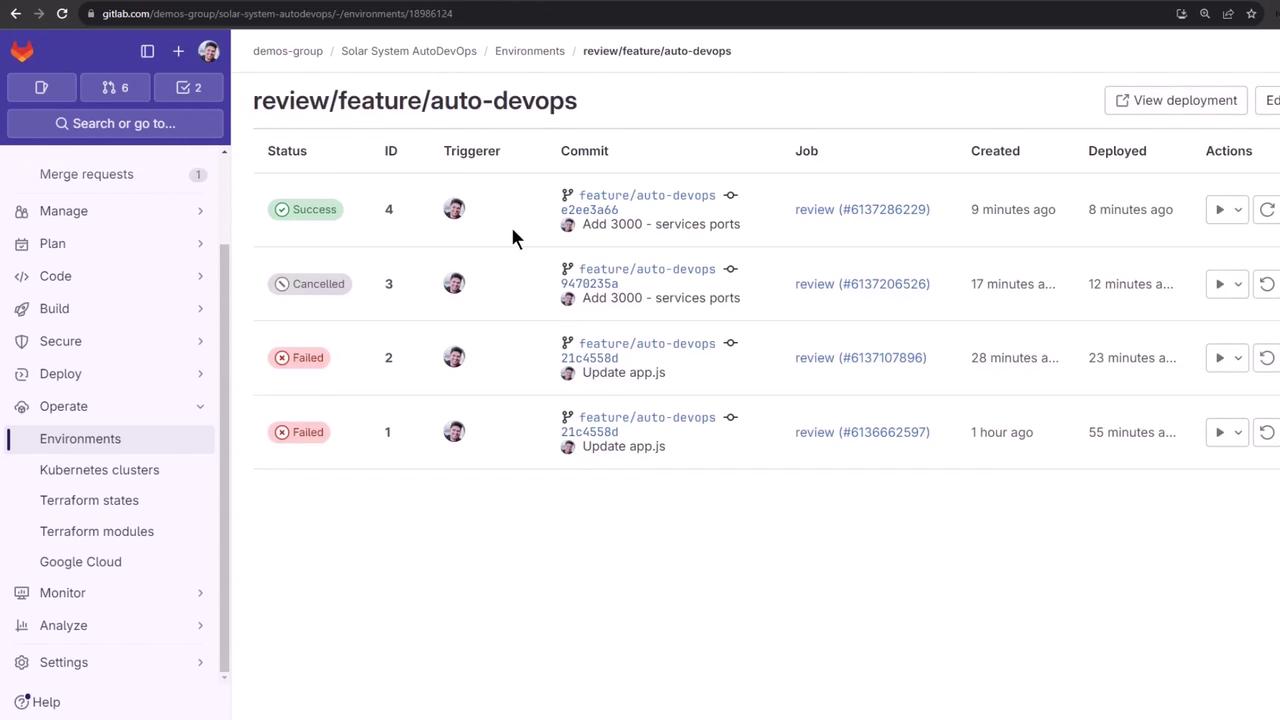
<Frame>
  ![The image shows a GitLab environment page displaying a list of deployment jobs with their statuses, IDs, commit messages, and timestamps. The sidebar includes navigation options like "Merge requests," "Manage," "Plan," and "Environments."](https://kodekloud.com/kk-media/image/upload/v1752877110/notes-assets/images/GitLab-CICD-Architecting-Deploying-and-Optimizing-Pipelines-Fixing-Issues-and-Deploying-to-Review-Environment/gitlab-deployment-jobs-statuses.jpg)
</Frame>

## Links and References

* [GitLab CI/CD Variables Documentation](https://docs.gitlab.com/ee/ci/variables/)
* [Auto DevOps Configuration](https://docs.gitlab.com/ee/topics/autodevops/)
* [Kubernetes Probes](https://kubernetes.io/docs/concepts/workloads/pods/pod-lifecycle/#container-probes)
* [Helm Chart Values](https://helm.sh/docs/chart_template_guide/values_files/)

<CardGroup>
  <Card title="Watch Video" icon="video" cta="Learn more" href="https://learn.kodekloud.com/user/courses/gitlab-ci-cd-architecting-deploying-and-optimizing-pipelines/module/a6a5540f-e7d1-4820-afc8-2be1d6e3061a/lesson/4a4d754b-3246-43be-b452-3e95c5f6557d" />
</CardGroup>