> ## Documentation Index
> Fetch the complete documentation index at: https://notes.kodekloud.com/llms.txt
> Use this file to discover all available pages before exploring further.

# Staging Environment and Canaray Deployment with AutoDevOps part 1

> This guide explains setting up a staging environment and canary deployment using GitLabs Auto DevOps for automated and manual production rollouts.

In this guide, we’ll leverage GitLab’s Auto DevOps to set up a **staging environment** and execute a **canary release** into production. By the end, you’ll have a pipeline that automatically deploys to staging and promotes to production manually, with incremental rollouts.

## GitLab Auto DevOps Deployment Strategy

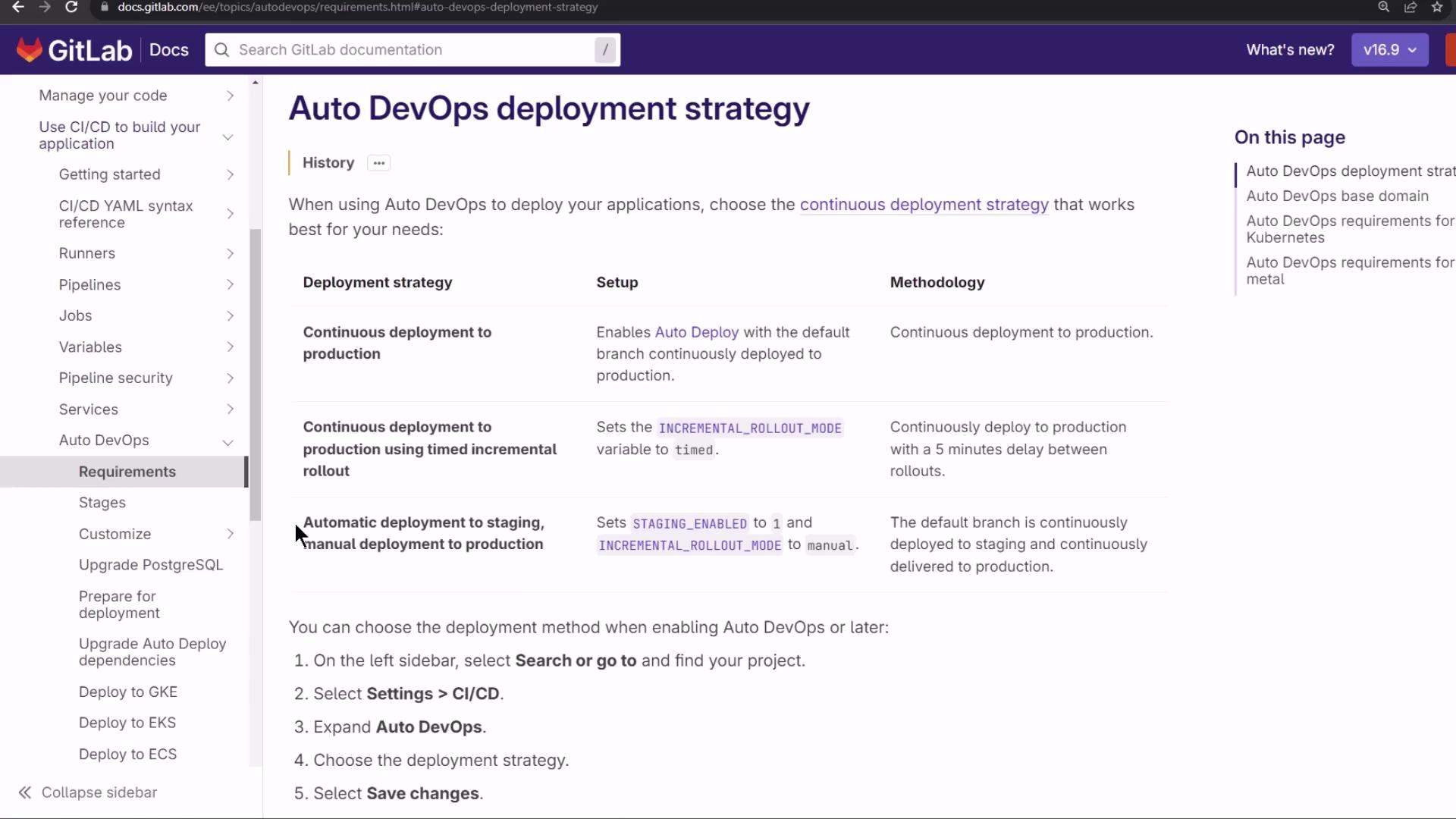
GitLab Auto DevOps offers multiple deployment workflows. In this lesson, we use:

* Automatic deployment to **staging**
* Manual approval for **production**
<Frame>
  ![The image shows a GitLab documentation page detailing the "Auto DevOps deployment strategy," including different deployment strategies, their setup, and methodology. The sidebar lists various related topics like CI/CD, pipelines, and requirements.](https://kodekloud.com/kk-media/image/upload/v1752877131/notes-assets/images/GitLab-CICD-Architecting-Deploying-and-Optimizing-Pipelines-Staging-Environment-and-Canaray-Deployment-with-AutoDevOps-part-1/gitlab-auto-devops-deployment-strategy.jpg)
</Frame>

<Callout icon="lightbulb" color="#1CB2FE">
  By default, `staging_enabled` is set to `1` and `INCREMENTAL_ROLLOUT_MODE` is `manual`. This means every commit goes to staging automatically, while production requires a manual trigger.
</Callout>

## Canary (Incremental) Rollout

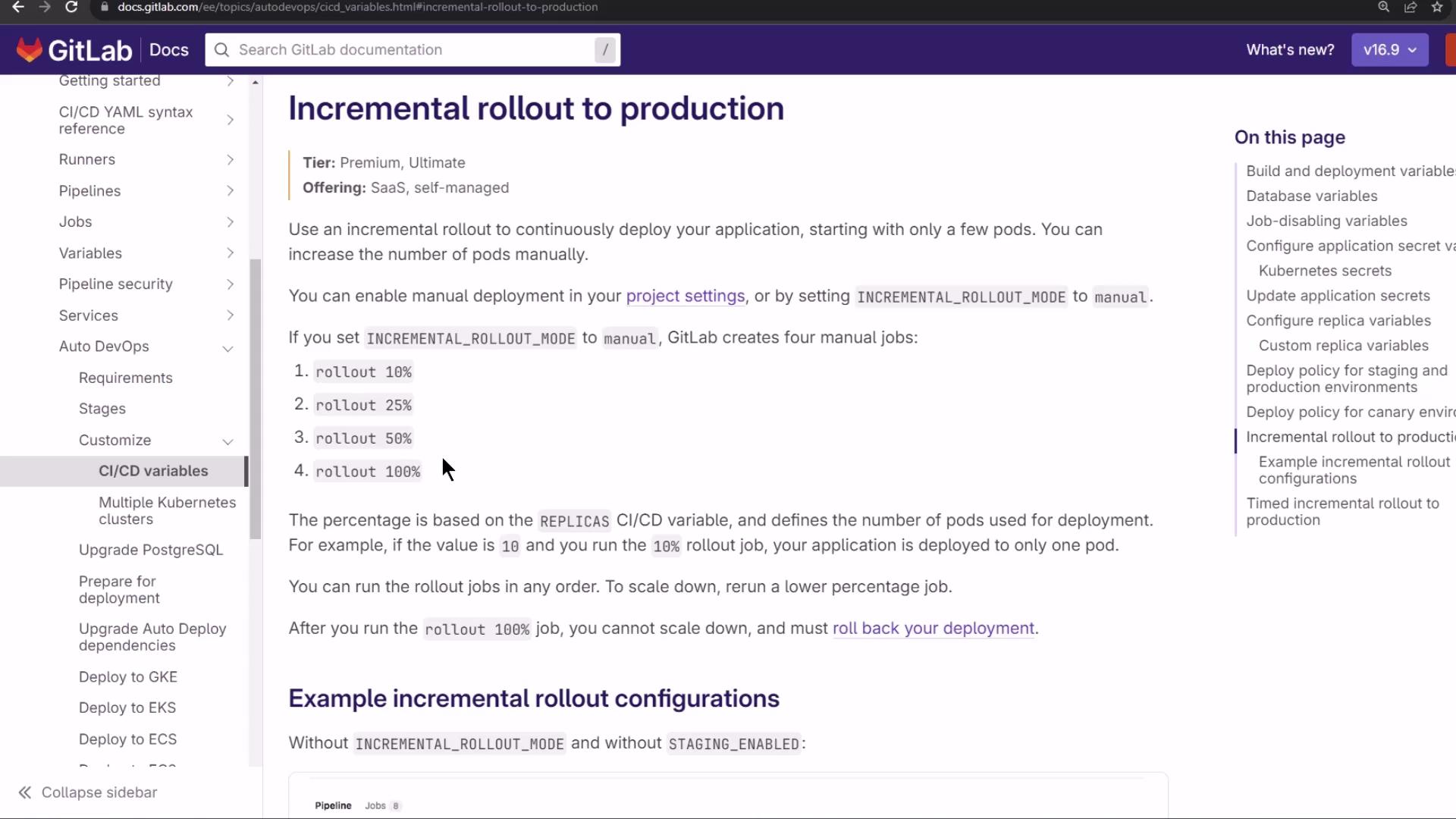
With a canary strategy, new releases go to a small subset of pods in steps. Monitor each phase before proceeding.
<Frame>
  ![The image shows a GitLab documentation page about "Incremental rollout to production," detailing how to deploy applications incrementally using manual jobs. The sidebar lists various CI/CD variables and related topics.](https://kodekloud.com/kk-media/image/upload/v1752877132/notes-assets/images/GitLab-CICD-Architecting-Deploying-and-Optimizing-Pipelines-Staging-Environment-and-Canaray-Deployment-with-AutoDevOps-part-1/gitlab-incremental-rollout-documentation.jpg)
</Frame>

Rollout example with **10 replicas**:

1. 10% → 1 new pod
2. 25% → 3 new pods
3. 50% → 5 new pods
4. 100% → all pods updated

If any phase fails, you can roll back completely before proceeding.

## Demo: Configuring Auto DevOps

1. Go to **Settings > CI/CD** in your project.
2. Under **Auto DevOps**, choose **Automatic deployment to staging and manual to production**.
3. Click **Save changes**.
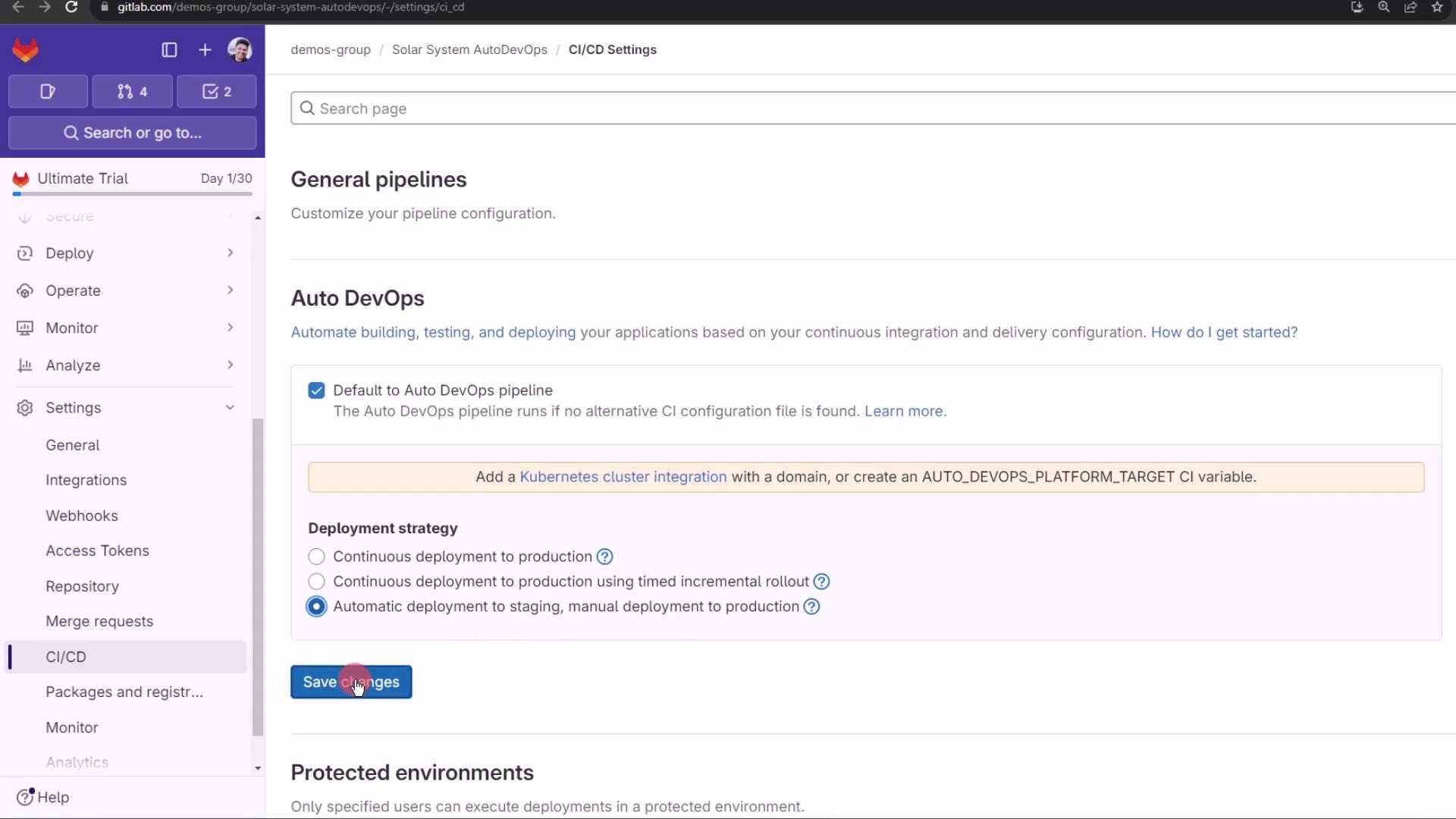
<Frame>
  ![The image shows a GitLab CI/CD settings page with options for configuring Auto DevOps pipelines and deployment strategies. A user is about to click the "Save changes" button.](https://kodekloud.com/kk-media/image/upload/v1752877134/notes-assets/images/GitLab-CICD-Architecting-Deploying-and-Optimizing-Pipelines-Staging-Environment-and-Canaray-Deployment-with-AutoDevOps-part-1/gitlab-ci-cd-auto-devops-settings.jpg)
</Frame>

No pipeline runs until you push new code. Next, create a feature branch and observe the behavior.

### Viewing Pipelines and Environments

After pushing, navigate to **CI/CD > Pipelines** to see your jobs:
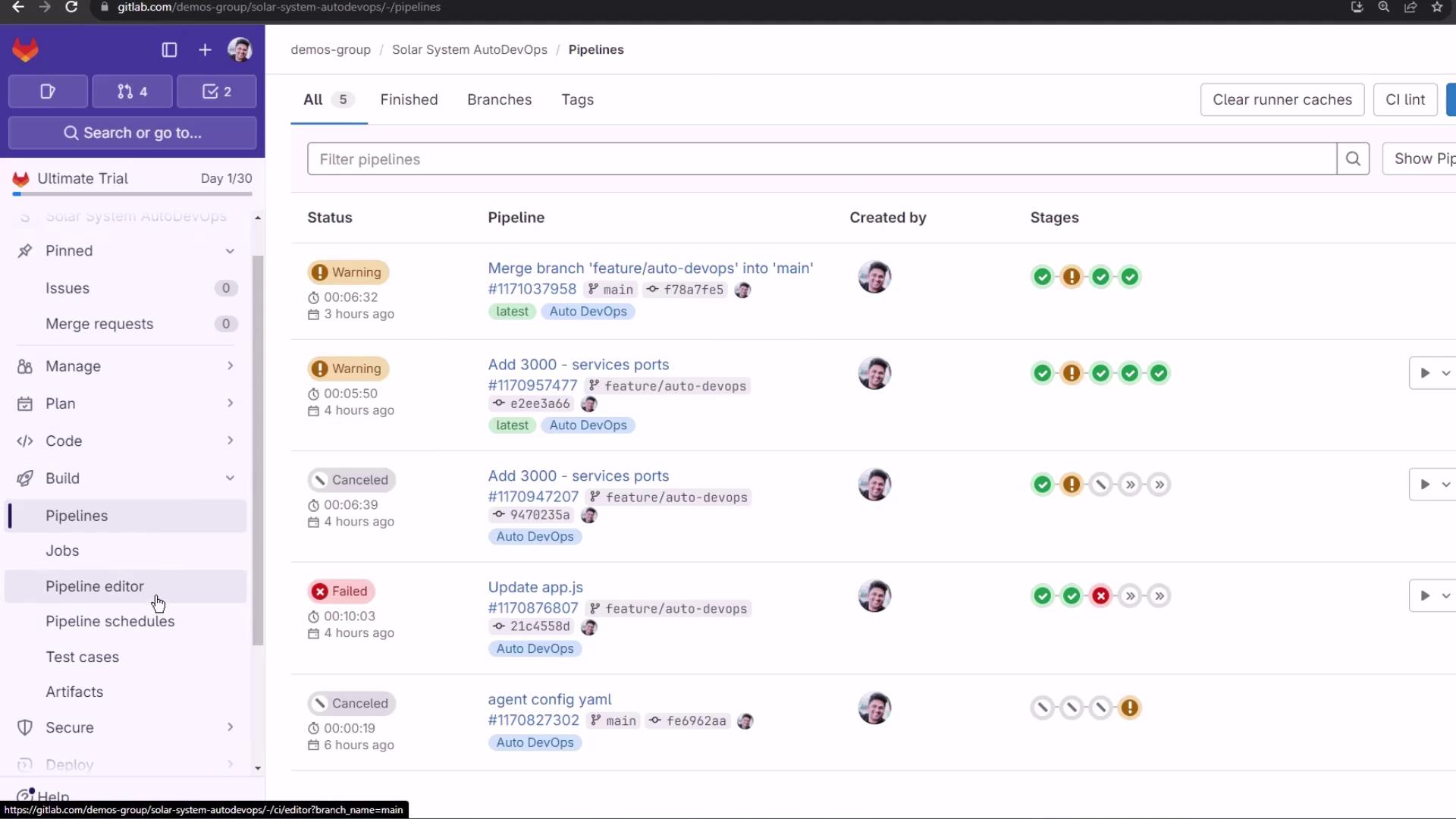
<Frame>
  ![The image shows a GitLab interface displaying a list of CI/CD pipelines with their statuses, names, and stages. The sidebar includes navigation options like Pipelines, Jobs, and Pipeline Editor.](https://kodekloud.com/kk-media/image/upload/v1752877135/notes-assets/images/GitLab-CICD-Architecting-Deploying-and-Optimizing-Pipelines-Staging-Environment-and-Canaray-Deployment-with-AutoDevOps-part-1/gitlab-cicd-pipelines-interface.jpg)
</Frame>

Protected branches (like `main`) block automatic production deployment. Under **Operations > Environments**, you’ll notice that production requires manual approval:
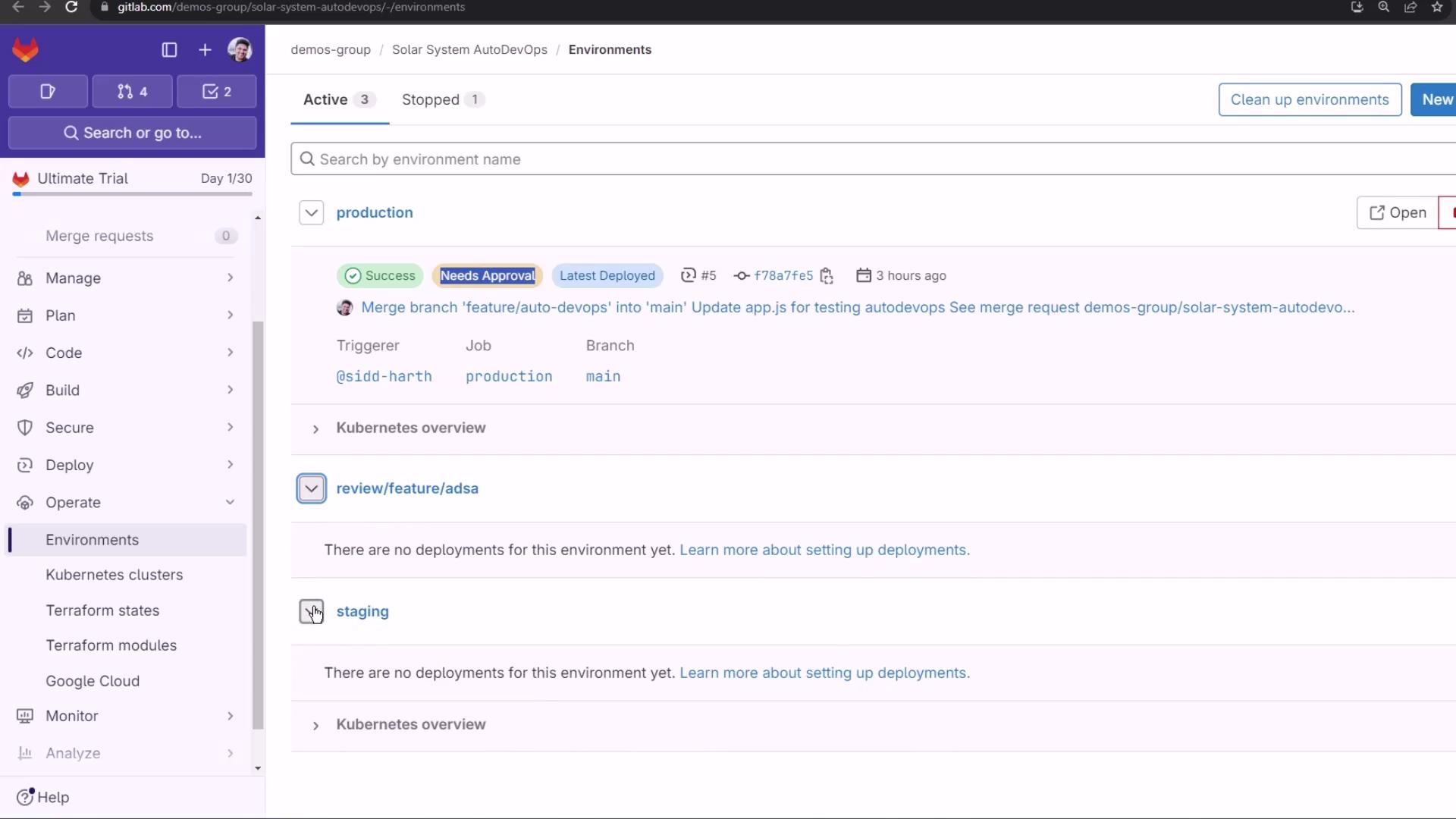
<Frame>
  ![The image shows a GitLab environment management interface with details about deployments, including a production environment that has a successful deployment needing approval. The sidebar includes options like "Manage," "Plan," "Code," and "Deploy."](https://kodekloud.com/kk-media/image/upload/v1752877136/notes-assets/images/GitLab-CICD-Architecting-Deploying-and-Optimizing-Pipelines-Staging-Environment-and-Canaray-Deployment-with-AutoDevOps-part-1/gitlab-environment-management-deployments.jpg)
</Frame>

## Making Code Changes

Create a branch named `feature/canary-deployment` and update these files:

### index.html

* Switch to a static background
* Remove the spinning keyframes

```html theme={null}
<!-- index.html -->
<link rel="stylesheet" href="https://cdnjs.cloudflare.com/ajax/libs/font-awesome/4.7.0/css/font-awesome.min.css">

<style>
  #planetImage {
    background: url('https://gitlab.com/sidd-harth/solar-system/-/raw/main/images/saturn.png') center no-repeat;
    background-size: cover;
    position: static;
    width: 50vw;
    height: 50vw;
    /* animation: spin 25s linear infinite; */
  }

  @keyframes spin {
    100% { transform: rotate(360deg); }
  }

  body {
    display: flex;
    align-items: center;
    justify-content: center;
    background: url('images/static-background.png');
  }
</style>
```

### app.js

* Comment out an extra `console.log`
* Preserve existing Express & Mongoose setup

```javascript theme={null}
// app.js
const path = require('path');
const express = require('express');
const mongoose = require('mongoose');
const bodyParser = require('body-parser');
const cors = require('cors');
const app = express();

app.use(bodyParser.json());
app.use(express.static(path.join(__dirname, '/')));
app.use(cors());

mongoose.connect(process.env.MONGO_URI, {
  user: process.env.MONGO_USERNAME,
  pass: process.env.MONGO_PASSWORD,
  useNewUrlParser: true,
  useUnifiedTopology: true
}, function(err) {
  if (err) {
    console.log("error!! " + err);
  } else {
    // console.log("MongoDB Connection Successful");
  }
});

// Define schema and routes...
```

### app-test.js

Enhance test logs for clarity:

```javascript theme={null}
// app-test.js
const mongoose = require('mongoose');
const server = require('../app');
const chai = require('chai');
const chaiHttp = require('chai-http');

chai.should();
chai.use(chaiHttp);

describe('Planets API Suite', () => {
  describe('Fetching Planet Details', () => {
    it('should fetch a planet named Mercury', (done) => {
      const payload = { id: 1 };
      chai.request(server)
        .post('/planet')
        .send(payload)
        .end((err, res) => {
          res.should.have.status(200);
          res.body.should.have.property('id').eql(1);
          res.body.should.have.property('name').eql('Mercury');
          done();
        });
    });

    it('should fetch a planet named Venus', (done) => {
      const payload = { id: 2 };
      chai.request(server)
        .post('/planet')
        .send(payload)
        .end((err, res) => {
          res.should.have.status(200);
          res.body.should.have.property('id').eql(2);
          done();
        });
    });
  });
});
```

Commit and push to trigger Auto DevOps.

## Observing the CI/CD Pipeline

The merge request or branch push triggers these stages:

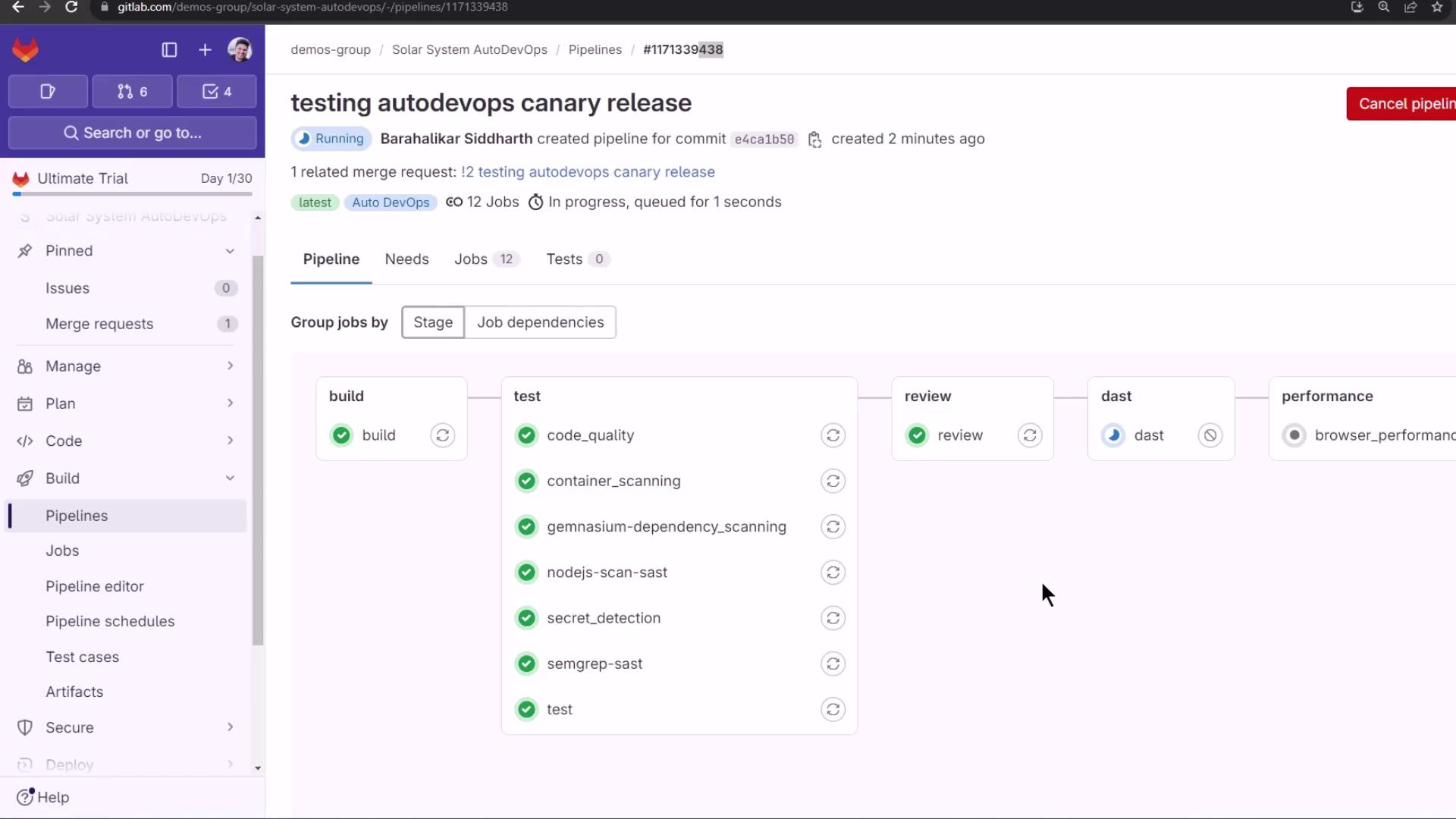
| Stage       | Purpose                                             |
| ----------- | --------------------------------------------------- |
| build       | Build Docker image                                  |
| test        | Run unit and integration tests                      |
| review      | Deploy to a dynamic review environment              |
| dast        | Perform Dynamic Application Security Testing (DAST) |
| performance | Execute performance and load tests                  |
| cleanup     | Tear down review resources                          |
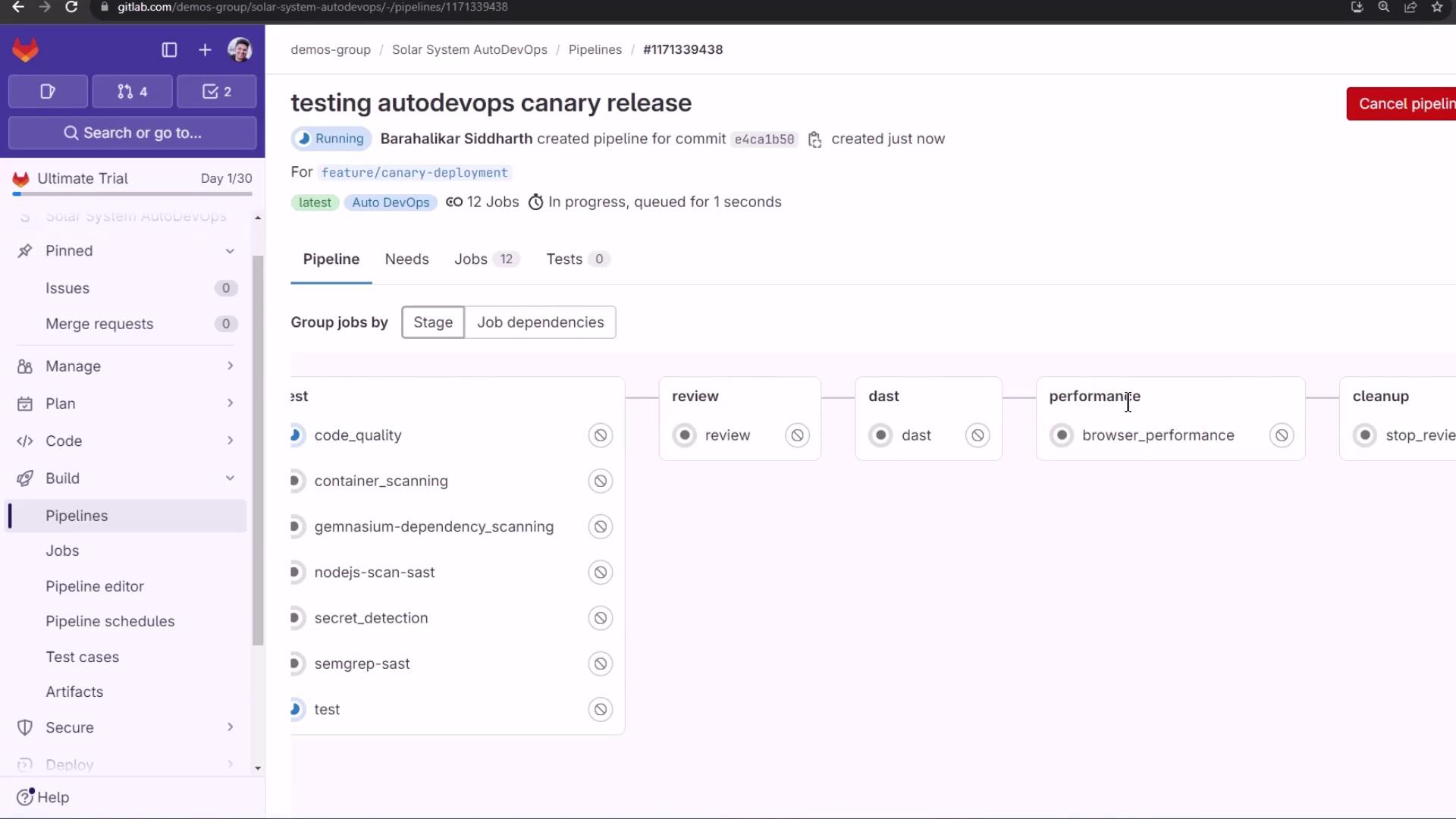
<Frame>
  ![The image shows a GitLab pipeline interface for a project named "Solar System AutoDevOps," displaying various stages and jobs such as code quality, container scanning, and performance testing. The pipeline is currently running, with a focus on a "canary release" for a specific feature branch.](https://kodekloud.com/kk-media/image/upload/v1752877137/notes-assets/images/GitLab-CICD-Architecting-Deploying-and-Optimizing-Pipelines-Staging-Environment-and-Canaray-Deployment-with-AutoDevOps-part-1/gitlab-pipeline-solarsystem-autodevops.jpg)
</Frame>

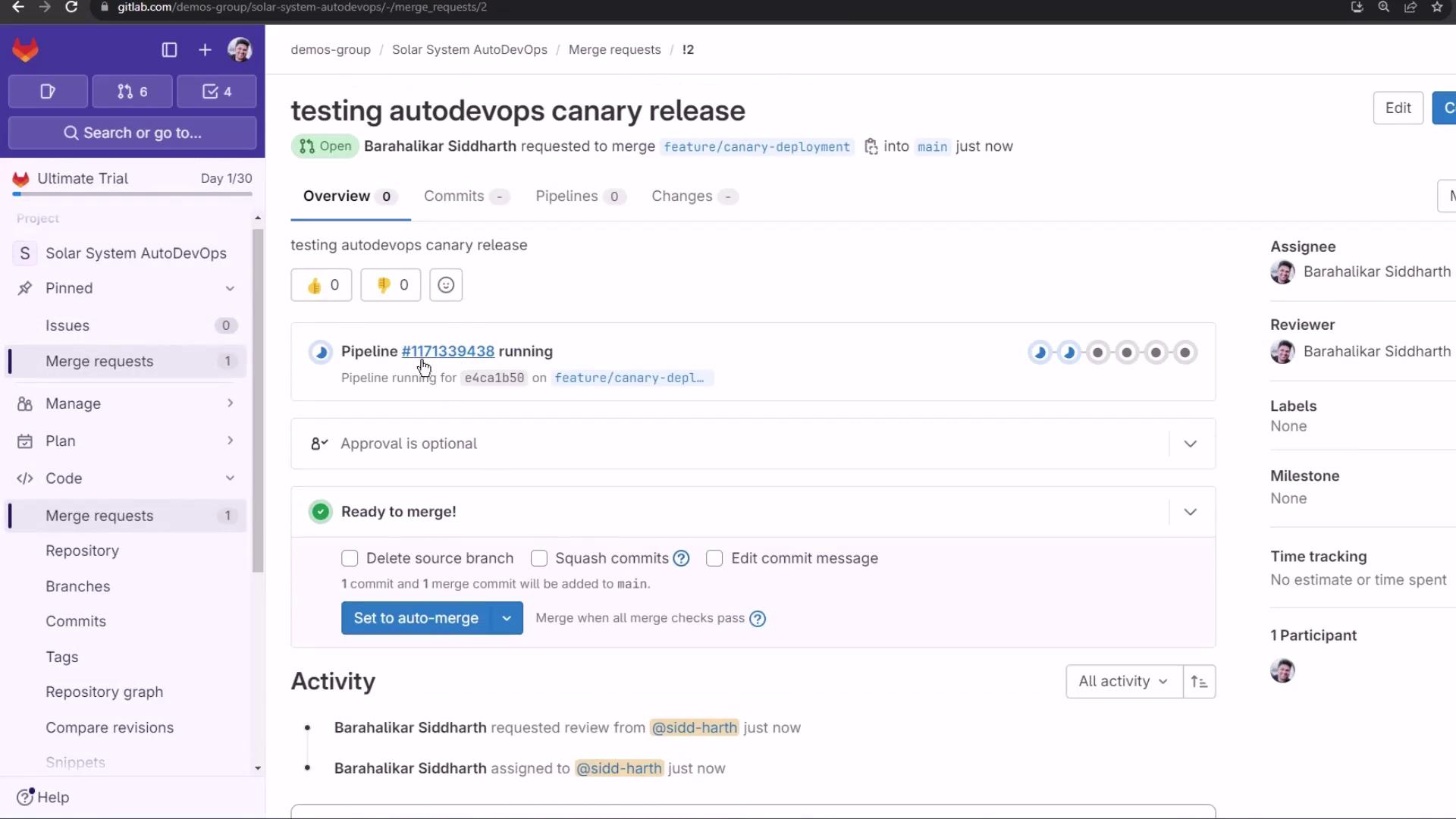
Create a Merge Request; Auto DevOps reuses the same pipeline:
<Frame>
  ![The image shows a GitLab interface with a merge request titled "testing autodevops canary release," including details about the pipeline status and merge options.](https://kodekloud.com/kk-media/image/upload/v1752877138/notes-assets/images/GitLab-CICD-Architecting-Deploying-and-Optimizing-Pipelines-Staging-Environment-and-Canaray-Deployment-with-AutoDevOps-part-1/gitlab-merge-request-autodevops.jpg)
</Frame>

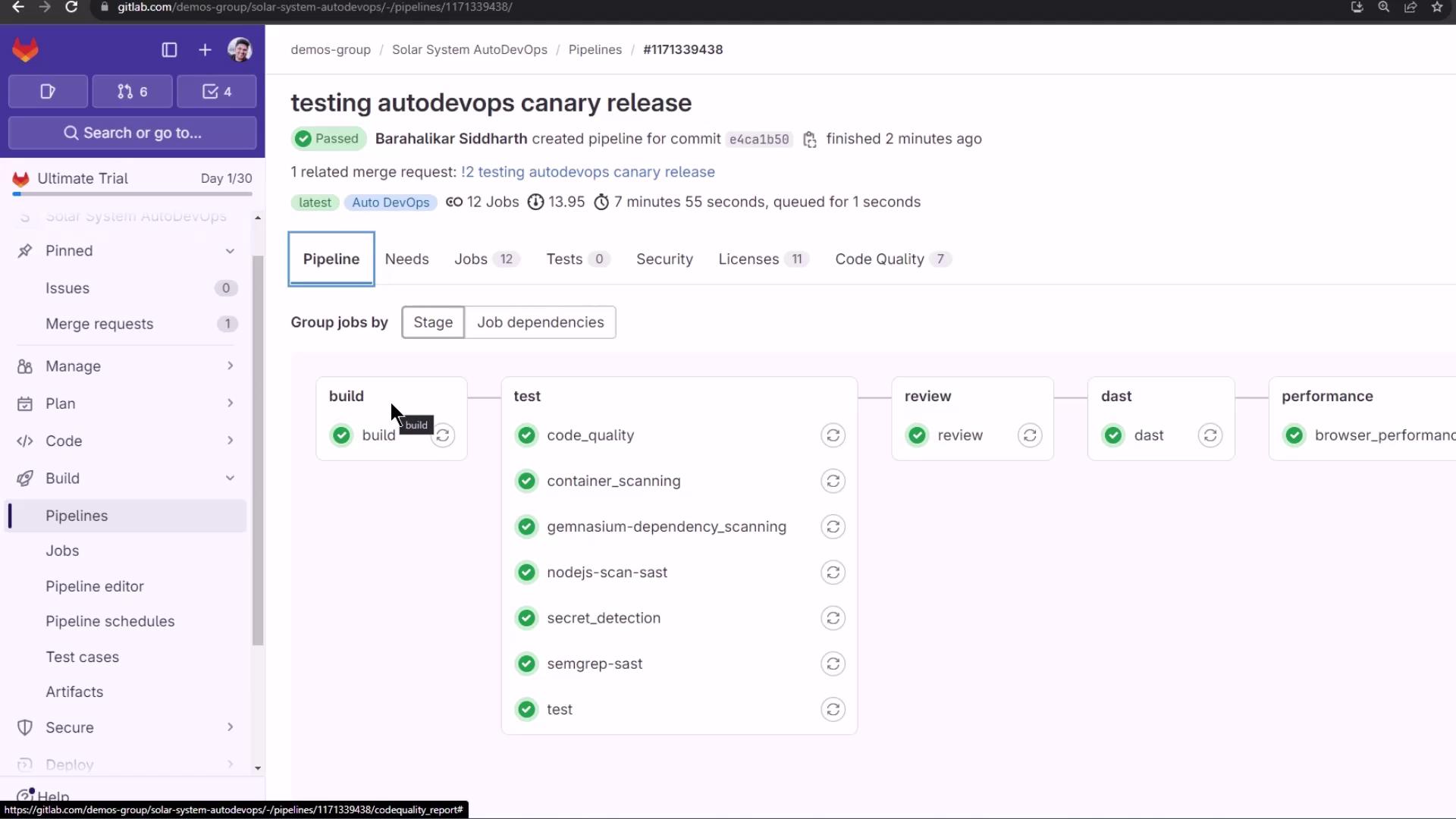
The MR pipeline kicks off with 12+ jobs:
<Frame>
  ![The image shows a GitLab pipeline interface with stages for build, test, review, dast, and performance, displaying the progress and status of various jobs.](https://kodekloud.com/kk-media/image/upload/v1752877140/notes-assets/images/GitLab-CICD-Architecting-Deploying-and-Optimizing-Pipelines-Staging-Environment-and-Canaray-Deployment-with-AutoDevOps-part-1/gitlab-pipeline-interface-stages.jpg)
</Frame>

## Dependency & Container Scanning

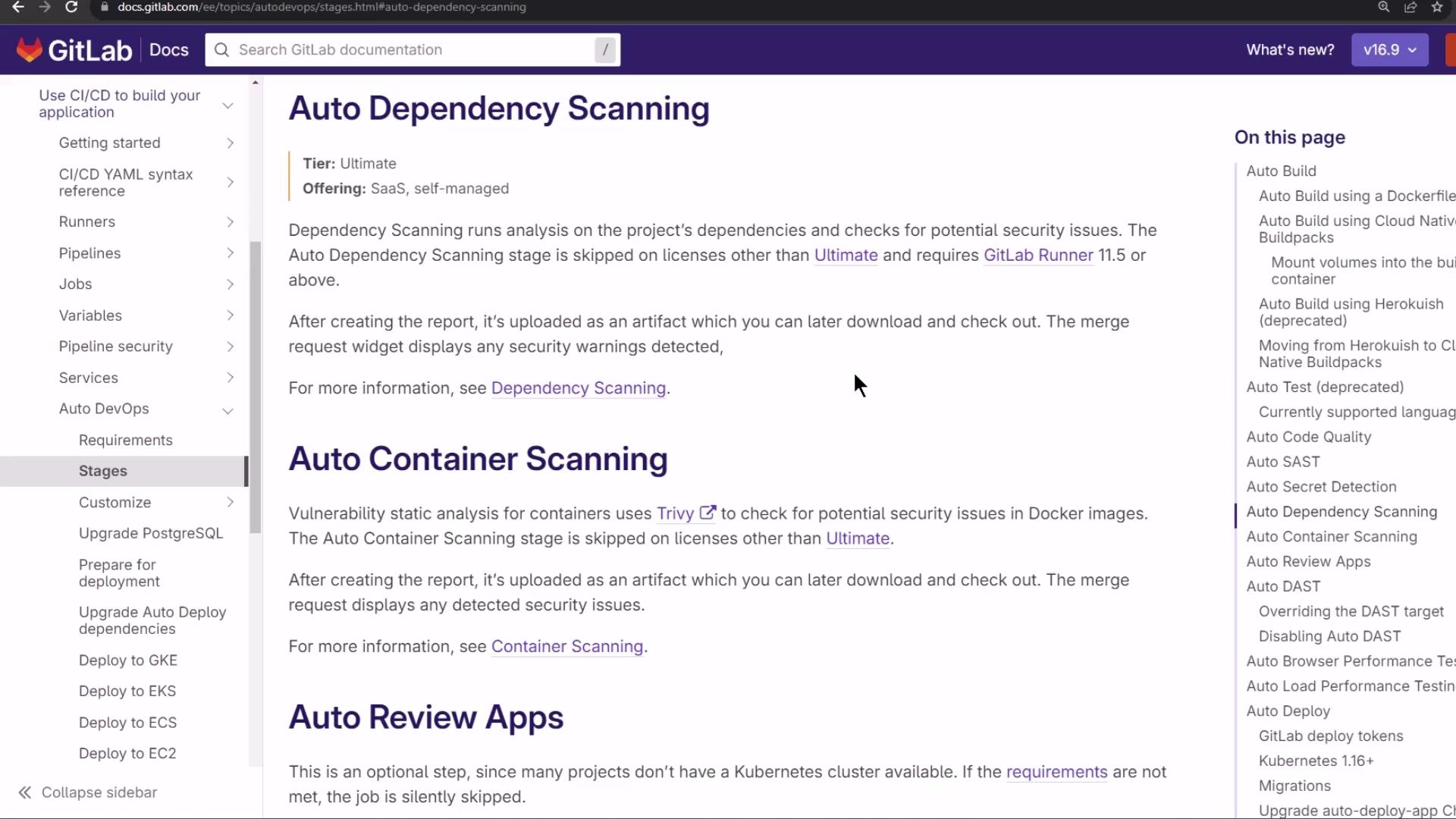
With an Ultimate license, Auto DevOps includes **Dependency Scanning** and **Container Scanning**:
<Frame>
  ![The image shows a GitLab documentation page detailing "Auto Dependency Scanning" and "Auto Container Scanning" features, with navigation menus on the left and right sides.](https://kodekloud.com/kk-media/image/upload/v1752877141/notes-assets/images/GitLab-CICD-Architecting-Deploying-and-Optimizing-Pipelines-Staging-Environment-and-Canaray-Deployment-with-AutoDevOps-part-1/gitlab-auto-dependency-container-scanning.jpg)
</Frame>

Example dependency scan logs:

```shell theme={null}
$ git remote set-url origin ${CI_REPOSITORY_URL}
$ analyzer run
[Gemnasium] v4.10.5 using schema model 15
Cannot auto-remediate: package-lock.json
Uploading artifacts: gl-sbom-*.cdx.json (CycloneDX format)
```

Sample snippet from the CycloneDX SBOM artifact:

```json theme={null}
{
  "bomFormat": "CycloneDX",
  "specVersion": "1.4",
  "metadata": { "timestamp": "2024-02-09T18:13:38Z" },
  "tools": [{ "vendor": "GitLab", "name": "Gemnasium", "version": "4.10.5" }],
  "components": [
    { "name": "@babel/core", "version": "7.22.20", "type": "library" },
    { "name": "@babel/code-frame", "version": "7.22.13", "type": "library" }
  ]
}
```

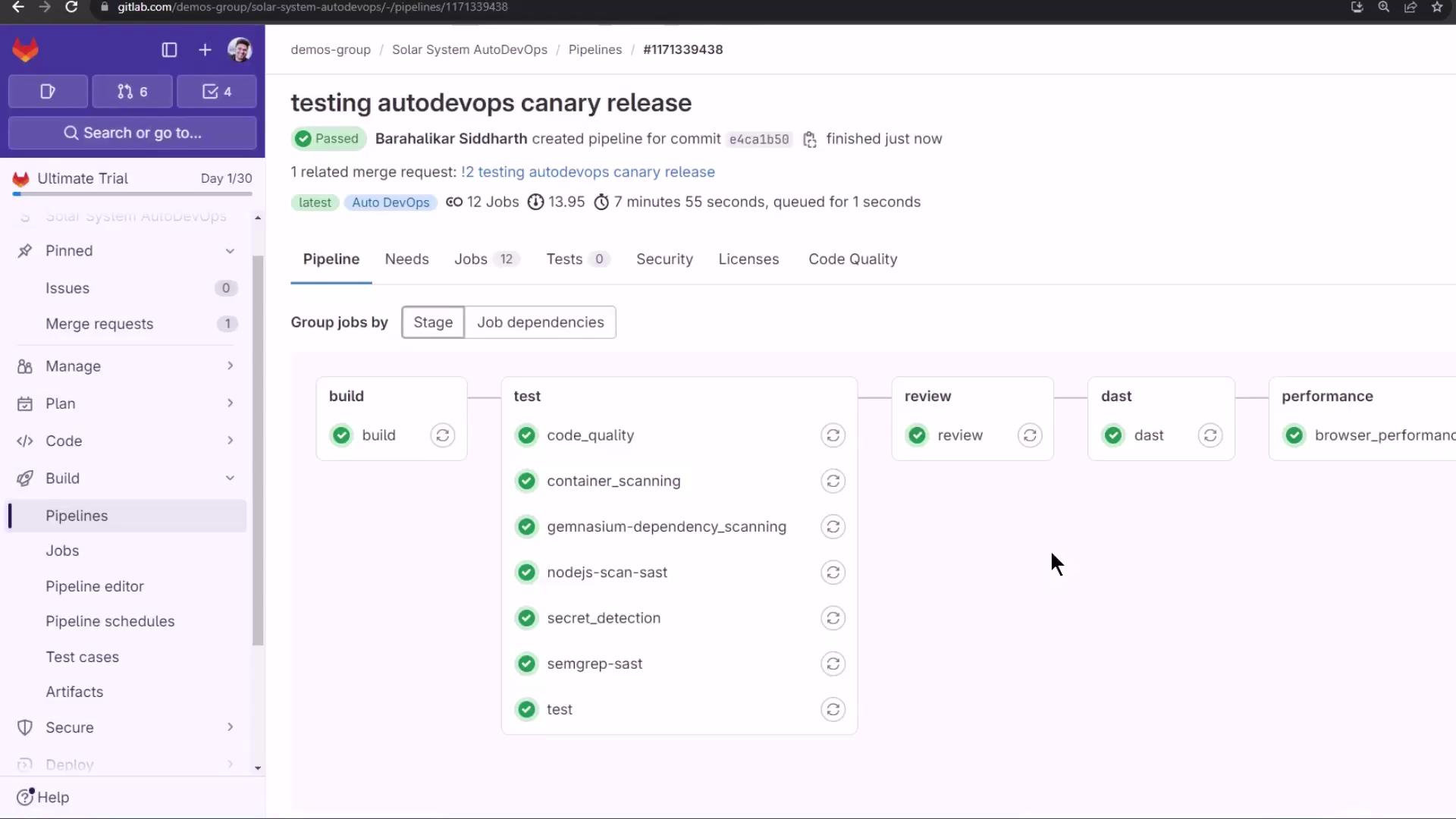
When all tests pass, the pipeline pauses at **review stop**:
<Frame>
  ![The image shows a GitLab pipeline interface with stages for build, test, review, dast, and performance, all marked as passed. The sidebar includes options like Pipelines, Jobs, and Merge requests.](https://kodekloud.com/kk-media/image/upload/v1752877142/notes-assets/images/GitLab-CICD-Architecting-Deploying-and-Optimizing-Pipelines-Staging-Environment-and-Canaray-Deployment-with-AutoDevOps-part-1/gitlab-pipeline-interface-stages-passed.jpg)
</Frame>

## Dynamic Application Security Testing (DAST)

DAST runs OWASP ZAP against the review URL:

```shell theme={null}
$ export DAST_WEBSITE=$(cat environment_url.txt)
$ zap-cli quick-scan --self-contained -r report.html $DAST_WEBSITE
```

Example DAST output:

```text theme={null}
PASS: Application Error Disclosure [90222]
WARN: Content Security Policy (CSP) Header Not Set [10938] x 3
SKIP: Big Redirect Detected [10044]
...
```

Review the `report.html` artifact. The live review environment now shows a static background:
<Frame>
  ![The image shows a GitLab pipeline interface with stages for build, test, review, dast, and performance, all marked as passed. The sidebar includes options like Pipelines, Jobs, and Code.](https://kodekloud.com/kk-media/image/upload/v1752877145/notes-assets/images/GitLab-CICD-Architecting-Deploying-and-Optimizing-Pipelines-Staging-Environment-and-Canaray-Deployment-with-AutoDevOps-part-1/gitlab-pipeline-interface-stages-passed-2.jpg)
</Frame>

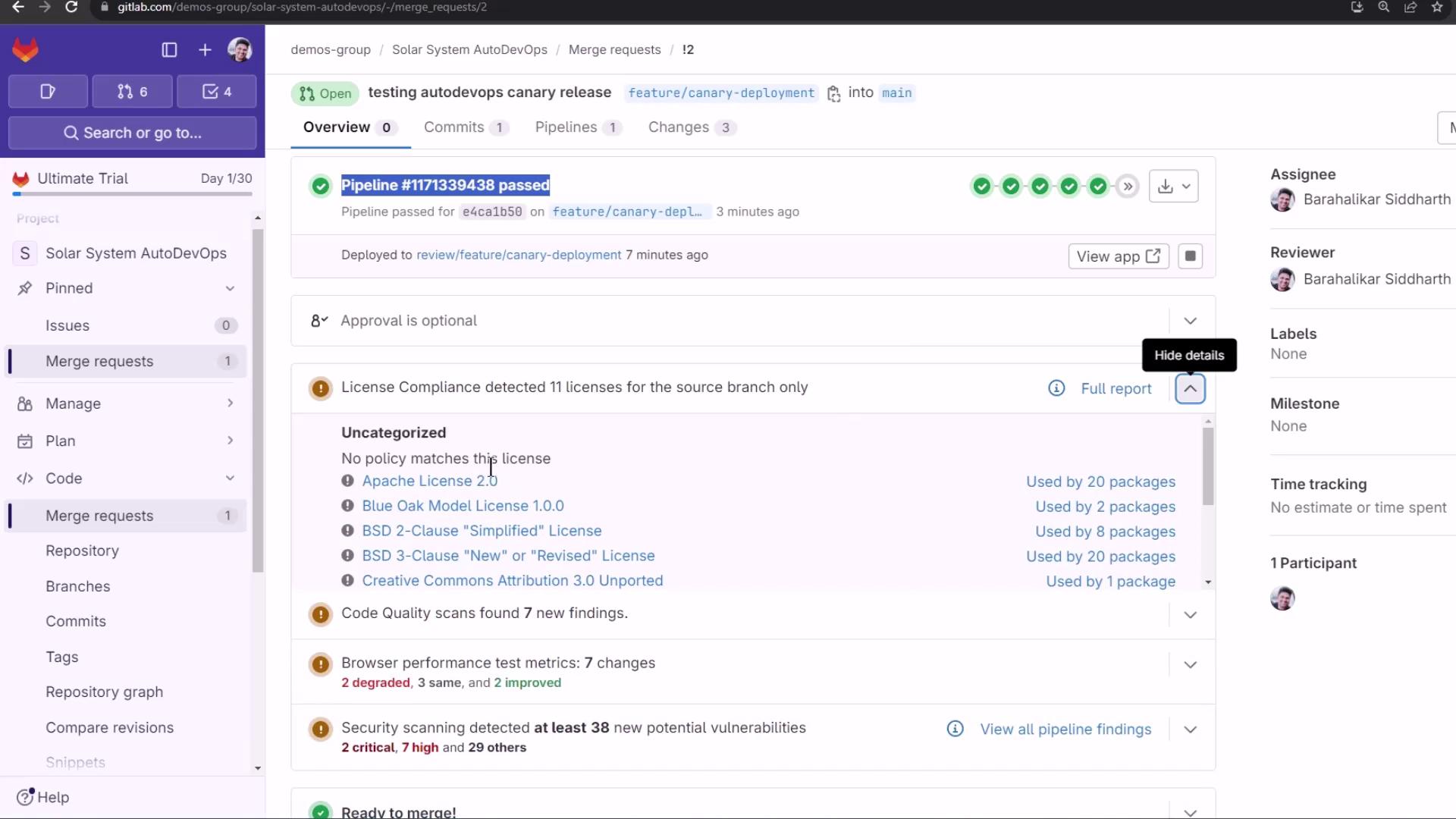
## Merge Request Overview & Reports

On the MR page, GitLab surfaces:

* **License Compliance**: e.g., Apache—20 packages
* **Code Quality**: Degradations and improvements
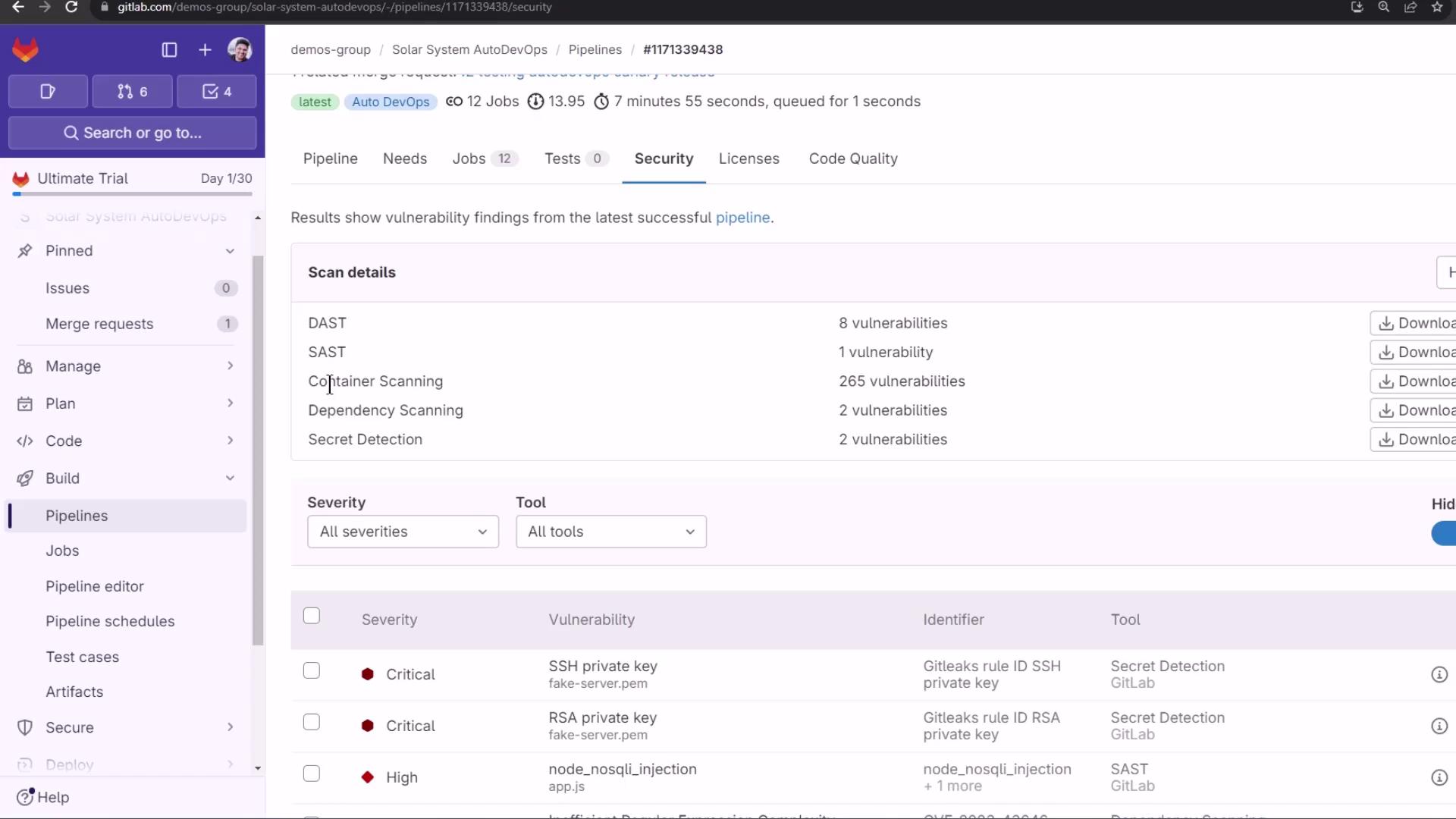
* **Security Scans**: SAST, DAST, Dependency Scanning, Container Scanning, Secret Detection
<Frame>
  ![The image shows a GitLab interface with a merge request overview, including pipeline status, license compliance, and code quality scans. It highlights various licenses and security scanning results.](https://kodekloud.com/kk-media/image/upload/v1752877146/notes-assets/images/GitLab-CICD-Architecting-Deploying-and-Optimizing-Pipelines-Staging-Environment-and-Canaray-Deployment-with-AutoDevOps-part-1/gitlab-merge-request-overview-pipeline.jpg)
</Frame>

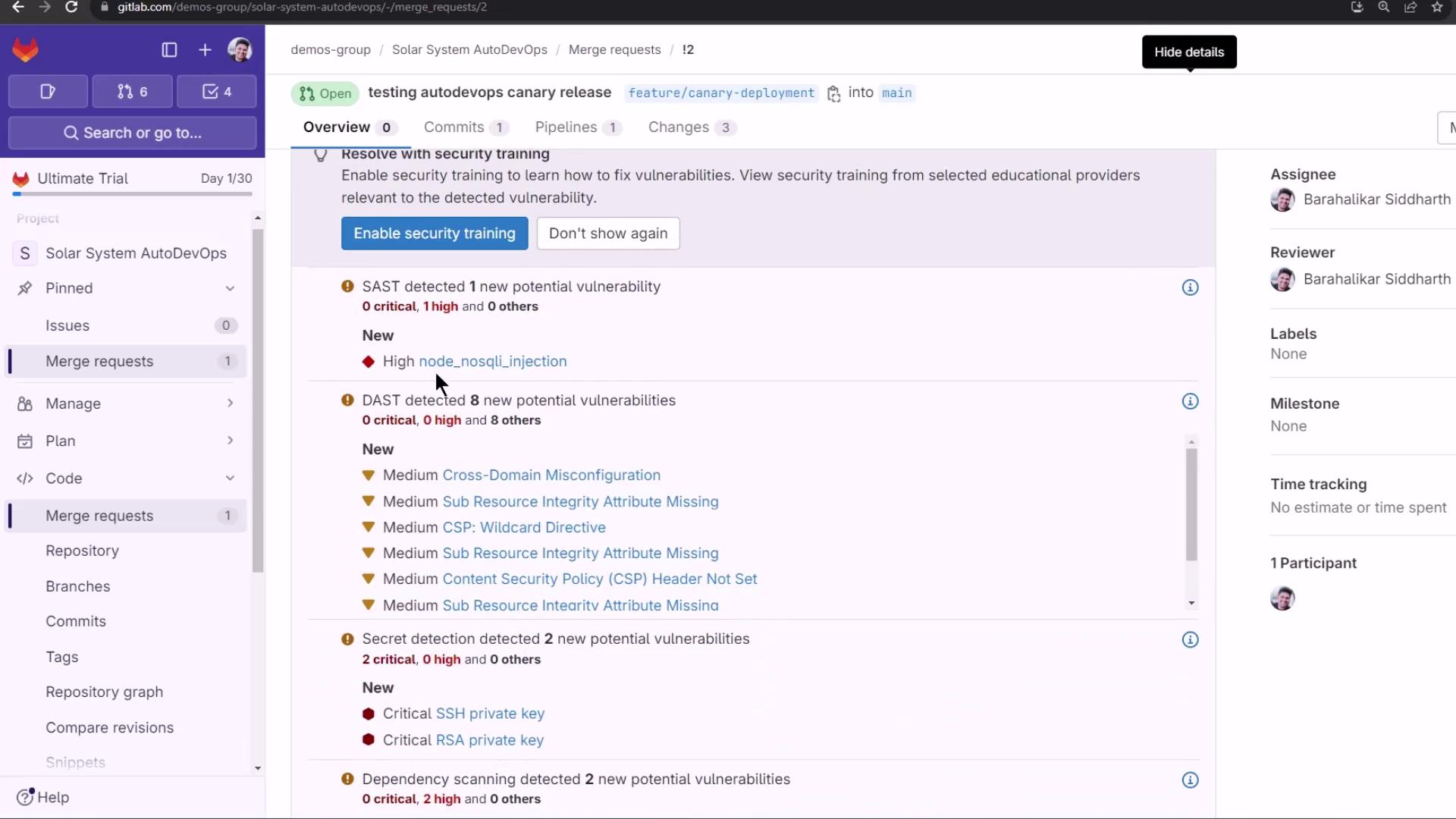
Detected vulnerabilities:

<Frame>
  ![The image shows a GitLab interface displaying a merge request with detected security vulnerabilities, including SAST, DAST, and secret detection results.](https://kodekloud.com/kk-media/image/upload/v1752877147/notes-assets/images/GitLab-CICD-Architecting-Deploying-and-Optimizing-Pipelines-Staging-Environment-and-Canaray-Deployment-with-AutoDevOps-part-1/gitlab-merge-request-security-vulnerabilities.jpg)
</Frame>

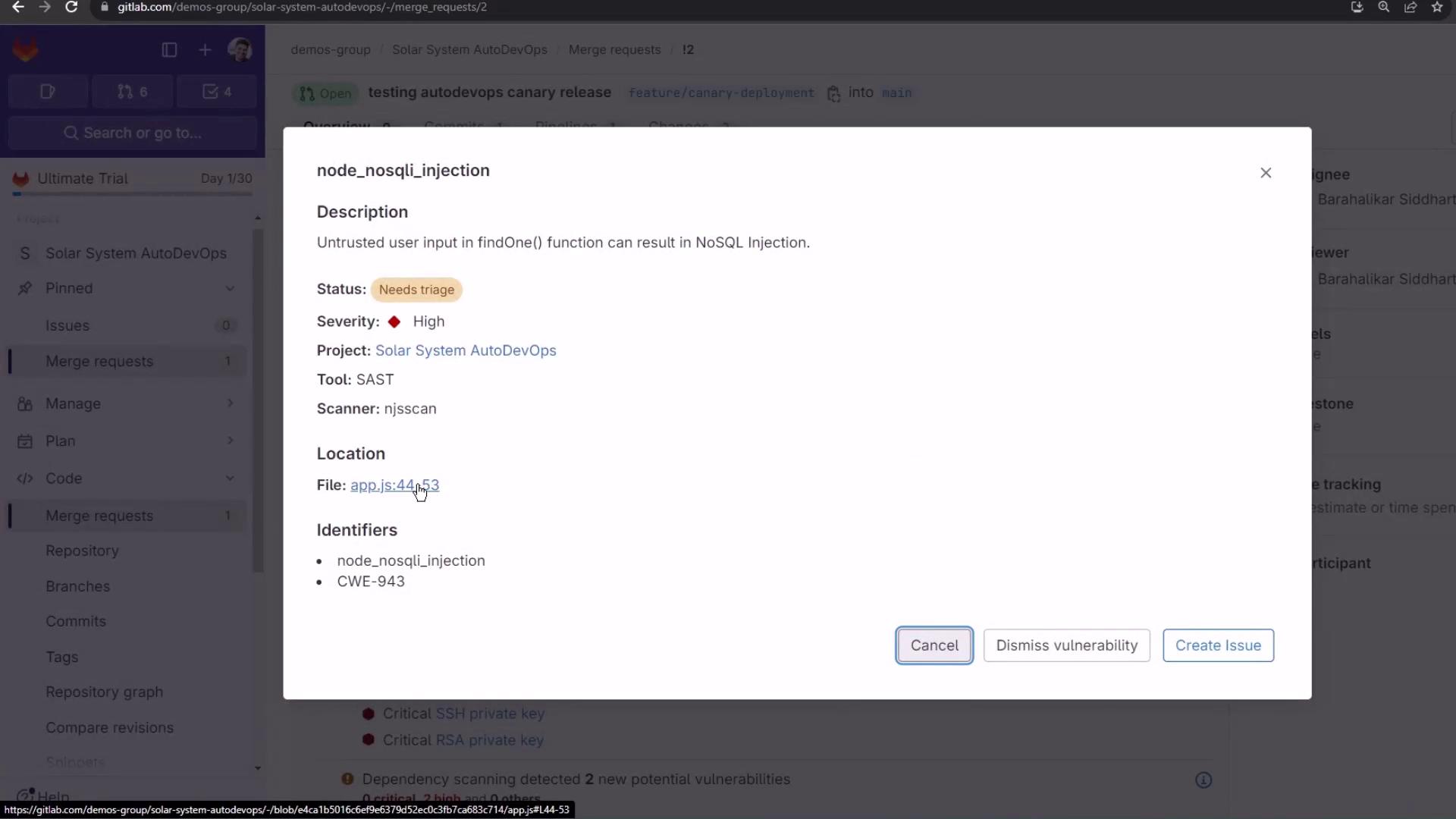
SAST flags a NoSQL injection:

<Frame>
  ![The image shows a GitLab interface with a pop-up detailing a NoSQL injection vulnerability in a project, highlighting its high severity and location in a specific file.](https://kodekloud.com/kk-media/image/upload/v1752877148/notes-assets/images/GitLab-CICD-Architecting-Deploying-and-Optimizing-Pipelines-Staging-Environment-and-Canaray-Deployment-with-AutoDevOps-part-1/gitlab-nosql-injection-vulnerability.jpg)
</Frame>

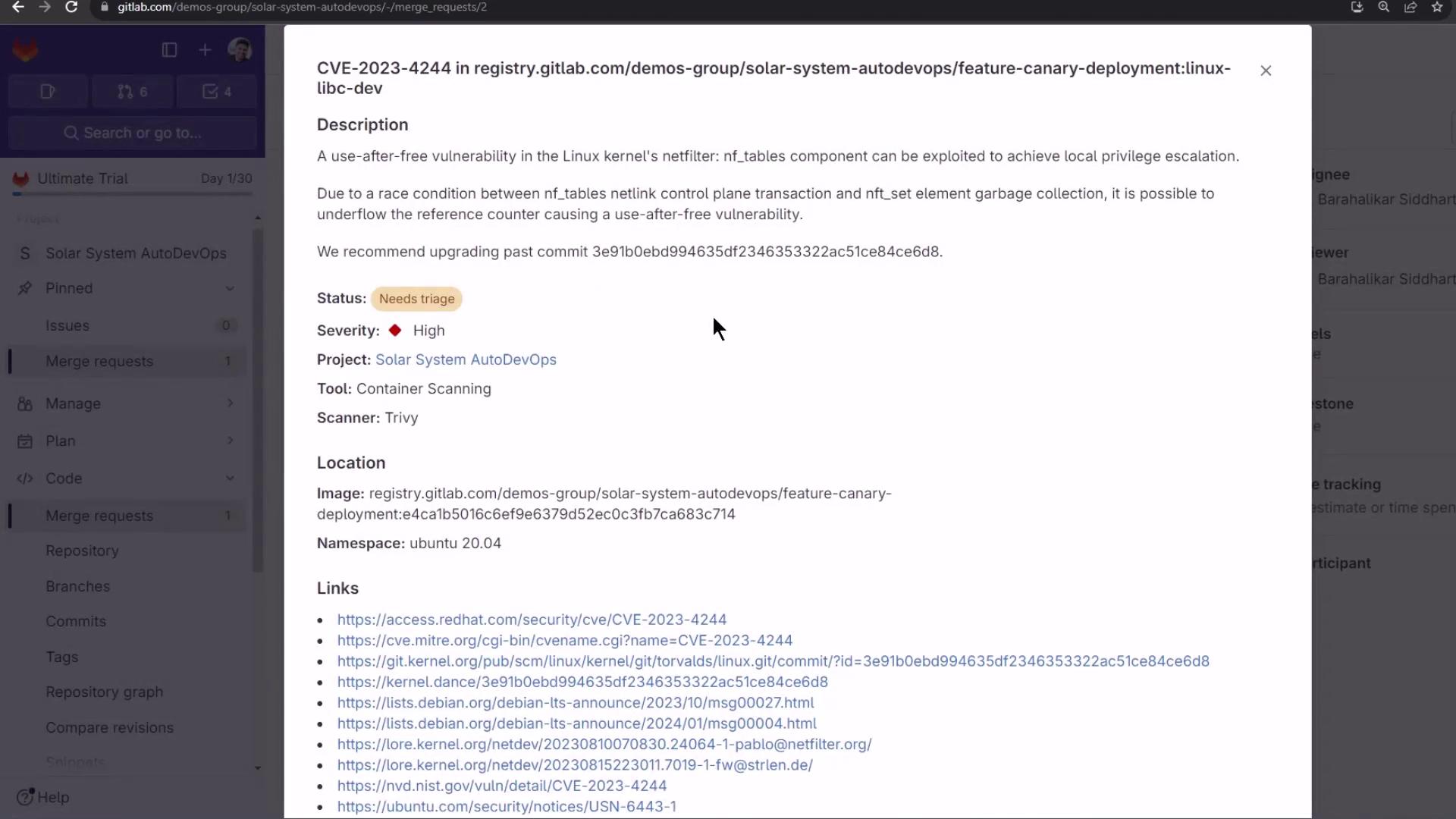
Container Scanning reveals OS-level CVEs:
<Frame>
  ![The image shows a GitLab interface displaying details of a security vulnerability (CVE-2023-4244) related to a use-after-free issue in the Linux kernel's netfilter component. It includes information about the severity, project, tool, scanner, and relevant links.](https://kodekloud.com/kk-media/image/upload/v1752877150/notes-assets/images/GitLab-CICD-Architecting-Deploying-and-Optimizing-Pipelines-Staging-Environment-and-Canaray-Deployment-with-AutoDevOps-part-1/gitlab-security-vulnerability-cve-2023-4244.jpg)
</Frame>

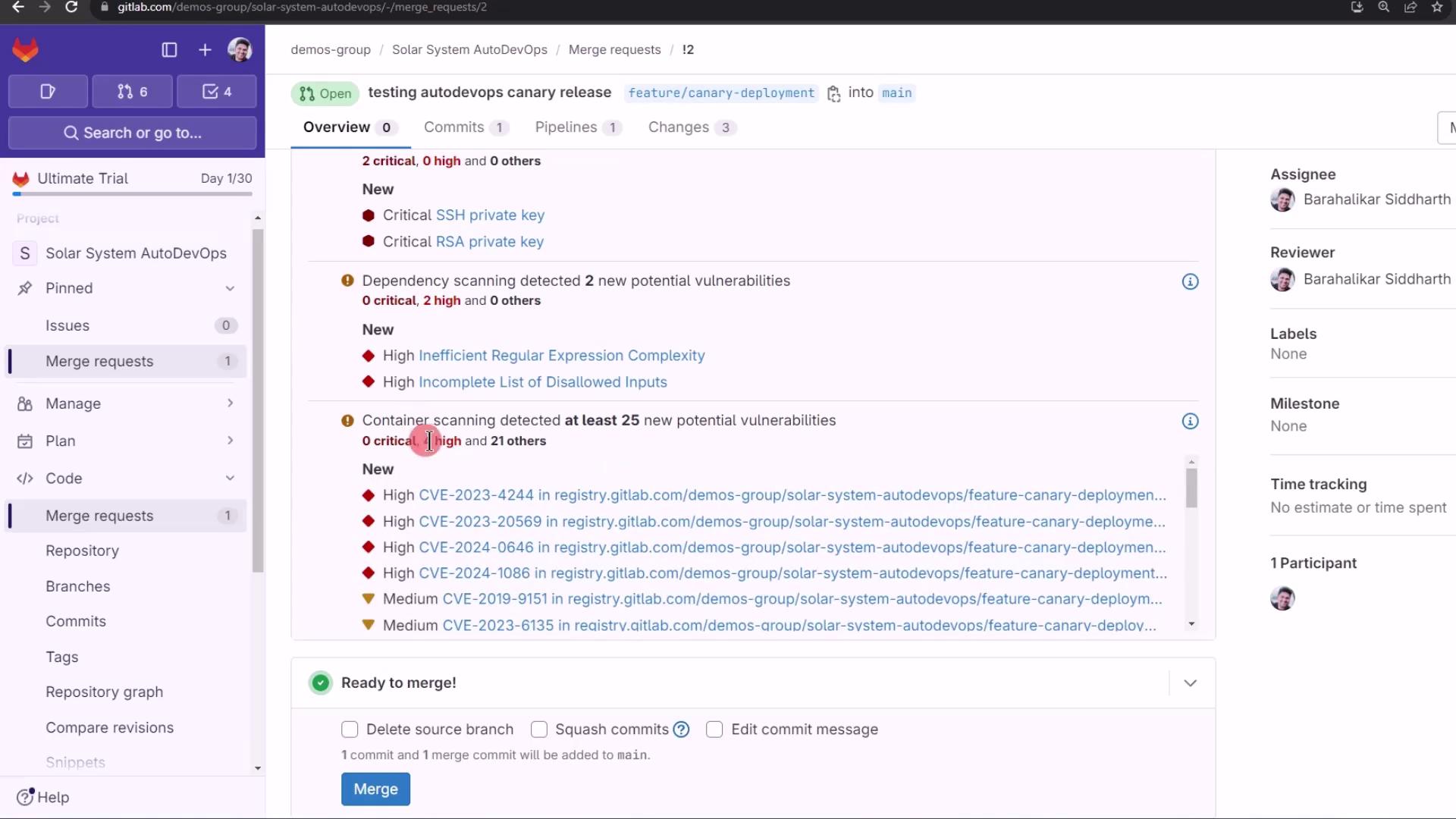
Merge ready, despite detected issues:
<Frame>
  ![The image shows a GitLab interface with a merge request for a project named "Solar System AutoDevOps." It highlights detected vulnerabilities in dependency and container scanning, with options to merge the request.](https://kodekloud.com/kk-media/image/upload/v1752877150/notes-assets/images/GitLab-CICD-Architecting-Deploying-and-Optimizing-Pipelines-Staging-Environment-and-Canaray-Deployment-with-AutoDevOps-part-1/gitlab-solar-system-autodevops-merge-request.jpg)
</Frame>

The **Security Dashboard** aggregates all findings:
<Frame>
  ![The image shows a GitLab security dashboard displaying scan results with various vulnerabilities identified, including critical and high severity issues. It lists details of vulnerabilities found in different categories like DAST, SAST, and container scanning.](https://kodekloud.com/kk-media/image/upload/v1752877151/notes-assets/images/GitLab-CICD-Architecting-Deploying-and-Optimizing-Pipelines-Staging-Environment-and-Canaray-Deployment-with-AutoDevOps-part-1/gitlab-security-dashboard-scan-results.jpg)
</Frame>

***

Finally, merge into the protected `main` branch. Watch the canary jobs promote your release in staged percentages, requiring manual approval at each step.

## Links and References

* [GitLab Auto DevOps](https://docs.gitlab.com/ee/topics/autodevops/)
* [Canary Deployments in GitLab](https://docs.gitlab.com/ee/topics/autodevops/deployment_strategies.html#incremental-rollout-canary)
* [GitLab CI/CD Documentation](https://docs.gitlab.com/ee/ci/)
* [OWASP ZAP](https://www.zaproxy.org/)

<CardGroup>
  <Card title="Watch Video" icon="video" cta="Learn more" href="https://learn.kodekloud.com/user/courses/gitlab-ci-cd-architecting-deploying-and-optimizing-pipelines/module/a6a5540f-e7d1-4820-afc8-2be1d6e3061a/lesson/b09a09fc-08c3-4fce-9e44-b4b2f56b98b9" />
</CardGroup>