> ## Documentation Index
> Fetch the complete documentation index at: https://notes.kodekloud.com/llms.txt
> Use this file to discover all available pages before exploring further.
# Staging Environment and Canary Deployment with AutoDevOps part 1
> Guide showing how to configure GitLab Auto DevOps for staging and manual canary production deployments, demonstrating incremental rollout, pipelines, security scans, and review apps
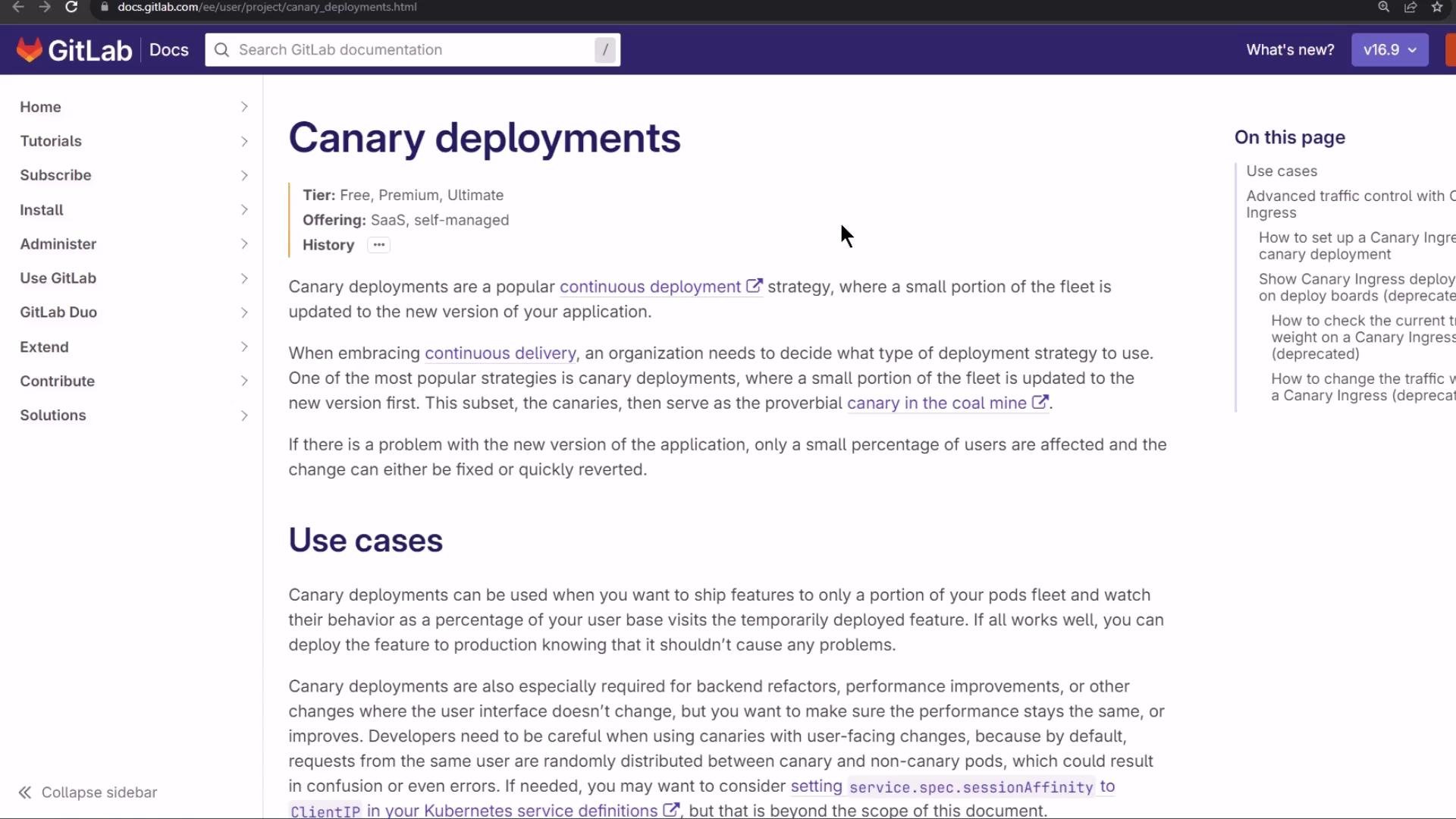
In this lesson we implement a canary (incremental) deployment using GitLab Auto DevOps. The pattern we demonstrate is common in CI/CD pipelines:
* Staging: continuous deployment — commits to the default branch are deployed automatically to staging.
* Production: continuous delivery — production deployments are gated by manual approval.
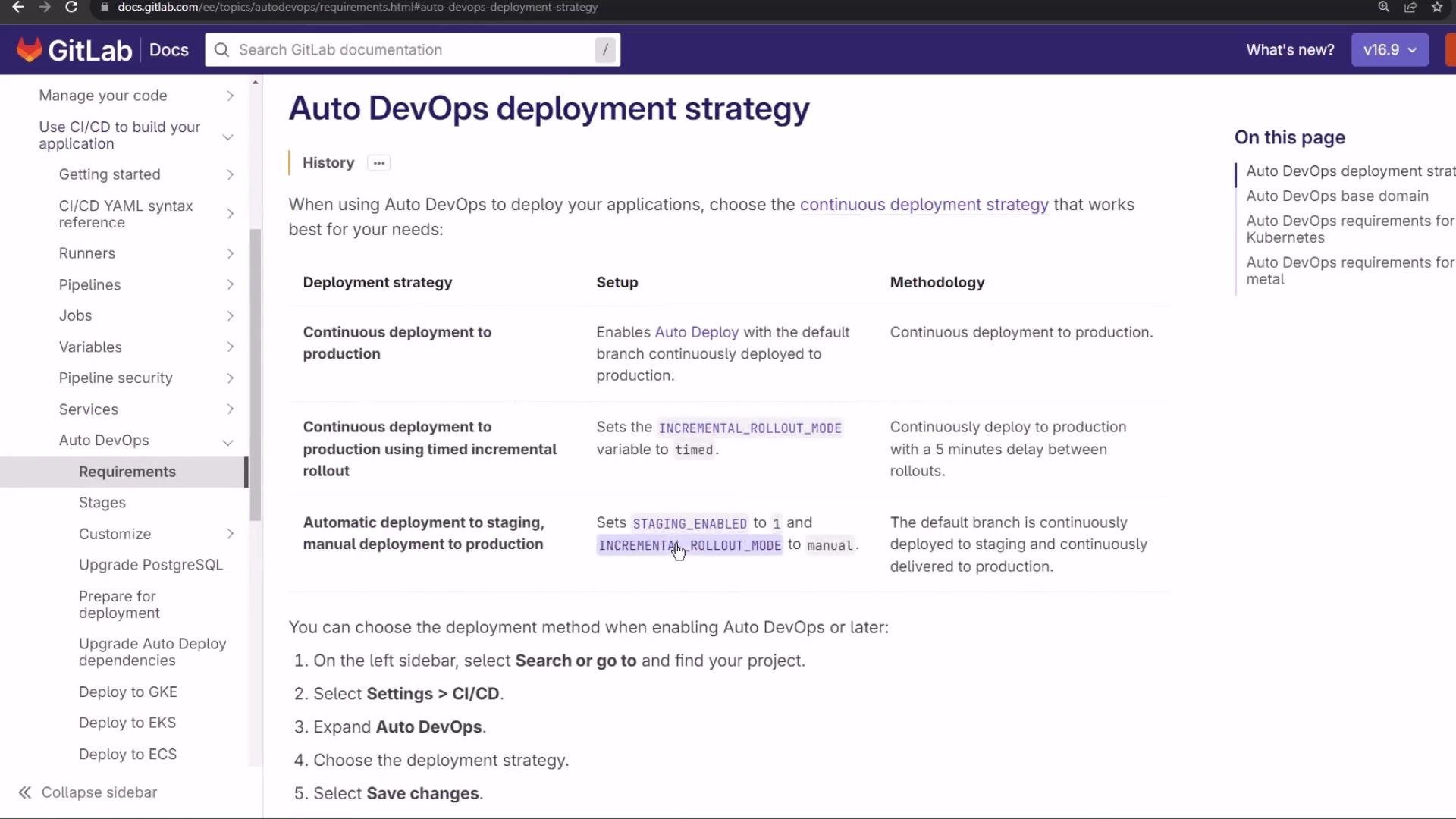
To enable this workflow you configure Auto DevOps (for example set `STAGING_ENABLED=1`) and choose an incremental rollout in manual mode. This allows you to step the production rollout percentage up or down during the deployment lifecycle.
What is an incremental rollout (canary)?
A canary deployment releases a new version to a small subset of running pods/instances first, verifies behavior, then increases the percentage of traffic (or replicas) routed to the new version. If issues appear you reduce or abort the rollout; if the release behaves correctly you continue until 100% of traffic or replicas run the new version.
A simple incremental rollout plan might look like:
```text theme={null}
1. rollout 10%
2. rollout 25%
3. rollout 50%
4. rollout 100%
```
With 10 replicas:
* 10% → 1 pod runs the new version, 9 run the old version.
* You can advance to 25%, 50%, etc.
* If something goes wrong you can reduce the rollout percentage. After a 100% rollout the only way to return to the previous version is a rollback to a prior deployment revision.
For more detail, see GitLab’s Auto DevOps documentation and the "incremental rollout" option for UI-managed canary steps: [https://docs.gitlab.com/ee/topics/autodevops/](https://docs.gitlab.com/ee/topics/autodevops/)
Demo: configure Auto DevOps for staging + manual production
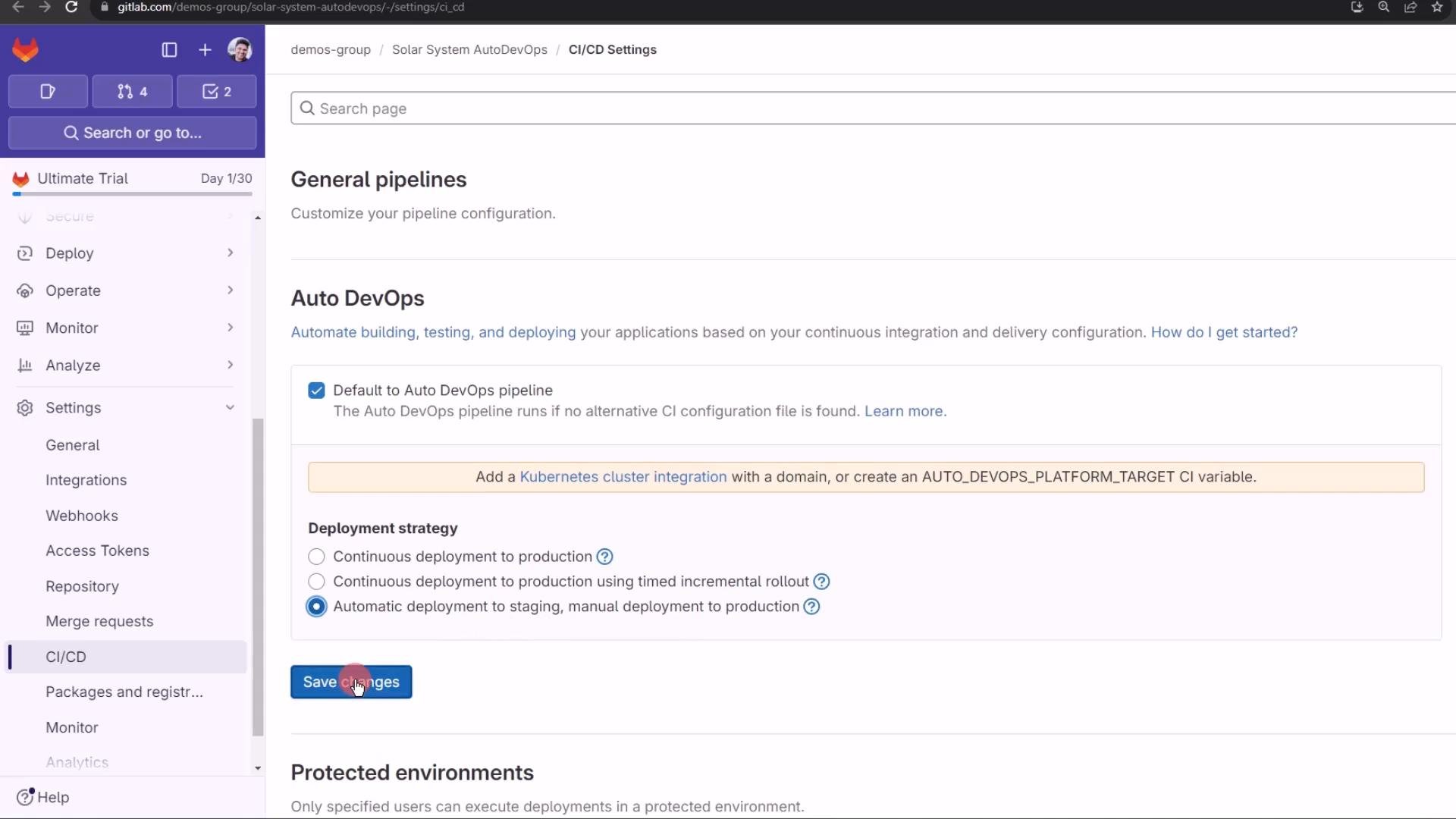
1. In GitLab, open your project → Settings → CI/CD → Auto DevOps.
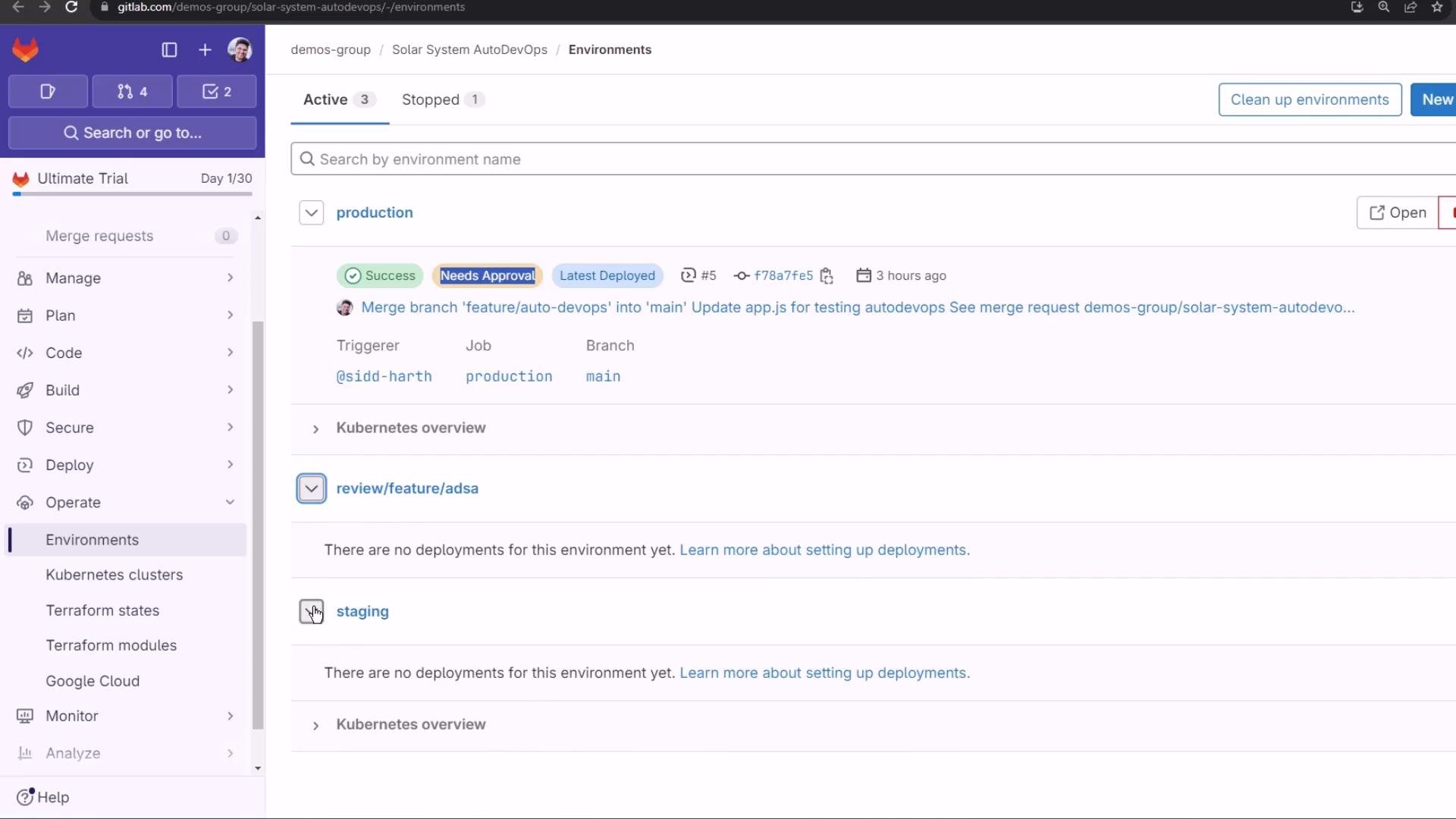
2. Select “Automatically deploy to staging, manually deploy to production” (the third strategy).
3. Save changes.
Note: changing the Auto DevOps strategy updates the configuration — it does not necessarily trigger an immediate pipeline run. In a typical workflow:
* Protected branches and protected environments enforce approvals for production.
* Production environments are usually protected, requiring manual approval before deployment.
Verify environment protections at Operate → Environments: [https://docs.gitlab.com/ee/ci/environments/](https://docs.gitlab.com/ee/ci/environments/)
Preparing a feature branch for the canary demo
For this demo repository (SolarSystemAutoDevOps) I created a feature branch containing small front-end and test changes so Auto DevOps runs the pipeline, deploys a review app, and exercises security scanning.
Files changed:
* `index.html` — replaced an animated GIF with a static PNG and commented out the rotation animation.
* `app.js` — cleaned up logging, ensured static assets are served, and added robust DB fallbacks.
* `tests/hyphen-test.js` — Mocha + Chai integration tests (use of `let` corrected).
Below are the cleaned, relevant snippets.
index.html (static background + commented animation)
```html theme={null}
Solar System - Sid
```
app.js (Node/Express + Mongoose — robust and simplified)
```javascript theme={null}
const path = require('path');
const express = require('express');
const OS = require('os');
const bodyParser = require('body-parser');
const mongoose = require('mongoose');
const cors = require('cors');
const app = express();
app.use(bodyParser.json());
app.use(express.static(path.join(__dirname, '/')));
app.use(cors());
mongoose.connect(process.env.MONGO_URI, {
user: process.env.MONGO_USERNAME,
pass: process.env.MONGO_PASSWORD,
useNewUrlParser: true,
useUnifiedTopology: true
}, function(err) {
if (err) {
console.error("MongoDB connection error:", err);
} else {
// Connection successful
}
});
const Schema = mongoose.Schema;
const dataSchema = new Schema({
name: String,
id: Number,
description: String,
image: String,
velocity: String,
distance: String
});
const planetModel = mongoose.model('Planet', dataSchema);
// Example fallback data used if a DB record isn't found (useful for local testing)
const samplePlanets = {
1: { id: 1, name: 'Mercury', description: 'Closest planet to the Sun' },
2: { id: 2, name: 'Venus', description: 'Second planet from the Sun' }
};
planetModel.findOne({ id: 1 }, function(err, planetData) {
if (err) {
console.error("Error fetching planet data:", err);
} else {
// Example usage
}
});
app.get('/', async (req, res) => {
res.sendFile(path.join(__dirname, '/', 'index.html'));
});
app.post('/planet', async (req, res) => {
const id = parseInt(req.body.id, 10);
if (isNaN(id)) {
return res.status(400).json({ error: 'Invalid id' });
}
try {
const planet = await planetModel.findOne({ id: id }).lean().exec();
if (planet) {
return res.json(planet);
}
// Fallback to sample data if DB not available or record missing
if (samplePlanets[id]) {
return res.json(samplePlanets[id]);
}
return res.status(404).json({ error: 'Planet not found' });
} catch (err) {
console.error('Error fetching planet:', err);
return res.status(500).json({ error: 'Internal server error' });
}
});
module.exports = app;
```
tests/hyphen-test.js (Mocha + Chai)
```javascript theme={null}
let mongoose = require('mongoose');
let server = require('./app');
let chai = require('chai');
let chaiHttp = require('chai-http');
chai.should();
chai.use(chaiHttp);
describe('Planets API Suite', () => {
describe('Fetching Planet Details', () => {
it('should fetch a planet named Mercury', (done) => {
let payload = { id: 1 };
chai.request(server)
.post('/planet')
.send(payload)
.end((err, res) => {
res.should.have.status(200);
res.body.should.have.property('id').eql(1);
res.body.should.have.property('name').eql('Mercury');
done();
});
});
it('should fetch a planet named Venus', (done) => {
let payload = { id: 2 };
chai.request(server)
.post('/planet')
.send(payload)
.end((err, res) => {
res.should.have.status(200);
res.body.should.have.property('id').eql(2);
res.body.should.have.property('name').eql('Venus');
done();
});
});
});
});
```
Commit and workflow
* Commit with a descriptive message such as `testing autodevops canary release`.
* Push as a feature branch (e.g., `feature/canary-deployment`) and create a merge request in the GitLab UI.
Watching the pipeline
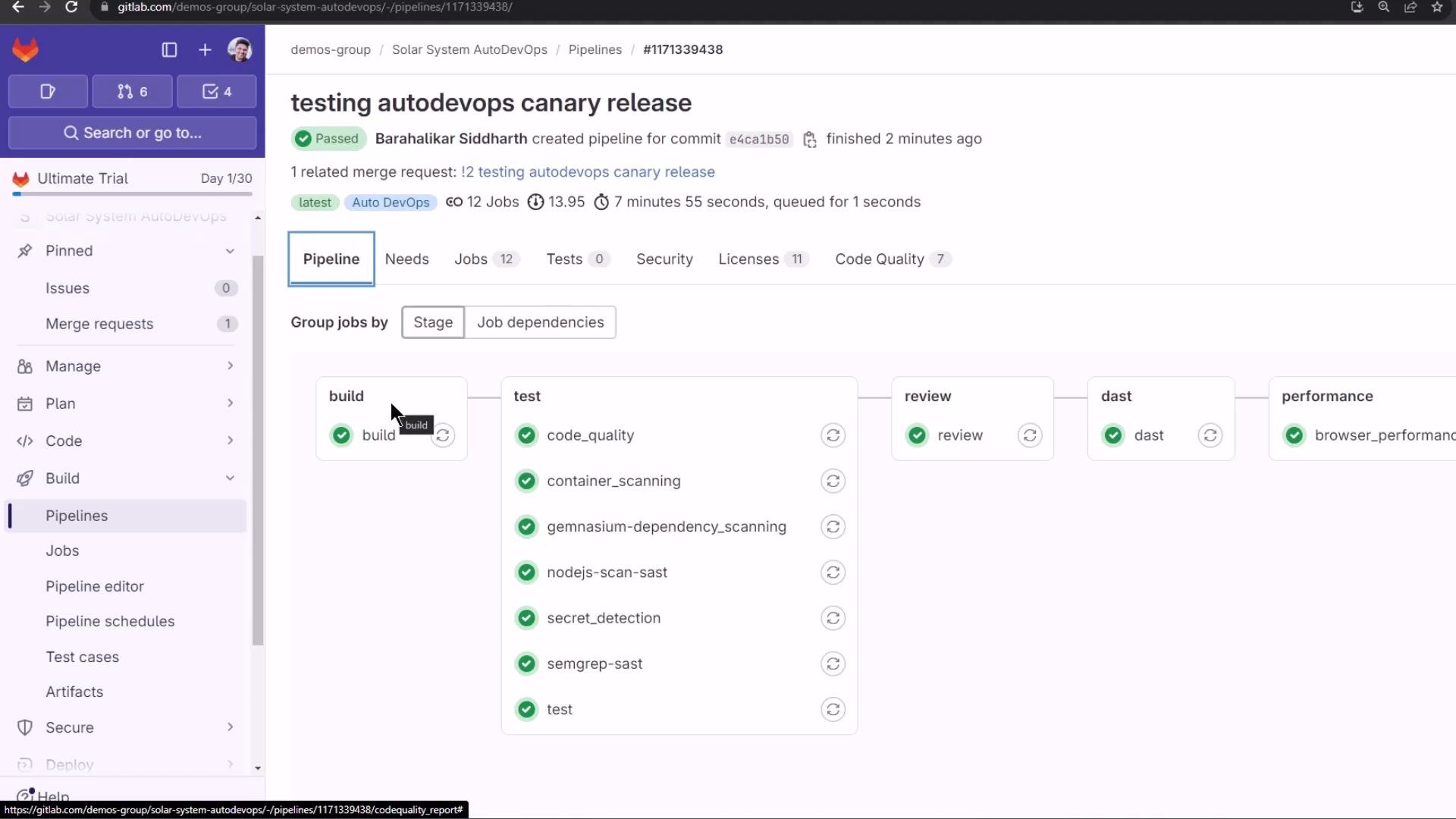
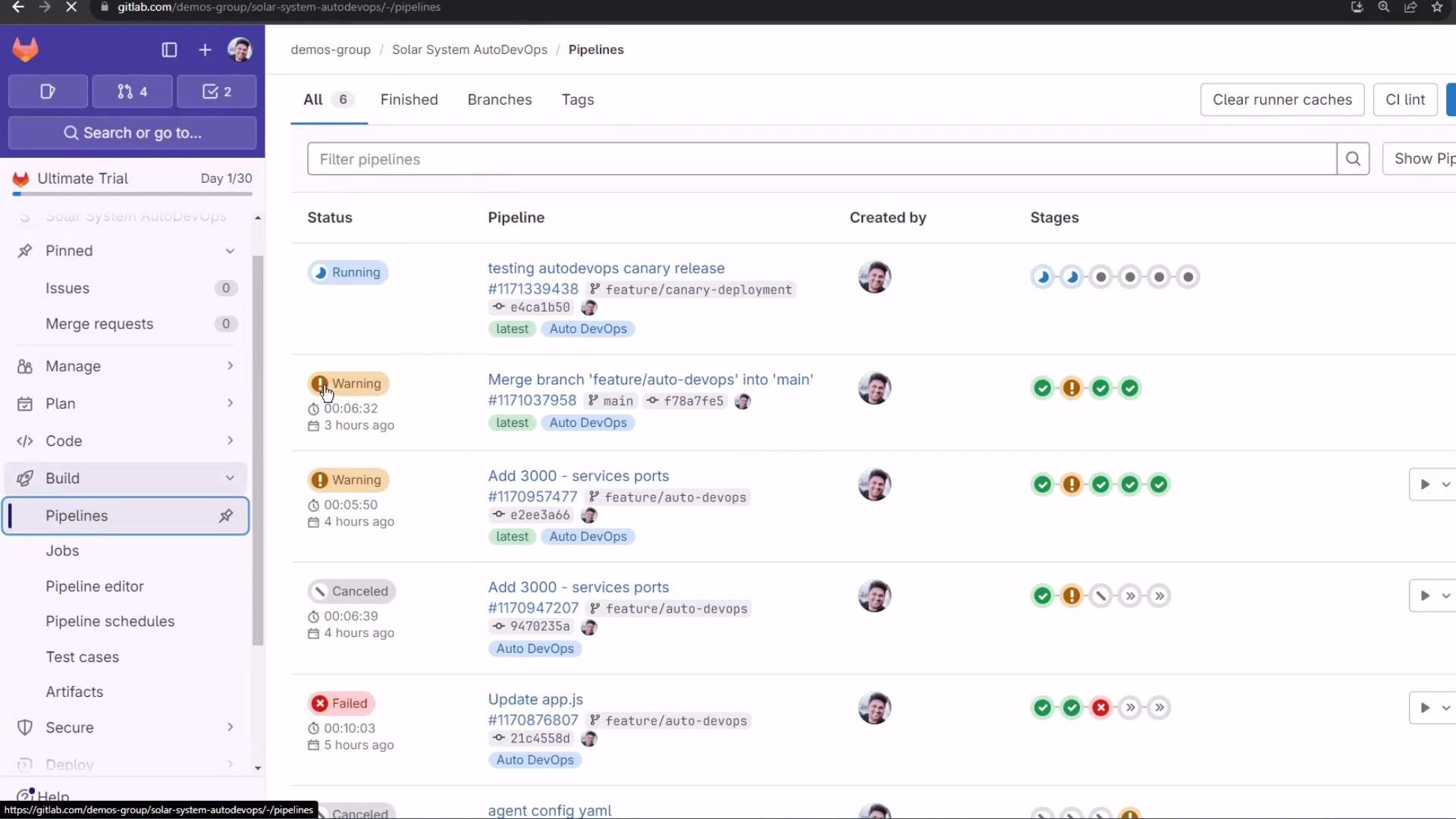
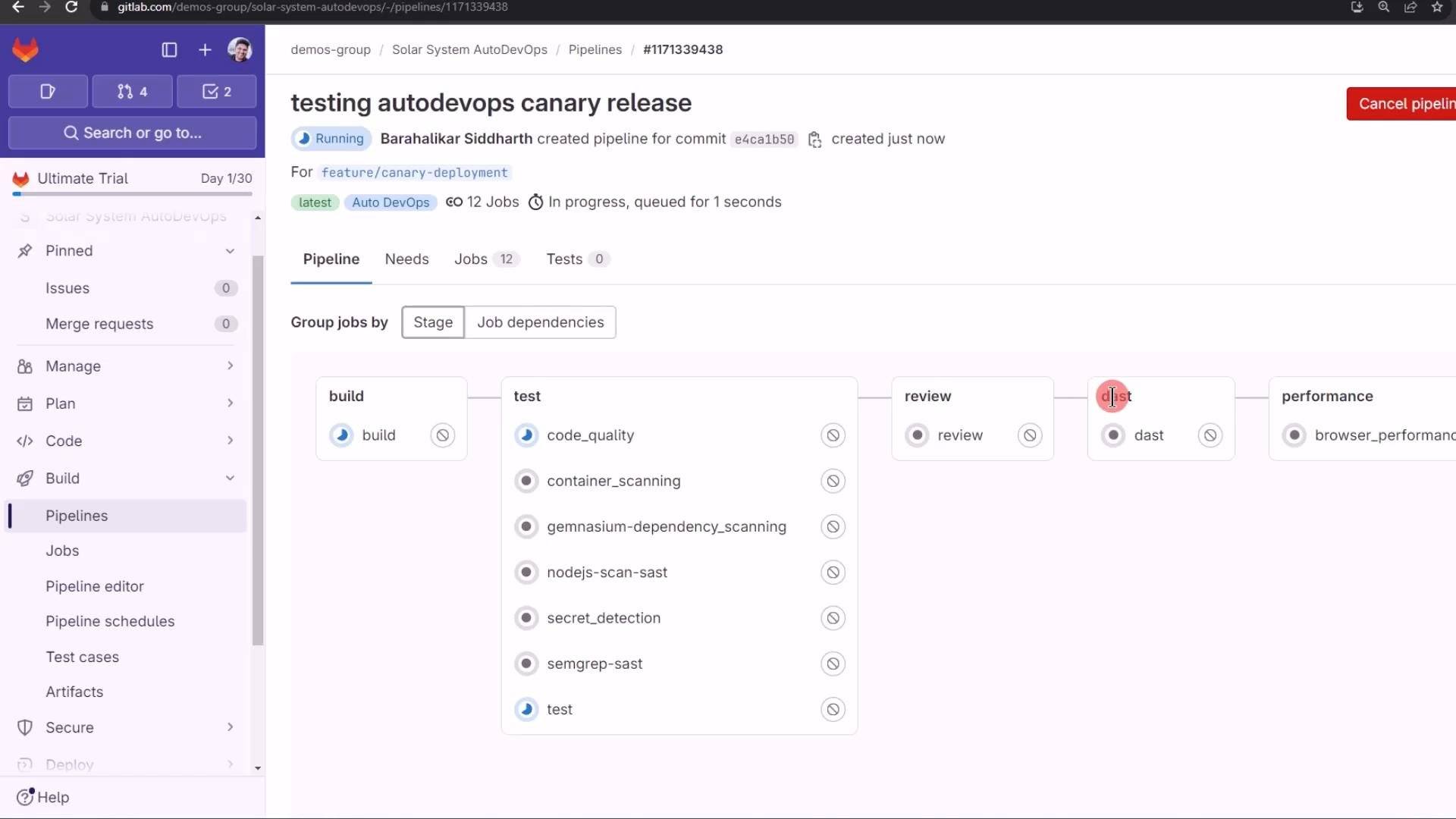
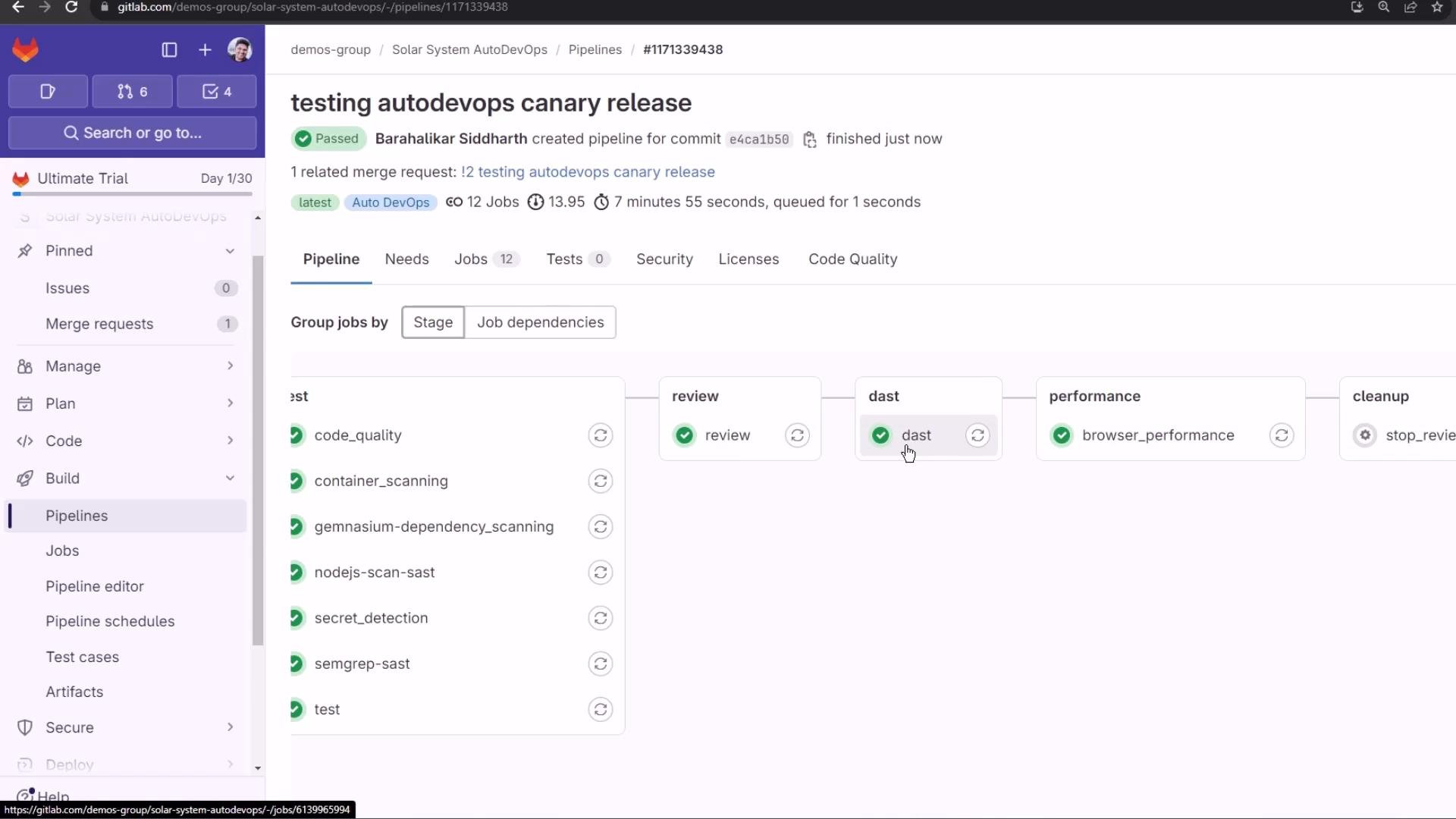
When the feature branch pipeline runs, Auto DevOps constructs many stages: build, test, review, security scans (SAST/DAST/container/dependency/secret detection), performance tests, and cleanup. The Pipelines view shows statuses and progress for each run.
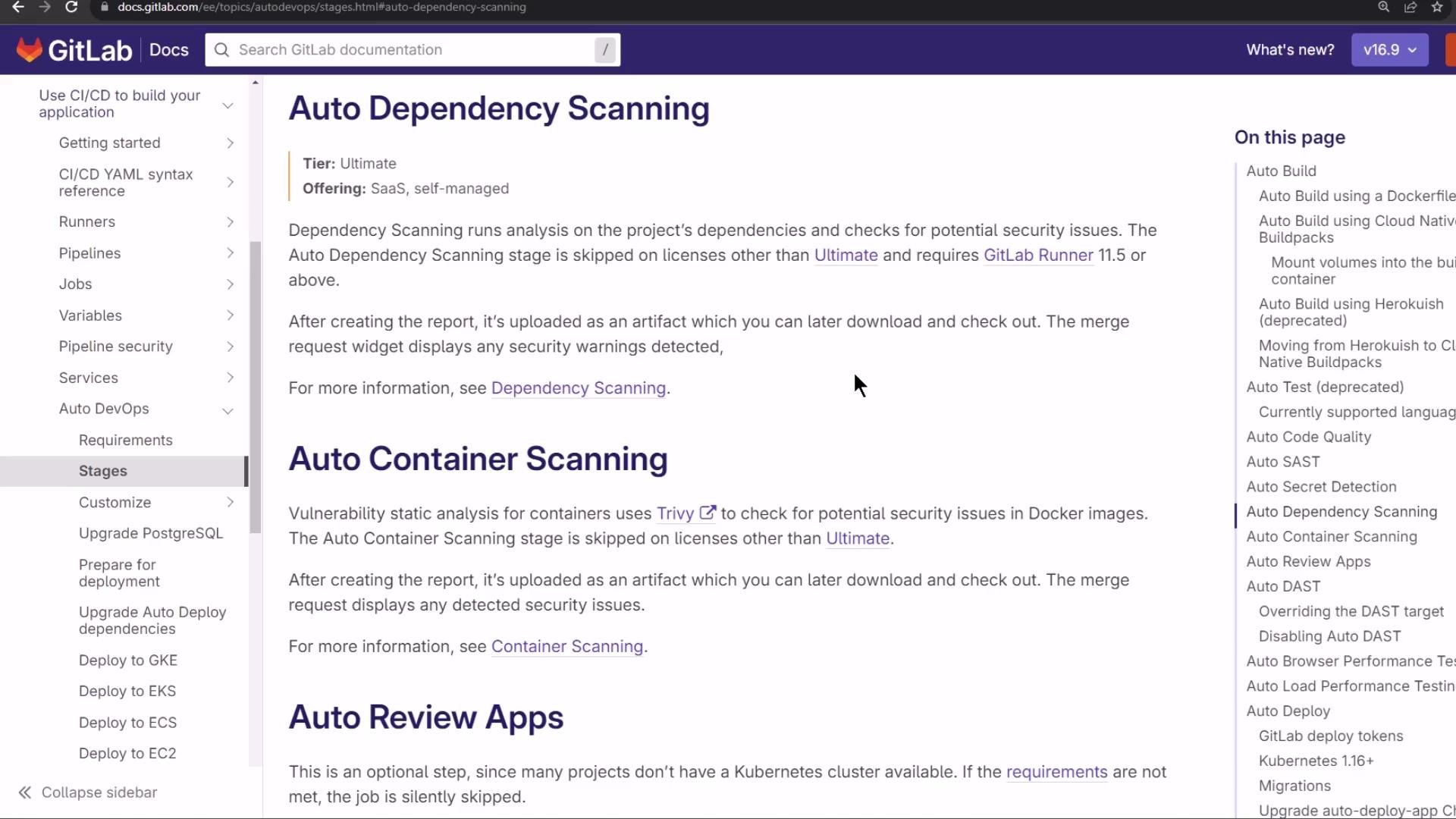
Common security and quality jobs you might see:
| Job / Feature | Purpose | Example artifact |
| - | - | - |
| dependency\_scanning | Creates a bill-of-materials and finds vulnerable packages | `gl-sbom-*.cdx.json` |
| container\_scanning | Scans Docker images for CVEs (Trivy, etc.) | vulnerability reports |
| code\_quality | Lints and identifies maintainability regressions | inline MR comments |
| dast | Dynamic application scanning of deployed review apps (ZAP) | `gl-dast-report.json` |
| performance/browser tests | Run synthetic performance tests | performance metrics artifacts |
Dependency scanning generates a Software Bill of Materials (SBOM) in CycloneDX format (`gl-sbom-*.cdx.json`) and dependency reports listing package names and versions. DAST uses OWASP ZAP to spider and scan a deployed review environment URL for runtime vulnerabilities.
When the pipeline completes, you can inspect artifacts and generated reports. The dependency scanning job may produce a CycloneDX JSON, and other scanners will upload their corresponding artifacts.
A successful pipeline run shows green checks and produced reports:
Dynamic Application Security Testing (DAST)
The DAST job boots an OWASP ZAP proxy, retrieves the review environment URL saved by the review job, spiders the site, and runs passive/active scans. The job uploads a `gl-dast-report.json` artifact summarizing findings.
Example (truncated) DAST log excerpt:
```text theme={null}
2024-02-09 18:16:16 Running DAST v4.0.25 on Python 3.10.12
Starting the ZAP Server
Running ZAP with parameters ['/zap/zap.sh', '-daemon', '-host', '0.0.0.0', '-port', '41596', '-dir', '/app/zap', ...]
looking for ZAP at http://127.0.0.1:41596...
Spider starting with target: http://54762898-review-feature-ca-pqok5f.139.84.208.48.nip.io
Spider complete
The following URLs were scanned:
GET https://54762898-review-feature-ca-pqok5f.139.84.208.48.nip.io/
...
PASS: Vulnerable JS Library (Powered by Retire.js) [10003]
WARN: Content Security Policy (CSP) Header Not Set [10038] x 3
PASS: Content-Type Header Missing [10019]
SUMMARY - PASS: 42 | WARN: 6 | SKIP: 12
Uploading artifacts...
gl-dast-report.json: found 1 matching artifact
Job succeeded
```
Review environments and review apps
The review environment deploys the feature branch to a unique URL (often with `-review-feature-...`), enabling manual inspection and runtime scans. Confirm the front-end change (e.g., static background and no rotation) at the review app URL — the environment’s unique pod/identifier is often present in the URL.
Merge request aggregation: reports and security findings
The merge request aggregates Auto DevOps reports so reviewers can triage issues before merging. From the MR you can:
* View the deployed review app.
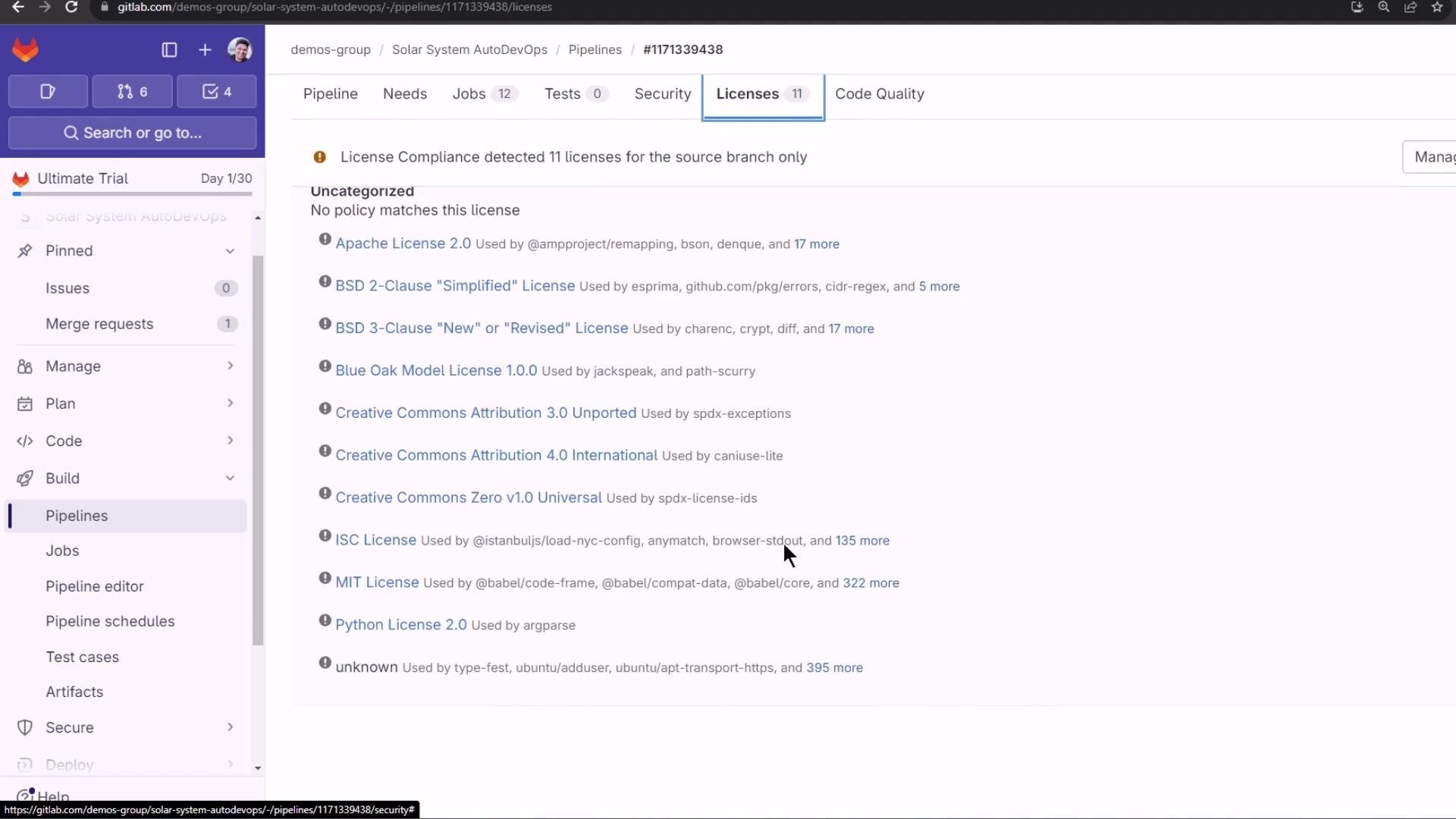
* Inspect license compliance details for dependencies.
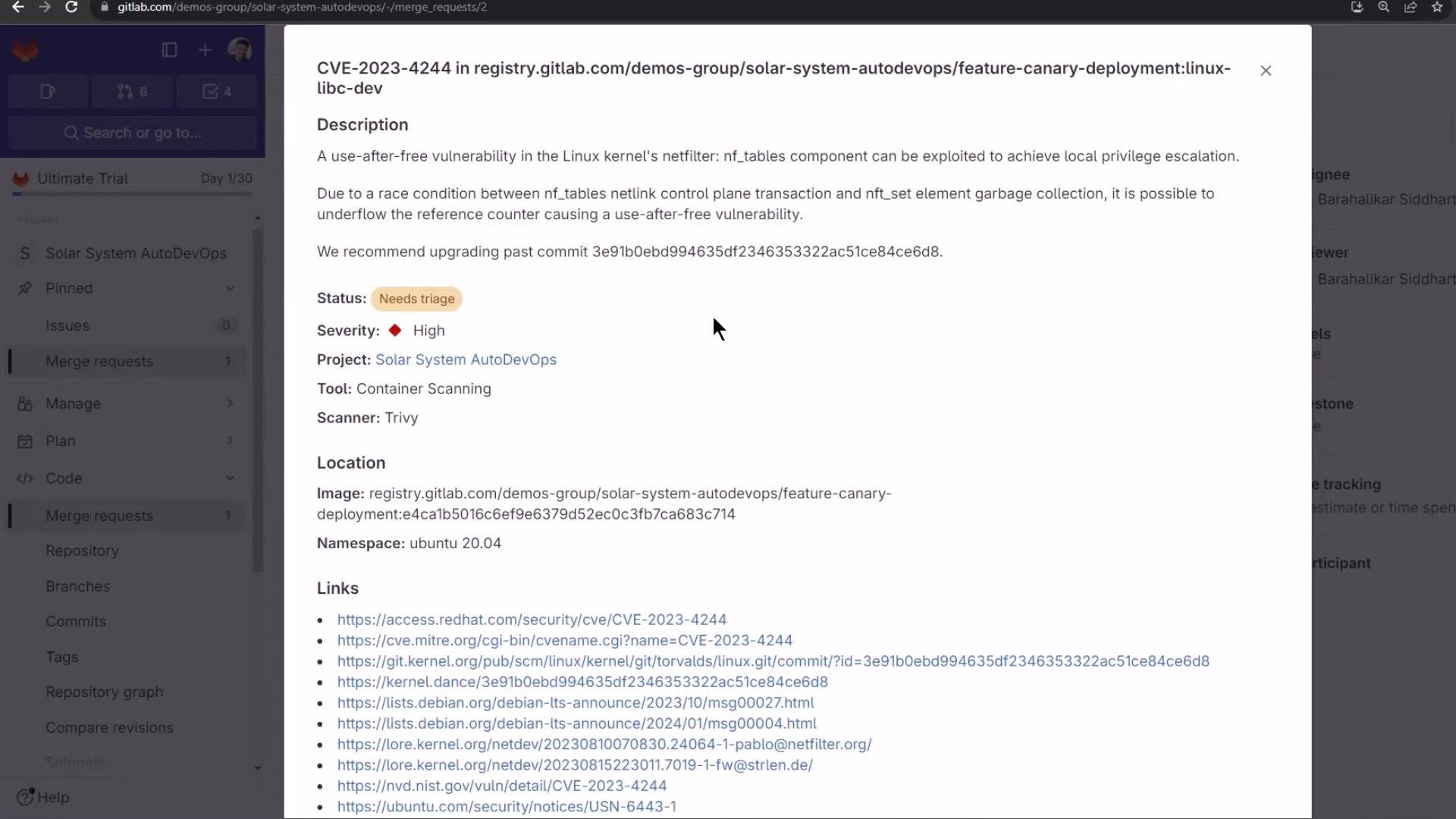
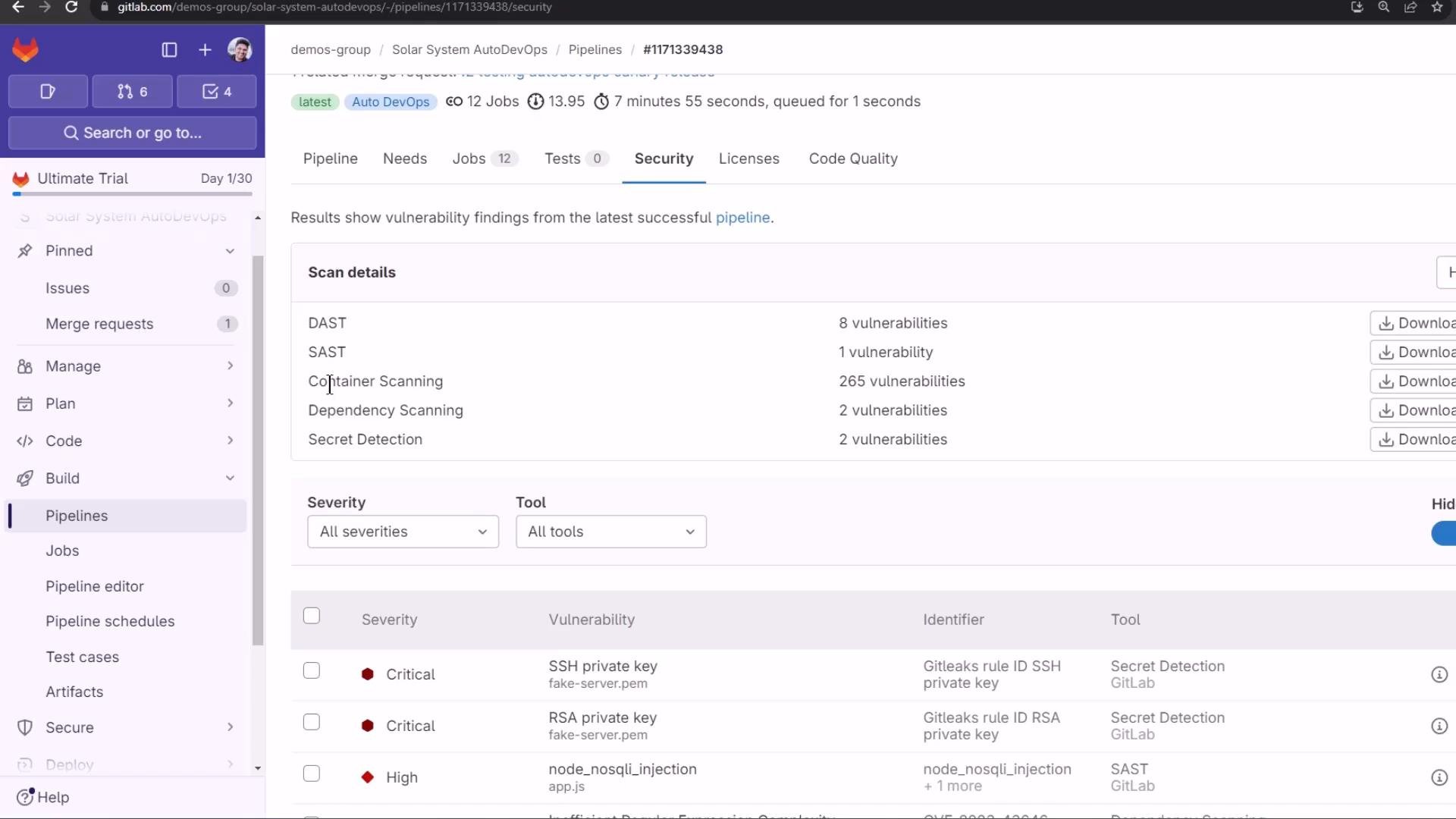
* Review consolidated security findings (SAST, DAST, container scanning, dependency scanning, secret detection) and create issues from findings.
Example findings visible in the MR:
* SAST findings: e.g., potential Node NoSQL injection.
* DAST warnings: medium/high runtime issues.
* Secret detection: critical findings such as exposed SSH/RSA private keys.
* Container/dependency CVEs flagged by Trivy, Gemnasium, or comparable scanners.
Clicking a finding opens a modal with contextual details (CVE, severity, scanner, file/image path) and remediation guidance when available.
The pipeline Security tab collects and filters findings across tools and severities, giving a single pane of glass for vulnerability triage.
License compliance and code quality
Auto DevOps also surfaces license compliance and code quality results in the pipeline and MR, useful for legal and maintainability reviews before merging.
Final notes and next steps
* Merging to the protected default branch triggers a pipeline that requires manual approval for production deploys. The production job will be gated by environment protection.
* In Part 2 we will merge the feature branch into the protected branch and observe the protected job and the UI-driven incremental rollout (canary) behavior for production. We’ll demonstrate manually stepping rollout percentages in the GitLab UI and handling a rollback.
Protect production environments and require approvals. Manual gates prevent unreviewed changes from reaching production and give you control over canary steps and rollbacks.
That's all for Part 1 — in the next session we’ll perform the protected merge and exercise the incremental rollout UI to complete the canary deployment to production.
Related links and references
* GitLab Auto DevOps: [https://docs.gitlab.com/ee/topics/autodevops/](https://docs.gitlab.com/ee/topics/autodevops/)
* GitLab CI/CD Environments: [https://docs.gitlab.com/ee/ci/environments/](https://docs.gitlab.com/ee/ci/environments/)
This documentation is built and hosted on [Mintlify](https://mintlify.com), a developer documentation platform.
 A simple incremental rollout plan might look like:
```text theme={null}
1. rollout 10%
2. rollout 25%
3. rollout 50%
4. rollout 100%
```
With 10 replicas:
* 10% → 1 pod runs the new version, 9 run the old version.
* You can advance to 25%, 50%, etc.
* If something goes wrong you can reduce the rollout percentage. After a 100% rollout the only way to return to the previous version is a rollback to a prior deployment revision.
For more detail, see GitLab’s Auto DevOps documentation and the "incremental rollout" option for UI-managed canary steps: [https://docs.gitlab.com/ee/topics/autodevops/](https://docs.gitlab.com/ee/topics/autodevops/)
A simple incremental rollout plan might look like:
```text theme={null}
1. rollout 10%
2. rollout 25%
3. rollout 50%
4. rollout 100%
```
With 10 replicas:
* 10% → 1 pod runs the new version, 9 run the old version.
* You can advance to 25%, 50%, etc.
* If something goes wrong you can reduce the rollout percentage. After a 100% rollout the only way to return to the previous version is a rollback to a prior deployment revision.
For more detail, see GitLab’s Auto DevOps documentation and the "incremental rollout" option for UI-managed canary steps: [https://docs.gitlab.com/ee/topics/autodevops/](https://docs.gitlab.com/ee/topics/autodevops/)
 Demo: configure Auto DevOps for staging + manual production
1. In GitLab, open your project → Settings → CI/CD → Auto DevOps.
2. Select “Automatically deploy to staging, manually deploy to production” (the third strategy).
3. Save changes.
Demo: configure Auto DevOps for staging + manual production
1. In GitLab, open your project → Settings → CI/CD → Auto DevOps.
2. Select “Automatically deploy to staging, manually deploy to production” (the third strategy).
3. Save changes.
 Note: changing the Auto DevOps strategy updates the configuration — it does not necessarily trigger an immediate pipeline run. In a typical workflow:
* Protected branches and protected environments enforce approvals for production.
* Production environments are usually protected, requiring manual approval before deployment.
Verify environment protections at Operate → Environments: [https://docs.gitlab.com/ee/ci/environments/](https://docs.gitlab.com/ee/ci/environments/)
Note: changing the Auto DevOps strategy updates the configuration — it does not necessarily trigger an immediate pipeline run. In a typical workflow:
* Protected branches and protected environments enforce approvals for production.
* Production environments are usually protected, requiring manual approval before deployment.
Verify environment protections at Operate → Environments: [https://docs.gitlab.com/ee/ci/environments/](https://docs.gitlab.com/ee/ci/environments/)
 Preparing a feature branch for the canary demo
For this demo repository (SolarSystemAutoDevOps) I created a feature branch containing small front-end and test changes so Auto DevOps runs the pipeline, deploys a review app, and exercises security scanning.
Files changed:
* `index.html` — replaced an animated GIF with a static PNG and commented out the rotation animation.
* `app.js` — cleaned up logging, ensured static assets are served, and added robust DB fallbacks.
* `tests/hyphen-test.js` — Mocha + Chai integration tests (use of `let` corrected).
Below are the cleaned, relevant snippets.
index.html (static background + commented animation)
```html theme={null}
Preparing a feature branch for the canary demo
For this demo repository (SolarSystemAutoDevOps) I created a feature branch containing small front-end and test changes so Auto DevOps runs the pipeline, deploys a review app, and exercises security scanning.
Files changed:
* `index.html` — replaced an animated GIF with a static PNG and commented out the rotation animation.
* `app.js` — cleaned up logging, ensured static assets are served, and added robust DB fallbacks.
* `tests/hyphen-test.js` — Mocha + Chai integration tests (use of `let` corrected).
Below are the cleaned, relevant snippets.
index.html (static background + commented animation)
```html theme={null}
 Common security and quality jobs you might see:
| Job / Feature | Purpose | Example artifact |
| - | - | - |
| dependency\_scanning | Creates a bill-of-materials and finds vulnerable packages | `gl-sbom-*.cdx.json` |
| container\_scanning | Scans Docker images for CVEs (Trivy, etc.) | vulnerability reports |
| code\_quality | Lints and identifies maintainability regressions | inline MR comments |
| dast | Dynamic application scanning of deployed review apps (ZAP) | `gl-dast-report.json` |
| performance/browser tests | Run synthetic performance tests | performance metrics artifacts |
Common security and quality jobs you might see:
| Job / Feature | Purpose | Example artifact |
| - | - | - |
| dependency\_scanning | Creates a bill-of-materials and finds vulnerable packages | `gl-sbom-*.cdx.json` |
| container\_scanning | Scans Docker images for CVEs (Trivy, etc.) | vulnerability reports |
| code\_quality | Lints and identifies maintainability regressions | inline MR comments |
| dast | Dynamic application scanning of deployed review apps (ZAP) | `gl-dast-report.json` |
| performance/browser tests | Run synthetic performance tests | performance metrics artifacts |
 A successful pipeline run shows green checks and produced reports:
 Dynamic Application Security Testing (DAST)
The DAST job boots an OWASP ZAP proxy, retrieves the review environment URL saved by the review job, spiders the site, and runs passive/active scans. The job uploads a `gl-dast-report.json` artifact summarizing findings.
Example (truncated) DAST log excerpt:
```text theme={null}
2024-02-09 18:16:16 Running DAST v4.0.25 on Python 3.10.12
Starting the ZAP Server
Running ZAP with parameters ['/zap/zap.sh', '-daemon', '-host', '0.0.0.0', '-port', '41596', '-dir', '/app/zap', ...]
looking for ZAP at http://127.0.0.1:41596...
Spider starting with target: http://54762898-review-feature-ca-pqok5f.139.84.208.48.nip.io
Spider complete
The following URLs were scanned:
GET https://54762898-review-feature-ca-pqok5f.139.84.208.48.nip.io/
...
PASS: Vulnerable JS Library (Powered by Retire.js) [10003]
WARN: Content Security Policy (CSP) Header Not Set [10038] x 3
PASS: Content-Type Header Missing [10019]
SUMMARY - PASS: 42 | WARN: 6 | SKIP: 12
Uploading artifacts...
gl-dast-report.json: found 1 matching artifact
Job succeeded
```
Review environments and review apps
The review environment deploys the feature branch to a unique URL (often with `-review-feature-...`), enabling manual inspection and runtime scans. Confirm the front-end change (e.g., static background and no rotation) at the review app URL — the environment’s unique pod/identifier is often present in the URL.
Dynamic Application Security Testing (DAST)
The DAST job boots an OWASP ZAP proxy, retrieves the review environment URL saved by the review job, spiders the site, and runs passive/active scans. The job uploads a `gl-dast-report.json` artifact summarizing findings.
Example (truncated) DAST log excerpt:
```text theme={null}
2024-02-09 18:16:16 Running DAST v4.0.25 on Python 3.10.12
Starting the ZAP Server
Running ZAP with parameters ['/zap/zap.sh', '-daemon', '-host', '0.0.0.0', '-port', '41596', '-dir', '/app/zap', ...]
looking for ZAP at http://127.0.0.1:41596...
Spider starting with target: http://54762898-review-feature-ca-pqok5f.139.84.208.48.nip.io
Spider complete
The following URLs were scanned:
GET https://54762898-review-feature-ca-pqok5f.139.84.208.48.nip.io/
...
PASS: Vulnerable JS Library (Powered by Retire.js) [10003]
WARN: Content Security Policy (CSP) Header Not Set [10038] x 3
PASS: Content-Type Header Missing [10019]
SUMMARY - PASS: 42 | WARN: 6 | SKIP: 12
Uploading artifacts...
gl-dast-report.json: found 1 matching artifact
Job succeeded
```
Review environments and review apps
The review environment deploys the feature branch to a unique URL (often with `-review-feature-...`), enabling manual inspection and runtime scans. Confirm the front-end change (e.g., static background and no rotation) at the review app URL — the environment’s unique pod/identifier is often present in the URL.
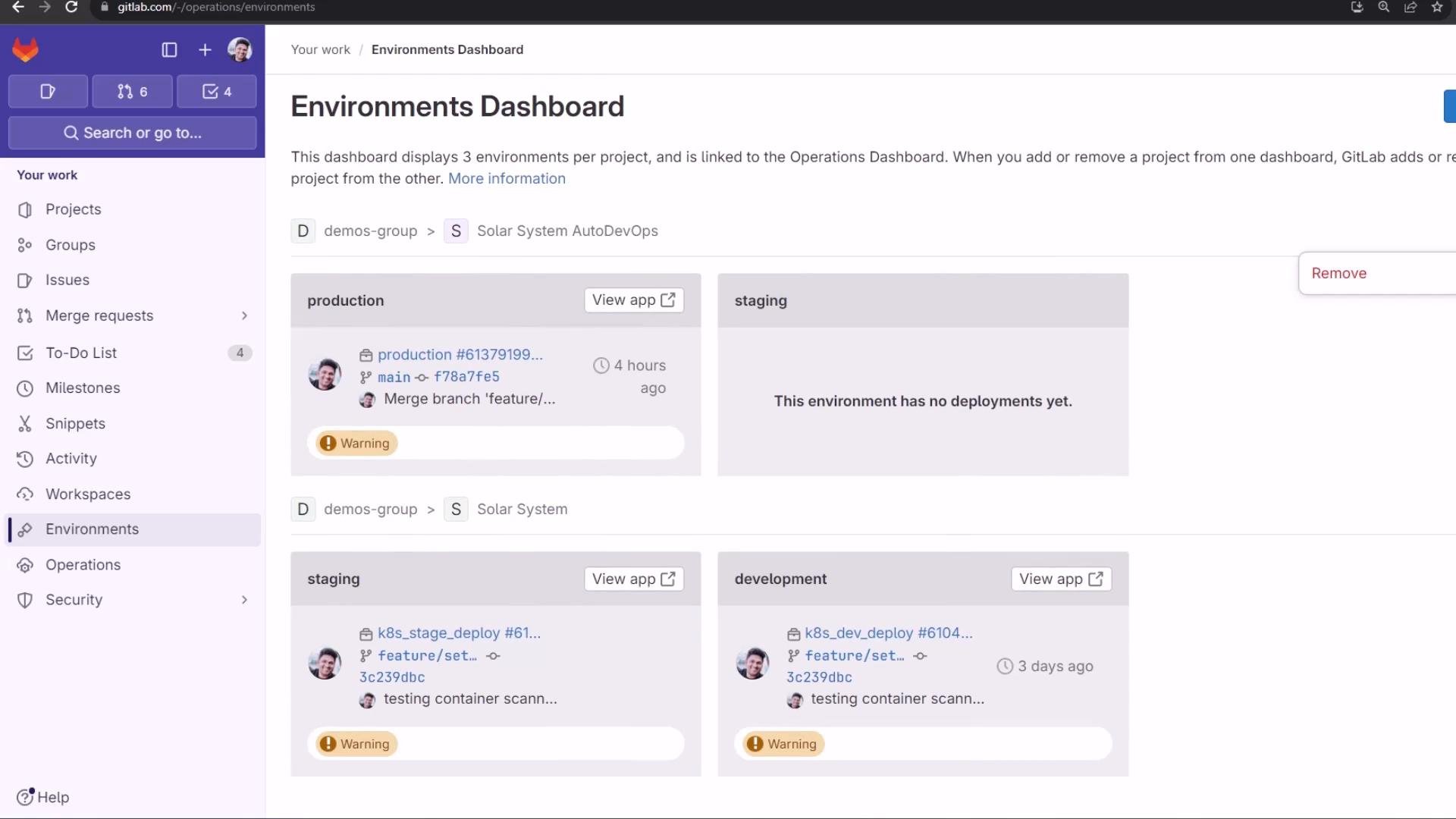 Merge request aggregation: reports and security findings
The merge request aggregates Auto DevOps reports so reviewers can triage issues before merging. From the MR you can:
* View the deployed review app.
* Inspect license compliance details for dependencies.
* Review consolidated security findings (SAST, DAST, container scanning, dependency scanning, secret detection) and create issues from findings.
Merge request aggregation: reports and security findings
The merge request aggregates Auto DevOps reports so reviewers can triage issues before merging. From the MR you can:
* View the deployed review app.
* Inspect license compliance details for dependencies.
* Review consolidated security findings (SAST, DAST, container scanning, dependency scanning, secret detection) and create issues from findings.
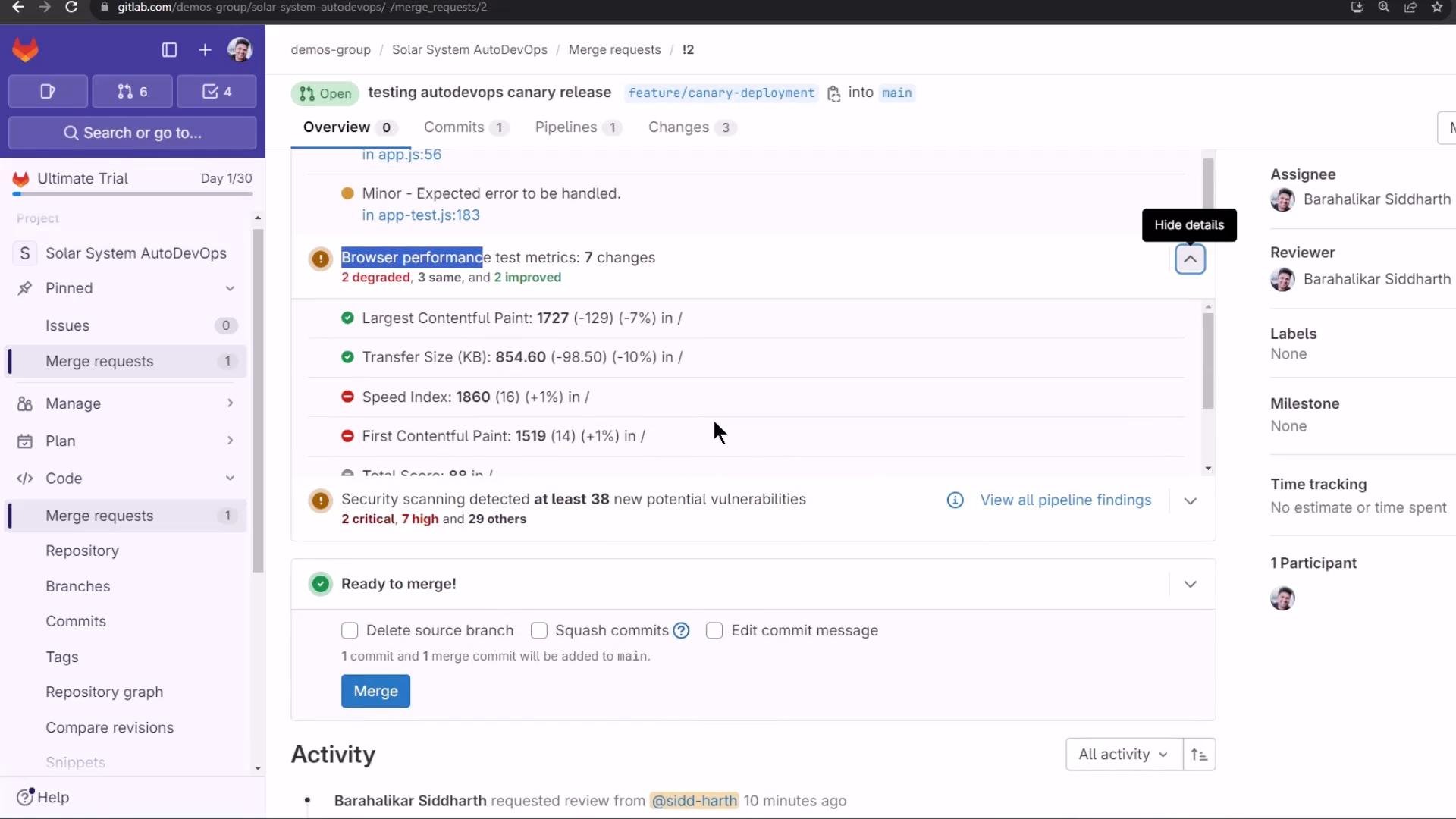 Example findings visible in the MR:
* SAST findings: e.g., potential Node NoSQL injection.
* DAST warnings: medium/high runtime issues.
* Secret detection: critical findings such as exposed SSH/RSA private keys.
* Container/dependency CVEs flagged by Trivy, Gemnasium, or comparable scanners.
Example findings visible in the MR:
* SAST findings: e.g., potential Node NoSQL injection.
* DAST warnings: medium/high runtime issues.
* Secret detection: critical findings such as exposed SSH/RSA private keys.
* Container/dependency CVEs flagged by Trivy, Gemnasium, or comparable scanners.
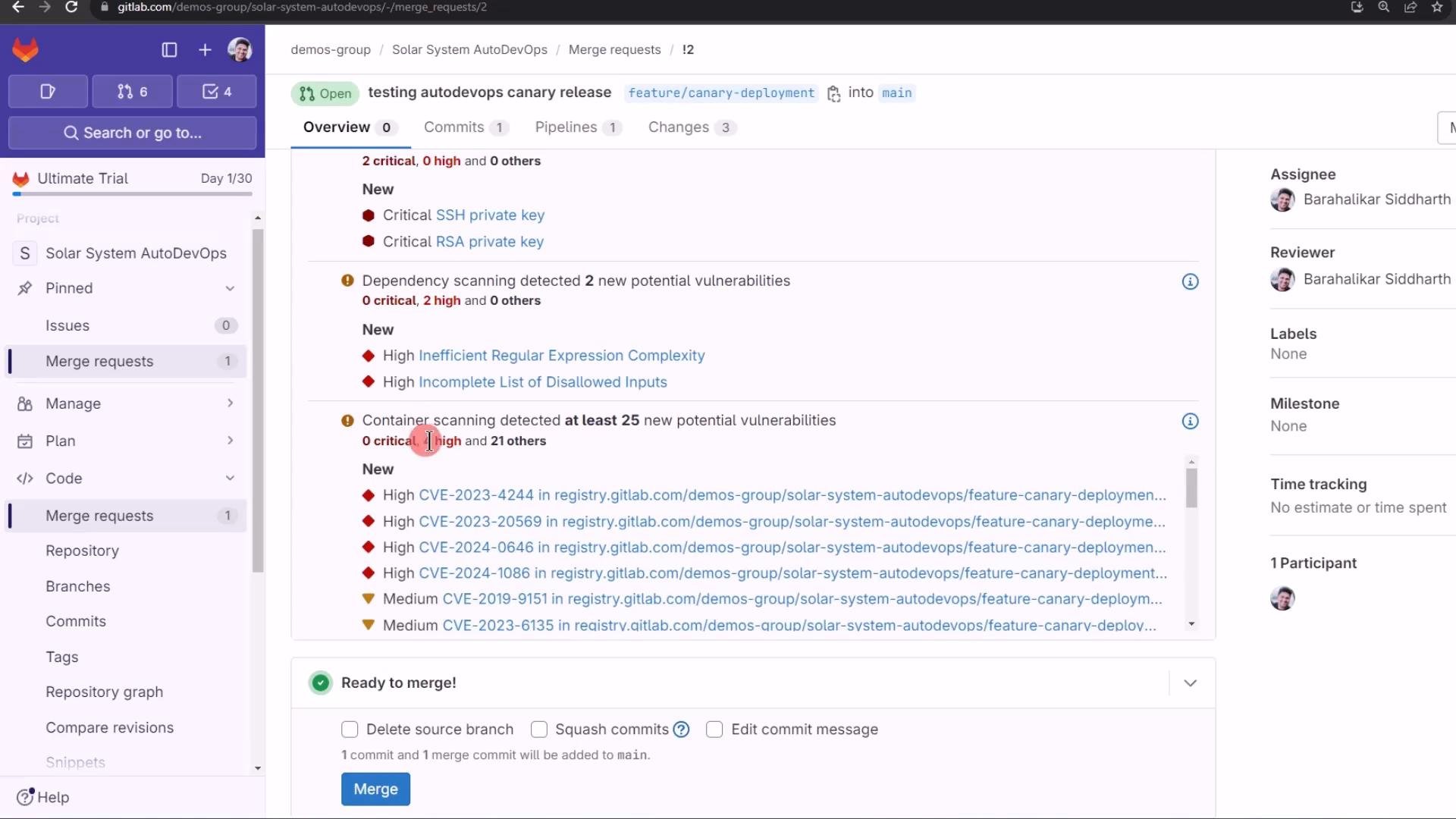 Clicking a finding opens a modal with contextual details (CVE, severity, scanner, file/image path) and remediation guidance when available.
 The pipeline Security tab collects and filters findings across tools and severities, giving a single pane of glass for vulnerability triage.
 License compliance and code quality
Auto DevOps also surfaces license compliance and code quality results in the pipeline and MR, useful for legal and maintainability reviews before merging.
License compliance and code quality
Auto DevOps also surfaces license compliance and code quality results in the pipeline and MR, useful for legal and maintainability reviews before merging.
 Final notes and next steps
* Merging to the protected default branch triggers a pipeline that requires manual approval for production deploys. The production job will be gated by environment protection.
* In Part 2 we will merge the feature branch into the protected branch and observe the protected job and the UI-driven incremental rollout (canary) behavior for production. We’ll demonstrate manually stepping rollout percentages in the GitLab UI and handling a rollback.
Final notes and next steps
* Merging to the protected default branch triggers a pipeline that requires manual approval for production deploys. The production job will be gated by environment protection.
* In Part 2 we will merge the feature branch into the protected branch and observe the protected job and the UI-driven incremental rollout (canary) behavior for production. We’ll demonstrate manually stepping rollout percentages in the GitLab UI and handling a rollback.