> ## Documentation Index
> Fetch the complete documentation index at: https://notes.kodekloud.com/llms.txt
> Use this file to discover all available pages before exploring further.
# Staging Environment and Canary Deployment with AutoDevOps part 2
> Explains GitLab Auto DevOps staged canary deployments, staging validation, manual incremental production rollouts, ingress weighted traffic splitting, Helm releases, and promotion or rollback procedures.
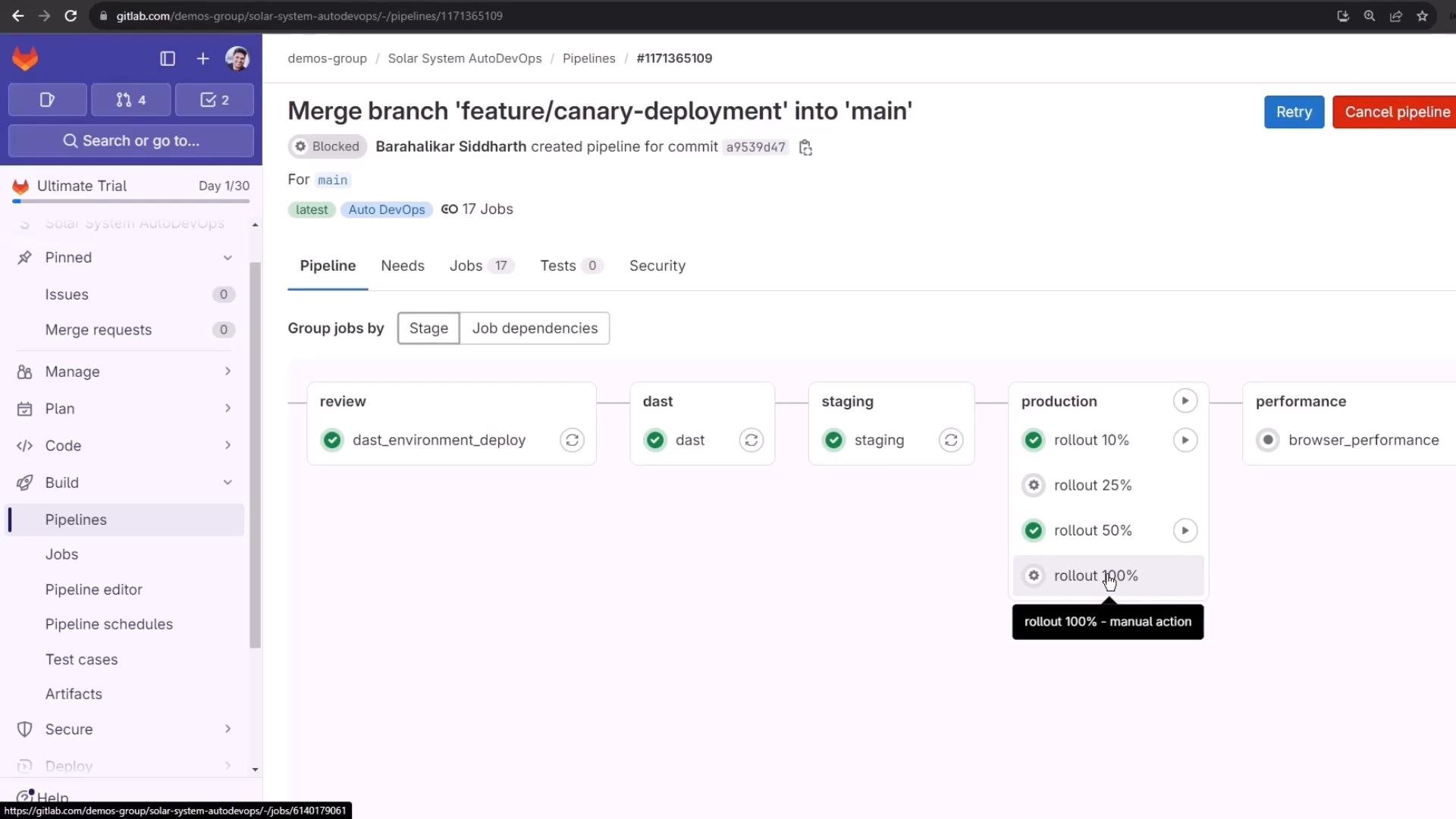
In the previous lesson we changed repository files on a feature branch, opened a merge request, and inspected the MR pipeline and its reports. In this lesson we accept that merge request and walk through how GitLab Auto DevOps performs a staged canary deployment to production — including manual approvals for incremental rollouts (10%, 25%, 50%, 100%).
This pipeline already ran successfully in the prior lesson; all jobs passed.
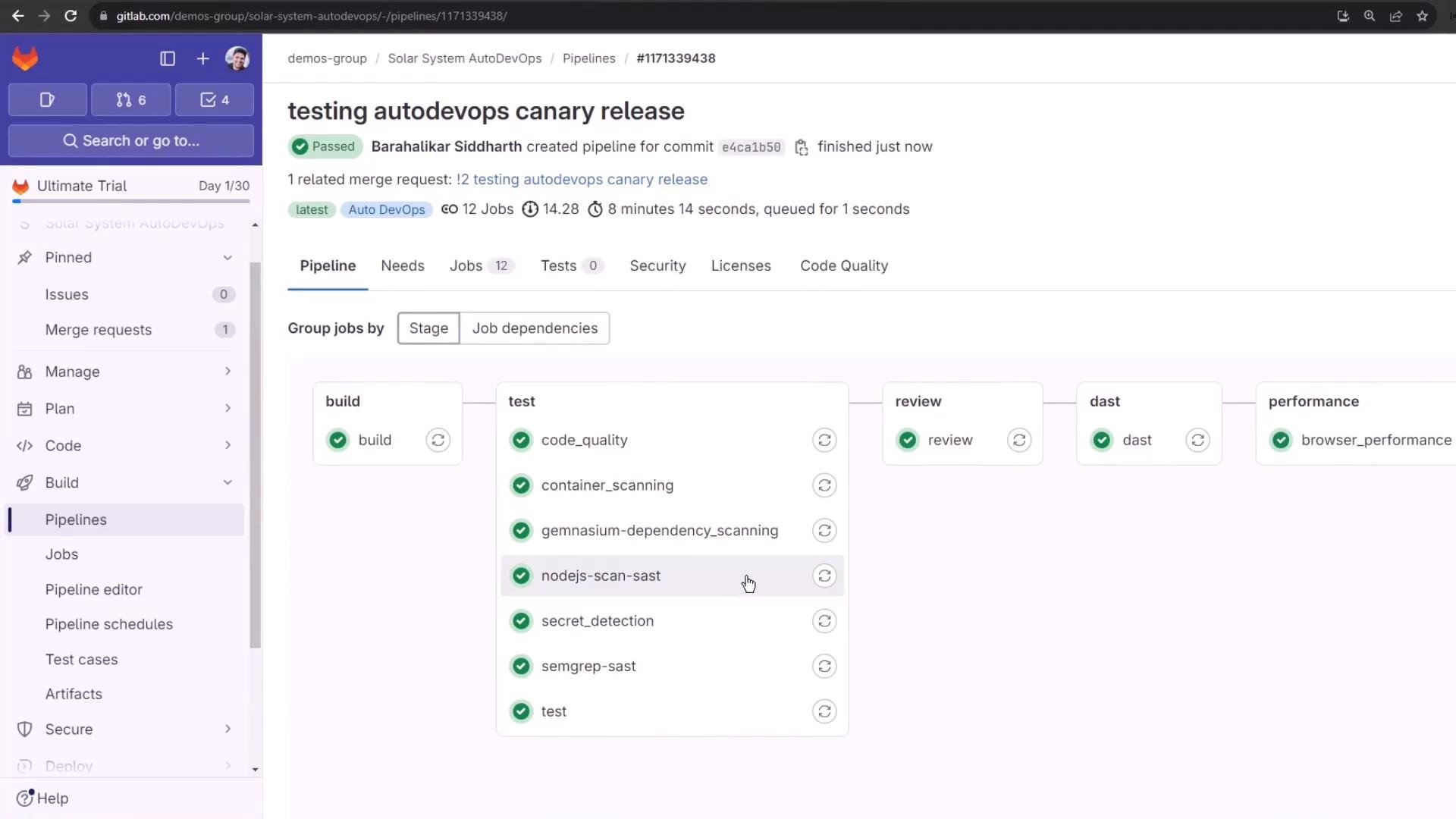 After reviewing the MR pipeline and scan reports, we merged the feature branch into `main`. Merging to the protected `main` branch automatically triggers a pipeline with additional stages compared with a feature-branch pipeline: build, test, review (DAST), staging, and manual production rollout jobs that enable incremental canary promotion. The pipeline also includes performance and cleanup jobs.
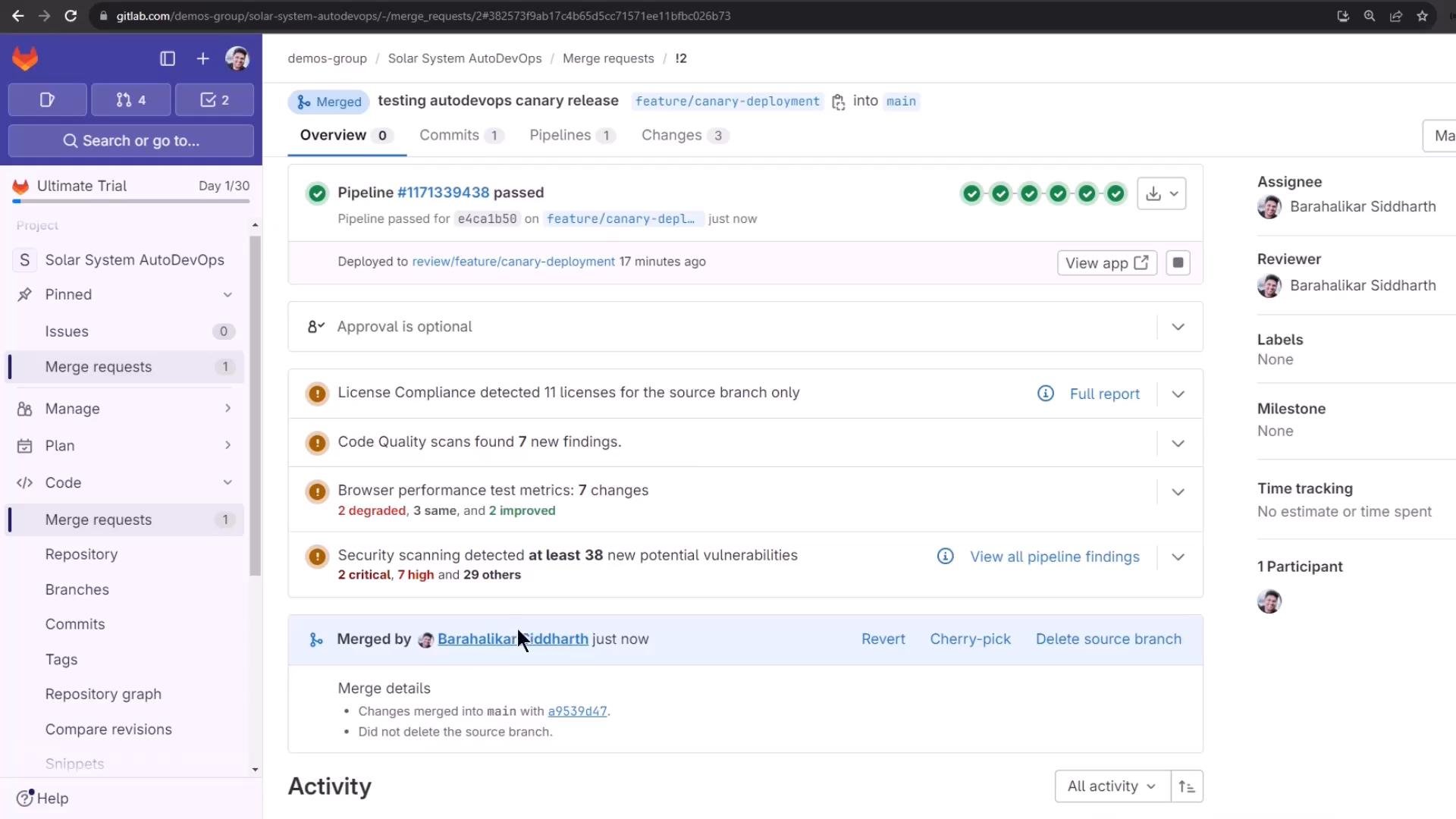 Because build, test, review, DAST, and staging are often long-running and already completed, the pipeline pauses and waits for manual approvals before performing production rollouts. Below we inspect the staging deployment and then perform the manual canary rollouts.
Staging environment
The `staging` job deploys the application into the `staging` namespace. Verify the deployed resources with kubectl (or your alias `k`):
```bash theme={null}
# Example: using your kubectl context (or alias 'k')
k -n staging get all
```
Sample output (condensed):
```bash theme={null}
NAME READY STATUS RESTARTS AGE
pod/staging-6548cd9479-tqpgp 1/1 Running 0 2m4s
NAME TYPE CLUSTER-IP EXTERNAL-IP PORT(S) AGE
service/staging-auto-deploy ClusterIP 10.98.41.96 3000/TCP 2m4s
NAME READY UP-TO-DATE AVAILABLE AGE
deployment.apps/staging 1/1 1 1 2m4s
```
You can also open Operate → Environments in GitLab to view the staging environment and confirm the application visually. The staging step spawns a temporary DAST environment to run security scans; that temporary environment is started and stopped automatically as part of the DAST job.
Auto DevOps behavior can be configured using CI/CD variables. Common variables include `STAGING_ENABLED`, `CANARY_ENABLED`, and `PRODUCTION_MANUAL`.
You can toggle staging and production behaviors with CI/CD variables:
* `STAGING_ENABLED=true` enables the staging step.
* `CANARY_ENABLED=true` enables canary-style deployments.
* `PRODUCTION_MANUAL=true` requires manual jobs for production rollouts (useful with protected environments).
Table: Common Auto DevOps CI/CD variables
| Variable | Purpose | Example |
| - | - | - |
| `STAGING_ENABLED` | Enable/disable the staging deployment | `STAGING_ENABLED=true` |
| `CANARY_ENABLED` | Enable canary deployment strategy | `CANARY_ENABLED=true` |
| `PRODUCTION_MANUAL` | Require manual production rollout jobs | `PRODUCTION_MANUAL=true` |
Production state before changes
Before launching any rollout, check the current production resources:
```bash theme={null}
k -n production get all
```
Sample output (condensed):
```bash theme={null}
NAME READY STATUS RESTARTS AGE
pod/production-df6dd64cf-2p8b6 1/1 Running 0 4h32m
...
pod/production-df6dd64cf-r6rsh 1/1 Running 0 4h32m
NAME TYPE CLUSTER-IP EXTERNAL-IP PORT(S) AGE
service/production-auto-deploy ClusterIP 10.104.1.52 3000/TCP 4h32m
NAME READY UP-TO-DATE AVAILABLE AGE
deployment.apps/production 10/10 10 10 4h32m
```
You can confirm load balancing across production pods by repeatedly calling the endpoint and observing which pod serves each request:
```bash theme={null}
# Repeatedly call the endpoint to observe responses indicating which pod served the request
while true; do curl -sk https://demos-group-solar-system-autodevops.139.84.208.48.nip.io/os | jq -r .os; done
```
Manual rollout approvals and running a rollout job
Production rollouts are protected by environment-level approvals when the environment is configured as protected. Each canary increment (10%, 25%, 50%, 100%) is implemented as a separate manual job that requires approval.
Approvals can be granted from the Environments page — selecting a waiting deployment opens an approval modal that lists approvers and required counts.
Because build, test, review, DAST, and staging are often long-running and already completed, the pipeline pauses and waits for manual approvals before performing production rollouts. Below we inspect the staging deployment and then perform the manual canary rollouts.
Staging environment
The `staging` job deploys the application into the `staging` namespace. Verify the deployed resources with kubectl (or your alias `k`):
```bash theme={null}
# Example: using your kubectl context (or alias 'k')
k -n staging get all
```
Sample output (condensed):
```bash theme={null}
NAME READY STATUS RESTARTS AGE
pod/staging-6548cd9479-tqpgp 1/1 Running 0 2m4s
NAME TYPE CLUSTER-IP EXTERNAL-IP PORT(S) AGE
service/staging-auto-deploy ClusterIP 10.98.41.96 3000/TCP 2m4s
NAME READY UP-TO-DATE AVAILABLE AGE
deployment.apps/staging 1/1 1 1 2m4s
```
You can also open Operate → Environments in GitLab to view the staging environment and confirm the application visually. The staging step spawns a temporary DAST environment to run security scans; that temporary environment is started and stopped automatically as part of the DAST job.
Auto DevOps behavior can be configured using CI/CD variables. Common variables include `STAGING_ENABLED`, `CANARY_ENABLED`, and `PRODUCTION_MANUAL`.
You can toggle staging and production behaviors with CI/CD variables:
* `STAGING_ENABLED=true` enables the staging step.
* `CANARY_ENABLED=true` enables canary-style deployments.
* `PRODUCTION_MANUAL=true` requires manual jobs for production rollouts (useful with protected environments).
Table: Common Auto DevOps CI/CD variables
| Variable | Purpose | Example |
| - | - | - |
| `STAGING_ENABLED` | Enable/disable the staging deployment | `STAGING_ENABLED=true` |
| `CANARY_ENABLED` | Enable canary deployment strategy | `CANARY_ENABLED=true` |
| `PRODUCTION_MANUAL` | Require manual production rollout jobs | `PRODUCTION_MANUAL=true` |
Production state before changes
Before launching any rollout, check the current production resources:
```bash theme={null}
k -n production get all
```
Sample output (condensed):
```bash theme={null}
NAME READY STATUS RESTARTS AGE
pod/production-df6dd64cf-2p8b6 1/1 Running 0 4h32m
...
pod/production-df6dd64cf-r6rsh 1/1 Running 0 4h32m
NAME TYPE CLUSTER-IP EXTERNAL-IP PORT(S) AGE
service/production-auto-deploy ClusterIP 10.104.1.52 3000/TCP 4h32m
NAME READY UP-TO-DATE AVAILABLE AGE
deployment.apps/production 10/10 10 10 4h32m
```
You can confirm load balancing across production pods by repeatedly calling the endpoint and observing which pod serves each request:
```bash theme={null}
# Repeatedly call the endpoint to observe responses indicating which pod served the request
while true; do curl -sk https://demos-group-solar-system-autodevops.139.84.208.48.nip.io/os | jq -r .os; done
```
Manual rollout approvals and running a rollout job
Production rollouts are protected by environment-level approvals when the environment is configured as protected. Each canary increment (10%, 25%, 50%, 100%) is implemented as a separate manual job that requires approval.
Approvals can be granted from the Environments page — selecting a waiting deployment opens an approval modal that lists approvers and required counts.
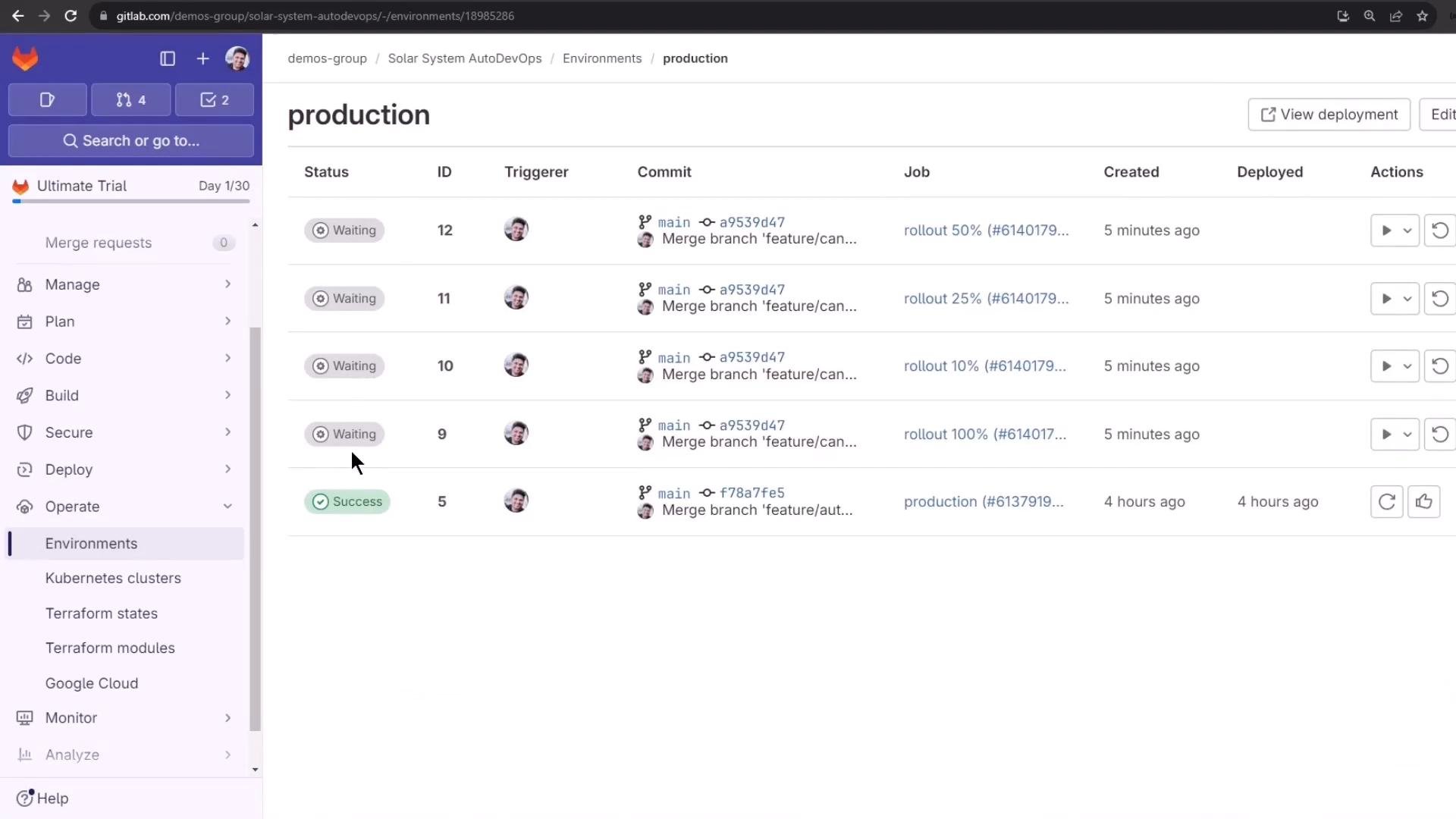
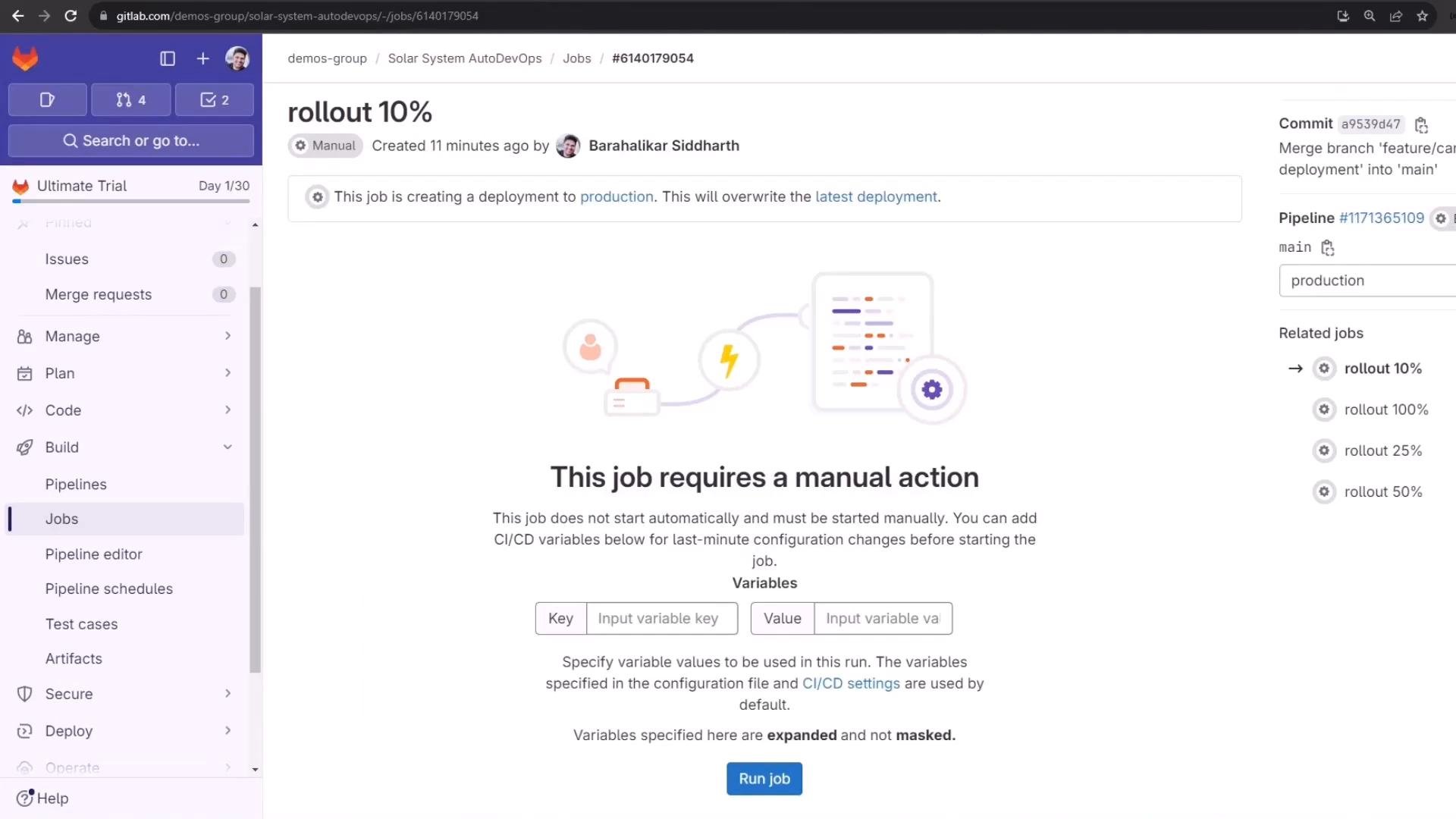
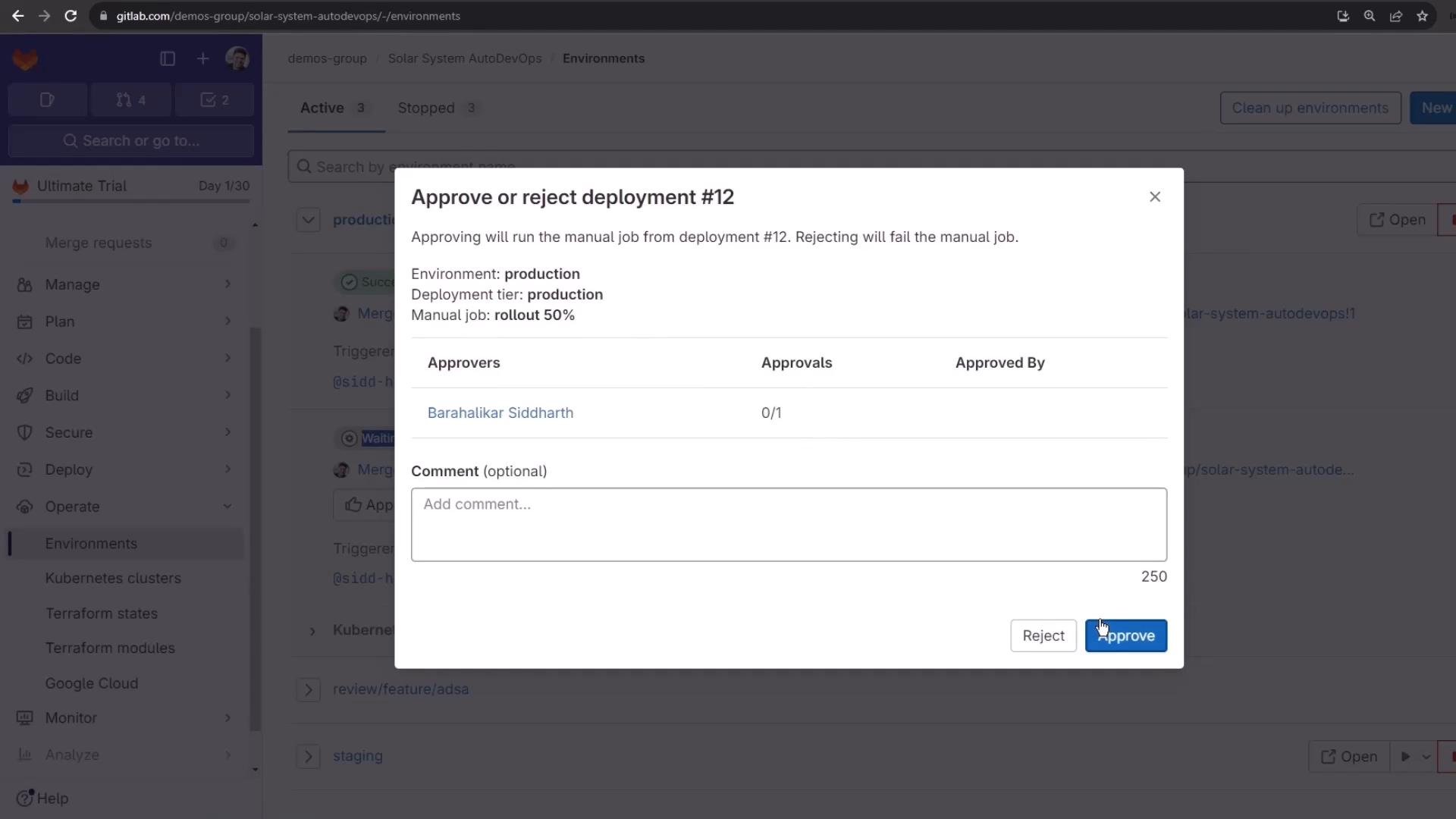 The Production environment UI will show multiple pending rollout jobs (e.g., Waiting for 10%, 25%, 50%, 100%). Approve the first rollout (10%), then run the corresponding manual job from the pipeline job page (“This job requires a manual action” → Run job).
 What the 10% rollout does
When you run the 10% rollout, Auto DevOps (via the auto-deploy helper) generally performs these actions:
* Validate Kubernetes domain and kubecontext.
* Fetch or use the built-in Helm chart for your app.
* Ensure the `production` namespace exists.
* Create or update any required Kubernetes secrets.
* Install a canary Helm release (for example, `production-canary`) into the `production` namespace.
* Create a canary-specific Ingress annotated with a weight to split traffic.
* Persist the environment URL as a job artifact.
Example job log excerpt (condensed):
```text theme={null}
Release "production-canary" does not exist. Installing it now.
NAME: production-canary
LAST DEPLOYED: Fri Feb 9 18:54:10 2024
NAMESPACE: production
STATUS: deployed
REVISION: 1
NOTES:
Application should be accessible at
http://demos-group-solar-system-autodevops.139.84.208.48.nip.io/
deployment "production-canary" successfully rolled out
Job succeeded
```
After the 10% rollout completes, you will see extra canary pods alongside stable production pods. Note: traffic split is controlled by the Ingress weight annotation — not by the relative pod counts. It’s common to have similar replica counts for stable and canary deployments while the ingress sends only \~10% of traffic to canary.
Checking the deployments and the Ingress
You’ll have two Deployments and two Ingresses when canary is running. The canary Ingress contains nginx annotations that trigger weighted routing:
```bash theme={null}
k -n production get ing
```
Sample output (condensed):
```text theme={null}
production-auto-deploy.nip.io 139.84.208.48 80,443 4h38m
production-canary-auto-deploy.nip.io 139.84.208.48 80,443 2m45s
```
Ingress YAML snippet (production canary ingress):
```yaml theme={null}
apiVersion: networking.k8s.io/v1
kind: Ingress
metadata:
annotations:
kubernetes.io/ingress.class: nginx
kubernetes.io/tls-acme: "true"
meta.helm.sh/release-name: production-canary
meta.helm.sh/release-namespace: production
nginx.ingress.kubernetes.io/canary: "true"
nginx.ingress.kubernetes.io/canary-by-header: canary
nginx.ingress.kubernetes.io/canary-weight: "10"
labels:
app: production
app.kubernetes.io/instance: production-canary
spec:
rules:
- host: demos-group-solar-system-autodevops.139.84.208.48.nip.io
```
How traffic is split
* `nginx.ingress.kubernetes.io/canary: "true"` marks the ingress resource as a canary target.
* `nginx.ingress.kubernetes.io/canary-weight: "10"` instructs the ingress controller to route \~10% of requests to the canary backend and the remainder to stable.
* `nginx.ingress.kubernetes.io/canary-by-header: canary` enables header-based routing if you want deterministic routing for tests.
Verify the split by issuing many requests and observing which pod responds (the sample app returns the pod name in `/os`):
```bash theme={null}
# Check for responses coming from canary pods
while true; do curl -sk https://demos-group-solar-system-autodevops.139.84.208.48.nip.io/os | jq -r .os; done
```
On a 10% rollout you should see roughly 1 in 10 responses coming from `production-canary-*` pods.
UI verification
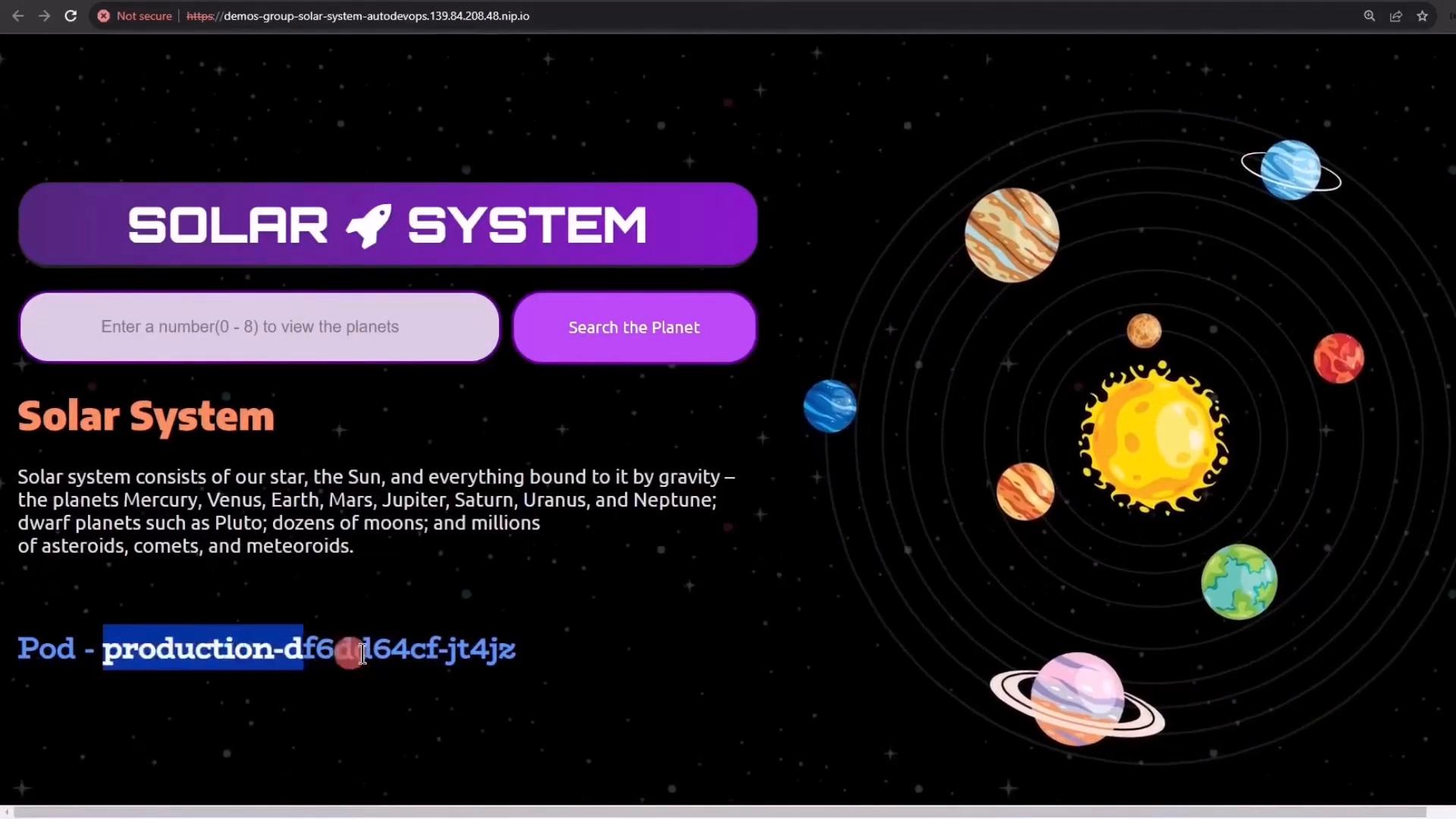
From the browser you may notice small visual differences when a canary is active. In this demo the canary uses a static, non-spinning solar system background while the stable production uses a dynamic/spinning version. Refreshing the page repeatedly will intermittently show the canary UI for some requests.
What the 10% rollout does
When you run the 10% rollout, Auto DevOps (via the auto-deploy helper) generally performs these actions:
* Validate Kubernetes domain and kubecontext.
* Fetch or use the built-in Helm chart for your app.
* Ensure the `production` namespace exists.
* Create or update any required Kubernetes secrets.
* Install a canary Helm release (for example, `production-canary`) into the `production` namespace.
* Create a canary-specific Ingress annotated with a weight to split traffic.
* Persist the environment URL as a job artifact.
Example job log excerpt (condensed):
```text theme={null}
Release "production-canary" does not exist. Installing it now.
NAME: production-canary
LAST DEPLOYED: Fri Feb 9 18:54:10 2024
NAMESPACE: production
STATUS: deployed
REVISION: 1
NOTES:
Application should be accessible at
http://demos-group-solar-system-autodevops.139.84.208.48.nip.io/
deployment "production-canary" successfully rolled out
Job succeeded
```
After the 10% rollout completes, you will see extra canary pods alongside stable production pods. Note: traffic split is controlled by the Ingress weight annotation — not by the relative pod counts. It’s common to have similar replica counts for stable and canary deployments while the ingress sends only \~10% of traffic to canary.
Checking the deployments and the Ingress
You’ll have two Deployments and two Ingresses when canary is running. The canary Ingress contains nginx annotations that trigger weighted routing:
```bash theme={null}
k -n production get ing
```
Sample output (condensed):
```text theme={null}
production-auto-deploy.nip.io 139.84.208.48 80,443 4h38m
production-canary-auto-deploy.nip.io 139.84.208.48 80,443 2m45s
```
Ingress YAML snippet (production canary ingress):
```yaml theme={null}
apiVersion: networking.k8s.io/v1
kind: Ingress
metadata:
annotations:
kubernetes.io/ingress.class: nginx
kubernetes.io/tls-acme: "true"
meta.helm.sh/release-name: production-canary
meta.helm.sh/release-namespace: production
nginx.ingress.kubernetes.io/canary: "true"
nginx.ingress.kubernetes.io/canary-by-header: canary
nginx.ingress.kubernetes.io/canary-weight: "10"
labels:
app: production
app.kubernetes.io/instance: production-canary
spec:
rules:
- host: demos-group-solar-system-autodevops.139.84.208.48.nip.io
```
How traffic is split
* `nginx.ingress.kubernetes.io/canary: "true"` marks the ingress resource as a canary target.
* `nginx.ingress.kubernetes.io/canary-weight: "10"` instructs the ingress controller to route \~10% of requests to the canary backend and the remainder to stable.
* `nginx.ingress.kubernetes.io/canary-by-header: canary` enables header-based routing if you want deterministic routing for tests.
Verify the split by issuing many requests and observing which pod responds (the sample app returns the pod name in `/os`):
```bash theme={null}
# Check for responses coming from canary pods
while true; do curl -sk https://demos-group-solar-system-autodevops.139.84.208.48.nip.io/os | jq -r .os; done
```
On a 10% rollout you should see roughly 1 in 10 responses coming from `production-canary-*` pods.
UI verification
From the browser you may notice small visual differences when a canary is active. In this demo the canary uses a static, non-spinning solar system background while the stable production uses a dynamic/spinning version. Refreshing the page repeatedly will intermittently show the canary UI for some requests.
 Increasing the canary percentage
To increase traffic to canary, approve and run the next manual rollout (25% or 50%). The pipeline updates the `production-canary` Helm release and updates the canary ingress annotation, for example:
```yaml theme={null}
nginx.ingress.kubernetes.io/canary-weight: "50"
```
Example job log excerpt for updating the canary:
```text theme={null}
Release "production-canary" has been upgraded. Happy Helming!
NAME: production-canary
LAST DEPLOYED: Fri Feb 9 19:00:43 2024
NAMESPACE: production
STATUS: deployed
REVISION: 2
deployment "production-canary" successfully rolled out
Job succeeded
```
With a higher weight, more requests will be routed to `production-canary-*` pods.
Rolling out 100% (promote canary to stable)
When you approve the 100% rollout, Auto DevOps promotes the canary to stable:
* Update the `production` Helm release with the new version.
* Wait for the stable rollout to complete.
* Uninstall the `production-canary` release and delete canary-specific secrets/resources.
* Persist the environment URL and finish the job.
Example log excerpt during promotion and cleanup:
```text theme={null}
Release "production" has been upgraded. Happy Helming!
NAME: production
LAST DEPLOYED: Fri Feb 9 19:03:09 2024
NAMESPACE: production
STATUS: deployed
REVISION: 2
deployment "production" successfully rolled out
$ auto-deploy delete canary
release "production-canary" uninstalled
secret "production-canary-secret" deleted
Job succeeded
```
After the 100% rollout completes, validate that only the stable `production-*` pods remain:
```bash theme={null}
k -n production get pods
```
Sample output after successful promotion:
```bash theme={null}
NAME READY STATUS RESTARTS AGE
production-84c4bd9684-2qp8t 1/1 Running 0 16h
production-84c4bd9684-6pklc 1/1 Running 0 16h
...
production-84c4bd9684-wstxj 1/1 Running 0 16h
```
Important behavior and rollback considerations
Once you perform a 100% rollout (promotion), the canary release is removed and the new version becomes the stable production release. You cannot reduce the production rollout percentage after promotion — to revert to a previous version you must perform a rollback to an earlier release.
Summary
* Merging into `main` triggered the Auto DevOps pipeline that runs review, staging, and manual production rollouts.
* Staging validates the deployment in its own namespace, and Auto DevOps can create temporary DAST environments for security scans.
* Production rollouts are manual when the environment is protected and support incremental canary percentages (10%, 25%, 50%, 100%) — each percentage maps to a manual job requiring approval.
* The canary is deployed as a separate Helm release plus an Ingress annotated for weighted routing. The ingress weight (not pod counts) determines the traffic split.
* Promoting to 100% updates the stable `production` release and deletes canary resources.
* To revert after a 100% promotion, perform a rollback to a previous release.
Increasing the canary percentage
To increase traffic to canary, approve and run the next manual rollout (25% or 50%). The pipeline updates the `production-canary` Helm release and updates the canary ingress annotation, for example:
```yaml theme={null}
nginx.ingress.kubernetes.io/canary-weight: "50"
```
Example job log excerpt for updating the canary:
```text theme={null}
Release "production-canary" has been upgraded. Happy Helming!
NAME: production-canary
LAST DEPLOYED: Fri Feb 9 19:00:43 2024
NAMESPACE: production
STATUS: deployed
REVISION: 2
deployment "production-canary" successfully rolled out
Job succeeded
```
With a higher weight, more requests will be routed to `production-canary-*` pods.
Rolling out 100% (promote canary to stable)
When you approve the 100% rollout, Auto DevOps promotes the canary to stable:
* Update the `production` Helm release with the new version.
* Wait for the stable rollout to complete.
* Uninstall the `production-canary` release and delete canary-specific secrets/resources.
* Persist the environment URL and finish the job.
Example log excerpt during promotion and cleanup:
```text theme={null}
Release "production" has been upgraded. Happy Helming!
NAME: production
LAST DEPLOYED: Fri Feb 9 19:03:09 2024
NAMESPACE: production
STATUS: deployed
REVISION: 2
deployment "production" successfully rolled out
$ auto-deploy delete canary
release "production-canary" uninstalled
secret "production-canary-secret" deleted
Job succeeded
```
After the 100% rollout completes, validate that only the stable `production-*` pods remain:
```bash theme={null}
k -n production get pods
```
Sample output after successful promotion:
```bash theme={null}
NAME READY STATUS RESTARTS AGE
production-84c4bd9684-2qp8t 1/1 Running 0 16h
production-84c4bd9684-6pklc 1/1 Running 0 16h
...
production-84c4bd9684-wstxj 1/1 Running 0 16h
```
Important behavior and rollback considerations
Once you perform a 100% rollout (promotion), the canary release is removed and the new version becomes the stable production release. You cannot reduce the production rollout percentage after promotion — to revert to a previous version you must perform a rollback to an earlier release.
Summary
* Merging into `main` triggered the Auto DevOps pipeline that runs review, staging, and manual production rollouts.
* Staging validates the deployment in its own namespace, and Auto DevOps can create temporary DAST environments for security scans.
* Production rollouts are manual when the environment is protected and support incremental canary percentages (10%, 25%, 50%, 100%) — each percentage maps to a manual job requiring approval.
* The canary is deployed as a separate Helm release plus an Ingress annotated for weighted routing. The ingress weight (not pod counts) determines the traffic split.
* Promoting to 100% updates the stable `production` release and deletes canary resources.
* To revert after a 100% promotion, perform a rollback to a previous release.
 Further reading and references
* GitLab Auto DevOps and deployment strategies: [https://docs.gitlab.com/ee/topics/autodevops/](https://docs.gitlab.com/ee/topics/autodevops/)
* Helm — The Kubernetes Package Manager: [https://helm.sh/docs/](https://helm.sh/docs/)
* NGINX Ingress Controller annotations for canary deployments: [https://kubernetes.github.io/ingress-nginx/user-guide/nginx-configuration/annotations/](https://kubernetes.github.io/ingress-nginx/user-guide/nginx-configuration/annotations/)
This documentation is built and hosted on [Mintlify](https://mintlify.com), a developer documentation platform.
Further reading and references
* GitLab Auto DevOps and deployment strategies: [https://docs.gitlab.com/ee/topics/autodevops/](https://docs.gitlab.com/ee/topics/autodevops/)
* Helm — The Kubernetes Package Manager: [https://helm.sh/docs/](https://helm.sh/docs/)
* NGINX Ingress Controller annotations for canary deployments: [https://kubernetes.github.io/ingress-nginx/user-guide/nginx-configuration/annotations/](https://kubernetes.github.io/ingress-nginx/user-guide/nginx-configuration/annotations/)
This documentation is built and hosted on [Mintlify](https://mintlify.com), a developer documentation platform.