> ## Documentation Index
> Fetch the complete documentation index at: https://notes.kodekloud.com/llms.txt
> Use this file to discover all available pages before exploring further.
# What is Auto DevOps
> GitLab Auto DevOps is a CI/CD feature that automates pipeline generation, integrating best practices for build, test, and deployment stages.
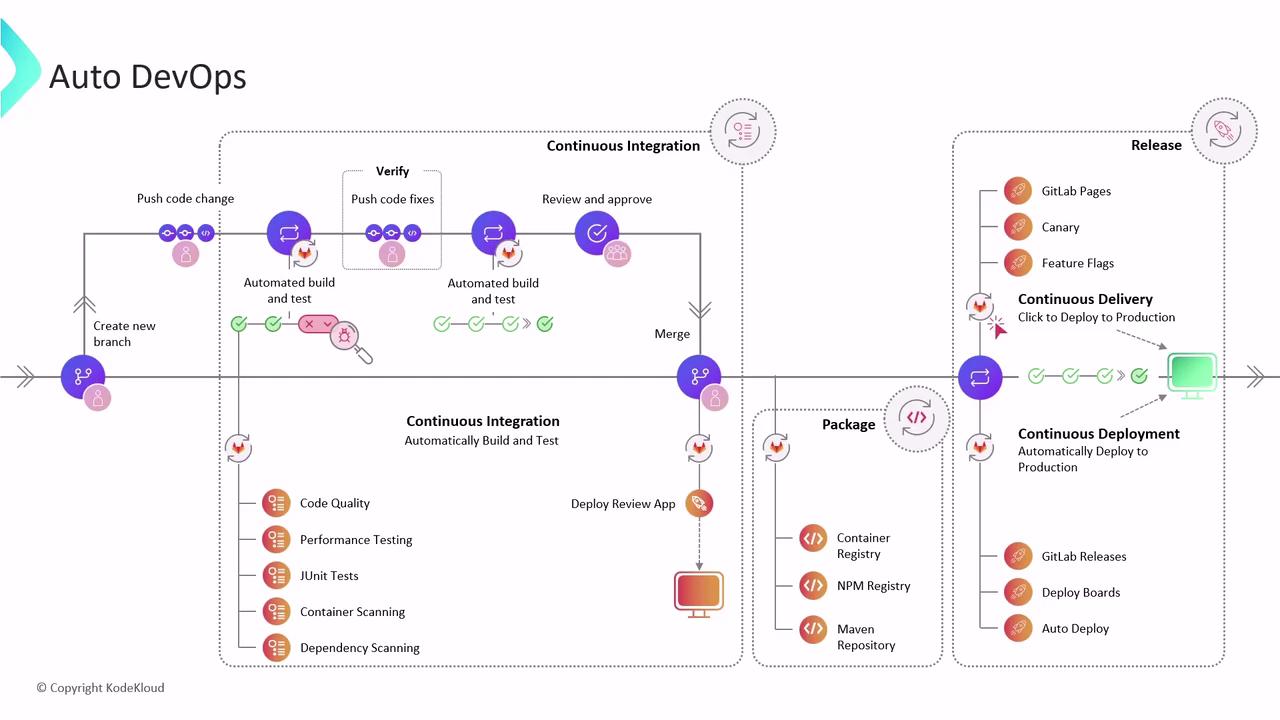
GitLab Auto DevOps is a built-in CI/CD feature that automatically detects your project’s language, framework, and configuration to generate a complete pipeline. It follows best practices across build, test, and deployment stages—integrating security scans, code quality checks, and container analysis—so you can focus on writing code instead of maintaining CI/CD scripts.
Auto DevOps provides:
* Automated build and containerization
* Comprehensive testing (unit, integration, security)
* Review Apps for testing merge request changes
* Continuous delivery or deployment after merge
Auto DevOps offers sensible defaults, but you can [customize the pipeline](https://docs.gitlab.com/ee/topics/autodevops/customize_deployment.html) via CI/CD templates or project-specific `.gitlab-ci.yml` overrides.
## How Auto DevOps Works at the Project Level
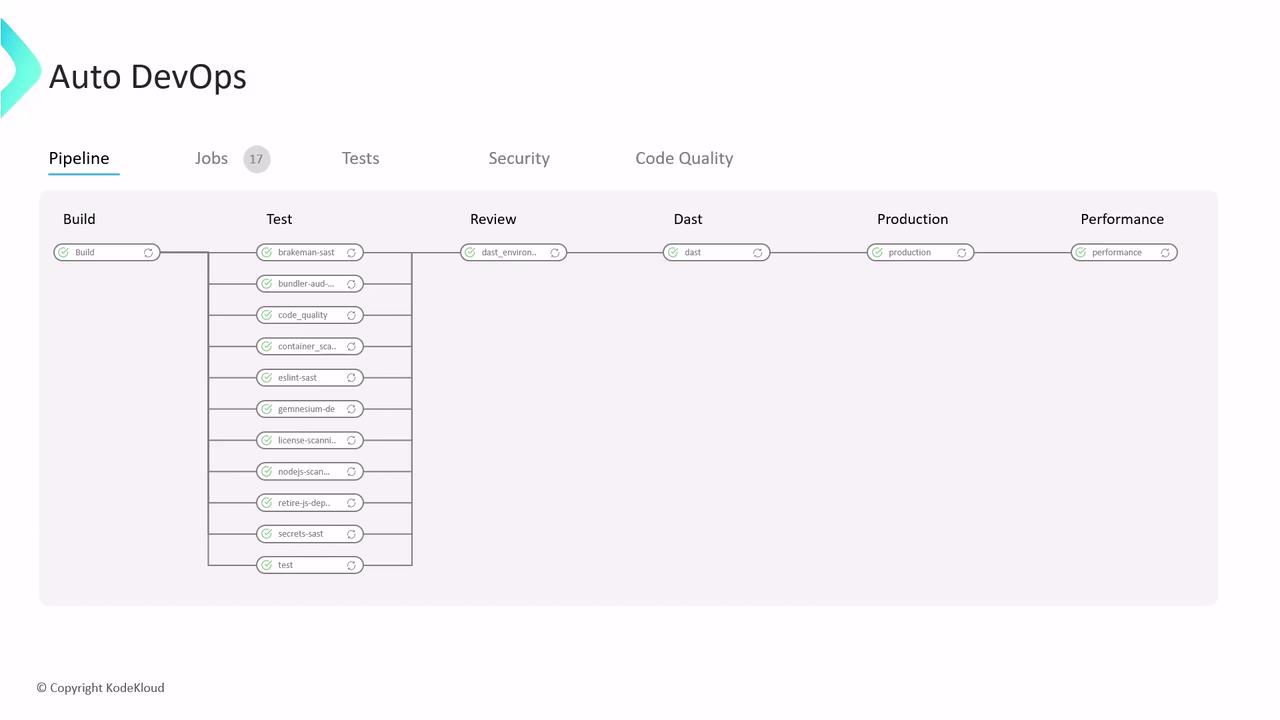
When you enable Auto DevOps in **Settings > CI/CD**, GitLab inspects your repository and applies predefined CI/CD templates. The default pipeline includes three core stages:
### 1. Build Stage
* Detects a `Dockerfile` in your repo and builds a container image.
* Falls back to [Heroku buildpacks](https://devcenter.heroku.com/articles/buildpacks) if no Dockerfile is found.
* Outputs a ready-to-use Docker image for subsequent stages.
### 2. Test Stage
Runs your test suite and adds built-in checks:
| Check Type | Description |
| ------------------------------------------ | -------------------------------------------------------------------------- |
| Code Quality | Analyzes source code for maintainability and style issues. |
| Static Application Security Testing (SAST) | Scans code for common vulnerabilities. |
| Secret Detection | Searches for accidentally committed credentials. |
| Dependency Scanning | Reviews `Gemfile.lock`, `package.json`, etc., for vulnerable dependencies. |
| Container Scanning | Scans the built Docker image for OS-level vulnerabilities. |
Supported languages include Ruby, Node.js, Java (Maven/Gradle), Python, Go, and more. All reports appear in the pipeline UI for immediate feedback.
### 3. Kubernetes Deployment
If you register a [Kubernetes cluster](https://kubernetes.io/) in **Operations > Kubernetes**, Auto DevOps can deploy your app automatically. Supported cluster providers include:
* [Amazon EKS (Elastic Kubernetes Service)](https://docs.aws.amazon.com/eks/latest/userguide/what-is-eks.html)
* [Google Kubernetes Engine (GKE)](https://cloud.google.com/kubernetes-engine)
* Self-managed (Bare Metal) clusters
## Review Apps and Security Testing
When a merge request is opened, Auto DevOps spins up a **Review App**—a temporary, live environment to validate changes before merge. This deployment uses the [Helm Auto Deploy chart](https://docs.gitlab.com/ee/topics/autodevops/deploy_with_helm.html), which you can customize.
Once the Review App is live, Auto DevOps runs Dynamic Application Security Testing (DAST) using [OWASP ZAP](https://www.zaproxy.org/). ZAP crawls the application, identifies vulnerabilities, and produces a comprehensive report with severity levels and remediation advice.
## Post-Merge Deployment and Performance Testing
After you merge to the default branch, Auto DevOps can deploy your application to staging or production based on your configuration. Post-deployment, it executes browser-based performance tests to benchmark page load times against previous releases—ensuring optimal user experience.
## Deployment Strategies
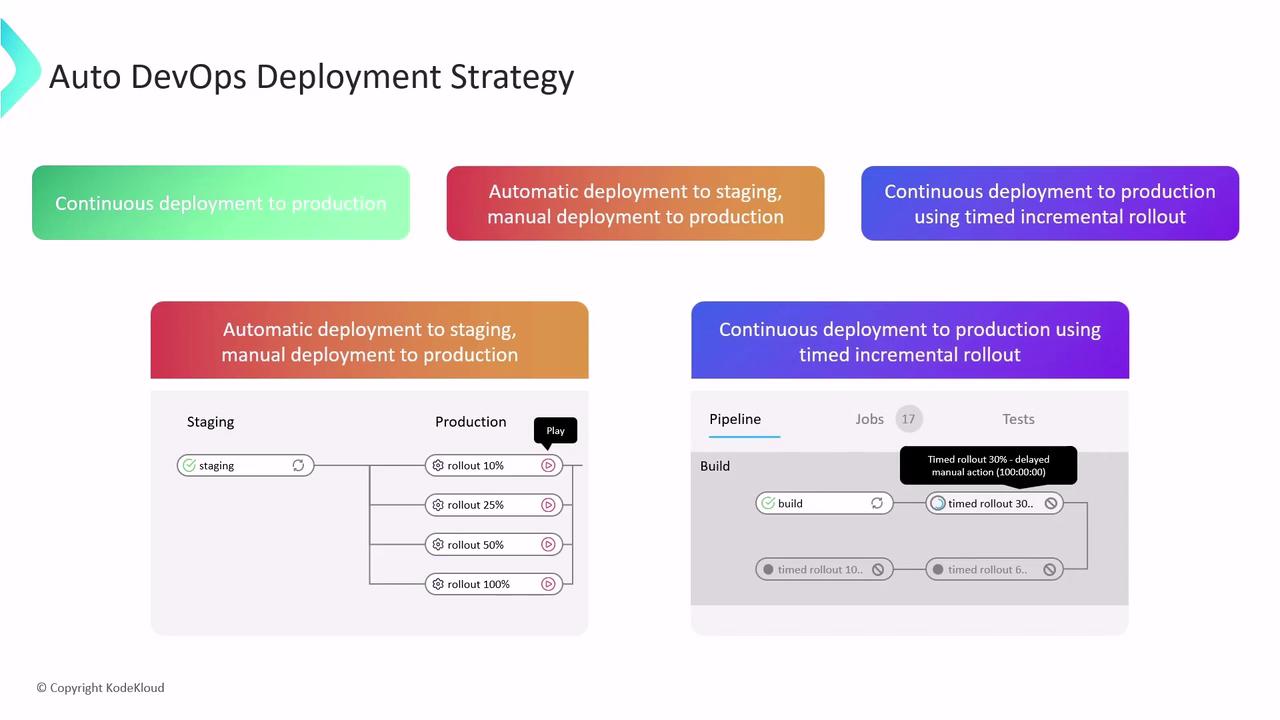
Choose from three release workflows to match your team’s requirements:
| Strategy | Behavior |
| -------------------------------------------- | ----------------------------------------------------------------------------------------------------------------------- |
| Continuous Deployment to Production | Deploys every successful pipeline run directly to production without manual steps. |
| Automatic Staging + Manual Production Deploy | Automatically updates staging; requires manual approval to promote changes to production (e.g., click the play button). |
| Timed Incremental Rollout | Performs staged deployments automatically with configurable delays (default: 5 minutes between stages). |
Ensure your rollback procedures are tested and documented. Timed rollouts reduce risk but require proper monitoring and alerts.
## Links and References
* [GitLab Auto DevOps documentation](https://docs.gitlab.com/ee/topics/autodevops/)
* [GitLab CI/CD Overview](https://docs.gitlab.com/ee/ci/)
* [Kubernetes Basics](https://kubernetes.io/docs/concepts/overview/what-is-kubernetes/)
* [OWASP ZAP Proxy](https://www.zaproxy.org/)
* [Heroku Buildpacks](https://devcenter.heroku.com/articles/buildpacks)