> ## Documentation Index
> Fetch the complete documentation index at: https://notes.kodekloud.com/llms.txt
> Use this file to discover all available pages before exploring further.
# Connecting a Kubernetes cluster with GitLab via agentK
> This guide explains how to use GitLab Kubernetes Agent for secure connectivity between Kubernetes clusters and GitLab, simplifying CI/CD processes.
In this guide, you’ll learn how to leverage the GitLab Kubernetes Agent (AgentK) for secure, bi-directional connectivity between your Kubernetes clusters and GitLab. AgentK eliminates the need to store raw Kubeconfig credentials in CI/CD variables, simplifies firewall/NAT traversal, and lays the foundation for GitOps-style workflows.
## Why Use the GitLab Kubernetes Agent?
Traditionally, CI/CD pipelines use a stored Kubeconfig file to authenticate against Kubernetes. However:
* Kubeconfig files contain sensitive data (API server URL, tokens, certificates).
* Storing them as masked variables still poses a risk if compromised.
* Connecting to clusters behind firewalls or NAT gateways can be complex.
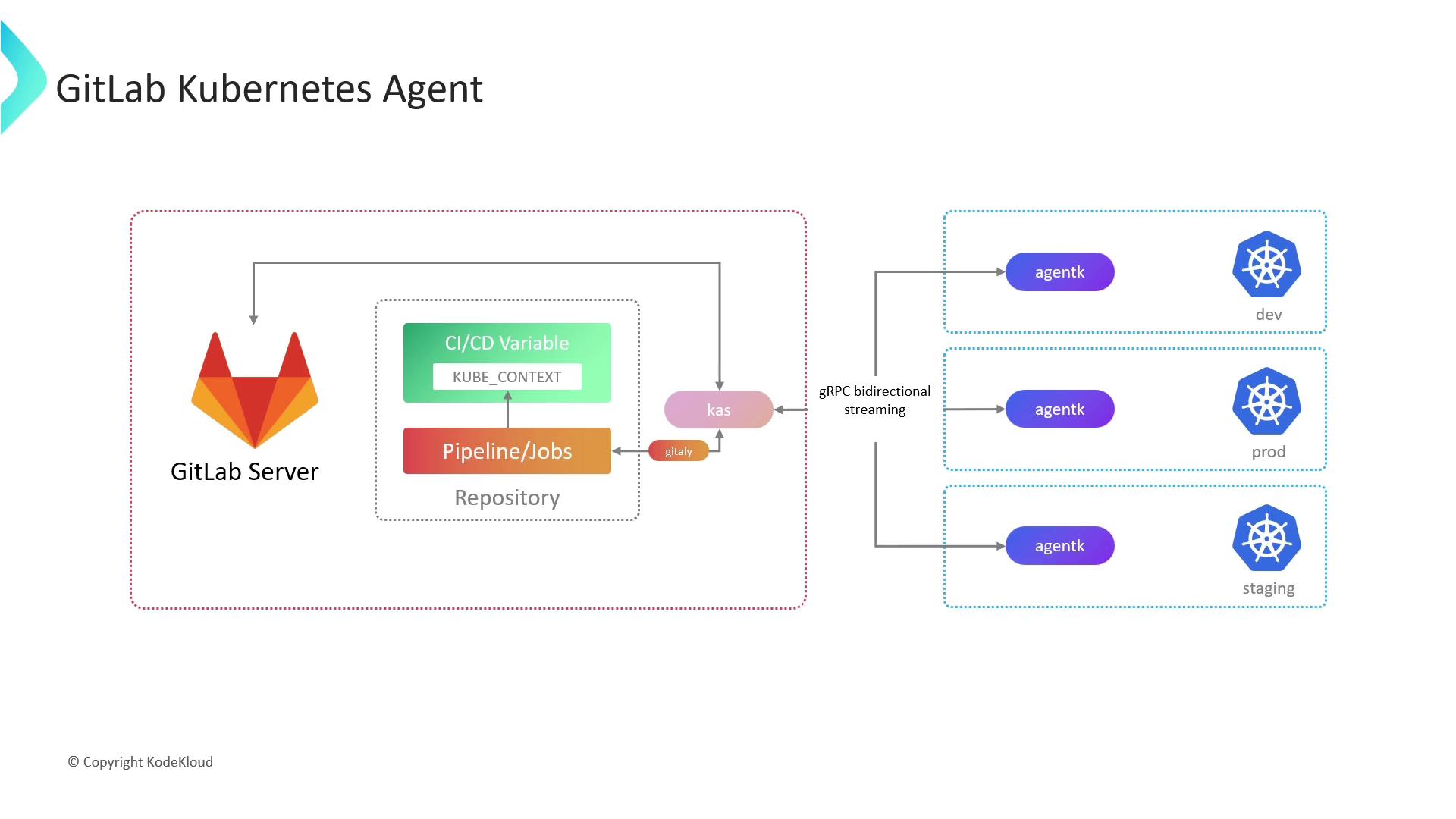
AgentK solves these challenges by initiating an outbound gRPC connection to GitLab’s Agent Server (KAS), enabling:
* Secure, credential-free communication
* Firewall/NAT traversal without port forwarding
* Bi-directional streaming for push and pull operations
AgentK is a lightweight pod running inside your cluster. It uses a token-based handshake with KAS to establish a persistent, encrypted channel—removing the need for direct API server exposure.
## Prerequisites
* A GitLab account with **Maintainer** or **Owner** access.
* A GitLab project to register the agent and store its configuration.
* A Kubernetes cluster v1.17+ (AgentK compatibility).
* `helm` CLI installed locally.
## 1. Register the GitLab Agent
1. In your GitLab project, navigate to **Operate > Kubernetes clusters**.
2. Click **Add Kubernetes cluster** and choose **GitLab Agent**.
3. Provide a unique **Agent name**.
4. GitLab will display a token and the Helm commands required for installation.
## 2. Install AgentK via Helm
Copy the Helm commands from the GitLab UI and execute them with your token:
```bash theme={null}
helm repo add gitlab https://charts.gitlab.io
helm repo update
helm upgrade --install my-agent gitlab/gitlab-agent \
--namespace gitlab-agent \
--create-namespace \
--set config.token= \
--set config.kasAddress=wss://kas.gitlab.com \
--set image.tag=v16.9.0
```
Keep your `` secret. Rotate the token if it is ever exposed.
After installation, AgentK will connect to GitLab automatically. You should see the agent status under **Operate > Kubernetes clusters**.
## 3. Configure the Agent
AgentK’s behavior is defined in your project’s repository at `.gitlab/agent//config.yaml`. Customize this file to control deployments, security, and remote workspaces.
```yaml theme={null}
gitops:
# Projects containing Kubernetes manifests to deploy
manifest_projects:
- id: gitlab-org/my-project
default_namespace: production
# Which projects can trigger CI/CD through this agent
ci_access:
projects:
- id: gitlab-org/my-project
# Remote development (GitLab EE only)
workspaces:
enabled: true
# configure workspace settings here
```
| Configuration Block | Description |
| ------------------------- | --------------------------------------------------------------------- |
| gitops.manifest\_projects | List of repositories with Kubernetes manifests and target namespaces. |
| gitops.ci\_access | Projects allowed to use this agent in CI/CD pipelines. |
| workspaces | Remote development settings (Enterprise Edition). |
Modify `config.yaml` as code and push changes to your default branch. AgentK watches this file and applies updates automatically.
## References
* [GitLab Kubernetes Agent Documentation](https://docs.gitlab.com/ee/user/clusters/agent/)
* [GitOps with GitLab](https://docs.gitlab.com/ee/topics/gitops/)
* [Helm Charts for GitLab](https://gitlab.com/gitlab-org/charts/gitlab-agent)