> ## Documentation Index
> Fetch the complete documentation index at: https://notes.kodekloud.com/llms.txt
> Use this file to discover all available pages before exploring further.
# Job Setup Kubectl
> This guide explains how to add a dev-deploy stage in a GitLab CI pipeline to install kubectl and deploy Kubernetes manifests.
In this guide, we'll walk through adding a **dev-deploy** stage to your existing GitLab CI pipeline. This stage installs the `kubectl` CLI on an Alpine runner and deploys Kubernetes manifest files to your cluster.
## 1. Define Pipeline Stages
First, extend your `.gitlab-ci.yml` to include the new deploy stage alongside `test` and `containerization`:
```yaml theme={null}
stages:
- test
- containerization
- dev-deploy
variables:
DOCKER_USERNAME: siddharth67
IMAGE_VERSION: $CI_PIPELINE_ID
```
| Stage | Purpose | Example Job |
| ------------------ | ---------------------------------------------------- | ---------------- |
| `test` | Run unit tests and code coverage | `unit_tests` |
| `containerization` | Build and push Docker images | `build_image` |
| `dev-deploy` | Install `kubectl` and deploy manifests to Kubernetes | `k8s_dev_deploy` |
Make sure the `DOCKER_USERNAME` and `IMAGE_VERSION` variables align with your project settings.
## 2. Create the `k8s_dev_deploy` Job
Add a job in the **dev-deploy** stage that uses Alpine 3.7, installs `kubectl`, and avoids pulling artifacts from earlier stages:
```yaml theme={null}
k8s_dev_deploy:
stage: dev-deploy
image:
name: alpine:3.7
dependencies: []
before_script:
# Download and install the latest stable kubectl binary
- wget -qO- "https://storage.googleapis.com/kubernetes-release/release/$(wget -qO- https://storage.googleapis.com/kubernetes-release/release/stable.txt)/bin/linux/amd64/kubectl" -O kubectl
- chmod +x kubectl
- mv kubectl /usr/bin/kubectl
script:
- kubectl version -o yaml
```
## 3. Visualize the Pipeline
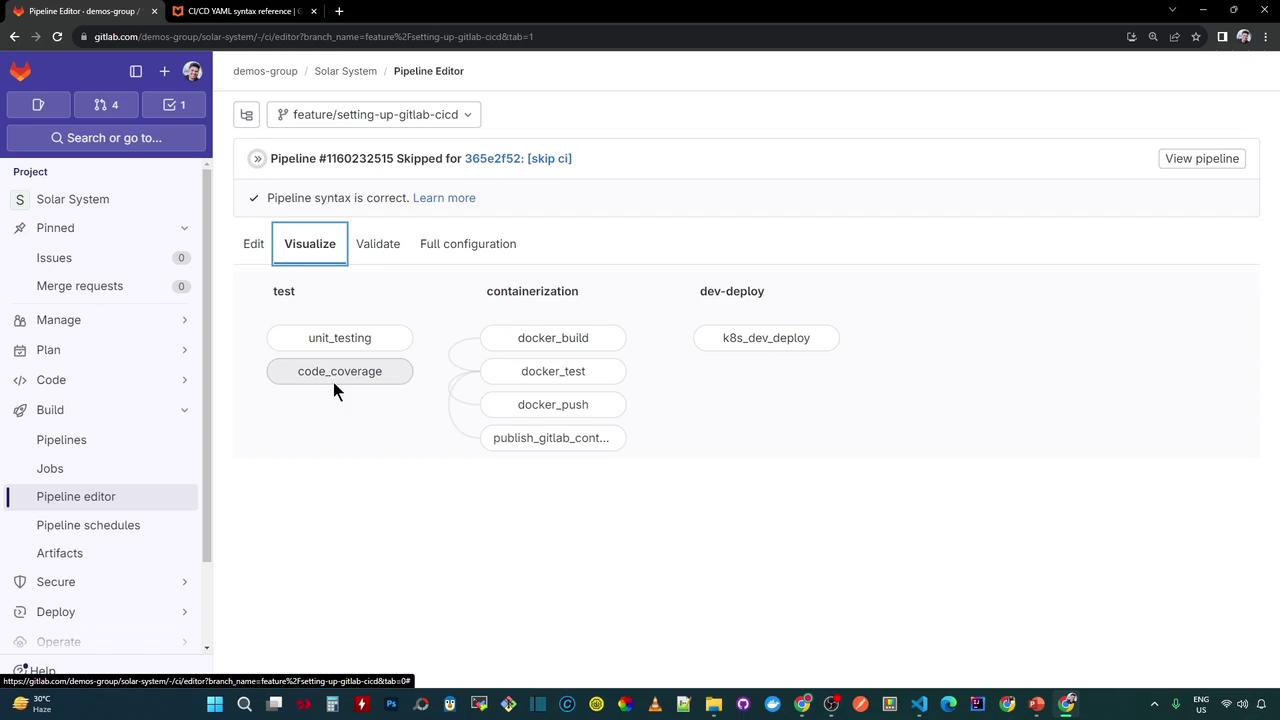
Once committed, your pipeline will include three stages—`test`, `containerization`, and `dev-deploy`. The diagram below shows how the new **dev-deploy** stage sits at the end of the workflow:
### Speed Up Iterations
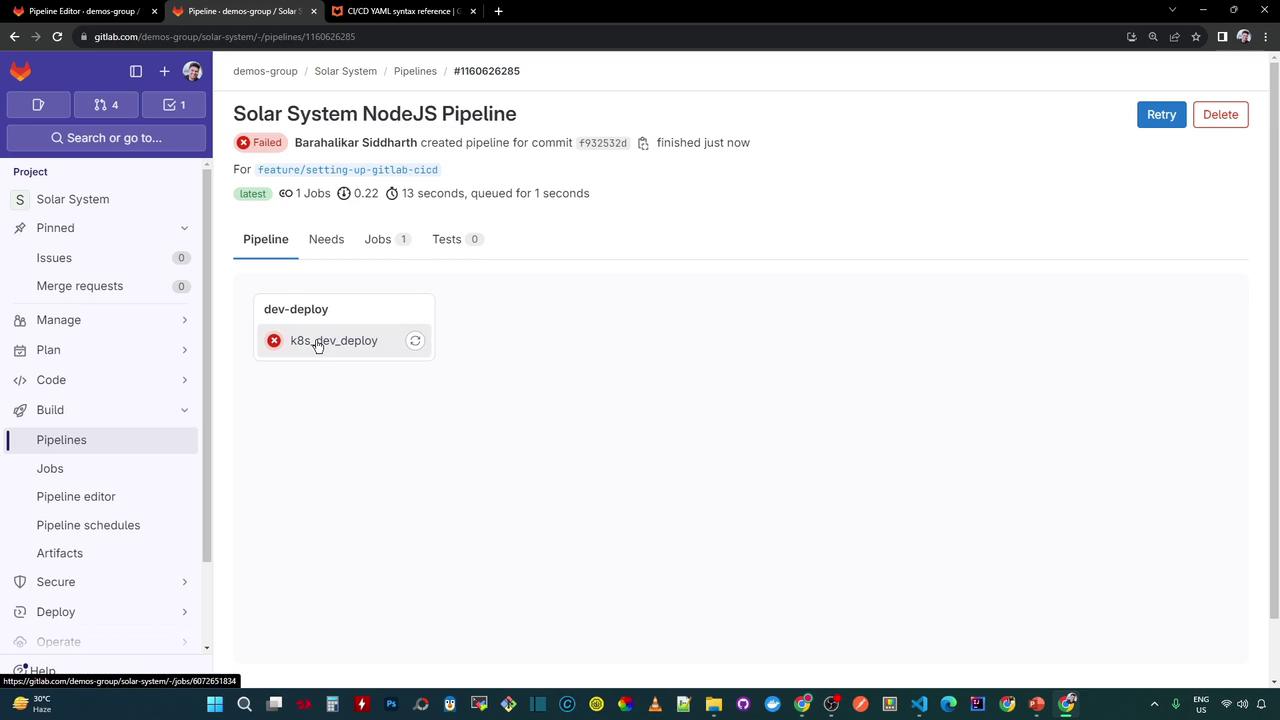
Since this deployment job doesn’t depend on artifacts from earlier stages, you can temporarily comment out other jobs (e.g., using Ctrl+/). This lets you focus solely on **dev-deploy** during development.
## 4. Troubleshoot the `kubectl version` Error
In the job logs, you’ll see the `kubectl` binary download successfully, but the `version` command fails to retrieve the server version:
```bash theme={null}
$ wget -qO- https://storage.googleapis.com/kubernetes-release/release/$(wget -qO- https://storage.googleapis.com/kubernetes-release/release/stable.txt)/bin/linux/amd64/kubectl -O kubectl
$ chmod +x kubectl
$ mv kubectl /usr/bin/kubectl
$ kubectl version -o yaml
clientVersion:
buildDate: "2024-01-17T15:51:03Z"
compiler: gc
gitCommit: bc40b19f2782041b3fb39fcaf3a995c4de90d2
gitTreeState: Clean
gitVersion: v1.29.1
major: "1"
minor: "29"
platform: linux/amd64
kustomizeVersion: v5.4.0-2023601165947-6ce0bf390ce3
ERROR: Job failed: exit code 1
```
This error indicates that `kubectl` cannot connect to a Kubernetes API server without a valid kubeconfig file. You must configure the kubeconfig before running any cluster operations.
## 5. Next Steps
1. Add your cluster credentials to a GitLab CI/CD variable (e.g., `KUBE_CONFIG`).
2. Write the kubeconfig file in a `before_script` step.
3. Re-run the pipeline to confirm that `kubectl version` returns both client and server information.
## References
* [Kubernetes Basics](https://kubernetes.io/docs/concepts/overview/what-is-kubernetes/)
* [GitLab CI/CD Pipelines](https://docs.gitlab.com/ee/ci/pipelines/)
* [kubectl Installation Guide](https://kubernetes.io/docs/tasks/tools/)