> ## Documentation Index
> Fetch the complete documentation index at: https://notes.kodekloud.com/llms.txt
> Use this file to discover all available pages before exploring further.
# Kubernetes A Brief Overview
> Kubernetes is an open-source platform for automating deployment, scaling, and management of containerized applications.
Kubernetes is an open-source container orchestration platform that automates the deployment, scaling, and management of containerized applications. Originally developed by Google and now maintained by the [Cloud Native Computing Foundation (CNCF)](https://www.cncf.io/), Kubernetes has become the de facto standard for running microservices at scale.
## Cluster Architecture
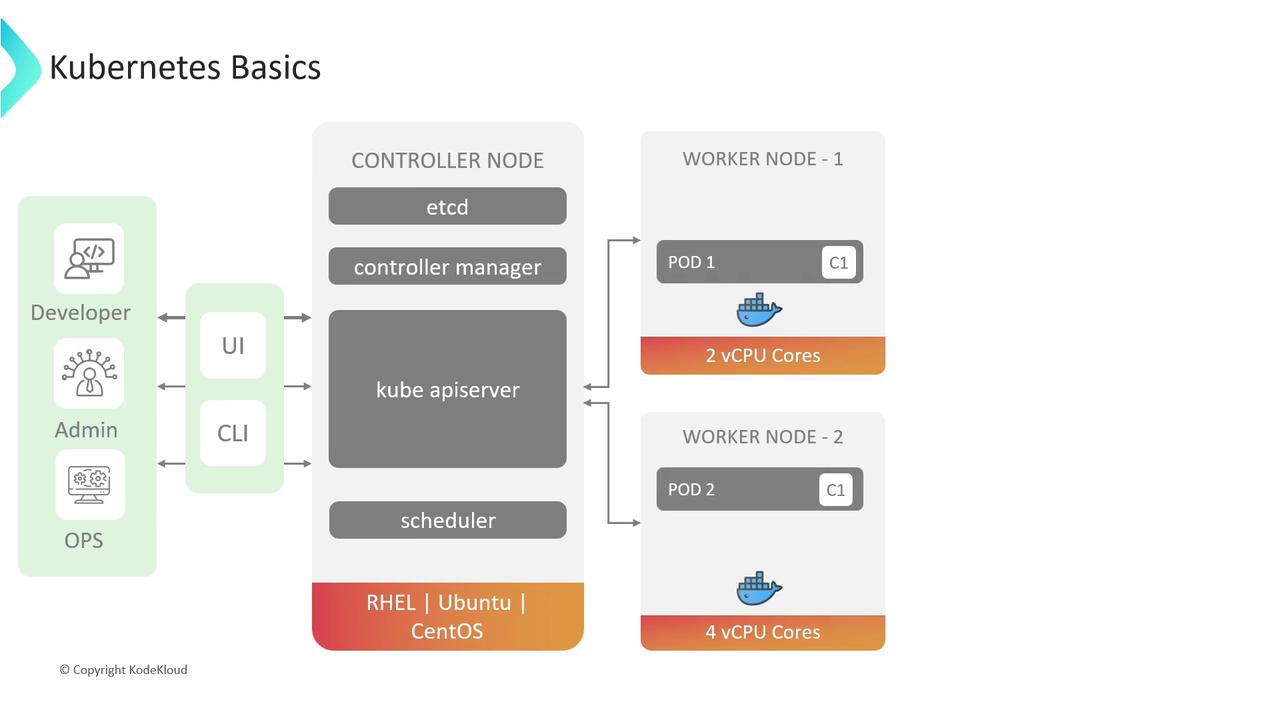
A Kubernetes cluster is composed of multiple machines—physical or virtual—called **nodes**. Nodes are grouped into:
* **Controller (Master) Nodes**: Maintain the cluster state and scheduling.
* **Worker Nodes**: Run your containerized workloads.
### Controller Node Components
| Component | Responsibility |
| ------------------ | --------------------------------------------------------------------------------- |
| API Server | Exposes the Kubernetes API for all cluster operations. |
| Controller Manager | Runs controllers (e.g., Node, Replication) to reconcile desired vs. actual state. |
| Scheduler | Assigns Pods to worker nodes based on resource requirements and policies. |
| etcd | Distributed key–value store for cluster configuration and state data. |
## Pods: The Smallest Deployable Unit
A **Pod** is the atomic unit in Kubernetes. It can host one or more containers that:
* Share the same network namespace (IP & ports).
* Mount the same storage volumes.
* Communicate via `localhost`.
When a standalone Pod fails or is deleted, Kubernetes does not recreate it automatically. To enable self-healing and horizontal scaling, use higher-level controllers.
For resilience and zero-downtime updates, wrap Pods in Deployments or ReplicaSets. These controllers ensure the desired replica count and support rolling updates and rollbacks.
## Deployments
A **Deployment** provides a declarative approach to managing Pods and ReplicaSets:
* Define the desired state (e.g., number of replicas, container image version).
* Kubernetes performs rolling updates or automatic rollbacks.
* Simplifies application versioning and scaling.
```yaml theme={null}
apiVersion: apps/v1
kind: Deployment
metadata:
name: nginx-deployment
spec:
replicas: 3
selector:
matchLabels:
app: nginx
template:
metadata:
labels:
app: nginx
spec:
containers:
- name: nginx
image: nginx:1.19
ports:
- containerPort: 80
```
## Services
Kubernetes **Services** provide a stable network endpoint (virtual IP and DNS name) for a set of Pods. Services decouple application components, enabling you to scale or replace Pods without updating clients.
### Service Types
| Type | Description | Use Case |
| ------------ | ---------------------------------------------------------------- | -------------------------------------------------------------------- |
| ClusterIP | Exposes Service on a cluster-internal IP (default). | Internal communication between microservices. |
| NodePort | Opens a specific port on each node to forward to the Service. | Expose a service on each node’s IP at a static port. |
| LoadBalancer | Provisions an external load balancer (cloud-provider dependent). | Route external traffic to the Service using a managed load balancer. |
Using a LoadBalancer Service may incur additional costs with your cloud provider (e.g., AWS ELB, GCP Load Balancer). Ensure you understand your infrastructure’s billing model before provisioning.
## Ingress
An **Ingress** resource manages external HTTP/HTTPS access, consolidating multiple Services under a single IP or hostname. Ingress allows advanced routing based on hostnames, paths, or headers, reducing the need for multiple load balancers. An external Ingress controller (e.g., NGINX, Traefik) implements these rules.
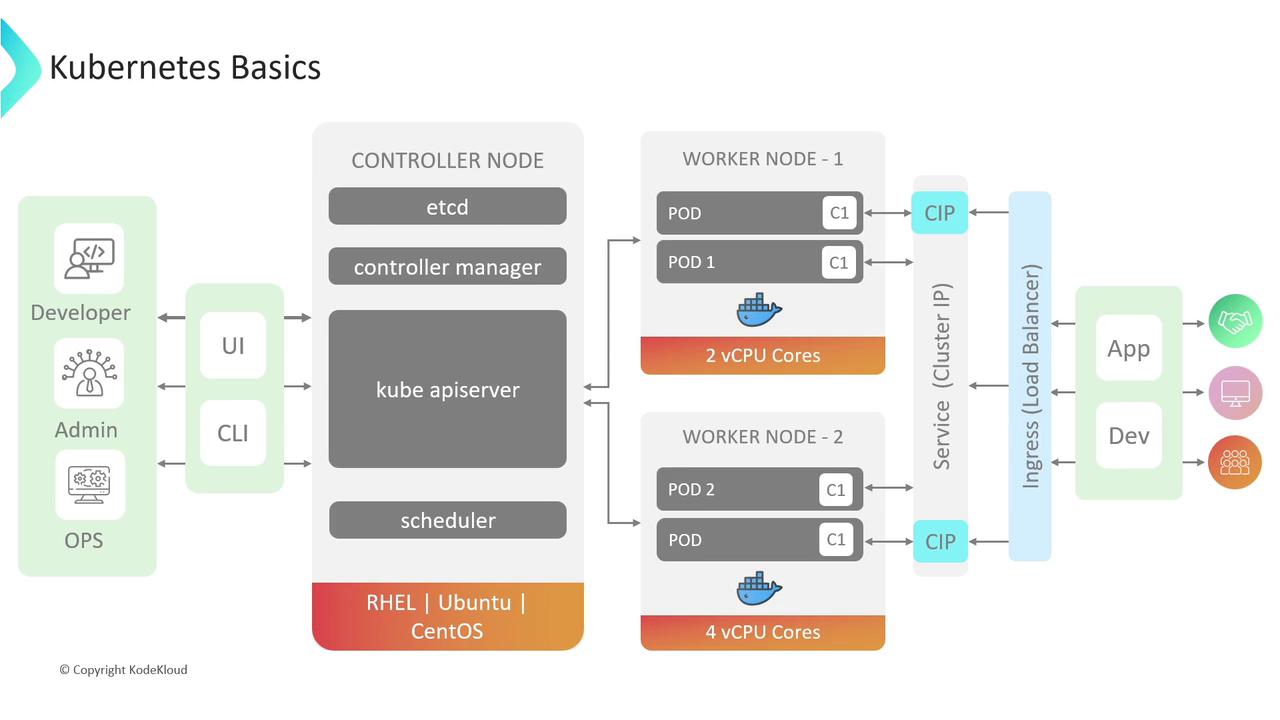
Typically, Services remain of type **ClusterIP** when fronted by Ingress. This ensures that external traffic flows through the Ingress controller rather than directly to node ports.
***
## References
* [Kubernetes Documentation](https://kubernetes.io/docs/)
* [Cloud Native Computing Foundation (CNCF)](https://www.cncf.io/)
* [AWS Elastic Load Balancing](https://aws.amazon.com/elasticloadbalancing/)
* [GCP Load Balancing](https://cloud.google.com/load-balancing/)