> ## Documentation Index
> Fetch the complete documentation index at: https://notes.kodekloud.com/llms.txt
> Use this file to discover all available pages before exploring further.
# Docker Test
> This guide explains how to validate Docker images in GitLab CI/CD by adding a testing job to ensure containers are production-ready.
In robust CI/CD workflows, validating your Docker image before pushing to a registry helps catch runtime issues early. This guide shows you how to extend a GitLab CI pipeline with a `docker_test` job that consumes the image built by `docker_build`, verifies the `/live` endpoint, and ensures your container is production-ready.
## CI/CD Pipeline Overview
Define your basic stages and shared variables in `.gitlab-ci.yml`:
```yaml theme={null}
stages:
- test
- containerization
variables:
DOCKER_USERNAME: siddharth67
IMAGE_VERSION: $CI_PIPELINE_ID
MONGO_URI: 'mongodb+srv://supercluster.d83jji.mongodb.net/superData'
MONGO_USERNAME: superuser
MONGO_PASSWORD: $M_DB_PASSWORD
unit_testing:
stage: test
# …
code_coverage:
stage: test
# …
```
| Stage | Job Name | Purpose |
| ---------------- | -------------- | ----------------------------------------------- |
| test | unit\_testing | Execute unit tests |
| test | code\_coverage | Generate code coverage reports |
| containerization | docker\_build | Build Docker image and save as artifact |
| containerization | docker\_test | Load the image, run container, and test `/live` |
## Building and Archiving Docker Images
The `docker_build` job builds your Node.js app into a Docker image, then saves it as a tarball artifact for downstream jobs.
```yaml theme={null}
docker_build:
stage: containerization
image: docker:24.0.5
services:
- docker:24.0.5-dind
script:
- docker build -t $DOCKER_USERNAME/solar-system:$IMAGE_VERSION .
- docker images $DOCKER_USERNAME/solar-system:$IMAGE_VERSION
- mkdir -p image
- docker save $DOCKER_USERNAME/solar-system:$IMAGE_VERSION \
-o image/solar-system-image-$IMAGE_VERSION.tar
artifacts:
paths:
- image
when: on_success
expire_in: 3 days
```
Artifacts are retained for 3 days by default. Adjust `expire_in` to suit your retention policy.
Make sure sensitive environment variables (like `MONGO_PASSWORD`) are stored in [GitLab CI/CD variables](/docs/ci/variables/), not hard-coded.
## Testing the Docker Image Before Push
The `docker_test` job retrieves the saved image artifact, runs the container, and probes the `/live` endpoint using an Alpine container with `wget`.
```yaml theme={null}
docker_test:
stage: containerization
image: docker:24.0.5
needs:
- docker_build
services:
- docker:24.0.5-dind
script:
- docker load -i image/solar-system-image-$IMAGE_VERSION.tar
- docker run --name solar-system-app -d -p 3000:3000 \
$DOCKER_USERNAME/solar-system:$IMAGE_VERSION
- export IP=$(docker inspect -f \
'{{range .NetworkSettings.Networks}}{{.IPAddress}}{{end}}' solar-system-app)
- echo "App IP: $IP"
- docker run --rm alpine \
wget -qO- http://$IP:3000/live | grep -q '"live"'
```
Steps in `docker_test`:
1. **docker load**: Imports the tarball into Docker.
2. **docker run**: Starts the container on port 3000 in detached mode.
3. **docker inspect**: Extracts the container’s IP address.
4. **wget**: From an Alpine image, requests `http://$IP:3000/live` and checks for `"live"` in the response.
## Node.js Health Check Endpoints
Below is the simplified `app.js`. The `/live` endpoint returns `{ status: "live" }` for liveness probes.
```javascript theme={null}
const express = require('express');
const path = require('path');
const OS = require('os');
const bodyParser = require('body-parser');
const mongoose = require('mongoose');
const cors = require('cors');
const app = express();
app.use(bodyParser.json());
app.use(express.static(path.join(__dirname, '/')));
app.use(cors());
mongoose.connect(process.env.MONGO_URI, {
user: process.env.MONGO_USERNAME,
pass: process.env.MONGO_PASSWORD,
useNewUrlParser: true,
useUnifiedTopology: true
}, err => {
if (err) console.error("MongoDB connection error:", err);
});
app.get('/', (req, res) => {
res.sendFile(path.join(__dirname, 'index.html'));
});
app.get('/os', (req, res) => {
res.json({ os: OS.hostname(), env: process.env.NODE_ENV });
});
app.get('/live', (req, res) => {
res.json({ status: "live" });
});
app.get('/ready', (req, res) => {
res.json({ status: "ready" });
});
app.listen(3000, () => {
console.log("Server running on port 3000");
});
module.exports = app;
```
## Pipeline Visualization
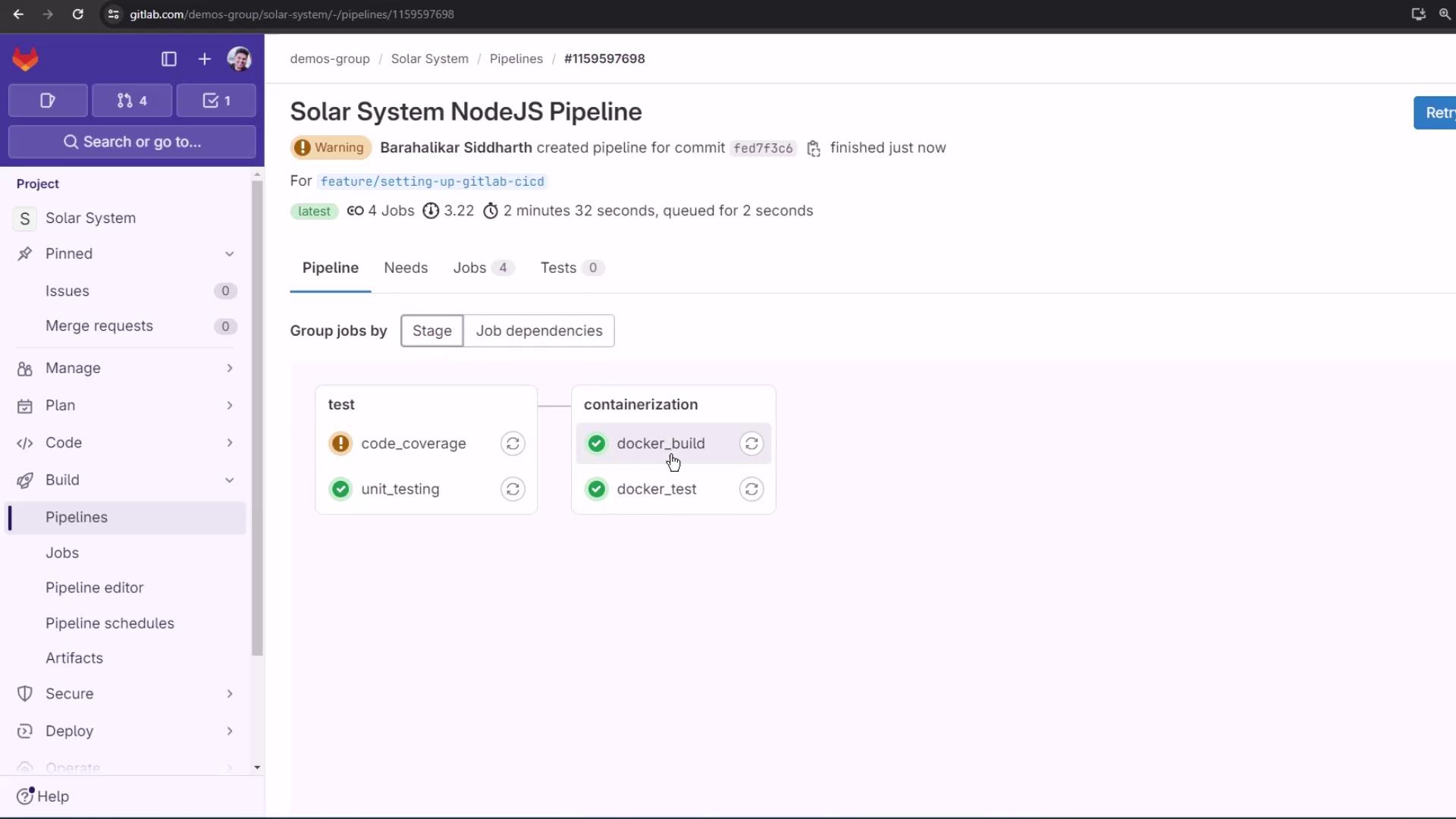
With this setup, `docker_test` will only run once `docker_build` successfully produces and archives the image. A successful liveness check means the container is ready to be pushed.
## Links and References
* [GitLab CI/CD Documentation](https://docs.gitlab.com/ee/ci/)
* [Docker Official Images](https://hub.docker.com/_/docker)
* [Express.js Guide](https://expressjs.com/)