> ## Documentation Index
> Fetch the complete documentation index at: https://notes.kodekloud.com/llms.txt
> Use this file to discover all available pages before exploring further.
# Invalidate Cache
> This guide explains how to force cache invalidation in GitLab CI/CD when project dependencies change.
In this guide, you'll learn how to force cache invalidation in GitLab CI/CD whenever your project dependencies change. We’ll cover:
1. Restoring an existing cache
2. Updating dependencies locally
3. Detecting a cache miss in the pipeline
4. Rebuilding and saving a new cache
5. Manually clearing the cache via the GitLab UI
This ensures your runners always use up-to-date artifacts, improving build reliability and performance.
## 1. Restoring the Existing Cache
When you run your pipeline without modifying dependencies, GitLab CI restores the cache using a key derived from the SHA of `package-lock.json`.
```bash theme={null}
$ gitlab-runner --version
Running with gitlab-runner 16.6.0~beta.105.gd263193 (d263193)
…
Restoring cache
Checking cache for node_modules-eb6511c24d2374382b3f5272690bfa2122-non_protected…
Downloading cache from https://storage.googleapis.com/.../node_modules-eb6511c24d2374382b3f5272690bfa2122-non_protected
Successfully extracted cache
…
$ npm install
up to date, audited 365 packages in 1s
31 packages are looking for funding
…
$ npm test
```
This confirms that the existing cache was restored and used for the `npm install` step.
GitLab CI uses the contents of `package-lock.json` to generate a unique cache key. Any modification to this file produces a new key.
## 2. Updating Dependencies Locally
To demonstrate cache invalidation, we’ll add [nodemon](https://www.npmjs.com/package/nodemon) as a dev dependency. Nodemon automatically restarts your Node.js server on file changes.
1. Switch to your feature branch
```bash theme={null}
$ cd solar-system
$ git checkout feature/setting-up-gitlab-ci
Switched to branch 'feature/setting-up-gitlab-ci'
```
2. Install `nodemon` and update lockfiles
```bash theme={null}
$ npm install nodemon --save-dev
added 384 packages, and audited 385 packages in 9s
45 packages are looking for funding
```
3. Verify changes in `package.json`
```json theme={null}
{
"dependencies": {
"cors": "^2.8.5",
"express": "^4.18.2",
"mongoose": "^5.13.20",
"nyc": "^15.1.0"
},
"devDependencies": {
"nodemon": "^3.0.3",
"chai": "*"
}
}
```
4. Commit and push
```bash theme={null}
$ git add package.json package-lock.json
$ git commit -m "chore: add nodemon as devDependency"
$ git push origin feature/setting-up-gitlab-ci
```
## 3. Observing Cache Invalidation in the Pipeline
After pushing, the pipeline’s **unit testing** job will attempt to restore the cache with a newly generated key. Because `package-lock.json` changed, GitLab cannot find the old cache.
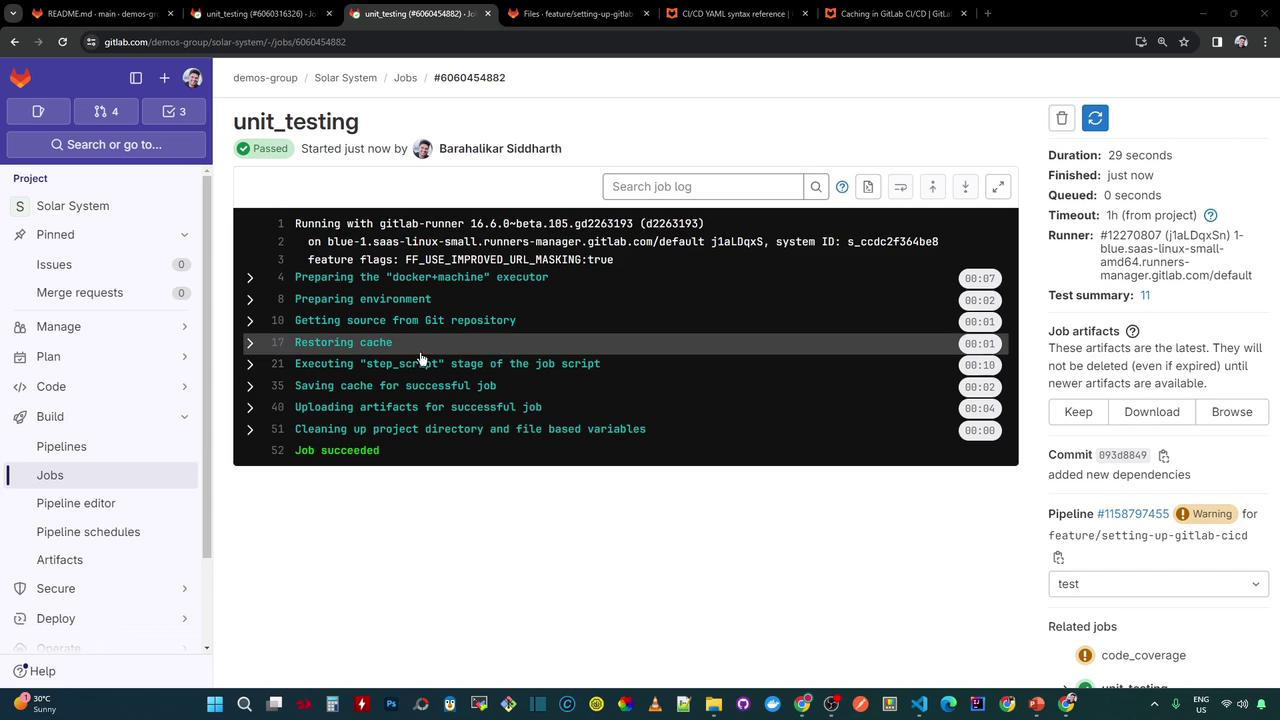
```bash theme={null}
Restoring cache
Checking cache for node_modules-89184f59d584d146040c768c579d223d8bc7ab-non_protected…
WARNING: file does not exist
Failed to extract cache
…
Saving cache for successful job
Uploading artifacts for successful job
Job succeeded
```
| Phase | Cache Key (SHA) | Outcome |
| ------------------------ | -------------------------------------- | ------- |
| Before dependency change | eb6511c24d2374382b3f5272690bfa2122 | Hit |
| After adding `nodemon` | 89184f59d584d146040c768c579d223d8bc7ab | Miss |
Because the key changed, GitLab reports a cache miss and proceeds to install dependencies from scratch.
## 4. Rebuilding and Saving the New Cache
On cache miss, the job runs `npm install` again:
```bash theme={null}
$ npm install
added 364 packages, and audited 385 packages in 7s
…
$ npm test
> Solar System@0.7.6 test
> mocha app-test.js --timeout 10000 --reporter mocha-junit-reporter --exit
Server successfully running on port - 3000
```
After tests pass, GitLab saves a new cache under the updated key:
```bash theme={null}
Saving cache for successful job
Creating cache node_modules-89184f59d584d146040c768c579d223d8bc7ab-non_protected…
node_modules: found 6041 matching artifact files and directories
Uploading cache.zip to https://storage.googleapis.com/.../node_modules-89184f59d584d146040c768c579d223d8bc7ab-non_protected
Created cache
```
Notice the increase in cached files (from \~5700 to \~6040) after adding `nodemon`.
## 5. Manually Clearing the Cache
You can also clear all runner caches for your project via the GitLab UI:
1. Go to **CI/CD > Pipelines**
2. Click **Clear runner caches**
3. Confirm the action
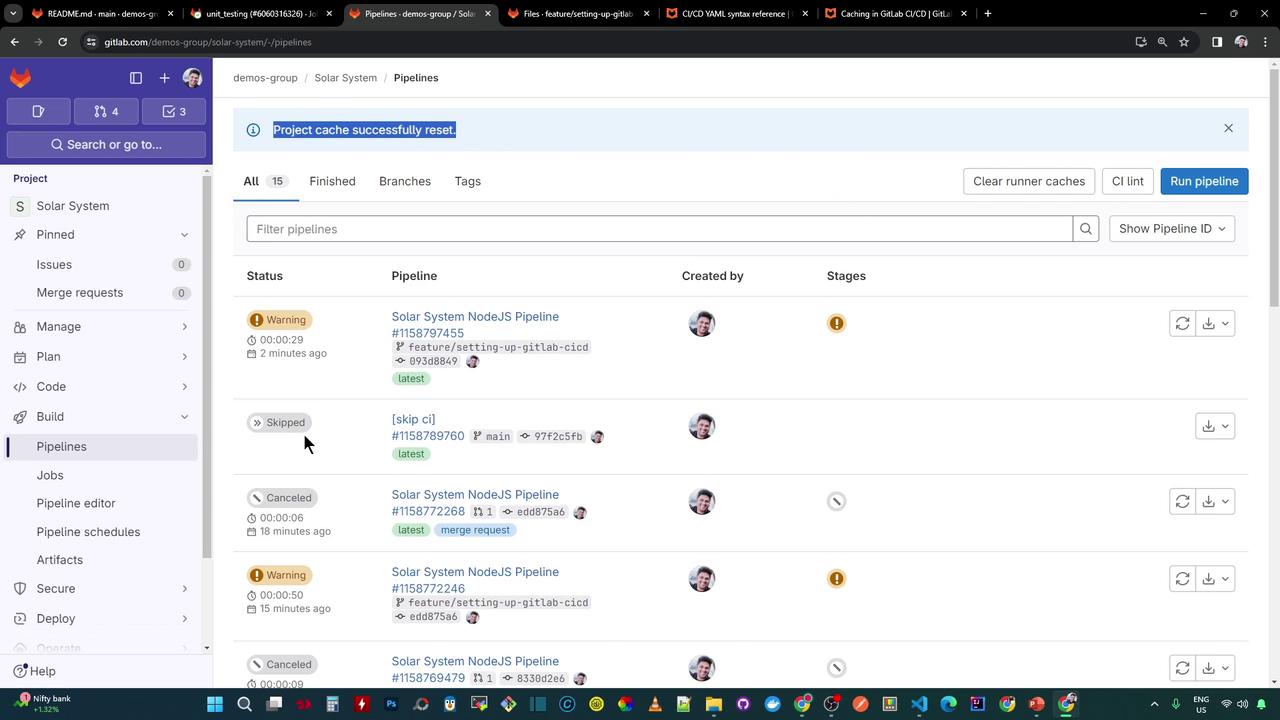
Clearing caches will remove all stored artifacts, potentially increasing build times until caches are rebuilt.
***
## Links and References
* [GitLab CI/CD Cache Documentation](https://docs.gitlab.com/ee/ci/caching/)
* [npm Cache Best Practices](https://docs.npmjs.com/cli/v9/commands/npm-cache)
* [nodemon on npm](https://www.npmjs.com/package/nodemon)
By following this approach, you ensure GitLab CI invalidates and regenerates caches whenever your dependency lockfiles change, keeping your pipelines fast and reliable.