> ## Documentation Index
> Fetch the complete documentation index at: https://notes.kodekloud.com/llms.txt
> Use this file to discover all available pages before exploring further.
# Anchors Reuse Configuration Deployment Jobs
> Learn to use YAML anchors in GitLab CI/CD for reusable deployment job templates, reducing redundancy and simplifying pipeline maintenance.
In this tutorial, you’ll learn how to leverage YAML anchors in GitLab CI/CD to DRY (Don’t Repeat Yourself) up your pipeline, creating reusable templates for deployment jobs. By defining anchors once and merging them across multiple jobs, you avoid boilerplate and simplify maintenance.
## What Are YAML Anchors?
YAML anchors let you define a named block of configuration that can be duplicated or inherited later. In GitLab CI/CD, you typically combine anchors with **hidden jobs** (names starting with a dot) to build templates.
Hidden jobs are not executed directly. They serve as templates when you use the `<<:` merge key to inherit their configuration.
### Basic Anchor Example
```yaml theme={null}
# Define a reusable scripts list
.default_scripts: &default_scripts
- ./default-script1.sh
- ./default-script2.sh
job1:
script:
- *default_scripts # Reuse the list of default scripts
- ./job-script.sh
```
| Feature | Syntax | Description |
| ----------------- | ------- | -------------------------------------- |
| Anchor definition | `&name` | Assigns a name to a block |
| Anchor reference | `*name` | Inserts the content of the named block |
## Merging Entire Job Configurations
You can reuse a full job template by defining it as a hidden job and then merging it into other jobs:
```yaml theme={null}
.job_template: &job_configuration
image: ruby:2.6
services:
- postgres
- redis
test1:
<<: *job_configuration
script:
- echo "Running test1"
test2:
<<: *job_configuration
script:
- echo "Running test2"
```
Here, `test1` and `test2` inherit `image: ruby:2.6` and the two services from the hidden `.job_template`.
## Combining Multiple Anchors
You can break a job template into smaller anchors—for example, separate anchors for `script`, `services`, or `tags`—and then merge only the pieces you need:
```yaml theme={null}
.job_template: &job_configuration
script:
- echo "Test project"
tags:
- dev
.postgres_services:
services: &postgres_configuration
- postgres
- ruby
.mysql_services:
services: &mysql_configuration
- mysql
- ruby
test_postgres:
<<: *job_configuration
services: *postgres_configuration
tags:
- postgres
test_mysql:
<<: *job_configuration
services: *mysql_configuration
```
In this example, `test_postgres` inherits the base `script` and `tags`, then overrides `services`.
## Real-World Pipeline: Reusing Deployment Configuration
Both `k8s_dev_deploy` and `k8s_stage_deploy` share:
* `alpine:3.7` as the job image
* No dependencies
* Identical `before_script` steps to install `kubectl` and `gettext`
Define a hidden job template with an anchor:
```yaml theme={null}
.prepare_deployment_environment: &kubernetes_deploy_job
image:
name: alpine:3.7
dependencies: []
before_script:
- wget "https://storage.googleapis.com/kubernetes-release/release/$(wget -q -O - \
https://storage.googleapis.com/kubernetes-release/release/stable.txt)/bin/linux/amd64/kubectl"
- chmod +x ./kubectl
- mv ./kubectl /usr/bin/kubectl
- apk add --no-cache gettext
- envsubst -V
```
### Dev Deploy Job
```yaml theme={null}
k8s_dev_deploy:
<<: *kubernetes_deploy_job
stage: dev-deploy
needs:
- docker_push
script:
- export KUBECONFIG=$DEV_KUBE_CONFIG
- kubectl version -o yaml
- kubectl config get-contexts
- kubectl get nodes
- export INGRESS_IP=$(kubectl -n ingress-nginx \
get services ingress-nginx-controller \
-o jsonpath="{.status.loadBalancer.ingress[0].ip}")
- echo $INGRESS_IP
- kubectl -n $NAMESPACE create secret generic mongo-db-creds \
--from-literal=MONGO_URI=$MONGO_URI \
--from-literal=MONGO_USERNAME=$MONGO_USERNAME \
--from-literal=MONGO_PASSWORD=$MONGO_PASSWORD \
--save-config --dry-run=client -o yaml | kubectl apply -f -
```
### Stage Deploy Job
```yaml theme={null}
k8s_stage_deploy:
<<: *kubernetes_deploy_job
stage: stage-deploy
when: manual
script:
- temp_kube_config_file=$(printenv KUBECONFIG)
- cat $temp_kube_config_file
- kubectl config get-contexts
- kubectl config use-context demos-group/solar-system:kk-gitlab-agent
- kubectl get po -A
- export INGRESS_IP=$(kubectl -n ingress-nginx \
get services ingress-nginx-controller \
-o jsonpath="{.status.loadBalancer.ingress[0].ip}")
- echo $INGRESS_IP
- kubectl -n $NAMESPACE create secret generic mongo-db-creds \
--from-literal=MONGO_URI=$MONGO_URI \
--from-literal=MONGO_USERNAME=$MONGO_USERNAME \
--from-literal=MONGO_PASSWORD=$MONGO_PASSWORD \
--save-config --dry-run=client -o yaml | kubectl apply -f -
```
Now both deployment jobs inherit the same `image`, `dependencies`, and `before_script` steps without duplication.

## Visualizing the Pipeline
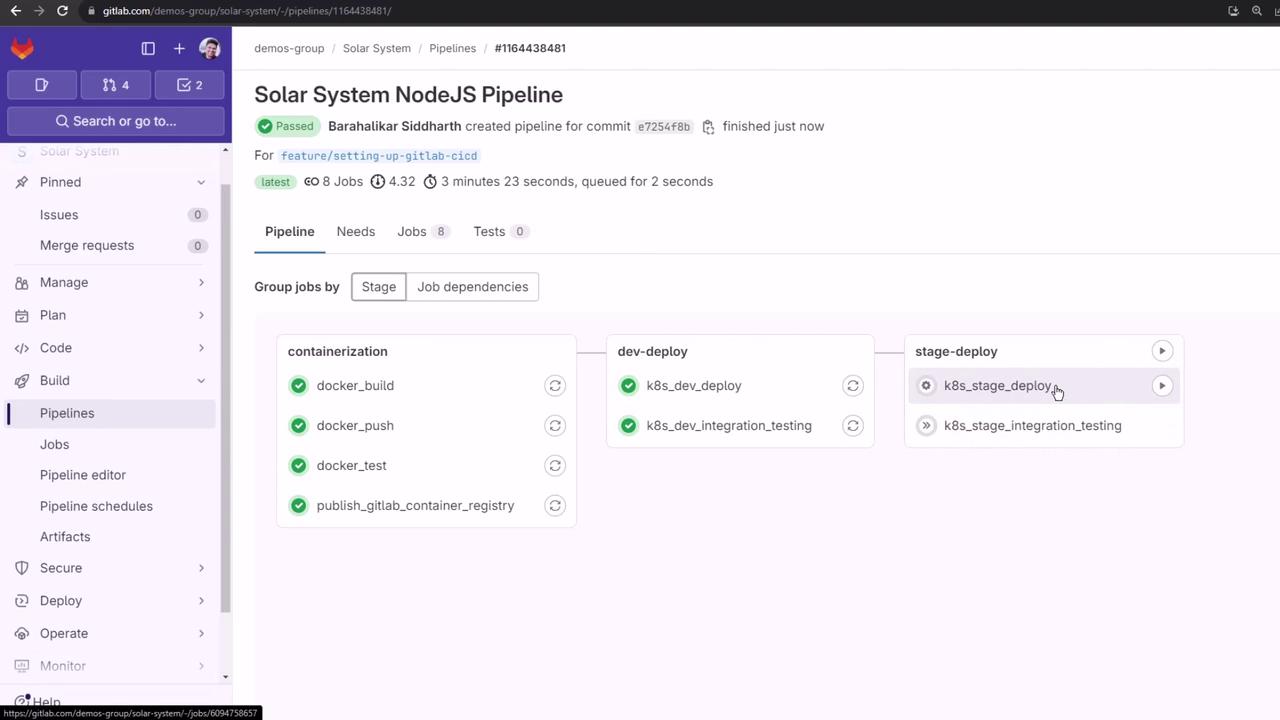
On the **CI/CD > Pipelines** page or the **Visualization** tab, confirm that:
* `k8s_dev_deploy` runs immediately after `docker_push` thanks to `needs:`
* `k8s_stage_deploy` is manual (`when: manual`)
* Both jobs share the anchored configuration
## Further Reading & References
* [GitLab CI/CD YAML Anchors](https://docs.gitlab.com/ee/ci/yaml/#anchors-and-aliases)
* [GitLab Pipeline Configuration](https://docs.gitlab.com/ee/ci/pipelines/)
* [Kubernetes Official Documentation](https://kubernetes.io/docs/)
That’s how you can use YAML anchors in GitLab CI/CD to keep your deployment jobs DRY and maintainable.