> ## Documentation Index
> Fetch the complete documentation index at: https://notes.kodekloud.com/llms.txt
> Use this file to discover all available pages before exploring further.
# Declarative Setup App of Apps
> Learn to deploy multiple applications using ArgoCDs app-of-apps pattern for streamlined management and deployment of services.
In this lesson, you'll learn how to extend ArgoCD’s declarative application approach by deploying multiple applications using the "app-of-apps" pattern. In this model, a single ArgoCD application manages other ArgoCD applications, streamlining the deployment and management of multiple services.
The repository structure for this setup organizes multiple ArgoCD configurations into separate directories, each containing the manifest files for individual applications.
## Multi-App ArgoCD Application
The primary multi-app ArgoCD application points to the Git repository and specifies the path containing the manifests that manage other ArgoCD applications. Its definition is shown below:
```yaml theme={null}
apiVersion: argoproj.io/v1alpha1
kind: Application
metadata:
name: app-of-apps
namespace: argocd
spec:
project: default
source:
repoURL: http://165.22.209.118:3000/siddharth/gitops-argocd.git
targetRevision: HEAD
path: ./declarative/multi-app
destination:
server: https://kubernetes.default.svc
namespace: argocd
syncPolicy:
automated:
prune: true
selfHeal: true
```
The multi-app configuration retrieves manifests from a specific directory, providing a centralized configuration for managing nested applications.
## App of Apps Configuration
The primary application references the "app-of-apps" directory, where multiple ArgoCD application manifests reside. The configuration for the app-of-apps is as follows:
```yaml theme={null}
apiVersion: argoproj.io/v1alpha1
kind: Application
metadata:
name: app-of-apps
namespace: argocd
spec:
project: default
source:
repoURL: http://165.22.209.118:3000/siddharth/gitops-argocd.git
targetRevision: HEAD
path: ./declarative/app-of-apps
destination:
server: https://kubernetes.default.svc
namespace: argocd
syncPolicy:
automated:
prune: true
selfHeal: true
```
Inside the `declarative/app-of-apps` directory, you will find three ArgoCD application manifests:
1. **Heliocentric App** – Retrieves Kubernetes manifests from a specified manifest path.
2. **Geocentric App** – Points to a different manifest path.
3. **Additional Applications** – You can add more sub-applications to extend deployment capabilities further.
## Heliocentric App Manifest
The following example shows the manifest for the Heliocentric application:
```yaml theme={null}
apiVersion: argoproj.io/v1alpha1
kind: Application
metadata:
name: heliocentric-app
namespace: argocd
finalizers:
- resources-finalizer.argocd.argoproj.io
spec:
project: default
source:
repoURL: http://165.22.209.118:3000/siddharth/gitops-argocd.git
targetRevision: HEAD
path: ./declarative/manifests/heliocentric-model
destination:
server: https://kubernetes.default.svc
namespace: heliocentric
syncPolicy:
syncOptions:
- CreateNamespace=true
automated:
prune: true
selfHeal: true
```
## Geocentric App Manifest
The Geocentric application manifest is configured similarly:
```yaml theme={null}
apiVersion: argoproj.io/v1alpha1
kind: Application
metadata:
name: geocentric-app
namespace: argocd
finalizers:
- resources-finalizer.argocd.argoproj.io
spec:
project: default
source:
repoURL: http://165.22.209.118:3000/siddharth/gitops-argocd.git
targetRevision: HEAD
path: ./declarative/manifests/geocentric-model
destination:
server: https://kubernetes.default.svc
namespace: geocentric
syncPolicy:
syncOptions:
- CreateNamespace=true
automated:
prune: true
selfHeal: true
```
## Kubernetes Application Manifests
Beyond the ArgoCD application manifests, the `declarative` directory also contains separate Kubernetes manifests for individual applications, including deployments and services. When you create the main app-of-apps ArgoCD application, it automatically triggers the creation of three more ArgoCD applications.
For example, an alternative app-of-apps manifest with a different destination namespace might be defined as:
```yaml theme={null}
apiVersion: argoproj.io/v1alpha1
kind: Application
metadata:
name: app-of-apps
namespace: argocd
spec:
project: default
source:
repoURL: http://165.22.209.118:3000/siddharth/gitops-argocd.git
targetRevision: HEAD
path: ./declarative/app-of-apps
destination:
server: https://kubernetes.default.svc
namespace: kubernetes
syncPolicy:
automated:
prune: true
selfHeal: true
```
Each nested application then deploys its respective Kubernetes resources based on its individual manifest.
## Deployment Process
To deploy applications using the app-of-apps pattern, follow these steps:
1. Delete any previously deployed Geocentric model application if it exists, since it will be recreated under the new management pattern.
2. Navigate to the `multi-app` directory, which contains the `app-of-apps.yml` file.
3. Apply the manifest in the `argocd` namespace by running:
```bash theme={null}
cd multi-app/
ll
# Ensure the app-of-apps.yml file is present here.
k -n argocd apply -f app-of-apps.yml
```
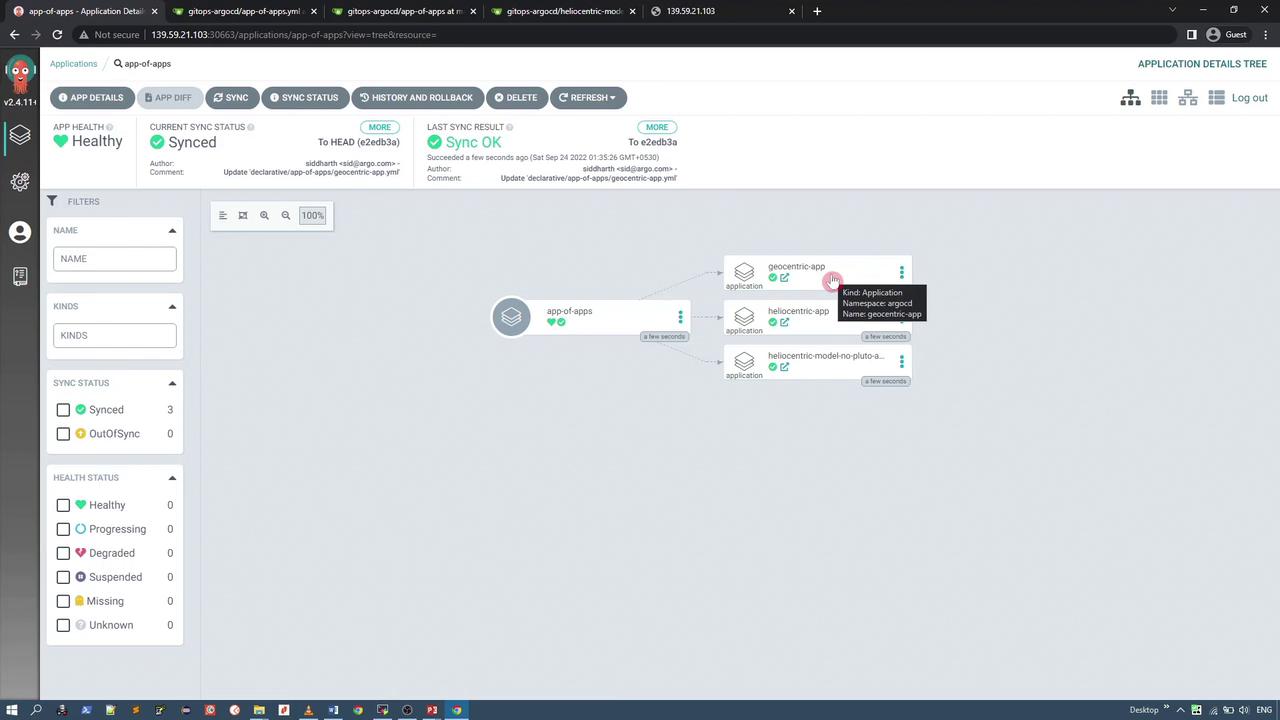
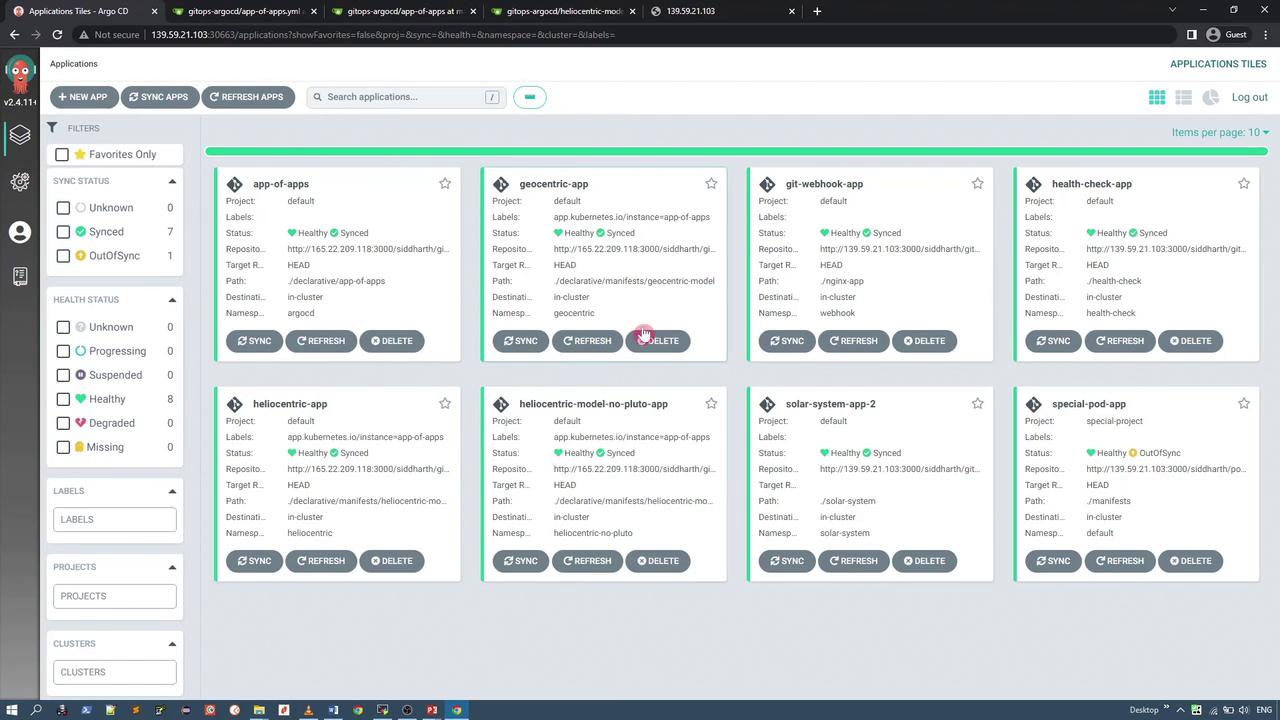
After deployment, the ArgoCD UI will display multiple applications:
* app-of-apps (managing the nested applications)
* geocentric-app
* heliocentric-app
* heliocentric-app with no Pluto (an alternative variant)
Ensure that no old configurations interfere with the new deployment by removing outdated applications before applying the new manifest.
## Viewing the Applications in the ArgoCD UI
Within the ArgoCD dashboard, clicking on any sub-application (e.g., geocentric-app or heliocentric-app) provides detailed manifest information. Below is an example manifest snippet for a syncing application:
```yaml theme={null}
status:
health:
status: Healthy
history:
deployStartDate: '2022-09-23T20:05:21Z'
deployEndDate: '2022-09-23T20:05:24Z'
revision: e2edb3a016b752028c38adb898d34114c1ec6
path: ./declarative/manifests/heliocentric-model
repoURL: http://165.22.209.118:3000/siddharth/gitops-argocd.git
operationState:
finishedAt: '2022-09-23T20:05:24Z'
message: successfully synced (all tasks run)
initiatedBy:
automated: true
retry:
limit: 5
sync:
prune: true
revision: e2edb3a016b752028c38adb898d34114c1ec6
syncOptions:
- CreateNamespace=true
phase: Succeeded
startedAt: '2022-09-23T20:05:21Z'
syncResult:
resources:
- group:
hookPhase: Succeeded
kind: Namespace
message: namespace/heliocentric created
namespace: heliocentric
status: Synced
syncPhase: PreSync
version: v1
- group:
hookPhase: Running
kind: Service
message: service/heliocentric-model-svc created
name: heliocentric-model-svc
namespace: heliocentric
status: Sync
```
Review a consolidated list of applications on the dashboard:
And a detailed list view of applications:
## Accessing the Deployed Kubernetes Applications
Each sub-application deploys its own set of Kubernetes resources, including services that expose the applications. Below are the configuration details for these services.
### Geocentric Model Service
The Geocentric model service represents an Earth-centered view and is configured as follows:
```yaml theme={null}
apiVersion: v1
kind: Service
metadata:
annotations:
kubectl.kubernetes.io/last-applied-configuration: >
{"apiVersion":"v1","kind":"Service","metadata":{"annotations":{},"labels":{"app.kubernetes.io/instance":"geocentric-app"},"name":"geocentric-model-svc","namespace":"geocentric"}}
labels:
app.kubernetes.io/instance: geocentric-app
name: geocentric-model-svc
```
### Heliocentric Model Service
The Heliocentric application uses a NodePort to expose its service:
```yaml theme={null}
apiVersion: v1
kind: Service
metadata:
annotations:
kubectl.kubernetes.io/last-applied-configuration: >
{"apiVersion":"v1","kind":"Service","metadata":{"annotations":{},"labels":{"app.kubernetes.io/instance":"heliocentric-app"},"name":"heliocentric-model-svc","namespace":"heliocentric"},"spec":{"clusterIP":"10.183.221.139","clusterIPs":["10.183.221.139"],"externalTrafficPolicy":"Cluster","internalTrafficPolicy":"Cluster","ipFamilies":["IPv4"],"ipFamilyPolicy":"SingleStack","ports":[{"nodePort":31334,"port":80,"protocol":"TCP","targetPort":80}],"selector":{"app":"heliocentric-model"},"sessionAffinity":"None","type":"NodePort"}}
spec:
clusterIP: 10.183.221.139
clusterIPs:
- 10.183.221.139
externalTrafficPolicy: Cluster
internalTrafficPolicy: Cluster
ipFamilies:
- IPv4
ipFamilyPolicy: SingleStack
ports:
- nodePort: 31334
port: 80
protocol: TCP
targetPort: 80
selector:
app: heliocentric-model
sessionAffinity: None
type: NodePort
loadBalancer: {}
```
### Heliocentric Model Service (No Pluto)
For users who prefer an application variant that excludes Pluto, use the configuration below:
```yaml theme={null}
apiVersion: v1
kind: Service
metadata:
annotations:
kubectl.kubernetes.io/last-applied-configuration: >
{"apiVersion":"v1","kind":"Service","metadata":{"annotations":{},"labels":{"app.kubernetes.io/instance":"heliocentric-model-no-pluto-app"},"name":"heliocentric-model-no-pluto-svc","resourceVersion":"1964046","uid":"73603805-36c2-4296-bd9c-2f14cac42080"}}
spec:
clusterIP: 10.180.97.241
externalIPs:
- 10.180.97.241
externalTrafficPolicy: Cluster
internalTrafficPolicy: Cluster
ipFamily:
- IPv4
ipFamilyPolicy: SingleStack
ports:
- name: nodePort
port: 80
protocol: TCP
targetPort: 80
selector:
app: heliocentric-model-no-pluto
sessionAffinity: None
type: NodePort
status:
loadBalancer: {}
```
Many users advocate that Pluto should not be classified as a planet due to its distant orbit and retrograde rotation, which is why an application variant excluding Pluto is provided.
***
All these applications are deployed using a single ArgoCD app-of-apps configuration. This pattern not only simplifies management but also enables centralized control over multiple applications from a single Git repository and ArgoCD instance.
For more detailed information on ArgoCD and GitOps, consider exploring the following resources:
* [ArgoCD Documentation](https://argo-cd.readthedocs.io/)
* [Kubernetes Documentation](https://kubernetes.io/docs/)
Happy deploying!