> ## Documentation Index
> Fetch the complete documentation index at: https://notes.kodekloud.com/llms.txt
> Use this file to discover all available pages before exploring further.
# FluxCD Architecture Part1
> This article explores the high-level architecture of FluxCD and its core components within a Kubernetes cluster.
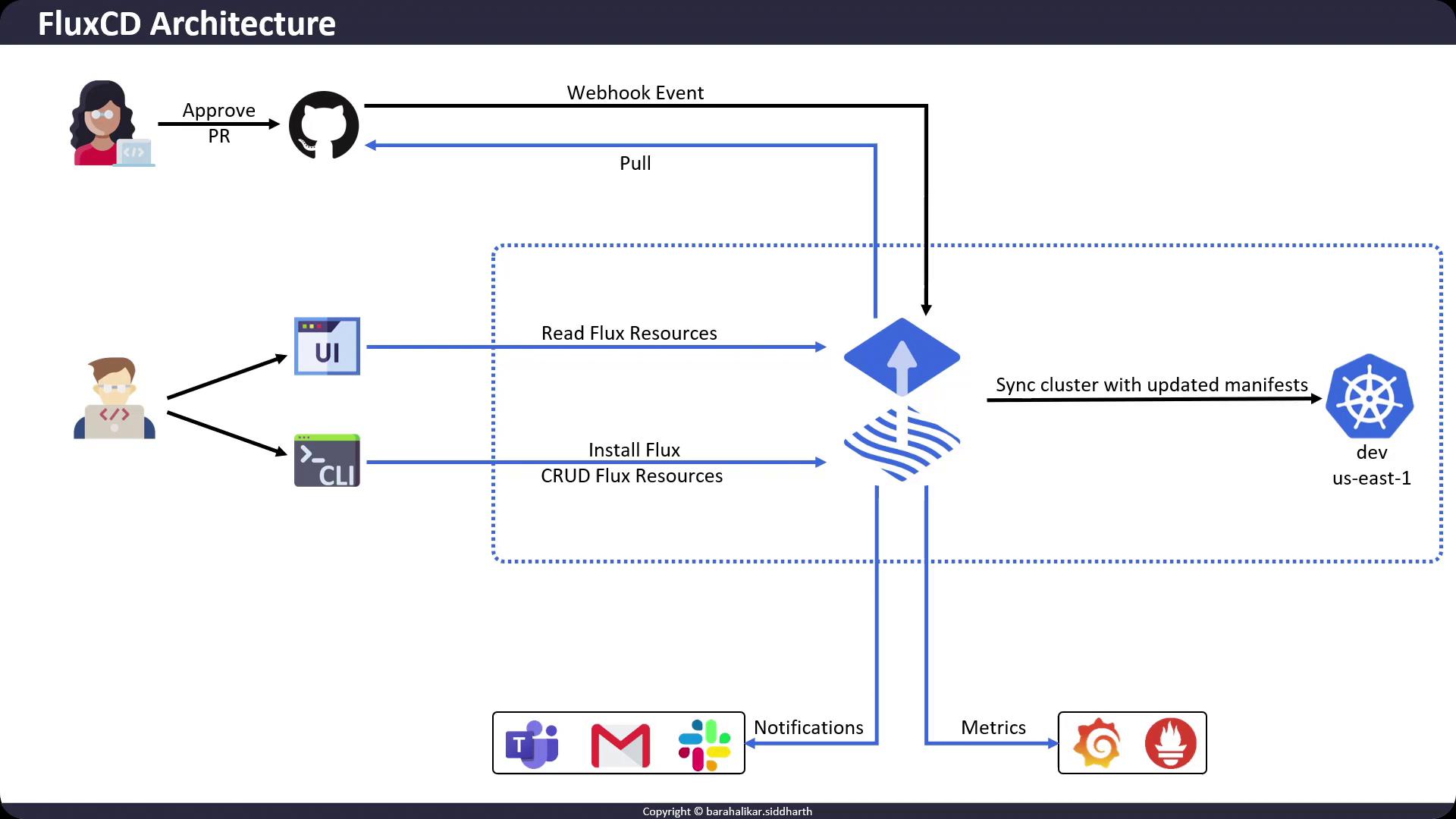
In this lesson, we’ll dive into the high-level architecture of **FluxCD** and examine how its core components collaborate within a Kubernetes cluster. By the end, you’ll understand:
* How FluxCD implements GitOps for continuous delivery
* The role of Flux controllers and CLI commands
* Observability and notification integration
## How FluxCD Operates in Kubernetes
FluxCD runs as an agent inside your Kubernetes cluster. Users typically interact via the [Flux CLI](https://fluxcd.io/docs/cmd/flux/) to:
1. **Create Sources**\
Configure Git repositories, Helm charts, or OCI registries as reconciliation sources.
2. **Define Kustomizations**\
Apply and manage Kubernetes manifests using Kustomize.
3. **Automate Image Updates**\
Monitor container registries to automatically bump image tags in Git.
FluxCD follows the GitOps pattern:
* The **desired state** lives in a Git repository.
* The **live state** resides in the Kubernetes cluster.
* FluxCD continually syncs them for drift correction.
## Core Flux Controllers
FluxCD comprises several controllers that reconcile resources in Kubernetes. Here’s a quick overview:
| Controller | Responsibility | Example CLI Command |
| --------------------------- | ------------------------------------------------ | ------------------------------------------------------------------------------------ |
| Source Controller | Tracks Git repos, Helm repositories, OCI images | `flux create source git podinfo --url=https://github.com/stefanprodan/podinfo` |
| Kustomize Controller | Applies Kustomize overlays | `flux create kustomization podinfo --source=GitRepository/podinfo --path="./deploy"` |
| Helm Controller | Installs and upgrades Helm charts | `flux create helmrelease nginx --chart=nginx --target-namespace=default` |
| Notification Controller | Sends events and alerts via Slack, email, GitHub | Configure via `Notification` and `Alert` custom resources |
| Image Automation Controller | Automates container image updates in Git | `flux create image policy podinfo --image-ref=ghcr.io/stefanprodan/podinfo` |
## The GitOps Workflow
FluxCD continuously monitors your Git repositories and the cluster’s live state. When a commit or pull-request merge occurs:
1. **Webhook Trigger** (optional)\
You can configure Git webhooks to notify FluxCD of new commits immediately.
2. **Reconciliation Loop**\
Each controller fetches the latest manifests, compares them to the live cluster state, and applies any differences.
3. **Status Reporting**\
Flux updates resource status back to Git (e.g., annotating commits), and emits events for observability.
## Observability & Notifications
FluxCD offers built-in metrics and alerts to help you monitor delivery pipelines:
* **Prometheus Metrics**\
Expose metrics from each controller; scrape with Prometheus for real-time insights.
* **Grafana Dashboards**\
Visualize Flux health and reconcile durations.
* **Notifications Controller**\
Send alerts on sync failures or promotion events to Slack, email, or GitHub.
Ensure your cluster’s RBAC policies allow Flux to read Secrets and apply CRDs. Misconfigured permissions can prevent controllers from reconciling.
## Next Steps
In the next part, we’ll walk through installing FluxCD and bootstrapping your first GitOps repository. Until then, explore these resources:
* [FluxCD Official Documentation](https://fluxcd.io/docs/)
* [Weave GitOps UI](https://github.com/weaveworks/ui)
* [Prometheus User Guide](https://prometheus.io/docs/introduction/overview/)
* [Grafana Dashboards for Flux](https://grafana.com/grafana/dashboards?search=fluxcd)
Thank you for following along—see you in Part 2!