> ## Documentation Index
> Fetch the complete documentation index at: https://notes.kodekloud.com/llms.txt
> Use this file to discover all available pages before exploring further.
# DEMO Flux Pull and Deploy from OCI Registry
> This tutorial explains how to use Flux CD to pull container images from an OCI registry and deploy them to a Kubernetes cluster.
In this tutorial, you’ll learn how to use the Flux Source Controller to fetch container images from an OCI-compatible registry (GitHub Container Registry) and deploy them to your Kubernetes cluster. We’ll pull the `bb-app` image (`7.7.0-0bb2691`) from GHCR, configure authentication, and create a Kustomization to manage deployments.
## Prerequisites
* A Kubernetes cluster with Flux CD installed ([Flux Installation Guide](https://fluxcd.io/docs/installation/)).
* `flux` CLI and `kubectl` configured to target your cluster.
* Docker (optional) to verify the image locally.
## Overview of Flux Resources
| Resource Type | Purpose | Flux Command Example |
| ------------- | --------------------------------------- | ------------------------------------------------------------------------------------------------------------------------- |
| OCIRepository | Registers an OCI image as a Flux source | `flux create source oci demo-source-oci-bb-app --url oci://ghcr.io/...` |
| Secret (OCI) | Stores registry credentials | `flux create secret oci ghcr-auth --url ghcr.io --username USER --password TOKEN` |
| Kustomization | Pulls and applies manifests or images | `flux create kustomization demo-kustomize-bb-app --source OCIRepository/demo-source-oci-bb-app --target-namespace bb-app` |
## 1. Pull the OCI Image Locally (Optional)
Verify the `bb-app` image before integrating with Flux:
```bash theme={null}
docker pull ghcr.io/sidd-harth-2/bb-app:7.7.0-0bb2691
```
You need both the image path (`ghcr.io/sidd-harth-2/bb-app`) and the tag (`7.7.0-0bb2691`).
Public OCI registries (e.g., Docker Hub) typically don’t require authentication. Private registries like GHCR do.
## 2. Create an OCIRepository Source
Register the image in Flux by creating an `OCIRepository`. Update the tag to `7.7.0-0bb2691`:
```bash theme={null}
cd block-buster/flux-clusters/dev-cluster
flux create source oci demo-source-oci-bb-app \
--url oci://ghcr.io/sidd-harth-2/bb-app \
--tag 7.7.0-0bb2691 \
--secret-ref ghcr-auth \
--provider generic \
--interval 1m \
--export > demo-source-oci-bb-app.yaml
```
Contents of `demo-source-oci-bb-app.yaml`:
```yaml theme={null}
apiVersion: source.toolkit.fluxcd.io/v1beta2
kind: OCIRepository
metadata:
name: demo-source-oci-bb-app
namespace: flux-system
spec:
interval: 1m0s
provider: generic
url: oci://ghcr.io/sidd-harth-2/bb-app
ref:
tag: 7.7.0-0bb2691
secretRef:
name: ghcr-auth
```
## 3. Create the OCI Authentication Secret
Flux requires credentials to pull from a private registry. Generate a GitHub Personal Access Token (PAT) with the `read:packages` scope, then create the secret:
```bash theme={null}
flux create secret oci ghcr-auth \
--url ghcr.io \
--username sidd-harth-2 \
--password \
--export > ghcr-auth.yaml
```
Keep your GitHub PAT secure. Do not commit `ghcr-auth.yaml` to public repositories.
Apply both manifests:
```bash theme={null}
kubectl apply -f ghcr-auth.yaml
kubectl apply -f demo-source-oci-bb-app.yaml
```
Verify the secret in the `flux-system` namespace:
```bash theme={null}
kubectl -n flux-system get secrets
# NAME TYPE DATA AGE
# flux-system Opaque 3 17h
# ghcr-auth kubernetes.io/dockerconfigjson 1 10s
```
## 4. Create a Kustomization for Deployment
Define a `Kustomization` that references your `OCIRepository`, sets up health checks, and enforces dependency ordering:
```bash theme={null}
flux create kustomization demo-kustomize-bb-app \
--source OCIRepository/demo-source-oci-bb-app \
--target-namespace bb-app \
--interval 10s \
--prune false \
--timeout 2m \
--depends-on infra-database-git-mysql \
--health-check 'Deployment/block-buster-7-7-0' \
--export > demo-kustomize-bb-app.yaml
```
`demo-kustomize-bb-app.yaml`:
```yaml theme={null}
apiVersion: kustomize.toolkit.fluxcd.io/v1beta2
kind: Kustomization
metadata:
name: demo-kustomize-bb-app
namespace: flux-system
spec:
interval: 10s
timeout: 2m0s
prune: false
dependsOn:
- name: infra-database-git-mysql
healthChecks:
- apiVersion: apps/v1
kind: Deployment
name: block-buster-7-7-0
namespace: bb-app
sourceRef:
kind: OCIRepository
name: demo-source-oci-bb-app
namespace: flux-system
targetNamespace: bb-app
```
Apply the Kustomization:
```bash theme={null}
kubectl apply -f demo-kustomize-bb-app.yaml
```
### Health Checks
Flux polls the specified resource and waits until it’s ready before marking the Kustomization as healthy. Example for a Git-based Kustomization:
```yaml theme={null}
apiVersion: kustomize.toolkit.fluxcd.io/v1
kind: Kustomization
metadata:
name: backend
namespace: default
spec:
sourceRef:
kind: GitRepository
name: webapp
healthChecks:
- apiVersion: apps/v1
kind: Deployment
name: backend
namespace: dev
```
### Dependencies
The `dependsOn` field enforces deployment order. In this demo, `bb-app` waits for `infra-database-git-mysql` (your SQL database) to succeed first.
## 5. Reconcile and Debug
Check the Kustomization status:
```bash theme={null}
flux get kustomizations
```
If reconciliation stalls or health checks time out, inspect the resource:
```bash theme={null}
kubectl -n flux-system get kustomizations.kustomize.toolkit.fluxcd.io demo-kustomize-bb-app -o yaml
```
Correct any mismatches (e.g., deployment names), then trigger a manual reconcile:
```bash theme={null}
flux reconcile kustomization demo-kustomize-bb-app
```
Verify the deployment reaches `Ready`:
```bash theme={null}
flux get kustomizations
# NAME READY MESSAGE
# demo-kustomize-bb-app True Applied revision: 7.7.0-0bb2691@sha256:...
```
## 6. Verify the Deployment
List all resources in the `bb-app` namespace:
```bash theme={null}
kubectl -n bb-app get all
# NAME STATUS AGE
# pod/block-buster-7-7-0-768744659-879jt Running 2m
# service/block-buster-service-7-7-0 NodePort 10.105.73.12 80:3770/TCP 2m
# deployment.apps/block-buster-7-7-0 1/1 2m
# replicaset.apps/block-buster-7-7-0-768744659 1/1 2m
```
Then open your browser at `http://127.0.0.1:3770`. In version 7.7.0 you’ll notice a new “High Score” field—but a known bug prevents high scores from persisting:
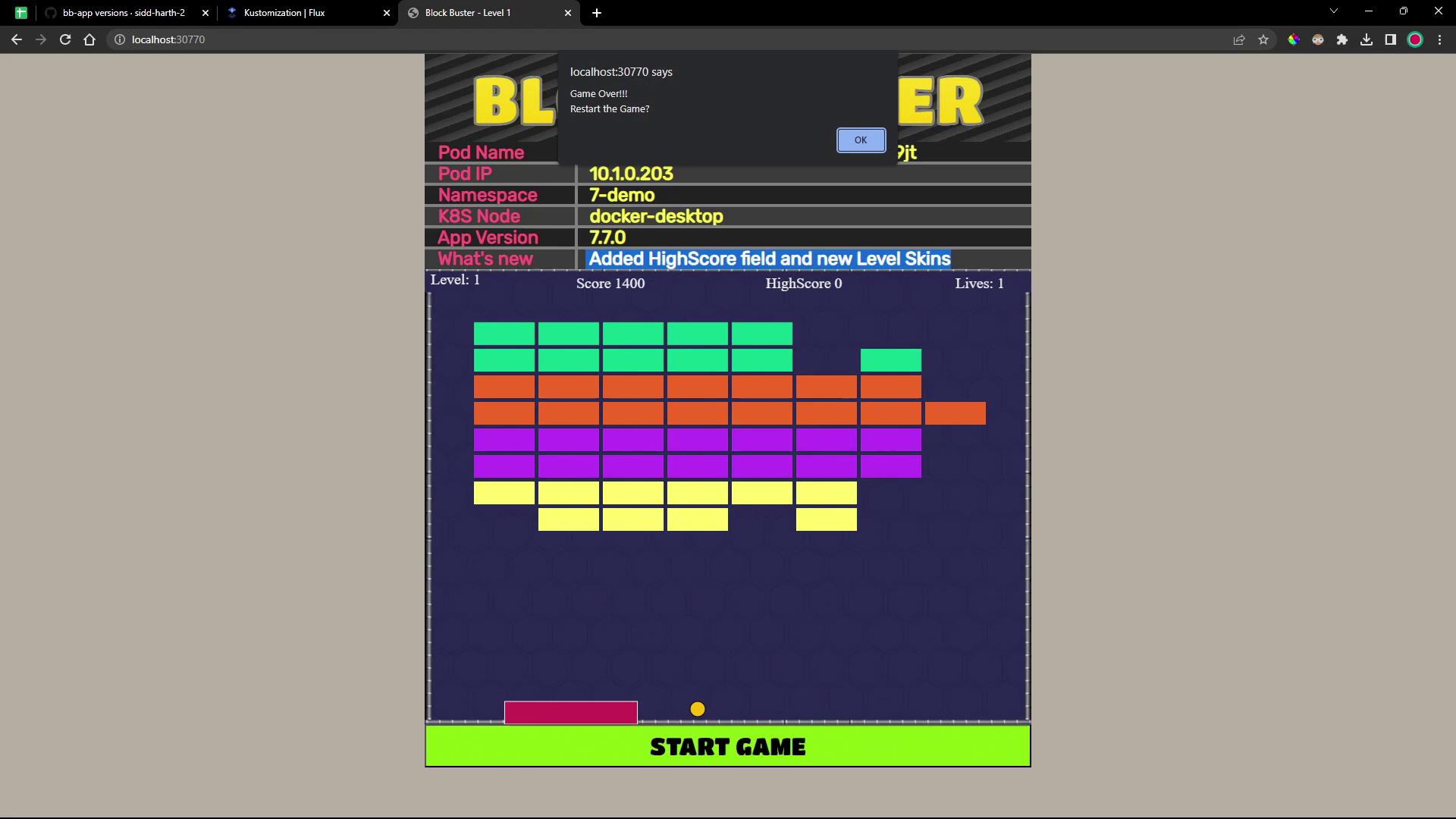
That issue will be fixed in the next release. Thanks for following along!
## References
* [Flux CD Documentation](https://fluxcd.io/docs/)
* [GitHub Container Registry](https://github.com/features/packages)
* [OCI Distribution Specification](https://github.com/opencontainers/distribution-spec)