> ## Documentation Index
> Fetch the complete documentation index at: https://notes.kodekloud.com/llms.txt
> Use this file to discover all available pages before exploring further.
# DEMO HELM Controller with Git as Source
> This tutorial teaches deploying a Helm chart from a Git repository into a Kubernetes cluster using Flux’s Helm Controller.
In this tutorial, you’ll learn how to use Flux’s Helm Controller to deploy a Helm chart from a Git repository into your Kubernetes cluster. We’ll create Flux sources, overrides, and a HelmRelease to run the **block-buster-helm-app** version **7.5.0**.
***
## Prerequisites
* A Kubernetes cluster with [Flux CD](https://fluxcd.io/) installed
* `kubectl` configured for your cluster
* A Git repository containing your Helm chart
***
## Step 1: Prepare a Git Branch
Switch to the application source and create a new branch called `5-demo` based on `4-demo`:
```bash theme={null}
cd bb-app/source
git checkout 4-demo
git checkout -b 5-demo origin/5-demo
```
This branch contains the `block-buster-helm-app` chart at version **7.5.0**.
***
## Step 2: Inspect the Helm Chart
Open **Chart.yaml** to view the chart metadata:
```yaml theme={null}
apiVersion: v2
name: block-buster-helm-app
description: A Helm Chart for Block Buster App
version: 7.5.0
```
Review the default values in **values.yaml**:
```yaml theme={null}
image:
repository: siddharth67/block-buster-dev:7.5.0
pullPolicy: Always
service:
type: ClusterIP
port: 80
targetPort: 80
namespace:
name: demo-app
labels:
app:
name: bb-app
version: 7.x.x
env: uat
```
The `templates/` directory includes standard Kubernetes manifests like Deployment and Service.
***
## Step 3: Create a GitRepository Source
Tell Flux where to fetch your chart by defining a `GitRepository`:
```bash theme={null}
flux create source git 5-demo-source-git-helm-bb-app \
--url https://github.com/sidd-harth-2/bb-app-source \
--branch 5-demo \
--timeout 10s \
--export > flux-clusters/dev-cluster/5-demo-source-git-bb-app.yaml
```
Save the following in `flux-clusters/dev-cluster/5-demo-source-git-bb-app.yaml`:
```yaml theme={null}
apiVersion: source.toolkit.fluxcd.io/v1beta2
kind: GitRepository
metadata:
name: 5-demo-source-git-helm-bb-app
namespace: flux-system
spec:
interval: 1m
url: https://github.com/sidd-harth-2/bb-app-source
ref:
branch: 5-demo
```
***
## Step 4: Override Chart Values
Add a `5-demo-values.yaml` file in your Flux cluster repo to customize deployment:
```yaml theme={null}
# flux-clusters/dev-cluster/5-demo-values.yaml
replicaCount: 2
service:
type: NodePort
nodePort: 30005
namespace:
name: 5-demo
labels:
app:
name: block-buster
version: 7.5.0
env: dev
```
***
## Step 5: Define the HelmRelease
Create a `HelmRelease` that combines your source and values:
```bash theme={null}
flux create helmrelease 5-demo-helm-release-git-helm-bb-app \
--chart block-buster-helm-app \
--interval 10s \
--target-namespace 5-demo \
--source GitRepository/5-demo-source-git-helm-bb-app \
--values 5-demo-values.yaml \
--export > flux-clusters/dev-cluster/5-demo-helm-release-git-helm-bb-app.yaml
```
Save it alongside the other manifests:
```yaml theme={null}
apiVersion: helm.toolkit.fluxcd.io/v2beta1
kind: HelmRelease
metadata:
name: 5-demo-helm-release-git-helm-bb-app
namespace: flux-system
spec:
interval: 10s
targetNamespace: 5-demo
chart:
spec:
chart: block-buster-helm-app
sourceRef:
kind: GitRepository
name: 5-demo-source-git-helm-bb-app
values:
replicaCount: 2
service:
type: NodePort
nodePort: 30005
namespace:
name: 5-demo
labels:
app:
name: block-buster
version: 7.5.0
env: dev
```
Ensure unique manifest names across your repo to avoid reconciliation conflicts.
***
## Summary of Flux Resources
| Kind | Filename | Description |
| ------------- | ---------------------------------------- | --------------------------------------------- |
| GitRepository | 5-demo-source-git-bb-app.yaml | Points Flux to your Helm chart in Git |
| Values File | 5-demo-values.yaml | Overrides default chart values |
| HelmRelease | 5-demo-helm-release-git-helm-bb-app.yaml | Deploys the chart into the Kubernetes cluster |
***
## Step 6: Commit and Reconcile
Push your manifests to the Flux cluster repo:
```bash theme={null}
cd flux-clusters/dev-cluster
git add 5-demo-source-git-bb-app.yaml 5-demo-values.yaml 5-demo-helm-release-git-helm-bb-app.yaml
git commit -m "Add Flux HelmRelease for block-buster-helm-app"
git push
```
Verify Flux has detected the resources:
```bash theme={null}
flux get sources git 5-demo-source-git-helm-bb-app
flux get helmreleases
```
***
## Step 7: Validate in Kubernetes
Check the new namespace and resources:
```bash theme={null}
kubectl get ns
kubectl get all -n 5-demo
```
You should see two replicas and a NodePort service on port 30005:
```bash theme={null}
NAME READY STATUS RESTARTS AGE
pod/block-buster-helm-app-xx 1/1 Running 0 2m
NAME TYPE CLUSTER-IP EXTERNAL-IP PORT(S) AGE
service/block-buster-helm-app NodePort 10.96.185.58 80:30005/TCP 2m
```
Confirm the overridden labels:
```bash theme={null}
kubectl get pod -n 5-demo block-buster-helm-app-xx --show-labels
```
***
## Step 8: Inspect the Packaged Helm Chart
Flux creates HelmChart artifacts—list and view them:
```bash theme={null}
flux get sources helmchart
kubectl -n flux-system get helmcharts.source.toolkit.fluxcd.io
kubectl -n flux-system get helmcharts.source.toolkit.fluxcd.io flux-system-5-demo-helm-release-git-helm-bb-app -o yaml
```
***
## Step 9: Access the Application
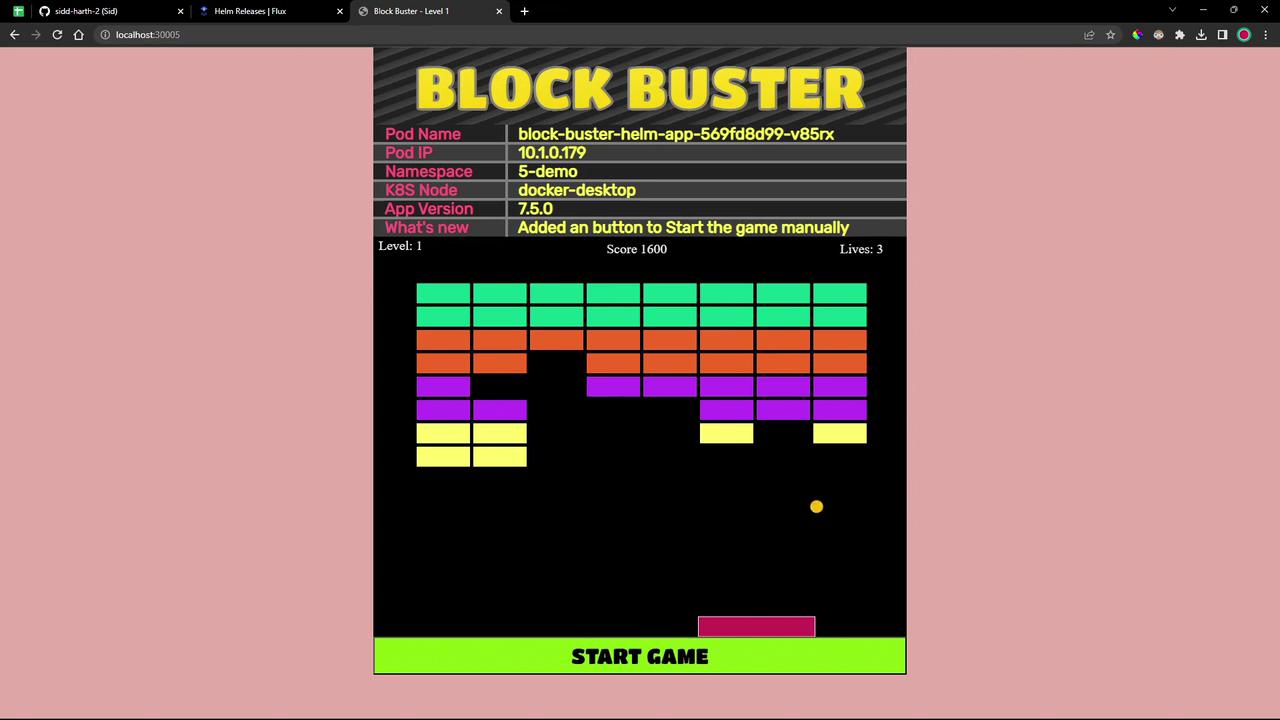
Point your browser to `http://:30005`. Version **7.5.0** includes a **Start Game** button to launch the game manually.
***
## References
* [Flux CD GitRepository](https://fluxcd.io/docs/components/source/gitrepositories/)
* [Flux CD HelmRelease](https://fluxcd.io/docs/components/helm/helmreleases/)
* [Kubernetes Documentation](https://kubernetes.io/docs/)
* [Helm Chart Best Practices](https://helm.sh/docs/topics/chart_best_practices/)