> ## Documentation Index
> Fetch the complete documentation index at: https://notes.kodekloud.com/llms.txt
> Use this file to discover all available pages before exploring further.
# Alerts amp Providers
> The article explains how to configure the Flux Notification Controller to send alerts from external sources to notification platforms like Slack.
## Overview
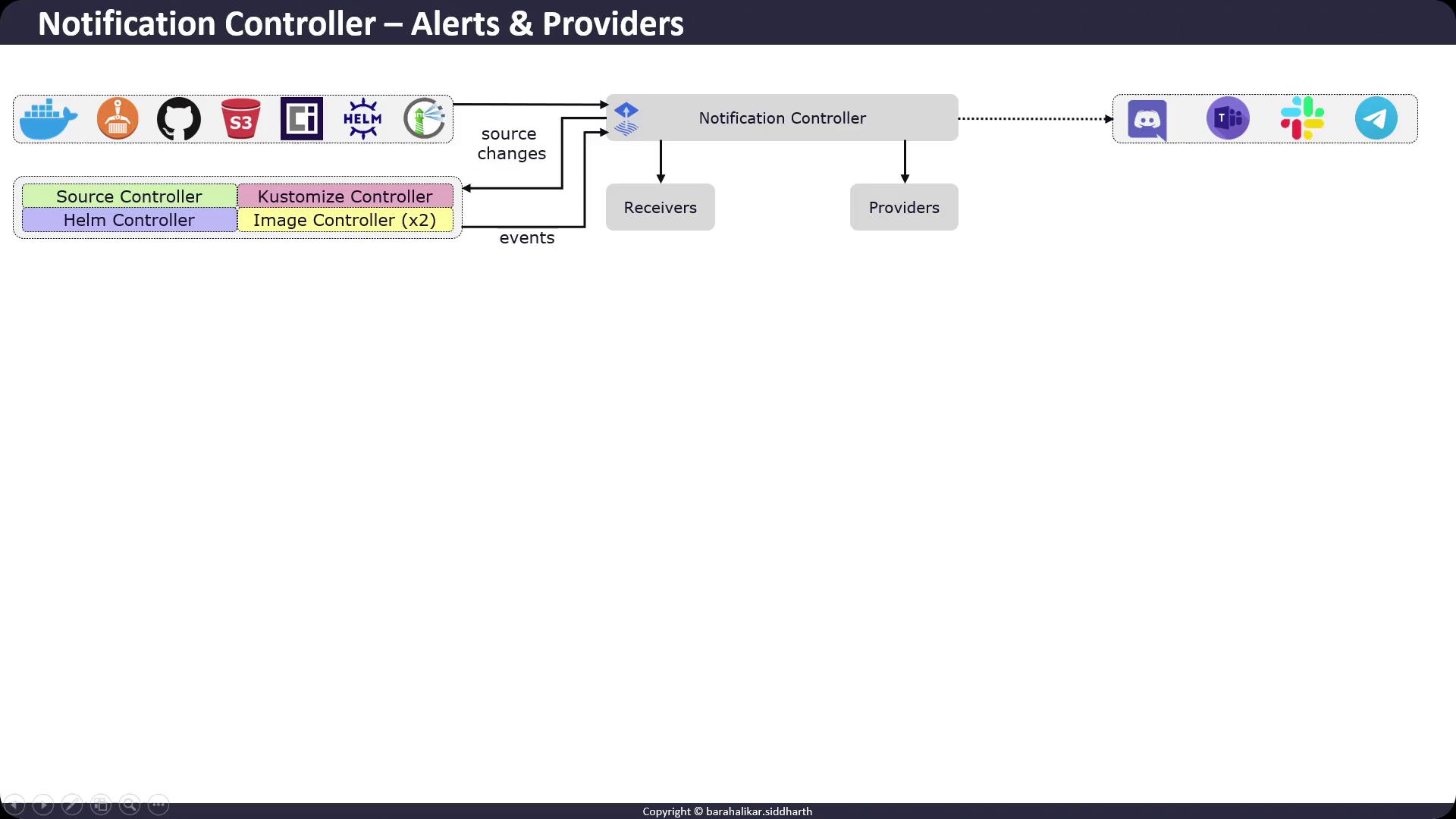
The Flux Notification Controller bridges external event sources (e.g., GitHub, S3 buckets, Helm repositories, Docker registries) with notification targets (Slack, Teams, Discord, Telegram). It comprises:
* **Receiver**: Watches changes in external sources and informs Flux controllers.
* **Provider**: Encodes and delivers events to external systems based on defined channels and formats.
Events emitted by Flux controllers (Source, Kustomize, Helm, Image) are matched against Alert rules and dispatched via Providers.
## Configuring Slack Notifications
In this example, we’ll use [Slack’s legacy incoming webhook API](https://api.slack.com/messaging/webhooks) to post Flux events to a channel.
### 1. Create the Slack Webhook Secret
Store your webhook URL in the `flux-system` namespace:
```bash theme={null}
kubectl -n flux-system create secret generic slack-webhook \
--from-literal=address=https://hooks.slack.com/services/SLACK/WEBHOOK/URL
```
Ensure your Slack workspace has incoming webhooks enabled on the target channel. You can configure and rotate webhooks via [Slack App Management](https://api.slack.com/apps).
### 2. Define an AlertProvider
Create an `AlertProvider` named `slack-example` of type `slack`, pointing at the `general` channel and referencing the `slack-webhook` secret:
```bash theme={null}
flux create alert-provider slack-example \
--type slack \
--channel general \
--username flux-webhook \
--secret-ref slack-webhook
```
### 3. Create an Alert
Define an `Alert` resource to filter and route events of `info` severity from all Flux controllers in `flux-system`:
```bash theme={null}
flux create alert slack-notification \
--event-severity info \
--provider-ref slack-example \
--event-source GitRepository/* \
--event-source HelmRepository/* \
--event-source Kustomization/* \
--event-source Bucket/* \
--event-source OCIRepository/* \
--event-source HelmChart/* \
--event-source HelmRelease/* \
--event-source ImageRepository/* \
--event-source ImagePolicy/* \
--event-source ImageUpdateAutomation/*
```
Slack’s legacy incoming webhooks may be deprecated in favor of the newer [Slack Apps & Block Kit APIs](https://api.slack.com/block-kit); plan to migrate when possible.
## Flux Notification Resources at a Glance
| Resource Type | Purpose | Example Command |
| ------------- | ------------------------------------ | ------------------------------------------------- |
| AlertProvider | Defines channel, format, and secrets | `flux create alert-provider slack-example ...` |
| Alert | Filters events by severity/source | `flux create alert slack-notification ...` |
| Secret | Stores webhook URLs or API tokens | `kubectl create secret generic slack-webhook ...` |
## References
* [Flux Notification Controller](https://fluxcd.io/docs/components/notification/)
* [Kubernetes Secrets](https://kubernetes.io/docs/concepts/configuration/secret/)
* [Slack Incoming Webhooks](https://api.slack.com/messaging/webhooks)