> ## Documentation Index
> Fetch the complete documentation index at: https://notes.kodekloud.com/llms.txt
> Use this file to discover all available pages before exploring further.
# DEMO Cosign OCI Artifacts
> This guide covers signing and verifying OCI artifacts using Cosign and configuring Flux CD for deployment in Kubernetes.
In this guide, we’ll walk through signing and verifying an OCI artifact using [Cosign](https://github.com/sigstore/cosign) and then configuring [Flux CD](https://fluxcd.io/) to fetch and verify that artifact before deploying it in Kubernetes.
## Prerequisites
* A fork or clone of the `bb-appsource-git` repository
* Docker CLI installed and authenticated
* A GitHub personal access token with **read:packages** and **write:packages** scopes
* [Flux CLI](https://fluxcd.io/docs/installation/) installed
* A Cosign key pair generated (`cosign.key` and `cosign.pub`)
***
## 1. Prepare the Repository
1. Switch to a new feature branch:
```bash theme={null}
git checkout -b 10-demo
```
2. Under the `manifests/` folder, confirm you have:
* `namespace.yaml`
* `deployment.yaml`
* `service.yaml`
3. Verify your `deployment.yaml` uses version **7.10.0**:
```yaml theme={null}
apiVersion: apps/v1
kind: Deployment
metadata:
name: block-buster
labels:
app: block-buster
api: downward
usage: global
spec:
replicas: 1
selector:
matchLabels:
app: block-buster
template:
metadata:
labels:
app: block-buster
env: dev
version: 7.10.0
spec:
containers:
- name: app
image: siddharth67/block-buster-dev:7.10.0
imagePullPolicy: Always
resources:
requests:
cpu: "100m"
memory: "256Mi"
```
***
## 2. Authenticate to GitHub Container Registry
Log in to [GitHub Container Registry (GHCR)](https://ghcr.io/) using your username and personal access token:
```bash theme={null}
docker login ghcr.io --username sidd-harth-2
# Enter your GHCR token when prompted
```
Ensure your token has at least `read:packages` and `write:packages` scopes to push and pull images.
***
## 3. Push the OCI Artifact with Flux
Package your manifests folder and push it as an OCI artifact:
```bash theme={null}
flux push artifact \
oci://ghcr.io/sidd-harth-2/bb-app:7.10.0-$(git rev-parse --short HEAD) \
--path="./manifests" \
--source="$(git config --get remote.origin.url)" \
--revision="7.10.0/$(git rev-parse --short HEAD)"
```
Expected output:
```plaintext theme={null}
pushing artifact to ghcr.io/sidd-harth-2/bb-app:7.10.0-d6c285f
artifact successfully pushed to ghcr.io/sidd-harth-2/bb-app:7.10.0-d6c285f@sha256:eda014...
```
Verify the new package under **Packages → bb-app** on GitHub.
***
## 4. Sign the Artifact with Cosign
1. Pull the image by tag:
```bash theme={null}
docker pull ghcr.io/sidd-harth-2/bb-app:7.10.0-d6c285f
```
2. Sign by digest:
```bash theme={null}
cosign sign \
--key ../cosign/cosign.key \
ghcr.io/sidd-harth-2/bb-app@sha256:eda014...
```
Approve uploading to the transparency log when prompted. A `.sig` blob is now attached to your OCI package.
***
## 5. Verify the Signature Locally
Use your public key to confirm the artifact’s integrity:
```bash theme={null}
cosign verify \
--key ../cosign/cosign.pub \
ghcr.io/sidd-harth-2/bb-app@sha256:eda014...
```
You should see:
```plaintext theme={null}
Verification for ghcr.io/sidd-harth-2/bb-app@sha256:eda014...
- The cosign claims were validated
- Evidence of claims in the transparency log was verified offline
- The signatures were verified against the specified public key
```
***
## 6. Configure Flux to Pull and Verify
1. Change to your Flux cluster repo:
```bash theme={null}
cd ~/block-buster/flux-clusters/dev-cluster
```
2. Create an `OCIRepository` source for GHCR:
```bash theme={null}
flux create source oci 10-demo-source-oci-bb-app \
--url oci://ghcr.io/sidd-harth-2/bb-app \
--tag 7.10.0-d6c285f \
--secret-ref ghcr-auth \
--provider generic \
--export > 10-demo-source-oci-bb-app.yaml
```
3. Edit **10-demo-source-oci-bb-app.yaml** to include Cosign verification:
```yaml theme={null}
apiVersion: source.toolkit.fluxcd.io/v1beta2
kind: OCIRepository
metadata:
name: 10-demo-source-oci-bb-app
namespace: flux-system
spec:
interval: 1m0s
provider: generic
url: oci://ghcr.io/sidd-harth-2/bb-app
ref:
tag: 7.10.0-d6c285f
secretRef:
name: ghcr-auth
verify:
provider: cosign
secretRef:
name: cosign-pub
```
4. Apply the source:
```bash theme={null}
kubectl apply -f 10-demo-source-oci-bb-app.yaml
```
5. Ensure secrets exist:
```bash theme={null}
kubectl -n flux-system get secret ghcr-auth cosign-pub
```
6. Create and apply a `Kustomization` to deploy the manifests:
```bash theme={null}
flux create kustomization 10-demo-kustomize-oci-bb-app \
--source=OCIRepository/10-demo-source-oci-bb-app \
--target-namespace=10-demo \
--path="./" \
--prune=false \
--interval=10s \
--export > 10-demo-kustomize-oci-bb-app.yaml
kubectl apply -f 10-demo-kustomize-oci-bb-app.yaml
```
***
## 7. Confirm Verification and Deployment
1. Reconcile and check the OCI source status:
```bash theme={null}
flux reconcile source oci -n flux-system 10-demo-source-oci-bb-app
flux get sources oci -n flux-system
```
You should see `READY True`.
2. Inspect the `SourceVerified` condition:
```bash theme={null}
kubectl -n flux-system get ocirepository 10-demo-source-oci-bb-app -o yaml
```
3. Verify deployment in the `10-demo` namespace:
```bash theme={null}
kubectl -n 10-demo get all
```
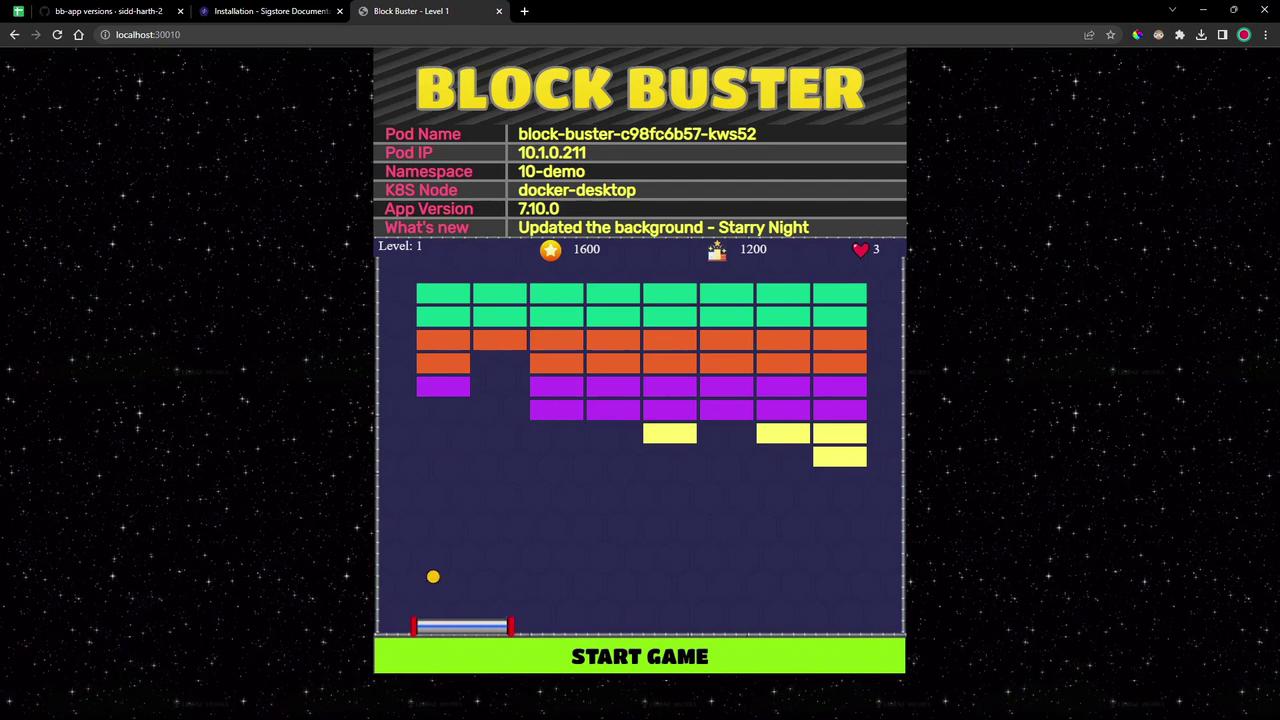
4. Access the application on its NodePort (e.g., `localhost:30010`). You should see version **7.10.0** of Block Buster:
***
## Links and References
* [Cosign by Sigstore](https://github.com/sigstore/cosign)
* [Flux CD Documentation](https://fluxcd.io/docs/)
* [GitHub Container Registry](https://ghcr.io/)
* [OCI Artifacts Spec](https://github.com/opencontainers/artifacts)