> ## Documentation Index
> Fetch the complete documentation index at: https://notes.kodekloud.com/llms.txt
> Use this file to discover all available pages before exploring further.
# DEMO Kustomize Controller Kustomize Overlay
> This hands-on tutorial teaches applying Kustomize overlays using Flux CD, covering setup, resource creation, verification, and inspecting deployed Kubernetes resources.
Welcome to this hands-on tutorial on using the Kustomize controller to apply overlays via Flux CD. In this lesson, you’ll learn how to:
1. Switch to the `3-demo` branch containing a `kustomization.yaml`
2. Create a Flux `GitRepository` source
3. Define a Flux `Kustomization` resource
4. Verify the setup with Flux commands
5. Inspect the deployed Kubernetes resources
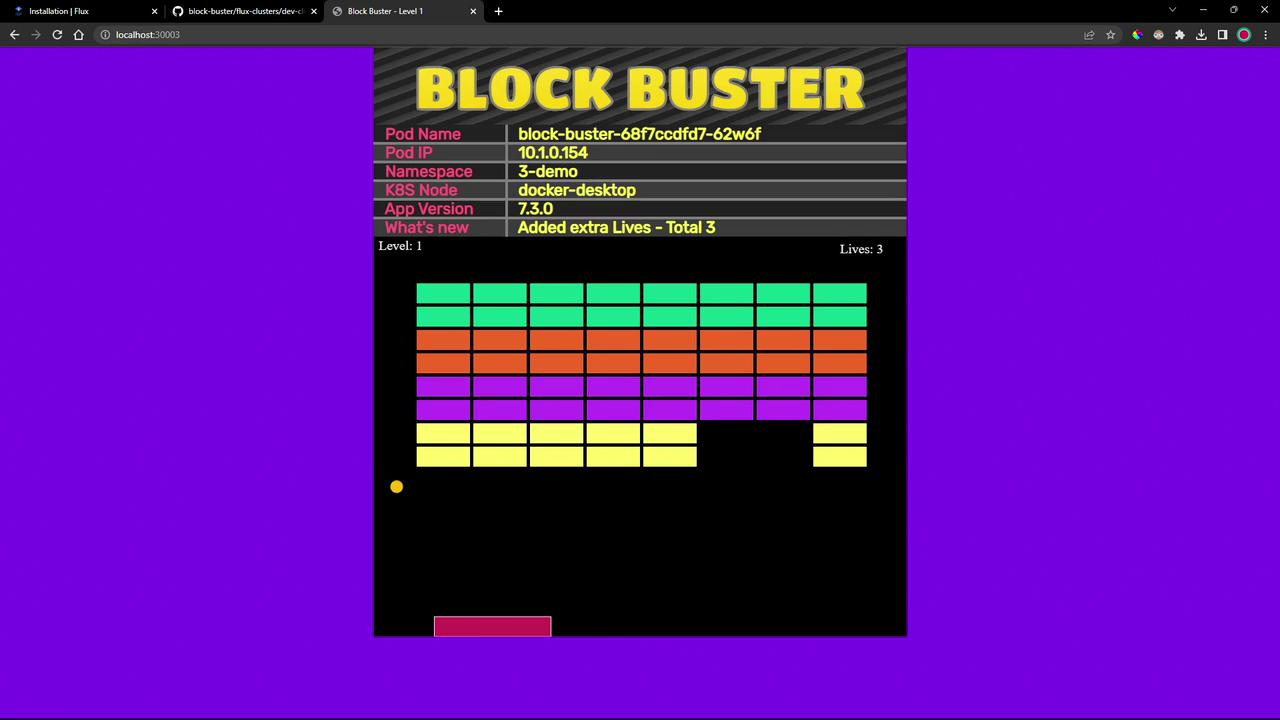
6. View the updated Block Buster application
By the end, you’ll have a working overlay that skips the build phase and applies changes automatically.
## 1. Switch to the `3-demo` Branch
First, clone or navigate to your application source and check out the `3-demo` branch where the `kustomization.yaml` is already defined:
```bash theme={null}
cd ~/bb-app-source
git checkout 3-demo
```
You should see:
```git theme={null}
Branch '3-demo' set up to track remote branch '3-demo' from 'origin'.
Switched to a new branch '3-demo'
```
List the directory to confirm all files:
```bash theme={null}
ls
```
| File | Description |
| ------------------ | ----------------------------------------- |
| deployment.yml | Deployment specification for block-buster |
| service.yml | Service exposing your application |
| namespace.yml | Namespace definition for isolation |
| kustomization.yaml | Kustomize resource list for overlay |
Contents of `kustomization.yaml`:
```yaml theme={null}
apiVersion: kustomize.config.k8s.io/v1beta1
kind: Kustomization
resources:
- deployment.yml
- service.yml
- namespace.yml
```
Because the `kustomization.yaml` is present, the Kustomize controller will skip the normal build phase and apply resources directly.
## 2. Create a Git Source in the Flux Cluster
Switch to your Flux configuration repository:
```bash theme={null}
cd ~/block-buster/flux-clusters/dev-cluster/
```
Define a `GitRepository` resource that points to branch `3-demo` of your app repo:
```bash theme={null}
flux create source git 3-demo-source-git-bb-app \
--url https://github.com/sidd-harth-2/bb-app-source \
--branch 3-demo \
--interval 10s \
--export > 3-demo-source-git-bb-app.yaml
```
`3-demo-source-git-bb-app.yaml`:
```yaml theme={null}
apiVersion: source.toolkit.fluxcd.io/v1beta2
kind: GitRepository
metadata:
name: 3-demo-source-git-bb-app
namespace: flux-system
spec:
interval: 10s
ref:
branch: 3-demo
url: https://github.com/sidd-harth-2/bb-app-source
```
Flux will poll the Git repository every 10 seconds and store an artifact for the specified branch.
## 3. Create the Kustomization Resource
Next, define a Flux `Kustomization` that applies the overlay found under `kustomize`:
```bash theme={null}
flux create kustomization 3-demo-kustomize-git-bb-app \
--source GitRepository/3-demo-source-git-bb-app \
--path kustomize \
--target-namespace 3-demo \
--prune true \
--interval 10s \
--export > 3-demo-kustomize-git-bb-app.yaml
```
Contents of `3-demo-kustomize-git-bb-app.yaml`:
```yaml theme={null}
apiVersion: kustomize.toolkit.fluxcd.io/v1beta2
kind: Kustomization
metadata:
name: 3-demo-kustomize-git-bb-app
namespace: flux-system
spec:
interval: 10s
path: ./kustomize
prune: true
sourceRef:
kind: GitRepository
name: 3-demo-source-git-bb-app
targetNamespace: 3-demo
```
Commit and push both Flux manifests:
```bash theme={null}
git add 3-demo-source-git-bb-app.yaml 3-demo-kustomize-git-bb-app.yaml
git commit -m "Add 3-demo overlay with Kustomization"
git push
```
## 4. Verify with Flux
Check that the Git source is registered:
```bash theme={null}
flux get sources git
```
Expected output:
```text theme={null}
NAME REVISION SUSPENDED READY MESSAGE
2-demo-source-git-bb-app 2-demo@sha1:7dfa8105 False True stored artifact for revision '2-demo@sha1:7dfa8105'
3-demo-source-git-bb-app 3-demo@sha1:990e6de9 False True stored artifact for revision '3-demo@sha1:990e6de9'
flux-system main@sha1:548f1930 False True stored artifact for revision 'main@sha1:548f1930'
```
Then confirm the overlay is applied:
```bash theme={null}
flux get kustomizations
```
Expected output:
```text theme={null}
NAME REVISION SUSPENDED READY MESSAGE
2-demo-kustomize-git-bb-app 2-demo@sha1:7dfa8105 False True Applied revision: 2-demo@sha1:7dfa8105
3-demo-kustomize-git-bb-app 3-demo@sha1:990e6de9 False True Applied revision: 3-demo@sha1:990e6de9
flux-system main@sha1:548f1930 False True Applied revision: main@sha1:548f1930
```
## 5. Inspect Deployed Resources
List all namespaces to ensure `3-demo` exists:
```bash theme={null}
kubectl get ns
```
View resources in the `3-demo` namespace:
```bash theme={null}
kubectl get all -n 3-demo
```
Sample output:
```text theme={null}
NAME READY STATUS RESTARTS AGE
pod/block-buster-68f7ccdfd7-62w6f 1/1 Running 0 69s
NAME TYPE CLUSTER-IP EXTERNAL-IP PORT(S) AGE
service/block-buster-service NodePort 10.101.115.232 80:30008/TCP 69s
NAME READY UP-TO-DATE AVAILABLE AGE
deployment.apps/block-buster 1/1 1 1 69s
NAME DESIRED CURRENT READY AGE
replicaset.apps/block-buster-68f7ccdfd7 1 1 1 69s
```
## 6. View the Updated Application
Open your browser to http\://\:30008. You’ll notice that the game now shows **three lives** instead of one:
***
## Links and References
* [Flux CD Documentation](https://fluxcd.io/docs/)
* [Kustomize Overview](https://kubectl.docs.kubernetes.io/references/kustomize/)
* [GitOps with Flux CD](https://fluxcd.io/)