> ## Documentation Index
> Fetch the complete documentation index at: https://notes.kodekloud.com/llms.txt
> Use this file to discover all available pages before exploring further.
# DEMO Kustomize Controller Plain YAML Manifests in Different Repo
> This article explains how to configure FluxCD to deploy YAML manifests from a separate Git repository using Kustomize Controller.
In this lesson, you’ll configure FluxCD to pull plain YAML manifests from a different Git repository and apply them with Kustomize Controller. We’ll create a `GitRepository` source and a `Kustomization` resource step by step.
## Prerequisites
* A Kubernetes cluster with FluxCD v0.38+ installed
* `flux` CLI configured with your cluster’s kubeconfig
* Access to the `bb-app-source` repository on GitHub
***
## 1. Checkout the `2-demo` Branch
Switch to the `2-demo` branch in your `bb-app-source` repository:
```bash theme={null}
cd bb-app-source
git checkout 2-demo
```
You should see:
```bash theme={null}
Branch '2-demo' set up to track remote branch '2-demo' from 'origin'.
Switched to a new branch '2-demo'
```
## 2. Review the Application Manifest
Inspect the Deployment manifest under `manifests/`. Notice the image version has been updated to **7.2.0**:
```yaml theme={null}
# bb-app-source/manifests/deployment.yaml
env: dev
version: 7.2.0
spec:
containers:
- name: app
image: siddharth67/block-buster-dev:7.2.0
imagePullPolicy: Always
resources:
requests:
memory: "10Mi"
cpu: "10m"
limits:
memory: "64Mi"
cpu: "20m"
```
***
## 3. Create the GitRepository Source
From your Flux cluster configuration directory (`block-buster/flux-clusters/dev-cluster`), run:
```bash theme={null}
cd ../block-buster/flux-clusters/dev-cluster
flux create source git bb-app-2demo \
--url https://github.com/sidd-harth-2/bb-app-source \
--branch 2-demo \
--timeout 10s \
--export > bb-app-2demo-source.yaml
```
This generates:
```yaml theme={null}
# bb-app-2demo-source.yaml
apiVersion: source.toolkit.fluxcd.io/v1beta2
kind: GitRepository
metadata:
name: bb-app-2demo
namespace: flux-system
spec:
interval: 1m0s
url: https://github.com/sidd-harth-2/bb-app-source
ref:
branch: 2-demo
```
Commit and push this file so Flux can fetch your manifests automatically.
***
## 4. Create the Kustomization Resource
Use the Flux CLI to define a `Kustomization` that points to the `manifests` folder in your `bb-app-source` repo:
```bash theme={null}
flux create kustomization bb-app-2demo-kustomize \
--source GitRepository/bb-app-2demo \
--path ./manifests \
--prune=true \
--interval=10s \
--target-namespace 2-demo \
--export > bb-app-2demo-kustomize.yaml
```
```yaml theme={null}
# bb-app-2demo-kustomize.yaml
apiVersion: kustomize.toolkit.fluxcd.io/v1beta2
kind: Kustomization
metadata:
name: bb-app-2demo-kustomize
namespace: flux-system
spec:
interval: 10s
path: ./manifests
prune: true
sourceRef:
kind: GitRepository
name: bb-app-2demo
targetNamespace: 2-demo
```
The `--prune=true` flag will remove any Kubernetes resources in the target namespace that are not tracked by this Kustomization. Ensure you don’t have unmanaged resources in `2-demo`.
Commit and push the Kustomization YAML so Flux can reconcile it.
***
## 5. Overview of Created Resources
| Resource Type | Purpose | Flux CLI Example |
| ------------- | ------------------------------------------------ | -------------------------------------------------------------------- |
| GitRepository | Fetch remote plain YAML manifests | `flux create source git bb-app-2demo … --export > source.yml` |
| Kustomization | Apply and reconcile manifests in the `2-demo` NS | `flux create kustomization bb-app-2demo-kustomize … > kustomize.yml` |
***
## 6. Verify Flux Reconciliation
First, check your Git sources:
```bash theme={null}
flux get sources git
```
Expected output:
```text theme={null}
NAME REVISION READY MESSAGE
bb-app-2demo 2-demo@sha1:7dfa8105 True stored artifact for revision '2-demo@sha1:7dfa8105'
flux-system main@sha1:cf1664a0 True stored artifact for revision 'main@sha1:cf1664a0'
```
Next, verify Kustomizations:
```bash theme={null}
flux get kustomizations
```
You should see:
```text theme={null}
NAME REVISION READY MESSAGE
bb-app-2demo-kustomize 2-demo@sha1:7dfa8105 True Applied revision: 2-demo@sha1:7dfa8105
```
***
## 7. Confirm Kubernetes Resources
List your namespaces and workload in `2-demo`:
```bash theme={null}
kubectl get ns
kubectl get all -n 2-demo
```
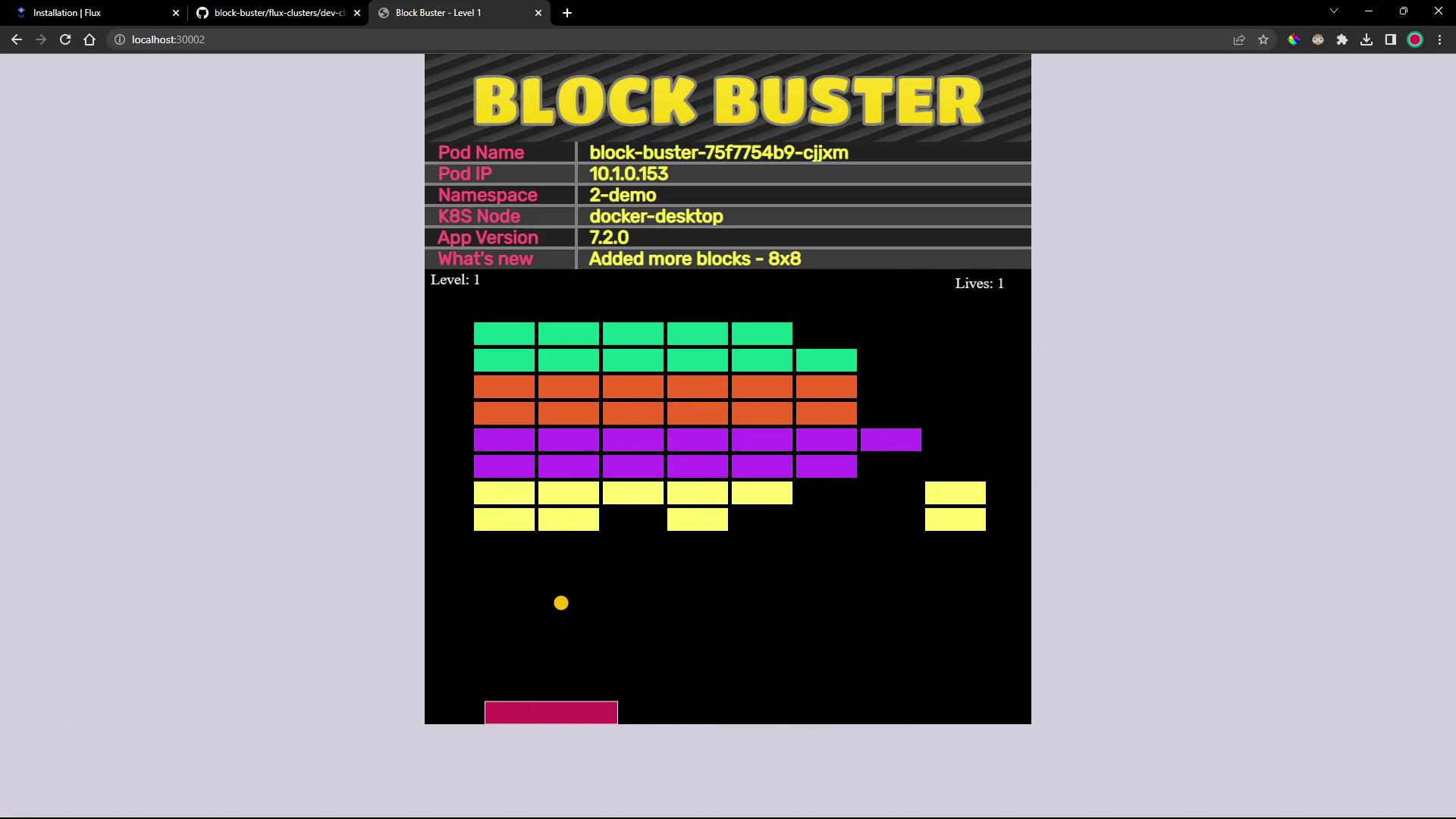
You should observe the `block-buster` Deployment, Service, and Pods running version **7.2.0**.
***
## 8. Access the Application
Find the NodePort for the `block-buster-service`:
```bash theme={null}
kubectl get svc block-buster-service -n 2-demo
```
Open your browser at `http://:`. You’ll see the updated “Block Buster” game interface running version 7.2.0:
***
## Links and References
* [FluxCD Source Toolkit – GitRepository](https://fluxcd.io/docs/components/source/gitrepositories/)
* [FluxCD Kustomize Toolkit – Kustomization](https://fluxcd.io/docs/components/kustomize/kustomization/)
* [Kubernetes Documentation](https://kubernetes.io/docs/)
* [GitOps with FluxCD](https://fluxcd.io/)
* [Docker Hub – block-buster-dev Image](https://hub.docker.com/)