> ## Documentation Index
> Fetch the complete documentation index at: https://notes.kodekloud.com/llms.txt
> Use this file to discover all available pages before exploring further.
# Demo Hands on with PubSub Subscription and its integration
> Hands on demo connecting Pub/Sub topic to Cloud Storage so published messages are written as files for zero infrastructure ingestion and downstream processing.
Welcome back. In this hands-on demo you'll extend your Pub/Sub knowledge by connecting a Pub/Sub topic to Cloud Storage so that published messages land as files in a bucket. This pattern is useful for simple, zero-infrastructure ingestion pipelines (for example, later loading objects into BigQuery or processing them with Spark).
Prerequisites
* A Google Cloud project with billing enabled.
* Pub/Sub API and Cloud Storage enabled.
* A Pub/Sub topic already created (this demo uses `kodekloud-demo-topic`).
What we'll do
1. Create a Cloud Storage bucket.
2. Inspect the Pub/Sub topic.
3. Create a subscription that writes messages to the bucket.
4. Publish messages and confirm files appear in Cloud Storage.
5. Clean up resources.
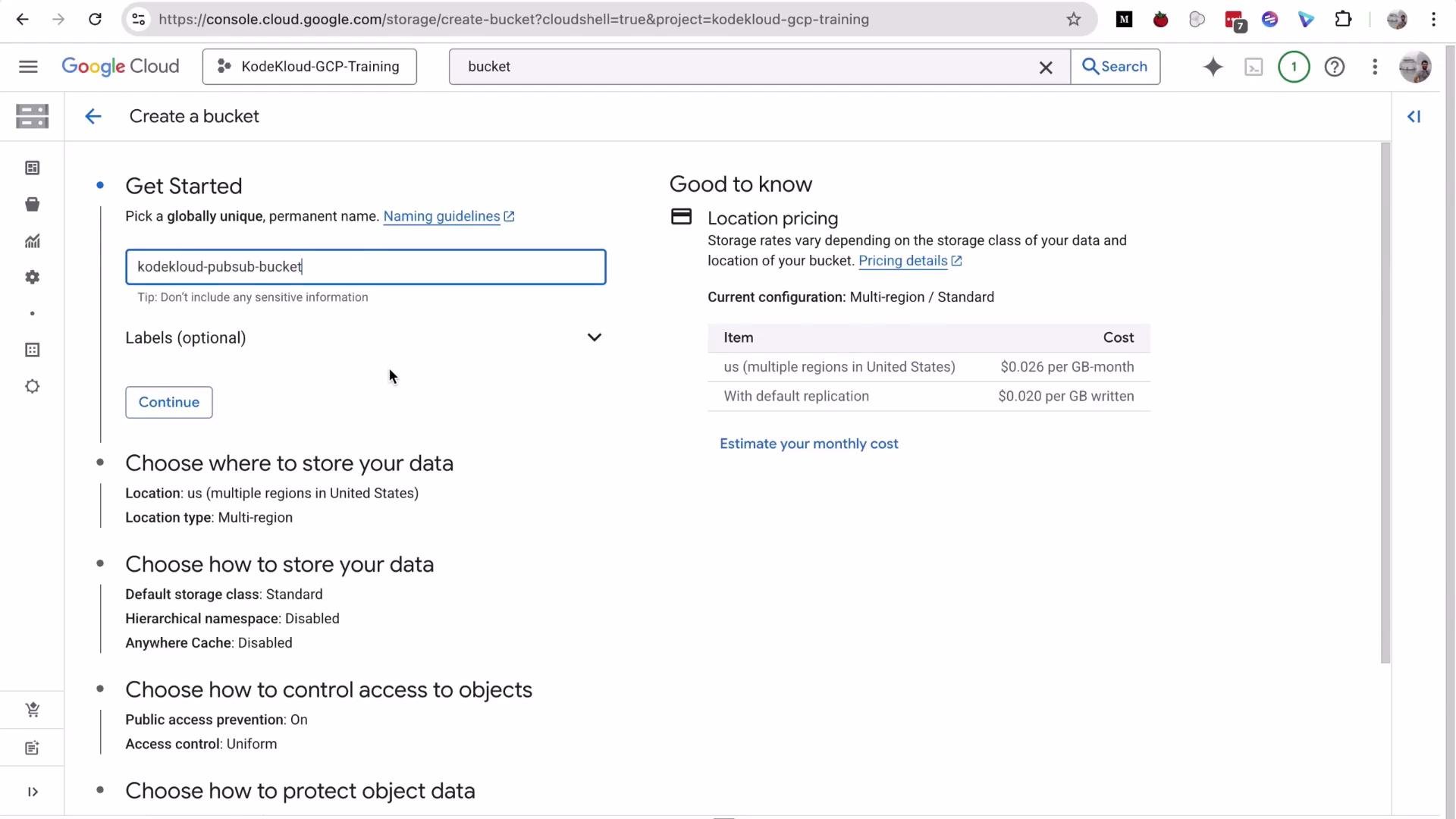
Step 1 — Create a Cloud Storage bucket
1. In the Cloud Console search for "Buckets" → Create.
2. Provide a globally unique name (demo uses `kodekloud-pubsub-bucket`).
3. Leave other settings at their defaults and click Create.
 Step 2 — Open the Pub/Sub topic and view metrics
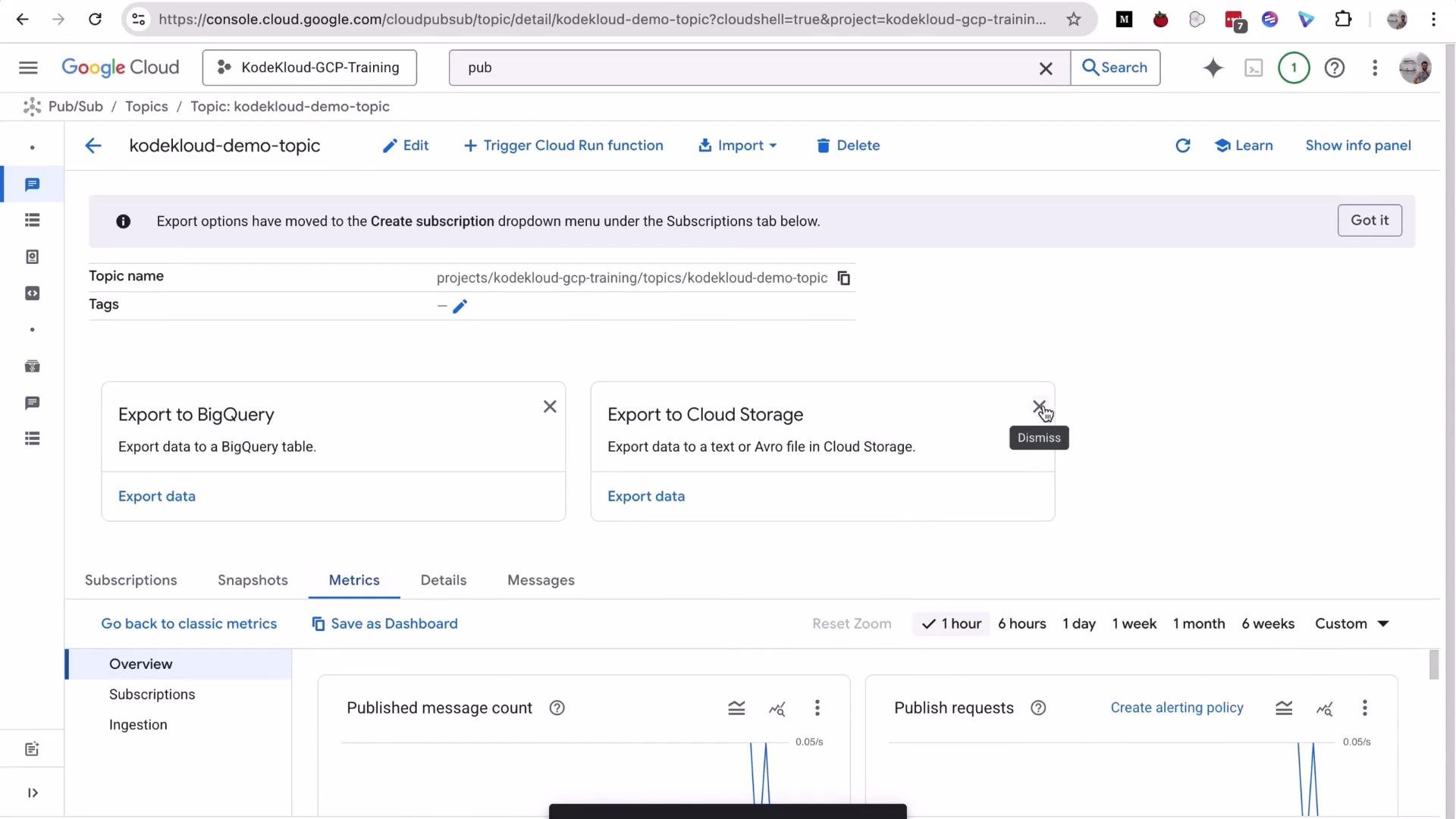
Open the topic you created earlier (`kodekloud-demo-topic`). The topic details page shows helpful monitoring metrics (published message count, publish requests, throughput) and export options (BigQuery, Cloud Storage).
Step 2 — Open the Pub/Sub topic and view metrics
Open the topic you created earlier (`kodekloud-demo-topic`). The topic details page shows helpful monitoring metrics (published message count, publish requests, throughput) and export options (BigQuery, Cloud Storage).
 Step 3 — Create a subscription that writes to Cloud Storage
Create a subscription that delivers messages from the topic into your Cloud Storage bucket:
1. Go to Pub/Sub → Subscriptions → Create subscription.
2. Enter a subscription ID (demo: `kodekloud-storage-sub`).
3. Select the topic `projects//topics/kodekloud-demo-topic`.
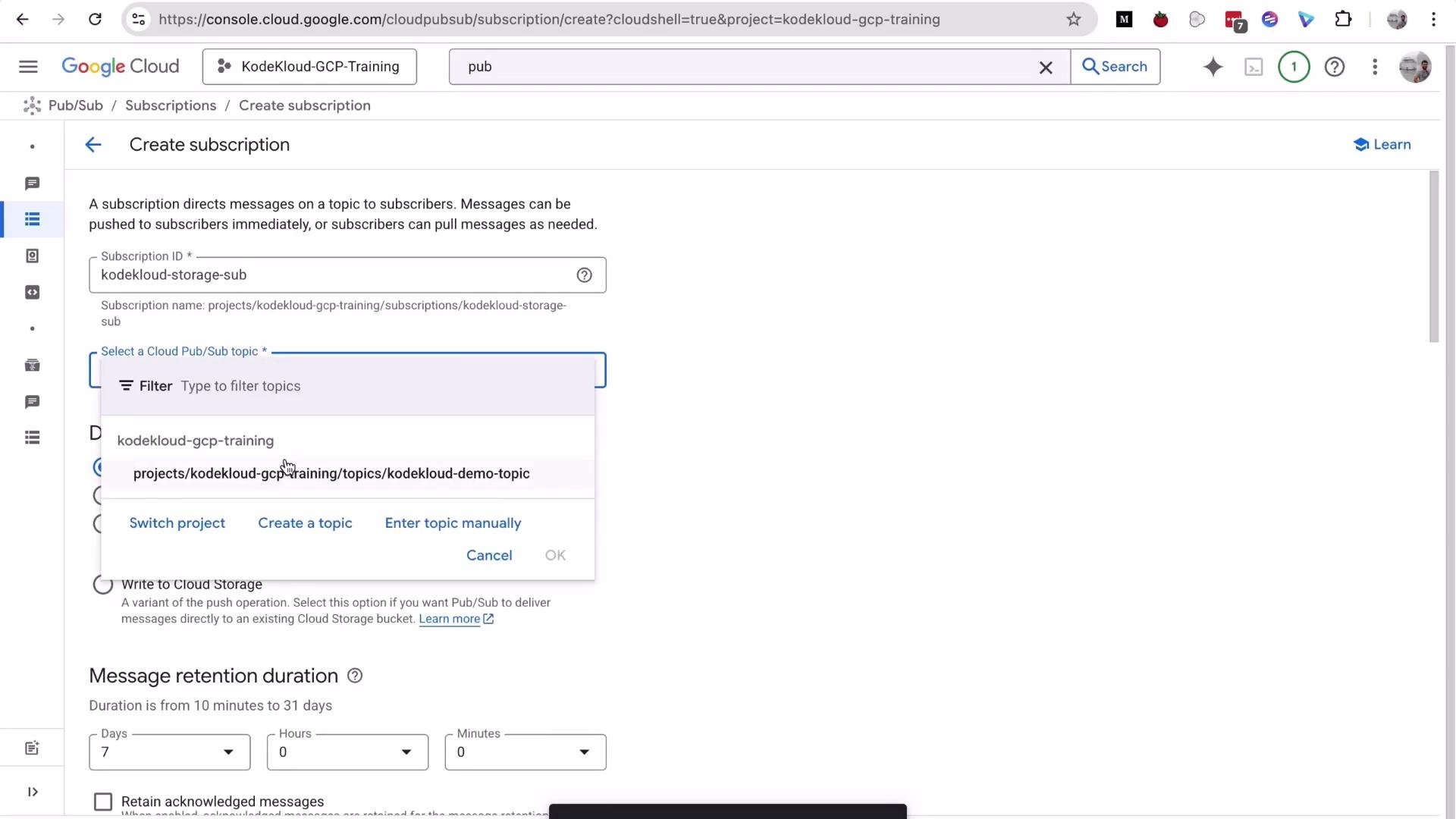
4. For Delivery type choose **Write to Cloud Storage**.
5. Browse and select the bucket `kodekloud-pubsub-bucket`.
6. Choose file format: `Avro` or `JSON` (demo uses `JSON`).
7. Configure file batching (how frequently Pub/Sub writes files). Demo uses a 1 minute batch interval.
When "Write to Cloud Storage" is selected, Pub/Sub needs permission to create objects in the bucket. The Console will detect missing permissions and offer a one-click option to set them.
Step 3 — Create a subscription that writes to Cloud Storage
Create a subscription that delivers messages from the topic into your Cloud Storage bucket:
1. Go to Pub/Sub → Subscriptions → Create subscription.
2. Enter a subscription ID (demo: `kodekloud-storage-sub`).
3. Select the topic `projects//topics/kodekloud-demo-topic`.
4. For Delivery type choose **Write to Cloud Storage**.
5. Browse and select the bucket `kodekloud-pubsub-bucket`.
6. Choose file format: `Avro` or `JSON` (demo uses `JSON`).
7. Configure file batching (how frequently Pub/Sub writes files). Demo uses a 1 minute batch interval.
When "Write to Cloud Storage" is selected, Pub/Sub needs permission to create objects in the bucket. The Console will detect missing permissions and offer a one-click option to set them.
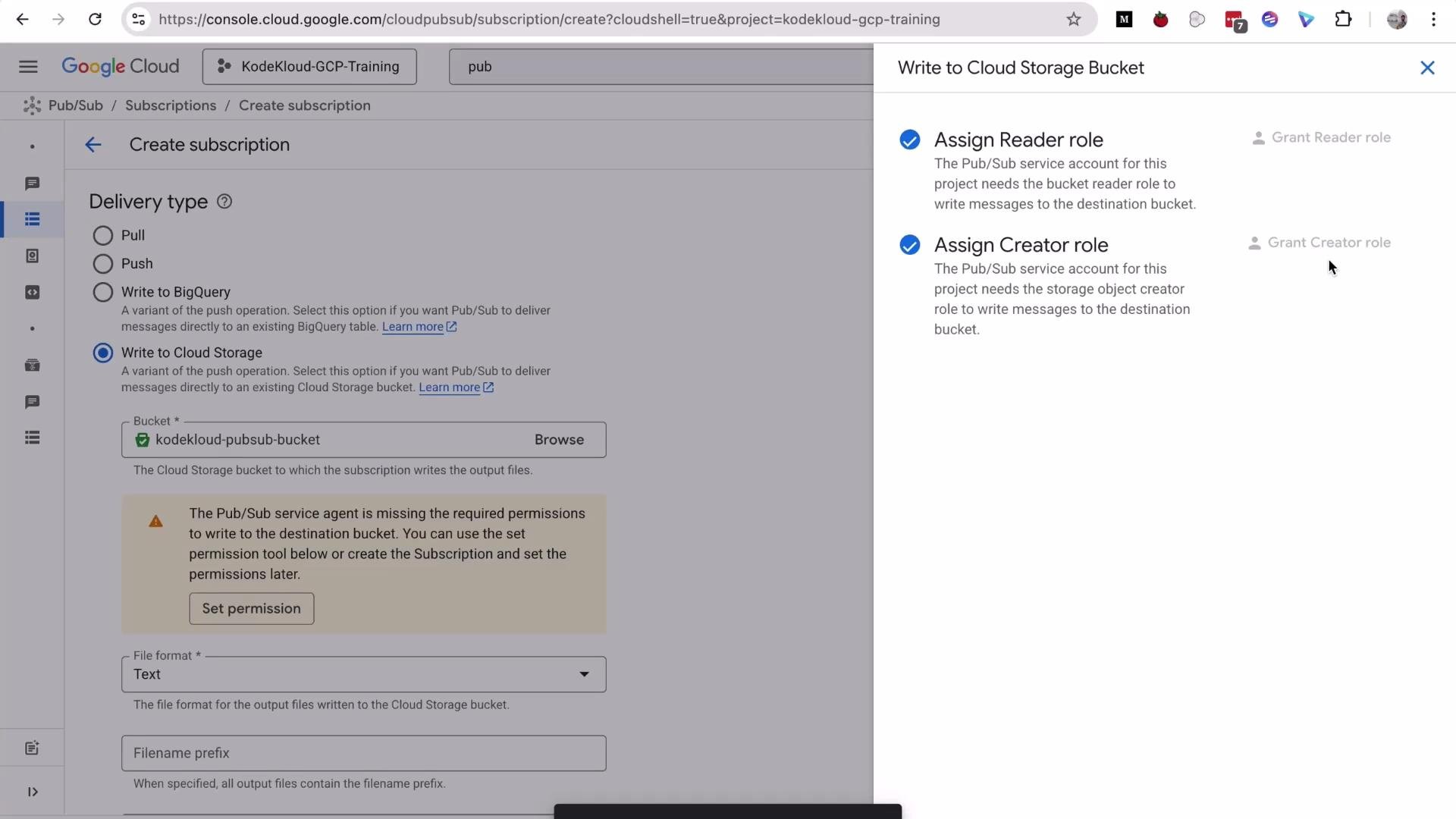
 Pub/Sub requires permission to write objects into the destination bucket (typically the Pub/Sub service account needs Object Creator and Object Viewer roles). The Console can auto-assign these when you click "Set permission" during subscription creation.
Finalize the subscription creation. With a 1 minute batching interval, Pub/Sub will write files to the bucket approximately once per minute (subject to batching thresholds).
Pub/Sub requires permission to write objects into the destination bucket (typically the Pub/Sub service account needs Object Creator and Object Viewer roles). The Console can auto-assign these when you click "Set permission" during subscription creation.
Finalize the subscription creation. With a 1 minute batching interval, Pub/Sub will write files to the bucket approximately once per minute (subject to batching thresholds).
 Step 4 — Publish messages and verify Cloud Storage objects
Publish messages to the topic to trigger the delivery. You can use a small publish script from Cloud Shell. Example output from a Cloud Shell publish run:
```bash theme={null}
# Example: publish_demo.sh invoked from Cloud Shell
$ bash publish_demo.sh
messageIds:
- '16406407522493350'
messageIds:
- '16406765299791405'
messageIds:
- '16406424317703217'
```
Wait for the subscription's configured batching interval (1 minute in this demo), then inspect the bucket `kodekloud-pubsub-bucket` in the Cloud Console. You should see new objects created by Pub/Sub; download them to view the JSON payloads.
Example Cloud Storage object URLs produced by this integration:
```text theme={null}
https://storage.googleapis.com/kodekloud-pubsub-bucket/2025-11-23T10%3A02%3A44%2B00%3A00_f879d9
https://storage.cloud.google.com/kodekloud-pubsub-bucket/2025-11-23T10%3A02%3A44%2B00%3A00_f879d9
gs://kodekloud-pubsub-bucket/2025-11-23T10:02:44+00:00_f879d9
```
Why this is useful
* Zero-infrastructure ingestion: Pub/Sub writes directly to Cloud Storage; you don't need a streaming consumer running all the time.
* Files can be consumed by downstream tools: bulk load to BigQuery, process with Dataflow/Spark, run batch analytics, or archive raw events.
Step 5 — Clean up resources
To avoid unexpected charges, delete resources you created when finished. Example cleanup commands (run in Cloud Shell):
```bash theme={null}
# Delete subscriptions
$ gcloud pubsub subscriptions delete kodekloud-pull-sub
Deleted subscription [projects/kodekloud-gcp-training/subscriptions/kodekloud-pull-sub].
$ gcloud pubsub subscriptions delete kodekloud-storage-sub
Deleted subscription [projects/kodekloud-gcp-training/subscriptions/kodekloud-storage-sub].
# Delete topic
$ gcloud pubsub topics delete kodekloud-demo-topic
Deleted topic [projects/kodekloud-gcp-training/topics/kodekloud-demo-topic].
# Delete bucket and its objects using gsutil (fast)
$ gsutil -m rm -r gs://kodekloud-pubsub-bucket
Removing gs://kodekloud-pubsub-bucket/2025-11-23T10:02:44+00:00_f879d9#1763892224947144...
Removing gs://kodekloud-pubsub-bucket/2025-11-23T10:02:45+00:00_9c0f14#1763892226046057...
Removing gs://kodekloud-pubsub-bucket/2025-11-23T10:02:46+00:00_921f91#1763892227045748...
Removing gs://kodekloud-pubsub-bucket/2025-11-23T10:02:48+00:00_ce2906#1763892229247529...
Removing gs://kodekloud-pubsub-bucket/2025-11-23T10:02:49+00:00_a39d4e#1763892230246973...
/ [5/5 objects] 100% Done
Operation completed over 5 objects.
Removing gs://kodekloud-pubsub-bucket/...
```
Always delete test topics, subscriptions, and buckets after your demo to prevent ongoing storage or Pub/Sub costs.
Resources used in this demo
| Resource | Example name / ID | Purpose |
| ------------------------------------- | ------------------------- | ----------------------------------------- |
| Pub/Sub topic | `kodekloud-demo-topic` | Source of published messages |
| Subscription (Cloud Storage delivery) | `kodekloud-storage-sub` | Writes messages to Cloud Storage |
| Cloud Storage bucket | `kodekloud-pubsub-bucket` | Destination for message files (JSON/Avro) |
Links and references
* Pub/Sub documentation: [https://cloud.google.com/pubsub/docs](https://cloud.google.com/pubsub/docs)
* Cloud Storage documentation: [https://cloud.google.com/storage/docs](https://cloud.google.com/storage/docs)
* BigQuery export for Pub/Sub: [https://cloud.google.com/pubsub/docs/integrations#bigquery](https://cloud.google.com/pubsub/docs/integrations#bigquery)
That’s it for this lesson — see you in the next one.
Step 4 — Publish messages and verify Cloud Storage objects
Publish messages to the topic to trigger the delivery. You can use a small publish script from Cloud Shell. Example output from a Cloud Shell publish run:
```bash theme={null}
# Example: publish_demo.sh invoked from Cloud Shell
$ bash publish_demo.sh
messageIds:
- '16406407522493350'
messageIds:
- '16406765299791405'
messageIds:
- '16406424317703217'
```
Wait for the subscription's configured batching interval (1 minute in this demo), then inspect the bucket `kodekloud-pubsub-bucket` in the Cloud Console. You should see new objects created by Pub/Sub; download them to view the JSON payloads.
Example Cloud Storage object URLs produced by this integration:
```text theme={null}
https://storage.googleapis.com/kodekloud-pubsub-bucket/2025-11-23T10%3A02%3A44%2B00%3A00_f879d9
https://storage.cloud.google.com/kodekloud-pubsub-bucket/2025-11-23T10%3A02%3A44%2B00%3A00_f879d9
gs://kodekloud-pubsub-bucket/2025-11-23T10:02:44+00:00_f879d9
```
Why this is useful
* Zero-infrastructure ingestion: Pub/Sub writes directly to Cloud Storage; you don't need a streaming consumer running all the time.
* Files can be consumed by downstream tools: bulk load to BigQuery, process with Dataflow/Spark, run batch analytics, or archive raw events.
Step 5 — Clean up resources
To avoid unexpected charges, delete resources you created when finished. Example cleanup commands (run in Cloud Shell):
```bash theme={null}
# Delete subscriptions
$ gcloud pubsub subscriptions delete kodekloud-pull-sub
Deleted subscription [projects/kodekloud-gcp-training/subscriptions/kodekloud-pull-sub].
$ gcloud pubsub subscriptions delete kodekloud-storage-sub
Deleted subscription [projects/kodekloud-gcp-training/subscriptions/kodekloud-storage-sub].
# Delete topic
$ gcloud pubsub topics delete kodekloud-demo-topic
Deleted topic [projects/kodekloud-gcp-training/topics/kodekloud-demo-topic].
# Delete bucket and its objects using gsutil (fast)
$ gsutil -m rm -r gs://kodekloud-pubsub-bucket
Removing gs://kodekloud-pubsub-bucket/2025-11-23T10:02:44+00:00_f879d9#1763892224947144...
Removing gs://kodekloud-pubsub-bucket/2025-11-23T10:02:45+00:00_9c0f14#1763892226046057...
Removing gs://kodekloud-pubsub-bucket/2025-11-23T10:02:46+00:00_921f91#1763892227045748...
Removing gs://kodekloud-pubsub-bucket/2025-11-23T10:02:48+00:00_ce2906#1763892229247529...
Removing gs://kodekloud-pubsub-bucket/2025-11-23T10:02:49+00:00_a39d4e#1763892230246973...
/ [5/5 objects] 100% Done
Operation completed over 5 objects.
Removing gs://kodekloud-pubsub-bucket/...
```
Always delete test topics, subscriptions, and buckets after your demo to prevent ongoing storage or Pub/Sub costs.
Resources used in this demo
| Resource | Example name / ID | Purpose |
| ------------------------------------- | ------------------------- | ----------------------------------------- |
| Pub/Sub topic | `kodekloud-demo-topic` | Source of published messages |
| Subscription (Cloud Storage delivery) | `kodekloud-storage-sub` | Writes messages to Cloud Storage |
| Cloud Storage bucket | `kodekloud-pubsub-bucket` | Destination for message files (JSON/Avro) |
Links and references
* Pub/Sub documentation: [https://cloud.google.com/pubsub/docs](https://cloud.google.com/pubsub/docs)
* Cloud Storage documentation: [https://cloud.google.com/storage/docs](https://cloud.google.com/storage/docs)
* BigQuery export for Pub/Sub: [https://cloud.google.com/pubsub/docs/integrations#bigquery](https://cloud.google.com/pubsub/docs/integrations#bigquery)
That’s it for this lesson — see you in the next one.