> ## Documentation Index
> Fetch the complete documentation index at: https://notes.kodekloud.com/llms.txt
> Use this file to discover all available pages before exploring further.
# Cloud Composer Orchestrating Data Workflows
> Introduction to Cloud Composer, Google’s managed Apache Airflow for orchestrating, scheduling, and monitoring data pipelines across GCP services.
Hello and welcome back.
In this lesson we’ll explore Cloud Composer — Google Cloud’s managed service for orchestrating data workflows. Composer runs Apache Airflow for you, so you get familiar DAG-based workflow authoring and the Airflow UI while Google handles the underlying infrastructure: scaling, monitoring, upgrades, and other operational tasks.
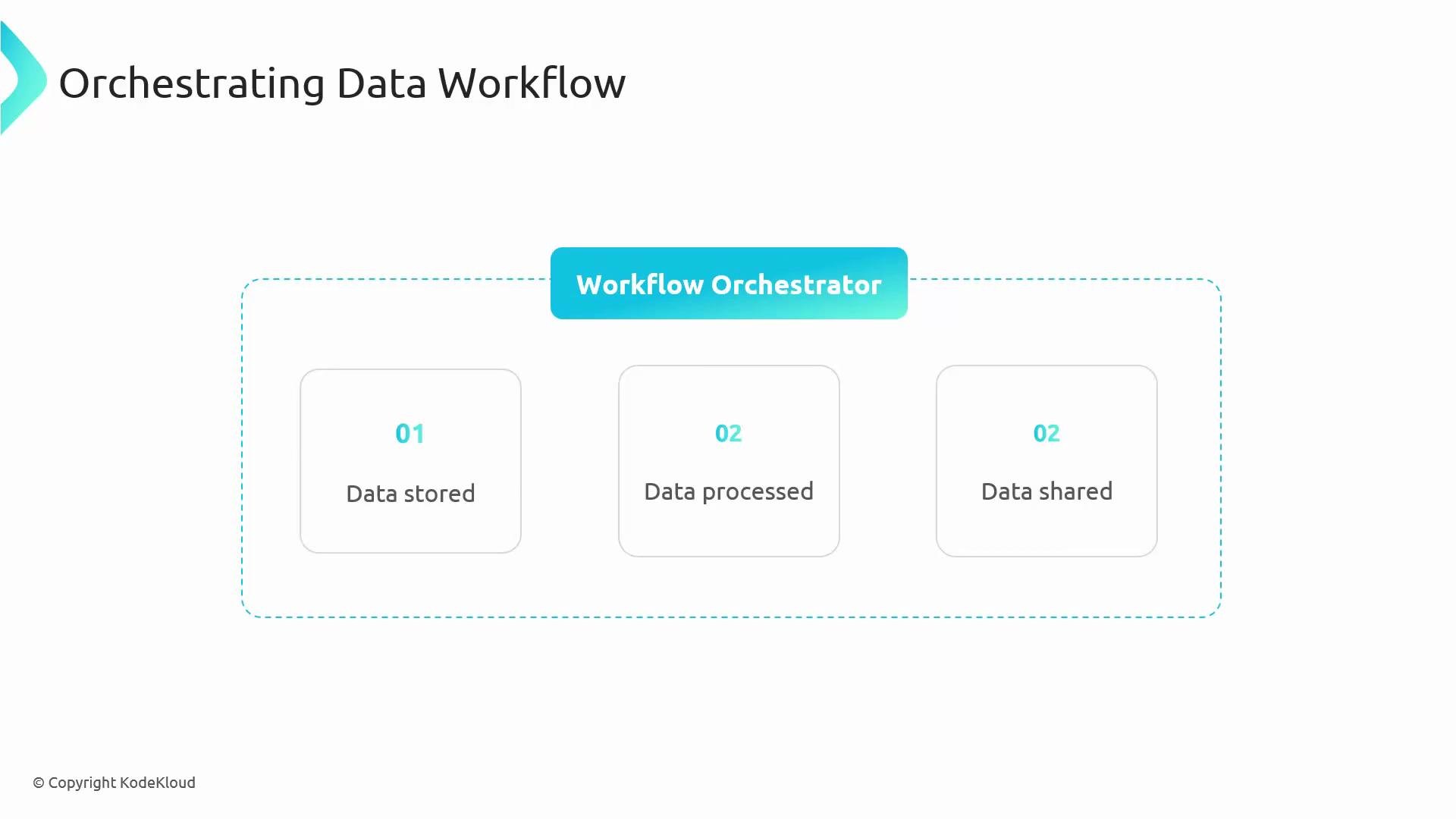
What problem does an orchestrator solve? Data pipelines typically require ordered steps (extract → transform → load → validate) and reliable scheduling. A workflow orchestrator ensures steps run in the correct order, handles retries, and centralizes monitoring and alerting.
 By the end of this lesson you will understand what Cloud Composer does, its core components, and how it fits into a typical data pipeline.
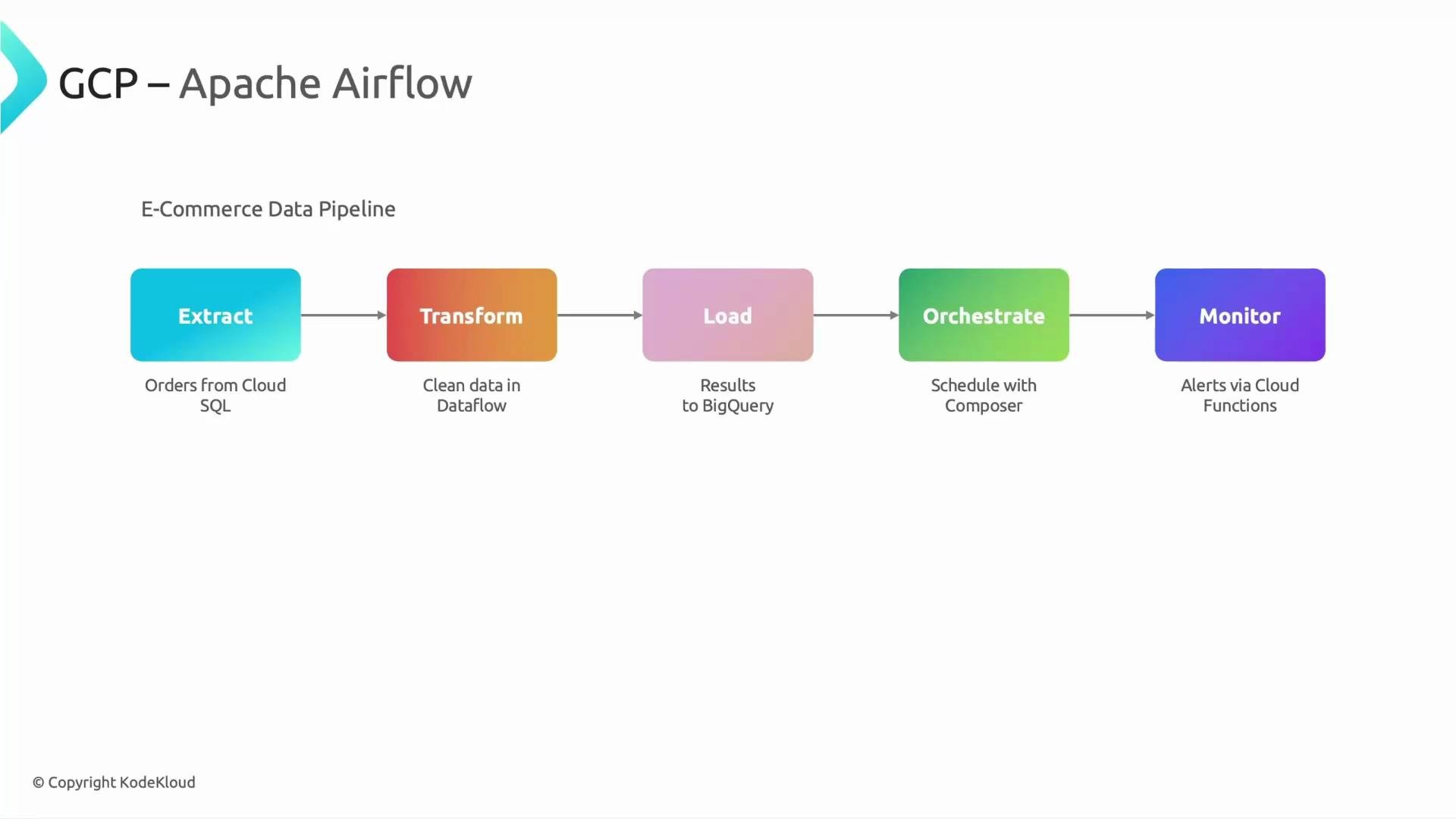
Scenario: a simple e-commerce ETL pipeline
* Regularly extract orders from Cloud SQL
* Transform the data (for example with Dataflow)
* Load the transformed results into BigQuery
* Send alerts when steps fail
Cloud Composer orchestrates and schedules these steps so they run automatically and reliably.
By the end of this lesson you will understand what Cloud Composer does, its core components, and how it fits into a typical data pipeline.
Scenario: a simple e-commerce ETL pipeline
* Regularly extract orders from Cloud SQL
* Transform the data (for example with Dataflow)
* Load the transformed results into BigQuery
* Send alerts when steps fail
Cloud Composer orchestrates and schedules these steps so they run automatically and reliably.
 Why use an orchestrator?
* Centralized scheduling and dependency management
* Standardized retry and failure handling
* Centralized logs, metrics, and alerting
* Easier to author and maintain many pipelines
What is Cloud Composer?
* Managed Apache Airflow environment hosted on Google Cloud.
* You write DAGs in Python and use the familiar Airflow UI.
* Google manages the underlying services (provisioning, scaling, upgrades, monitoring).
Cloud Composer exposes the familiar Airflow UI and DAG semantics but handles provisioning and management of the underlying services for you.
How Composer maps Airflow to Google-managed services
| Composer component | Backing Google-managed service | Purpose |
| --------------------------- | ------------------------------------------------------: | ------------------------------ |
| Airflow workers & scheduler | [GKE](https://cloud.google.com/kubernetes-engine) | Runs tasks and the scheduler |
| Airflow metadata DB | [Cloud SQL](https://cloud.google.com/sql) | Task states, DAG history |
| DAGs & logs storage | [Cloud Storage](https://cloud.google.com/storage) | Stores DAG files and task logs |
| Airflow webserver / UI | App Engine or managed runtime | Access the Airflow UI |
| Monitoring & alerts | [Cloud Monitoring](https://cloud.google.com/monitoring) | Metrics and alerting |
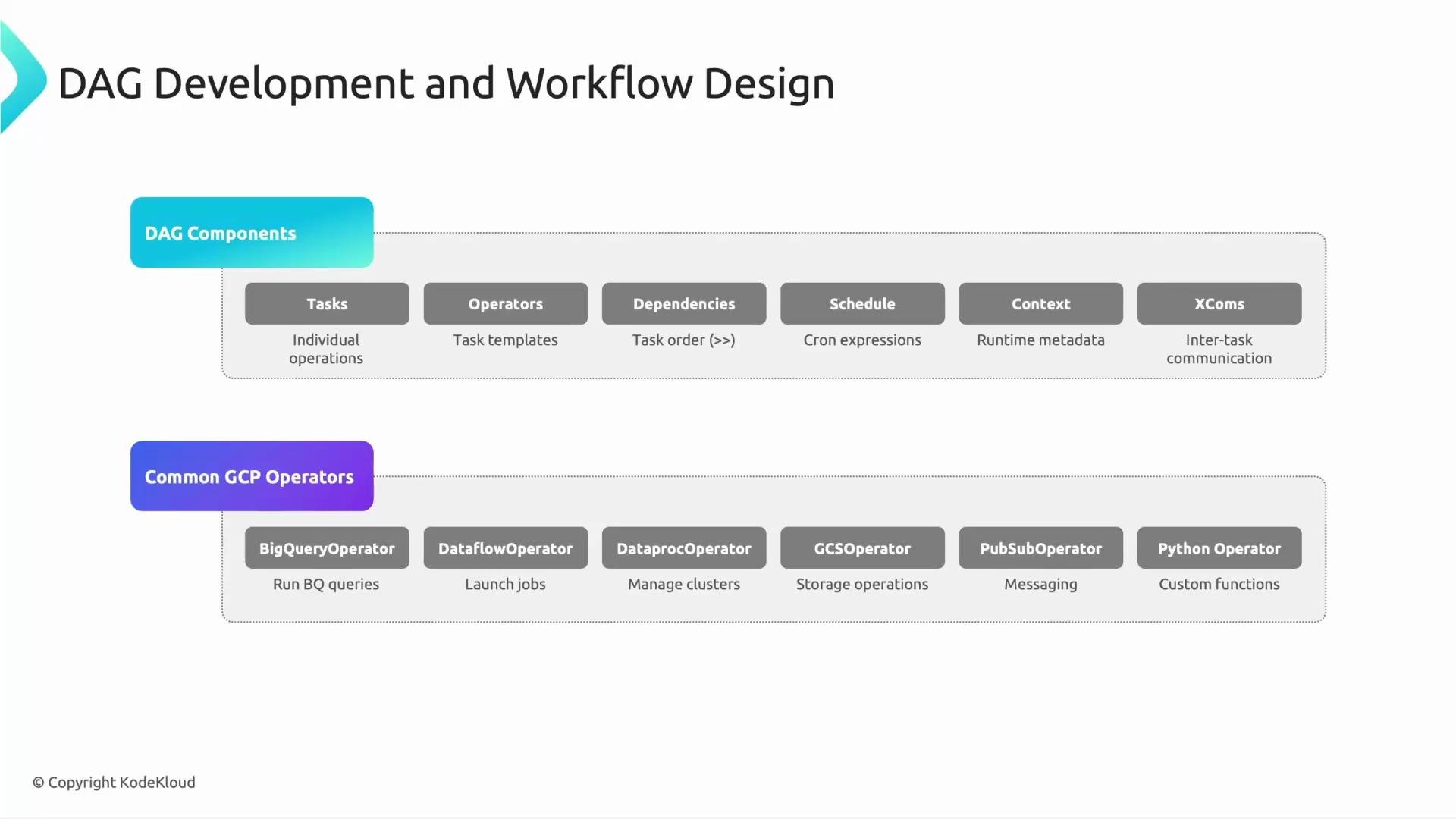
Core Airflow/DAG fundamentals
* Tasks: units of work inside a DAG.
* Operators: task templates that define work to execute.
* Dependencies: edges that control execution order.
* Schedules: cron or preset expressions that trigger DAG runs.
* Context: runtime metadata available to tasks.
* XCom: small payload mechanism for task-to-task data exchange.
Common GCP-focused operators
| Operator | Typical use |
| --------------------------------------------------------------------------------------------------- | --------------------------------- |
| [BigQuery operator](https://cloud.google.com/bigquery) | Querying/loading data to BigQuery |
| [Dataflow operator](https://cloud.google.com/dataflow) | Launch Dataflow pipelines |
| [Dataproc operator](https://cloud.google.com/dataproc) | Submit Spark/Hadoop jobs |
| [GCS operator](https://cloud.google.com/storage) | Transfer or manage objects in GCS |
| [Pub/Sub operator](https://cloud.google.com/pubsub) | Publish/subscribe messages |
| [Python operator](https://airflow.apache.org/docs/apache-airflow/stable/howto/operator/python.html) | Run custom Python logic |
You can also use third-party operators (e.g., AWS S3, Salesforce). Store credentials securely (for example in [Secret Manager](https://cloud.google.com/secret-manager)) and expose them to Airflow via Connections.
Why use an orchestrator?
* Centralized scheduling and dependency management
* Standardized retry and failure handling
* Centralized logs, metrics, and alerting
* Easier to author and maintain many pipelines
What is Cloud Composer?
* Managed Apache Airflow environment hosted on Google Cloud.
* You write DAGs in Python and use the familiar Airflow UI.
* Google manages the underlying services (provisioning, scaling, upgrades, monitoring).
Cloud Composer exposes the familiar Airflow UI and DAG semantics but handles provisioning and management of the underlying services for you.
How Composer maps Airflow to Google-managed services
| Composer component | Backing Google-managed service | Purpose |
| --------------------------- | ------------------------------------------------------: | ------------------------------ |
| Airflow workers & scheduler | [GKE](https://cloud.google.com/kubernetes-engine) | Runs tasks and the scheduler |
| Airflow metadata DB | [Cloud SQL](https://cloud.google.com/sql) | Task states, DAG history |
| DAGs & logs storage | [Cloud Storage](https://cloud.google.com/storage) | Stores DAG files and task logs |
| Airflow webserver / UI | App Engine or managed runtime | Access the Airflow UI |
| Monitoring & alerts | [Cloud Monitoring](https://cloud.google.com/monitoring) | Metrics and alerting |
Core Airflow/DAG fundamentals
* Tasks: units of work inside a DAG.
* Operators: task templates that define work to execute.
* Dependencies: edges that control execution order.
* Schedules: cron or preset expressions that trigger DAG runs.
* Context: runtime metadata available to tasks.
* XCom: small payload mechanism for task-to-task data exchange.
Common GCP-focused operators
| Operator | Typical use |
| --------------------------------------------------------------------------------------------------- | --------------------------------- |
| [BigQuery operator](https://cloud.google.com/bigquery) | Querying/loading data to BigQuery |
| [Dataflow operator](https://cloud.google.com/dataflow) | Launch Dataflow pipelines |
| [Dataproc operator](https://cloud.google.com/dataproc) | Submit Spark/Hadoop jobs |
| [GCS operator](https://cloud.google.com/storage) | Transfer or manage objects in GCS |
| [Pub/Sub operator](https://cloud.google.com/pubsub) | Publish/subscribe messages |
| [Python operator](https://airflow.apache.org/docs/apache-airflow/stable/howto/operator/python.html) | Run custom Python logic |
You can also use third-party operators (e.g., AWS S3, Salesforce). Store credentials securely (for example in [Secret Manager](https://cloud.google.com/secret-manager)) and expose them to Airflow via Connections.
 Minimal DAG example
Below is a compact DAG that runs daily and demonstrates extract → validate → transform → load with XCom usage. Replace the function bodies with your real extraction, validation, and transformation logic or the appropriate GCP operators.
```python theme={null}
# example_dag.py
from datetime import datetime, timedelta
from airflow import DAG
from airflow.operators.python import PythonOperator
default_args = {
"owner": "data_engineer",
"retries": 1,
"retry_delay": timedelta(minutes=5),
}
def extract(**kwargs):
# Example: pull orders from Cloud SQL and store a file in GCS
# Return a small reference (e.g., path or job id) that downstream tasks can use
extracted_path = "gs://my-bucket/orders/2023-01-01.json"
return extracted_path # returned value becomes an XCom
def validate(**kwargs):
ti = kwargs["ti"]
extracted = ti.xcom_pull(task_ids="extract")
# Validate extracted data
valid = True
if not valid:
raise ValueError("Validation failed")
return "validated"
def transform(**kwargs):
ti = kwargs["ti"]
extracted = ti.xcom_pull(task_ids="extract")
# Launch Dataflow job or run transformation logic
transformed_path = "gs://my-bucket/transformed/2023-01-01.parquet"
return transformed_path
def load(**kwargs):
ti = kwargs["ti"]
transformed = ti.xcom_pull(task_ids="transform")
# Load transformed data into BigQuery
return "loaded"
with DAG(
dag_id="ecommerce_etl",
default_args=default_args,
description="Daily ETL for e-commerce orders",
schedule_interval="0 2 * * *", # daily at 02:00
start_date=datetime(2023, 1, 1),
catchup=False,
) as dag:
t_extract = PythonOperator(task_id="extract", python_callable=extract)
t_validate = PythonOperator(task_id="validate", python_callable=validate)
t_transform = PythonOperator(task_id="transform", python_callable=transform)
t_load = PythonOperator(task_id="load", python_callable=load)
# Set dependencies (extract -> validate -> transform -> load)
t_extract >> t_validate >> t_transform >> t_load
```
Practical notes on XComs and the TaskFlow API
* Airflow 2.x′s TaskFlow API (using `@task`) pushes return values to XCom automatically and can simplify code.
* When using `PythonOperator`, return values can be pushed if `do_xcom_push` is enabled, or use `ti.xcom_push(...)`.
* Keep XCom payloads small — use references (GCS paths, job IDs) rather than large datasets.
Monitoring and troubleshooting Composer workloads
* Access the Airflow UI from the Cloud Composer environment page in the GCP Console.
* The UI shows DAG graphs, task instance status, logs, and historical runs.
* Task logs are stored in the configured Cloud Storage bucket; you can view logs via the UI or directly in GCS.
* Use Cloud Monitoring to create alerting policies for failed DAG runs or abnormal metrics.
Cost considerations and alternatives
Cloud Composer runs several managed services (Cloud SQL, GKE node pools, Cloud Storage, App Engine/managed runtime, monitoring). That can lead to significant cost for small or infrequent workloads.
Alternatives to consider for lower-cost or serverless orchestration:
* [Cloud Functions](https://cloud.google.com/functions) — event-driven single-purpose functions.
* [Cloud Workflows](https://cloud.google.com/workflows) — manage serverless orchestration for APIs and services.
* Combine scheduling with Dataflow or Dataproc jobs for batch pipelines.
* [Cloud Data Fusion](https://cloud.google.com/data-fusion) — low-code ETL for typical data integration scenarios.
Cloud Composer environments involve multiple managed services and can incur significant costs. Evaluate workload size and frequency before choosing Composer, and consider alternatives for small or infrequent jobs.
Summary
* Cloud Composer is Google’s managed Apache Airflow: author DAGs in Python and let Google manage the underlying infrastructure.
* Composer maps Airflow components to Google-managed services (GKE, Cloud SQL, Cloud Storage, App Engine/managed runtime, Cloud Monitoring).
* DAGs express workflows using tasks, operators, dependencies, schedules, context, and XComs.
* Composer is ideal for large-scale orchestration but evaluate cost and alternatives for simpler scenarios.
That’s it for this lesson.
Minimal DAG example
Below is a compact DAG that runs daily and demonstrates extract → validate → transform → load with XCom usage. Replace the function bodies with your real extraction, validation, and transformation logic or the appropriate GCP operators.
```python theme={null}
# example_dag.py
from datetime import datetime, timedelta
from airflow import DAG
from airflow.operators.python import PythonOperator
default_args = {
"owner": "data_engineer",
"retries": 1,
"retry_delay": timedelta(minutes=5),
}
def extract(**kwargs):
# Example: pull orders from Cloud SQL and store a file in GCS
# Return a small reference (e.g., path or job id) that downstream tasks can use
extracted_path = "gs://my-bucket/orders/2023-01-01.json"
return extracted_path # returned value becomes an XCom
def validate(**kwargs):
ti = kwargs["ti"]
extracted = ti.xcom_pull(task_ids="extract")
# Validate extracted data
valid = True
if not valid:
raise ValueError("Validation failed")
return "validated"
def transform(**kwargs):
ti = kwargs["ti"]
extracted = ti.xcom_pull(task_ids="extract")
# Launch Dataflow job or run transformation logic
transformed_path = "gs://my-bucket/transformed/2023-01-01.parquet"
return transformed_path
def load(**kwargs):
ti = kwargs["ti"]
transformed = ti.xcom_pull(task_ids="transform")
# Load transformed data into BigQuery
return "loaded"
with DAG(
dag_id="ecommerce_etl",
default_args=default_args,
description="Daily ETL for e-commerce orders",
schedule_interval="0 2 * * *", # daily at 02:00
start_date=datetime(2023, 1, 1),
catchup=False,
) as dag:
t_extract = PythonOperator(task_id="extract", python_callable=extract)
t_validate = PythonOperator(task_id="validate", python_callable=validate)
t_transform = PythonOperator(task_id="transform", python_callable=transform)
t_load = PythonOperator(task_id="load", python_callable=load)
# Set dependencies (extract -> validate -> transform -> load)
t_extract >> t_validate >> t_transform >> t_load
```
Practical notes on XComs and the TaskFlow API
* Airflow 2.x′s TaskFlow API (using `@task`) pushes return values to XCom automatically and can simplify code.
* When using `PythonOperator`, return values can be pushed if `do_xcom_push` is enabled, or use `ti.xcom_push(...)`.
* Keep XCom payloads small — use references (GCS paths, job IDs) rather than large datasets.
Monitoring and troubleshooting Composer workloads
* Access the Airflow UI from the Cloud Composer environment page in the GCP Console.
* The UI shows DAG graphs, task instance status, logs, and historical runs.
* Task logs are stored in the configured Cloud Storage bucket; you can view logs via the UI or directly in GCS.
* Use Cloud Monitoring to create alerting policies for failed DAG runs or abnormal metrics.
Cost considerations and alternatives
Cloud Composer runs several managed services (Cloud SQL, GKE node pools, Cloud Storage, App Engine/managed runtime, monitoring). That can lead to significant cost for small or infrequent workloads.
Alternatives to consider for lower-cost or serverless orchestration:
* [Cloud Functions](https://cloud.google.com/functions) — event-driven single-purpose functions.
* [Cloud Workflows](https://cloud.google.com/workflows) — manage serverless orchestration for APIs and services.
* Combine scheduling with Dataflow or Dataproc jobs for batch pipelines.
* [Cloud Data Fusion](https://cloud.google.com/data-fusion) — low-code ETL for typical data integration scenarios.
Cloud Composer environments involve multiple managed services and can incur significant costs. Evaluate workload size and frequency before choosing Composer, and consider alternatives for small or infrequent jobs.
Summary
* Cloud Composer is Google’s managed Apache Airflow: author DAGs in Python and let Google manage the underlying infrastructure.
* Composer maps Airflow components to Google-managed services (GKE, Cloud SQL, Cloud Storage, App Engine/managed runtime, Cloud Monitoring).
* DAGs express workflows using tasks, operators, dependencies, schedules, context, and XComs.
* Composer is ideal for large-scale orchestration but evaluate cost and alternatives for simpler scenarios.
That’s it for this lesson.