> ## Documentation Index
> Fetch the complete documentation index at: https://notes.kodekloud.com/llms.txt
> Use this file to discover all available pages before exploring further.
# Cloud Functions Serverless Fundamentals
> Overview of Google Cloud Functions and serverless fundamentals, covering event-driven execution, supported runtimes, triggers, examples, billing model, and best uses for short lived stateless tasks.
Hello and welcome back.
In this lesson we’ll examine Cloud Functions and the fundamentals of serverless computing. We previously covered Cloud Workflows for orchestrating multi-step processes. When you only need a single piece of logic to run in response to an event — without managing servers or infrastructure — Cloud Functions is the right tool.
Cloud Functions is a managed, event-driven serverless compute service. Google Cloud handles the underlying servers, scaling, and patching so you can focus on code and the events that trigger it. It is analogous to [AWS Lambda](https://learn.kodekloud.com/user/courses/aws-lambda).
## Core serverless concepts for Cloud Functions
* No server management\
Google Cloud manages provisioning, patching, and the runtime environment so you don’t have to.
* Automatic scaling\
Functions scale out automatically by creating instances to handle increased traffic.
* Pay-per-use billing\
You are charged only while your function is executing; idle time is not billed.
* Event-driven execution\
Functions execute in response to events: HTTP requests, Pub/Sub messages, storage events, Firestore changes, etc.
* Statelessness\
Each execution is independent and should not rely on local filesystem state. Use external services (Firestore, Cloud Storage, BigQuery) for persistence.
Cloud Functions are best for short-lived, stateless compute tasks. Persist any durable state in external stores such as Firestore, Cloud Storage, or BigQuery.
Example scenario:
A user uploads a PDF to Cloud Storage. That upload triggers a Cloud Function which extracts text, creates a summary, and writes the summary into BigQuery. No servers run between uploads — the function executes only when triggered.
## Supported languages and runtimes
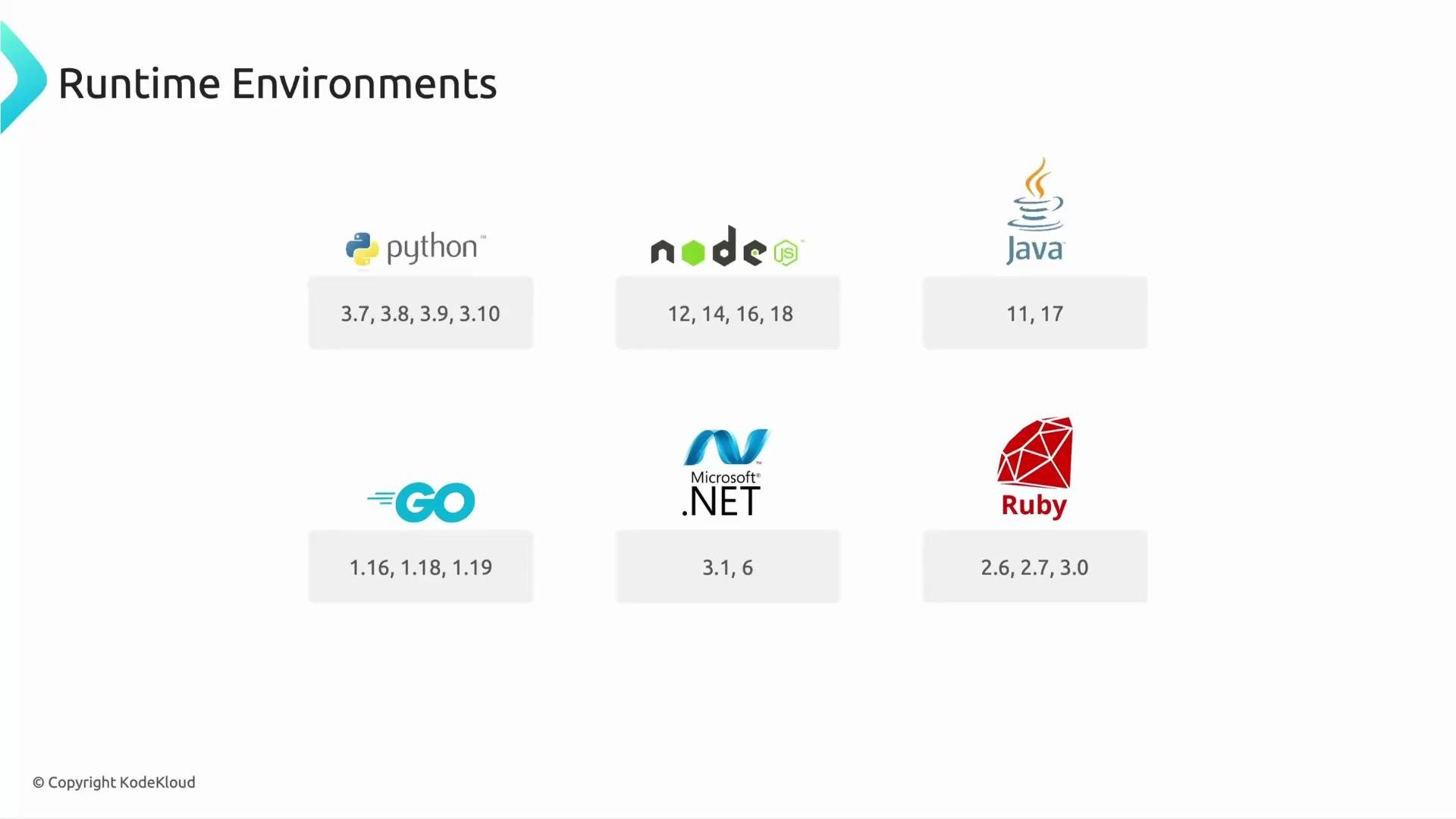
Cloud Functions supports multiple runtimes so teams can use familiar languages. Supported languages typically include:
* Python
* Node.js
* Java
* Go
* .NET
* Ruby
(Note: supported runtime versions change over time—check the [Cloud Functions runtime documentation](https://cloud.google.com/functions/docs/concepts/runtime-support) for the latest versions.)
 If you want a quick reference, here is a compact table of languages and common use cases:
| Language | Typical use case |
| -------- | ---------------------------------------------- |
| Python | Data processing, ML glue code, ETL tasks |
| Node.js | HTTP APIs, webhooks, lightweight microservices |
| Java | Enterprise code, existing JVM libraries |
| Go | High-performance, low-latency services |
| .NET | Microsoft-stack integrations |
| Ruby | Webhooks, scripting for Rails ecosystems |
## Triggers — how functions are invoked
Functions run in response to one of several trigger types:
| Trigger type | Description | Example uses |
| -------------------- | ------------------------------------------------ | ------------------------------------------- |
| HTTP trigger | Expose a function as an HTTP(S) endpoint | REST APIs, webhooks |
| Pub/Sub trigger | React to asynchronous messages | Event-driven pipelines, decoupled services |
| Cloud Storage events | Trigger on object create/delete/metadata changes | File processing, thumbnails, virus scanning |
| Firestore triggers | React to document create/update/delete | Database-driven workflows, audit logs |
## Minimal examples
HTTP-triggered Cloud Function examples — these show the handler signature and basic response.
Node.js (HTTP):
```javascript theme={null}
// index.js
exports.helloHttp = (req, res) => {
const name = req.query.name || req.body?.name || 'World';
res.status(200).send(`Hello ${name}!`);
};
```
Python (HTTP):
```python theme={null}
# main.py
def hello_http(request):
name = request.args.get('name') or request.get_json(silent=True).get('name', 'World')
return f'Hello {name}!', 200
```
Deploy example (gcloud CLI, HTTP-triggered):
```bash theme={null}
gcloud functions deploy helloHttp \
--runtime nodejs18 \
--trigger-http \
--allow-unauthenticated \
--entry-point helloHttp
```
Use Pub/Sub or Storage triggers similarly by specifying `--trigger-topic` or `--trigger-bucket` during deployment.
## Quick exam-style question
Which billing model does Cloud Functions use?
1. Pay for servers running 24/7.
2. Pay per use only when your code executes.
3. Monthly subscription, regardless of usage.
Correct answer: option 2 — pay per use only when your Cloud Function executes. This billing model reduces cost by eliminating charges for idle compute.
## Summary
Cloud Functions offers lightweight, event-driven compute that scales automatically and removes the burden of server management. Use Cloud Functions for small, focused units of logic that respond to events; rely on external services for persistent state.
Topics to explore next:
* Performance characteristics and cold-start behavior
* Data-processing design patterns with Cloud Functions
* Rate limiting, batching, and retry strategies
* When to choose Cloud Functions vs. Cloud Run or Workflows
## Links and references
* [Cloud Functions documentation](https://cloud.google.com/functions/docs)
* [Cloud Functions runtime support](https://cloud.google.com/functions/docs/concepts/runtime-support)
* [Google Cloud Storage events](https://cloud.google.com/storage/docs/pubsub-notifications)
* [Pub/Sub documentation](https://cloud.google.com/pubsub/docs)
That is it for this lesson. Speak with you in the next lesson.
If you want a quick reference, here is a compact table of languages and common use cases:
| Language | Typical use case |
| -------- | ---------------------------------------------- |
| Python | Data processing, ML glue code, ETL tasks |
| Node.js | HTTP APIs, webhooks, lightweight microservices |
| Java | Enterprise code, existing JVM libraries |
| Go | High-performance, low-latency services |
| .NET | Microsoft-stack integrations |
| Ruby | Webhooks, scripting for Rails ecosystems |
## Triggers — how functions are invoked
Functions run in response to one of several trigger types:
| Trigger type | Description | Example uses |
| -------------------- | ------------------------------------------------ | ------------------------------------------- |
| HTTP trigger | Expose a function as an HTTP(S) endpoint | REST APIs, webhooks |
| Pub/Sub trigger | React to asynchronous messages | Event-driven pipelines, decoupled services |
| Cloud Storage events | Trigger on object create/delete/metadata changes | File processing, thumbnails, virus scanning |
| Firestore triggers | React to document create/update/delete | Database-driven workflows, audit logs |
## Minimal examples
HTTP-triggered Cloud Function examples — these show the handler signature and basic response.
Node.js (HTTP):
```javascript theme={null}
// index.js
exports.helloHttp = (req, res) => {
const name = req.query.name || req.body?.name || 'World';
res.status(200).send(`Hello ${name}!`);
};
```
Python (HTTP):
```python theme={null}
# main.py
def hello_http(request):
name = request.args.get('name') or request.get_json(silent=True).get('name', 'World')
return f'Hello {name}!', 200
```
Deploy example (gcloud CLI, HTTP-triggered):
```bash theme={null}
gcloud functions deploy helloHttp \
--runtime nodejs18 \
--trigger-http \
--allow-unauthenticated \
--entry-point helloHttp
```
Use Pub/Sub or Storage triggers similarly by specifying `--trigger-topic` or `--trigger-bucket` during deployment.
## Quick exam-style question
Which billing model does Cloud Functions use?
1. Pay for servers running 24/7.
2. Pay per use only when your code executes.
3. Monthly subscription, regardless of usage.
Correct answer: option 2 — pay per use only when your Cloud Function executes. This billing model reduces cost by eliminating charges for idle compute.
## Summary
Cloud Functions offers lightweight, event-driven compute that scales automatically and removes the burden of server management. Use Cloud Functions for small, focused units of logic that respond to events; rely on external services for persistent state.
Topics to explore next:
* Performance characteristics and cold-start behavior
* Data-processing design patterns with Cloud Functions
* Rate limiting, batching, and retry strategies
* When to choose Cloud Functions vs. Cloud Run or Workflows
## Links and references
* [Cloud Functions documentation](https://cloud.google.com/functions/docs)
* [Cloud Functions runtime support](https://cloud.google.com/functions/docs/concepts/runtime-support)
* [Google Cloud Storage events](https://cloud.google.com/storage/docs/pubsub-notifications)
* [Pub/Sub documentation](https://cloud.google.com/pubsub/docs)
That is it for this lesson. Speak with you in the next lesson.