> ## Documentation Index
> Fetch the complete documentation index at: https://notes.kodekloud.com/llms.txt
> Use this file to discover all available pages before exploring further.
# Cloud FunctionsPerformance Characteristics and Common Data Processing Patterns
> Overview of Google Cloud Functions performance, cold starts, timeouts, invocations, and common event-driven data processing patterns with practical tips and an example CSV to BigQuery workflow
Hello and welcome back. In this lesson/article we continue learning about Google Cloud Functions.
In the previous lesson we covered serverless fundamentals: how Cloud Functions automatically scale and how you don't need to manage servers. Here, we build on that foundation and focus on two practical areas often encountered in production systems: performance characteristics and common data-processing patterns.
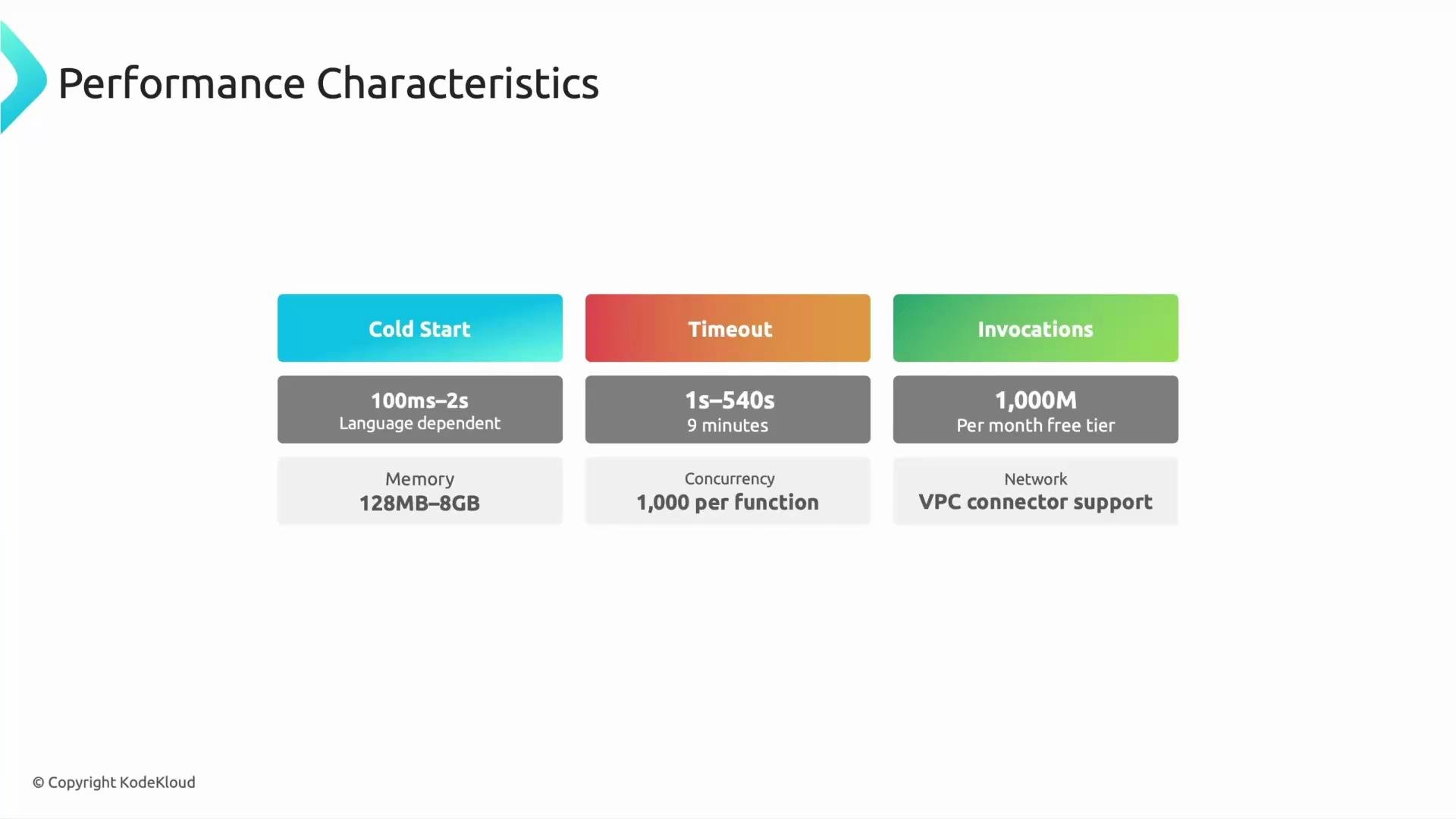
The most important runtime behaviors to understand when designing Cloud Functions are cold start, timeout, and invocations — with additional considerations for memory/CPU, concurrency, and networking.
Performance characteristics at a glance:
| Characteristic | What it means | Practical impact |
| ------------------------ | ----------------------------------------------------------------------------: | ------------------------------------------------------------------------------------------- |
| Cold start | Time to initialize a new function instance before handling requests | Affects first-request latency; varies by runtime, language, dependencies, and function size |
| Timeout | Maximum runtime before the platform terminates the function | Limits how long a single invocation can run; check current limits in docs |
| Invocations | How often the function is executed (billing unit) | Influences cost and scale planning; functions are billed per invocation + compute usage |
| Memory & CPU | Configurable memory influences CPU allocation | Increasing memory often gives more CPU and can reduce execution time |
| Concurrency & Networking | Whether an instance can handle concurrent requests and how it connects to VPC | Affects throughput, connection reuse, and integration with private networks |
* Cold start — the time required for a new function instance to initialize before it begins handling requests. Cold starts vary by runtime, language, and generation (first vs second generation), and may range from a few hundred milliseconds to a couple of seconds in many cases. Choose runtimes and function sizes with cold-start behavior in mind if you need low-latency responses.
* Timeout — the maximum runtime before the platform forcibly terminates the function. Google Cloud Functions supports timeouts up to several minutes (check the [product documentation](https://cloud.google.com/functions/quotas) for current limits).
* Invocations — how often a function is executed. Cloud Functions integrate with many event sources and are billed per invocation and compute usage. Cloud providers often provide a free tier and quotas; always consult the Cloud Functions [pricing](https://cloud.google.com/functions/pricing) and [quota](https://cloud.google.com/functions/quotas) pages for up-to-date limits.
* Memory and CPU — you can configure memory which also impacts CPU allocation; larger memory allocations typically get more CPU and can reduce execution time.
* Concurrency and networking — generation and runtime affect whether a function can handle multiple concurrent requests on one instance and how it connects to VPC networks via connectors.
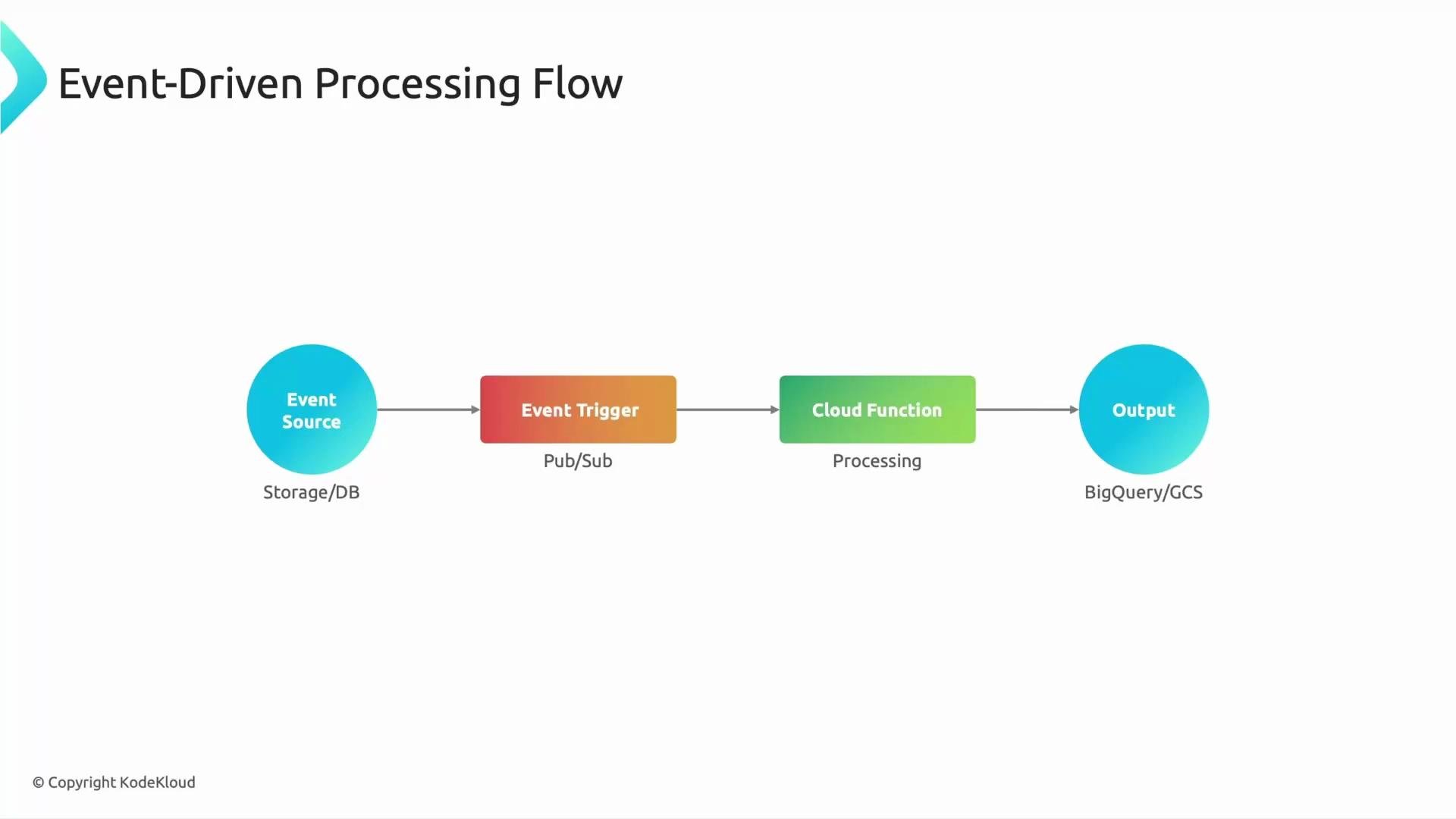
 Event-driven architecture is the primary operating model for Cloud Functions. Everything begins with an event source — Cloud Storage, Pub/Sub, Firestore, HTTP requests, etc. An event trigger detects a change and invokes a Cloud Function. The function executes business logic: transform data, validate records, enrich metadata, or route to downstream systems — then writes results to destinations like BigQuery, Cloud Storage, or other services.
A simple logical flow:
Event Source (Storage/DB) → Event Trigger (Pub/Sub/Trigger) → Cloud Function (Processing) → Output (BigQuery/GCS)
Event-driven architecture is the primary operating model for Cloud Functions. Everything begins with an event source — Cloud Storage, Pub/Sub, Firestore, HTTP requests, etc. An event trigger detects a change and invokes a Cloud Function. The function executes business logic: transform data, validate records, enrich metadata, or route to downstream systems — then writes results to destinations like BigQuery, Cloud Storage, or other services.
A simple logical flow:
Event Source (Storage/DB) → Event Trigger (Pub/Sub/Trigger) → Cloud Function (Processing) → Output (BigQuery/GCS)
 Example scenario: when a CSV file is uploaded to Cloud Storage, a Cloud Function can be triggered to parse the CSV, perform light transformations and validation, and load the cleaned rows into BigQuery — all automatically and without manual intervention.
Quick conceptual question: which component initiates the execution of a Cloud Function? The answer is the event trigger. Event triggers (storage events, Pub/Sub messages, HTTP requests, etc.) are what cause the function to run.
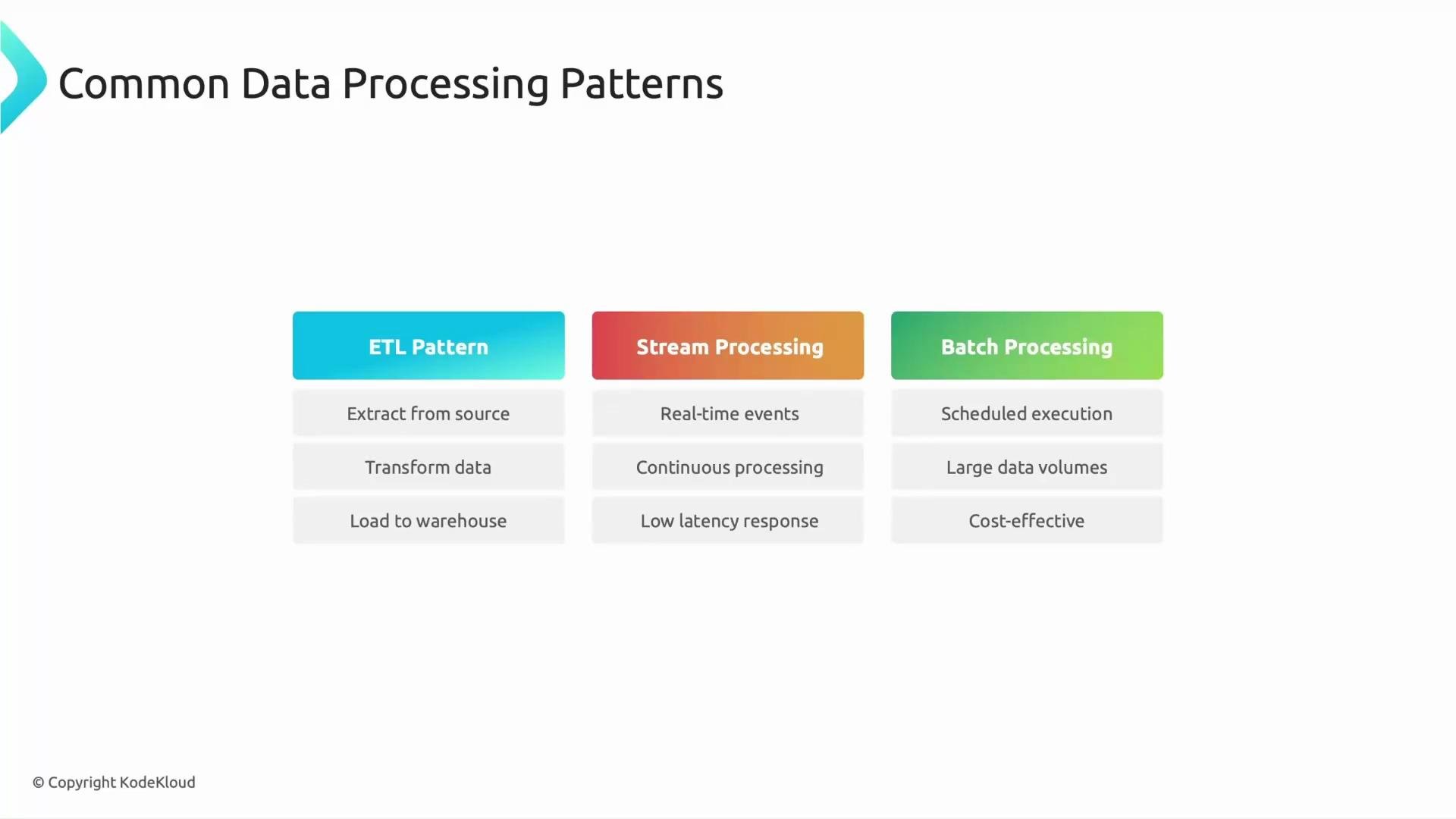
Common data-processing patterns where Cloud Functions are often used:
| Pattern | Typical use cases | How Cloud Functions fit |
| ------------------------------ | ----------------------------------------------------------------------------------------------: | -------------------------------------------------------------------------------------------------------------- |
| ETL (Extract, Transform, Load) | Small, event-driven transformations after data arrival (file rename, normalization, validation) | Ideal for lightweight, immediate transformations and quick data hygiene |
| Stream processing | Real-time metrics, fraud detection, event enrichment | Low-latency reaction to events and continuous processing of event streams |
| Batch orchestration | Scheduled jobs that coordinate larger pipelines | Great for scheduling/triggering batch jobs or starting workflows; not for very long-running compute-heavy jobs |
Example scenario: when a CSV file is uploaded to Cloud Storage, a Cloud Function can be triggered to parse the CSV, perform light transformations and validation, and load the cleaned rows into BigQuery — all automatically and without manual intervention.
Quick conceptual question: which component initiates the execution of a Cloud Function? The answer is the event trigger. Event triggers (storage events, Pub/Sub messages, HTTP requests, etc.) are what cause the function to run.
Common data-processing patterns where Cloud Functions are often used:
| Pattern | Typical use cases | How Cloud Functions fit |
| ------------------------------ | ----------------------------------------------------------------------------------------------: | -------------------------------------------------------------------------------------------------------------- |
| ETL (Extract, Transform, Load) | Small, event-driven transformations after data arrival (file rename, normalization, validation) | Ideal for lightweight, immediate transformations and quick data hygiene |
| Stream processing | Real-time metrics, fraud detection, event enrichment | Low-latency reaction to events and continuous processing of event streams |
| Batch orchestration | Scheduled jobs that coordinate larger pipelines | Great for scheduling/triggering batch jobs or starting workflows; not for very long-running compute-heavy jobs |
 Example: GCS CSV → BigQuery
Below is a compact background Cloud Function in Python that responds to a Cloud Storage "finalize" event (object creation). It downloads the uploaded CSV to the function instance, parses it, and loads it into a BigQuery table. Use this as a starting point and adapt to your schema, error handling, and permission model (ensure appropriate IAM roles for the function service account).
```python theme={null}
# requirements:
# google-cloud-storage
# google-cloud-bigquery
#
import csv
import os
from tempfile import NamedTemporaryFile
from google.cloud import storage, bigquery
PROJECT_ID = "your-project-id"
BQ_DATASET = "your_dataset"
BQ_TABLE = "your_table"
storage_client = storage.Client()
bq_client = bigquery.Client(project=PROJECT_ID)
def gcs_csv_to_bigquery(event, context):
"""
Cloud Function triggered by Cloud Storage when a CSV file is created.
event contains keys like 'bucket' and 'name'.
"""
bucket_name = event.get("bucket")
object_name = event.get("name")
if not bucket_name or not object_name:
print("Missing bucket or name in event payload.")
return
bucket = storage_client.bucket(bucket_name)
blob = bucket.blob(object_name)
# Download file to a temporary local file
with NamedTemporaryFile(delete=False) as tmp:
blob.download_to_file(tmp)
tmp_path = tmp.name
try:
# Simple CSV parsing and streaming into BigQuery via load job
table_ref = bq_client.dataset(BQ_DATASET).table(BQ_TABLE)
job_config = bigquery.LoadJobConfig(
source_format=bigquery.SourceFormat.CSV,
skip_leading_rows=1, # adjust if CSV has header
autodetect=True # or provide schema explicitly
)
with open(tmp_path, "rb") as source_file:
load_job = bq_client.load_table_from_file(
source_file, table_ref, job_config=job_config
)
load_job.result() # wait for completion
print(f"Loaded {object_name} into {BQ_DATASET}.{BQ_TABLE}")
except Exception as e:
print(f"Error loading {object_name} to BigQuery: {e}")
finally:
try:
os.remove(tmp_path)
except OSError:
pass
```
Practical tips and best practices:
* Keep functions small and focused; use them as glue code for reacting, transforming, routing, and automating data flows.
* Optimize for cold start where needed: choose runtimes with faster startup times, minimize dependency size, and prefer later-generation runtimes or smaller deployment artifacts.
* Use batching strategies (grouping multiple events into one processing job) to improve throughput and reduce per-invocation overhead where applicable.
* For high-throughput or long-running processing, evaluate concurrency settings, batching, and alternative compute options such as [Cloud Run](https://cloud.google.com/run/docs) or [Dataflow](https://cloud.google.com/dataflow/docs) depending on throughput, cost, and latency requirements.
* Ensure the function’s service account has least-privilege IAM permissions (e.g., read access to GCS objects, write access to BigQuery tables).
* Monitor cold starts, error rates, latency, and costs using Cloud Monitoring and Logs to tune memory, concurrency, and retry strategies.
Cloud Function quotas, free tiers, and supported features change over time and can differ by generation and region. Always consult the official Google Cloud documentation for current limits and pricing before production use.
References and further reading:
* [Cloud Functions Pricing](https://cloud.google.com/functions/pricing)
* [Cloud Functions Quotas](https://cloud.google.com/functions/quotas)
* [Google Cloud Run documentation](https://cloud.google.com/run/docs)
* [Google Cloud Dataflow documentation](https://cloud.google.com/dataflow/docs)
* [Kubernetes Concepts — if considering alternative orchestration](https://kubernetes.io/docs/concepts/overview/what-is-kubernetes/)
That wraps up performance characteristics and common data-processing patterns for Cloud Functions. The examples and patterns shown here illustrate how event-driven serverless functions integrate into real-world data pipelines.
Example: GCS CSV → BigQuery
Below is a compact background Cloud Function in Python that responds to a Cloud Storage "finalize" event (object creation). It downloads the uploaded CSV to the function instance, parses it, and loads it into a BigQuery table. Use this as a starting point and adapt to your schema, error handling, and permission model (ensure appropriate IAM roles for the function service account).
```python theme={null}
# requirements:
# google-cloud-storage
# google-cloud-bigquery
#
import csv
import os
from tempfile import NamedTemporaryFile
from google.cloud import storage, bigquery
PROJECT_ID = "your-project-id"
BQ_DATASET = "your_dataset"
BQ_TABLE = "your_table"
storage_client = storage.Client()
bq_client = bigquery.Client(project=PROJECT_ID)
def gcs_csv_to_bigquery(event, context):
"""
Cloud Function triggered by Cloud Storage when a CSV file is created.
event contains keys like 'bucket' and 'name'.
"""
bucket_name = event.get("bucket")
object_name = event.get("name")
if not bucket_name or not object_name:
print("Missing bucket or name in event payload.")
return
bucket = storage_client.bucket(bucket_name)
blob = bucket.blob(object_name)
# Download file to a temporary local file
with NamedTemporaryFile(delete=False) as tmp:
blob.download_to_file(tmp)
tmp_path = tmp.name
try:
# Simple CSV parsing and streaming into BigQuery via load job
table_ref = bq_client.dataset(BQ_DATASET).table(BQ_TABLE)
job_config = bigquery.LoadJobConfig(
source_format=bigquery.SourceFormat.CSV,
skip_leading_rows=1, # adjust if CSV has header
autodetect=True # or provide schema explicitly
)
with open(tmp_path, "rb") as source_file:
load_job = bq_client.load_table_from_file(
source_file, table_ref, job_config=job_config
)
load_job.result() # wait for completion
print(f"Loaded {object_name} into {BQ_DATASET}.{BQ_TABLE}")
except Exception as e:
print(f"Error loading {object_name} to BigQuery: {e}")
finally:
try:
os.remove(tmp_path)
except OSError:
pass
```
Practical tips and best practices:
* Keep functions small and focused; use them as glue code for reacting, transforming, routing, and automating data flows.
* Optimize for cold start where needed: choose runtimes with faster startup times, minimize dependency size, and prefer later-generation runtimes or smaller deployment artifacts.
* Use batching strategies (grouping multiple events into one processing job) to improve throughput and reduce per-invocation overhead where applicable.
* For high-throughput or long-running processing, evaluate concurrency settings, batching, and alternative compute options such as [Cloud Run](https://cloud.google.com/run/docs) or [Dataflow](https://cloud.google.com/dataflow/docs) depending on throughput, cost, and latency requirements.
* Ensure the function’s service account has least-privilege IAM permissions (e.g., read access to GCS objects, write access to BigQuery tables).
* Monitor cold starts, error rates, latency, and costs using Cloud Monitoring and Logs to tune memory, concurrency, and retry strategies.
Cloud Function quotas, free tiers, and supported features change over time and can differ by generation and region. Always consult the official Google Cloud documentation for current limits and pricing before production use.
References and further reading:
* [Cloud Functions Pricing](https://cloud.google.com/functions/pricing)
* [Cloud Functions Quotas](https://cloud.google.com/functions/quotas)
* [Google Cloud Run documentation](https://cloud.google.com/run/docs)
* [Google Cloud Dataflow documentation](https://cloud.google.com/dataflow/docs)
* [Kubernetes Concepts — if considering alternative orchestration](https://kubernetes.io/docs/concepts/overview/what-is-kubernetes/)
That wraps up performance characteristics and common data-processing patterns for Cloud Functions. The examples and patterns shown here illustrate how event-driven serverless functions integrate into real-world data pipelines.