> ## Documentation Index
> Fetch the complete documentation index at: https://notes.kodekloud.com/llms.txt
> Use this file to discover all available pages before exploring further.
# Dataproc Introduction
> Overview of Google Cloud Dataproc, a managed Hadoop and Spark service for running open source big data workloads with fast provisioning, autoscaling, and tight GCP integration.
Welcome back. In this article we explore Dataproc: Google Cloud’s managed Hadoop and Spark cluster service for running large-scale batch and interactive data processing jobs. After covering streaming with Dataflow, Dataproc is the natural choice when you need to run established big data frameworks (Hadoop, Spark, Hive, etc.) in the cloud with minimal ops overhead.
If you’re familiar with AWS, Dataproc is analogous to [EMR](https://aws.amazon.com/emr/). Teams migrating on-premises Hadoop or Spark workloads to Google Cloud often pick Dataproc because it preserves compatibility with existing jobs and tooling while adding the benefits of native GCP integration.
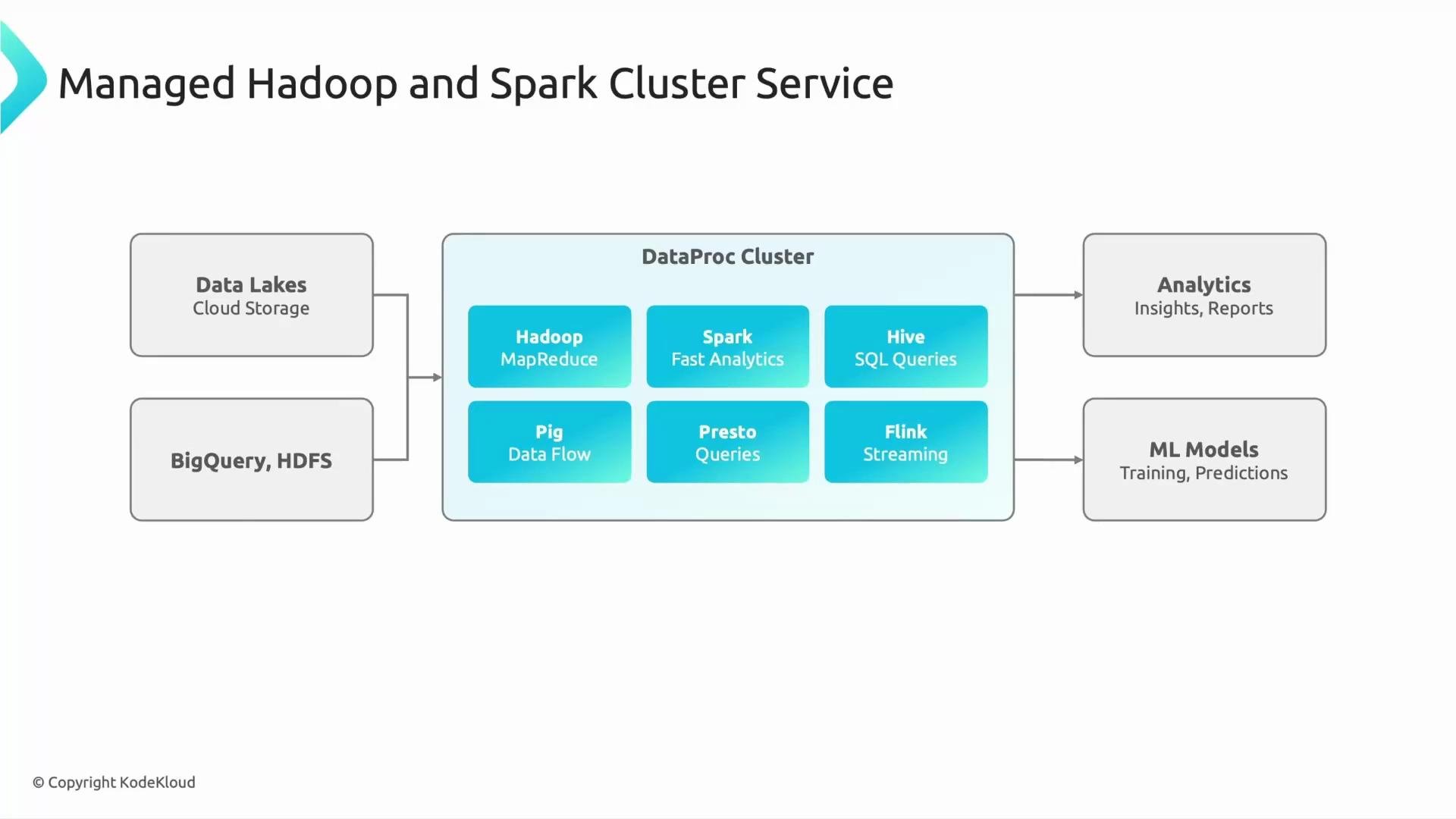
Dataproc processes large datasets stored in Cloud Storage (commonly used as a data lake), and it can access BigQuery and HDFS for hybrid or migrated workloads. Google manages cluster lifecycle, software versions, and orchestration so you can focus on jobs and analysis rather than infrastructure.
Common frameworks available on Dataproc:
* Hadoop (MapReduce)
* Spark (batch and fast analytics)
* Hive (SQL-on-Hadoop)
* Pig
* Presto / Trino (interactive SQL queries)
* Flink (streaming)
* Optional tools: Iceberg, Trino, and other ecosystem components you can enable on a cluster
 Real-world example:
Your team receives a terabyte of log files and needs rapid insights. With Dataproc you can:
1. Spin up a Spark cluster in minutes.
2. Run Spark jobs against Cloud Storage input.
3. Persist results to Cloud Storage or load them into BigQuery for dashboards.
4. Feed processed data into ML model training.
Because Dataproc supports standard open-source tools, migrating existing Spark jobs is usually straightforward and requires minimal code changes.
Why organizations choose Dataproc
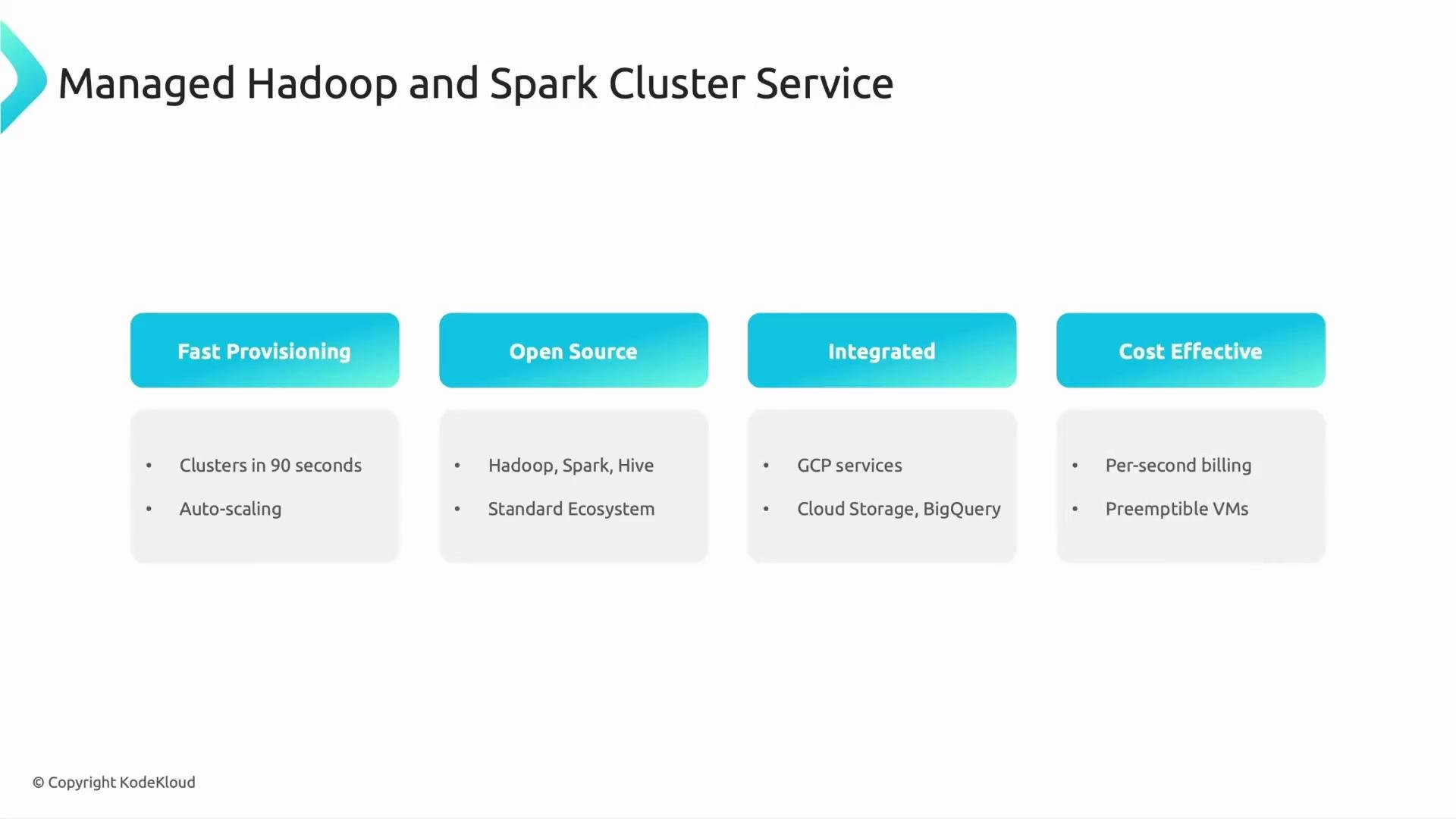
* Fast provisioning — clusters can be created in roughly 90 seconds, enabling rapid iteration.
* Autoscaling — clusters can grow or shrink to match demand (covered in a later article).
* Open-source compatibility — reuse your existing Hadoop/Spark/Hive tooling and libraries.
* Tight GCP integration — native access to Cloud Storage, BigQuery, Cloud Logging, Cloud Monitoring, IAM, and more.
* Cost efficiency — per-second billing, support for preemptible (Spot) worker VMs, and ephemeral clusters for short-lived jobs.
Frameworks and their typical use cases:
| Framework | Typical use case |
| ------------------ | ------------------------------------------- |
| Hadoop (MapReduce) | Large-scale, batch-oriented ETL |
| Spark | Fast batch analytics, machine learning, ETL |
| Hive | SQL queries over large datasets |
| Presto / Trino | Interactive SQL across data lakes |
| Flink | Streaming analytics and event processing |
Quick CLI examples
* Create a basic Dataproc cluster:
```bash theme={null}
gcloud dataproc clusters create my-cluster \
--region=us-central1 \
--single-node \
--image-version=2.1-debian10
```
* Submit a Spark job:
```bash theme={null}
gcloud dataproc jobs submit spark \
--cluster=my-cluster \
--region=us-central1 \
--class=org.apache.spark.examples.SparkPi \
--jars=file:///usr/lib/spark/examples/jars/spark-examples.jar \
-- 1000
```
* Create an ephemeral cluster, run a job, then delete it (example workflow):
```bash theme={null}
# Create
gcloud dataproc clusters create ephemeral-cluster --region=us-central1 --single-node
# Submit job
gcloud dataproc jobs submit pyspark --cluster=ephemeral-cluster --region=us-central1 job.py
# Delete
gcloud dataproc clusters delete ephemeral-cluster --region=us-central1 --quiet
```
Best practices for cost efficiency
* Use ephemeral clusters for ad-hoc or short batch jobs.
* Choose preemptible (Spot) worker VMs for non-critical tasks to save up to 80% on compute costs.
* Combine autoscaling with job-driven cluster policies to right-size resources.
Real-world example:
Your team receives a terabyte of log files and needs rapid insights. With Dataproc you can:
1. Spin up a Spark cluster in minutes.
2. Run Spark jobs against Cloud Storage input.
3. Persist results to Cloud Storage or load them into BigQuery for dashboards.
4. Feed processed data into ML model training.
Because Dataproc supports standard open-source tools, migrating existing Spark jobs is usually straightforward and requires minimal code changes.
Why organizations choose Dataproc
* Fast provisioning — clusters can be created in roughly 90 seconds, enabling rapid iteration.
* Autoscaling — clusters can grow or shrink to match demand (covered in a later article).
* Open-source compatibility — reuse your existing Hadoop/Spark/Hive tooling and libraries.
* Tight GCP integration — native access to Cloud Storage, BigQuery, Cloud Logging, Cloud Monitoring, IAM, and more.
* Cost efficiency — per-second billing, support for preemptible (Spot) worker VMs, and ephemeral clusters for short-lived jobs.
Frameworks and their typical use cases:
| Framework | Typical use case |
| ------------------ | ------------------------------------------- |
| Hadoop (MapReduce) | Large-scale, batch-oriented ETL |
| Spark | Fast batch analytics, machine learning, ETL |
| Hive | SQL queries over large datasets |
| Presto / Trino | Interactive SQL across data lakes |
| Flink | Streaming analytics and event processing |
Quick CLI examples
* Create a basic Dataproc cluster:
```bash theme={null}
gcloud dataproc clusters create my-cluster \
--region=us-central1 \
--single-node \
--image-version=2.1-debian10
```
* Submit a Spark job:
```bash theme={null}
gcloud dataproc jobs submit spark \
--cluster=my-cluster \
--region=us-central1 \
--class=org.apache.spark.examples.SparkPi \
--jars=file:///usr/lib/spark/examples/jars/spark-examples.jar \
-- 1000
```
* Create an ephemeral cluster, run a job, then delete it (example workflow):
```bash theme={null}
# Create
gcloud dataproc clusters create ephemeral-cluster --region=us-central1 --single-node
# Submit job
gcloud dataproc jobs submit pyspark --cluster=ephemeral-cluster --region=us-central1 job.py
# Delete
gcloud dataproc clusters delete ephemeral-cluster --region=us-central1 --quiet
```
Best practices for cost efficiency
* Use ephemeral clusters for ad-hoc or short batch jobs.
* Choose preemptible (Spot) worker VMs for non-critical tasks to save up to 80% on compute costs.
* Combine autoscaling with job-driven cluster policies to right-size resources.
 Tip: For short batch jobs, consider creating ephemeral clusters (spin up, run the job, then delete the cluster) and using preemptible/Spot worker nodes to reduce cost. Dataproc’s per-second billing further minimizes charges for brief workloads.
Summary
Dataproc brings the familiar power of Hadoop and Spark to Google Cloud with minimal operational overhead. It’s designed for teams that want:
* fast provisioning,
* open-source compatibility,
* deep GCP integration,
* and cost-efficient execution of batch and interactive analytics workloads.
Autoscaling and advanced cluster customization (init actions, custom images, and cluster policies) are covered in follow-up articles to show how Dataproc adjusts cluster size and configuration to save time and money.
Links and references
* [Google Cloud Dataproc documentation](https://cloud.google.com/dataproc)
* [Cloud Storage](https://cloud.google.com/storage)
* [BigQuery](https://cloud.google.com/bigquery)
* [Google Cloud Logging](https://cloud.google.com/logging)
* [AWS EMR (for comparison)](https://aws.amazon.com/emr/)
That's it for this article.
Tip: For short batch jobs, consider creating ephemeral clusters (spin up, run the job, then delete the cluster) and using preemptible/Spot worker nodes to reduce cost. Dataproc’s per-second billing further minimizes charges for brief workloads.
Summary
Dataproc brings the familiar power of Hadoop and Spark to Google Cloud with minimal operational overhead. It’s designed for teams that want:
* fast provisioning,
* open-source compatibility,
* deep GCP integration,
* and cost-efficient execution of batch and interactive analytics workloads.
Autoscaling and advanced cluster customization (init actions, custom images, and cluster policies) are covered in follow-up articles to show how Dataproc adjusts cluster size and configuration to save time and money.
Links and references
* [Google Cloud Dataproc documentation](https://cloud.google.com/dataproc)
* [Cloud Storage](https://cloud.google.com/storage)
* [BigQuery](https://cloud.google.com/bigquery)
* [Google Cloud Logging](https://cloud.google.com/logging)
* [AWS EMR (for comparison)](https://aws.amazon.com/emr/)
That's it for this article.