> ## Documentation Index
> Fetch the complete documentation index at: https://notes.kodekloud.com/llms.txt
> Use this file to discover all available pages before exploring further.
# Storage Options and Migration to Dataproc
> Guide comparing Dataproc storage options, costs, performance, and durability, with practical four‑phase migration steps from Hadoop or Spark to Dataproc
Welcome — this guide explains recommended storage choices for Dataproc, how they compare by cost, performance, and persistence, and a pragmatic, low-risk migration strategy from an existing Hadoop/Spark environment to Dataproc.
What you'll learn:
* Storage options that fit Dataproc workloads (HDFS, Google Cloud Storage, Local SSD, Persistent Disk).
* How to compare storage by cost, performance, and durability.
* A four-phase migration plan with practical steps and example commands.
## Storage choices (summary)
Below are common storage options used with Dataproc, their characteristics, and typical use cases.
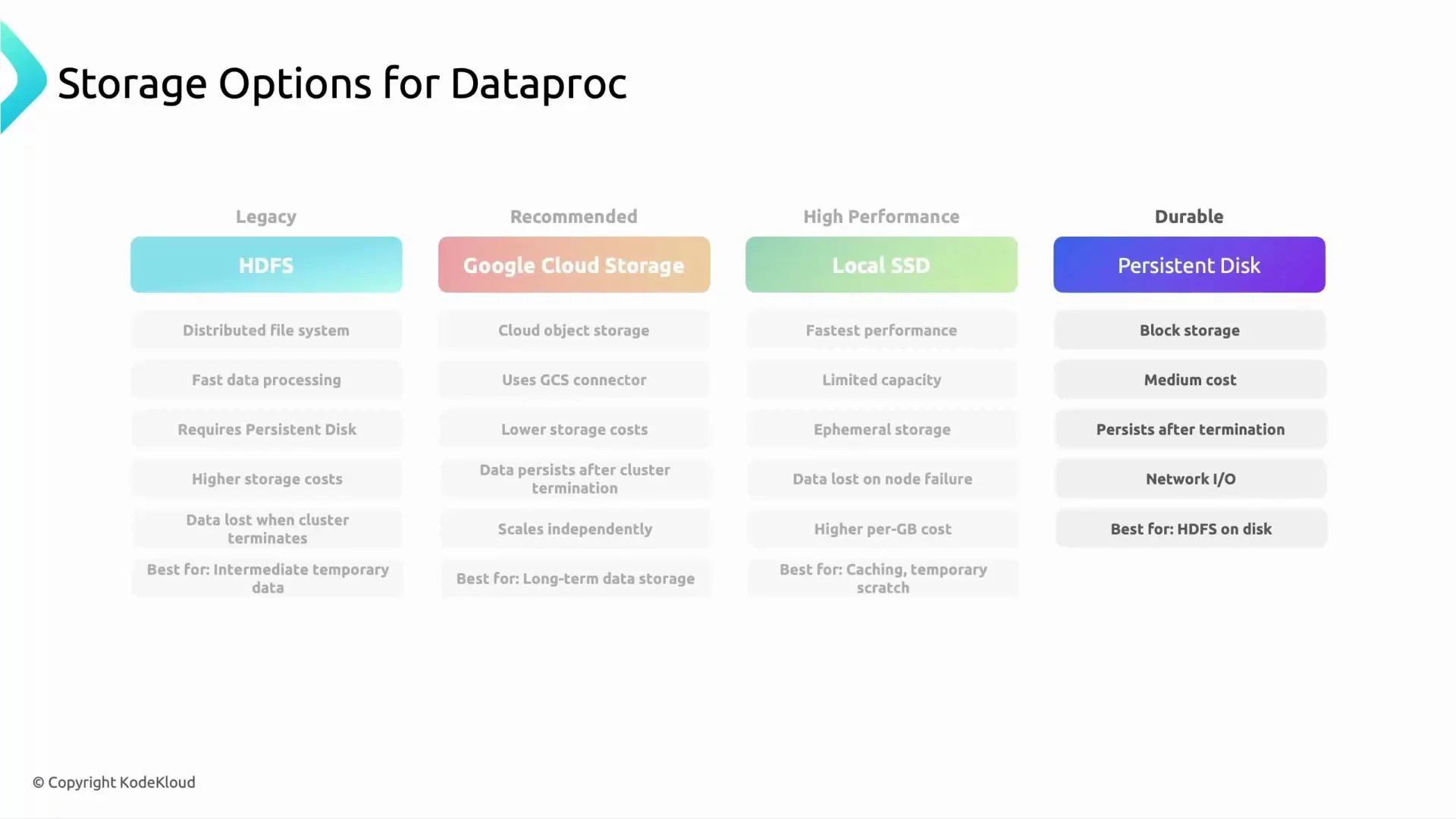
### HDFS (Hadoop Distributed File System)
* Block-based distributed filesystem used by on-prem Hadoop clusters.
* Runs on disks attached to cluster nodes (on GCP often Persistent Disks).
* Very fast for locality-optimized workloads, but data is tied to cluster lifecycle unless disks are preserved.
* Best for temporary data or workloads that rely on HDFS semantics.
* Considered legacy for cloud-native deployments; prefer object storage for long-term storage on GCP.
### Google Cloud Storage (GCS) — recommended
* Object storage, addressed with `gs://` URIs. Data persists independently of Dataproc clusters.
* Low cost at scale, virtually unlimited capacity, and simple management.
* Integrates with Dataproc via the GCS connector; recommended for long-term analytics storage (input/output datasets, checkpoints, artifacts).
* Good performance for many analytics workloads; watch out for small-file overhead—partition and compact files appropriately.
Google Cloud Storage (GCS) is the most cloud-native option for long-term analytics data with Dataproc. Use HDFS or Local SSD only for temporary, performance-sensitive data inside the running cluster.
### Local SSD
* Ephemeral, physically attached to the VM instance.
* Highest IOPS and lowest latency — useful for temporary caches or shuffle-heavy stages.
* Data is lost if the VM fails or is deleted. Use only for transient data.
### Persistent Disk (PD)
* Durable block storage that persists independent of the VM lifecycle (unless explicitly deleted).
* Good general-purpose performance and durability at a moderate cost.
* Useful if you need HDFS-like performance with block-storage durability; can be zonal or regional.
 ## Comparison: cost, performance, and persistence
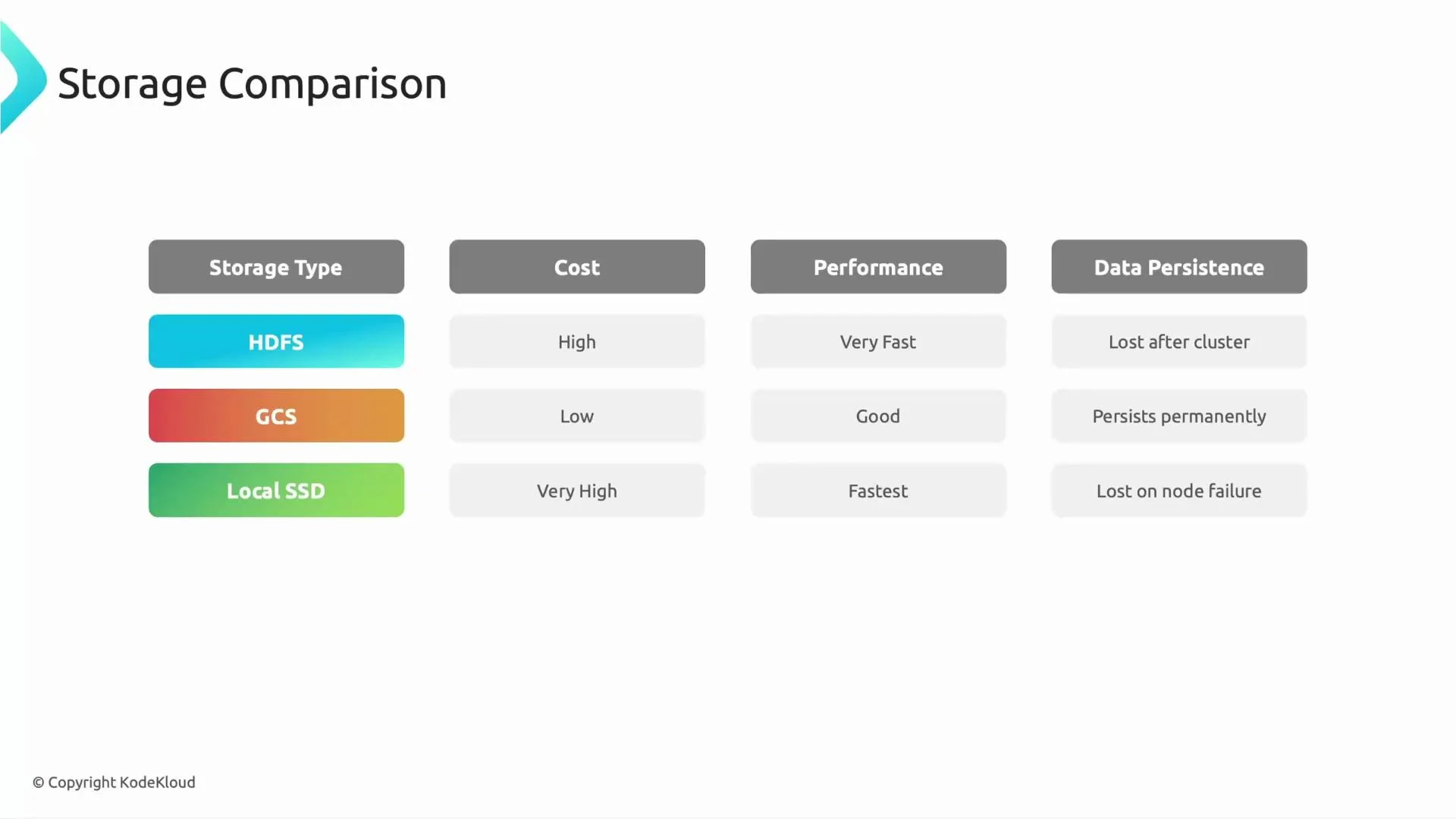
Choose storage based on whether you prioritize speed, durability, or cost-efficiency. The table below summarizes typical trade-offs and recommended usage patterns.
| Storage Type | Cost | Performance | Persistence / Durability | Recommended use |
| -------------------------- | -----------: | ---------------------------------- | -------------------------------------------------- | -------------------------------------------------------------------- |
| HDFS (on PD) | High | Very fast for data-local workloads | Tied to cluster unless disks preserved | Temporary workloads needing data locality or legacy HDFS semantics |
| Google Cloud Storage (GCS) | Low at scale | Good for analytics; network-bound | Persists independently of clusters; highly durable | Long-term analytics storage: inputs, outputs, checkpoints, artifacts |
| Local SSD | Very high | Fastest I/O and lowest latency | Ephemeral — lost on VM failure | Temporary caches, shuffle optimization inside running cluster |
| Persistent Disk (PD) | Moderate | Good general performance | Durable across VM lifecycle unless deleted | Durable block storage where HDFS-like performance is needed |
Common architecture pattern:
* Store long-lived datasets in GCS.
* Use HDFS or Local SSD inside Dataproc for temporary caching, intermediate shuffle files, or performance-sensitive stages.
* Use PD when you need durable block storage with predictable I/O.
## Comparison: cost, performance, and persistence
Choose storage based on whether you prioritize speed, durability, or cost-efficiency. The table below summarizes typical trade-offs and recommended usage patterns.
| Storage Type | Cost | Performance | Persistence / Durability | Recommended use |
| -------------------------- | -----------: | ---------------------------------- | -------------------------------------------------- | -------------------------------------------------------------------- |
| HDFS (on PD) | High | Very fast for data-local workloads | Tied to cluster unless disks preserved | Temporary workloads needing data locality or legacy HDFS semantics |
| Google Cloud Storage (GCS) | Low at scale | Good for analytics; network-bound | Persists independently of clusters; highly durable | Long-term analytics storage: inputs, outputs, checkpoints, artifacts |
| Local SSD | Very high | Fastest I/O and lowest latency | Ephemeral — lost on VM failure | Temporary caches, shuffle optimization inside running cluster |
| Persistent Disk (PD) | Moderate | Good general performance | Durable across VM lifecycle unless deleted | Durable block storage where HDFS-like performance is needed |
Common architecture pattern:
* Store long-lived datasets in GCS.
* Use HDFS or Local SSD inside Dataproc for temporary caching, intermediate shuffle files, or performance-sensitive stages.
* Use PD when you need durable block storage with predictable I/O.
 ## Migration to Dataproc — phased approach
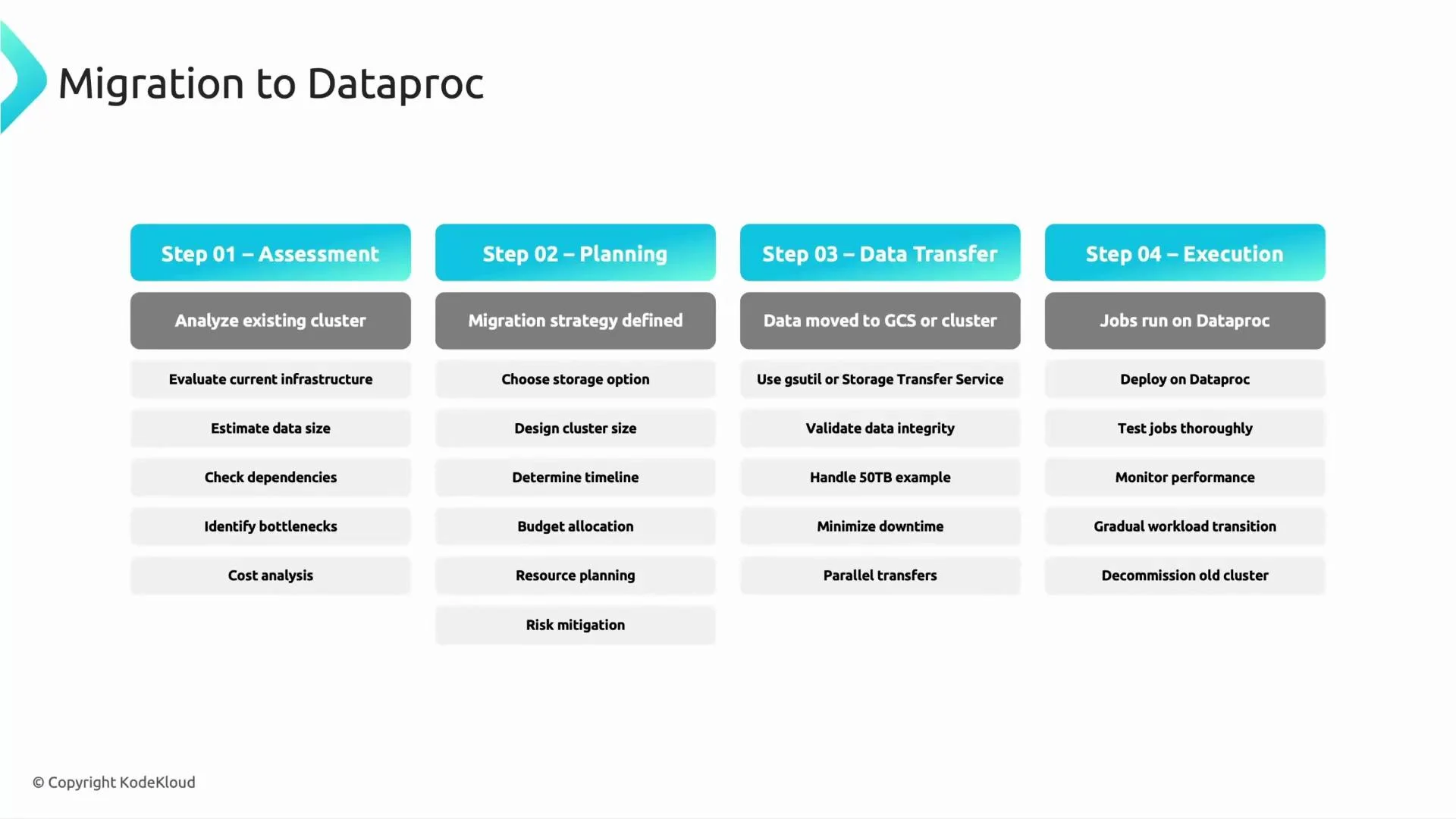
Use a phased migration to reduce risk and validate each step. Below is a practical four-step plan commonly used when moving Hadoop/Spark workloads to Dataproc.
| Phase | Key actions |
| ---------------- | -------------------------------------------------------------------------------------------------------------------------------------------------------------------------------------------------------------- |
| 1) Assessment | Inventory datasets, job types, connectors, libraries; identify bottlenecks and performance-sensitive stages; measure dataset sizes and growth. |
| 2) Planning | Choose storage target (e.g., `gs://` for long-term, Local SSD for shuffle), size clusters (CPU, memory, I/O), plan changes to job paths and credentials, and map Hadoop-specific configs to cloud equivalents. |
| 3) Data transfer | Move data to GCS using `gsutil` or Storage Transfer Service; validate integrity with checksums; design partitioning to avoid small-file issues. |
| 4) Execution | Provision Dataproc clusters, update job paths to `gs://` or PD mounts, run representative workloads, validate correctness and performance, then cut over and decommission legacy clusters. |
Step details and practical tips:
1. Assessment
* Create a catalog of datasets, job DAGs, triggers, libraries, and third-party connectors.
* Identify jobs with heavy shuffles, joins, or small-file patterns — these influence storage and cluster design.
* Capture historical job resource usage to size cluster instances and autoscaling rules.
2. Planning
* Convert HDFS paths to `gs://` URIs for long-term datasets; use PD or Local SSD for temporary disks where you need block-level performance.
* Plan IAM and credentials (service accounts, bucket policies) and any required VPC/peering for secure data access.
* Estimate monthly storage and compute cost; include network egress if cross-region transfers are required.
3. Data transfer
* Use `gsutil` for many migrations or Storage Transfer Service for large or scheduled transfers.
* Example gsutil commands:
```bash theme={null}
# Copy a directory recursively to a GCS bucket (parallelized)
gsutil -m cp -r /local/data/path gs://my-bucket/path
# Or synchronize source to destination (efficiently updates changed files)
gsutil -m rsync -r /local/data/path gs://my-bucket/path
```
* For very large or offline transfers, consider Transfer Appliance or the Storage Transfer Service. Use checksums or object metadata to validate integrity after transfer.
Always validate transferred data (checksums, row counts) and run representative jobs on Dataproc before decommissioning legacy clusters. Small-file patterns and schema differences are common migration pitfalls.
4. Execution
* Provision test Dataproc clusters sized for your peak workloads, using initialization actions if you need extra libraries.
* Update job configuration to reference `gs://` paths and test end-to-end.
* Measure runtime and I/O characteristics; iterate on partitioning, shuffle behavior, and executor sizing.
* After validation, schedule a cutover: run final incremental sync if needed, switch production jobs to Dataproc, and decommission old clusters.
## Migration to Dataproc — phased approach
Use a phased migration to reduce risk and validate each step. Below is a practical four-step plan commonly used when moving Hadoop/Spark workloads to Dataproc.
| Phase | Key actions |
| ---------------- | -------------------------------------------------------------------------------------------------------------------------------------------------------------------------------------------------------------- |
| 1) Assessment | Inventory datasets, job types, connectors, libraries; identify bottlenecks and performance-sensitive stages; measure dataset sizes and growth. |
| 2) Planning | Choose storage target (e.g., `gs://` for long-term, Local SSD for shuffle), size clusters (CPU, memory, I/O), plan changes to job paths and credentials, and map Hadoop-specific configs to cloud equivalents. |
| 3) Data transfer | Move data to GCS using `gsutil` or Storage Transfer Service; validate integrity with checksums; design partitioning to avoid small-file issues. |
| 4) Execution | Provision Dataproc clusters, update job paths to `gs://` or PD mounts, run representative workloads, validate correctness and performance, then cut over and decommission legacy clusters. |
Step details and practical tips:
1. Assessment
* Create a catalog of datasets, job DAGs, triggers, libraries, and third-party connectors.
* Identify jobs with heavy shuffles, joins, or small-file patterns — these influence storage and cluster design.
* Capture historical job resource usage to size cluster instances and autoscaling rules.
2. Planning
* Convert HDFS paths to `gs://` URIs for long-term datasets; use PD or Local SSD for temporary disks where you need block-level performance.
* Plan IAM and credentials (service accounts, bucket policies) and any required VPC/peering for secure data access.
* Estimate monthly storage and compute cost; include network egress if cross-region transfers are required.
3. Data transfer
* Use `gsutil` for many migrations or Storage Transfer Service for large or scheduled transfers.
* Example gsutil commands:
```bash theme={null}
# Copy a directory recursively to a GCS bucket (parallelized)
gsutil -m cp -r /local/data/path gs://my-bucket/path
# Or synchronize source to destination (efficiently updates changed files)
gsutil -m rsync -r /local/data/path gs://my-bucket/path
```
* For very large or offline transfers, consider Transfer Appliance or the Storage Transfer Service. Use checksums or object metadata to validate integrity after transfer.
Always validate transferred data (checksums, row counts) and run representative jobs on Dataproc before decommissioning legacy clusters. Small-file patterns and schema differences are common migration pitfalls.
4. Execution
* Provision test Dataproc clusters sized for your peak workloads, using initialization actions if you need extra libraries.
* Update job configuration to reference `gs://` paths and test end-to-end.
* Measure runtime and I/O characteristics; iterate on partitioning, shuffle behavior, and executor sizing.
* After validation, schedule a cutover: run final incremental sync if needed, switch production jobs to Dataproc, and decommission old clusters.
 ## Final notes and best practices
* Prefer GCS for long-term analytics datasets on Dataproc. It decouples storage from compute and reduces lifecycle management overhead.
* Use ephemeral HDFS or Local SSD for shuffle or temporary caches only while the cluster is running.
* Keep Persistent Disks for workloads that need durable block storage.
* Apply a phased migration (assess → plan → transfer → execute) and validate at each phase.
* Monitor costs and performance post-migration; tune partition sizes and file formats (Parquet/Avro) to reduce small-file overhead.
## Links and references
* Dataproc: [https://cloud.google.com/dataproc](https://cloud.google.com/dataproc)
* GCS connector and Dataproc: [https://cloud.google.com/dataproc/docs/concepts/connectors/cloud-storage](https://cloud.google.com/dataproc/docs/concepts/connectors/cloud-storage)
* gsutil: [https://cloud.google.com/storage/docs/gsutil](https://cloud.google.com/storage/docs/gsutil)
* Storage Transfer Service: [https://cloud.google.com/storage-transfer-service](https://cloud.google.com/storage-transfer-service)
* Transfer Appliance: [https://cloud.google.com/transfer-appliance](https://cloud.google.com/transfer-appliance)
* Signed URLs for ingestion: [https://cloud.google.com/storage/docs/access-control/signed-urls](https://cloud.google.com/storage/docs/access-control/signed-urls)
This concise overview provides a practical decision framework for Dataproc storage and a migration checklist you can act on. A follow-up hands-on demo can walk through provisioning a Dataproc cluster and running sample jobs to validate these patterns in your environment.
## Final notes and best practices
* Prefer GCS for long-term analytics datasets on Dataproc. It decouples storage from compute and reduces lifecycle management overhead.
* Use ephemeral HDFS or Local SSD for shuffle or temporary caches only while the cluster is running.
* Keep Persistent Disks for workloads that need durable block storage.
* Apply a phased migration (assess → plan → transfer → execute) and validate at each phase.
* Monitor costs and performance post-migration; tune partition sizes and file formats (Parquet/Avro) to reduce small-file overhead.
## Links and references
* Dataproc: [https://cloud.google.com/dataproc](https://cloud.google.com/dataproc)
* GCS connector and Dataproc: [https://cloud.google.com/dataproc/docs/concepts/connectors/cloud-storage](https://cloud.google.com/dataproc/docs/concepts/connectors/cloud-storage)
* gsutil: [https://cloud.google.com/storage/docs/gsutil](https://cloud.google.com/storage/docs/gsutil)
* Storage Transfer Service: [https://cloud.google.com/storage-transfer-service](https://cloud.google.com/storage-transfer-service)
* Transfer Appliance: [https://cloud.google.com/transfer-appliance](https://cloud.google.com/transfer-appliance)
* Signed URLs for ingestion: [https://cloud.google.com/storage/docs/access-control/signed-urls](https://cloud.google.com/storage/docs/access-control/signed-urls)
This concise overview provides a practical decision framework for Dataproc storage and a migration checklist you can act on. A follow-up hands-on demo can walk through provisioning a Dataproc cluster and running sample jobs to validate these patterns in your environment.