> ## Documentation Index
> Fetch the complete documentation index at: https://notes.kodekloud.com/llms.txt
> Use this file to discover all available pages before exploring further.
# Demo Materialized Views
> Guide demonstrating BigQuery materialized views including creation, limitations, refresh options, joins, performance benefits, and SQL examples using employees and departments tables
Welcome back. This guide expands on BigQuery fundamentals — creating datasets, tables, and views — and walks through materialized views in BigQuery: what they are, when to use them, and how to manage refresh behavior.
Materialized views store precomputed query results to speed up repeated queries. They can refresh automatically on a schedule or be refreshed manually when you need immediate, up-to-date results.
Prerequisites
* A BigQuery dataset (this example uses `kodekloud-gcp-training.demo_dataset`).
* A base `employees` table already present in the dataset (used for the materialized view source).
Quick check — view current summary
```sql theme={null}
SELECT *
FROM `kodekloud-gcp-training.demo_dataset.employee_summary`
ORDER BY salary DESC;
```
Create a departments table
To demonstrate joining a materialized view with another table, create a simple `departments` table:
```sql theme={null}
CREATE TABLE `kodekloud-gcp-training.demo_dataset.departments` (
department_id INT64 NOT NULL,
department_name STRING NOT NULL,
location STRING,
budget INT64
);
```
Insert sample department records:
```sql theme={null}
INSERT INTO `kodekloud-gcp-training.demo_dataset.departments`
(department_id, department_name, location, budget)
VALUES
(101, 'Engineering', 'San Francisco', 500000),
(102, 'Sales', 'New York', 300000),
(103, 'Marketing', 'Los Angeles', 250000),
(104, 'HR', 'Chicago', 150000);
```
Verify the inserted data:
```sql theme={null}
SELECT department_id, department_name, location, budget
FROM `kodekloud-gcp-training.demo_dataset.departments`
ORDER BY department_id;
```
Relational context
Now you have two related tables: `employees` and `departments`. This is a classic relational setup where `department_id` in `employees` references `department_id` in `departments`, enabling joins at query time.
Important: materialized view limitations
BigQuery materialized views are optimized for performance but have SQL restrictions. They do not support arbitrary joins across multiple base tables or every SQL construct. If you require a precomputed result combining many tables or unsupported SQL, use:
* a regular view (virtual, computed at query time), or
* a scheduled query that writes a denormalized table for fast access.
Warning: use materialized views when queries match the supported patterns and when caching precomputed results is beneficial.
Create a materialized view (precomputed employees)
This example creates a materialized view that precomputes selected columns from the `employees` table, including `department_id` so you can join to `departments` in queries. The materialized view is configured to auto-refresh every 30 minutes.
```sql theme={null}
CREATE MATERIALIZED VIEW `kodekloud-gcp-training.demo_dataset.employee_department_view`
OPTIONS (
enable_refresh = TRUE,
refresh_interval_minutes = 30
)
AS
SELECT
employee_id,
CONCAT(first_name, ' ', last_name) AS full_name,
email,
salary,
hire_date,
department_id
FROM `kodekloud-gcp-training.demo_dataset.employees`;
```
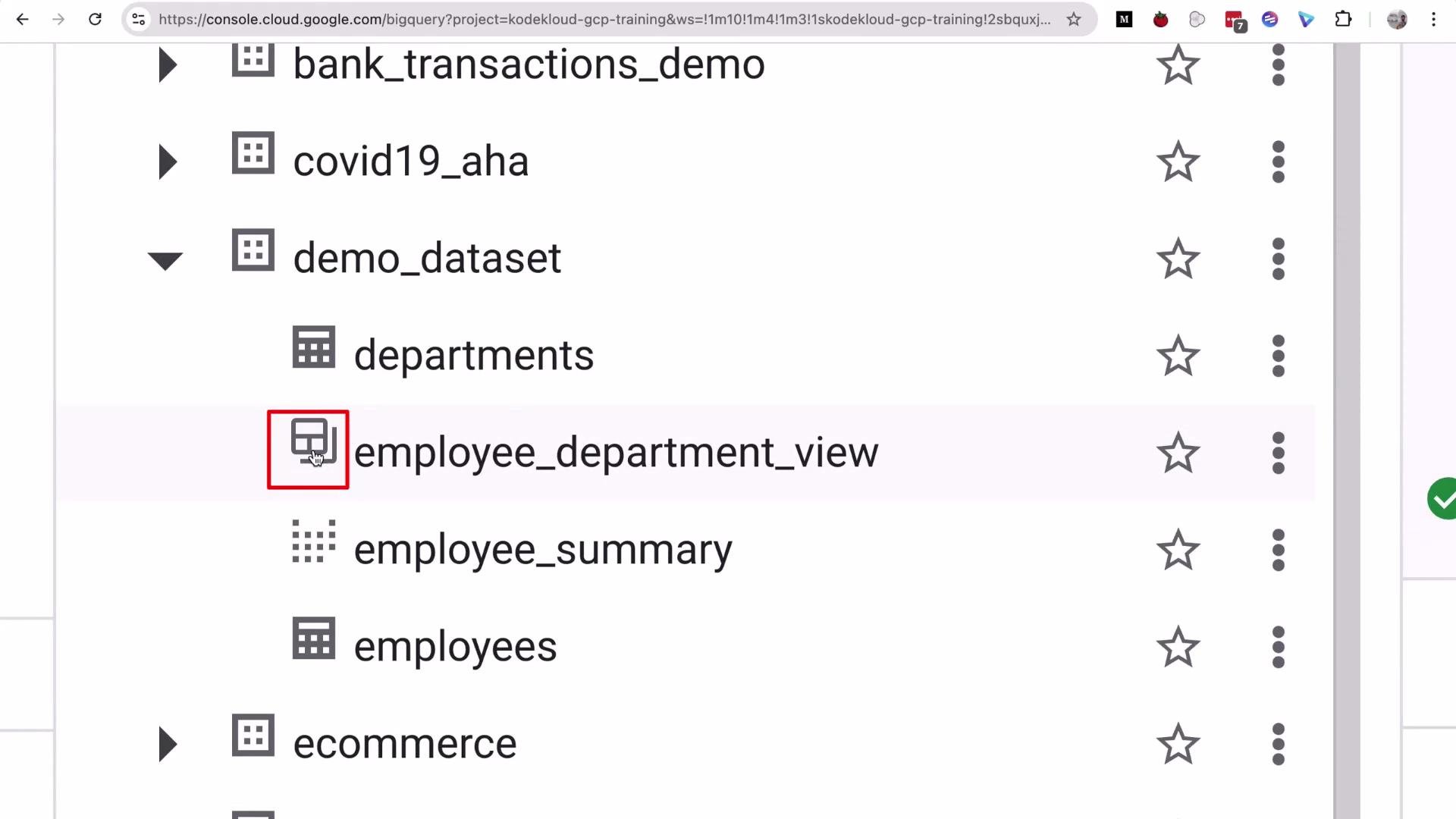
The materialized view is created. In the BigQuery UI it has a distinct icon that differentiates materialized views from regular views and tables:
 Query the materialized view
Run a simple query against the materialized view to read the precomputed results:
```sql theme={null}
SELECT *
FROM `kodekloud-gcp-training.demo_dataset.employee_department_view`
ORDER BY department_id, salary DESC;
```
Join the materialized view with departments
If you need department metadata (name, budget), join the materialized view with the `departments` table at query time:
```sql theme={null}
SELECT
mv.employee_id,
mv.full_name,
mv.email,
mv.salary,
d.department_name,
d.budget
FROM `kodekloud-gcp-training.demo_dataset.employee_department_view` AS mv
JOIN `kodekloud-gcp-training.demo_dataset.departments` AS d
ON mv.department_id = d.department_id
ORDER BY d.department_name, mv.salary DESC;
```
Materialized view metadata & benefits
BigQuery displays metadata for materialized views (for example, row counts and logical bytes stored). Materialized views store logical results and can reduce both query cost and latency for repeated queries that match the materialized query pattern.
Table — Materialized view vs Regular view (summary)
| Feature | Materialized View | Regular View |
| ----------- | ---------------------------------------- | ----------------------------------- |
| Storage | Stores precomputed results (logical) | No storage; computed at query time |
| Performance | Faster for repeated, supported queries | Depends on the underlying query |
| Refresh | Automatic interval or manual (`REFRESH`) | Always reflects current base tables |
| SQL support | Limited; no arbitrary multi-table joins | Full SQL support |
| Use case | Cache common aggregations/filters | Flexible joins/complex queries |
Refresh behavior — demo and manual refresh
* Automatic refresh: materialized view results refresh automatically on the configured interval (30 minutes in this example).
* Manual refresh: you can force an immediate refresh to ensure the materialized view reflects the latest base-table changes.
1. Check current values for an employee (example: `employee_id = 1`):
```sql theme={null}
SELECT
full_name,
department_id,
salary
FROM `kodekloud-gcp-training.demo_dataset.employee_department_view`
WHERE employee_id = 1;
```
2. Update the base `employees` table (for example, change salary):
```sql theme={null}
UPDATE `kodekloud-gcp-training.demo_dataset.employees`
SET salary = 85000
WHERE employee_id = 1;
```
3. If you query the materialized view immediately, it may still show the previous salary until the next automatic refresh. Force an immediate refresh:
```sql theme={null}
REFRESH MATERIALIZED VIEW `kodekloud-gcp-training.demo_dataset.employee_department_view`;
```
4. Re-run the SELECT to validate the refresh:
```sql theme={null}
SELECT
full_name,
department_id,
salary
FROM `kodekloud-gcp-training.demo_dataset.employee_department_view`
WHERE employee_id = 1;
```
After the forced refresh, the materialized view should show the updated salary (85,000).
Materialized views are useful for precomputing and accelerating common queries. They have limitations (for example, not all SQL constructs or non-deterministic functions are supported). You can rely on scheduled refresh intervals or trigger refreshes (for example, from `Airflow` or other orchestration tools) when you need up-to-date results.
References and further reading
* BigQuery documentation: [https://cloud.google.com/bigquery/docs](https://cloud.google.com/bigquery/docs)
* BigQuery materialized views: [https://cloud.google.com/bigquery/docs/materialized-views](https://cloud.google.com/bigquery/docs/materialized-views)
* Apache Airflow: [https://airflow.apache.org/](https://airflow.apache.org/)
That concludes this demo on BigQuery materialized views. See you in the next lesson.
Query the materialized view
Run a simple query against the materialized view to read the precomputed results:
```sql theme={null}
SELECT *
FROM `kodekloud-gcp-training.demo_dataset.employee_department_view`
ORDER BY department_id, salary DESC;
```
Join the materialized view with departments
If you need department metadata (name, budget), join the materialized view with the `departments` table at query time:
```sql theme={null}
SELECT
mv.employee_id,
mv.full_name,
mv.email,
mv.salary,
d.department_name,
d.budget
FROM `kodekloud-gcp-training.demo_dataset.employee_department_view` AS mv
JOIN `kodekloud-gcp-training.demo_dataset.departments` AS d
ON mv.department_id = d.department_id
ORDER BY d.department_name, mv.salary DESC;
```
Materialized view metadata & benefits
BigQuery displays metadata for materialized views (for example, row counts and logical bytes stored). Materialized views store logical results and can reduce both query cost and latency for repeated queries that match the materialized query pattern.
Table — Materialized view vs Regular view (summary)
| Feature | Materialized View | Regular View |
| ----------- | ---------------------------------------- | ----------------------------------- |
| Storage | Stores precomputed results (logical) | No storage; computed at query time |
| Performance | Faster for repeated, supported queries | Depends on the underlying query |
| Refresh | Automatic interval or manual (`REFRESH`) | Always reflects current base tables |
| SQL support | Limited; no arbitrary multi-table joins | Full SQL support |
| Use case | Cache common aggregations/filters | Flexible joins/complex queries |
Refresh behavior — demo and manual refresh
* Automatic refresh: materialized view results refresh automatically on the configured interval (30 minutes in this example).
* Manual refresh: you can force an immediate refresh to ensure the materialized view reflects the latest base-table changes.
1. Check current values for an employee (example: `employee_id = 1`):
```sql theme={null}
SELECT
full_name,
department_id,
salary
FROM `kodekloud-gcp-training.demo_dataset.employee_department_view`
WHERE employee_id = 1;
```
2. Update the base `employees` table (for example, change salary):
```sql theme={null}
UPDATE `kodekloud-gcp-training.demo_dataset.employees`
SET salary = 85000
WHERE employee_id = 1;
```
3. If you query the materialized view immediately, it may still show the previous salary until the next automatic refresh. Force an immediate refresh:
```sql theme={null}
REFRESH MATERIALIZED VIEW `kodekloud-gcp-training.demo_dataset.employee_department_view`;
```
4. Re-run the SELECT to validate the refresh:
```sql theme={null}
SELECT
full_name,
department_id,
salary
FROM `kodekloud-gcp-training.demo_dataset.employee_department_view`
WHERE employee_id = 1;
```
After the forced refresh, the materialized view should show the updated salary (85,000).
Materialized views are useful for precomputing and accelerating common queries. They have limitations (for example, not all SQL constructs or non-deterministic functions are supported). You can rely on scheduled refresh intervals or trigger refreshes (for example, from `Airflow` or other orchestration tools) when you need up-to-date results.
References and further reading
* BigQuery documentation: [https://cloud.google.com/bigquery/docs](https://cloud.google.com/bigquery/docs)
* BigQuery materialized views: [https://cloud.google.com/bigquery/docs/materialized-views](https://cloud.google.com/bigquery/docs/materialized-views)
* Apache Airflow: [https://airflow.apache.org/](https://airflow.apache.org/)
That concludes this demo on BigQuery materialized views. See you in the next lesson.