> ## Documentation Index
> Fetch the complete documentation index at: https://notes.kodekloud.com/llms.txt
> Use this file to discover all available pages before exploring further.
# Firestore Intro Data Modeling Datastore Mode
> Explains Google Cloud Firestore features, data models, and differences between Native and Datastore modes for real-time client apps versus backend workloads
Hello and welcome back.
In this lesson we shift focus from Bigtable to Firestore — Google Cloud’s fully managed NoSQL document database. Cloud SQL, Cloud Spanner, and Bigtable each solve different problems; Firestore exists to address use cases that need flexible schemas, automatic scaling, and real-time synchronization for client-driven applications.
Consider a mobile food-delivery app: users sign up, place orders, and track delivery status concurrently. That app needs:
* a database that scales automatically,
* real-time updates to multiple clients,
* offline support for mobile users,
* flexible schema for evolving features.
Firestore is designed for exactly that set of requirements.
Key Firestore capabilities:
* Automatic scaling and low-latency performance for variable workloads.
* Schema-less documents and collections that let your data model evolve.
* Native real-time synchronization and local offline persistence for mobile/web SDKs.
* Rich queries (filters, ordering, compound queries, array membership checks) in Native mode.
* Fully managed service with strong integration into the Google Cloud ecosystem.
When to choose Firestore vs other Google Cloud databases:
* Use Cloud SQL for relational workloads with strong ACID needs and SQL joins.
* Use Cloud Spanner when you need global consistency, horizontal scaling, and relational schema at massive scale.
* Use Bigtable for very large, low-latency, high-throughput analytical or time-series workloads.
* Use Firestore when you need real-time sync, offline-first mobile/web experiences, or flexible document data.
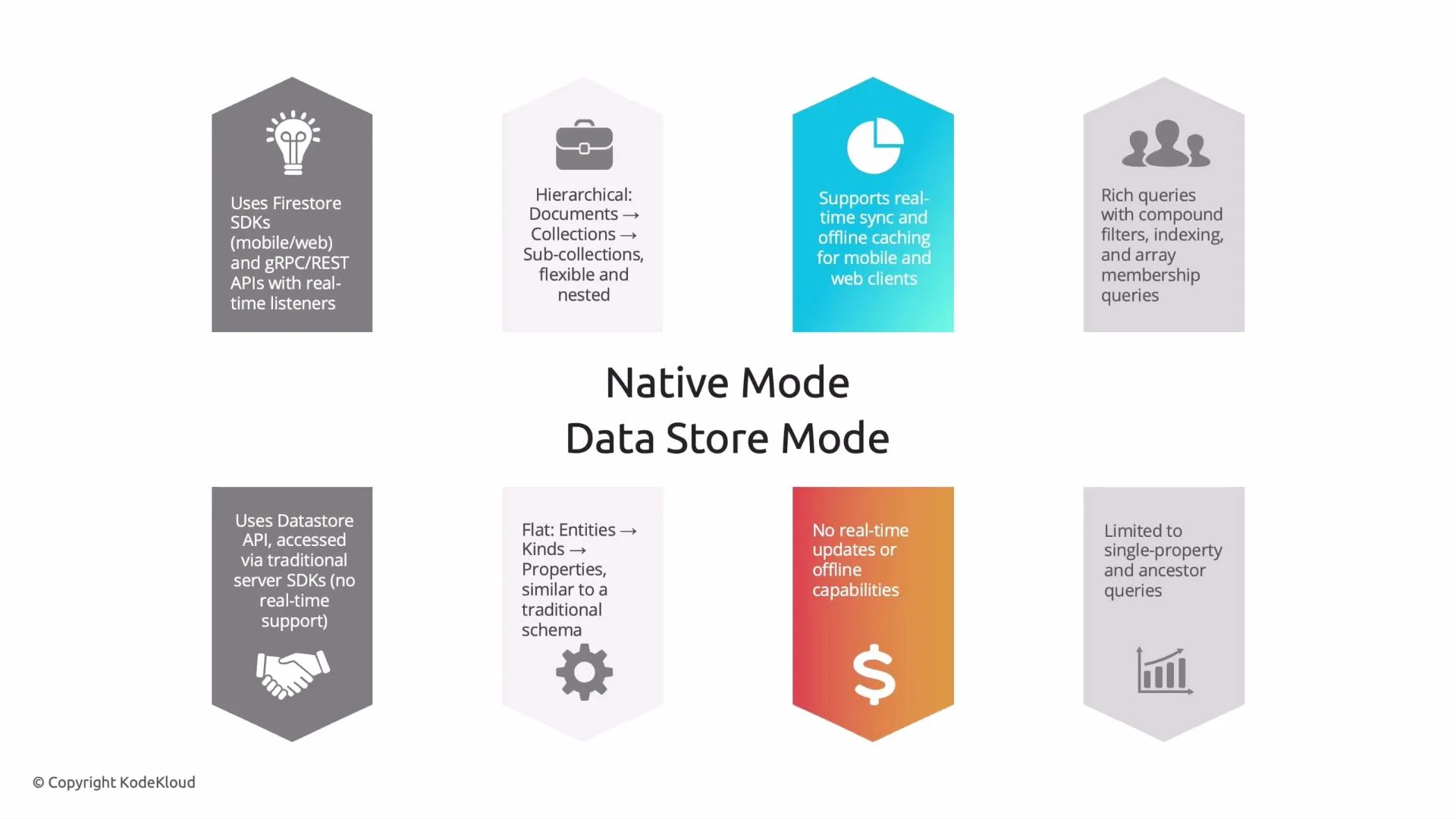
Firestore supports two operation modes. Which you pick determines APIs, data model, and client capabilities.
Native mode
* Uses Firestore SDKs for mobile and web (also supports gRPC/REST for server components).
* Hierarchical data model: documents in collections, with nested subcollections and complex objects.
* Real-time listeners and local offline persistence on mobile/web SDKs.
* Rich client-side queries (compound filters, array membership, ordering) and indexes.
* Best for interactive client-driven apps requiring real-time sync and offline support.
Datastore mode
* Uses the Datastore API (backwards-compatible with Cloud Datastore).
* Flat data model: entities grouped into kinds with properties (more like traditional schemas).
* No real-time listeners or mobile/web offline SDK experience.
* Suited for backend-heavy, server-side workloads, batch processing, or legacy Datastore migrations.
 A simple rule of thumb:
If your application needs real-time updates and an interactive mobile/web experience, choose Firestore Native mode. If the workload is backend-focused, batch-oriented, or does not require real-time sync, choose Datastore mode.
Firestore Modes — Quick Comparison
| Feature | Native mode | Datastore mode |
| ----------------------- | -------------------------------------------------------- | -------------------------------------------------------- |
| Recommended clients | Mobile & web SDKs, server gRPC/REST | Server-side and Datastore-compatible clients |
| Data model | Hierarchical: collections → documents → subcollections | Flat: entities with kinds and properties |
| Real-time listeners | Yes | No |
| Offline SDK persistence | Yes (mobile/web) | No |
| Query capabilities | Rich client-side queries & indexes | Limited relative to Native mode |
| Typical use cases | Interactive apps, real-time collaboration, offline-first | Backend services, batch jobs, legacy Datastore workloads |
Example architecture (mobile food-delivery app)
* Client devices use Firestore Native SDKs to read/write order and delivery documents.
* Real-time listeners push status updates to the UI as drivers update their location.
* Offline persistence allows users to continue interacting while network is intermittent.
* Server-side components (e.g., billing, analytics) can access the same data using REST or Admin SDKs.
Additional considerations
* Indexing: Native mode may require composite indexes for some compound queries. Plan and monitor index usage to avoid query failures.
* Pricing: Firestore pricing is based on operations, storage, and network. Real-time listeners and frequent writes can increase costs—design data access patterns accordingly.
* Migrations: If migrating from Cloud Datastore, Datastore mode preserves compatibility; consider Native mode only if you need real-time and mobile SDK features and are ready to adapt client code.
Relevant links and references
* [Google Cloud Firestore documentation](https://cloud.google.com/firestore)
* [Cloud Datastore to Firestore migration guide](https://cloud.google.com/datastore/docs/firestore-or-datastore)
* [Google Cloud Professional Data Engineer Certification](https://learn.kodekloud.com/user/courses/google-cloud-professional-data-engineer-certification)
Wrap-up
Understanding Firestore’s purpose and the differences between Native and Datastore modes helps you choose the right database for interactive client-driven applications or backend workloads. Native mode is optimized for real-time, offline-capable apps with hierarchical documents; Datastore mode is aimed at server-side workloads and legacy Datastore compatibility.
That is it for this lesson. See you in the next one.
A simple rule of thumb:
If your application needs real-time updates and an interactive mobile/web experience, choose Firestore Native mode. If the workload is backend-focused, batch-oriented, or does not require real-time sync, choose Datastore mode.
Firestore Modes — Quick Comparison
| Feature | Native mode | Datastore mode |
| ----------------------- | -------------------------------------------------------- | -------------------------------------------------------- |
| Recommended clients | Mobile & web SDKs, server gRPC/REST | Server-side and Datastore-compatible clients |
| Data model | Hierarchical: collections → documents → subcollections | Flat: entities with kinds and properties |
| Real-time listeners | Yes | No |
| Offline SDK persistence | Yes (mobile/web) | No |
| Query capabilities | Rich client-side queries & indexes | Limited relative to Native mode |
| Typical use cases | Interactive apps, real-time collaboration, offline-first | Backend services, batch jobs, legacy Datastore workloads |
Example architecture (mobile food-delivery app)
* Client devices use Firestore Native SDKs to read/write order and delivery documents.
* Real-time listeners push status updates to the UI as drivers update their location.
* Offline persistence allows users to continue interacting while network is intermittent.
* Server-side components (e.g., billing, analytics) can access the same data using REST or Admin SDKs.
Additional considerations
* Indexing: Native mode may require composite indexes for some compound queries. Plan and monitor index usage to avoid query failures.
* Pricing: Firestore pricing is based on operations, storage, and network. Real-time listeners and frequent writes can increase costs—design data access patterns accordingly.
* Migrations: If migrating from Cloud Datastore, Datastore mode preserves compatibility; consider Native mode only if you need real-time and mobile SDK features and are ready to adapt client code.
Relevant links and references
* [Google Cloud Firestore documentation](https://cloud.google.com/firestore)
* [Cloud Datastore to Firestore migration guide](https://cloud.google.com/datastore/docs/firestore-or-datastore)
* [Google Cloud Professional Data Engineer Certification](https://learn.kodekloud.com/user/courses/google-cloud-professional-data-engineer-certification)
Wrap-up
Understanding Firestore’s purpose and the differences between Native and Datastore modes helps you choose the right database for interactive client-driven applications or backend workloads. Native mode is optimized for real-time, offline-capable apps with hierarchical documents; Datastore mode is aimed at server-side workloads and legacy Datastore compatibility.
That is it for this lesson. See you in the next one.