> ## Documentation Index
> Fetch the complete documentation index at: https://notes.kodekloud.com/llms.txt
> Use this file to discover all available pages before exploring further.
# Quick Summary on Database SQL NoSQL and memory
> Compact guide to Google Cloud database options (SQL, NoSQL, in-memory) with use cases, scaling, and decision tips for selecting the right service.
Hello and welcome back.
This cheat-sheet assumes you already understand Cloud Memorystore basics and where an in-memory store fits in an architecture. Below is a compact, searchable guide to Google Cloud database choices — SQL, NoSQL, and in-memory — to help you decide which GCP database best fits a workload or exam scenario.
By the end you should be able to say: I know which GCP database fits which workload.
## How to choose a database on GCP
Focus on the workload characteristics: transactional vs analytical, consistency vs availability, scale, latency, and access patterns. Use the short descriptions below to narrow options, then consult the product docs to finalize architecture and SLA choices.
* Transactional, relational, strong consistency: Cloud SQL or Cloud Spanner
* Globally-distributed transactions and horizontal scaling: Cloud Spanner
* Large-scale analytics and reporting: BigQuery
* Real-time sync for mobile/web, schemaless documents: Firestore
* High-throughput, low-latency wide-column access (time-series): Cloud Bigtable
* Ultra-low latency caching or ephemeral state: Memorystore (Redis / Memcached)
* Legacy Datastore apps: Firestore in Datastore mode
* PostgreSQL compatibility with higher performance: AlloyDB for PostgreSQL
## Service-by-service quick guide
### Cloud SQL
* What it is: Fully managed relational database (MySQL, PostgreSQL, SQL Server).
* Best for: OLTP — many small, fast transactions such as user accounts, payments, and session state.
* Scaling: Vertical scale (larger VMs); add read replicas for read throughput; HA via regional failover replicas.
* Exam tip: Not designed as a horizontally sharded, globally-distributed database.
* Docs: [Cloud SQL documentation](https://cloud.google.com/sql/docs)
### Cloud Spanner
* What it is: Horizontally distributed, strongly consistent relational DB with SQL.
* Best for: Global, mission-critical OLTP that requires consistent cross-region transactions (financial systems, global backends).
* Scaling: Horizontal scaling across nodes/regions with automatic sharding and replication.
* Key property: Global transactions with strong consistency.
* Docs: [Cloud Spanner documentation](https://cloud.google.com/spanner/docs)
### BigQuery
* What it is: Serverless, petabyte-scale analytical warehouse that uses SQL.
* Best for: OLAP — analytics, dashboards, ETL and large-scale reporting.
* Architecture note: Storage and compute are separated for independent scaling.
* Best practice: Use BigQuery for analytical queries and reporting; not for transactional updates.
* Docs: [BigQuery documentation](https://cloud.google.com/bigquery/docs)
### Cloud Firestore
* What it is: Serverless, document-oriented NoSQL database with real-time synchronization.
* Best for: Mobile/web apps needing real-time sync, offline support, and automatic scaling (chat, collaborative apps, user profiles).
* Modes: Native mode (recommended for new apps) and Datastore mode (compatibility with legacy Datastore apps).
* Key property: Low operational overhead and client-side real-time listeners.
* Docs: [Cloud Firestore documentation](https://cloud.google.com/firestore/docs)
### Cloud Bigtable
* What it is: Wide-column NoSQL store (HBase-compatible) optimized for very large scale and low-latency single-row reads/writes.
* Best for: Time-series, telemetry, IoT, ad-tech — workloads with known access patterns requiring high throughput and low latency.
* Limitations: No joins; transactions limited to single-row atomic operations — design schema around access patterns.
* Docs: [Cloud Bigtable documentation](https://cloud.google.com/bigtable/docs)
### Memorystore (Redis / Memcached)
* What it is: Managed in-memory data store offering Redis and Memcached engines.
* Best for: Sub-millisecond caching, session stores, leaderboards, ephemeral state, and fast counters.
* Persistence: Redis supports persistence mechanisms (RDB/AOF) and some persistence options are available in Memorystore depending on tier; Memcached is ephemeral.
* Key decision: Choose Redis for persistence and richer data structures; choose Memcached for simple, volatile caching.
* Docs: [Memorystore docs](https://cloud.google.com/memorystore/docs)
### Cloud Datastore (legacy)
* What it is: The original schemaless NoSQL datastore, now legacy.
* Current guidance: Use Firestore in Datastore mode for compatibility with older applications; prefer Firestore Native mode for new projects.
* Docs: [Migrating from Datastore](https://cloud.google.com/datastore/docs/upgrade-to-firestore)
### AlloyDB for PostgreSQL
* What it is: Fully managed, PostgreSQL-compatible database optimized for higher performance and operational features.
* Best for: Mixed transactional and analytical workloads that need PostgreSQL compatibility with better performance characteristics than standard managed Postgres.
* Scaling: Read replicas for read scaling, performance optimizations; not globally sharded like Spanner.
* Docs: [AlloyDB documentation](https://cloud.google.com/alloydb/docs)
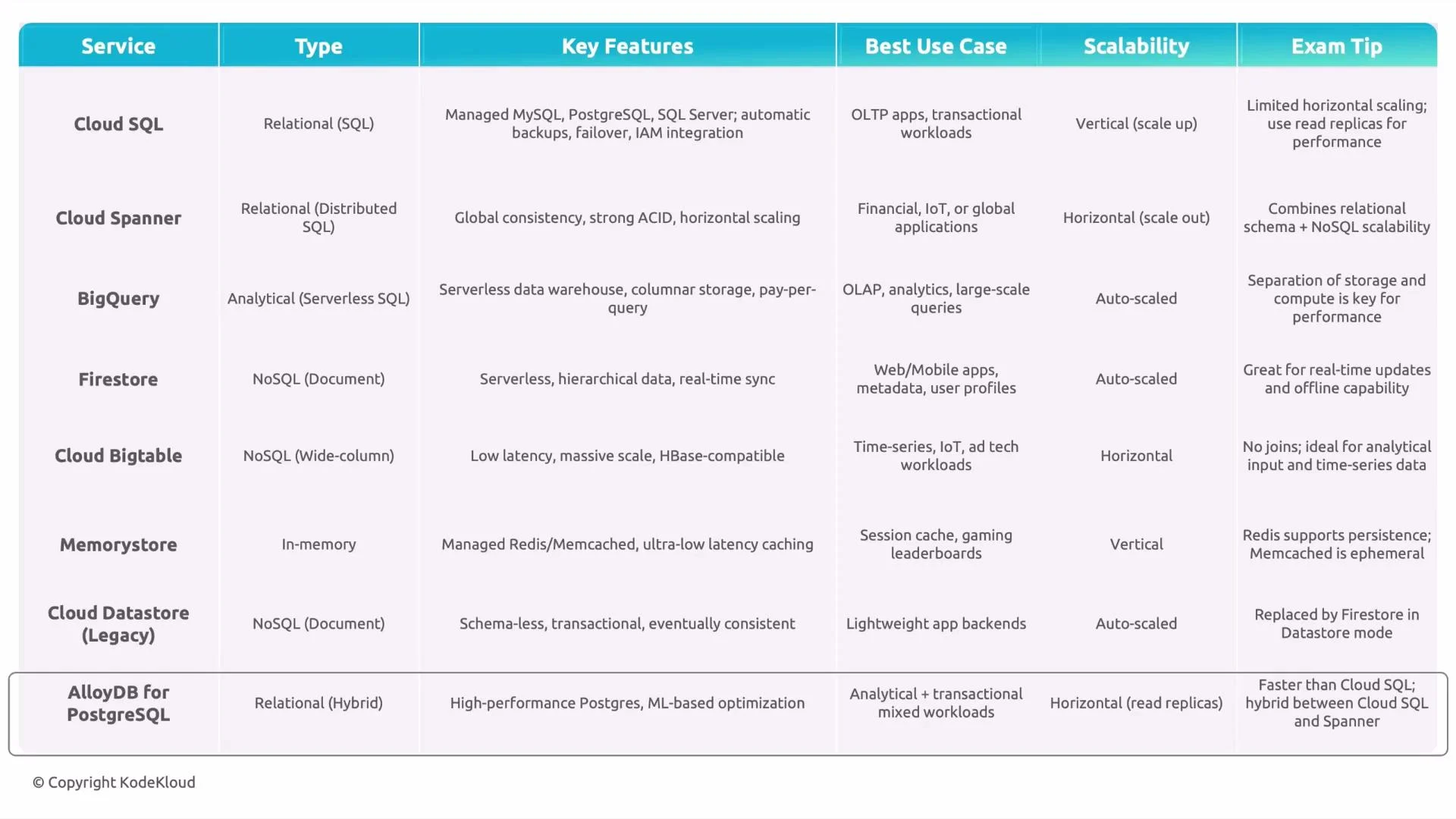 ## Comparison at a glance
| Service | Type | Best use case | Scaling model | Quick exam tip |
| ------------------------ | -------------------------------------: | ----------------------------------- | --------------------------------------------------- | ------------------------------------------------------------------- |
| Cloud SQL | Relational (MySQL/Postgres/SQL Server) | Traditional OLTP, small-medium apps | Vertical (bigger machines), read replicas for reads | Not horizontally sharded; single-region primary |
| Cloud Spanner | Relational, globally distributed | Global OLTP with strong consistency | Horizontal across nodes & regions | Use for global transactions and consistency |
| BigQuery | Analytical data warehouse | OLAP, dashboards, reporting | Serverless separation of storage & compute | Use for analytics, not transactions |
| Firestore | Document NoSQL (serverless) | Real-time mobile/web, offline sync | Automatic, serverless | Native mode for new apps; Datastore mode for legacy |
| Cloud Bigtable | Wide-column NoSQL | Time-series, telemetry, ad-tech | Scale by nodes (horizontal) | Schema must match read/write patterns |
| Memorystore | In-memory (Redis/Memcached) | Caching, sessions, ephemeral state | Scale by instance size/tier | Redis for persistence & data structures; Memcached for simple cache |
| Cloud Datastore (legacy) | NoSQL (legacy) | Legacy apps needing compatibility | Use Firestore in Datastore mode | Migrate to Firestore if possible |
| AlloyDB | PostgreSQL-compatible | High-performance Postgres workloads | Read replicas & optimizations | Use when Postgres compatibility and higher perf required |
Exam tip: Map the workload to database properties — Cloud SQL for traditional OLTP, Cloud Spanner for globally-distributed transactional systems, BigQuery for OLAP analytics, Firestore or Bigtable for NoSQL application data, and Memorystore for caching and sub-millisecond access.
## Final checklist when deciding
* Is the workload transactional (OLTP) or analytical (OLAP)?
* Do you need global consistency across regions?
* Are access patterns known and simple (Bigtable) or flexible and document-oriented (Firestore)?
* Is sub-millisecond latency required (Memorystore)?
* Is PostgreSQL compatibility a hard requirement (AlloyDB or Cloud SQL)?
That wraps up this quick summary of SQL, NoSQL, and in-memory databases on Google Cloud. Use this guide as a mental map while designing architectures or preparing for the GCP Data Engineer exam.
See you next time.
## Comparison at a glance
| Service | Type | Best use case | Scaling model | Quick exam tip |
| ------------------------ | -------------------------------------: | ----------------------------------- | --------------------------------------------------- | ------------------------------------------------------------------- |
| Cloud SQL | Relational (MySQL/Postgres/SQL Server) | Traditional OLTP, small-medium apps | Vertical (bigger machines), read replicas for reads | Not horizontally sharded; single-region primary |
| Cloud Spanner | Relational, globally distributed | Global OLTP with strong consistency | Horizontal across nodes & regions | Use for global transactions and consistency |
| BigQuery | Analytical data warehouse | OLAP, dashboards, reporting | Serverless separation of storage & compute | Use for analytics, not transactions |
| Firestore | Document NoSQL (serverless) | Real-time mobile/web, offline sync | Automatic, serverless | Native mode for new apps; Datastore mode for legacy |
| Cloud Bigtable | Wide-column NoSQL | Time-series, telemetry, ad-tech | Scale by nodes (horizontal) | Schema must match read/write patterns |
| Memorystore | In-memory (Redis/Memcached) | Caching, sessions, ephemeral state | Scale by instance size/tier | Redis for persistence & data structures; Memcached for simple cache |
| Cloud Datastore (legacy) | NoSQL (legacy) | Legacy apps needing compatibility | Use Firestore in Datastore mode | Migrate to Firestore if possible |
| AlloyDB | PostgreSQL-compatible | High-performance Postgres workloads | Read replicas & optimizations | Use when Postgres compatibility and higher perf required |
Exam tip: Map the workload to database properties — Cloud SQL for traditional OLTP, Cloud Spanner for globally-distributed transactional systems, BigQuery for OLAP analytics, Firestore or Bigtable for NoSQL application data, and Memorystore for caching and sub-millisecond access.
## Final checklist when deciding
* Is the workload transactional (OLTP) or analytical (OLAP)?
* Do you need global consistency across regions?
* Are access patterns known and simple (Bigtable) or flexible and document-oriented (Firestore)?
* Is sub-millisecond latency required (Memorystore)?
* Is PostgreSQL compatibility a hard requirement (AlloyDB or Cloud SQL)?
That wraps up this quick summary of SQL, NoSQL, and in-memory databases on Google Cloud. Use this guide as a mental map while designing architectures or preparing for the GCP Data Engineer exam.
See you next time.