> ## Documentation Index
> Fetch the complete documentation index at: https://notes.kodekloud.com/llms.txt
> Use this file to discover all available pages before exploring further.
# Demo Creating a VPC and Subnet in GCP
> Step-by-step tutorial showing how to create and manage a custom VPC and subnet in Google Cloud, including CIDR sizing, firewall rules, verification, and cleanup.
Hello and welcome back.
In this lesson you'll learn how to create a Virtual Private Cloud (VPC) and a subnet in Google Cloud Platform (GCP). A custom VPC is useful when you need network isolation, explicit IP addressing, or control over subnet ranges and routing—for example when hosting a VM for a [Streamlit](https://streamlit.io) app or other services.
Before you begin
* Sign into the Google Cloud Console and ensure the correct project is selected.
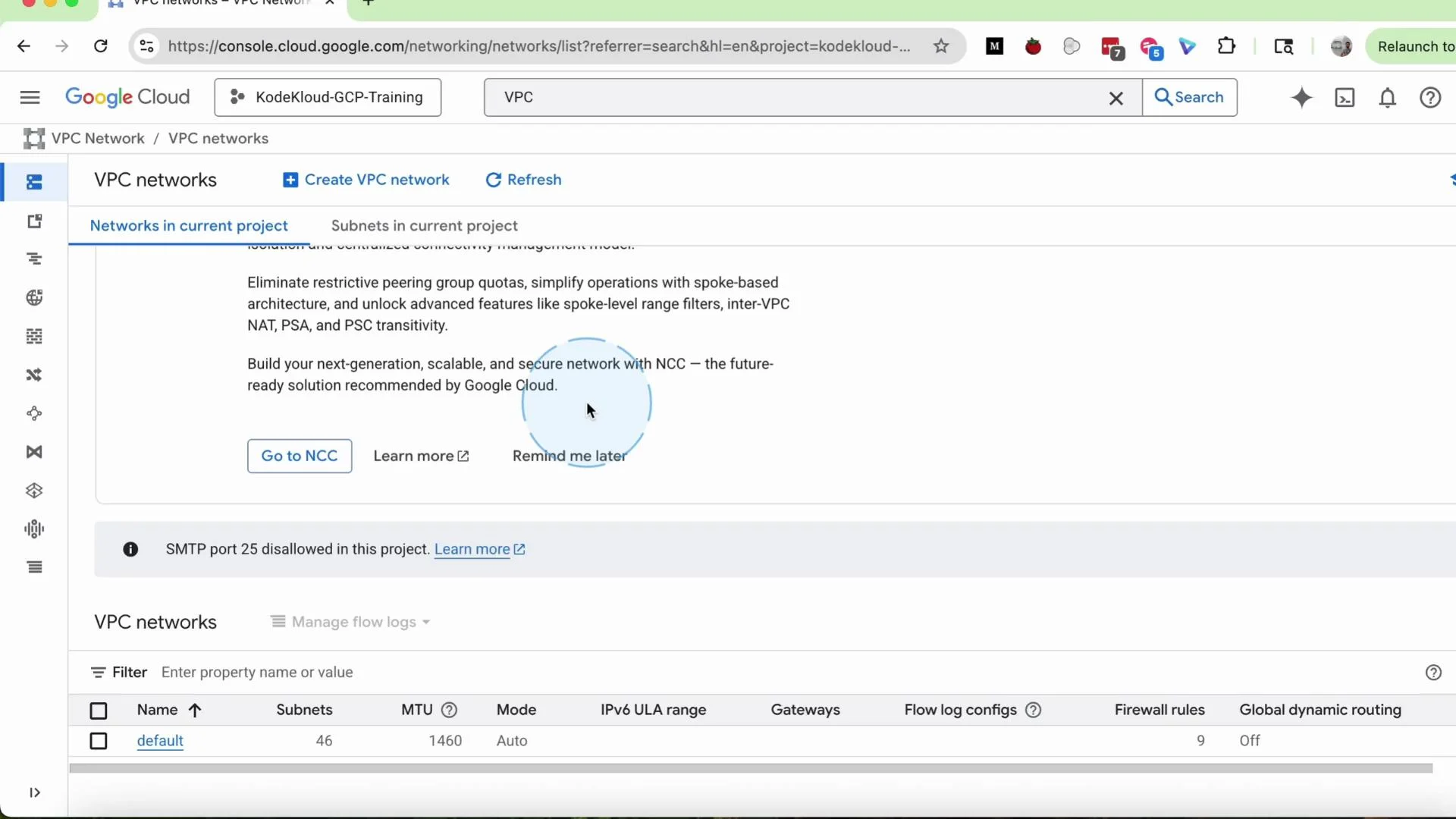
* In the top search bar enter `VPC` and choose **VPC network** from the results to view the project’s VPC list.
Typically a new project includes a `default` VPC that GCP creates for convenience. Creating a custom VPC gives you control over subnet CIDR ranges, regions, and routing behavior.
 Step-by-step: create a custom VPC
1. Click the `Create VPC` button on the VPC networks page.
2. Enter a VPC name, for example `my-vpc`. Optionally add a short description such as “simple VPC for demo”.
3. Select the Subnet creation mode:
* `Automatic`: GCP will create a subnet in every region with default address ranges. Use this for fast testing but note it’s less flexible.
* `Custom`: you define specific subnets, regions, and CIDR ranges. Select **Custom** for this tutorial.
4. Add a subnet:
* Set the subnet `Name`, e.g. `my-subnet`.
* Choose a `Region`, for example `us-central1` (Iowa).
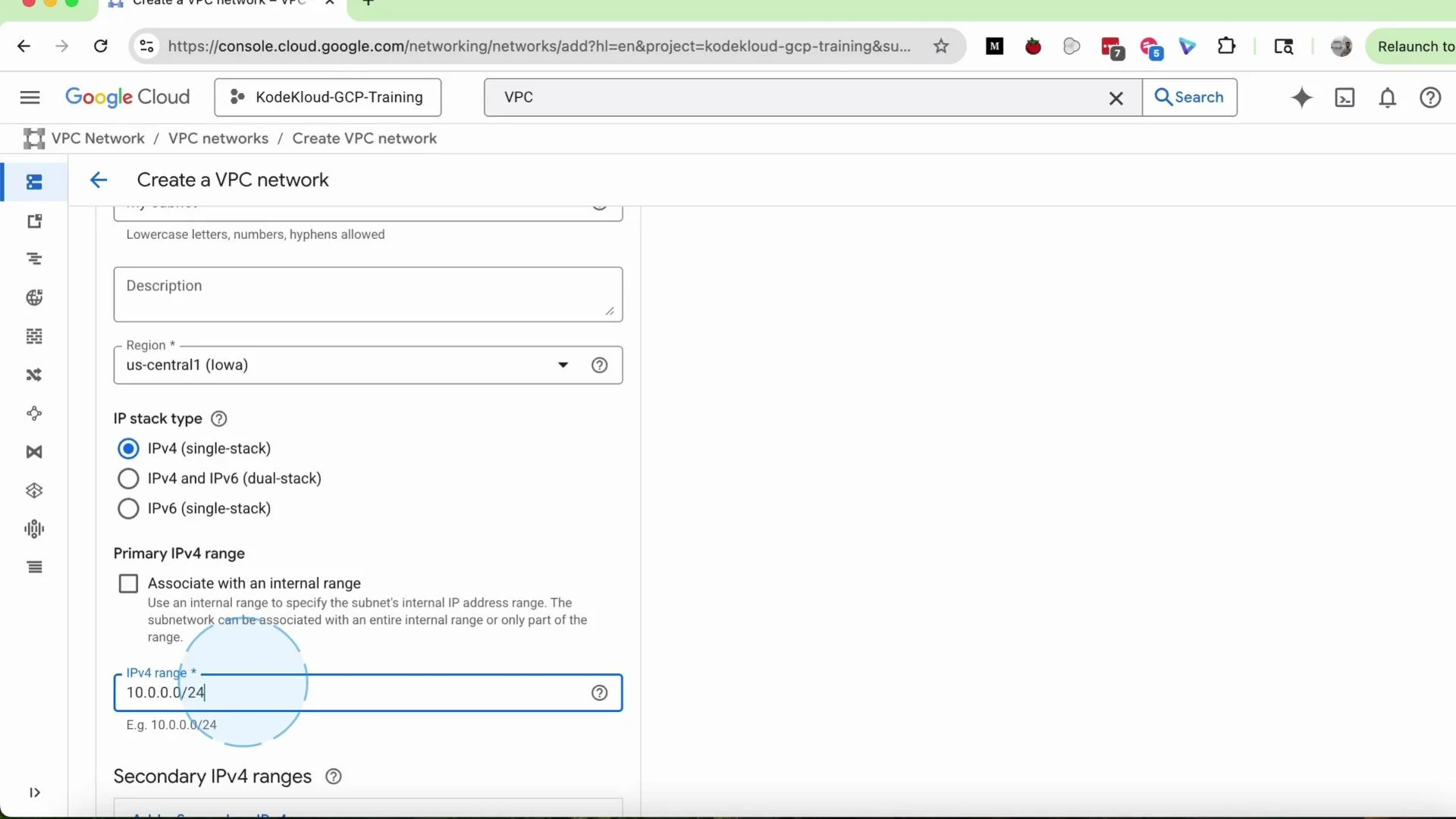
* Provide the `Primary IPv4 range` as a CIDR block, e.g. `10.0.0.0/24`.
The form should look similar to the screenshot below, showing `us-central1` selected and the primary IPv4 range set to `10.0.0.0/24`.
Step-by-step: create a custom VPC
1. Click the `Create VPC` button on the VPC networks page.
2. Enter a VPC name, for example `my-vpc`. Optionally add a short description such as “simple VPC for demo”.
3. Select the Subnet creation mode:
* `Automatic`: GCP will create a subnet in every region with default address ranges. Use this for fast testing but note it’s less flexible.
* `Custom`: you define specific subnets, regions, and CIDR ranges. Select **Custom** for this tutorial.
4. Add a subnet:
* Set the subnet `Name`, e.g. `my-subnet`.
* Choose a `Region`, for example `us-central1` (Iowa).
* Provide the `Primary IPv4 range` as a CIDR block, e.g. `10.0.0.0/24`.
The form should look similar to the screenshot below, showing `us-central1` selected and the primary IPv4 range set to `10.0.0.0/24`.
 CIDR sizing quick reference
| Prefix | Total addresses | Usable hosts (GCP reserves 5 IPs per subnet) | Typical use |
| ------ | --------------- | -------------------------------------------- | ----------------------------------- |
| /26 | 64 | 59 | Small test subnet, few hosts |
| /24 | 256 | 251 | Moderate-sized subnet (most demos) |
| /20 | 4096 | 4091 | Large farms, many hosts or services |
Choose a prefix length that matches your expected number of hosts and future growth. If unsure, pick a slightly larger CIDR to avoid having to resize later.
Firewall rules and routing
* Defaults: You can leave most settings at their default values during VPC creation and add firewall rules later.
* Firewall rules: After the VPC exists, add firewall rules to control traffic between instances or to/from the internet. Common examples are allowing SSH (`TCP:22`), HTTP (`TCP:80`), and HTTPS (`TCP:443`).
* Dynamic routing mode: Select `Regional` for typical single-region deployments. Use `Global` only if you need cross-region route advertisement across Cloud Routers and dynamic routing.
Example: to allow SSH to VMs in this VPC, create a firewall rule named `my-vpc-allow-ssh` that permits ingress on `tcp:22` from your IP or a CIDR block.
Create and verify
* Click `Create` to provision the VPC and subnet. Creation usually completes in seconds, but may take a minute.
* The new VPC appears in the VPC list with the number of subnets shown. Click the VPC name, then open the `Subnets` tab to inspect the subnet you added.
* To add more subnets later, click `Add subnet`, and repeat the name → region → CIDR steps.
Cleaning up (delete VPC)
If you created resources in a personal account for testing, delete them to avoid lingering charges:
1. From the VPC networks list, select your `my-vpc`.
2. Click `Delete VPC`.
3. When prompted, type the VPC name (e.g. `my-vpc`) to confirm and complete deletion.
Deletion will fail if the VPC still has active resources attached (VM instances, reserved IPs, load balancers, etc.). Remove or move dependent resources before deleting the VPC.
Additional tips
GCP creates a `default` VPC for new projects. That default is sufficient for many tutorials and quick labs. Create custom VPCs when you need dedicated addressing, segmentation, or custom routing behavior.
References and further reading
* [VPC networks overview — Google Cloud Documentation](https://cloud.google.com/vpc/docs/overview)
* [Creating VPC networks — Google Cloud Documentation](https://cloud.google.com/vpc/docs/using-vpc)
* [Subnetworks — Google Cloud Documentation](https://cloud.google.com/vpc/docs/subnets)
That’s it for this lesson. Use the default VPC for simple labs and create custom VPCs when your architecture requires explicit network controls.
CIDR sizing quick reference
| Prefix | Total addresses | Usable hosts (GCP reserves 5 IPs per subnet) | Typical use |
| ------ | --------------- | -------------------------------------------- | ----------------------------------- |
| /26 | 64 | 59 | Small test subnet, few hosts |
| /24 | 256 | 251 | Moderate-sized subnet (most demos) |
| /20 | 4096 | 4091 | Large farms, many hosts or services |
Choose a prefix length that matches your expected number of hosts and future growth. If unsure, pick a slightly larger CIDR to avoid having to resize later.
Firewall rules and routing
* Defaults: You can leave most settings at their default values during VPC creation and add firewall rules later.
* Firewall rules: After the VPC exists, add firewall rules to control traffic between instances or to/from the internet. Common examples are allowing SSH (`TCP:22`), HTTP (`TCP:80`), and HTTPS (`TCP:443`).
* Dynamic routing mode: Select `Regional` for typical single-region deployments. Use `Global` only if you need cross-region route advertisement across Cloud Routers and dynamic routing.
Example: to allow SSH to VMs in this VPC, create a firewall rule named `my-vpc-allow-ssh` that permits ingress on `tcp:22` from your IP or a CIDR block.
Create and verify
* Click `Create` to provision the VPC and subnet. Creation usually completes in seconds, but may take a minute.
* The new VPC appears in the VPC list with the number of subnets shown. Click the VPC name, then open the `Subnets` tab to inspect the subnet you added.
* To add more subnets later, click `Add subnet`, and repeat the name → region → CIDR steps.
Cleaning up (delete VPC)
If you created resources in a personal account for testing, delete them to avoid lingering charges:
1. From the VPC networks list, select your `my-vpc`.
2. Click `Delete VPC`.
3. When prompted, type the VPC name (e.g. `my-vpc`) to confirm and complete deletion.
Deletion will fail if the VPC still has active resources attached (VM instances, reserved IPs, load balancers, etc.). Remove or move dependent resources before deleting the VPC.
Additional tips
GCP creates a `default` VPC for new projects. That default is sufficient for many tutorials and quick labs. Create custom VPCs when you need dedicated addressing, segmentation, or custom routing behavior.
References and further reading
* [VPC networks overview — Google Cloud Documentation](https://cloud.google.com/vpc/docs/overview)
* [Creating VPC networks — Google Cloud Documentation](https://cloud.google.com/vpc/docs/using-vpc)
* [Subnetworks — Google Cloud Documentation](https://cloud.google.com/vpc/docs/subnets)
That’s it for this lesson. Use the default VPC for simple labs and create custom VPCs when your architecture requires explicit network controls.