> ## Documentation Index
> Fetch the complete documentation index at: https://notes.kodekloud.com/llms.txt
> Use this file to discover all available pages before exploring further.
# Cloud IAM Principles of Least Privilege
> Guidelines for applying the Principle of Least Privilege in cloud IAM to minimize permissions, use scoped and custom roles, conduct audits, and secure service accounts
Hello and welcome back.
In this lesson we dive into one of the most important fundamentals in Cloud IAM: the Principle of Least Privilege. You will encounter this concept frequently across teams and projects.
Earlier we covered what Cloud IAM is. This article explains the next step—how to apply the Principle of Least Privilege in practice for cloud users, services, and automation.
## What is the Principle of Least Privilege?
Least privilege means granting only the permissions required to perform a task—and nothing more. That applies to human users, service accounts, and APIs: each actor should receive the minimal permissions necessary for its role.
Example:
* If a user only needs to view logs in Cloud Logging, grant them viewer permissions for logs. Do not grant delete or modify permissions.
Why not just give admin access because it's easier? While broader access can simplify setup, it significantly increases risk. Excessive permissions raise the chance of accidental changes, data exposure, or malicious use. Always ask: does this user or service truly need this permission to perform the job?
Before granting permissions, ask: "Is this required for the task now?" If not, do not grant it. This simple discipline prevents many security incidents.
## Why least privilege matters
Limiting permissions provides measurable security and operational benefits:
| Benefit | What it prevents |
| ---------------------------------------- | ------------------------------------------------------------------------- |
| Reduces data leakage risk | Limits blast radius from compromised credentials or accidental exposure |
| Prevents unauthorized production changes | Reduces accidental or malicious modifications that can lead to outages |
| Aids audit and compliance | Simplifies proving controlled access during audits and compliance reviews |
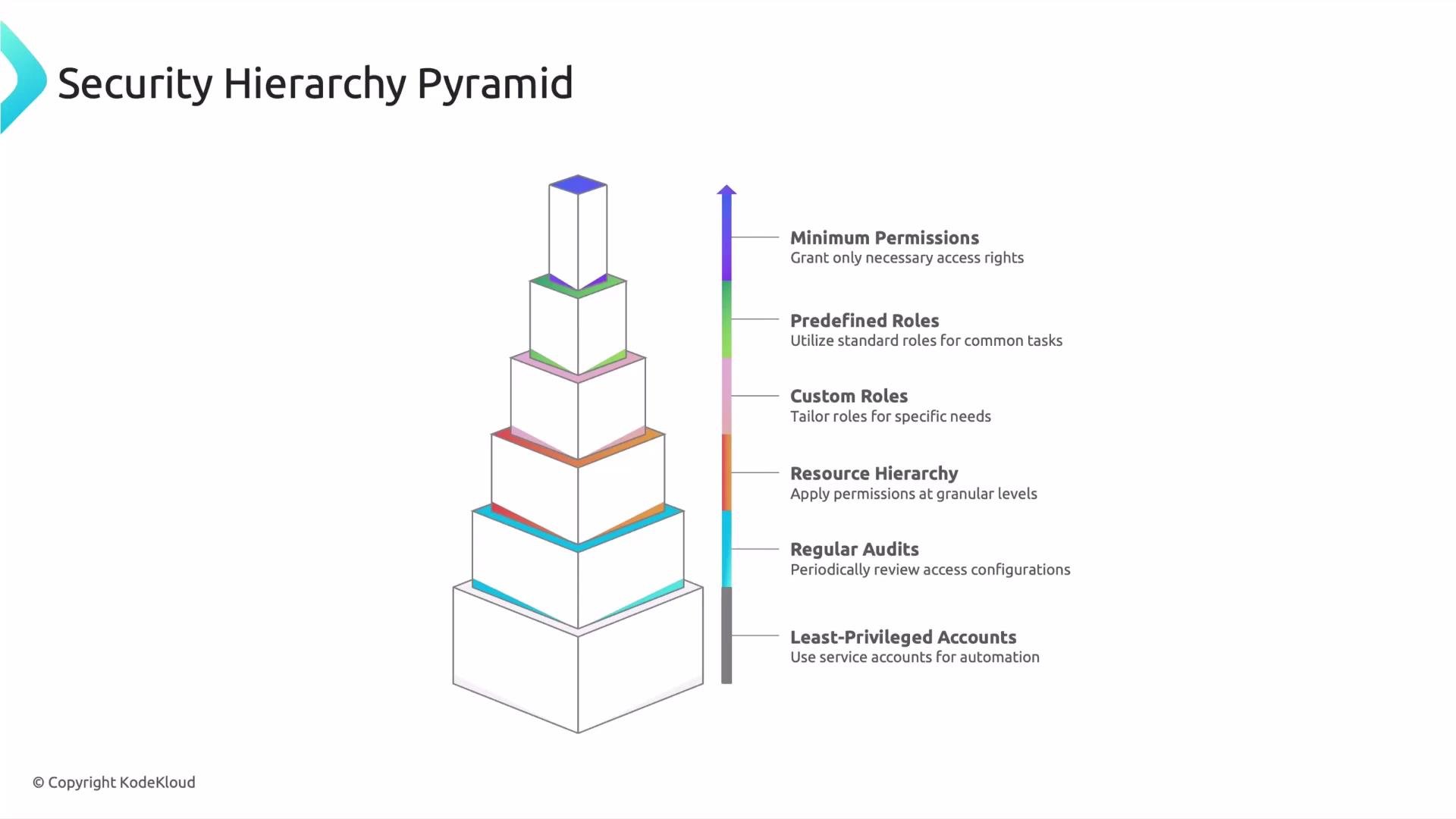
## A practical security hierarchy for implementing least privilege
Apply least privilege as a layered approach. Work from broad controls down to the most precise permissions:
* Least-privileged accounts: Use service accounts and automation identities scoped narrowly for their tasks.
* Regular audits: Periodically review roles and remove unnecessary or stale permissions.
* Resource hierarchy: Apply IAM at the most appropriate level—organization, folder, project, or resource—so permissions are as granular as possible.
* Custom roles: When predefined roles are too broad, create custom roles that include only the required permissions.
* Predefined roles: Use cloud provider predefined roles when they map well to responsibilities; they’re maintained and commonly follow best practices.
* Minimum permissions: The ultimate goal—grant only the essential permissions needed to operate.
Below is a quick reference summary of the hierarchy and common practices.
| Layer | Description | Example action |
| ------------------------- | --------------------------------------------------------------------: | ------------------------------------------------------------------------------- |
| Least-privileged accounts | Use distinct service/accounts for automation and limit scope | Create a service account for CI/CD with only BigQuery write permissions |
| Regular audits | Revoke stale roles and rotate credentials | Run monthly IAM access reviews and remove unused roles |
| Resource hierarchy | Grant at project/resource level instead of organization when possible | Grant Storage Object Viewer at bucket level not org level |
| Custom roles | Tailor permissions to exactly what the role needs | Create a role that allows `bigquery.jobs.create` and `bigquery.tables.get` only |
| Predefined roles | Use for common tasks when appropriate | Use `roles/logging.viewer` for log-read-only users |
| Minimum permissions | Final check to ensure permissions are strictly necessary | Reduce a role if it includes extra permissions not used by the workflow |
 ## Practical tips for applying least privilege
* Start with the smallest scope: assign roles at the resource or project level rather than the organization level when possible.
* Prefer predefined roles if they match the required capabilities—these are tested and frequently updated.
* When predefined roles are too broad, create a custom role with only the necessary permissions.
* Use groups for IAM assignments to simplify management and reduce human error.
* Automate permission reviews and logging to detect overprivileged accounts quickly.
* Use short-lived credentials where possible and enable audit logging to monitor actions.
## Next steps
Later in this series we'll dive deeper into Cloud IAM permissions and roles to show how permissions are structured in Google Cloud and how roles aggregate permissions. You’ll learn how to inspect permissions, test roles, and design custom roles that follow least-privilege principles.
## Links and references
* [Google Cloud IAM documentation](https://cloud.google.com/iam/docs)
* [Principle of Least Privilege — NIST](https://csrc.nist.gov/glossary/term/least_privilege)
* [Google Cloud best practices for IAM](https://cloud.google.com/solutions/best-practices-for-iam)
Speak with you in the next lesson.
## Practical tips for applying least privilege
* Start with the smallest scope: assign roles at the resource or project level rather than the organization level when possible.
* Prefer predefined roles if they match the required capabilities—these are tested and frequently updated.
* When predefined roles are too broad, create a custom role with only the necessary permissions.
* Use groups for IAM assignments to simplify management and reduce human error.
* Automate permission reviews and logging to detect overprivileged accounts quickly.
* Use short-lived credentials where possible and enable audit logging to monitor actions.
## Next steps
Later in this series we'll dive deeper into Cloud IAM permissions and roles to show how permissions are structured in Google Cloud and how roles aggregate permissions. You’ll learn how to inspect permissions, test roles, and design custom roles that follow least-privilege principles.
## Links and references
* [Google Cloud IAM documentation](https://cloud.google.com/iam/docs)
* [Principle of Least Privilege — NIST](https://csrc.nist.gov/glossary/term/least_privilege)
* [Google Cloud best practices for IAM](https://cloud.google.com/solutions/best-practices-for-iam)
Speak with you in the next lesson.