> ## Documentation Index
> Fetch the complete documentation index at: https://notes.kodekloud.com/llms.txt
> Use this file to discover all available pages before exploring further.
# Cloud IAM Types of Service Accounts
> Explains Google Cloud service accounts, their types, usage differences, and production best practices for secure least privileged identity management.
Hello and welcome back.
In this lesson we cover service accounts: what they are, why you need them, how they differ, and safe production practices for using them.
## What is a service account and why use one?
IAM grants identities (users or service accounts) roles that permit specific actions. A human Google account receives a role and a person signs in to the Cloud Console to act. For non-human identities—Compute Engine VMs, Cloud Run services, Cloud Composer workers, or other GCP services—you need a programmatic identity: a service account.
When you attach a service account to a resource (for example, a Compute Engine VM), applications running on that resource can call Google Cloud APIs with the service account identity and the permissions you granted. This avoids impersonating individual users and enables automated tasks to act securely.
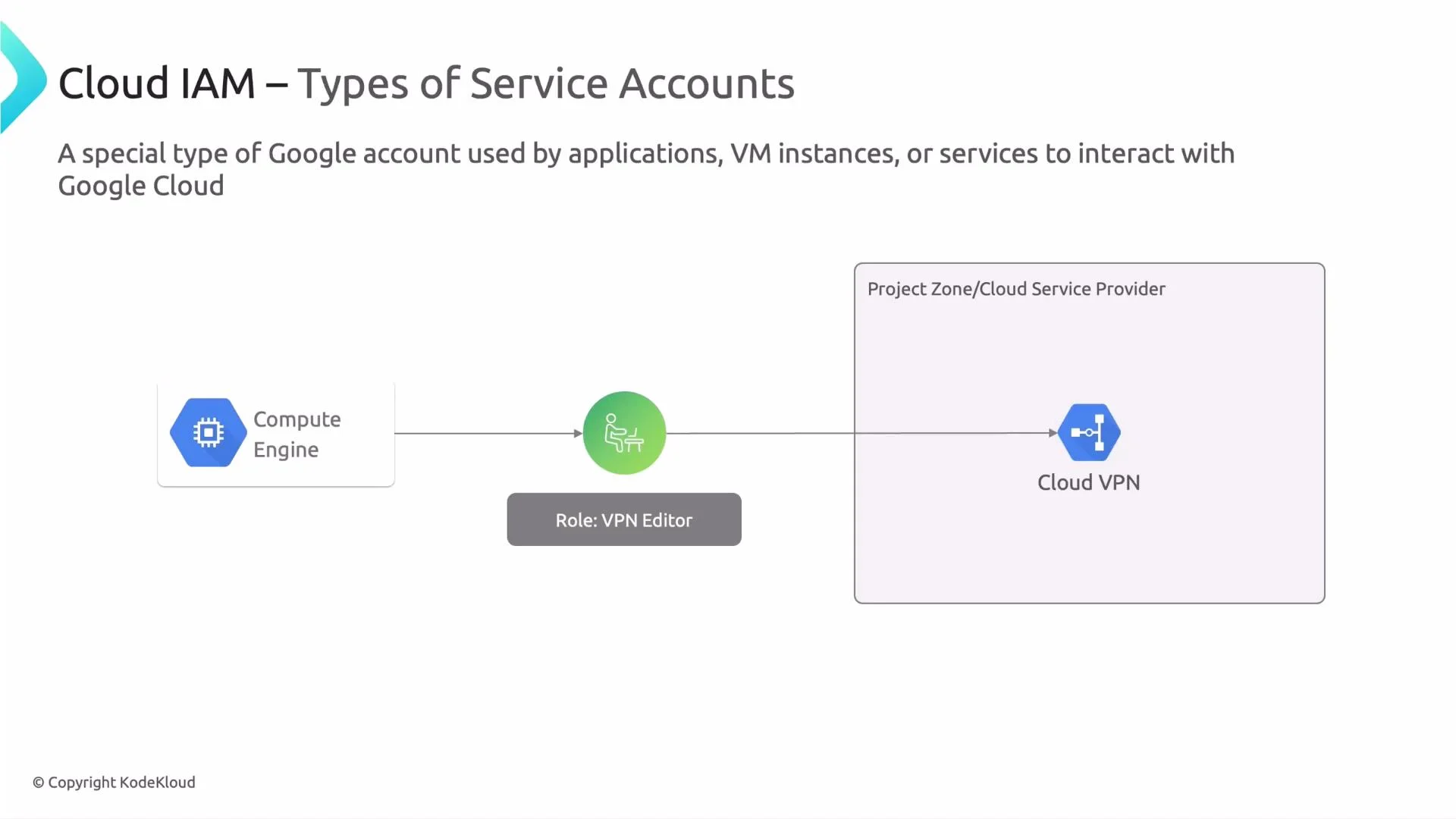 Example scenarios:
* A VM needs to change network settings (Compute Network Admin). Attach a service account with the appropriate role and the VM can make those changes programmatically.
* Cloud Composer needs to write to Cloud Storage. Assign a dedicated service account to Composer and grant the required Storage permissions so Composer writes without a human credential.
Quick CLI examples:
* Grant a role to a service account:
```bash theme={null}
gcloud projects add-iam-policy-binding PROJECT_ID \
--member="serviceAccount:SA_EMAIL" \
--role="roles/compute.networkAdmin"
```
* Create a VM with a service account attached:
```bash theme={null}
gcloud compute instances create INSTANCE_NAME \
--zone=ZONE \
--service-account=SA_EMAIL \
--scopes=https://www.googleapis.com/auth/cloud-platform
```
* Replace the service account on an existing VM:
```bash theme={null}
gcloud compute instances set-service-account INSTANCE_NAME \
--service-account=SA_EMAIL --zone=ZONE
```
## Types of service accounts
Google Cloud provides three main types of service accounts. The table below summarizes who manages each type, typical use cases, privilege patterns, and how they are created or deleted.
| Type | Who manages | Typical use cases | Privileges | Creation / Deletion |
| ------------------------------- | -------------------------------------------------- | ------------------------------------------------------------------------------------------------- | ---------------------------------------------------------------------- | ---------------------------------------------------------------------- |
| User-managed service accounts | You (project admins/dev teams) | Custom applications, ETL pipelines, CI/CD, VM workloads — any workload identity you control | You define roles and permissions; best for least-privilege enforcement | Created and deleted by your team (manual or IaC) |
| Default service accounts | Auto-created by GCP when certain services are used | Used by Google Cloud services that need a service identity (e.g., Compute Engine default account) | Often granted broad permissions by default — can be overprivileged | Created automatically; deleting may break services that depend on them |
| Google-managed service accounts | Fully managed by Google | Internal support for Google-managed services (e.g., App Engine internal accounts) | Permissions are fixed by Google and not configurable by project admins | Creation and deletion controlled by Google |
Example scenarios:
* A VM needs to change network settings (Compute Network Admin). Attach a service account with the appropriate role and the VM can make those changes programmatically.
* Cloud Composer needs to write to Cloud Storage. Assign a dedicated service account to Composer and grant the required Storage permissions so Composer writes without a human credential.
Quick CLI examples:
* Grant a role to a service account:
```bash theme={null}
gcloud projects add-iam-policy-binding PROJECT_ID \
--member="serviceAccount:SA_EMAIL" \
--role="roles/compute.networkAdmin"
```
* Create a VM with a service account attached:
```bash theme={null}
gcloud compute instances create INSTANCE_NAME \
--zone=ZONE \
--service-account=SA_EMAIL \
--scopes=https://www.googleapis.com/auth/cloud-platform
```
* Replace the service account on an existing VM:
```bash theme={null}
gcloud compute instances set-service-account INSTANCE_NAME \
--service-account=SA_EMAIL --zone=ZONE
```
## Types of service accounts
Google Cloud provides three main types of service accounts. The table below summarizes who manages each type, typical use cases, privilege patterns, and how they are created or deleted.
| Type | Who manages | Typical use cases | Privileges | Creation / Deletion |
| ------------------------------- | -------------------------------------------------- | ------------------------------------------------------------------------------------------------- | ---------------------------------------------------------------------- | ---------------------------------------------------------------------- |
| User-managed service accounts | You (project admins/dev teams) | Custom applications, ETL pipelines, CI/CD, VM workloads — any workload identity you control | You define roles and permissions; best for least-privilege enforcement | Created and deleted by your team (manual or IaC) |
| Default service accounts | Auto-created by GCP when certain services are used | Used by Google Cloud services that need a service identity (e.g., Compute Engine default account) | Often granted broad permissions by default — can be overprivileged | Created automatically; deleting may break services that depend on them |
| Google-managed service accounts | Fully managed by Google | Internal support for Google-managed services (e.g., App Engine internal accounts) | Permissions are fixed by Google and not configurable by project admins | Creation and deletion controlled by Google |
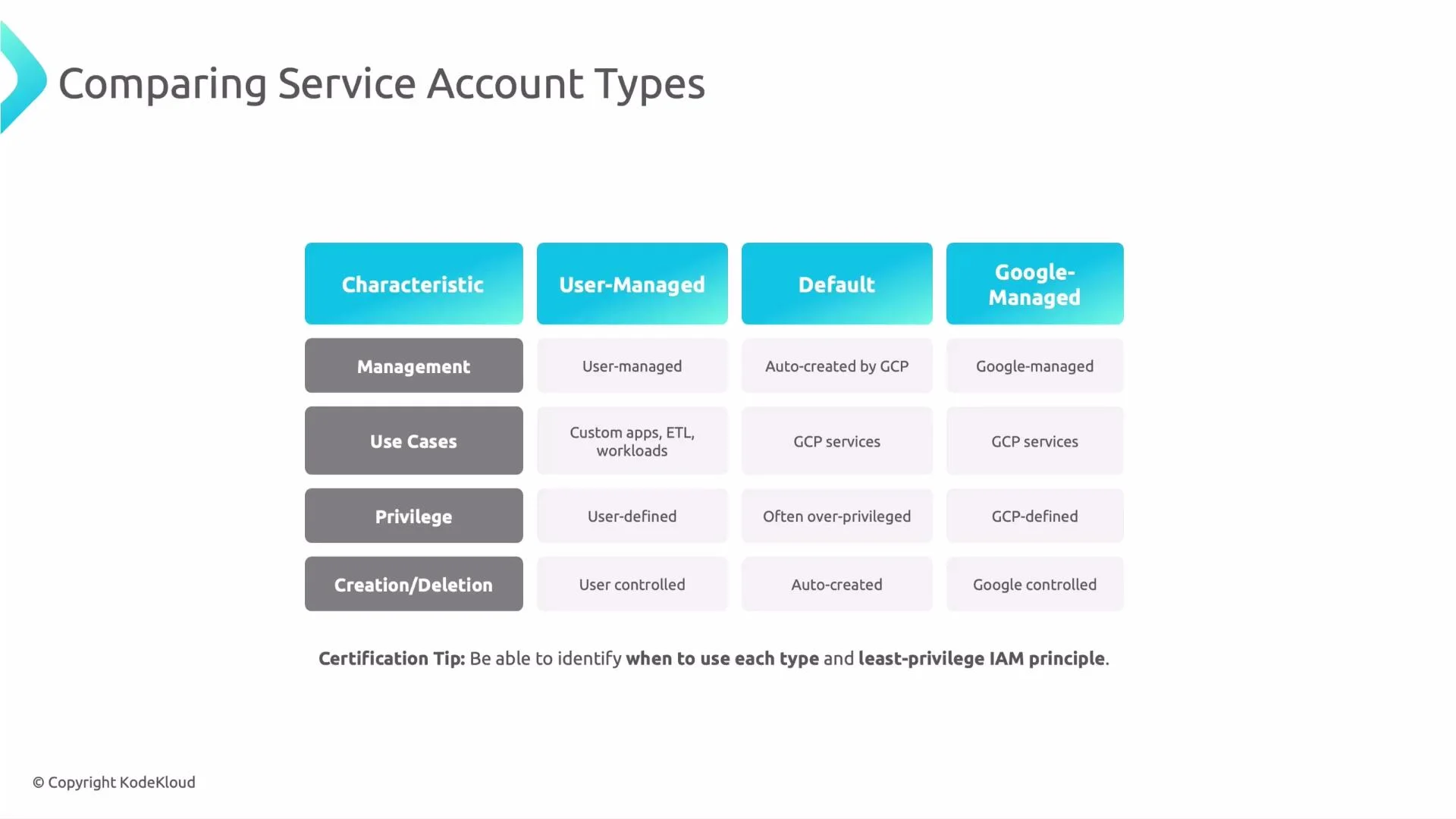 Certification tip: Know which service account type to use for each scenario and which supports least privilege. Always ask: does this workload need broad roles like `Editor`, or can you grant a narrowly scoped role?
Prefer user-managed service accounts for workloads. They provide ownership and let you grant only required permissions (least privilege).
## Recommended production practices
Follow these practices to maintain good IAM hygiene and reduce risk:
| Best practice | Why it matters |
| ----------------------------------------------------------------- | ---------------------------------------------------------------------------------- |
| Use user-managed service accounts per workload | Easier auditing, clearer ownership, and tighter permission scoping |
| Disable automatic default service account creation where feasible | Prevents unexpected over-privileged accounts and forces explicit identity creation |
| Grant the minimal permissions required | Limits blast radius from bugs or compromise (principle of least privilege) |
| Use structured naming and ownership | One account per app/environment simplifies incident response and audits |
| Enable audit logs and monitoring | Detect and attribute automated activity; correlate Cloud Audit Logs and app logs |
Additional operational tips:
* Rotate credentials and keys for any service account keys you create.
* Prefer Workload Identity Federation or short-lived tokens over long-lived service account keys where possible.
* Use IAM Conditions for more granular access (e.g., restrict by request time or resource attributes).
Certification tip: Know which service account type to use for each scenario and which supports least privilege. Always ask: does this workload need broad roles like `Editor`, or can you grant a narrowly scoped role?
Prefer user-managed service accounts for workloads. They provide ownership and let you grant only required permissions (least privilege).
## Recommended production practices
Follow these practices to maintain good IAM hygiene and reduce risk:
| Best practice | Why it matters |
| ----------------------------------------------------------------- | ---------------------------------------------------------------------------------- |
| Use user-managed service accounts per workload | Easier auditing, clearer ownership, and tighter permission scoping |
| Disable automatic default service account creation where feasible | Prevents unexpected over-privileged accounts and forces explicit identity creation |
| Grant the minimal permissions required | Limits blast radius from bugs or compromise (principle of least privilege) |
| Use structured naming and ownership | One account per app/environment simplifies incident response and audits |
| Enable audit logs and monitoring | Detect and attribute automated activity; correlate Cloud Audit Logs and app logs |
Additional operational tips:
* Rotate credentials and keys for any service account keys you create.
* Prefer Workload Identity Federation or short-lived tokens over long-lived service account keys where possible.
* Use IAM Conditions for more granular access (e.g., restrict by request time or resource attributes).
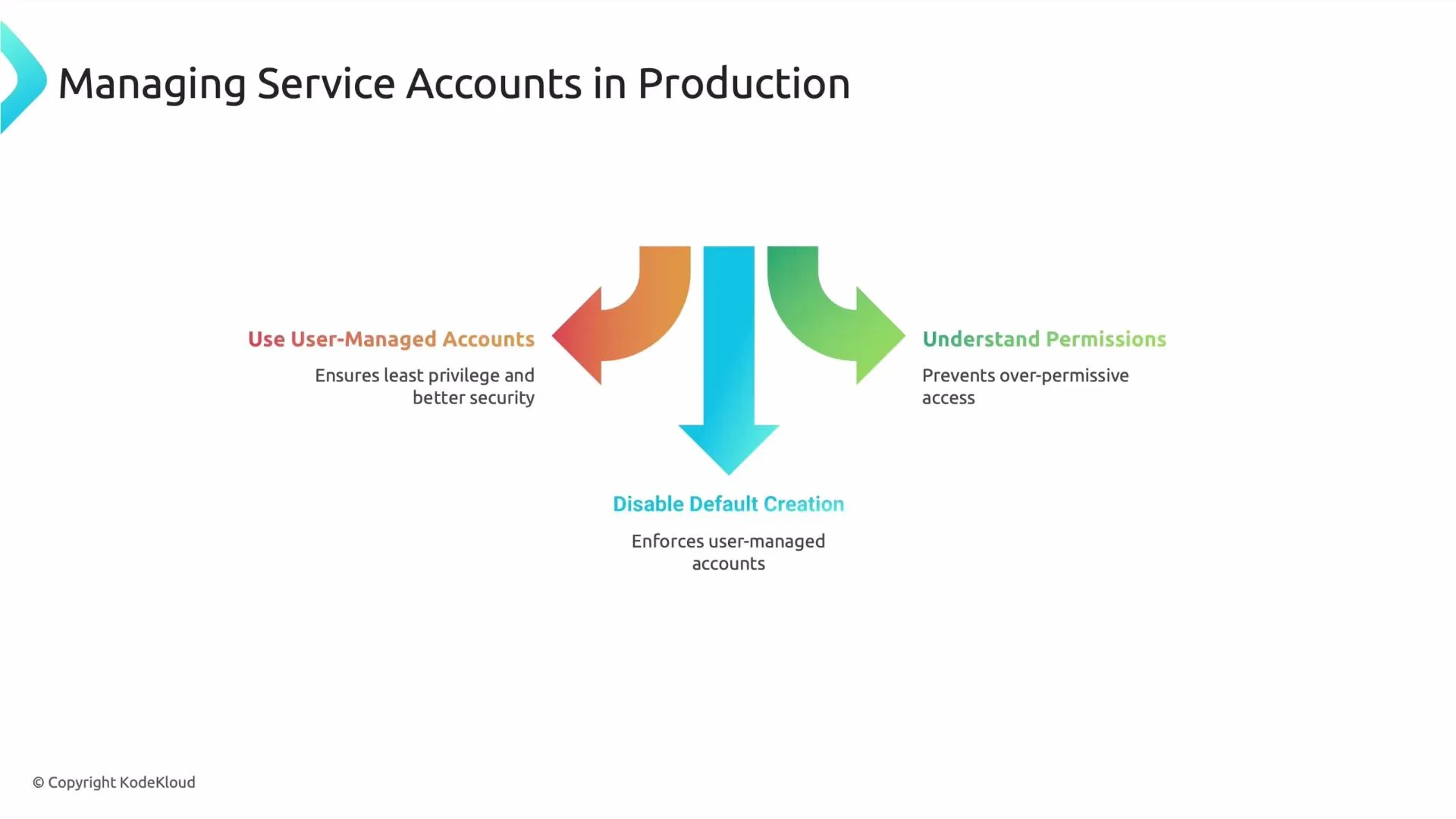 Do NOT reuse a single service account across unrelated services or environments. Reuse increases the blast radius of a compromise and makes it hard to determine which workload performed an action.
## Summary
* Service accounts are non-human identities used by applications and services to call Google Cloud APIs.
* Prefer user-managed service accounts for production workloads and enforce least-privilege permissions.
* Avoid default account reuse, create explicit service identities with clear ownership, and monitor their activity.
## Links and references
* [Cloud IAM overview — Google Cloud](https://cloud.google.com/iam)
* [Understand service accounts — Google Cloud](https://cloud.google.com/iam/docs/service-accounts)
* [Principle of least privilege — Google Cloud security guidance](https://cloud.google.com/architecture/security-design-principles#least_privilege)
That is it for this lesson. See you in the next lesson.
Do NOT reuse a single service account across unrelated services or environments. Reuse increases the blast radius of a compromise and makes it hard to determine which workload performed an action.
## Summary
* Service accounts are non-human identities used by applications and services to call Google Cloud APIs.
* Prefer user-managed service accounts for production workloads and enforce least-privilege permissions.
* Avoid default account reuse, create explicit service identities with clear ownership, and monitor their activity.
## Links and references
* [Cloud IAM overview — Google Cloud](https://cloud.google.com/iam)
* [Understand service accounts — Google Cloud](https://cloud.google.com/iam/docs/service-accounts)
* [Principle of least privilege — Google Cloud security guidance](https://cloud.google.com/architecture/security-design-principles#least_privilege)
That is it for this lesson. See you in the next lesson.