> ## Documentation Index
> Fetch the complete documentation index at: https://notes.kodekloud.com/llms.txt
> Use this file to discover all available pages before exploring further.
# BigQuery ML Model Types
> Guide to BigQuery ML workflows using SQL to create, train, evaluate, and predict with models, plus production practices for automating, monitoring, and deploying machine learning at scale.
Hello and welcome back.
This guide walks through the core BigQuery ML workflow: how to create, train, evaluate, and use models for prediction — all using SQL inside BigQuery. In a few minutes you'll see how straightforward the end-to-end cycle can be.
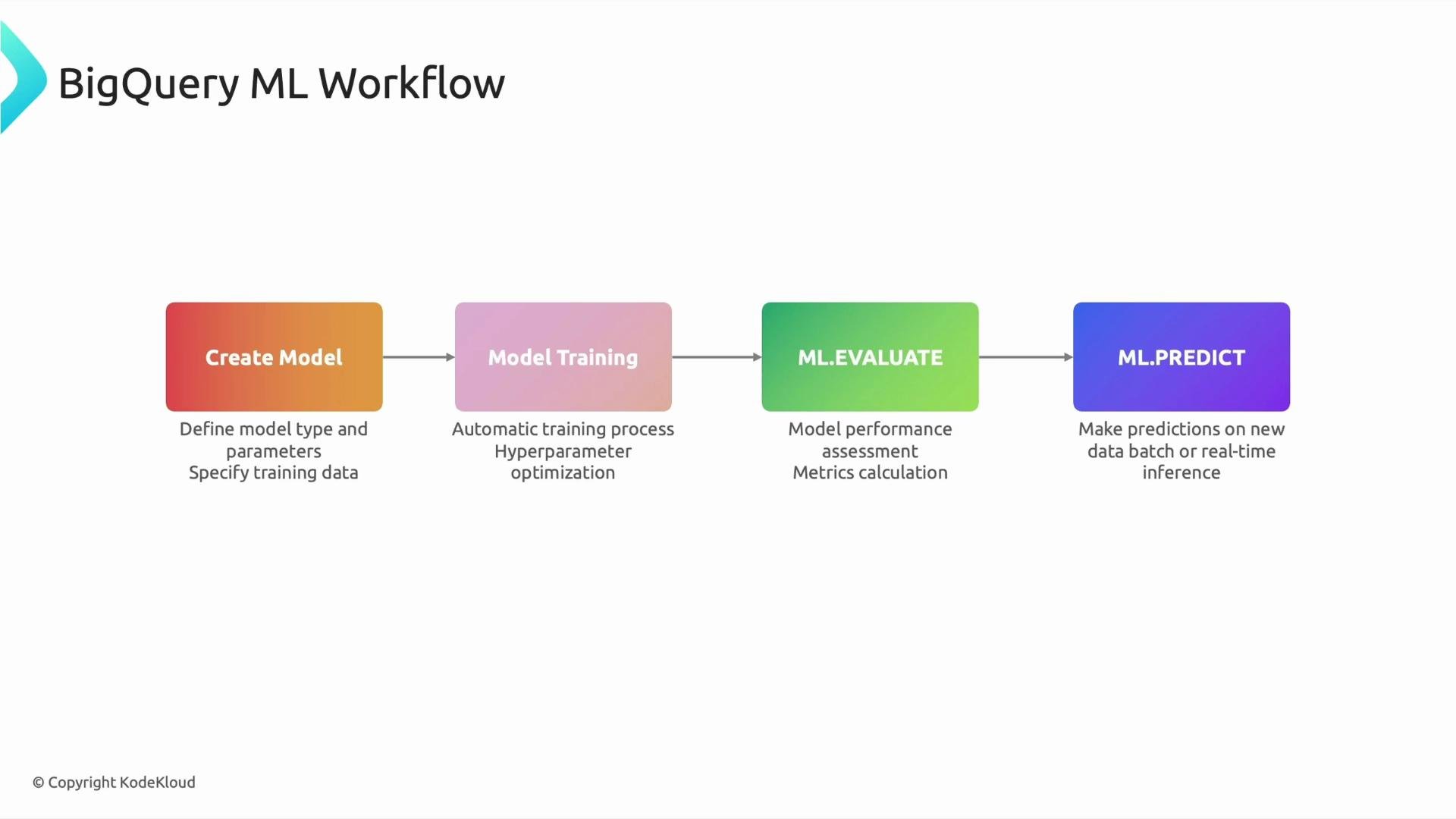
We can break the workflow into four clear stages:
* CREATE MODEL — define the model and the training query.
* Model training — BigQuery executes the SQL, trains the model, and can tune hyperparameters (you can also set hyperparameters explicitly via `OPTIONS`).
* ML.EVALUATE — compute evaluation metrics to verify model quality.
* ML.PREDICT — generate predictions on new data (batch or streaming).
This create → train → evaluate → predict cycle repeats as you refine features or incorporate new data.
and that's
 the beauty of all of this.
## 1) CREATE MODEL — define your model with SQL
`CREATE MODEL` registers a model in your dataset and specifies the training query. Use the `OPTIONS` clause to select `model_type` and other configuration values (e.g., hyperparameters, input label, and optimization settings). The SELECT query defines the features and the label (target). If you know SQL, you already have most of the skills required to start with BigQuery ML.
Example — create a simple linear regression model:
```sql theme={null}
CREATE MODEL `project.dataset.model_name`
OPTIONS(model_type='linear_reg') AS
SELECT
feature1,
feature2,
target
FROM `project.dataset.training_data`;
```
Notes on this example:
* `model_type='linear_reg'` specifies linear regression. BigQuery ML supports many model types: logistic regression, DNN classifiers/regressors, boosted tree and XGBoost models, clustering, matrix factorization, and more.
* The SELECT query defines the training set and the features. For supervised models, include the label (target) column in the query.
* Use additional `OPTIONS` to set hyperparameters or to enable automatic hyperparameter tuning for supported model types.
Table — common BigQuery ML model types and typical use cases:
| Model type | Use case | Example |
| ---------------------------------------------------- | -------------------------------------- | --------------------------------- |
| `linear_reg` | Continuous numeric target (regression) | Predict revenue, price |
| `logistic_reg` | Binary classification | Churn, fraud detection |
| `boosted_tree_regressor` / `boosted_tree_classifier` | Tabular data with complex interactions | High-performance tabular modeling |
| `dnn_regressor` / `dnn_classifier` | Large feature sets or embeddings | Deep learning on structured data |
| `kmeans` | Unsupervised clustering | Customer segmentation |
| `matrix_factorization` | Recommendation systems | Collaborative filtering |
## 2) Model training — automatic or configured
When you run `CREATE MODEL ... AS SELECT ...`, BigQuery trains the model using the specified training data. For many model types it:
* Performs feature preprocessing when appropriate (e.g., automatic handling of categorical features).
* Can run automatic hyperparameter tuning (if enabled).
* Persists the trained model in your dataset for later use.
You can control behavior with `OPTIONS`, for example to set the `max_iterations`, `hidden_units` for DNNs, or `learn_rate`.
## 3) ML.EVALUATE — validate model performance
After training, use `ML.EVALUATE` to compute metrics and confirm the model's quality. Typical metrics include:
| Task | Common metrics |
| -------------- | ----------------------------------------------------------------------------------------- |
| Classification | `accuracy`, `precision`, `recall`, `f1_score`, `roc_auc` |
| Regression | `mean_squared_error` (MSE), `mean_absolute_error` (MAE), `root_mean_squared_error` (RMSE) |
Example — evaluate a trained model:
```sql theme={null}
SELECT *
FROM ML.EVALUATE(MODEL `project.dataset.model_name`,
(
SELECT feature1, feature2, target
FROM `project.dataset.evaluation_data`
)
);
```
If evaluation metrics indicate poor performance, iterate: change features, add or clean data, engineer new features, or adjust model options, then retrain.
## 4) ML.PREDICT — generate predictions
Use `ML.PREDICT` to apply a trained model to new data and produce predictions. Predictions can be executed in batch (SQL) for offline scoring or integrated into streaming pipelines and APIs for near-real-time inference.
Example — batch prediction:
```sql theme={null}
SELECT *
FROM ML.PREDICT(MODEL `project.dataset.model_name`,
(
SELECT feature1, feature2
FROM `project.dataset.new_data`
)
);
```
ML.PREDICT returns the predicted value along with probability/confidence columns for classification models (e.g., `predicted_label`, `probability`) and predicted values for regression models (`predicted_value`).
If your model underperforms, treat the evaluation results as actionable feedback: refine features, enrich or clean the training data, tune model options, and retrain. The SQL-first approach makes iteration fast and reproducible.
## Production considerations and workflow at scale
Designing a production-ready BigQuery ML workflow includes:
* Automating training and retraining (via scheduled queries, Airflow, or Cloud Build).
* Monitoring model performance and data drift.
* Versioning models and tracking experiments.
* Exposing predictions through APIs or streaming exports to Pub/Sub / Dataflow.
* Managing cost and quota (training large models can be compute-intensive).
These topics are frequently discussed in interviews and are essential for deploying ML systems in production.
## Links and references
* BigQuery ML overview: [https://cloud.google.com/bigquery-ml](https://cloud.google.com/bigquery-ml)
* BigQuery ML CREATE MODEL: [https://cloud.google.com/bigquery-ml/docs/reference/standard-sql/bigqueryml-syntax-create](https://cloud.google.com/bigquery-ml/docs/reference/standard-sql/bigqueryml-syntax-create)
* BigQuery ML ML.EVALUATE and ML.PREDICT: [https://cloud.google.com/bigquery-ml/docs/reference/standard-sql/bigqueryml-syntax-evaluate-predict](https://cloud.google.com/bigquery-ml/docs/reference/standard-sql/bigqueryml-syntax-evaluate-predict)
Happy modeling — iterate quickly, validate thoroughly, and move successful models into production.
the beauty of all of this.
## 1) CREATE MODEL — define your model with SQL
`CREATE MODEL` registers a model in your dataset and specifies the training query. Use the `OPTIONS` clause to select `model_type` and other configuration values (e.g., hyperparameters, input label, and optimization settings). The SELECT query defines the features and the label (target). If you know SQL, you already have most of the skills required to start with BigQuery ML.
Example — create a simple linear regression model:
```sql theme={null}
CREATE MODEL `project.dataset.model_name`
OPTIONS(model_type='linear_reg') AS
SELECT
feature1,
feature2,
target
FROM `project.dataset.training_data`;
```
Notes on this example:
* `model_type='linear_reg'` specifies linear regression. BigQuery ML supports many model types: logistic regression, DNN classifiers/regressors, boosted tree and XGBoost models, clustering, matrix factorization, and more.
* The SELECT query defines the training set and the features. For supervised models, include the label (target) column in the query.
* Use additional `OPTIONS` to set hyperparameters or to enable automatic hyperparameter tuning for supported model types.
Table — common BigQuery ML model types and typical use cases:
| Model type | Use case | Example |
| ---------------------------------------------------- | -------------------------------------- | --------------------------------- |
| `linear_reg` | Continuous numeric target (regression) | Predict revenue, price |
| `logistic_reg` | Binary classification | Churn, fraud detection |
| `boosted_tree_regressor` / `boosted_tree_classifier` | Tabular data with complex interactions | High-performance tabular modeling |
| `dnn_regressor` / `dnn_classifier` | Large feature sets or embeddings | Deep learning on structured data |
| `kmeans` | Unsupervised clustering | Customer segmentation |
| `matrix_factorization` | Recommendation systems | Collaborative filtering |
## 2) Model training — automatic or configured
When you run `CREATE MODEL ... AS SELECT ...`, BigQuery trains the model using the specified training data. For many model types it:
* Performs feature preprocessing when appropriate (e.g., automatic handling of categorical features).
* Can run automatic hyperparameter tuning (if enabled).
* Persists the trained model in your dataset for later use.
You can control behavior with `OPTIONS`, for example to set the `max_iterations`, `hidden_units` for DNNs, or `learn_rate`.
## 3) ML.EVALUATE — validate model performance
After training, use `ML.EVALUATE` to compute metrics and confirm the model's quality. Typical metrics include:
| Task | Common metrics |
| -------------- | ----------------------------------------------------------------------------------------- |
| Classification | `accuracy`, `precision`, `recall`, `f1_score`, `roc_auc` |
| Regression | `mean_squared_error` (MSE), `mean_absolute_error` (MAE), `root_mean_squared_error` (RMSE) |
Example — evaluate a trained model:
```sql theme={null}
SELECT *
FROM ML.EVALUATE(MODEL `project.dataset.model_name`,
(
SELECT feature1, feature2, target
FROM `project.dataset.evaluation_data`
)
);
```
If evaluation metrics indicate poor performance, iterate: change features, add or clean data, engineer new features, or adjust model options, then retrain.
## 4) ML.PREDICT — generate predictions
Use `ML.PREDICT` to apply a trained model to new data and produce predictions. Predictions can be executed in batch (SQL) for offline scoring or integrated into streaming pipelines and APIs for near-real-time inference.
Example — batch prediction:
```sql theme={null}
SELECT *
FROM ML.PREDICT(MODEL `project.dataset.model_name`,
(
SELECT feature1, feature2
FROM `project.dataset.new_data`
)
);
```
ML.PREDICT returns the predicted value along with probability/confidence columns for classification models (e.g., `predicted_label`, `probability`) and predicted values for regression models (`predicted_value`).
If your model underperforms, treat the evaluation results as actionable feedback: refine features, enrich or clean the training data, tune model options, and retrain. The SQL-first approach makes iteration fast and reproducible.
## Production considerations and workflow at scale
Designing a production-ready BigQuery ML workflow includes:
* Automating training and retraining (via scheduled queries, Airflow, or Cloud Build).
* Monitoring model performance and data drift.
* Versioning models and tracking experiments.
* Exposing predictions through APIs or streaming exports to Pub/Sub / Dataflow.
* Managing cost and quota (training large models can be compute-intensive).
These topics are frequently discussed in interviews and are essential for deploying ML systems in production.
## Links and references
* BigQuery ML overview: [https://cloud.google.com/bigquery-ml](https://cloud.google.com/bigquery-ml)
* BigQuery ML CREATE MODEL: [https://cloud.google.com/bigquery-ml/docs/reference/standard-sql/bigqueryml-syntax-create](https://cloud.google.com/bigquery-ml/docs/reference/standard-sql/bigqueryml-syntax-create)
* BigQuery ML ML.EVALUATE and ML.PREDICT: [https://cloud.google.com/bigquery-ml/docs/reference/standard-sql/bigqueryml-syntax-evaluate-predict](https://cloud.google.com/bigquery-ml/docs/reference/standard-sql/bigqueryml-syntax-evaluate-predict)
Happy modeling — iterate quickly, validate thoroughly, and move successful models into production.