> ## Documentation Index
> Fetch the complete documentation index at: https://notes.kodekloud.com/llms.txt
> Use this file to discover all available pages before exploring further.
# Project architecture status
> Overview of using AWS CodeBuild, CodeCommit, and Amazon ECR to build, tag, push, and validate Docker images using buildspec.yml and EC2 or local testing
Welcome back.
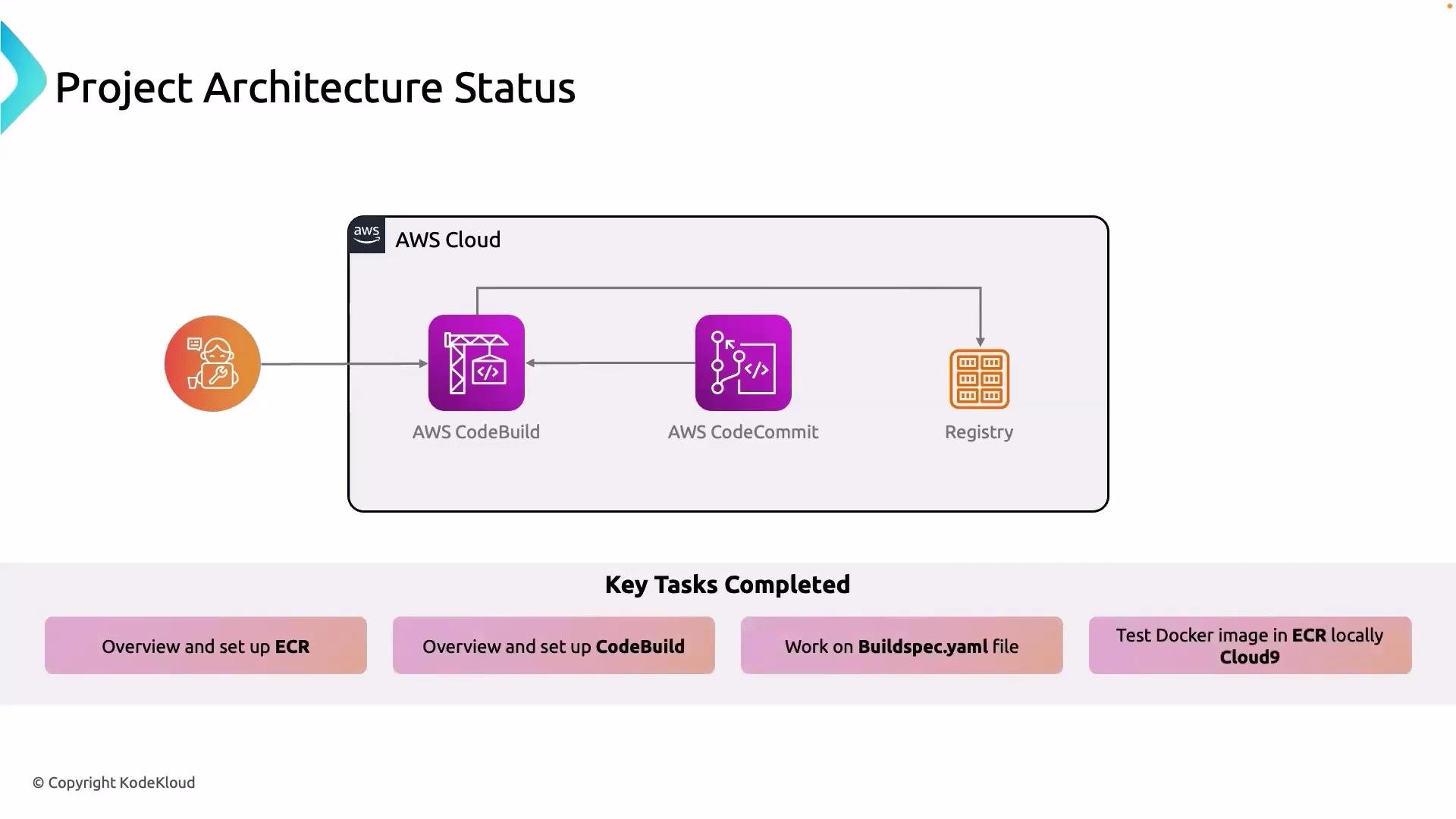
This lesson reviews the current project status and recaps what we've completed so far. The focus is on how CodeBuild, CodeCommit, and Amazon ECR fit together in our CI workflow, how the Docker image is produced and validated, and the commands you can reuse to reproduce or debug the flow.
We have completed the following:
* Set up AWS CodeBuild and integrated it with AWS CodeCommit for automated builds.
* Configured CodeBuild to use a `buildspec.yml` file to produce Docker images during the build lifecycle.
* Pushed the resulting Docker image into Amazon ECR (Elastic Container Registry).
* Validated the Docker image by running it on an EC2 instance.
* Learned how to authenticate locally to ECR so developers can pull and test images on their machines.
 What to remember
* CodeBuild reads the `buildspec.yml` in your repository root (or a path you specify in the CodeBuild project). It executes the standard phases: `install`, `pre_build`, `build`, and `post_build`. Make sure `buildspec.yml` is in the intended location and correctly formatted YAML.
* The Docker image produced during the build must be tagged for your ECR repository and pushed using authenticated Docker commands. Typical steps are to obtain ECR auth token, log in Docker, tag the image, and push.
* To validate images on EC2, authenticate the instance to ECR the same way you authenticate locally, then `docker pull` the image and run it with `docker run`.
Quick reference: common commands and snippets
* Authenticate Docker to ECR (Linux/macOS):
```bash theme={null}
aws ecr get-login-password --region | docker login --username AWS --password-stdin .dkr.ecr..amazonaws.com
```
* Tag and push the image:
```bash theme={null}
docker tag my-app:latest .dkr.ecr..amazonaws.com/my-repo:latest
docker push .dkr.ecr..amazonaws.com/my-repo:latest
```
* Pull and run on EC2 (after authenticating on the instance):
```bash theme={null}
docker pull .dkr.ecr..amazonaws.com/my-repo:latest
docker run -d -p 80:80 .dkr.ecr..amazonaws.com/my-repo:latest
```
* Minimal `buildspec.yml` example (used by CodeBuild to build and push a Docker image):
```yaml theme={null}
version: 0.2
phases:
pre_build:
commands:
- echo Logging in to Amazon ECR...
- aws ecr get-login-password --region $AWS_REGION | docker login --username AWS --password-stdin $ACCOUNT_ID.dkr.ecr.$AWS_REGION.amazonaws.com
build:
commands:
- echo Build started on `date`
- docker build -t my-repo:latest .
- docker tag my-repo:latest $ACCOUNT_ID.dkr.ecr.$AWS_REGION.amazonaws.com/my-repo:latest
post_build:
commands:
- echo Pushing the Docker image...
- docker push $ACCOUNT_ID.dkr.ecr.$AWS_REGION.amazonaws.com/my-repo:latest
artifacts:
files:
- '**/*'
```
Checklist: where to find things and why they matter
| Artifact | Purpose | Example / Notes |
| ----------------- | -----------------------------------------: | ------------------------------------------------------------- |
| `buildspec.yml` | Defines CodeBuild lifecycle and commands | Place in repository root or reference it in CodeBuild project |
| ECR repository | Stores built Docker images | Use `docker tag` and `docker push` to upload images |
| CodeBuild project | Runs the build & push pipeline | Connects to CodeCommit, GitHub, or other source providers |
| EC2 validation | Confirms the image runs in a real instance | Authenticate to ECR from EC2 before `docker pull` |
Do not commit credentials, tokens, or long-lived secrets into your repository. Use IAM roles (for CodeBuild and EC2) or secrets managers to provide secure access to ECR and other resources.
Summary of completed tasks: ECR setup, CodeBuild project creation and integration with CodeCommit, `buildspec.yml`-driven Docker builds, pushing images to ECR, and validating images from both EC2 and local development environments.
Further reading and references
* AWS CodeBuild documentation: [https://docs.aws.amazon.com/codebuild/](https://docs.aws.amazon.com/codebuild/)
* Amazon ECR documentation: [https://docs.aws.amazon.com/AmazonECR/](https://docs.aws.amazon.com/AmazonECR/)
* Docker CLI documentation: [https://docs.docker.com/engine/reference/commandline/cli/](https://docs.docker.com/engine/reference/commandline/cli/)
That’s it for this lesson — see you in the next one.
What to remember
* CodeBuild reads the `buildspec.yml` in your repository root (or a path you specify in the CodeBuild project). It executes the standard phases: `install`, `pre_build`, `build`, and `post_build`. Make sure `buildspec.yml` is in the intended location and correctly formatted YAML.
* The Docker image produced during the build must be tagged for your ECR repository and pushed using authenticated Docker commands. Typical steps are to obtain ECR auth token, log in Docker, tag the image, and push.
* To validate images on EC2, authenticate the instance to ECR the same way you authenticate locally, then `docker pull` the image and run it with `docker run`.
Quick reference: common commands and snippets
* Authenticate Docker to ECR (Linux/macOS):
```bash theme={null}
aws ecr get-login-password --region | docker login --username AWS --password-stdin .dkr.ecr..amazonaws.com
```
* Tag and push the image:
```bash theme={null}
docker tag my-app:latest .dkr.ecr..amazonaws.com/my-repo:latest
docker push .dkr.ecr..amazonaws.com/my-repo:latest
```
* Pull and run on EC2 (after authenticating on the instance):
```bash theme={null}
docker pull .dkr.ecr..amazonaws.com/my-repo:latest
docker run -d -p 80:80 .dkr.ecr..amazonaws.com/my-repo:latest
```
* Minimal `buildspec.yml` example (used by CodeBuild to build and push a Docker image):
```yaml theme={null}
version: 0.2
phases:
pre_build:
commands:
- echo Logging in to Amazon ECR...
- aws ecr get-login-password --region $AWS_REGION | docker login --username AWS --password-stdin $ACCOUNT_ID.dkr.ecr.$AWS_REGION.amazonaws.com
build:
commands:
- echo Build started on `date`
- docker build -t my-repo:latest .
- docker tag my-repo:latest $ACCOUNT_ID.dkr.ecr.$AWS_REGION.amazonaws.com/my-repo:latest
post_build:
commands:
- echo Pushing the Docker image...
- docker push $ACCOUNT_ID.dkr.ecr.$AWS_REGION.amazonaws.com/my-repo:latest
artifacts:
files:
- '**/*'
```
Checklist: where to find things and why they matter
| Artifact | Purpose | Example / Notes |
| ----------------- | -----------------------------------------: | ------------------------------------------------------------- |
| `buildspec.yml` | Defines CodeBuild lifecycle and commands | Place in repository root or reference it in CodeBuild project |
| ECR repository | Stores built Docker images | Use `docker tag` and `docker push` to upload images |
| CodeBuild project | Runs the build & push pipeline | Connects to CodeCommit, GitHub, or other source providers |
| EC2 validation | Confirms the image runs in a real instance | Authenticate to ECR from EC2 before `docker pull` |
Do not commit credentials, tokens, or long-lived secrets into your repository. Use IAM roles (for CodeBuild and EC2) or secrets managers to provide secure access to ECR and other resources.
Summary of completed tasks: ECR setup, CodeBuild project creation and integration with CodeCommit, `buildspec.yml`-driven Docker builds, pushing images to ECR, and validating images from both EC2 and local development environments.
Further reading and references
* AWS CodeBuild documentation: [https://docs.aws.amazon.com/codebuild/](https://docs.aws.amazon.com/codebuild/)
* Amazon ECR documentation: [https://docs.aws.amazon.com/AmazonECR/](https://docs.aws.amazon.com/AmazonECR/)
* Docker CLI documentation: [https://docs.docker.com/engine/reference/commandline/cli/](https://docs.docker.com/engine/reference/commandline/cli/)
That’s it for this lesson — see you in the next one.