> ## Documentation Index
> Fetch the complete documentation index at: https://notes.kodekloud.com/llms.txt
> Use this file to discover all available pages before exploring further.
# What is Service and Task
> Overview of AWS ECS concepts and how services use task definitions to run, update, and manage tasks and containers within a cluster.
In this lesson we’ll explain the core ECS concepts—service, task definition, task, container, and cluster—and show how they relate visually. Instead of only giving definitions, we’ll map these concepts onto an ECS cluster so you can see how deployments work in practice.
At a glance
* ECS cluster: a logical grouping of resources where your tasks run.
* Service: runs and maintains a specified number of copies (the desired count) of a task definition on the cluster.
* Task definition: the immutable blueprint that describes one or more containers, CPU/memory, networking mode, IAM roles, environment variables, and other runtime parameters.
* Task: a running instantiation of a task definition. A task can contain multiple containers and can be started manually or managed by a service.
* Container: the packaged unit containing your application code and runtime dependencies.
How these pieces fit together
* You register a task definition (e.g., revision 1). A service uses that task definition to launch tasks.
* Each running copy created by the service is called a task.
* When you update your application, register a new task definition revision (e.g., revision 2) and update the service to use it.
* The service performs a deployment (usually a rolling deployment), replacing tasks running the old revision with tasks running the new one while keeping the desired count.
* Deployment behavior (how many tasks are replaced at once) is controlled by the service deployment configuration — e.g., `minimumHealthyPercent` and `maximumPercent`. AWS also supports other deployment strategies such as Blue/Green via CodeDeploy.
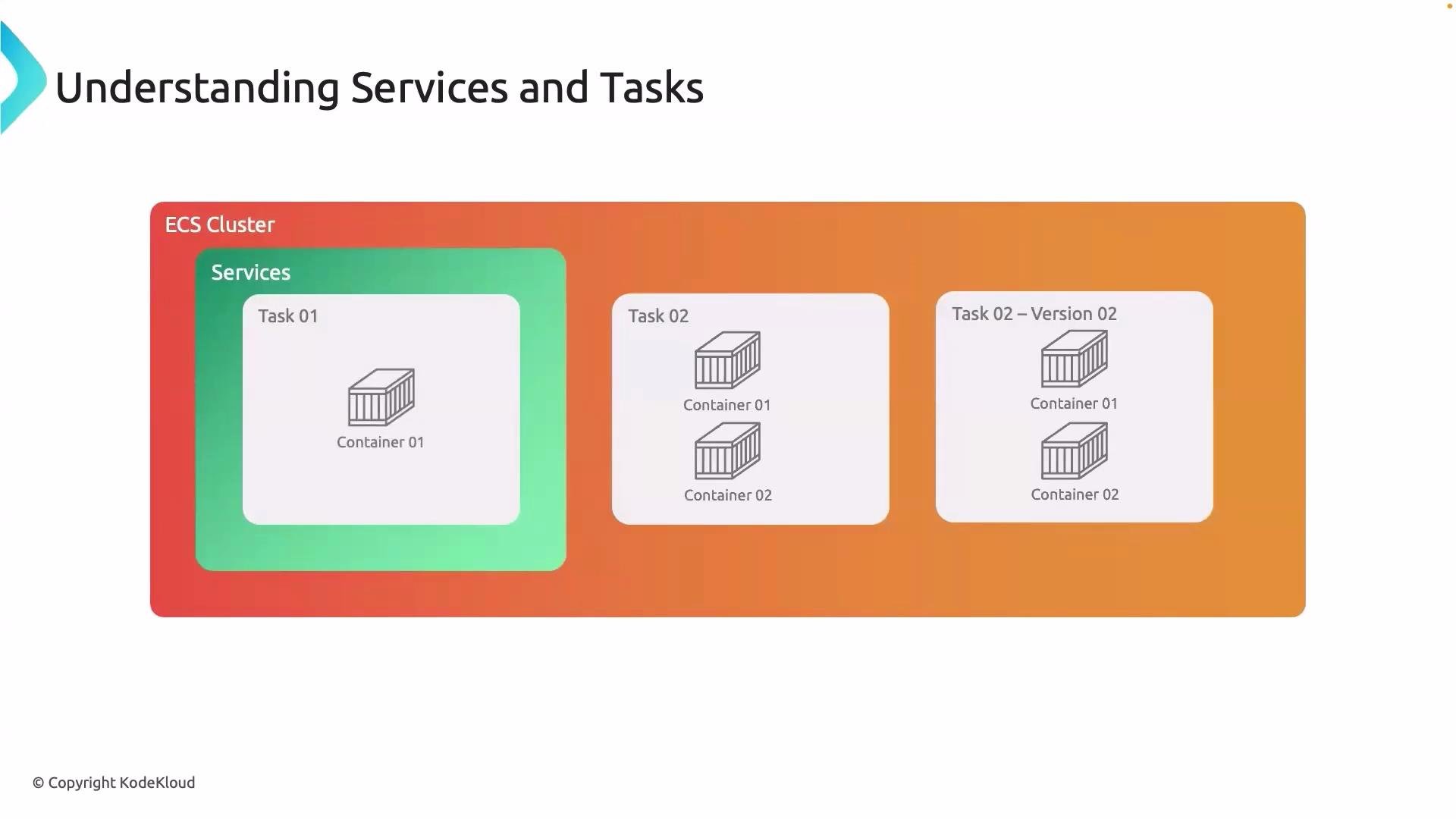 Diagram notes
* The diagram shows an ECS cluster containing a service.
* The service launches multiple tasks—each is an instance of a task definition.
* Each task can include one or more containers that work together.
* Multiple task definition revisions (for example, v1 and v2) are illustrated to show how a service can roll between revisions during updates.
A service ensures the desired number of task instances are running and performs controlled, automated deployments when you switch to a new task definition revision. Remember: the task definition is the immutable blueprint; a task is the running copy of that blueprint.
Quick reference table
| Concept | Purpose | Example / Notes |
| --------------- | ------------------------------------------------------------------------------- | -------------------------------------------------- |
| Cluster | Logical grouping of compute resources for running tasks | `prod-cluster` or `dev-cluster` |
| Service | Keeps a specified number of task instances running and manages deployments | `web-service` with desired count = 3 |
| Task definition | Immutable blueprint describing containers, resources, networking, IAM, env vars | Revisioned as `my-app:1`, `my-app:2` |
| Task | Running instance of a task definition (can contain multiple containers) | One task = one running copy of the task definition |
| Container | Packaged application and its runtime dependencies | Docker image from ECR |
CLI tip: start a task manually
* Tasks do not need to be managed by a service. You can start them directly using the AWS CLI:
```bash theme={null}
aws ecs run-task \
--cluster my-cluster \
--task-definition my-task:1 \
--launch-type FARGATE \
--network-configuration "awsvpcConfiguration={subnets=[subnet-abc123],assignPublicIp=ENABLED}"
```
When to use a service vs. a standalone task
* Use a service when you need high availability, automatic restarts, scaling, or rolling deployments.
* Use `run-task` for one-off jobs, batch processing, or tasks that don’t require continuous management.
Next steps
* With this understanding, you’re ready to deploy a Docker image from Amazon ECR onto your ECS cluster by creating a task definition and a service that runs it.
References
* [Amazon ECS overview](https://learn.kodekloud.com/user/courses/amazon-elastic-container-service-aws-ecs)
* [ECS run-task CLI reference](https://docs.aws.amazon.com/cli/latest/reference/ecs/run-task.html)
* [Amazon ECR](https://docs.aws.amazon.com/AmazonECR/latest/userguide/what-is-amazon-ecr.html)
* [AWS CodeDeploy (Blue/Green)](https://docs.aws.amazon.com/codedeploy/latest/userguide/welcome.html)
That’s it for this lesson—see you in the next one.
Diagram notes
* The diagram shows an ECS cluster containing a service.
* The service launches multiple tasks—each is an instance of a task definition.
* Each task can include one or more containers that work together.
* Multiple task definition revisions (for example, v1 and v2) are illustrated to show how a service can roll between revisions during updates.
A service ensures the desired number of task instances are running and performs controlled, automated deployments when you switch to a new task definition revision. Remember: the task definition is the immutable blueprint; a task is the running copy of that blueprint.
Quick reference table
| Concept | Purpose | Example / Notes |
| --------------- | ------------------------------------------------------------------------------- | -------------------------------------------------- |
| Cluster | Logical grouping of compute resources for running tasks | `prod-cluster` or `dev-cluster` |
| Service | Keeps a specified number of task instances running and manages deployments | `web-service` with desired count = 3 |
| Task definition | Immutable blueprint describing containers, resources, networking, IAM, env vars | Revisioned as `my-app:1`, `my-app:2` |
| Task | Running instance of a task definition (can contain multiple containers) | One task = one running copy of the task definition |
| Container | Packaged application and its runtime dependencies | Docker image from ECR |
CLI tip: start a task manually
* Tasks do not need to be managed by a service. You can start them directly using the AWS CLI:
```bash theme={null}
aws ecs run-task \
--cluster my-cluster \
--task-definition my-task:1 \
--launch-type FARGATE \
--network-configuration "awsvpcConfiguration={subnets=[subnet-abc123],assignPublicIp=ENABLED}"
```
When to use a service vs. a standalone task
* Use a service when you need high availability, automatic restarts, scaling, or rolling deployments.
* Use `run-task` for one-off jobs, batch processing, or tasks that don’t require continuous management.
Next steps
* With this understanding, you’re ready to deploy a Docker image from Amazon ECR onto your ECS cluster by creating a task definition and a service that runs it.
References
* [Amazon ECS overview](https://learn.kodekloud.com/user/courses/amazon-elastic-container-service-aws-ecs)
* [ECS run-task CLI reference](https://docs.aws.amazon.com/cli/latest/reference/ecs/run-task.html)
* [Amazon ECR](https://docs.aws.amazon.com/AmazonECR/latest/userguide/what-is-amazon-ecr.html)
* [AWS CodeDeploy (Blue/Green)](https://docs.aws.amazon.com/codedeploy/latest/userguide/welcome.html)
That’s it for this lesson—see you in the next one.