> ## Documentation Index
> Fetch the complete documentation index at: https://notes.kodekloud.com/llms.txt
> Use this file to discover all available pages before exploring further.
# Fixing tagging convention
> Describes replacing mutable latest image tags by commit hash tagged Docker images in CodeBuild and updating ECS task definitions for immutable, reproducible ECS deployments.
Hello, and welcome back.
Using the `latest` image tag can be convenient during early development, but it causes problems during ECS rolling updates because `latest` is mutable and multiple revisions may reference the same tag. In this lesson we fix that by ensuring the ECS task definition references the image built from the exact commit hash instead of `latest`. This produces immutable, reproducible deployments and prevents image ambiguity during rolling updates.
Revert any temporary changes in `app.py` so the app behaves as originally intended. For reference, here is the login route used by the app:
```python theme={null}
@app.route('/login', methods=['GET', 'POST'])
def login():
error = None
if request.method == 'POST':
username = request.form['username']
password = request.form['password']
# Check if provided credentials match the default ones
if username == DEFAULT_USERNAME and password == DEFAULT_PASSWORD:
return redirect(url_for('welcome'))
else:
error = 'Invalid Credentials. Please try again.'
return render_template('login.html', error=error)
```
Overview of the solution
* Replace the `image` field in the task definition with a placeholder (e.g. `REPOSITORY_URI_PLACEHOLDER`).
* In CodeBuild's `buildspec.yml`, compute a short image tag from the commit SHA, build and push both `latest` and the commit-tagged image to ECR.
* Use `sed` (or another replacement method) to replace the placeholder in `task-definition.json` with the full `REPOSITORY_URI:IMAGE_TAG`.
* Register the updated task definition with ECS so the service uses the immutable, commit-specific image.
Task definition JSON (with placeholder)
```json theme={null}
{
"family": "aws-crypto-coin",
"containerDefinitions": [
{
"name": "kodekloud-crypto-coin",
"image": "REPOSITORY_URI_PLACEHOLDER",
"memory": 512,
"portMappings": [
{
"containerPort": 80,
"hostPort": 0,
"protocol": "tcp"
},
{
"containerPort": 5000,
"hostPort": 5000,
"protocol": "tcp"
}
],
"logConfiguration": {
"logDriver": "awslogs",
"options": {
"awslogs-create-group": "true",
"awslogs-group": "/ecs/aws-microservice",
"awslogs-region": "eu-central-1",
"awslogs-stream-prefix": "ecs"
},
"secretOptions": []
},
"essential": true
}
]
}
```
CodeBuild buildspec: compute commit tag, build, push, replace placeholder, register
```yaml theme={null}
version: 0.2
phases:
pre_build:
commands:
- echo Logging in to Amazon ECR...
- aws ecr get-login-password --region $AWS_DEFAULT_REGION | docker login --username AWS --password-stdin 666234783844.dkr.ecr.eu-central-1.amazonaws.com
- IMAGE_TAG=$(echo $CODEBUILD_RESOLVED_SOURCE_VERSION | cut -c 1-7)
build:
commands:
- echo Build started on `date`
- echo Building the Docker image...
- docker build -t $REPOSITORY_URI:latest .
- docker tag $REPOSITORY_URI:latest $REPOSITORY_URI:$IMAGE_TAG
post_build:
commands:
- echo Build completed on `date`
- echo Pushing the Docker images...
- docker push $REPOSITORY_URI:latest
- docker push $REPOSITORY_URI:$IMAGE_TAG
- echo Replacing placeholder in task definition with exact image URI...
- sed -i "s|REPOSITORY_URI_PLACEHOLDER|${REPOSITORY_URI}:${IMAGE_TAG}|g" task-definition.json
- aws ecs register-task-definition --cli-input-json file://task-definition.json
```
Compute `IMAGE_TAG` from the first 7 characters of the commit SHA (`CODEBUILD_RESOLVED_SOURCE_VERSION`) to create a short, stable, and human-readable tag. Pushing both `latest` and the commit-tagged image keeps `latest` convenience during development while ensuring deployments reference an immutable tag.
Key points explained
* `IMAGE_TAG=$(echo $CODEBUILD_RESOLVED_SOURCE_VERSION | cut -c 1-7)` — derives a short tag from the build's commit SHA.
* Building and tagging both `$REPOSITORY_URI:latest` and `$REPOSITORY_URI:$IMAGE_TAG` preserves `latest` while creating an immutable image reference for deployments.
* `sed -i "s|REPOSITORY_URI_PLACEHOLDER|${REPOSITORY_URI}:${IMAGE_TAG}|g" task-definition.json` — replaces the placeholder in the task definition with the commit-tagged image before registering the task definition.
* `aws ecs register-task-definition --cli-input-json file://task-definition.json` — registers the new task definition revision in ECS which points to the specific image tag.
Commit and push changes
```bash theme={null}
git status
git add .
git commit -m "Revert app changes and update buildspec to tag images with commit hash and update task definition"
git push origin master
```
Start a build in CodeBuild (or let CI trigger it) and monitor the logs. CodeBuild will:
1. Build the Docker image.
2. Tag and push both `latest` and commit-tagged images to ECR.
3. Replace the placeholder in `task-definition.json`.
4. Register the updated task definition in ECS.
Example Docker build / pip output from the CodeBuild logs:
```bash theme={null}
#8 [3/4] COPY . .
#7 DONE 0.1s
#8 [4/4] RUN pip install --no-cache-dir -r requirements.txt
#8 1.960 Collecting Flask==2.1.2
#8 2.162 Collecting Werkzeug==2.1.1
#8 2.162 Downloading Werkzeug-2.1.1-py3-none-any.whl (224 kB)
#8 2.189 Collecting psycopg2-binary==2.9.3
#8 2.189 Downloading psycopg2_binary-2.9.3-cp310-cp310-manylinux_2_17_x86_64.whl (3.0 MB)
#8 2.848 Collecting boto3
#8 2.843 Downloading boto3-1.34.69-py3-none-any.whl (139 kB)
#8 2.951 Collecting pdflkit
#8 2.913 Downloading pdflkit-1.0.0-py3-none-any.whl (12 kB)
#8 3.022 Collecting Jinja2==3.1.3
#8 3.080 Downloading Jinja2-3.1.3-py3-none-any.whl (133 kB)
#8 3.197 Collecting itsdangerous==2.0.1
#8 3.301 Downloading itsdangerous-2.0.1-py3-none-any.whl (20 kB)
#8 3.388 Collecting jmespath==1.0.1
#8 3.453 Downloading jmespath-1.0.1-py3-none-any.whl (28 kB)
#8 3.590 Collecting s3transfer==0.6.0
#8 3.593 Downloading s3transfer-0.6.0-py3-none-any.whl (62 kB)
#8 3.710 Collecting urllib3==1.26.12
#8 3.743 Downloading urllib3-1.26.12-py2.py3-none-any.whl (133 kB)
#8 4.030 Collecting python-dateutil==2.8.2
#8 4.085 Downloading python_dateutil-2.8.2-py3-none-any.whl (229 kB)
#8 4.156 Collecting MarkupSafe==2.0.1
#8 4.190 Downloading MarkupSafe-2.0.1-cp310-cp310-manylinux_2_17_x86_64.whl (25 kB)
#8 4.422 installing collected packages: Werkzeug, itsdangerous, click, python-dateutil, Jinja2, Flask, botocore, s3transfer, boto3
#8 5.703 Successfully installed Flask-2.1.2 Jinja2-3.1.3 MarkupSafe-2.0.1 Werkzeug-2.1.1 botocore-1.34.69 click-8.1.7 itsdangerous-2.0.1 jmespath-1.0.1 pdflkit-1.0.0
#8 5.700 WARNING: Running pip as the 'root' user can result in broken permissions and conflicting behaviour with the system package manager. It is recommended to use a virtual environment instead: https://pip.pypa.io/warnings/venv
```
After the post-build phase you should see the `sed` replacement followed by ECS task definition registration. Example of a registration response (trimmed):
```json theme={null}
{
"taskDefinitionArn": "arn:aws:ecs:eu-central-1:666234783044:task-definition/aws-crypto-app:5",
"containerDefinitions": [
{
"name": "kodekloud-crypto-coin",
"image": "666234783044.dkr.ecr.eu-central-1.amazonaws.com/cryptoproject:2afb79",
"cpu": 0,
"memory": 512,
"portMappings": [
{
"containerPort": 80,
"hostPort": 80,
"protocol": "tcp"
},
{
"containerPort": 5000,
"hostPort": 5000,
"protocol": "tcp"
}
],
"essential": true,
"environment": [],
"mountPoints": [],
"volumesFrom": [],
"logConfiguration": {
"logDriver": "awslogs",
"options": {
"awslogs-create-group": "true",
"awslogs-group": "aws-microservice",
"awslogs-region": "eu-central-1",
"awslogs-stream-prefix": "ecs"
}
},
"secrets": [],
"systemControls": []
}
]
}
```
Validate the pipeline flow and ECS update
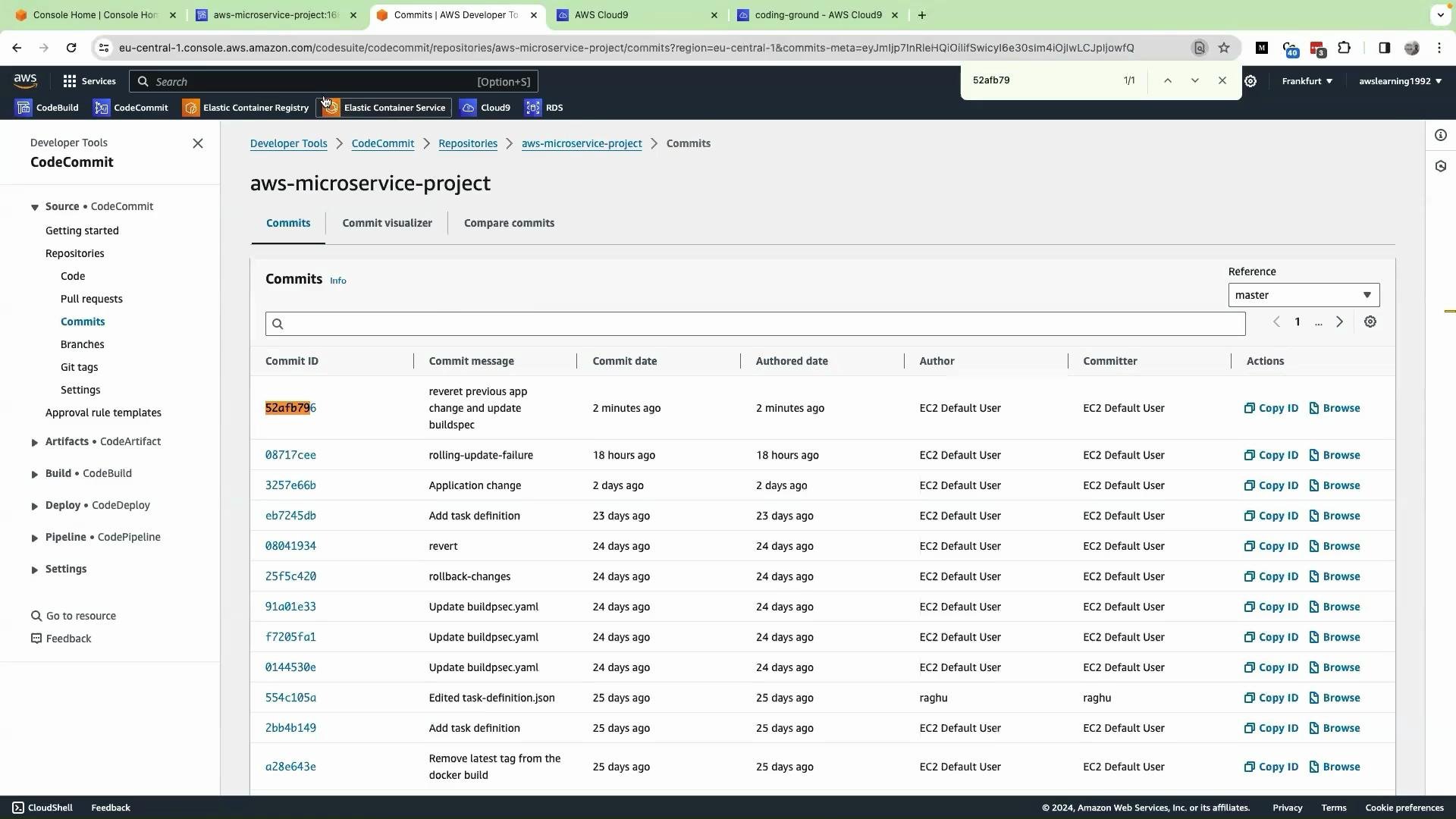
* Inspect CodeCommit to confirm the commit that triggered the build and to capture the exact commit hash used for your image tag.
 * In the ECS console, open Task Definitions and verify the new revision JSON references the specific commit-tagged image in the `image` field:
```json theme={null}
{
"taskDefinitionArn": "arn:aws:ecs:eu-central-1:666234783044:task-definition/aws-crypto-app:5",
"containerDefinitions": [
{
"name": "kodekloud-crypto-coin",
"image": "666234783044.dkr.ecr.eu-central-1.amazonaws.com/cryptoproject:52afb79",
"cpu": 0,
"memory": 512,
"portMappings": [
{
"containerPort": 80,
"hostPort": 0,
"protocol": "tcp"
}
]
}
]
}
```
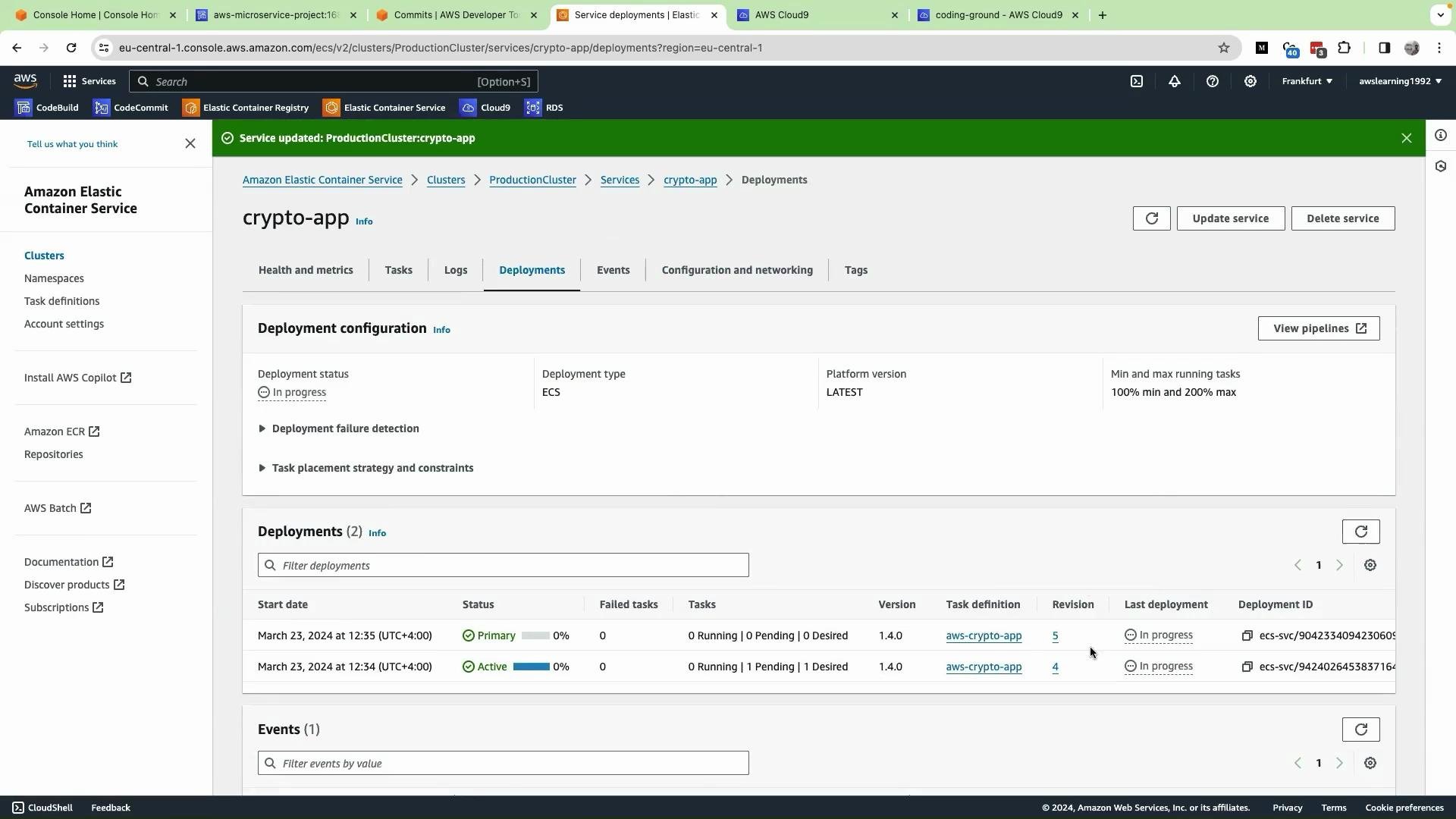
* Update the ECS service to use the latest task definition revision: in your cluster, select the service -> Update Service -> pick the latest task definition revision -> Update Service. ECS will start a new deployment using the commit-tagged image.
You will observe two deployments in the ECS service view: the previous (older) deployment and the new primary deployment created from the registered task definition.
* In the ECS console, open Task Definitions and verify the new revision JSON references the specific commit-tagged image in the `image` field:
```json theme={null}
{
"taskDefinitionArn": "arn:aws:ecs:eu-central-1:666234783044:task-definition/aws-crypto-app:5",
"containerDefinitions": [
{
"name": "kodekloud-crypto-coin",
"image": "666234783044.dkr.ecr.eu-central-1.amazonaws.com/cryptoproject:52afb79",
"cpu": 0,
"memory": 512,
"portMappings": [
{
"containerPort": 80,
"hostPort": 0,
"protocol": "tcp"
}
]
}
]
}
```
* Update the ECS service to use the latest task definition revision: in your cluster, select the service -> Update Service -> pick the latest task definition revision -> Update Service. ECS will start a new deployment using the commit-tagged image.
You will observe two deployments in the ECS service view: the previous (older) deployment and the new primary deployment created from the registered task definition.
 * After the deployment finishes and new tasks are in `RUNNING` status, validate the application through the ALB (copy the ALB DNS name and open the site).
* Verify the app workflow: select a crypto coin, provide the name and shipping address, set quantity, submit order, and return to the product page.
Recap (why this matters)
* We replaced the `image` URI in the task definition with a placeholder and then programmatically replaced it with the commit-specific image URI during the build pipeline.
* CodeBuild builds and tags images with both `latest` and the short commit hash.
* The replacement and ECS task definition registration ensure deployments reference immutable image tags (commit hashes), preventing rolling-update issues caused by the mutable `latest` tag.
Best practices and final notes
* Use commit-based or semantic version tags for production deployments to ensure repeatability and easier rollbacks.
* Ensure CodeBuild has the required IAM permissions to push to ECR and register task definitions in ECS.
* If you prefer not to use `sed`, consider using a templating tool (e.g., `envsubst`, `jq`, or a small script) for cross-platform robustness.
Make sure your CodeBuild project has the correct IAM permissions and environment variables (`REPOSITORY_URI`, `AWS_DEFAULT_REGION`, etc.). Mistakes in permissions or region configuration will cause push or register-step failures.
Links and references
* [Amazon ECS Task Definitions](https://docs.aws.amazon.com/AmazonECS/latest/developerguide/task_definitions.html)
* [Amazon ECR: Pushing a Docker image](https://docs.aws.amazon.com/AmazonECR/latest/userguide/docker-push-ecr-image.html)
* [AWS CodeBuild environment variables](https://docs.aws.amazon.com/codebuild/latest/userguide/build-env-ref-env-vars.html)
That’s it for this lesson. The next lesson will recreate a rolling-update failure scenario and walk through diagnosing and fixing it.
* After the deployment finishes and new tasks are in `RUNNING` status, validate the application through the ALB (copy the ALB DNS name and open the site).
* Verify the app workflow: select a crypto coin, provide the name and shipping address, set quantity, submit order, and return to the product page.
Recap (why this matters)
* We replaced the `image` URI in the task definition with a placeholder and then programmatically replaced it with the commit-specific image URI during the build pipeline.
* CodeBuild builds and tags images with both `latest` and the short commit hash.
* The replacement and ECS task definition registration ensure deployments reference immutable image tags (commit hashes), preventing rolling-update issues caused by the mutable `latest` tag.
Best practices and final notes
* Use commit-based or semantic version tags for production deployments to ensure repeatability and easier rollbacks.
* Ensure CodeBuild has the required IAM permissions to push to ECR and register task definitions in ECS.
* If you prefer not to use `sed`, consider using a templating tool (e.g., `envsubst`, `jq`, or a small script) for cross-platform robustness.
Make sure your CodeBuild project has the correct IAM permissions and environment variables (`REPOSITORY_URI`, `AWS_DEFAULT_REGION`, etc.). Mistakes in permissions or region configuration will cause push or register-step failures.
Links and references
* [Amazon ECS Task Definitions](https://docs.aws.amazon.com/AmazonECS/latest/developerguide/task_definitions.html)
* [Amazon ECR: Pushing a Docker image](https://docs.aws.amazon.com/AmazonECR/latest/userguide/docker-push-ecr-image.html)
* [AWS CodeBuild environment variables](https://docs.aws.amazon.com/codebuild/latest/userguide/build-env-ref-env-vars.html)
That’s it for this lesson. The next lesson will recreate a rolling-update failure scenario and walk through diagnosing and fixing it.