> ## Documentation Index
> Fetch the complete documentation index at: https://notes.kodekloud.com/llms.txt
> Use this file to discover all available pages before exploring further.
# Rolling Update on ECS Deployment of the application
> Guide to ECS rolling updates, ALB health checks and connection draining, deployment tuning, failure handling and rollback options
Welcome — in this lesson we'll walk through how rolling updates work for an Amazon Elastic Container Service (ECS) service, what the Application Load Balancer (ALB) does during the update, and how to handle failures and rollbacks.
This guide covers:
* Step-by-step console flow for updating an ECS service
* What happens under the hood during a rolling update
* How to tune deployment behavior and connection draining
* Failure scenarios and rollback options
Step through the deployment flow in the AWS console:
1. Open the ECS cluster for your production environment.
2. Choose the existing service for your application (this example uses a "crypto app").
3. Click Create a new service (or Update service if modifying an existing one).
4. In the deployment options choose between Rolling update (default) and Blue/Green deployment.
5. Update the service to a new task definition revision and, for example, increase the desired task count to four. Click Update to start the process.
What happens during a rolling deployment
* ECS creates a new deployment and the service scheduler starts new tasks using the selected task definition revision (e.g., revision 2).
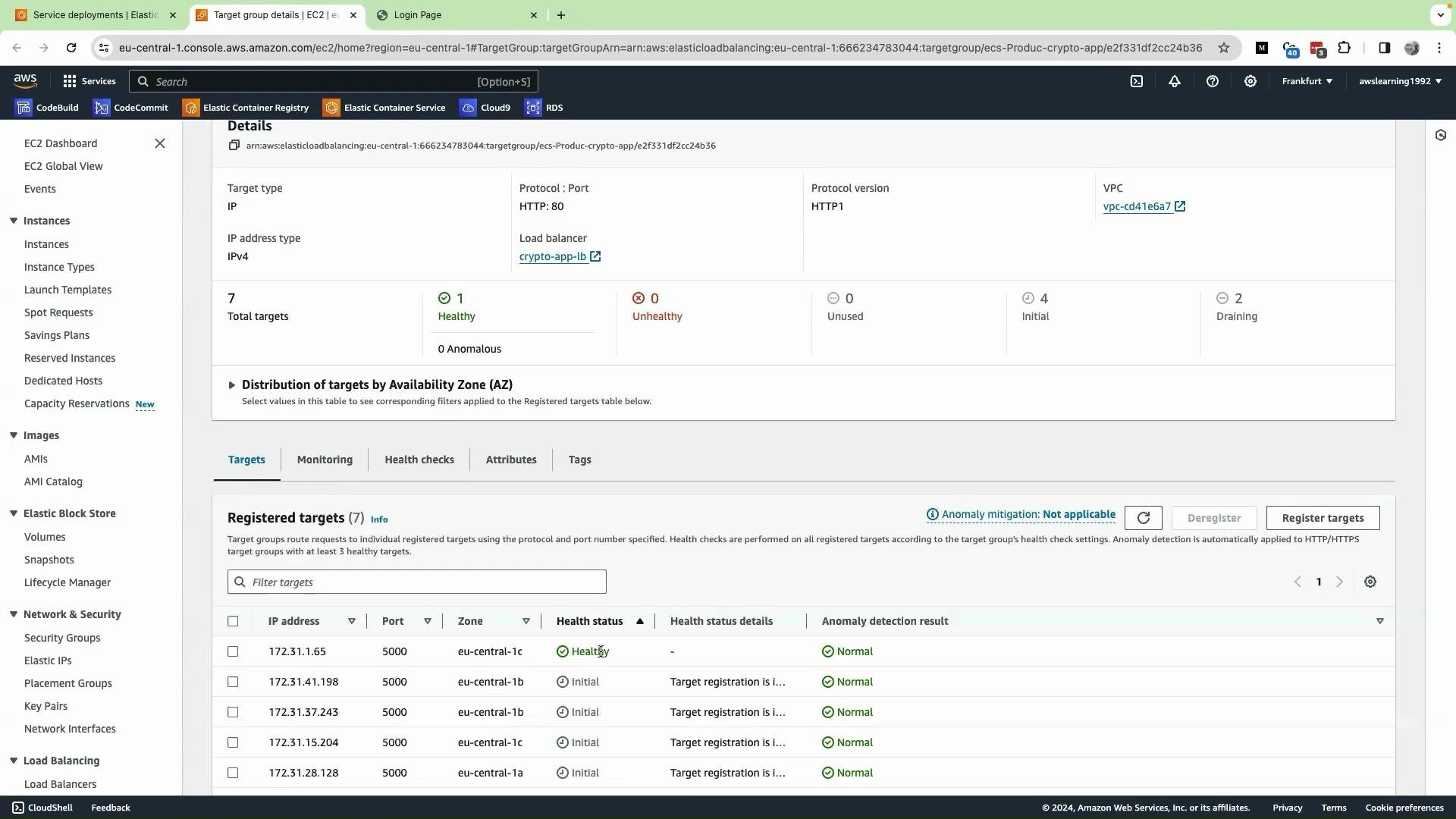
* The ALB target group begins registering the new task IPs/targets. ALB health checks determine when these targets become healthy.
* While the new targets are coming up, the old targets remain registered and continue serving traffic.
* As each new target becomes healthy, the ALB starts routing traffic to it. Once traffic shifts and the old target is deregistered, ECS stops the old task after connection draining (the target group’s deregistration delay).
Here you can see the ALB target group showing registered targets and their health states as the new tasks are launched and checked:
 Progress, draining, and service events
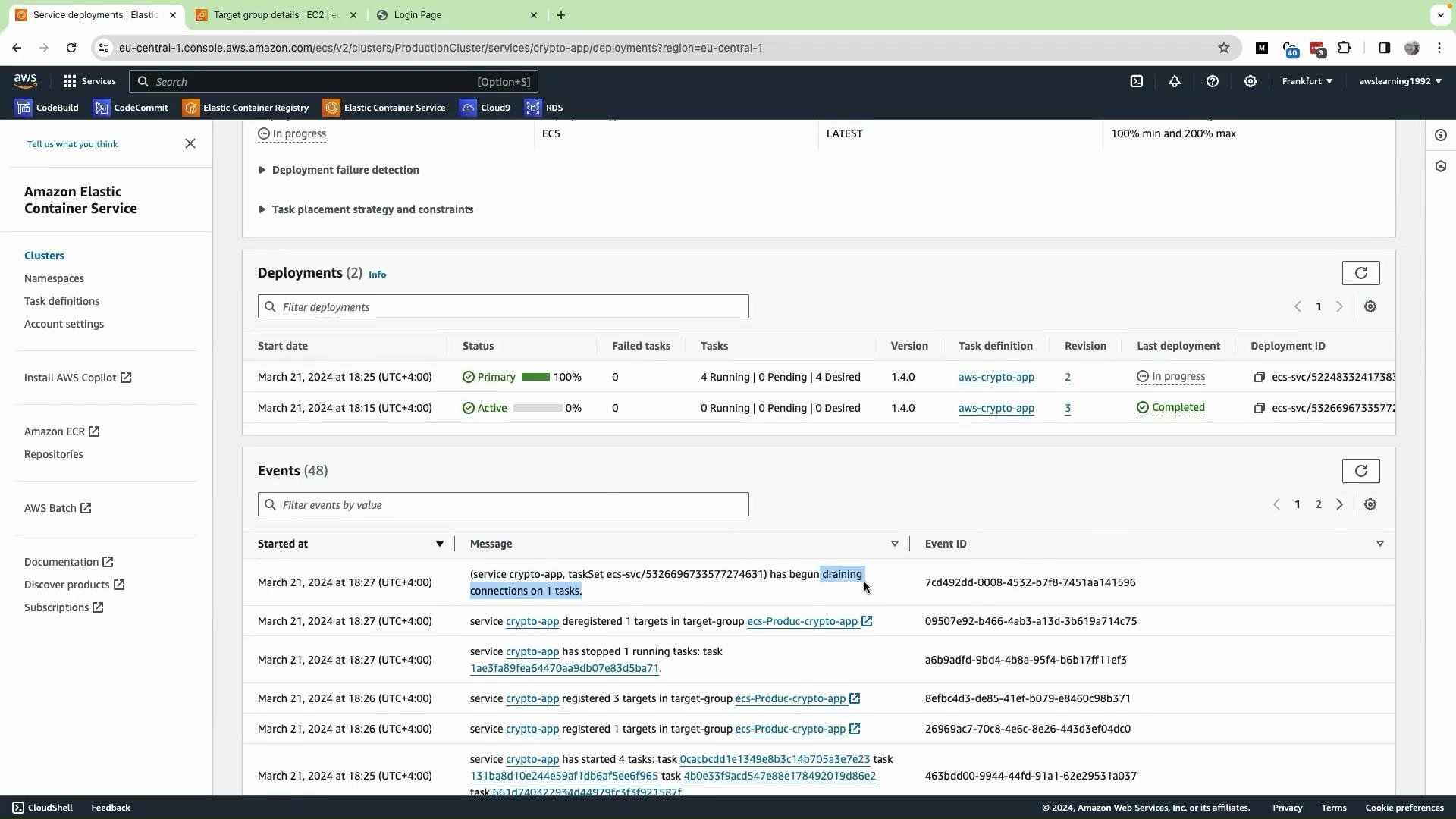
* The ECS console shows deployment progress as a percentage of desired tasks that have been updated and passed health checks. For example, 25% means roughly 25% of desired tasks are already replaced and healthy.
* When ECS starts removing old tasks you will see "draining" activity in the service events. “Draining” means the target is being deregistered from the target group and the container is being stopped gracefully (connections can continue to drain for the configured deregistration delay).
Example of service events showing draining and deployments:
Progress, draining, and service events
* The ECS console shows deployment progress as a percentage of desired tasks that have been updated and passed health checks. For example, 25% means roughly 25% of desired tasks are already replaced and healthy.
* When ECS starts removing old tasks you will see "draining" activity in the service events. “Draining” means the target is being deregistered from the target group and the container is being stopped gracefully (connections can continue to drain for the configured deregistration delay).
Example of service events showing draining and deployments:
 Control rolling-update behavior
You can tune rolling-update concurrency and connection draining via ECS service settings and ALB target group settings.
| Configuration | Purpose | Where to set | Example |
| ----------------------- | ------------------------------------------------------------------------------------------------------------------------------------------------------------: | ------------------------------------ | --------------- |
| `minimumHealthyPercent` | Minimum percentage of tasks that must remain healthy during deployment. Controls how many old tasks are allowed to remain running. | ECS service deployment configuration | `50` |
| `maximumPercent` | Maximum percentage of tasks (as percent of desired count) that are allowed to run during deployment. Controls how many new tasks may be started concurrently. | ECS service deployment configuration | `200` |
| Deregistration delay | Time (seconds) the ALB waits for in-flight connections to drain after target deregistration. | ALB target group settings | `300` (default) |
| Health check settings | Path, interval, and thresholds that determine when ALB marks targets healthy/unhealthy. | ALB target group settings | `/health` |
Example ECS service JSON snippet (deployment configuration):
```json theme={null}
{
"deploymentConfiguration": {
"maximumPercent": 200,
"minimumHealthyPercent": 50
}
}
```
Tuning guidance
* Lower `minimumHealthyPercent` allows ECS to stop more old tasks sooner (faster cutover but riskier).
* Higher `maximumPercent` allows ECS to start more new tasks above the desired count (requires available capacity).
* Decrease ALB deregistration delay to reduce wait time for draining connections, but only if your application tolerates shorter drain windows.
* Configure ALB health checks (path, interval, healthy threshold) to balance speed of promotion vs. safety.
Failure scenarios and rollback
* If new tasks fail health checks or crash, ECS will not automatically revert the running tasks to the previous task definition for a rolling-update deployment.
* Depending on `minimumHealthyPercent`, a failed deployment may either block progress or reduce the number of running tasks until you intervene.
* To roll back a failed rolling update you typically:
* Update the service again and specify the previous task definition revision, or
* Re-deploy the previous image, or
* Use a CI/CD pipeline that automates rollback steps.
* For automated rollback and traffic-shift rollback capabilities, consider Blue/Green deployments managed by AWS CodeDeploy, which can enforce automatic rollbacks on failure conditions.
Control ECS rolling-update behavior with `minimumHealthyPercent` and `maximumPercent`, and tune ALB target group deregistration delay to manage concurrency and connection draining during updates.
ECS rolling updates do not automatically roll back to a previous task definition. Monitor deployments and prepare a rollback plan (manual re-deploy or automated CI/CD pipeline) in case the new revision fails health checks.
Further reading and references
* [Amazon ECS Best Practices](https://docs.aws.amazon.com/AmazonECS/latest/developerguide/best_practices.html)
* [ECS Service Scheduler Concepts](https://docs.aws.amazon.com/AmazonECS/latest/developerguide/service-scheduler.html)
* [ALB Target Groups and Health Checks](https://docs.aws.amazon.com/elasticloadbalancing/latest/application/load-balancer-target-groups.html)
* [AWS CodeDeploy Blue/Green Deployments with ECS](https://docs.aws.amazon.com/codedeploy/latest/userguide/deployments-ecs.html)
That concludes this lesson on rolling updates for an ECS service: what to expect, how to tune behavior, and how to plan rollback strategies.
Control rolling-update behavior
You can tune rolling-update concurrency and connection draining via ECS service settings and ALB target group settings.
| Configuration | Purpose | Where to set | Example |
| ----------------------- | ------------------------------------------------------------------------------------------------------------------------------------------------------------: | ------------------------------------ | --------------- |
| `minimumHealthyPercent` | Minimum percentage of tasks that must remain healthy during deployment. Controls how many old tasks are allowed to remain running. | ECS service deployment configuration | `50` |
| `maximumPercent` | Maximum percentage of tasks (as percent of desired count) that are allowed to run during deployment. Controls how many new tasks may be started concurrently. | ECS service deployment configuration | `200` |
| Deregistration delay | Time (seconds) the ALB waits for in-flight connections to drain after target deregistration. | ALB target group settings | `300` (default) |
| Health check settings | Path, interval, and thresholds that determine when ALB marks targets healthy/unhealthy. | ALB target group settings | `/health` |
Example ECS service JSON snippet (deployment configuration):
```json theme={null}
{
"deploymentConfiguration": {
"maximumPercent": 200,
"minimumHealthyPercent": 50
}
}
```
Tuning guidance
* Lower `minimumHealthyPercent` allows ECS to stop more old tasks sooner (faster cutover but riskier).
* Higher `maximumPercent` allows ECS to start more new tasks above the desired count (requires available capacity).
* Decrease ALB deregistration delay to reduce wait time for draining connections, but only if your application tolerates shorter drain windows.
* Configure ALB health checks (path, interval, healthy threshold) to balance speed of promotion vs. safety.
Failure scenarios and rollback
* If new tasks fail health checks or crash, ECS will not automatically revert the running tasks to the previous task definition for a rolling-update deployment.
* Depending on `minimumHealthyPercent`, a failed deployment may either block progress or reduce the number of running tasks until you intervene.
* To roll back a failed rolling update you typically:
* Update the service again and specify the previous task definition revision, or
* Re-deploy the previous image, or
* Use a CI/CD pipeline that automates rollback steps.
* For automated rollback and traffic-shift rollback capabilities, consider Blue/Green deployments managed by AWS CodeDeploy, which can enforce automatic rollbacks on failure conditions.
Control ECS rolling-update behavior with `minimumHealthyPercent` and `maximumPercent`, and tune ALB target group deregistration delay to manage concurrency and connection draining during updates.
ECS rolling updates do not automatically roll back to a previous task definition. Monitor deployments and prepare a rollback plan (manual re-deploy or automated CI/CD pipeline) in case the new revision fails health checks.
Further reading and references
* [Amazon ECS Best Practices](https://docs.aws.amazon.com/AmazonECS/latest/developerguide/best_practices.html)
* [ECS Service Scheduler Concepts](https://docs.aws.amazon.com/AmazonECS/latest/developerguide/service-scheduler.html)
* [ALB Target Groups and Health Checks](https://docs.aws.amazon.com/elasticloadbalancing/latest/application/load-balancer-target-groups.html)
* [AWS CodeDeploy Blue/Green Deployments with ECS](https://docs.aws.amazon.com/codedeploy/latest/userguide/deployments-ecs.html)
That concludes this lesson on rolling updates for an ECS service: what to expect, how to tune behavior, and how to plan rollback strategies.