> ## Documentation Index
> Fetch the complete documentation index at: https://notes.kodekloud.com/llms.txt
> Use this file to discover all available pages before exploring further.
# Understanding Rolling Update again
> A walkthrough reproducing and troubleshooting a failing AWS ECS rolling update, showing build and deploy steps, root causes, and recommendations like immutable image tags and deployment circuit breaker.
Welcome back. In this walkthrough we recreate a failing ECS rolling update and analyze what went wrong. We'll:
* Rebuild the Docker image and push a new task definition revision from CodeBuild.
* Deploy the new task definition revision to an ECS service and observe the failed rolling update.
* Manually roll back to the previously working revision and explain why ECS did not automatically restore the service.
This guide preserves the exact commands and configuration used in the reproduction, while clarifying the sequence and root causes so you can apply the same troubleshooting steps in your environment.
## 1) Build pipeline: CodeBuild buildspec
Below is the buildspec used in CodeBuild to build, tag, and push the Docker image. Note that the tagging was corrected so both `latest` and the commit-hash tag are pushed.
```yaml theme={null}
version: 0.2
phases:
pre_build:
commands:
- echo Logging in to Amazon ECR...
- aws ecr get-login-password --region $AWS_DEFAULT_REGION | docker login --username AWS --password-stdin 666234738304.dkr.ecr.eu-central-1.amazonaws.com/cryptoproject
- COMMIT_HASH=$(echo $CODEBUILD_RESOLVED_SOURCE_VERSION | cut -c 1-7)
- IMAGE_TAG=${COMMIT_HASH:-latest}
build:
commands:
- echo Build started on `date`
- echo Building the Docker image...
- docker build -t $REPOSITORY_URI:latest .
- docker tag $REPOSITORY_URI:latest $REPOSITORY_URI:$IMAGE_TAG
post_build:
commands:
- echo Build completed on `date`
- echo Pushing the Docker image...
- docker push $REPOSITORY_URI:latest
- docker push $REPOSITORY_URI:$IMAGE_TAG
- sed -i "s|REPOSITORY_URI|$REPOSITORY_URI:$IMAGE_TAG|g" task-definition.json
- aws ecs register-task-definition --cli-input-json file://task-definition.json
```
Tips:
* Prefer using immutable tags (commit hash or image digest) in the task definition to avoid ambiguity during rollbacks.
* Pushing both `latest` and a commit-tag helps during development, but relying on `latest` for production rollbacks can cause recovered revisions to pull the same broken image.
## 2) Application change that caused the failure
We intentionally introduced a code change that caused the container to fail at runtime. The fixed snippet below shows the application after adding `app` and handling `error` in the login route while keeping the commented-out route and the commented blocks that originally introduced the issue.
```python theme={null}
from flask import Flask, render_template, request, redirect, url_for
app = Flask(__name__)
# Default credentials
DEFAULT_USERNAME = "admin"
DEFAULT_PASSWORD = "password123"
@app.route('/login', methods=['GET', 'POST'])
def login():
error = None
if request.method == 'POST':
username = request.form['username']
password = request.form['password']
# Check if provided credentials match the default ones
if username == DEFAULT_USERNAME and password == DEFAULT_PASSWORD:
return redirect(url_for('welcome'))
else:
error = 'Invalid Credentials. Please try again.'
return render_template('login.html', error=error)
# @app.route('/welcome')
def welcome():
return render_template('product.html')
@app.route('/place-order')
def place_order():
product_id = request.args.get('product')
return render_template('place_order.html', product_id=product_id)
```
This is the exact runtime state that CodeBuild packaged and pushed.
## 3) Git commands used to prepare the image
Commands executed to amend a commit and push a new change (output examples included):
```bash theme={null}
git add .
git commit --amend --reset-author
# Example output:
# 3 files changed, 7 insertions(+), 6 deletions(-)
# Enumerating objects: 9, done.
# Counting objects: 100% (9/9), done.
# Compressing objects: 100% (6/6), done.
# Writing objects: 100% (5/5), 213.80 KiB | 16.00 KiB/s, done.
# Total 5 (delta 3), reused 0 (delta 0)
# To https://git-codecommit.eu-central-1.amazonaws.com/v1/repos/aws-microservice-project
# 87216782..e1389e2 master -> master
```
Then a new commit and push:
```bash theme={null}
git commit -m "Understand rolling update"
git push origin master
# Example push output:
# Enumerating objects: 5, done.
# Counting objects: 100% (5/5), done.
# Compressing objects: 100% (3/3), done.
# Writing objects: 100% (3/3), 367.00 KiB | 0 bytes/s, done.
# Total 3 (delta 2), reused 0 (delta 0), pack-reused 0
# remote: Validating objects...
# To https://git-codecommit.eu-central-1.amazonaws.com/v1/repos/aws-microservice-project
# 52afb79..3769762 master -> master
```
## 4) Task definition registration
When CodeBuild completed, it updated the `task-definition.json` and registered a new task definition revision. The relevant portion of the registered task-definition (revision 6) is shown below:
```json theme={null}
{
"taskDefinition": {
"taskDefinitionArn": "arn:aws:ecs:eu-central-1:666234783044:task-definition/aws-crypto-app:6",
"containerDefinitions": [
{
"name": "kodeklud-crypto-coin",
"cpu": 0,
"memory": 512,
"portMappings": [
{
"containerPort": 80,
"hostPort": 80,
"protocol": "tcp"
},
{
"containerPort": 5000,
"hostPort": 5000,
"protocol": "tcp"
}
],
"essential": true,
"logConfiguration": {
"logDriver": "awslogs",
"options": {
"awslogs-create-group": "true",
"awslogs-group": "/ecs/aws-microservice",
"awslogs-region": "eu-central-1",
"awslogs-stream-prefix": "ecs"
}
}
}
],
"family": "aws-crypto-app",
"executionRoleArn": "arn:aws:iam::666234783044:role/ecsTaskExecutionRole",
"networkMode": "awsvpc",
"revision": 6,
"status": "ACTIVE"
}
}
```
The build pipeline substituted the commit hash into the `task-definition.json`, so the task definition revision is correlated with the image tag.
## 5) Deploying the new revision in ECS
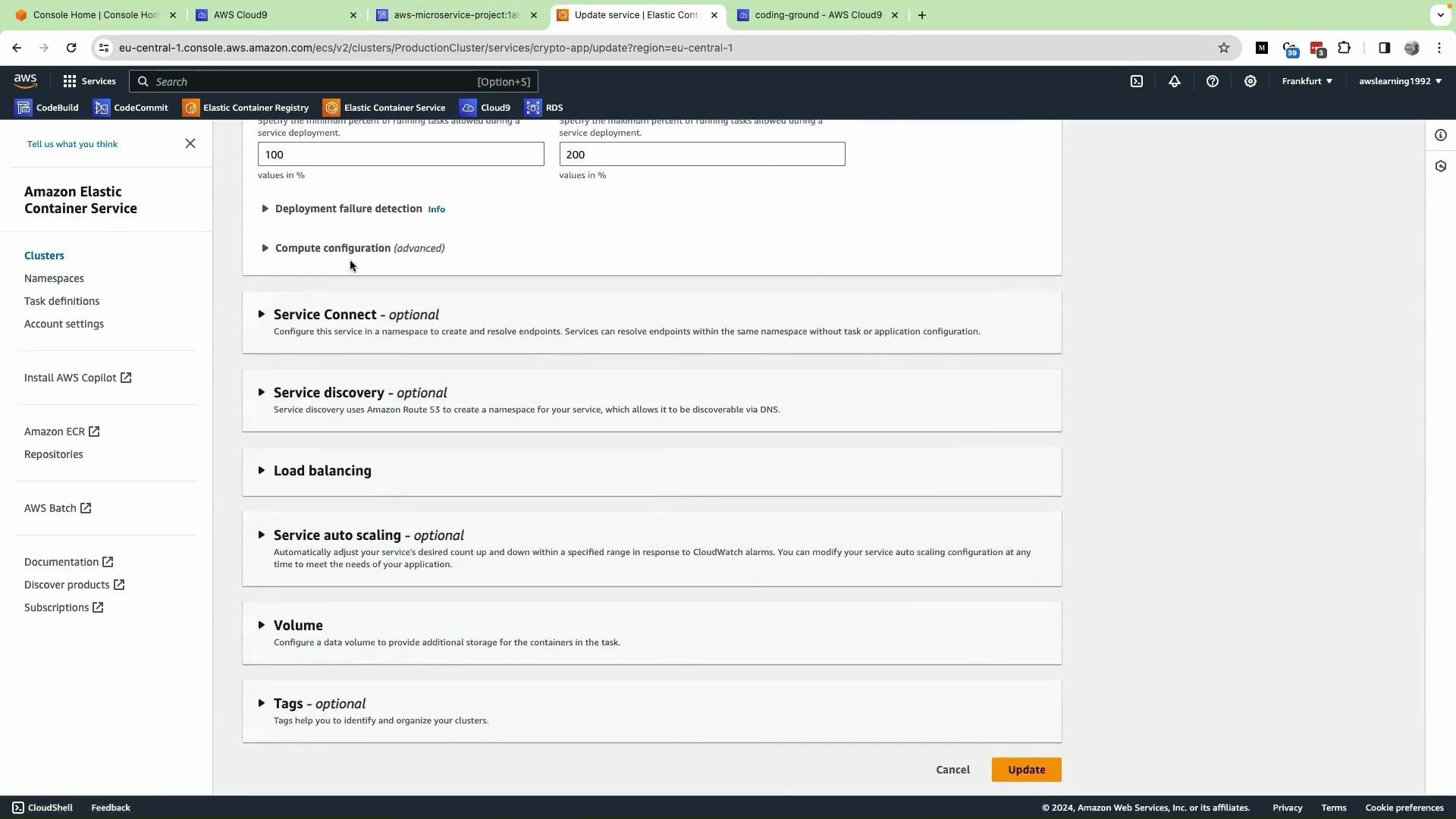
From the ECS console we updated the service to use revision 6. On the Update Service page we selected revision 6 and clicked Update.
 What happened after the update:
* ECS started tasks for revision 6, but they failed to reach a RUNNING state.
* The deployment hung in a loop: tasks were repeatedly started and stopped due to container start errors caused by the introduced change.
* ECS kept trying to bring up the failing revision instead of returning to the previously working revision.
## 6) Manual rollback performed
To recover we manually reverted the service back to the last-known working revision:
1. Open the service in the ECS console and click Update service.
2. Select the previous working task definition revision (revision 5).
3. Click Update.
After that:
* ECS started tasks using revision 5 and the corresponding image.
* The new failing deployment was drained and the service returned to a healthy RUNNING state.
## Why ECS did not automatically roll back
Automatic rollback in ECS is not guaranteed by default. Two common blockers are:
1. No automatic detection and abort: ECS will continue attempting a deployment until it either succeeds or you enable the deployment circuit breaker or external automation to stop it.
2. Non-immutable image tags: If both the old and new task definitions reference a moving tag like `latest`, rolling back the task definition may still pull the same broken image.
Best practices: use immutable image tags (commit-hash or image digest like `repo@sha256:...`) and enable the ECS deployment circuit breaker or monitoring automation to detect and recover from faulty deployments.
## Quick reference: Common causes and mitigation
| Problem | Why it causes failed rollouts | Mitigation |
| -------------------------------- | ------------------------------------------------------------------------------------------------------- | ------------------------------------------------------------------------------------------------------------------------- |
| Using `latest` or mutable tags | Rollback to a previous task definition can still pull the same broken image if `latest` was overwritten | Use immutable tags (`` or image digest). |
| No deployment circuit breaker | ECS will keep trying a failing deployment indefinitely | Enable the ECS deployment circuit breaker or add health checks/alarms to trigger rollback automation. See AWS docs below. |
| Application runtime errors | The container exits during startup, causing new tasks to fail | Add container-level logging and health checks; test images locally before pushing. |
| Missing logging or observability | Hard to determine why tasks fail | Configure CloudWatch logs and structured logs in the container. |
Note: In the table cell above `latest` is shown as inline code to avoid parsing/ambiguity.
## Recap and recommended hardening steps
* Reproduced a failing rolling update by pushing a new task definition revision with a runtime error.
* ECS attempted the rolling update, but the deployment repeatedly failed and did not auto-rollback.
* Manual rollback to the previous task definition revision restored the service.
* Root cause: mutable image tags (`latest`) and lack of an automatic deployment abort mechanism.
Recommended actions:
* Use immutable image tags (commit-hash tags or digests) in task definitions.
* Enable the ECS deployment circuit breaker to automatically stop unhealthy deployments:
* AWS docs: [https://docs.aws.amazon.com/AmazonECS/latest/developerguide/deployment-type-ecs.html](https://docs.aws.amazon.com/AmazonECS/latest/developerguide/deployment-type-ecs.html)
* Implement health checks (load balancer and container-level) and CloudWatch alarms to detect failed deployments quickly.
* Ensure CI/CD injects the immutable image identifier into the task definition that you register.
Further reading and references:
* Amazon ECS task definitions: [https://docs.aws.amazon.com/AmazonECS/latest/developerguide/task\_definitions.html](https://docs.aws.amazon.com/AmazonECS/latest/developerguide/task_definitions.html)
* ECS deployment circuit breaker: [https://docs.aws.amazon.com/AmazonECS/latest/developerguide/deployment-type-ecs.html#deployment-circuit-breaker](https://docs.aws.amazon.com/AmazonECS/latest/developerguide/deployment-type-ecs.html#deployment-circuit-breaker)
* Amazon ECR best practices for image tags and immutability: [https://docs.aws.amazon.com/AmazonECR/latest/userguide/image-tag-mutability.html](https://docs.aws.amazon.com/AmazonECR/latest/userguide/image-tag-mutability.html)
That's all for now—apply immutable tagging and circuit-breaker protections to avoid similar deadlock-style failures in rolling updates.
What happened after the update:
* ECS started tasks for revision 6, but they failed to reach a RUNNING state.
* The deployment hung in a loop: tasks were repeatedly started and stopped due to container start errors caused by the introduced change.
* ECS kept trying to bring up the failing revision instead of returning to the previously working revision.
## 6) Manual rollback performed
To recover we manually reverted the service back to the last-known working revision:
1. Open the service in the ECS console and click Update service.
2. Select the previous working task definition revision (revision 5).
3. Click Update.
After that:
* ECS started tasks using revision 5 and the corresponding image.
* The new failing deployment was drained and the service returned to a healthy RUNNING state.
## Why ECS did not automatically roll back
Automatic rollback in ECS is not guaranteed by default. Two common blockers are:
1. No automatic detection and abort: ECS will continue attempting a deployment until it either succeeds or you enable the deployment circuit breaker or external automation to stop it.
2. Non-immutable image tags: If both the old and new task definitions reference a moving tag like `latest`, rolling back the task definition may still pull the same broken image.
Best practices: use immutable image tags (commit-hash or image digest like `repo@sha256:...`) and enable the ECS deployment circuit breaker or monitoring automation to detect and recover from faulty deployments.
## Quick reference: Common causes and mitigation
| Problem | Why it causes failed rollouts | Mitigation |
| -------------------------------- | ------------------------------------------------------------------------------------------------------- | ------------------------------------------------------------------------------------------------------------------------- |
| Using `latest` or mutable tags | Rollback to a previous task definition can still pull the same broken image if `latest` was overwritten | Use immutable tags (`` or image digest). |
| No deployment circuit breaker | ECS will keep trying a failing deployment indefinitely | Enable the ECS deployment circuit breaker or add health checks/alarms to trigger rollback automation. See AWS docs below. |
| Application runtime errors | The container exits during startup, causing new tasks to fail | Add container-level logging and health checks; test images locally before pushing. |
| Missing logging or observability | Hard to determine why tasks fail | Configure CloudWatch logs and structured logs in the container. |
Note: In the table cell above `latest` is shown as inline code to avoid parsing/ambiguity.
## Recap and recommended hardening steps
* Reproduced a failing rolling update by pushing a new task definition revision with a runtime error.
* ECS attempted the rolling update, but the deployment repeatedly failed and did not auto-rollback.
* Manual rollback to the previous task definition revision restored the service.
* Root cause: mutable image tags (`latest`) and lack of an automatic deployment abort mechanism.
Recommended actions:
* Use immutable image tags (commit-hash tags or digests) in task definitions.
* Enable the ECS deployment circuit breaker to automatically stop unhealthy deployments:
* AWS docs: [https://docs.aws.amazon.com/AmazonECS/latest/developerguide/deployment-type-ecs.html](https://docs.aws.amazon.com/AmazonECS/latest/developerguide/deployment-type-ecs.html)
* Implement health checks (load balancer and container-level) and CloudWatch alarms to detect failed deployments quickly.
* Ensure CI/CD injects the immutable image identifier into the task definition that you register.
Further reading and references:
* Amazon ECS task definitions: [https://docs.aws.amazon.com/AmazonECS/latest/developerguide/task\_definitions.html](https://docs.aws.amazon.com/AmazonECS/latest/developerguide/task_definitions.html)
* ECS deployment circuit breaker: [https://docs.aws.amazon.com/AmazonECS/latest/developerguide/deployment-type-ecs.html#deployment-circuit-breaker](https://docs.aws.amazon.com/AmazonECS/latest/developerguide/deployment-type-ecs.html#deployment-circuit-breaker)
* Amazon ECR best practices for image tags and immutability: [https://docs.aws.amazon.com/AmazonECR/latest/userguide/image-tag-mutability.html](https://docs.aws.amazon.com/AmazonECR/latest/userguide/image-tag-mutability.html)
That's all for now—apply immutable tagging and circuit-breaker protections to avoid similar deadlock-style failures in rolling updates.