> ## Documentation Index
> Fetch the complete documentation index at: https://notes.kodekloud.com/llms.txt
> Use this file to discover all available pages before exploring further.
# Interacting with Consul KV
> This article explains how to interact with Consuls key/value store using HTTP API, command-line interface, and web UI.
Consul’s key/value (KV) store lets you centrally manage configuration data, feature flags, and more. You can interact with the KV store in three ways:
| Interface | Description | Ideal For |
| ------------ | ----------------------------------------- | ------------------------------ |
| HTTP API | Perform CRUD operations over HTTP | Applications, automation, SDKs |
| Command-Line | `consul kv` subcommands for KV management | Administrators, scripts |
| Web UI | Browser-based view and edit | Exploratory or ad hoc changes |
Below, we’ll explore each interface in detail.
***
## 1. Consul KV HTTP API
The HTTP API exposes a `/v1/kv` endpoint. Use standard HTTP verbs (`PUT`, `GET`, `DELETE`) to manage keys.
### 1.1 Writing a Key (`PUT`)
```bash theme={null}
curl --request PUT \
--data 'enabled' \
https://consul.example.com:8500/v1/kv/data/app4
# => true
```
A response of `true` means the write succeeded. If the path (`data/app4`) doesn’t exist, Consul creates it automatically.
### 1.2 Reading a Key (`GET`)
```bash theme={null}
curl https://consul.example.com:8500/v1/kv/data/app4 | jq
```
```json theme={null}
[
{
"LockIndex": 0,
"Key": "data/app4",
"Flags": 0,
"Value": "J2VuYWJsZWQn",
"CreateIndex": 69,
"ModifyIndex": 87
}
]
```
The `Value` field is Base64-encoded. Decode it:
```bash theme={null}
echo "J2VuYWJsZWQn" | base64 --decode
# => 'enabled'
```
Base64 encoding is not encryption. Data at rest in Consul is unencrypted by default; the API simply returns values encoded in Base64.
For full API reference, see the [Consul KV HTTP API documentation](https://www.consul.io/api-docs/kv).
***
## 2. Consul Command-Line Interface
The `consul kv` set of commands provides a quick way to interact with the KV store from your terminal.
```bash theme={null}
# Write or update a key
consul kv put app1/config/apikey 4fe20s12a02$23
# Read back the value
consul kv get app1/config/apikey
# Delete the key
consul kv delete app1/config/apikey
# Output: Success! Data deleted at key: app1/config/apikey
```
| Subcommand | Action |
| ---------- | ---------------------------- |
| `put` | Create or update a key |
| `get` | Retrieve the plaintext value |
| `delete` | Remove a key and its data |
Consult the [Consul CLI documentation](https://www.consul.io/docs/commands/kv) for additional flags and examples.
***
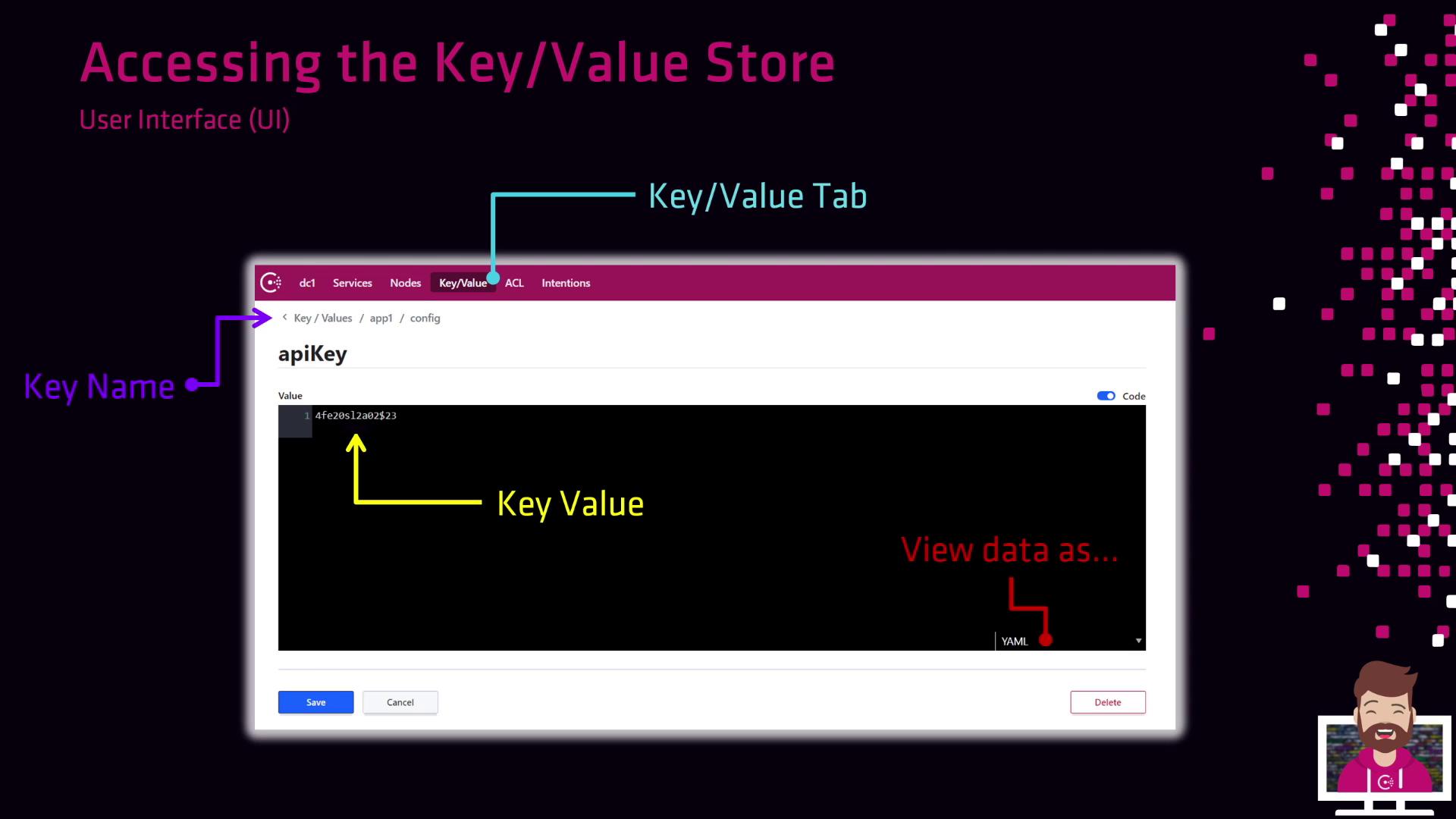
## 3. Consul Web UI
The Consul UI provides a visual way to browse and modify KV entries.
1. Log in to your Consul cluster.
2. Click on the **Key/Value** tab in the top navigation.
3. Drill down through key prefixes to locate your entry.
4. Click on a key to view or edit its value in JSON, YAML, or HCL format.
***
## 4. Limiting Access with ACLs
By default, Consul’s KV store is open to all clients. To enforce security:
1. Enable ACLs in your Consul configuration.
2. Bootstrap an ACL management token.
3. Create policies that grant read/write permissions on specific key prefixes.
4. Distribute tokens to users or applications.
Once ACLs are enabled, all API, CLI, and UI requests require a valid token. Plan your migration and token distribution carefully.
For a deep dive, see the [Consul ACL guide](https://www.consul.io/docs/security/acl).
***
## Links and References
* [Consul Key/Value HTTP API](https://www.consul.io/api-docs/kv)
* [Consul CLI Commands: `kv`](https://www.consul.io/docs/commands/kv)
* [Consul Web UI Overview](https://www.consul.io/docs/ui)
* [Consul ACL Security](https://www.consul.io/docs/security/acl)
* [HashiCorp Consul Documentation](https://www.consul.io/docs)