> ## Documentation Index
> Fetch the complete documentation index at: https://notes.kodekloud.com/llms.txt
> Use this file to discover all available pages before exploring further.
# Redundancy Zones
> This article explains Consul Enterprises Redundancy Zones feature for improving scaling and high availability through fault domain partitioning.
Consul Enterprise’s **Redundancy Zones** feature partitions your server cluster into distinct fault domains—such as cloud availability zones or separate on-premise racks—to improve both scaling and high availability. By assigning exactly one voting server per zone and running additional non-voting peers alongside it, Consul ensures automatic promotion and maintains quorum if a voting member fails.
## How Redundancy Zones Work
1. Define fault domains (e.g., AZs or data center racks).
2. Deploy one **voting** server and one or more **non-voting** servers in each zone.
3. On voting-server failure, a non-voting peer is **automatically promoted** within the same zone.
Fault domains can be any logical grouping—availability zones, racks, or even geographic regions. This setup prevents a single domain failure from taking down your entire cluster.
## Example: Three Availability Zones
Imagine an AWS setup with **three availability zones** (AZ1, AZ2, AZ3) and a six-node Consul server cluster:
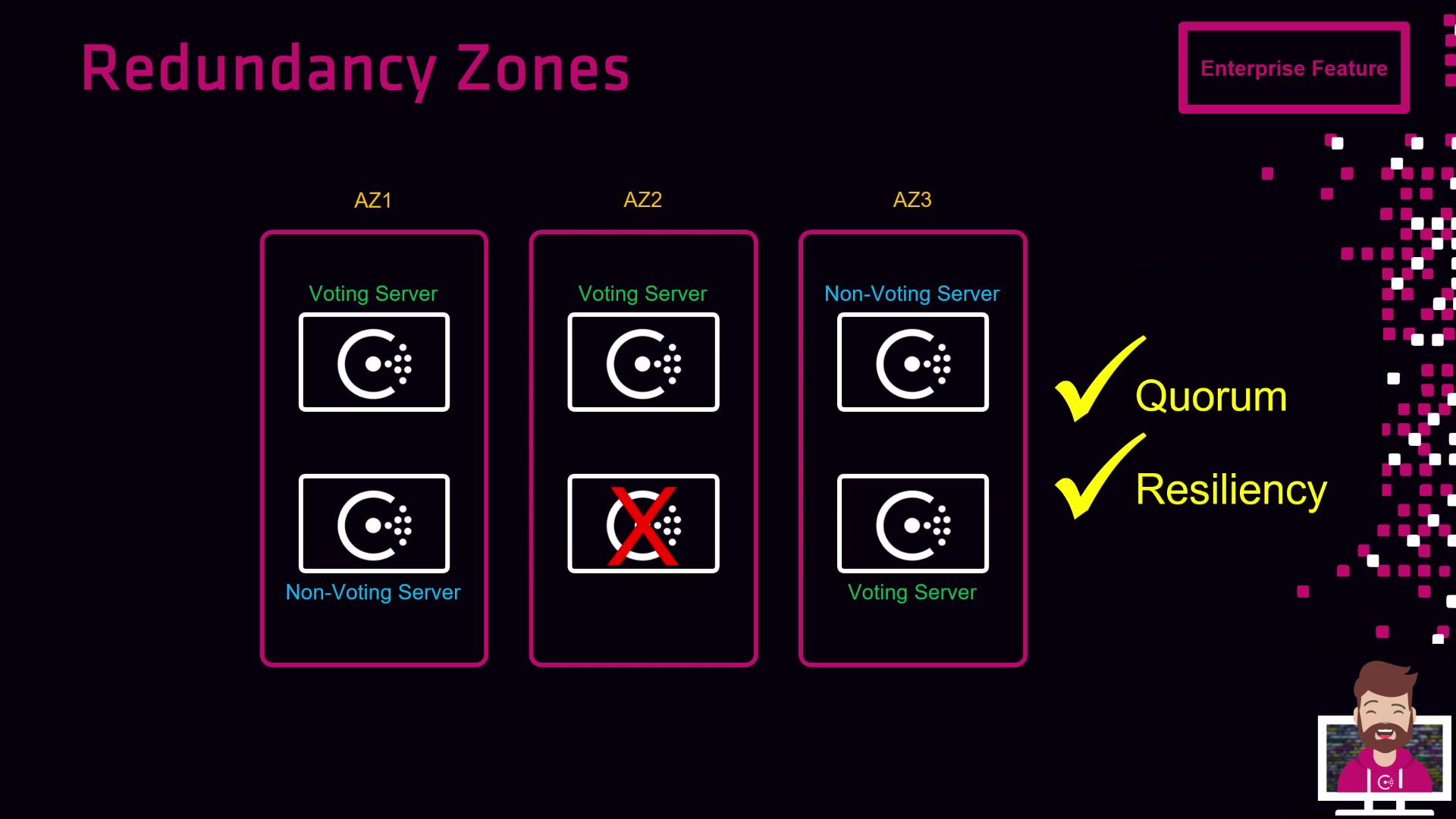
| Availability Zone | Voting Servers | Non-Voting Servers |
| ----------------- | -------------- | ------------------ |
| AZ1 | 1 | 1 |
| AZ2 | 1 | 1 |
| AZ3 | 1 | 1 |
* If the **voting server in AZ2 fails**, its non-voting peer in AZ2 is promoted.
* Quorum (3 of 5 voting servers) is maintained with one voting member in each zone.
* Topology still spans three zones, giving you time to replace the failed node.
## Handling an Entire Zone Failure
If a entire zone (for example, AZ1) goes offline:
* **AZ2**: 1 voting, 1 non-voting
* **AZ3**: 1 voting, 1 non-voting
* **Quorum remains intact** (2 of 3 voting servers), and Consul continues to serve requests.
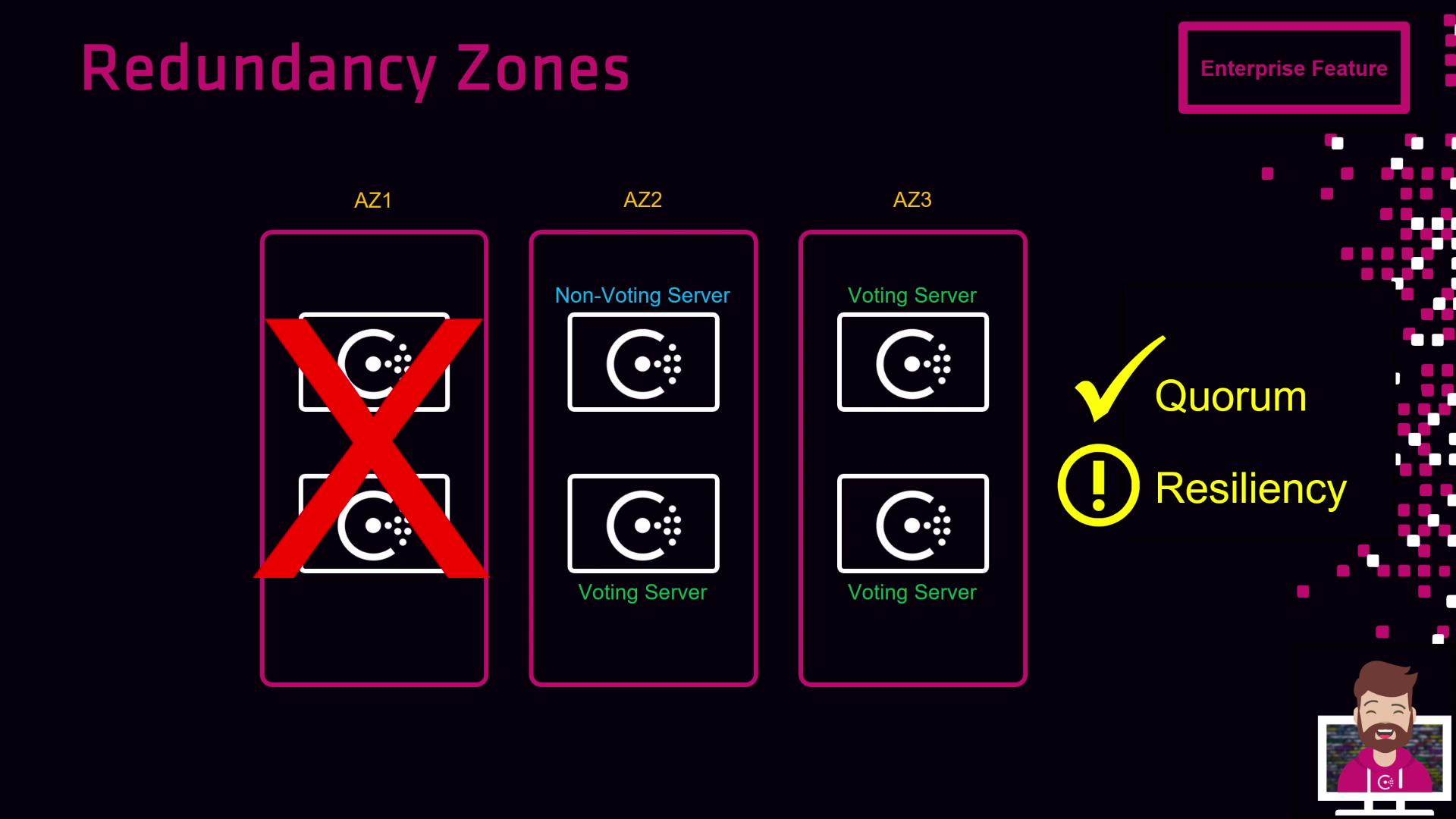
If two or more zones fail simultaneously, you risk losing quorum. Always monitor zone health and automate node replacements.
## Benefits of Using Redundancy Zones
* High availability with cross-zone failover
* Automated promotion of non-voting peers
* Fault-domain isolation to prevent cascade failures
* Simplified operations in multi-region or hybrid environments
## Links and References
* [Consul Enterprise Redundancy Zones](https://www.consul.io/docs/enterprise/ha)
* [Kubernetes Service Discovery with Consul](https://www.consul.io/docs/connect)
* [HashiCorp Learn: Failover and Recovery](https://learn.hashicorp.com/consul/high-availability)
* [Terraform AWS Provider](https://registry.terraform.io/providers/hashicorp/aws/latest/docs)