> ## Documentation Index
> Fetch the complete documentation index at: https://notes.kodekloud.com/llms.txt
> Use this file to discover all available pages before exploring further.
# Service Configuration
> This article explores using Consuls distributed Key/Value store for dynamic service configuration, ensuring redundancy and high availability for application settings.
In this lesson, we’ll explore how to leverage Consul’s distributed Key/Value (K/V) store for dynamic service configuration. Consul automatically replicates all K/V data across every server in the cluster, delivering redundancy and high availability for your application settings.
## Consul K/V Store: At a Glance
| Feature | Description |
| ------------------------ | ------------------------------------------------------------------------------------------------------------------------------------ |
| Distributed & Replicated | Every write is propagated to all Consul servers, ensuring consistency across the cluster. |
| Flexible Storage | Store any configuration data—strings, JSON blobs, or serialized objects (≤512 KB per key). |
| Versioning & Atomic Ops | Supports atomic Compare-and-Set (CAS) operations and optimistic locking. |
| Not a Full Data Store | Designed for configuration and service discovery, not high-throughput persistence like [DynamoDB](https://aws.amazon.com/dynamodb/). |
Always enable ACLs to restrict access to your K/V data. Without proper ACLs, unauthorized users could browse or delete critical entries.
## Accessing the K/V Store
You can interact with Consul’s K/V store in several ways:
| Method | Usage Example |
| -------- | ---------------------------------------------------- |
| CLI | `consul kv put key value` |
| HTTP API | `curl --request PUT http://localhost:8500/v1/kv/key` |
| Web UI | Navigate to **Key/Value** in the Consul dashboard |
## Key/Value Hierarchies & Limits
* **Flat Namespace**: Keys are simple strings; forward slashes (`/`) only emulate folders (e.g., `app/config/db/connection_string`).
* **Size Limit**: Each value ▶ 512 KB.
* **Any Object Type**: Store text, JSON, or serialized binaries, up to the size cap.
## Example: Managing Application Parameters
Suppose you have a “training” application deployed by a CI/CD pipeline (Jenkins, CircleCI, GitLab CI, etc.). You need to supply:
* Database connection string
* Application version
* Database name
* Database table name
First, store these in Consul:
```bash theme={null}
# Store configuration in Consul K/V
consul kv put training/app/database/connection_string \
"Server=prod.db.local;Database=training;User Id=app;Password=secret"
consul kv put training/app/version "1.2.3"
consul kv put training/app/database/name "training_db"
consul kv put training/app/database/table "users"
```
During deployment, your pipeline retrieves the values:
```bash theme={null}
# Fetch the application version
consul kv get training/app/version
# → 1.2.3
```
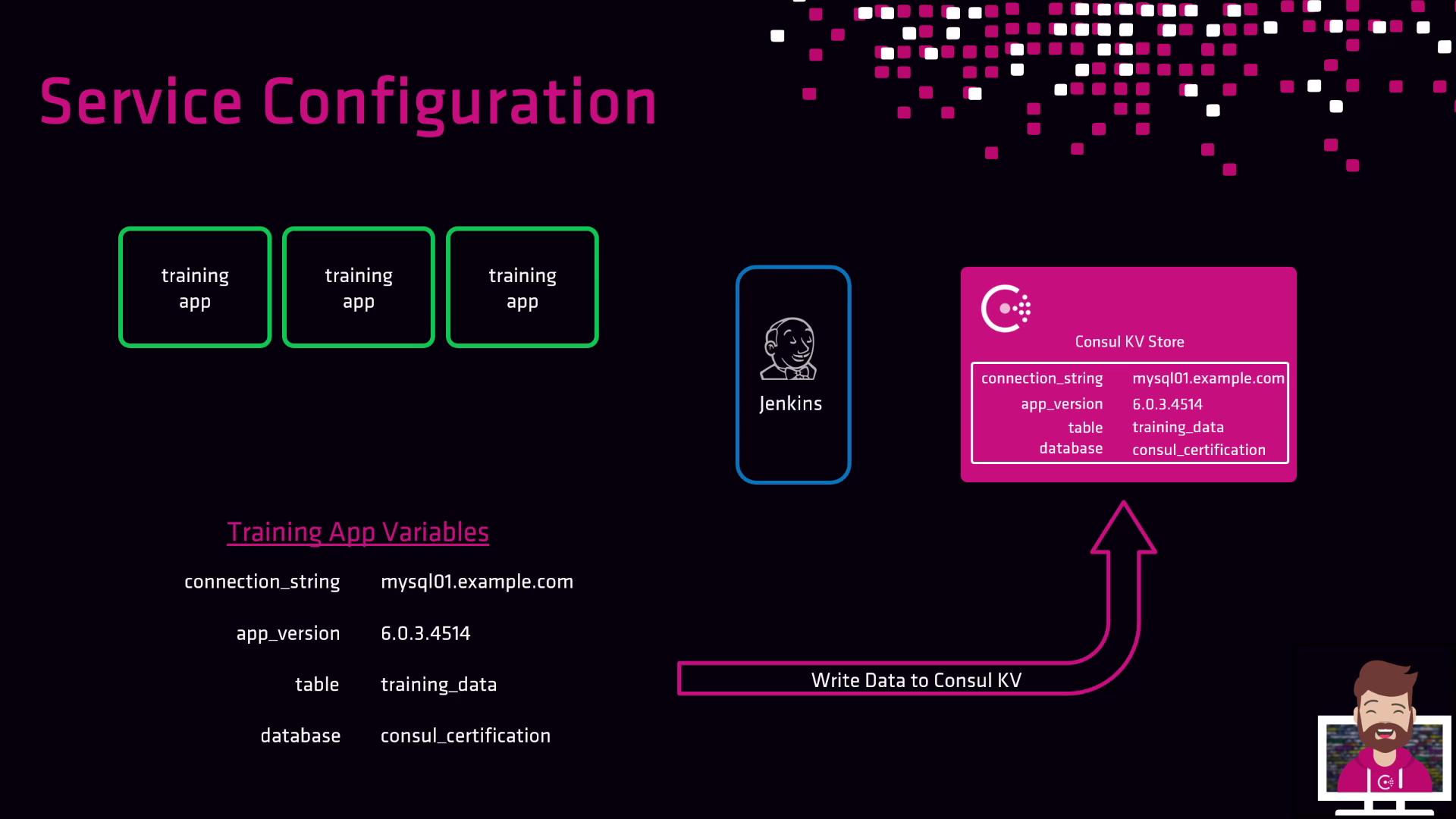
1. CI/CD fetches configuration from Consul.
2. Pipeline applies parameters at deploy time.
3. Any update to Consul entries triggers new deployments with current settings.
Updating K/V entries decouples configuration changes from pipeline scripts—your deployments always use up-to-date parameters.
## Links and References
* [Consul Key/Value Store API](https://www.consul.io/api-docs/kv)
* [Consul CLI Documentation](https://www.consul.io/docs/commands/kv)
* [HashiCorp Consul Official Site](https://www.consul.io/)