> ## Documentation Index
> Fetch the complete documentation index at: https://notes.kodekloud.com/llms.txt
> Use this file to discover all available pages before exploring further.
# Creating a Service Definition
> This article explains how to create a service definition in Consul for application registration and health checks.
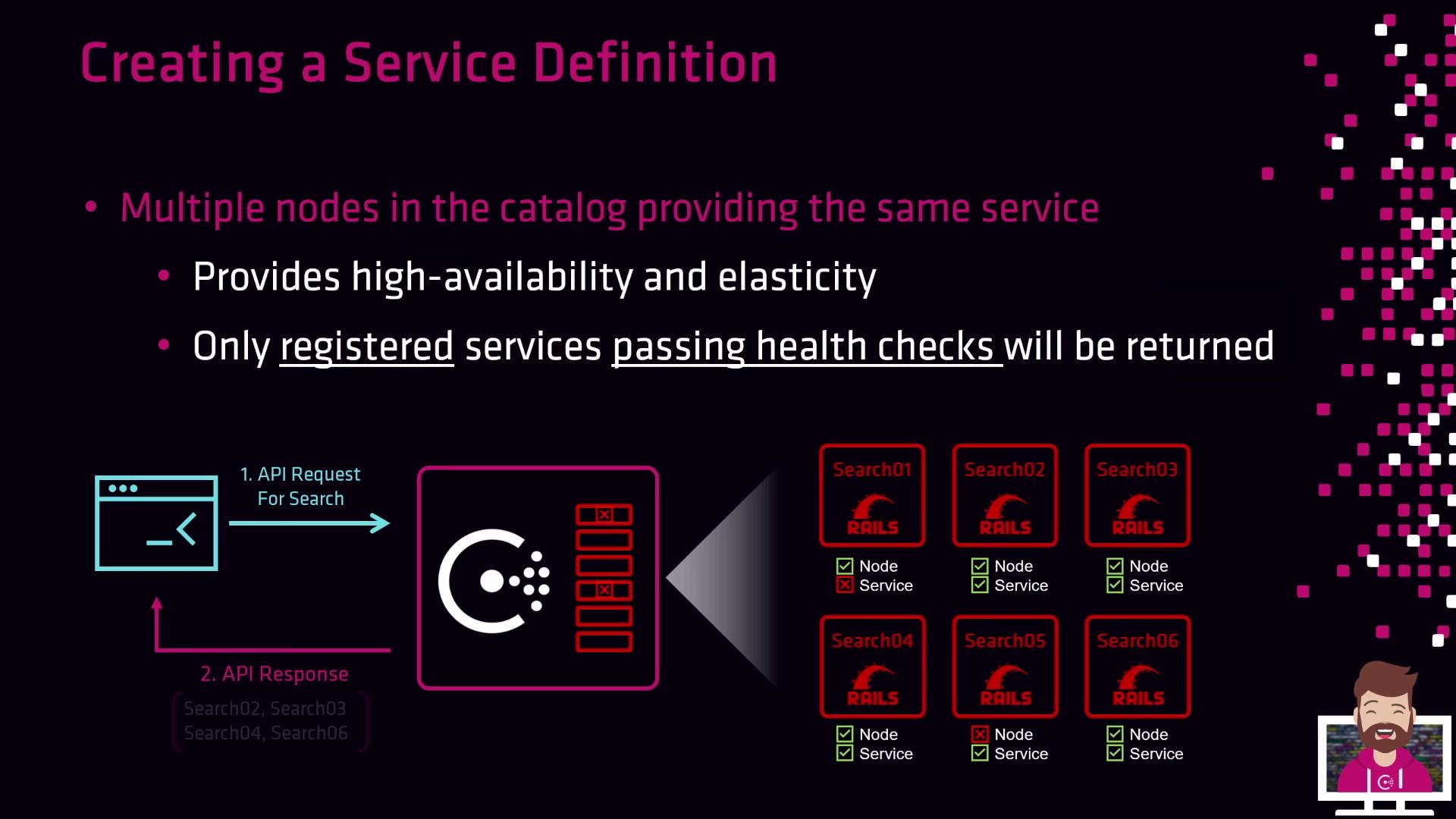
A **service definition** is a JSON file that the Consul agent uses to register your application in the Consul catalog. Once registered—and if any defined health checks pass—the service is discoverable by other nodes and can receive traffic. Failed health checks mark the service as unhealthy in the registry, and Consul will not return it in queries until it recovers.
## Service Definition Parameters
You can customize a service definition with the following fields:
| Parameter | Description | Example |
| --------- | ----------------------------------------------------------------------- | ------------------------ |
| id | Unique identifier for this service instance (defaults to `name`) | `web-server-01` |
| name | Logical service name (DNS-compliant) **\[required]** | `front-end-ecommerce` |
| tags | Optional metadata to filter queries (e.g., version, environment) | `["v7.05","production"]` |
| address | IP address where the service listens (defaults to agent’s bind address) | `10.3.13.112` |
| port | Port on which the service is running | `8080` |
| checks | Array of health checks (script, HTTP, TCP, etc.) | See below |
Only the `name` field is required. If you omit `id`, Consul uses the value of `name`. Explicitly setting `id` helps avoid collisions when running multiple instances.
## Example Service Definition
```json theme={null}
{
"service": {
"id": "web-server-01",
"name": "front-end-ecommerce",
"tags": ["v7.05", "production"],
"address": "10.3.13.112",
"port": 8080,
"checks": [
{
"args": ["/usr/local/bin/check_mem.py"],
"interval": "30s"
}
]
}
}
```
### Field Breakdown
* **id**: Unique per instance (e.g., `web-server-01`, `web-server-02`).
* **name**: Service identifier for discovery (e.g., `front-end-ecommerce`).
* **tags**: Filterable attributes like `v7.05` or `production`.
* **address**: Interface IP for the service (agent bind address if omitted).
* **port**: Network port (e.g., `8080` for HTTP).
* **checks**: Health checks; here, a memory-check script running every 30 seconds.
If health checks continually fail, the service remains in the catalog but marked unhealthy—it will not receive traffic until the check passes.
## Discovery via DNS
Consul exposes services under the `service.consul` domain. Only healthy instances are returned:
```bash theme={null}
dig A front-end-ecommerce.service.consul
;; ANSWER SECTION:
front-end-ecommerce.service.consul. 0 IN A 10.3.13.112
```
## High Availability and Elasticity
Registering multiple instances under the same `name` delivers:
* High availability: Traffic shifts to other healthy nodes if one fails.
* Elasticity: Scale instances up or down to match load and optimize resource usage.
## Next Steps
1. Save your JSON definition in the Consul agent’s configuration directory (e.g., `/etc/consul.d/`).
2. Reload or restart the Consul agent:
```bash theme={null}
consul reload # For HCL- or JSON-based configs
consul agent restart
```
3. Verify registration and health status:
```bash theme={null}
consul catalog services
consul health node web-server-01
```
## Links and References
* [Consul Service Registration](https://www.consul.io/docs/agent/services)
* [Consul Health Checks](https://www.consul.io/docs/agent/checks)
* [Consul DNS Interface](https://www.consul.io/docs/discovery/dns)