> ## Documentation Index
> Fetch the complete documentation index at: https://notes.kodekloud.com/llms.txt
> Use this file to discover all available pages before exploring further.
# Organizing Your Work with Projects
> Using Projects in Terraform Cloud to group workspaces, apply shared settings and permissions, and simplify workspace management and scalability
As your organization adopts HCP Terraform (Terraform Cloud) and the number of workspaces grows, a single flat list of workspaces becomes hard to manage. This guide explains how Projects help you scale workspace administration by grouping related workspaces, applying shared settings, and scoping team permissions.
When workspaces are all listed together—networking-dev, web-prod, customer-data, monitoring-qa, etc.—you encounter several operational challenges:
* Discovery becomes harder: lists with dozens or hundreds of workspaces slow down finding the right one.
* Repetitive changes are error-prone: updating variables or permissions per-workspace doesn’t scale.
* Team boundaries blur: everyone sees the same global list with no natural separation.
* Duplication and inconsistency: teams recreate identical variable configurations (for example, provider credentials) across many workspaces.
Projects solve these problems by grouping related workspaces and enabling shared configuration and scoped permissions.
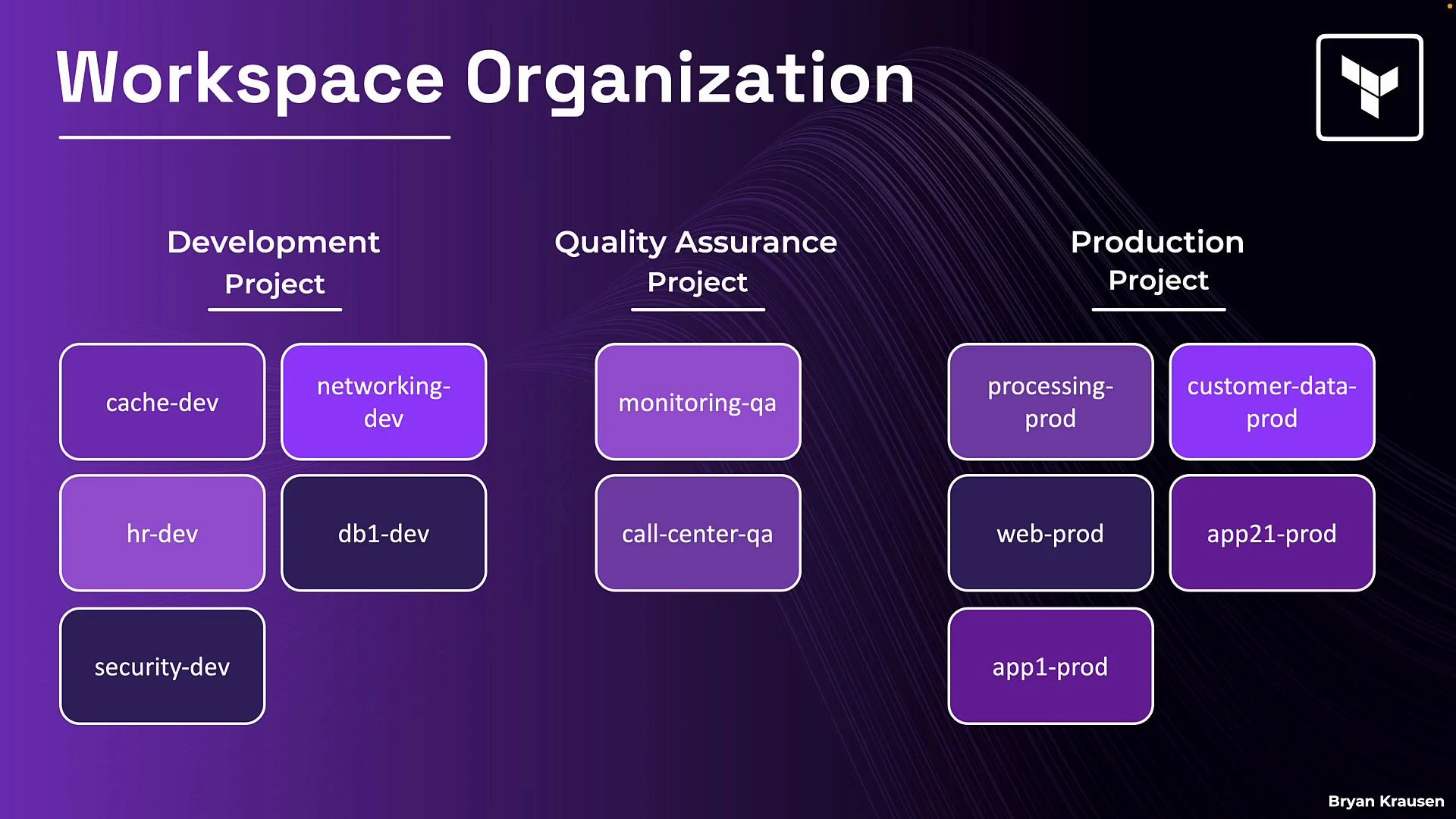 In the diagram above, twelve workspaces are organized into three projects—Development, Quality Assurance, and Production. Grouping provides a clear home for each team’s workspaces and lets administrators apply permissions and shared settings at the project level rather than repeating them across individual workspaces.
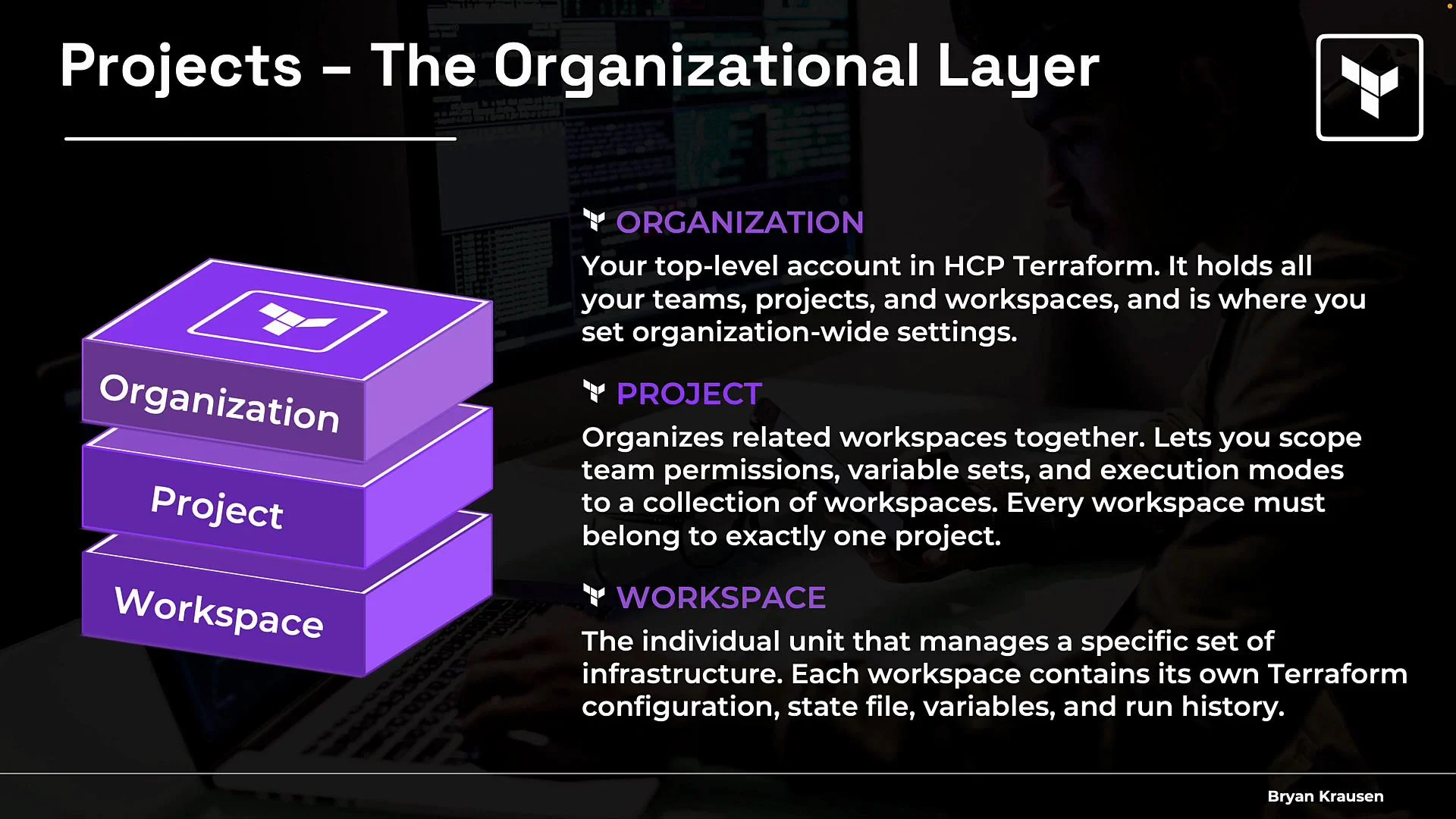
Organizational hierarchy (bottom-up)
| Level | Purpose | What it contains / controls |
| ------------------ | ------------------------------------- | --------------------------------------------------------------------------------- |
| Workspace (bottom) | Unit of deployment and runs | Terraform configuration, state, variables, and run history |
| Project (middle) | Grouping layer for related workspaces | Scoped team permissions, project-level variable sets, and execution-mode defaults |
| Organization (top) | Top-level account | Teams, projects, organization-wide defaults, and global permissions |
In the diagram above, twelve workspaces are organized into three projects—Development, Quality Assurance, and Production. Grouping provides a clear home for each team’s workspaces and lets administrators apply permissions and shared settings at the project level rather than repeating them across individual workspaces.
Organizational hierarchy (bottom-up)
| Level | Purpose | What it contains / controls |
| ------------------ | ------------------------------------- | --------------------------------------------------------------------------------- |
| Workspace (bottom) | Unit of deployment and runs | Terraform configuration, state, variables, and run history |
| Project (middle) | Grouping layer for related workspaces | Scoped team permissions, project-level variable sets, and execution-mode defaults |
| Organization (top) | Top-level account | Teams, projects, organization-wide defaults, and global permissions |
 Key project behaviors and best practices
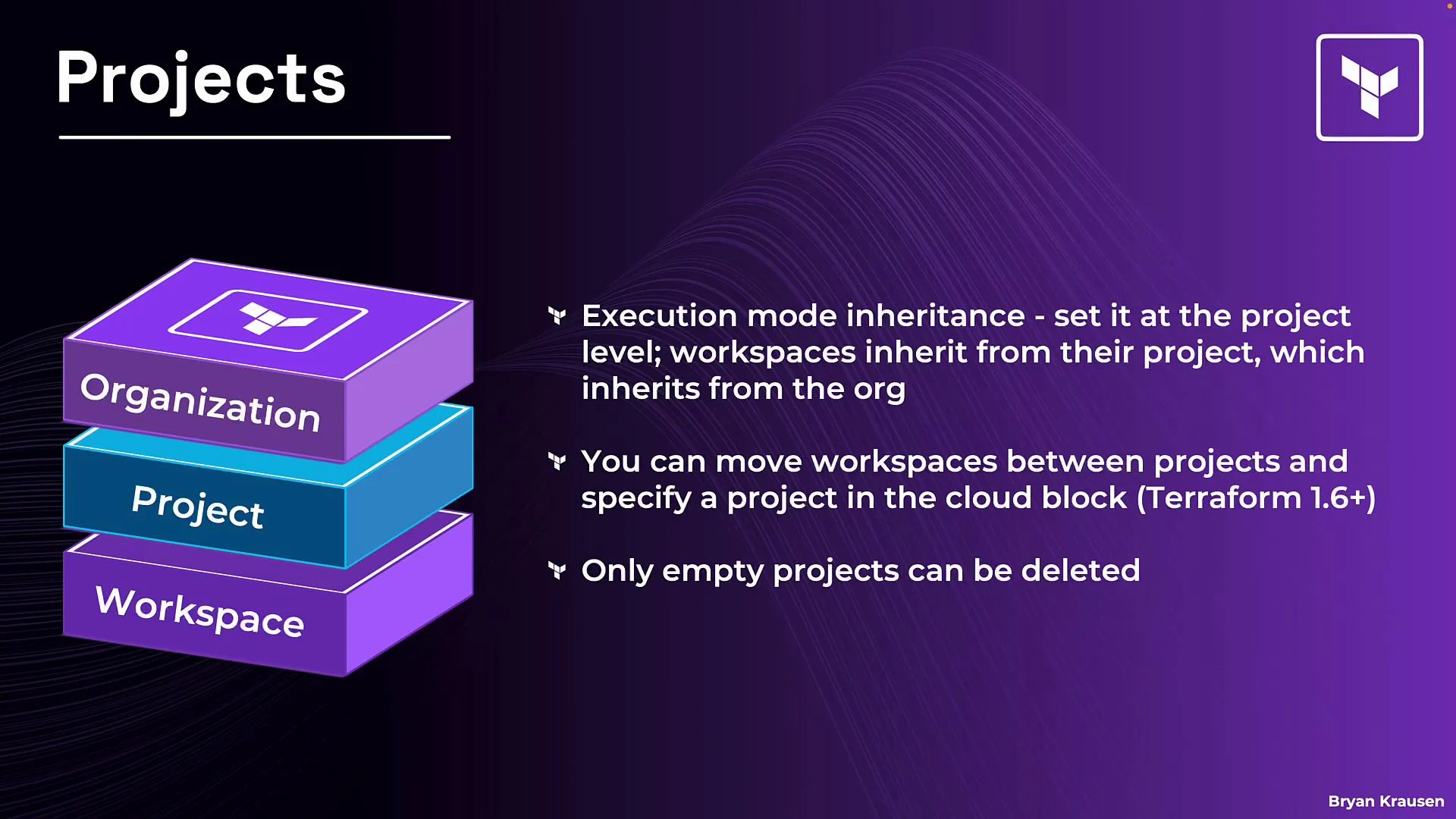
* Every workspace belongs to exactly one project.
* Workspaces cannot be in multiple projects or outside a project; each workspace is assigned to one and only one project.
* A default project is created for every organization.
* HCP Terraform creates a default project on organization creation. You may rename it, but you cannot delete it.
The default project guarantees every workspace has a project. Rename it to match your naming conventions, but note it cannot be removed.
* Scoped team permissions:
* Grant teams access at the project level instead of on each workspace. Any current or future workspace added to that project inherits the project-level permissions automatically.
* Project-level variable sets:
* Attach variable sets (or organization variable sets) to the project so they apply to current and future workspaces in that project. This reduces duplication and enforces consistency.
* Execution mode inheritance:
* The organization defines an execution-mode default (remote, local, or agent). Projects can adopt sensible defaults for their workspaces, while individual workspaces retain the ability to override execution mode when needed.
* Moving workspaces:
* Move workspaces between projects to reflect team reorganizations or shifting responsibilities without re-creating the workspace.
* Infrastructure-as-code for project assignments:
* Manage workspace ↔ project relationships programmatically using the Terraform Cloud API or the Terraform `tfe` provider. Consult the provider/API docs for exact fields and examples:
* Terraform Cloud API: [https://www.terraform.io/cloud-docs/api-docs](https://www.terraform.io/cloud-docs/api-docs)
* `tfe` provider docs: [https://registry.terraform.io/providers/hashicorp/tfe/latest/docs](https://registry.terraform.io/providers/hashicorp/tfe/latest/docs)
* Deleting projects:
* A project must be empty before it can be deleted. Move or delete workspaces in a project prior to removing the project to avoid accidental orphaning of workspaces.
Only empty projects can be deleted. Always reassign or remove workspaces before attempting to delete a project.
Key project behaviors and best practices
* Every workspace belongs to exactly one project.
* Workspaces cannot be in multiple projects or outside a project; each workspace is assigned to one and only one project.
* A default project is created for every organization.
* HCP Terraform creates a default project on organization creation. You may rename it, but you cannot delete it.
The default project guarantees every workspace has a project. Rename it to match your naming conventions, but note it cannot be removed.
* Scoped team permissions:
* Grant teams access at the project level instead of on each workspace. Any current or future workspace added to that project inherits the project-level permissions automatically.
* Project-level variable sets:
* Attach variable sets (or organization variable sets) to the project so they apply to current and future workspaces in that project. This reduces duplication and enforces consistency.
* Execution mode inheritance:
* The organization defines an execution-mode default (remote, local, or agent). Projects can adopt sensible defaults for their workspaces, while individual workspaces retain the ability to override execution mode when needed.
* Moving workspaces:
* Move workspaces between projects to reflect team reorganizations or shifting responsibilities without re-creating the workspace.
* Infrastructure-as-code for project assignments:
* Manage workspace ↔ project relationships programmatically using the Terraform Cloud API or the Terraform `tfe` provider. Consult the provider/API docs for exact fields and examples:
* Terraform Cloud API: [https://www.terraform.io/cloud-docs/api-docs](https://www.terraform.io/cloud-docs/api-docs)
* `tfe` provider docs: [https://registry.terraform.io/providers/hashicorp/tfe/latest/docs](https://registry.terraform.io/providers/hashicorp/tfe/latest/docs)
* Deleting projects:
* A project must be empty before it can be deleted. Move or delete workspaces in a project prior to removing the project to avoid accidental orphaning of workspaces.
Only empty projects can be deleted. Always reassign or remove workspaces before attempting to delete a project.
 Project benefits at a glance
| Benefit | How projects help |
| ------------------------ | ----------------------------------------------------------------------------- |
| Faster discovery | Teams look in their project first instead of scanning a flat workspace list |
| Consistent configuration | Apply variable sets and execution defaults at the project level |
| Simpler permissions | Grant access to a whole project instead of individual workspaces |
| Reduced duplication | Shared variable sets and defaults eliminate repeated setup work |
| Scalable administration | Centralized changes propagate to current and future workspaces in the project |
Summary
Projects are the organizational layer between your organization and individual workspaces in Terraform Cloud/HCP Terraform. They reduce workspace sprawl by providing grouping, scoped permissions, shared variable sets, and execution-mode inheritance—making workspace management more scalable, consistent, and secure.
Next steps / walkthrough
A follow-up walkthrough demonstrates how to:
* Create a new project,
* Assign existing workspaces to a project,
* Move workspaces between projects, and
* Attach project-level variable sets.
Links and references
* Terraform Cloud API: [https://www.terraform.io/cloud-docs/api-docs](https://www.terraform.io/cloud-docs/api-docs)
* `tfe` provider (Terraform Cloud provider): [https://registry.terraform.io/providers/hashicorp/tfe/latest/docs](https://registry.terraform.io/providers/hashicorp/tfe/latest/docs)
* Terraform Cloud documentation: [https://www.terraform.io/cloud-docs](https://www.terraform.io/cloud-docs)
Project benefits at a glance
| Benefit | How projects help |
| ------------------------ | ----------------------------------------------------------------------------- |
| Faster discovery | Teams look in their project first instead of scanning a flat workspace list |
| Consistent configuration | Apply variable sets and execution defaults at the project level |
| Simpler permissions | Grant access to a whole project instead of individual workspaces |
| Reduced duplication | Shared variable sets and defaults eliminate repeated setup work |
| Scalable administration | Centralized changes propagate to current and future workspaces in the project |
Summary
Projects are the organizational layer between your organization and individual workspaces in Terraform Cloud/HCP Terraform. They reduce workspace sprawl by providing grouping, scoped permissions, shared variable sets, and execution-mode inheritance—making workspace management more scalable, consistent, and secure.
Next steps / walkthrough
A follow-up walkthrough demonstrates how to:
* Create a new project,
* Assign existing workspaces to a project,
* Move workspaces between projects, and
* Attach project-level variable sets.
Links and references
* Terraform Cloud API: [https://www.terraform.io/cloud-docs/api-docs](https://www.terraform.io/cloud-docs/api-docs)
* `tfe` provider (Terraform Cloud provider): [https://registry.terraform.io/providers/hashicorp/tfe/latest/docs](https://registry.terraform.io/providers/hashicorp/tfe/latest/docs)
* Terraform Cloud documentation: [https://www.terraform.io/cloud-docs](https://www.terraform.io/cloud-docs)