> ## Documentation Index
> Fetch the complete documentation index at: https://notes.kodekloud.com/llms.txt
> Use this file to discover all available pages before exploring further.
# Sharing Variables with Variable Sets
> Explains using variable sets in Terraform Cloud to centrally manage and apply reusable input and environment variables across workspaces, projects, scopes, and override precedence.
Projects let you organize workspaces; variable sets provide the same convenience for variables. A variable set is a named, reusable collection of Terraform input variables and environment variables that you can apply to multiple workspaces or projects. This avoids repetitive edits and helps you rotate or update credentials centrally.
Consider a typical scenario: six production workspaces — networking, web, customer-data, app-one, caching, and processing — all deploy to [Google Cloud Platform (GCP)](https://cloud.google.com). Each workspace needs the same GCP credentials. Without variable sets you'd add the same sensitive environment variable to each workspace individually — six separate edits. If credentials expire or are rotated, you'd have to repeat that work across each workspace. Variable sets solve this by centralizing variables so a single update propagates to all linked workspaces.
 Key best practices
* Create variable sets focused on a single concern — do not combine unrelated variables in one giant set.
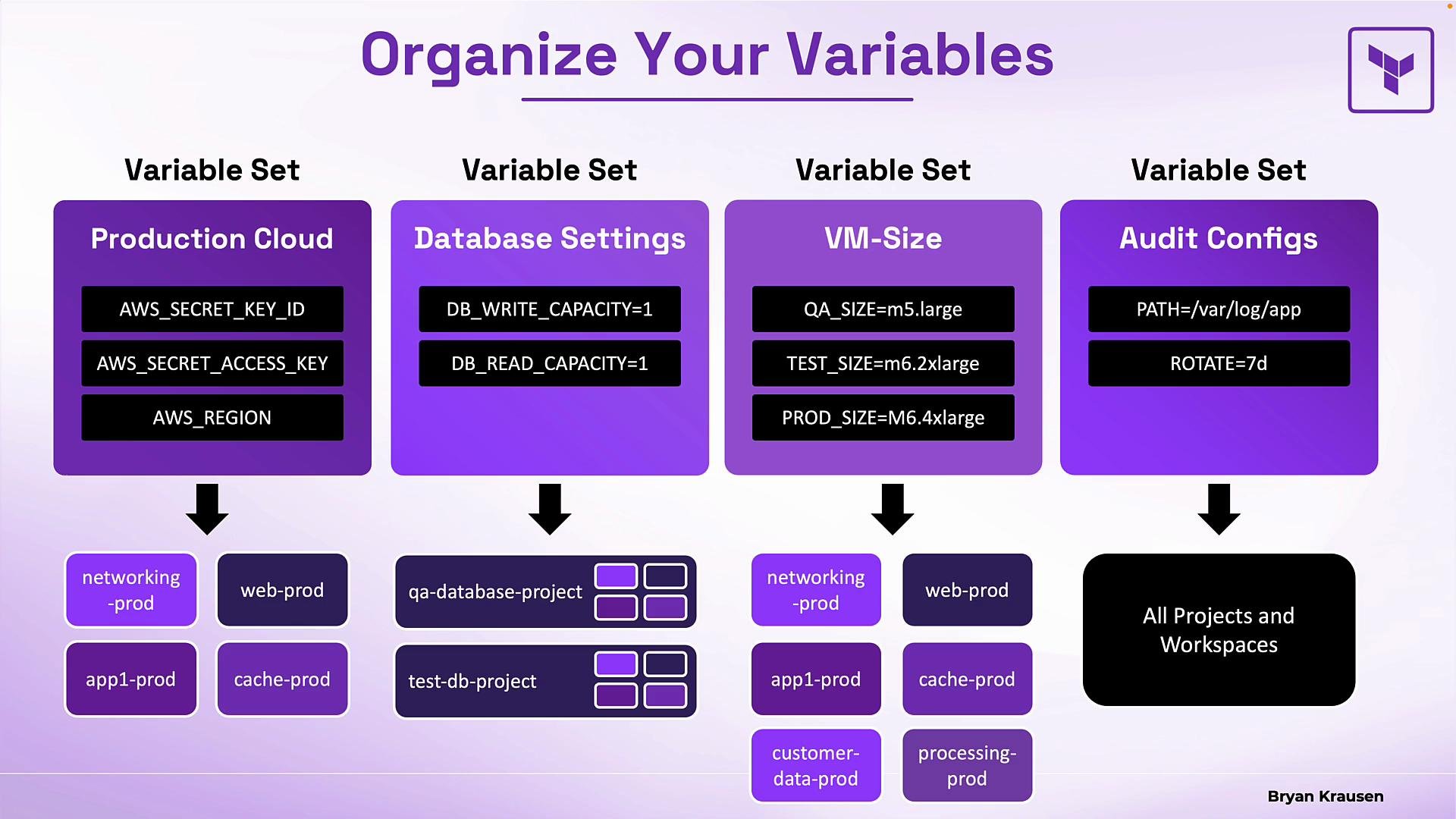
* Use descriptive names (for example, `Production Cloud`, `Database Settings`, `VM-Size`, `Audit Configs`) so teams understand intent and scope.
* Prefer project-scoped sets for team credentials and global sets only for organization-wide defaults (audit settings, compliance tags).
Examples of common variable sets:
| Variable set | Purpose |
| ----------------- | ---------------------------------------------------- |
| Production Cloud | Cloud credentials (client ID, client secret, region) |
| Database Settings | Default DB read/write capacity, connection settings |
| VM-Size | Instance sizing standards for QA, Test, Production |
| Audit Configs | Centralized logging path and rotation settings |
How these are applied
* A variable set can be applied to individual workspaces, to all workspaces within specific projects, or globally across the organization.
* In the infographic above, `Production Cloud` is applied to several workspaces (networking, web, app-one, caching). `Database Settings` applies to two projects (QA DB and Test DB), so every current and future workspace in those projects inherits those settings. `VM-Size` targets six specific workspaces, and `Audit Configs` is applied globally.
Benefits
* One place to update or rotate credentials.
* Consistent settings across many workspaces.
* Workspace-specific variables still allowed to override set values when necessary.
What variable sets provide (summary)
| Feature | Details |
| --------------------- | ----------------------------------------------------------------------------------------------- |
| Reusable collections | Define once, apply to multiple workspaces or projects |
| Mixed variable types | Can include Terraform input variables and environment variables in the same set |
| Automatic propagation | Updating a value in a variable set propagates to all associated workspaces |
| Local overrides | Workspace-specific variables can override variable set values (subject to priority rules below) |
Scopes
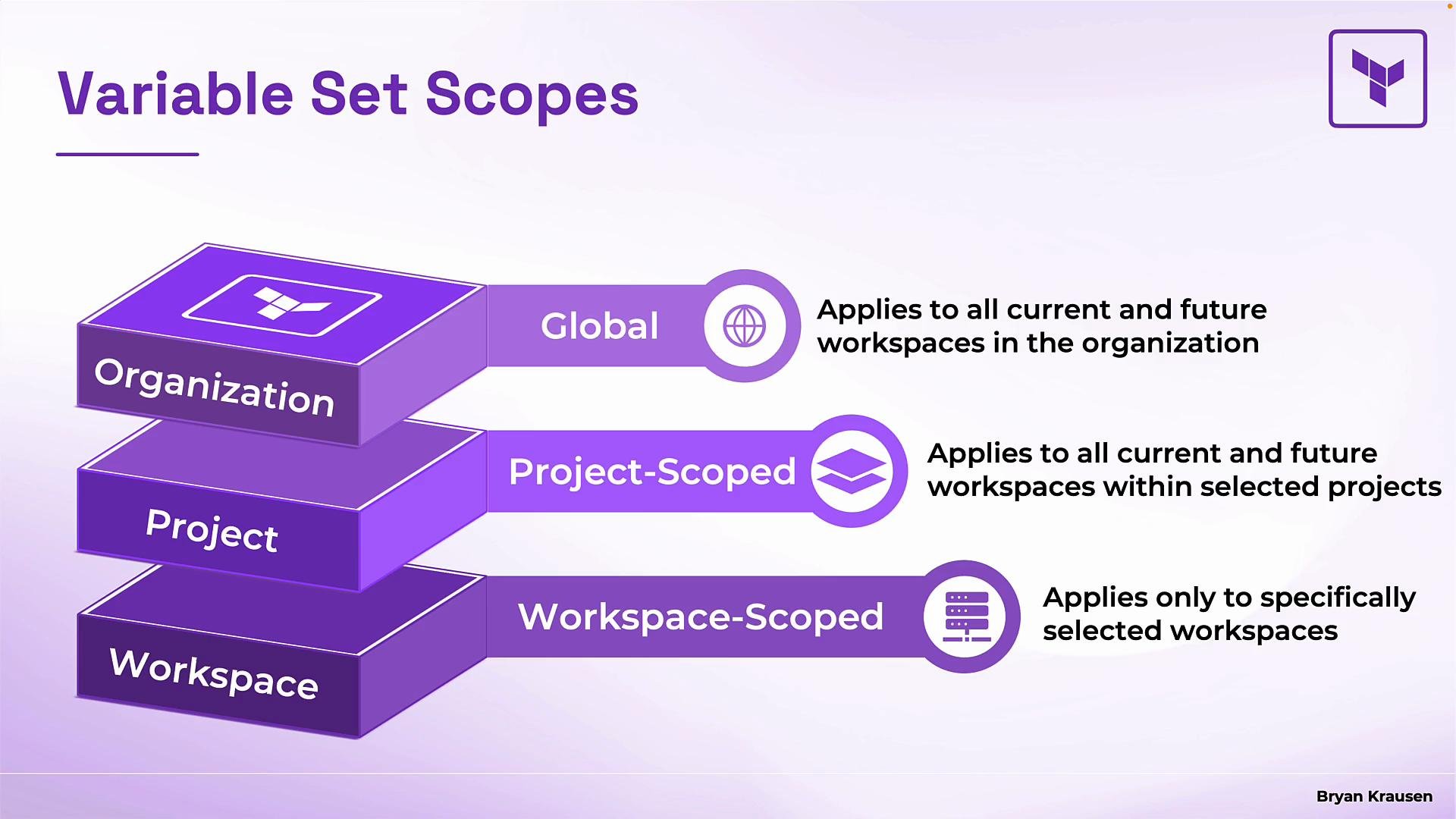
Variable sets map to the organization hierarchy. There are three scopes:
| Scope | Applies to | Typical use |
| ---------------- | ----------------------------------------------------------- | --------------------------------------------------------------------- |
| Global | All current and future workspaces in the organization | Organization-wide defaults (audit settings, compliance tags) |
| Project-scoped | All current and future workspaces within a selected project | Team-level credentials and defaults |
| Workspace-scoped | Specific workspaces you select | Shared settings for a subset of workspaces that aren’t in one project |
Key best practices
* Create variable sets focused on a single concern — do not combine unrelated variables in one giant set.
* Use descriptive names (for example, `Production Cloud`, `Database Settings`, `VM-Size`, `Audit Configs`) so teams understand intent and scope.
* Prefer project-scoped sets for team credentials and global sets only for organization-wide defaults (audit settings, compliance tags).
Examples of common variable sets:
| Variable set | Purpose |
| ----------------- | ---------------------------------------------------- |
| Production Cloud | Cloud credentials (client ID, client secret, region) |
| Database Settings | Default DB read/write capacity, connection settings |
| VM-Size | Instance sizing standards for QA, Test, Production |
| Audit Configs | Centralized logging path and rotation settings |
How these are applied
* A variable set can be applied to individual workspaces, to all workspaces within specific projects, or globally across the organization.
* In the infographic above, `Production Cloud` is applied to several workspaces (networking, web, app-one, caching). `Database Settings` applies to two projects (QA DB and Test DB), so every current and future workspace in those projects inherits those settings. `VM-Size` targets six specific workspaces, and `Audit Configs` is applied globally.
Benefits
* One place to update or rotate credentials.
* Consistent settings across many workspaces.
* Workspace-specific variables still allowed to override set values when necessary.
What variable sets provide (summary)
| Feature | Details |
| --------------------- | ----------------------------------------------------------------------------------------------- |
| Reusable collections | Define once, apply to multiple workspaces or projects |
| Mixed variable types | Can include Terraform input variables and environment variables in the same set |
| Automatic propagation | Updating a value in a variable set propagates to all associated workspaces |
| Local overrides | Workspace-specific variables can override variable set values (subject to priority rules below) |
Scopes
Variable sets map to the organization hierarchy. There are three scopes:
| Scope | Applies to | Typical use |
| ---------------- | ----------------------------------------------------------- | --------------------------------------------------------------------- |
| Global | All current and future workspaces in the organization | Organization-wide defaults (audit settings, compliance tags) |
| Project-scoped | All current and future workspaces within a selected project | Team-level credentials and defaults |
| Workspace-scoped | Specific workspaces you select | Shared settings for a subset of workspaces that aren’t in one project |
 Variable precedence and conflict resolution
When a workspace receives variables from multiple sources, these rules determine which value is used.
Example: a variable set defines default database capacity settings:
```hcl theme={null}
db_write_capacity = 1
db_read_capacity = 1
```
If that set is applied to three workspaces, all three inherit those defaults. If one workspace needs a higher read capacity (for a reporting app), add a workspace-specific variable:
```hcl theme={null}
db_read_capacity = 10
```
Result:
* The workspace with the workspace-specific variable uses `db_read_capacity = 10`.
* The other two workspaces continue to use `db_read_capacity = 1`.
* `db_write_capacity` remains `1` everywhere since no overrides exist.
Rule to remember: a workspace-specific variable normally overrides values from applied variable sets.
Additional precedence rules
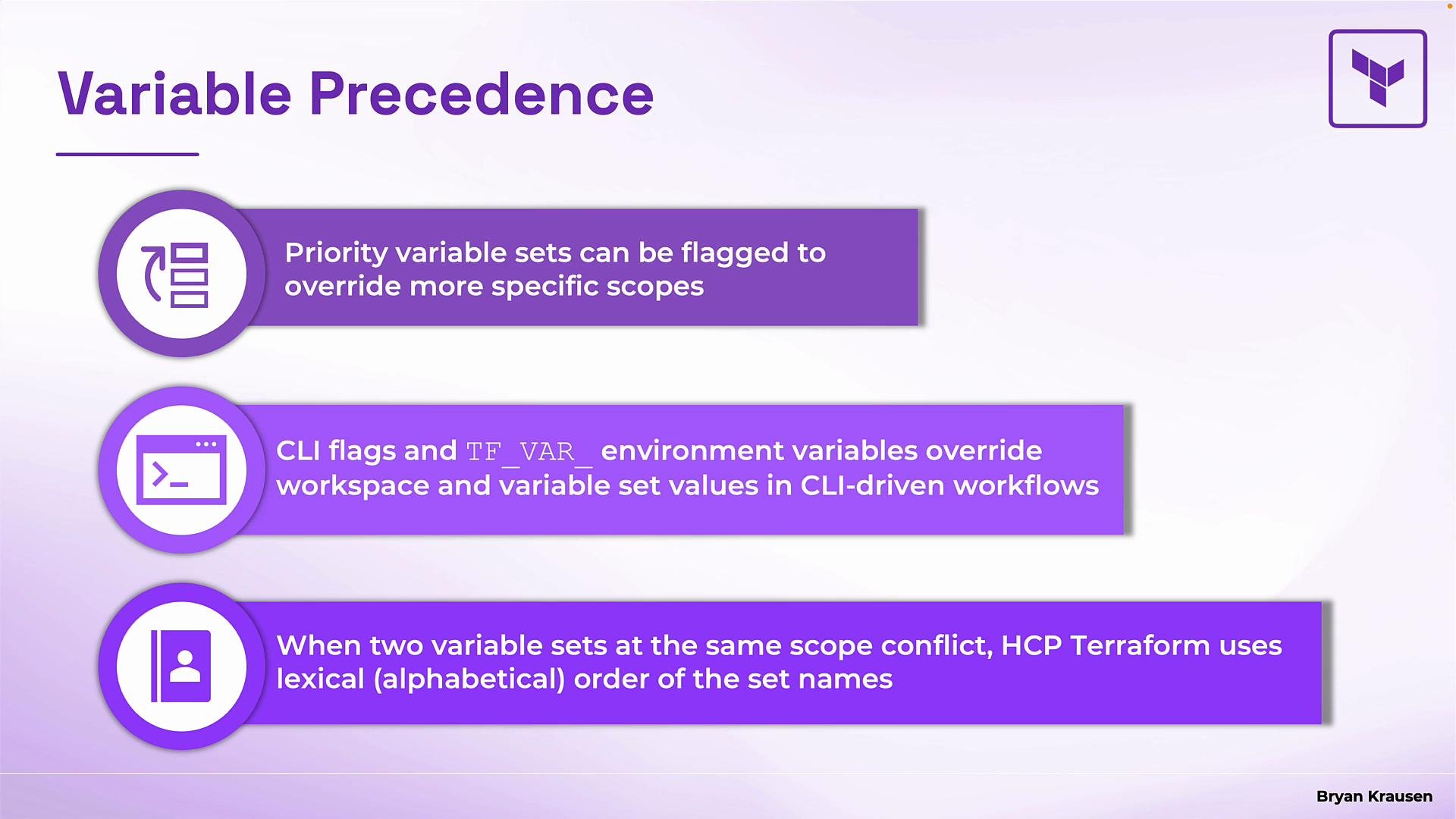
* Priority variable sets: You can mark a variable set as a priority set. A priority set's values override more specific scopes, including workspace-specific variables. This is an admin enforcement mechanism for organization-wide policies or required credentials.
Use priority variable sets carefully: they override workspace-specific variables and can prevent teams from using local overrides when necessary.
* CLI and environment overrides: When you supply values directly at runtime they override both workspace and variable set values. These include:
* `-var` and `-var-file` command-line flags
* Environment variables prefixed with `TF_VAR_` (for example `TF_VAR_db_read_capacity=10`)
* Conflicts between variable sets at the same scope: If two variable sets at the same scope define the same variable key and both apply to a workspace, [HCP Terraform](https://www.terraform.io/cloud) resolves the conflict using alphabetical order of the variable set names. For example, `A-settings` overrides `B-settings` if both define the same key. The system uses lexical order only — not most-recent-edit or size.
Variable precedence and conflict resolution
When a workspace receives variables from multiple sources, these rules determine which value is used.
Example: a variable set defines default database capacity settings:
```hcl theme={null}
db_write_capacity = 1
db_read_capacity = 1
```
If that set is applied to three workspaces, all three inherit those defaults. If one workspace needs a higher read capacity (for a reporting app), add a workspace-specific variable:
```hcl theme={null}
db_read_capacity = 10
```
Result:
* The workspace with the workspace-specific variable uses `db_read_capacity = 10`.
* The other two workspaces continue to use `db_read_capacity = 1`.
* `db_write_capacity` remains `1` everywhere since no overrides exist.
Rule to remember: a workspace-specific variable normally overrides values from applied variable sets.
Additional precedence rules
* Priority variable sets: You can mark a variable set as a priority set. A priority set's values override more specific scopes, including workspace-specific variables. This is an admin enforcement mechanism for organization-wide policies or required credentials.
Use priority variable sets carefully: they override workspace-specific variables and can prevent teams from using local overrides when necessary.
* CLI and environment overrides: When you supply values directly at runtime they override both workspace and variable set values. These include:
* `-var` and `-var-file` command-line flags
* Environment variables prefixed with `TF_VAR_` (for example `TF_VAR_db_read_capacity=10`)
* Conflicts between variable sets at the same scope: If two variable sets at the same scope define the same variable key and both apply to a workspace, [HCP Terraform](https://www.terraform.io/cloud) resolves the conflict using alphabetical order of the variable set names. For example, `A-settings` overrides `B-settings` if both define the same key. The system uses lexical order only — not most-recent-edit or size.
 Precedence summary (most to least specific)
1. CLI-provided variables (`-var`, `-var-file`) and `TF_VAR_` environment variables
2. Priority variable sets (admin-enforced)
3. Workspace-specific variables
4. Project/global variable sets
* If multiple variable sets at the same scope conflict, alphabetical set name order wins
Recap and next steps
* Variable sets centralize and reuse variables across workspaces and projects.
* Scopes: Global, Project, Workspace — choose the right scope for credentials vs. organization defaults.
* Precedence: know the override order and use priority sets sparingly.
Try it hands-on: create variable sets and experiment with scope and overrides in [HCP Terraform](https://www.terraform.io/cloud) to see how scoping and precedence behave in your environment.
Links and references
* [Terraform Cloud (HCP Terraform)](https://www.terraform.io/cloud)
* [Google Cloud Platform (GCP)](https://cloud.google.com)
Precedence summary (most to least specific)
1. CLI-provided variables (`-var`, `-var-file`) and `TF_VAR_` environment variables
2. Priority variable sets (admin-enforced)
3. Workspace-specific variables
4. Project/global variable sets
* If multiple variable sets at the same scope conflict, alphabetical set name order wins
Recap and next steps
* Variable sets centralize and reuse variables across workspaces and projects.
* Scopes: Global, Project, Workspace — choose the right scope for credentials vs. organization defaults.
* Precedence: know the override order and use priority sets sparingly.
Try it hands-on: create variable sets and experiment with scope and overrides in [HCP Terraform](https://www.terraform.io/cloud) to see how scoping and precedence behave in your environment.
Links and references
* [Terraform Cloud (HCP Terraform)](https://www.terraform.io/cloud)
* [Google Cloud Platform (GCP)](https://cloud.google.com)