> ## Documentation Index
> Fetch the complete documentation index at: https://notes.kodekloud.com/llms.txt
> Use this file to discover all available pages before exploring further.
# Understanding HCP Terraform Workspaces
> Explains HCP Terraform workspaces, differences from CLI workspaces, their contents, workflows, and best practices for team and VCS driven infrastructure management.
In this lesson we examine the foundational building block of HCP Terraform: workspaces.
You've already authenticated and connected your CLI to HCP Terraform, so the CLI can interact with your account and your token is stored. Before managing infrastructure in HCP Terraform, understand what an HCP Terraform workspace is — and how it differs from the local CLI workspaces you may already know from Terraform.
Although the names are the same, CLI workspaces and HCP Terraform workspaces are different concepts. Keep this distinction in mind when designing your workflow and organizing environments.
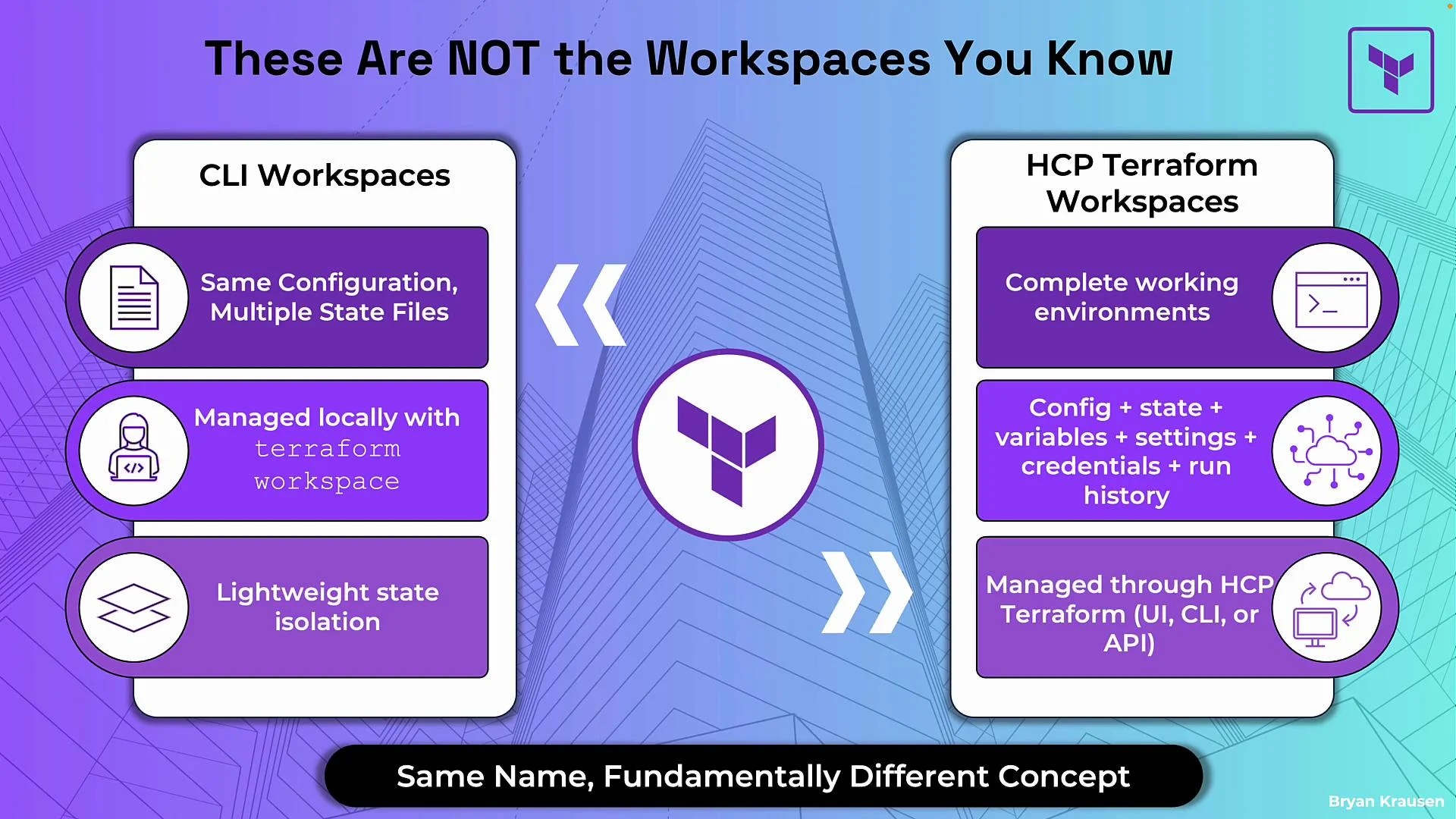 ## CLI workspaces vs HCP Terraform workspaces
CLI workspaces and HCP Terraform workspaces both help manage multiple infrastructure environments, but they solve different problems and operate at different scopes.
| Aspect | CLI Workspaces | HCP Terraform Workspaces |
| ---------- | ------------------------------------------------------------------------------------------------ | ---------------------------------------------------------------------------------- |
| Scope | Local directory-level state isolation | Full remote environment with config, state, runs, variables, and access controls |
| State | Multiple state files in the working directory | Single encrypted state per workspace with version history and rollback |
| Management | Managed locally with the Terraform CLI (`terraform workspace new`, `terraform workspace select`) | Managed via HCP UI, CLI, or API; supports teams and production workflows |
| Use case | Lightweight environment switching for local testing | Team-oriented lifecycle, auditability, and access control for production and CI/CD |
CLI workspace commands you may use locally:
```bash theme={null}
terraform workspace new dev
terraform workspace select prod
```
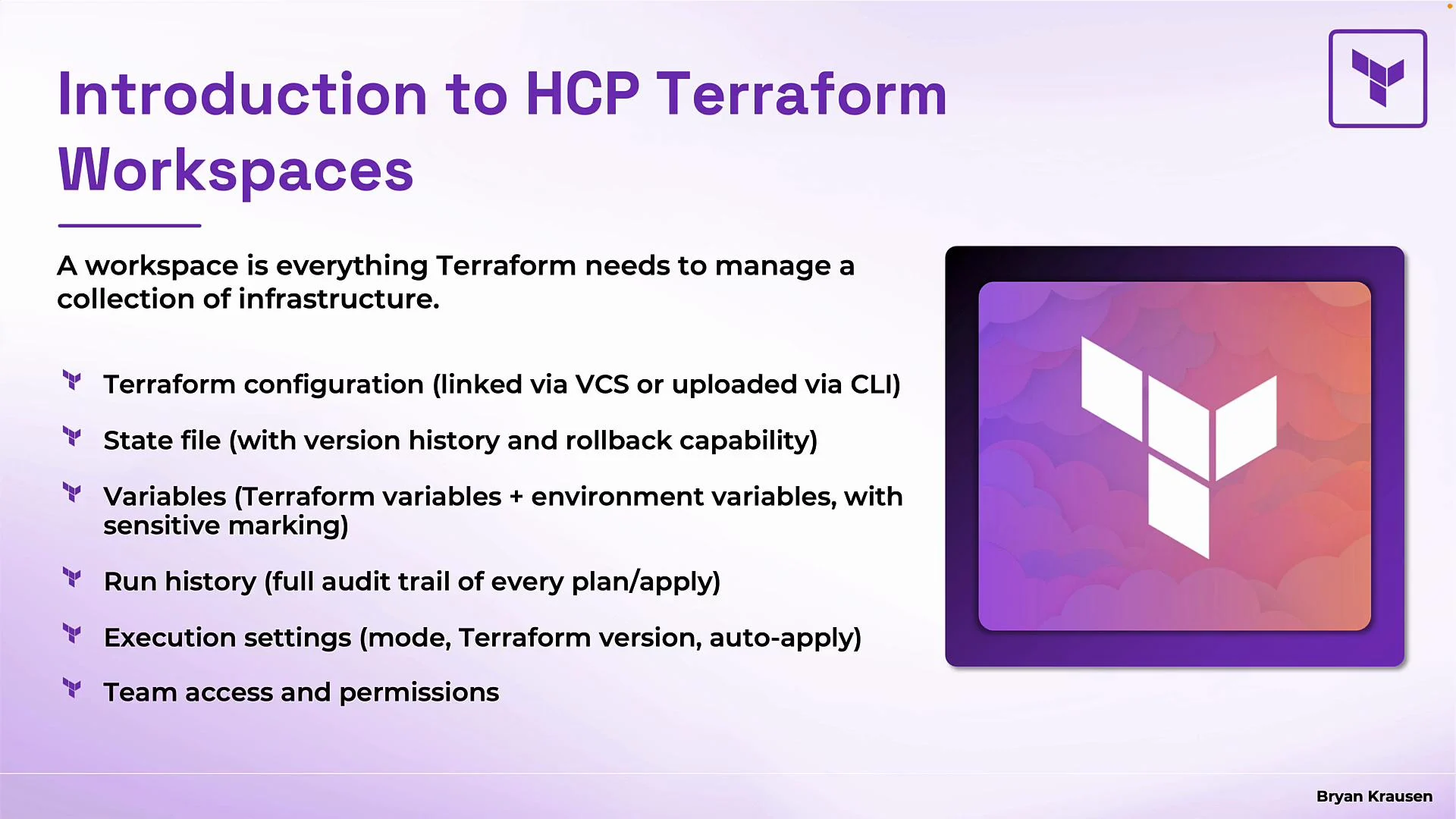
HCP Terraform workspaces are self-contained environments that include configuration, state, variables, run history, execution settings, credentials, and access controls. They are intended for team workflows and production usage rather than simple local state isolation.
## What an HCP Terraform workspace contains
* Terraform configuration
* `.tf` files are provided to the workspace by linking a VCS repository (GitHub, GitLab, Bitbucket, etc.) or by uploading/running from the CLI against the workspace.
* State file and history
* Remote, encrypted state with full version history and rollback capability.
* Variables
* Plaintext and sensitive variables can be stored in the workspace; sensitive values are write-only.
* Run history
* Every plan, apply, and destroy is recorded with user identity, timestamps, change details, and logs.
* Execution settings
* Execution mode, pinned Terraform version, and `auto-apply` settings per workspace.
* Team access and permissions
* Fine-grained controls over who can view, plan, apply, or modify workspace settings.
## CLI workspaces vs HCP Terraform workspaces
CLI workspaces and HCP Terraform workspaces both help manage multiple infrastructure environments, but they solve different problems and operate at different scopes.
| Aspect | CLI Workspaces | HCP Terraform Workspaces |
| ---------- | ------------------------------------------------------------------------------------------------ | ---------------------------------------------------------------------------------- |
| Scope | Local directory-level state isolation | Full remote environment with config, state, runs, variables, and access controls |
| State | Multiple state files in the working directory | Single encrypted state per workspace with version history and rollback |
| Management | Managed locally with the Terraform CLI (`terraform workspace new`, `terraform workspace select`) | Managed via HCP UI, CLI, or API; supports teams and production workflows |
| Use case | Lightweight environment switching for local testing | Team-oriented lifecycle, auditability, and access control for production and CI/CD |
CLI workspace commands you may use locally:
```bash theme={null}
terraform workspace new dev
terraform workspace select prod
```
HCP Terraform workspaces are self-contained environments that include configuration, state, variables, run history, execution settings, credentials, and access controls. They are intended for team workflows and production usage rather than simple local state isolation.
## What an HCP Terraform workspace contains
* Terraform configuration
* `.tf` files are provided to the workspace by linking a VCS repository (GitHub, GitLab, Bitbucket, etc.) or by uploading/running from the CLI against the workspace.
* State file and history
* Remote, encrypted state with full version history and rollback capability.
* Variables
* Plaintext and sensitive variables can be stored in the workspace; sensitive values are write-only.
* Run history
* Every plan, apply, and destroy is recorded with user identity, timestamps, change details, and logs.
* Execution settings
* Execution mode, pinned Terraform version, and `auto-apply` settings per workspace.
* Team access and permissions
* Fine-grained controls over who can view, plan, apply, or modify workspace settings.
 You can think of a workspace as much more than “just state” — it is a complete, isolated environment for managing a discrete collection of infrastructure.
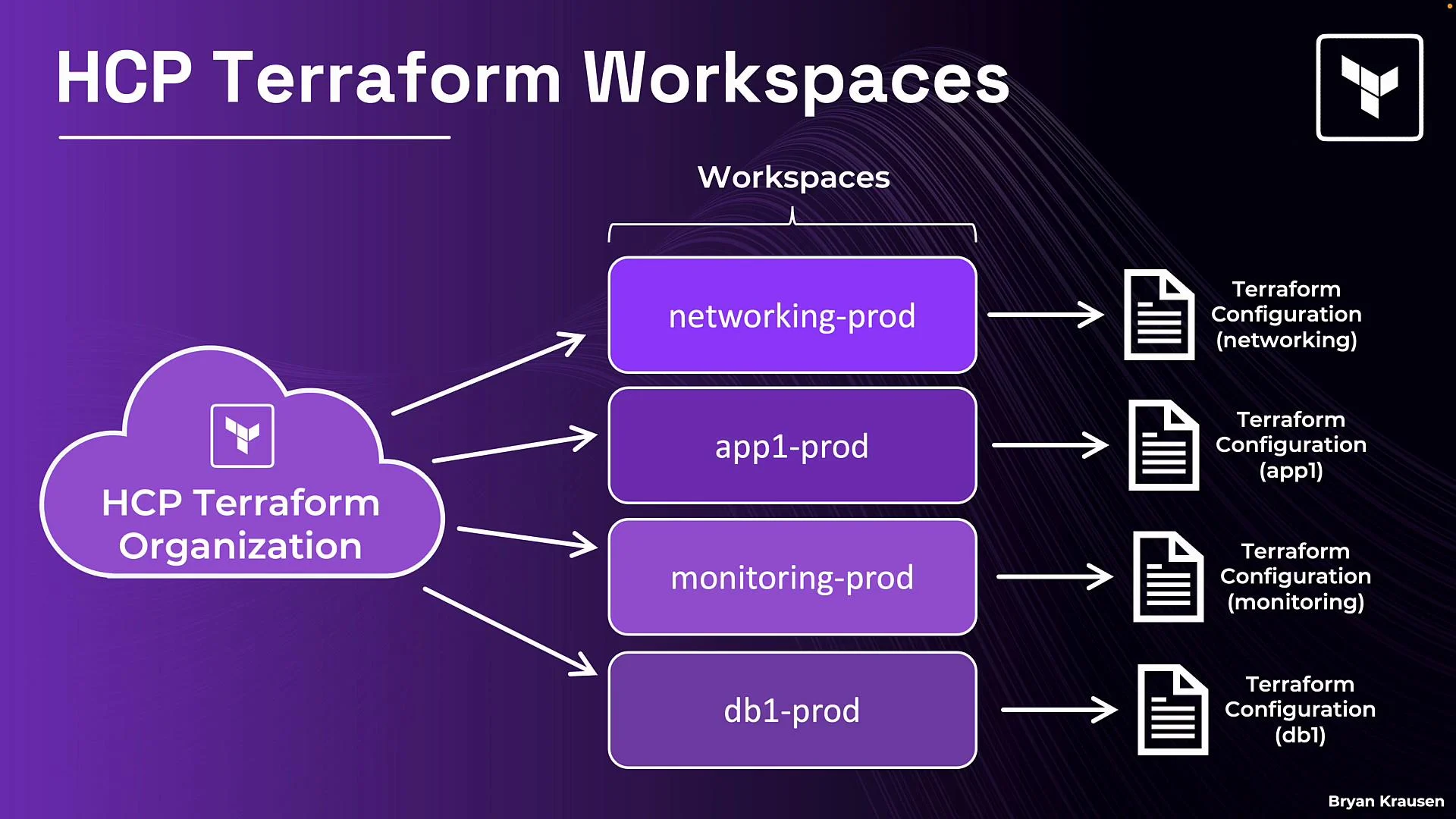
## How workspaces fit into the organization structure
Workspaces belong to an HCP Terraform organization (the top-level container). An organization can contain many workspaces; each workspace is insulated with its own configuration, state, variables, and run history. Changes in one workspace do not affect another.
Example naming pattern for clarity and reduced blast radius:
* `networking-prod`, `networking-dev`
* `app1-prod`, `app1-dev`
* `monitoring-prod`, `monitoring-dev`
Workspaces often point to a root configuration that corresponds to a logical area of infrastructure. Multiple workspaces can reference the same repository but differ by variables or workspace-level settings.
You can think of a workspace as much more than “just state” — it is a complete, isolated environment for managing a discrete collection of infrastructure.
## How workspaces fit into the organization structure
Workspaces belong to an HCP Terraform organization (the top-level container). An organization can contain many workspaces; each workspace is insulated with its own configuration, state, variables, and run history. Changes in one workspace do not affect another.
Example naming pattern for clarity and reduced blast radius:
* `networking-prod`, `networking-dev`
* `app1-prod`, `app1-dev`
* `monitoring-prod`, `monitoring-dev`
Workspaces often point to a root configuration that corresponds to a logical area of infrastructure. Multiple workspaces can reference the same repository but differ by variables or workspace-level settings.
 ## Inside a single workspace
In a single workspace you will typically manage:
* Variables: Environment-specific inputs (region, instance types, credentials).
* Terraform version: Pin a workspace to a Terraform version (e.g., `1.5`) to ensure consistent remote runs.
* Run history and audits: Detailed logs for plans and applies for traceability and debugging.
* Permissions: Workspace-level IAM to control who can plan/apply or manage variables.
* State file: Encrypted-at-rest and versioned per workspace.
* Terraform configuration: `.tf` files linked via VCS or uploaded from the CLI.
HCP Terraform encrypts workspace state at rest automatically — you do not need to configure separate encryption for workspace state.
## VCS connections and the VCS-driven workflow
Linking a workspace to a version control system (VCS) repository enables a declarative, reviewable workflow where infrastructure changes are tied to code changes.
Typical VCS-driven flow:
1. Developer updates code locally and pushes a commit or opens a pull request.
2. HCP Terraform detects the change and creates a plan in the linked workspace.
3. The team reviews the plan and either approves/apply manually or relies on `auto-apply` to apply automatically after a successful plan.
This workflow improves traceability and ensures infrastructure changes are reviewed alongside application code. It is recommended for teams practicing GitOps or wanting clear audit trails.
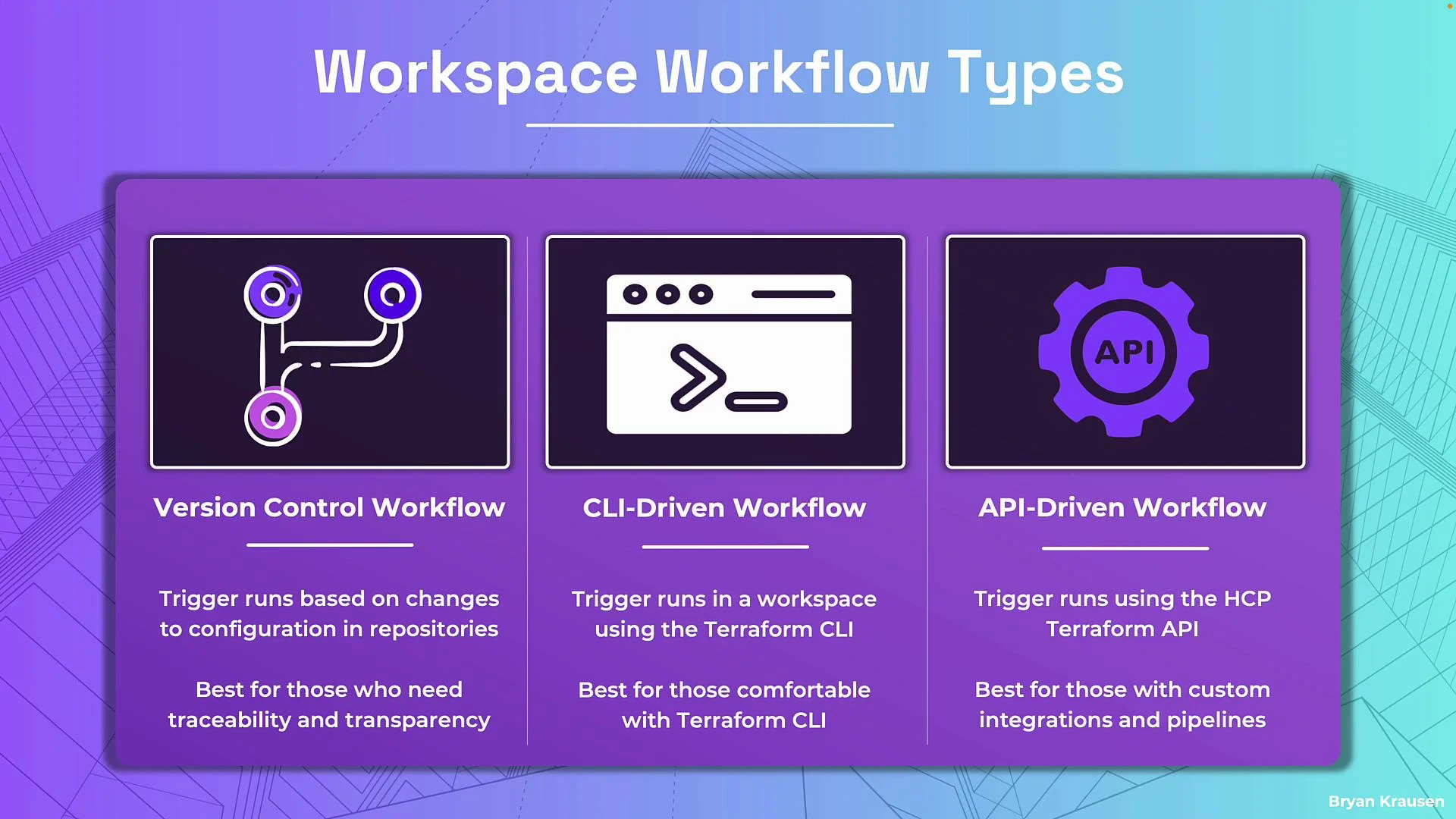
## Workspace workflows — how runs are triggered
When creating a workspace you select a workflow type; this determines how runs are initiated and how state changes propagate.
| Workflow Type | Trigger | Best for | Example |
| ------------------------ | ----------------------------------- | ------------------------------------------------------------------------ | ------------------------------------------------------------ |
| Version Control Workflow | Commits / Pull Requests | Teams that want traceability and reviewable plans | Link workspace to GitHub repo to auto-create plans on PRs |
| CLI-Driven Workflow | Local CLI (after `terraform login`) | Individuals or teams who prefer direct CLI control with remote execution | `terraform plan` / `terraform apply` against the HCP backend |
| API-Driven Workflow | HCP Terraform API calls | Custom automation, CI/CD pipelines, or integrations | GitHub Actions calling HCP API to trigger runs |
Use the workflow that fits your team: VCS-driven for collaborative, auditable changes; CLI-driven for developer-driven runs; API-driven for automation and pipelines.
## Inside a single workspace
In a single workspace you will typically manage:
* Variables: Environment-specific inputs (region, instance types, credentials).
* Terraform version: Pin a workspace to a Terraform version (e.g., `1.5`) to ensure consistent remote runs.
* Run history and audits: Detailed logs for plans and applies for traceability and debugging.
* Permissions: Workspace-level IAM to control who can plan/apply or manage variables.
* State file: Encrypted-at-rest and versioned per workspace.
* Terraform configuration: `.tf` files linked via VCS or uploaded from the CLI.
HCP Terraform encrypts workspace state at rest automatically — you do not need to configure separate encryption for workspace state.
## VCS connections and the VCS-driven workflow
Linking a workspace to a version control system (VCS) repository enables a declarative, reviewable workflow where infrastructure changes are tied to code changes.
Typical VCS-driven flow:
1. Developer updates code locally and pushes a commit or opens a pull request.
2. HCP Terraform detects the change and creates a plan in the linked workspace.
3. The team reviews the plan and either approves/apply manually or relies on `auto-apply` to apply automatically after a successful plan.
This workflow improves traceability and ensures infrastructure changes are reviewed alongside application code. It is recommended for teams practicing GitOps or wanting clear audit trails.
## Workspace workflows — how runs are triggered
When creating a workspace you select a workflow type; this determines how runs are initiated and how state changes propagate.
| Workflow Type | Trigger | Best for | Example |
| ------------------------ | ----------------------------------- | ------------------------------------------------------------------------ | ------------------------------------------------------------ |
| Version Control Workflow | Commits / Pull Requests | Teams that want traceability and reviewable plans | Link workspace to GitHub repo to auto-create plans on PRs |
| CLI-Driven Workflow | Local CLI (after `terraform login`) | Individuals or teams who prefer direct CLI control with remote execution | `terraform plan` / `terraform apply` against the HCP backend |
| API-Driven Workflow | HCP Terraform API calls | Custom automation, CI/CD pipelines, or integrations | GitHub Actions calling HCP API to trigger runs |
Use the workflow that fits your team: VCS-driven for collaborative, auditable changes; CLI-driven for developer-driven runs; API-driven for automation and pipelines.
 ## Best practices
* Use one workspace per logical component/environment to reduce blast radius.
* Pin Terraform versions per workspace to avoid drift between local and remote runs.
* Prefer VCS-driven workflows for team environments to enforce code review and traceability.
* Mark sensitive variables as sensitive in the workspace to prevent accidental disclosure.
* Use workspace-level permissions to separate duties (e.g., reviewers vs operators).
## Summary
* CLI workspaces and HCP Terraform workspaces are distinct: CLI workspaces are for local state isolation, while HCP Terraform workspaces are full remote environments for team use.
* An HCP Terraform workspace includes configuration, encrypted state with history, variables (including sensitive values), run history, execution settings, and access controls.
* Workspaces live under an organization and are typically used one-per logical component/environment to limit blast radius.
* Choose a workspace workflow that aligns with your team’s needs: VCS-driven for traceability, CLI-driven for direct control, or API-driven for automation.
Further reading and references:
* [Terraform documentation — Workspaces](https://www.terraform.io/docs/commands/workspace/index.html)
* [HCP Terraform (Terraform Cloud) documentation](https://cloud.hashicorp.com/products/terraform)
If you're preparing for the [Terraform Associate exam](https://learn.kodekloud.com/user/courses/terraform-associate-certification-hashicorp-certified), make sure you understand these workspace types and when to use each workflow.
## Best practices
* Use one workspace per logical component/environment to reduce blast radius.
* Pin Terraform versions per workspace to avoid drift between local and remote runs.
* Prefer VCS-driven workflows for team environments to enforce code review and traceability.
* Mark sensitive variables as sensitive in the workspace to prevent accidental disclosure.
* Use workspace-level permissions to separate duties (e.g., reviewers vs operators).
## Summary
* CLI workspaces and HCP Terraform workspaces are distinct: CLI workspaces are for local state isolation, while HCP Terraform workspaces are full remote environments for team use.
* An HCP Terraform workspace includes configuration, encrypted state with history, variables (including sensitive values), run history, execution settings, and access controls.
* Workspaces live under an organization and are typically used one-per logical component/environment to limit blast radius.
* Choose a workspace workflow that aligns with your team’s needs: VCS-driven for traceability, CLI-driven for direct control, or API-driven for automation.
Further reading and references:
* [Terraform documentation — Workspaces](https://www.terraform.io/docs/commands/workspace/index.html)
* [HCP Terraform (Terraform Cloud) documentation](https://cloud.hashicorp.com/products/terraform)
If you're preparing for the [Terraform Associate exam](https://learn.kodekloud.com/user/courses/terraform-associate-certification-hashicorp-certified), make sure you understand these workspace types and when to use each workflow.